

Introduction
The quality status of DOCA libraries is listed here.
DOCA DevEmu PCI is part of the DOCA Device Emulation subsystem. It provides low-level software APIs that allow management of an emulated PCIe device using the emulation capability of NVIDIA® BlueField® networking platforms.
It is a common layer for all PCIe emulation modules, such as DOCA DevEmu PCIe Generic Emulation, and DOCA DevEmu Virtio subsystem emulation.
Prerequisites
This library follows the architecture of a DOCA Core Context. It is recommended read the following sections beforehand:
Generic device emulation is part of DOCA device emulation. It is recommended to read the following guides beforehand:
Environment
DOCA DevEmu PCI Emulation is supported only on the BlueField target. The BlueField must meet the following requirements
-
DOCA version 2.7.0 or greater
-
BlueField-3 firmware 32.41.1000 or higher
Please refer to the DOCA Compatibility Policy.
The library must be run with root privileges.
Perform the following:
-
Configure the BlueField to work in DPU mode as described in BlueField Modes of Operation.
-
Enable the PCIe switch emulation capability needed for hot plugging emulated PCIe devices. This can be done by running the following command on the host or BlueField:
Bashhost/bf> sudo mlxconfig -d /dev/mst/mt41692_pciconf0 s PCI_SWITCH_EMULATION_ENABLE=1 -
Perform a BlueField system-level reset for the
mlxconfigsettings to take effect.
To support hot-plug feature, the host must have the following boot parameters:
-
Intel CPU:
intel_iommu=on iommu=pt pci=realloc -
AMD CPU:
iommu=pt pci=realloc
This can be done using the following steps:
This process may vary depending on the host OS. Users can find multiple guides online describing this process.
-
Add the boot parameters:
Bashhost> sudo nano /etc/default/grub Find the variable GRUB_CMDLINE_LINUX_DEFAULT="<existing-params>" Add the params at the end GRUB_CMDLINE_LINUX_DEFAULT="<existing-params> intel_iommu=on iommu=pt pci=realloc" -
Update configuration.
-
For Ubuntu:
Bashhost> update-grub -
For RHEL:
Bashhost> grub2-mkconfig -o /boot/grub2/grub.cfg
-
-
Perform warm boot.
-
Confirm that the parameters are in effect:
Bashhost> cat /proc/cmdline <existing-params> intel_iommu=on iommu=pt pci=realloc
Architecture
The DOCA DevEmu PCI library provides two main software abstractions:
-
The PCIe type
-
The PCIe endpoint
The PCIe type represents the configurations of the emulated device, while the PCIe endpoint represents an instance of an emulated device. Furthermore, any PCIe endpoint instance must be associated with a single PCIe type, while a PCIe type can be associated with many PCIe endpoints.
The DOCA DevEmu PCI endpoint serves as a base structure for all DOCA DevEmu library devices (such as the DOCA DevEmu PCI Device for generic emulation and the DOCA DevEmu PCI TLP Device for TLP emulation). The endpoint can be retrieved using the doca_devemu_pci_*dev_as_ep API.
The rest of this document mostly describes the features and characteristics of the DOCA DevEmu PCI Device object (generic emulation). Only the following sections apply to all objects:
Pre-defined PCI Type vs. Generic/TLP PCI Type
A PCIe type object can be acquired in 2 different ways:
-
Acquire a pre-defined type, using emulation libraries of existing protocols such as DOCA DevEmu Virtio FS library
-
Create from scratch using the DOCA DevEmu PCI Generic library or the DOCA DevEmu PCI TLP library
In case of pre-defined type, the configurability of the type is limited.
PCIe Type Name
As part of the DOCA PCIe emulation, every type has a name assigned to it. This property is not part of the PCIe specification, but rather a mechanism in DOCA that uniquely identifies the PCIe type.
There cannot be 2 different PCIe types with the same name, even across different processes, unless the type in the second process is configured in identical manner to the first one. Furthermore, attempting to configure the second type with same name but with slight configuration difference will fail.
Create Emulated Device
After configuring the desired DOCA DevEmu PCIe type, it is possible to create an emulated device based on the configured type using doca_devemu_pci_type_create_rep. This sequential process ensures that the DOCA DevEmu PCIe endpoint is created with the specified parameters and configuration defined by the PCIe type object. Furthermore, it is possible to destroy the emulated device using doca_devemu_pci_type_destroy_rep.
Specifically when the device is a DOCA DevEmu PCI Device, the created device representor starts in "power_off" state and is not visible to the host until hot-plug sequence is issued by the user, see Hot-plug Emulated Device. The device can then be destroyed only while in "power_off" state.
The created emulated device may outlive the application that created it, see Objects Lifecycle and Persistency.
Extension
The emulated device can be created with extended configurations, such as setting an Expansion ROM BAR, using doca_devemu_pci_type_create_rep_ex.
Hot-plug Emulated Device
Hot-plugging refers to the process of emulating the physical attachment of a PCIe device to the host PCIe subsystem after the system has been powered on and initialized. Note that some operating systems require additional settings to enable the process of hot-plugging a PCIe device. For supported systems, this feature proves particularly advantageous for systems that need to remain operational at all times while expanding their hardware resources, such as additional storage and networking capabilities. DOCA DevEmu PCI provides software APIs that allow users to emulate this process in an asynchronous manner.
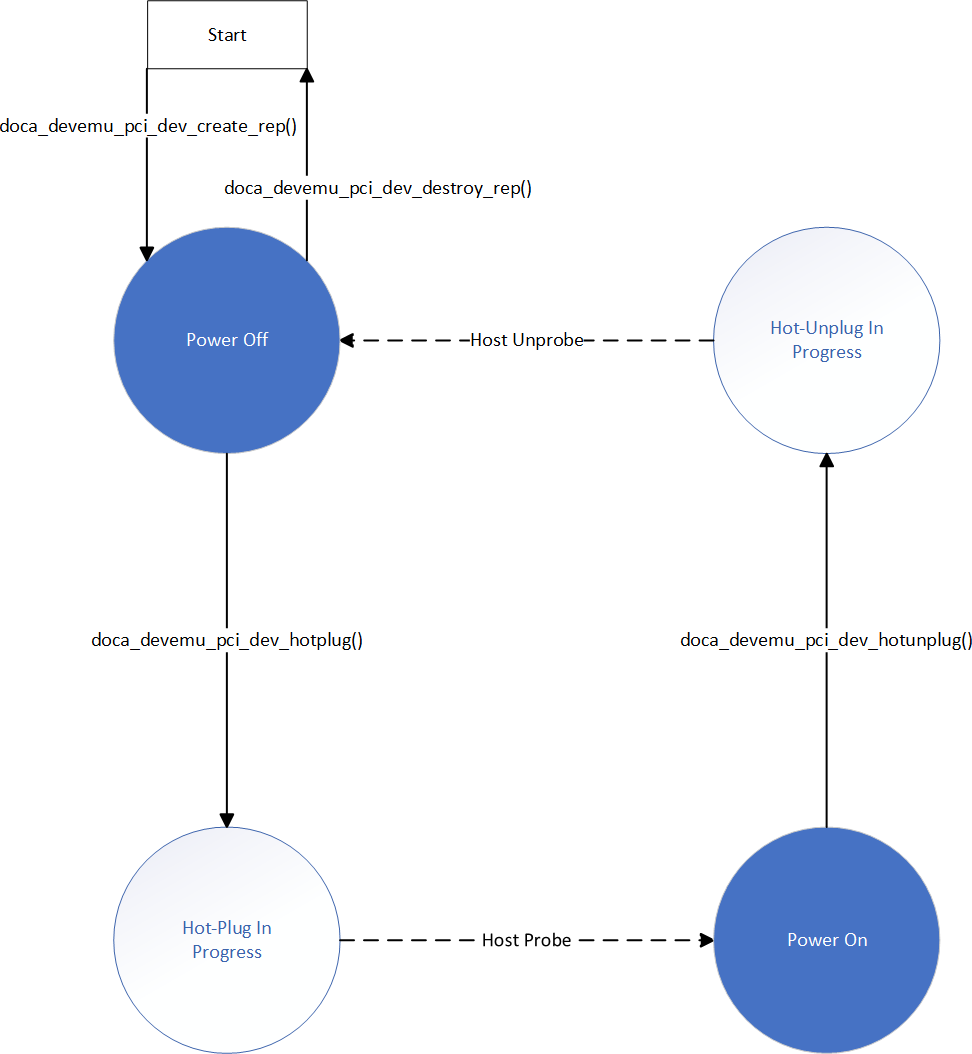
When creating a PCIe device object, if it starts in "power off" state, then the device is not yet visible to the host. It is possible then, from the BlueField, to hot-plug the device. This starts an async process of the device getting hot-plugged towards the host. Once the process completes, the emulated device transitions to "power on" and becomes visible to the host. Usually at this stage, the emulated device receives its BDF address. The hot-unplug process works in similar async manner.
Using DOCA API, the BlueField Arm can register to any changes to the hot-plug state of each emulated device using doca_devemu_pci_dev_event_hotplug_state_change_register.
Emulated Device Discovery
The emulated device is represented as a doca_devinfo_rep. It is possible to iterate through all the emulated devices as explained in DOCA Core Representor Discovery.
There are 2 ways of filtering the list of emulated devices:
-
Get all emulated devices – use
DOCA_DEVINFO_REP_FILTER_EMULATEDas the filter argument indoca_devinfo_rep_create_list -
Get all emulated devices that belong to a certain type –
doca_devemu_pci_type_create_rep_list
Objects Lifecycle and Persistency
This section creates distinction between firmware resources and software resources:
-
Firmware resources persist until the next power cycle, and can be accessible from different processes on the BlueField Arm. Such resources are not cleared once the application exits.
-
Software resources are representations of firmware resources, and are only relevant for the same process.
Using this terminology, it is possible to describe the objects as follows:
-
The PCIe type object
doca_devemu_pci_typerepresents a PCIe type firmware resource. The resource persists if any of the following apply:-
There is at least 1 process holding reference to the PCIe type
-
There is at least 1 PCIe device firmware resource belonging to this type
-
-
The emulated device representor,
doca_devinfo_rep, represents an emulated PCIe function firmware resource:-
doca_devemu_pci_type_create_repcan be used to create such firmware resource -
To destroy the firmware resource,
doca_devemu_pci_type_destroy_repcan be used -
For static functions, the representor resource persists until configured otherwise in NVCONFIG
-
To find existing PCIe device firmware resources, use
doca_devemu_pci_type_create_rep_list
-
Function-level Reset
The created emulated devices support PCIe function level reset (FLR).
Using DOCA API, the BlueField Arm can register to FLR event using doca_devemu_pci_dev_event_flr_register. Once the driver requests FLR, this event is triggered, calling the user provided callback.
Once FLR is detected, it is expected for the BlueField Arm to do the following:
-
Destroy all resources related to the PCIe device. For information on such resources, refer to the guide of concrete PCIe type (generic/virtiofs).
-
Stop the PCIe device
-
Start the PCIe device again
PCIe Resources
It is possible to query the number of available PCIe emulation resources. The resources that can be queried are:
-
Number of doorbells
-
Number of MSI-X
These resources are globally shared across the system between all emulated devices that are created using the same doca_dev.
Device Support
DOCA PCIe Device emulation requires a device to operate. For picking a device, see DOCA Core Device Discovery.
The device emulation library is supported only on BlueField-3 and later.
As device capabilities may change in the future (see Capability Checking), it is recommended that users choose a device using the following method:
-
doca_devemu_pci_cap_type_is_hotplug_supported– for create and hot-plug support -
doca_devemu_*_cap_is_*type_supported– for device discovery only
PCIe Device
Configuration Phase
To start using the DOCA DevEmu PCI Device, users must first go through a configuration phase as described in DOCA Core Context Configuration Phase.
This section describes how to configure and start the context to allow retrieval of events.
Configurations
The context can be configured to match the application use case.
To find if a configuration is supported or what its min/max value is, refer to Device Support.
Mandatory Configurations
All mandatory configurations are provided during the creation of the PCIe device.
These configurations are as follows:
-
A DOCA DevEmu PCIe type object
-
A DOCA Device Representor, representing an emulated function with the same type as the provided PCIe object type
-
A DOCA Progress Engine object
Optional Configurations
These configurations are optional. If not set, then a default value is used:
-
Registering to events as described in the "Events" section. By default, the user does not receive events
-
The PCIe device ID. By default, it is derived from the PCIe type.
-
The PCIe vendor ID. By default, it is derived from the PCIe type.
-
The PCIe subsystem ID. By default, it is derived from the PCIe type.
-
The PCIe subsystem vendor ID. By default, it is derived from the PCIe type.
-
The PCIe revision ID. By default, it is derived from the PCIe type.
-
The PCIe class code. By default, it is derived from the PCIe type.
-
The number of MSI-X vectors for MSI-X capability. By default, it is derived from the PCIe type.
Execution Phase
This section describes execution on CPU using DOCA Core Progress Engine.
Events
The DOCA DevEmu PCI device exposes asynchronous events to notify about sudden changes according to DOCA Core architecture.
Common events are described in DOCA Core Event.
Hotplug State Change
The hotplug state change event allows users to receive notifications whenever the hotplug state of the emulated device changes. See section "Hot-plug Emulated Device".
Event Configuration
|
Description |
API to Set the Configuration |
API to Query Support |
|---|---|---|
|
Register to the event |
|
|
Event Trigger Condition
The event is triggered anytime an asynchronous transition happens as follows:
-
DOCA_DEVEMU_PCI_HP_STATE_PLUG_IN_PROGRESS→DOCA_DEVEMU_PCI_HP_STATE_POWER_ON -
DOCA_DEVEMU_PCI_HP_STATE_UNPLUG_IN_PROGRESS→DOCA_DEVEMU_PCI_HP_STATE_POWER_OFF -
DOCA_DEVEMU_PCI_HP_STATE_POWER_ON→DOCA_DEVEMU_PCI_HP_STATE_UNPLUG_IN_PROGRESS(when initiated by the host)
Any transition initiated by user is not triggered (e.g., calling hotplug to transition from POWER_OFF to PLUG_IN_PROGRESS).
The following APIs can be used to initiate hotplug or hot-unplug transition processes:
-
doca_devemu_pci_dev_hotplug -
doca_devemu_pci_dev_hotunplug
Event Output
Common output as described in DOCA Core Event.
Additionally, the internal cached hotplug state is updated and can be fetched using doca_devemu_pci_dev_get_hotplug_state.
Event Handling
Once the event is triggered, it means that the hotplug state has changed. The application is expected to do the following:
-
Retrieve the new hotplug state using
doca_devemu_pci_dev_get_hotplug_state
Function-level Reset
The FLR event allows users to receive notifications whenever the host initiates an FLR flow. See section "Function Level Reset".
Event Configuration
|
Description |
API to Set the Configuration |
|---|---|
|
Register to the event |
|
Event Trigger Condition
The event is triggered anytime the host driver initiates an FLR flow. See section "Function Level Reset".
Event Output
Common output as described in DOCA Core Event.
Additionally, the internal cached FLR indicator is updated and can be fetched using doca_devemu_pci_dev_is_flr.
Event Handling
Once the event is triggered, it means that the host driver has initiated the FLR flow.
The user must handle the FLR flow by doing the following:
-
Flush all the outstanding requests back to the associated resource
-
Release all the PCIe device resources dynamically created after device start
-
Stop the PCIe device –
doca_ctx_stop -
Start the PCIe device again –
doca_ctx_start-
Call
doca_pe_progressrepeatedly until the PCIe device transitions to "running" state
-
For more information on starting the PCIe device again, refer to section "State Machine".
State Machine
The DOCA DevEmu PCI device object follows the context state machine as described in DOCA Core Context State Machine.
The following section describes how to transition to any state and what is allowed in each state.
Idle
In this state, it is expected that application either:
-
Destroys the context
-
Starts the context
Allowed operations:
-
Configuring the context according to section "Configurations"
-
Starting the context
It is possible to reach this state as follows:
|
Previous State |
Transition Action |
|---|---|
|
None |
Create the context |
|
Running |
Call stop after making sure all resources have been destroyed |
|
Stopping |
Call progress until all resources have been destroyed |
Starting
In this state, it is expected that application:
-
Calls progress to allow transition to next state
-
Keeps context in this state until FLR flow is complete
It is possible to reach this state as follows:
|
Previous State |
Transition Action |
|---|---|
|
Idle |
Call start after receiving FLR event (i.e., while FLR is in progress) |
Running
In this state, it is expected that application:
-
Calls progress to receive events
-
Creates/destroys PCIe device resources
It is possible to reach this state as follows:
|
Previous State |
Transition Action |
|---|---|
|
Idle |
Call start after configuration |
|
Starting |
Call progress until FLR flow is completed |
Stopping
In this state, it is expected that application:
-
Destroys all emulated device resources as described in section "Function Level Reset".
Allowed operations:
-
Destroying PCIe device resources
It is possible to reach this state as follows:
|
Previous State |
Transition Action |
|---|---|
|
Running |
Call stop without freeing emulated device resources |
Last updated: