

Note
This library is supported at alpha level; backward compatibility is not guaranteed.
Introduction
The DOCA TLP DevEmu Virtio-blk library, part of the DOCA DevEmu Virtio subsystem, provides low-level software APIs. These APIs serve as the building blocks for developing and manipulating virtio-blk (virtio block) devices by leveraging the device emulation capabilities of NVIDIA® BlueField® DPUs.
Architecture and Library Interaction
This library is part of a modular subsystem, where each library manages its own logic:
-
DOCA DevEmu PCI: Manages the PCIe transport layer, including configuration, discovery, and features like MSI-X and device hot plug/unplug.
-
DOCA DevEmu Virtio Common: Manages generic virtio logic, such as handling common virtio registers, the virtio offload engine, and virtqueue lifecycle. Note: for TLP-based virtio-blk devices, the virtio device reset flow is handled by the application.
-
DOCA DevEmu Virtio-blk: Manages the specific logic for the virtio block device, including block I/O request parsing, scatter-gather segment handling, and block device configuration.
This layered design allows for seamless integration and independent operation of each component.
Core Functionality
The DOCA DevEmu Virtio-blk library efficiently handles virtio descriptors that carry block I/O requests from the device driver. It translates these into abstract virtio-blk requests (doca_devemu_vblk_req) that are then routed to the user application via registered event handlers. Each request carries the block operation type (read, write, get ID, etc.), the target sector (LBA), and a DOCA buffer representing the host memory data region. This process abstracts away the underlying device-specific acceleration details.
The library supports two data path providers:
-
DPA (Data Path Accelerator) — Offloads virtqueue processing to BlueField's DPA for hardware-accelerated, low-latency operation. Recommended for production workloads.
-
DPU (ARM cores) — Processes virtqueues on the DPU ARM cores for maximum flexibility and debugging.
User Responsibilities
Users of this library are responsible for developing a virtio-blk controller. This controller application must:
-
Manage the underlying DOCA DevEmu Virtio-blk offload engine and IO contexts.
-
Receive the abstracted DOCA Virtio-blk requests via registered event handlers.
-
Process these requests according to the virtio-blk specification (read, write, get device ID, etc.).
-
Perform DMA data transfers between host and DPU memory as needed.
-
Complete each request back to the IO context with the appropriate status code.
Note
The backend block storage implementation is outside the scope of DOCA. The reference application (
doca_vblk_pci_dev) demonstrates a RAM-backed block device for illustration.
Prerequisites
Virtio-blk device emulation is part of the DOCA DevEmu Virtio subsystem. It is, therefore, recommended to read the following guides before proceeding:
-
DOCA Device Emulation
- DOCA DevEmu PCI TLP
-
DOCA DevEmu Virtio (TODO: link pending)
Environment
DOCA DevEmu Virtio-blk is supported on the BlueField target only. The BlueField must meet the following requirements:
-
DOCA version 3.4.0 or greater
-
BlueField-3 firmware 32.49.0288 or higher
Info
Please refer to the DOCA Compatibility Policy.
Note
Library must be run with root privileges.
Perform the following:
-
Configure BlueField to work in DPU mode as described in BlueField Modes of Operation.
-
Enable TLP emulation by running the following on the DPU:
[dpu] mlxconfig -y -d /dev/mst/mt41692_pciconf0 set TLP_EMULATION_ENABLE=1
[dpu] mlxconfig -y -d /dev/mst/mt41692_pciconf0 set TLP_EMULATION_NUM_PF=32
-
Perform a BlueField system cold reboot for the
mlxconfigsettings to take effect.
Hot-plug
Host Configuration
With a Linux environment on the host OS, additional kernel boot parameters are required to support the hot-plug feature:
-
For Intel machines:
intel_iommu=on iommu=pt pci=realloc
-
For AMD machines:
iommu=pt pci=realloc
Note
On AMD machines, hotplug may not work.
Firmware Configuration
When PCIe switch emulation is enabled, BlueField can support hot-plugged virtio-blk functions. These PCIe functions are shared among all BlueField users and applications and may hold hot-plugged devices of type NVMe, virtio-blk, virtio-fs, or other (e.g., virtio-net).
To enable PCIe switch emulation and configure hot-plugged ports, run:
[dpu] mlxconfig -y -d /dev/mst/mt41692_pciconf0 set PCI_SWITCH_EMULATION_ENABLE=1 [dpu] mlxconfig -y -d /dev/mst/mt41692_pciconf0 set PCI_SWITCH_EMULATION_NUM_TLP_PORT=1 [dpu] mlxconfig -y -d /dev/mst/mt41692_pciconf0 set PCI_SWITCH_EMULATION_NUM_PORT=2
PCI_SWITCH_EMULATION_NUM_PORT equals 1 plus the number of hot-plugged PCIe functions.
Architecture
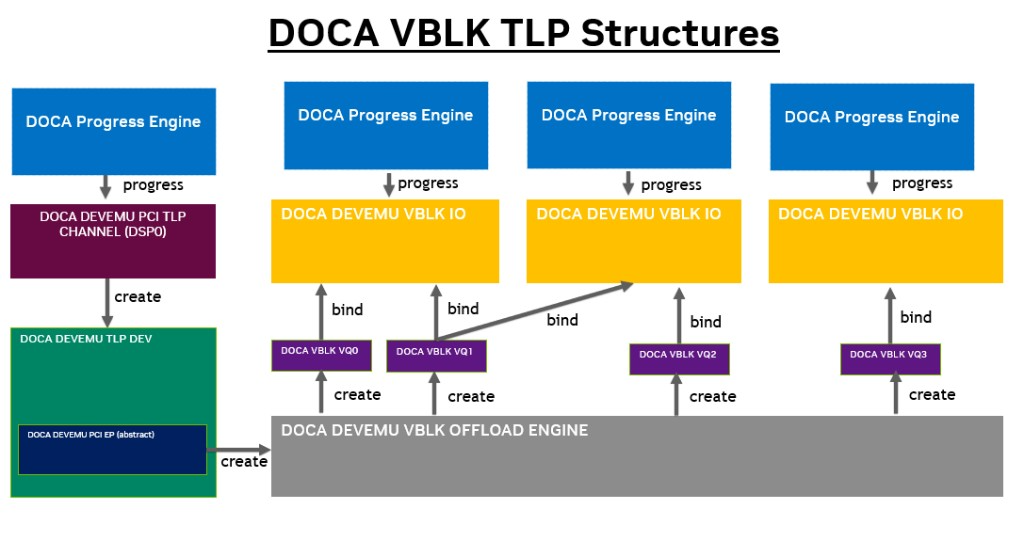
The DOCA DevEmu Virtio-blk library provides the following main software abstractions:
-
The virtio-blk type — extends the PCIe TLP type; creates a PCI type specifically configured for virtio-blk device emulation
-
The virtio-blk offload engine — extends the virtio offload engine; manages virtqueue lifecycle and block-specific configuration (e.g.,
seg_max) -
The virtio-blk IO context — extends the virtio IO context; represents a progress context responsible for processing virtio descriptors carrying block I/O requests
-
The virtio-blk request — represents a single block I/O operation from the host driver
The following diagram illustrates the relationships between these abstractions:
Virtio-blk Feature Bits
The following virtio feature bits are relevant to virtio-blk emulation:
|
Feature Bit |
Description |
|---|---|
|
|
Maximum segment size is reported |
|
|
Maximum segments per request is reported |
|
|
Multi-queue support |
|
|
Indirect descriptor support |
|
|
VirtIO 1.0 compliance |
|
|
Device access restricted to platform IOMMU |
For TLP-based virtio-blk devices, feature bits are configured directly by the application in the emulated PCI configuration space. Indirect descriptor support must first be verified via doca_devemu_vblk_cap_is_indir_descs_supported() before enabling.
Virtio-blk Configuration Layout
According to the virtio specification, the virtio-blk device configuration structure layout includes the following key fields:
struct virtio_blk_config { le64 capacity; /* device capacity in 512-byte sectors */ le32 size_max; /* maximum size of any single segment */ le32 seg_max; /* maximum number of segments in a request */ /* ... additional fields ... */ le16 num_queues; /* number of request queues */ /* ... */ };
For TLP-based virtio-blk devices, these fields are managed directly by the application in the emulated PCI configuration space. The seg_max, and num_queues values must also be configured on the offload engine (via doca_devemu_vblk_offload_engine_set_seg_max()and doca_devemu_virtio_offload_engine_set_num_queues() respectively) so the library can allocate internal resources accordingly.
Virtio-blk Type
The virtio-blk type creates a PCI TLP type specifically configured for VirtIO Block device emulation, providing full control over the PCIe configuration space.
To create and configure a virtio-blk type:
-
doca_devemu_vblk_is_pci_tlp_type_supported()— Check if the device supports VirtIO Block TLP type management. -
doca_devemu_vblk_pci_tlp_type_create()— Create a stopped PCI TLP type for VirtIO Block emulation. -
Configure the type using the following setters:
-
doca_devemu_pci_type_set_dev()— Associate a DOCA device with the type. -
doca_devemu_pci_tlp_type_set_pci_cap_conf()— Register PCI capability configurations (e.g., PCI Express, MSI-X). -
doca_devemu_pci_type_set_num_msix()— Set the number of MSI-X vectors. -
doca_devemu_pci_type_set_num_db()— Set the number of doorbells.
-
-
doca_devemu_pci_type_start()— Start the PCI type to finalize configuration.
Virtio-blk Offload Engine
The virtio-blk offload engine (doca_devemu_vblk_offload_engine) extends the virtio offload engine with block-specific configuration. It is responsible for managing the state of all offloaded entities on a device, including configuration, creation, destruction, start, and stop of virtio-blk request virtqueues. Each offload engine is associated with a single DOCA DevEmu PCI endpoint.
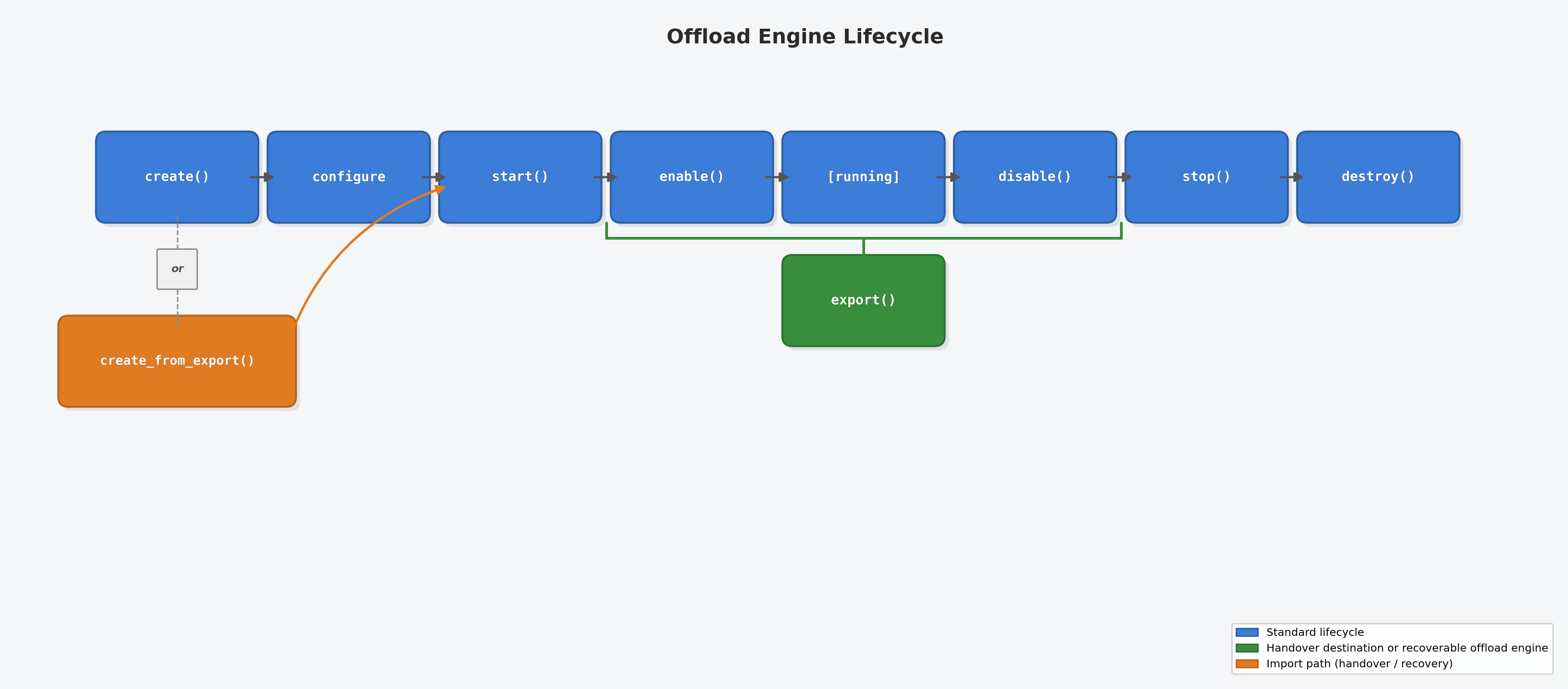
Offload Engine Lifecycle
The offload engine follows this lifecycle. Configuration (e.g. seg_max, indirect descriptors) happens between create() and start(). In handover and recovery scenarios, create_from_export() replaces both create() and the configuration phase — configuration values are inherited from the export descriptor:
Standard Configuration
The standard flow for creating and configuring a virtio-blk offload engine is as follows:
-
doca_devemu_vblk_offload_engine_create()— Create an offload engine bound to a PCI endpoint. -
doca_devemu_vblk_offload_engine_set_seg_max()— Set the maximum scatter-gather segments per request. -
Cast to virtio offload engine via
doca_devemu_vblk_offload_engine_as_virtio_offload()for common configuration:-
doca_devemu_virtio_offload_engine_set_indir_descs_enabled()— Enable/disable indirect descriptor processing. -
doca_devemu_virtio_offload_engine_set_num_queues()— Set the number of virtqueues.
-
-
doca_devemu_virtio_offload_engine_start()— Start the offload engine. -
doca_devemu_virtio_offload_engine_enable()— Enable the offload engine to begin processing requests.
Optional Configurations
-
doca_devemu_vblk_offload_engine_set_seg_max()— Set theseg_maxvalue for the block device. If not set, the value defaults to the globalseg_maxconfigured viadoca_devemu_vblk_set_seg_max(). -
doca_devemu_virtio_offload_engine_set_indir_descs_enabled()— Enable indirect descriptor support. Only valid ifdoca_devemu_vblk_cap_is_indir_descs_supported()returns true.
Export/Import Overlay
|
Function |
When to Call |
Effect |
|---|---|---|
|
|
After |
Produces an opaque export descriptor containing the runtime state of the offload engine. The caller owns the descriptor and must free it with |
|
|
Instead of |
Creates a new idle offload engine seeded with the state from an export descriptor. The new engine must still be started and enabled. |
Offload Engine States
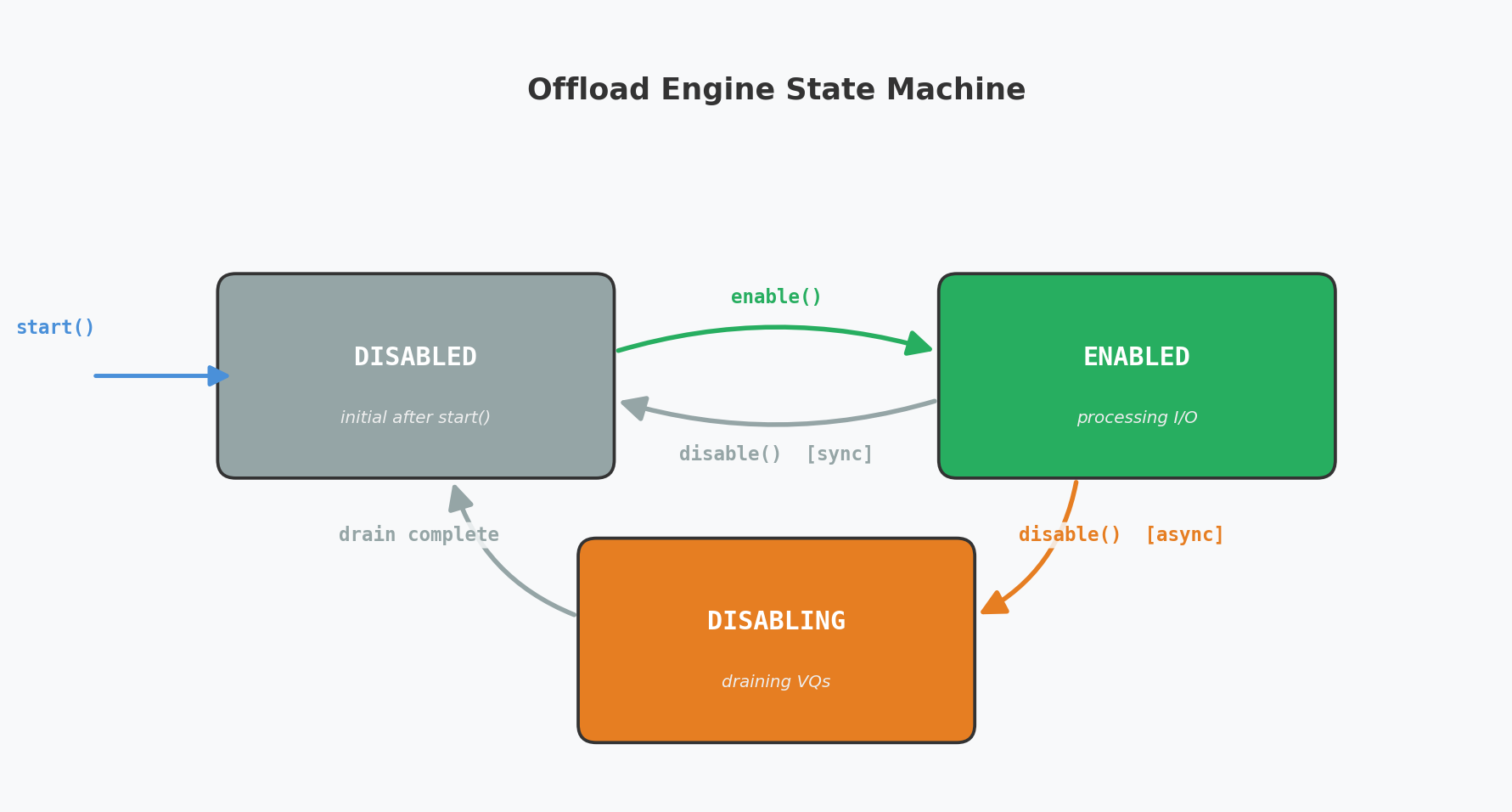
A started offload engine is in one of three states:
|
State |
Description |
|---|---|
|
|
Initial state after |
|
|
Processing operations from the host driver. Virtqueues can be individually enabled/disabled. |
|
|
Transitioning to |
Enable/Disable Semantics
-
enable()moves all started-and-disabled virtqueues to the enabled state. If the engine is already enabled, callingenable()again enables any newly started virtqueues that are currently disabled. -
disable()may returnDOCA_SUCCESS(synchronous) orDOCA_ERROR_IN_PROGRESS(asynchronous, at least one VQ is still draining). In the async case, poll withget_state()until the engine reachesDISABLED.
Handover Constraint
During a handover, for each source/destination pair of offload engines sharing the same PCI endpoint, at most one engine may be enabled at any time. Both engines may be disabled simultaneously (between the source's disable() and the destination's enable()), but having both enabled leads to undefined behavior.
State Export/Import (Live Upgrade and Recovery)
The DOCA DevEmu Virtio Block SDK provides a state export/import mechanism that enables two resilience scenarios for an offload engine managing a Virtio Block device:
|
Scenario |
Description |
|---|---|
|
Handover (Live Upgrade) |
A running source process exports the offload engine state and transfers it to a destination process. The destination imports the state, and the two processes coordinate so that exactly one engine is enabled at any time. In-flight I/O during handover is not supported. |
|
Takeover (Recovery) |
A running process exports the offload engine state and stores the export descriptor in a durable location. If the process crashes, a recovering process imports the descriptor to recreate the offload engine and replay in-flight I/O. |
Both scenarios use the same three API calls:
doca_devemu_vblk_offload_engine_export() doca_devemu_vblk_offload_engine_create_from_export() doca_devemu_vblk_offload_engine_export_release()
API Reference
|
API |
Description |
Preconditions |
Postconditions |
|---|---|---|---|
|
|
Exports the runtime state of a started offload engine into an opaque descriptor blob. |
|
|
|
|
Creates a new offload engine from an export descriptor. This is the import-side counterpart of |
|
|
|
|
Releases engine-side resources associated with the export. Must be called exactly once per export. Does not free the descriptor buffer — the caller is responsible for freeing it with |
|
N/A |
Handover (Live Upgrade) Flow
In a handover scenario, a source process transfers ownership of an offload engine to a destination process while maintaining host-visible state. The SDK does not prescribe any particular IPC mechanism or process architecture - the coordination protocol is application-defined.
Sequence
-
Source has a valid export descriptor. The
export()call is typically done during regular bring-up of the application, not necessarily at the time of handover. -
Source transfers the export descriptor to the destination through an application-defined channel.
-
Destination calls
create_from_export()with the received descriptor and a PCI endpoint handle. This creates an idle offload engine seeded with the source's state. -
Destination calls
start()on the new engine. Configuration is inherited from the descriptor. The engine enters theDISABLEDstate. -
Destination calls
export()on its own engine to prepare for future recovery or live update. Virtqueues must not be started before this call. -
Destination creates, configures, and starts its virtqueues.
-
Source calls
disable()on its engine. IfDOCA_ERROR_IN_PROGRESSis returned, pollget_state()untilDISABLED. -
Once the source is fully disabled, destination calls
enable()on its engine. The engine and its virtqueues must be enabled to start processing I/Os from the host driver. -
Source calls
stop()anddestroy()to release its engine. -
export_release()is called on the source's descriptor.
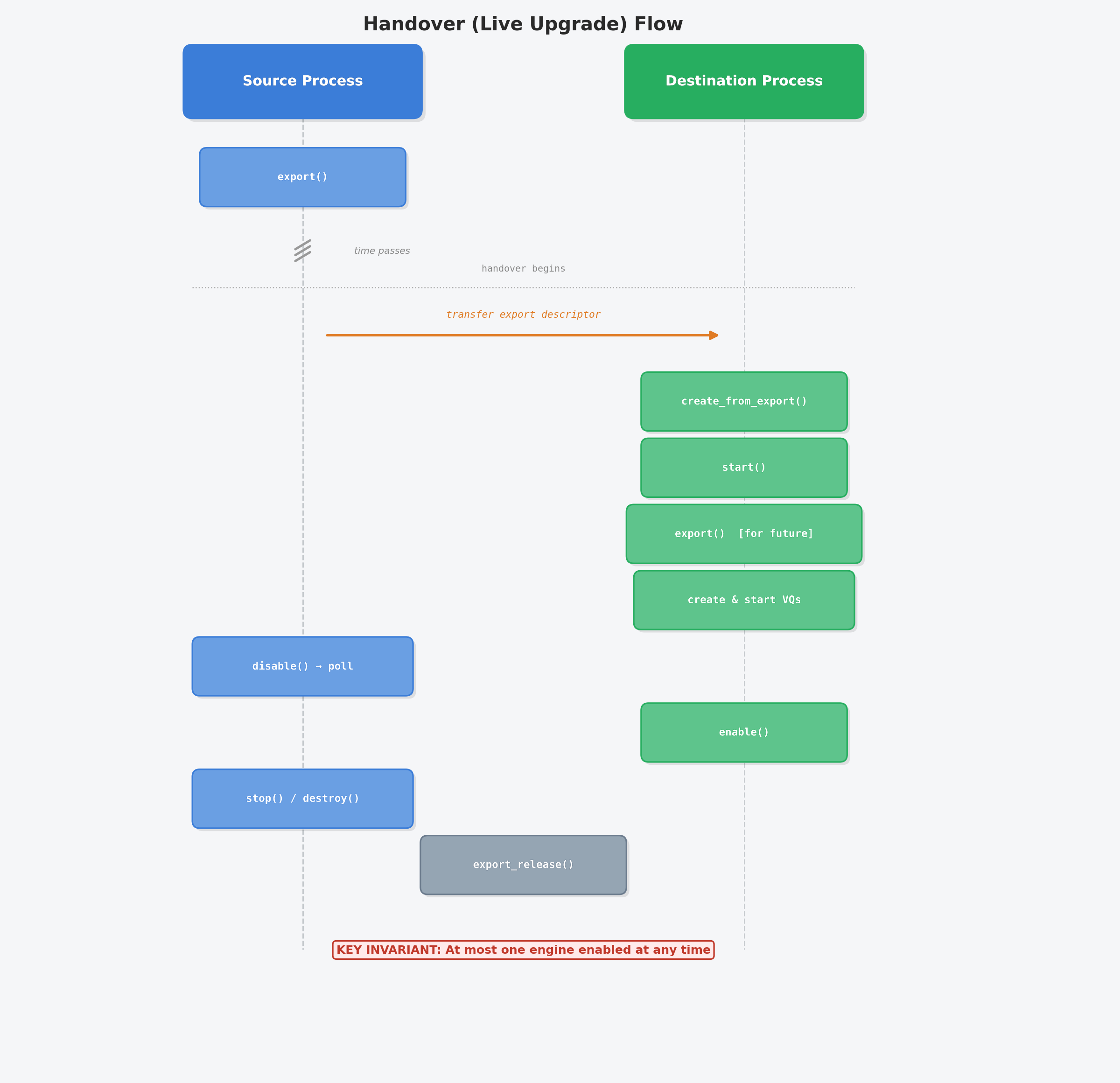
Key invariant: At no point during the handover should both engines be enabled simultaneously.
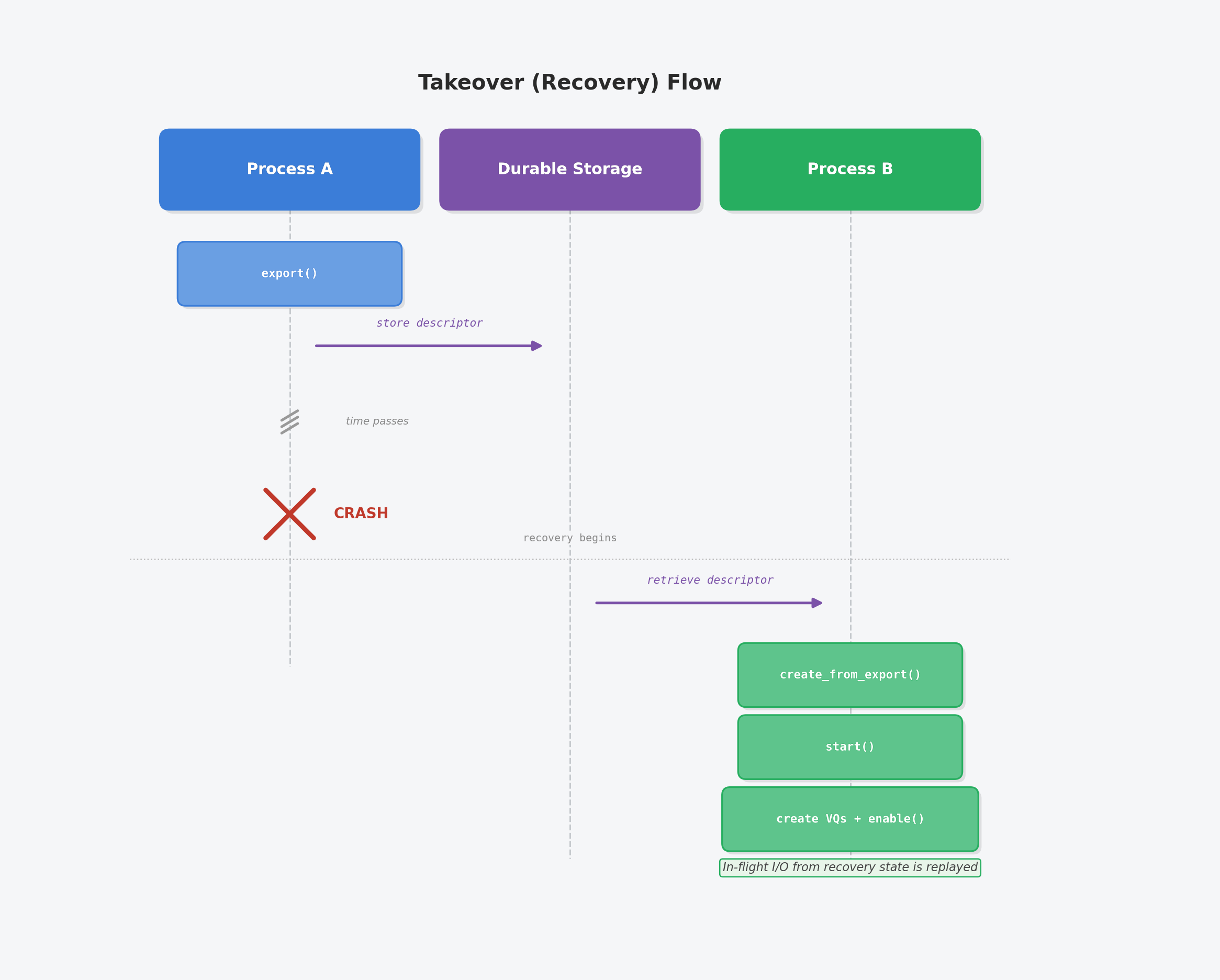
Takeover (Recovery) Flow
In a takeover scenario, a process exports its offload engine state proactively so that a recovering process can restore the engine after a crash.
Sequence
-
Process A calls
export()on its started offload engine and stores the export descriptor in a durable location (e.g. shared memory, file, or another process). -
Process A crashes.
-
Process B (the recovering process) retrieves the stored export descriptor.
-
Process B calls
create_from_export()with the descriptor and a PCI endpoint handle. This creates an idle offload engine seeded with the crashed process's state. -
Process B calls
start()on the engine. -
Process B creates, configures, and starts its virtqueues, then calls
enable()on the engine. The engine and its virtqueues must be enabled to start processing I/Os. In-flight I/O from the recovery state is replayed.
Limitation: Process B must configure the VirtIO Block global parameters (e.g.
doca_devemu_vblk_set_*()) with the same values that were used by Process A before takeover. These values are not captured in the export descriptor.
Request Virtqueue Management
Each VirtIO Block virtqueue is created and managed through the offload engine:
|
API |
Description |
|---|---|
|
|
Create a VirtIO Block request virtqueue from a started offload engine. Must be called on the offload engine thread. |
|
|
Destroy a VirtIO Block request virtqueue. Must not be started. |
|
|
Cast to base virtio virtqueue for common operations ( |
Virtio-blk IO Context
The virtio-blk IO context (doca_devemu_vblk_io) extends the virtio IO context. It is responsible for routing incoming block I/O requests from the host driver towards the application, and relaying completions back to the driver. Each IO context is associated with a single offload engine and is progressed by a single DOCA Core progress engine. Usually, users configure a single virtio-blk IO context per BlueField ARM core used by the application.
The IO context can only route requests while in running state and when its associated offload engine is enabled.
Virtio-blk IO Configurations
The flow for creating and configuring a virtio-blk IO context is as follows:
-
doca_devemu_vblk_io_create_from_offload_engine()— Create a new IO context from a started offload engine. Must be called on the ARM core that will manage the IO context. -
doca_devemu_vblk_io_event_vblk_req_register()— Register the event handler for incoming VirtIO Block requests. -
Cast to DOCA context via
doca_devemu_vblk_io_as_ctx()for progress engine connection:-
doca_pe_connect_ctx()— Connect the IO context to a progress engine. -
doca_ctx_start()— Start the IO context.
-
Mandatory Configurations
-
doca_devemu_vblk_io_event_vblk_req_register()— Register the event handler for incoming VirtIO Block requests. This is mandatory.
Virtio-blk Request
The virtio-blk request object (doca_devemu_vblk_req) serves as an abstraction for handling block I/O requests arriving on virtio-blk request queues. These requests are generated by the device driver through virtio queues and routed to the user via the registered event handler on the associated IO context.
Once the event handler is called, ownership of the virtio-blk request and the associated request user data transfers to the user. The ownership moves back to the associated IO context when the request is completed by calling doca_devemu_vblk_req_complete().
The event handler provides the following parameters directly:
void handler(struct doca_devemu_vblk_req *req, uint32_t type, /* VIRTIO_BLK_T_IN, VIRTIO_BLK_T_OUT, etc. */ uint64_t sector, /* starting sector (LBA) */ void *req_user_data); /* per-request user data buffer */
The following APIs operate on a virtio-blk request:
|
API |
Description |
|---|---|
|
|
Get a DOCA buffer representing the |
|
|
Get the total data length (in bytes) of the data buffer linked list. |
|
|
Get the number of scatter-gather elements in the data buffer linked list. |
|
|
Get the associated DOCA Virtio Block IO context. |
|
|
Get the user data associated with the virtqueue binding. Must be called on the IO context thread. |
|
|
Complete the request with a status value and the number of bytes written into the device-writable portion of the buffer. The status follows the virtio specification: |
Global Configuration and Capability Queries
Before initializing the VirtIO Block subsystem, the application must configure global parameters and may query device capabilities.
Global Configuration
The following APIs configure the VirtIO Block subsystem before doca_devemu_vblk_init() is called. For the setter APIs (set_vblk_req_user_data_size, set_max_queue_size, set_seg_max, set_datapath_on_dpa), if called multiple times, only the last call before doca_devemu_vblk_init() takes effect.
|
API |
Description |
|---|---|
|
|
Register a DOCA device for VirtIO Block management. The device must support VirtIO Block type management. |
|
|
Unregister a previously added DOCA device. |
|
|
Set the size of the per-request user data buffer allocated for each |
|
|
Set the maximum virtqueue depth. Must conform to |
|
|
Set the global maximum scatter-gather segments per request. Must conform to |
|
|
Set to |
|
|
Initialize the VirtIO Block subsystem. One-time call after all configuration is complete. |
|
|
Tear down the VirtIO Block subsystem and release all global resources. |
Capability Queries
|
API |
Description |
|---|---|
|
|
Query the maximum supported virtqueue depth for the device. |
|
|
Query the maximum supported |
|
|
Check whether the device supports indirect descriptor processing. |
Discovery
The virtio-blk library uses the TLP emulation path, creating its own PCI type and representors dynamically.
To find a suitable device and prepare for virtio-blk emulation, users should perform the following:
-
Open a DOCA device that supports VirtIO Block TLP type management. This can be done by:
-
Iterating
doca_devinfo_create_list()and checkingdoca_devemu_vblk_is_pci_tlp_type_supported()for each device, or -
Opening a known device directly by IB device name (e.g.,
mlx5_0) via helper utilities such asopen_doca_device_with_ibdev_name().
-
-
doca_devemu_vblk_pci_tlp_type_create()— Create the VirtIO Block PCI TLP type. -
Configure and start the PCI type (
doca_devemu_pci_type_set_dev(),doca_devemu_pci_type_start(), etc.). -
doca_devemu_pci_type_create_rep()— Create representors for each endpoint. -
doca_devemu_pci_tlp_dev_create()— Create PCI TLP devices from the representors.
At this point, the user can proceed with the initialization flow to create offload engines and IO contexts.
Initialization
This section describes the initialization flow of a DOCA DevEmu Virtio-blk offload engine and one or more IO contexts. During initialization, the user sets up and prepares the environment before starting to receive block I/O requests from the host.
The user should perform the following:
-
Configure global VirtIO Block parameters (
add_dev,set_seg_max,set_datapath_on_dpa, etc.) and calldoca_devemu_vblk_init(). -
Choose N ARM cores to run the application IO threads on.
-
Create N DOCA Core progress engine (PE) objects.
-
Create the VirtIO Block PCI TLP type via
doca_devemu_vblk_pci_tlp_type_create(), configure capabilities, and start it. -
Create a PCI TLP device for the endpoint.
-
Configure global offload enigne parameters.
-
Create and configure the VirtIO Block offload engine:
-
If offload engine doesn't perform state import:
-
doca_devemu_vblk_offload_engine_create()with the PCI endpoint. -
Configure
seg_max,num_queues, and optionally indirect descriptors. -
doca_devemu_virtio_offload_engine_start(). -
Optionally, call
doca_vblk_pci_export()for future handover/export (see DOCA DevEmu Virtio-blk | State Export/Import (Live Upgrade and Recovery)).
-
-
If state import:
-
doca_devemu_vblk_offload_engine_create_from_export()for future export, passing the export descriptor and its length along with the PCI endpoint. -
If offload engine is a handover destination, call
doca_devemu_vblk_offload_engine_export(). -
doca_devemu_virtio_offload_engine_start().
-
-
-
Create N VirtIO Block IO contexts:
-
doca_devemu_vblk_io_create_from_offload_engine()on each ARM core. -
Register the block request event handler.
-
Connect to the progress engine and start.
-
-
Enable the offload engine via
doca_devemu_virtio_offload_engine_enable().
At this point, the offload engine and IO contexts are fully operational and ready to process block I/O requests from the host.
Note
During the initialization flow, no block I/O requests are routed to the user until the offload engine is enabled.
Teardown
This section describes the teardown flow of a DOCA DevEmu Virtio-blk offload engine and its associated IO contexts.
The user should perform the following:
-
For each bound virtqueue, perform the per-VQ teardown sequence:
-
doca_devemu_virtio_vq_disable()— Disable the virtqueue. -
If the call returns
DOCA_ERROR_IN_PROGRESS(virtqueue is draining in-flight requests), optionally calldoca_devemu_virtio_io_flush_vq()to flush pending events to the application. -
Handle and complete any outstanding virtio-blk requests via
doca_devemu_vblk_req_complete(). -
Loop: call
doca_pe_progress()on the IO context's progress engine until the virtqueue reachesDISABLEDstate (poll viadoca_devemu_virtio_vq_get_state()). -
doca_devemu_virtio_io_unbind_vq()— Unbind the virtqueue from the IO context.
-
-
For each VirtIO Block IO context:
-
Stop the IO context via
doca_ctx_stop()and wait foridlestate. -
Destroy the IO context via
doca_devemu_vblk_io_destroy().
-
-
Disable the offload engine via
doca_devemu_virtio_offload_engine_disable()after all virtqueues are disabled. -
Destroy all virtqueues via
doca_devemu_vblk_req_vq_destroy(). -
Stop and destroy the offload engine:
-
doca_devemu_virtio_offload_engine_stop() -
doca_devemu_vblk_offload_engine_destroy()
-
-
Stop and destroy the PCI TLP type and devices.
-
Tear down the VirtIO Block subsystem via
doca_devemu_vblk_teardown().
Execution Phase
This section describes execution on BlueField ARM cores using DOCA Core progress engines.
Control Path
The DOCA Virtio-blk offload engine manages the control path, including:
-
Virtqueue lifecycle — Creation, configuration, start, enable, disable, stop, and destruction of request virtqueues, driven by host driver state transitions (e.g.,
DRIVER_OK, device reset). -
Device reset — When the host driver writes
device_status = 0, the virtio core library triggers a reset event. The application must tear down all active virtqueues, flush in-flight operations, and reinitialize the device. -
Offload engine state — The engine transitions through
DISABLED → ENABLED → DISABLING → DISABLEDas described in the DOCA DevEmu Virtio (TODO: link pending) offload engine lifecycle.
IO Path
This section describes the flow for a single virtio-blk request sent by the device driver until its completion.
It is assumed that the user properly configured an event handler for incoming virtio-blk requests using doca_devemu_vblk_io_event_vblk_req_register().
It is also assumed that the user is familiar with the virtio-blk specification and has the ability to perform DMA operations to/from the host using DOCA DMA or any other suitable method.
The IO path for a block request:
-
Request arrival — The DOCA library invokes the registered event handler with the request object, type, sector, and user data.
-
Request inspection — The application examines the request type:
-
VIRTIO_BLK_T_IN(0) — Read from block device. -
VIRTIO_BLK_T_OUT(1) — Write to block device. -
VIRTIO_BLK_T_GET_ID(8) — Return 20-byte device serial number. -
Other types (e.g.,
VIRTIO_BLK_T_FLUSH,VIRTIO_BLK_T_DISCARD) — The application decides how to handle these based on the feature bits it has exported to the host.
-
-
Data access — The application calls
doca_devemu_vblk_req_get_data()to obtain a DOCA buffer representing the host memory data region, anddoca_devemu_vblk_req_get_data_len()for the total data length. -
DMA transfer — For read operations, the application populates a local buffer and uses DOCA DMA to transfer data to host memory. Note: For BLK_BT_IN and BLK_T_GET_ID, it needs to call
doca_buf_reset_data_lenfor every data buf segment. For write operations, the application uses DOCA DMA to transfer data from host memory to a local buffer. -
Request completion — The application calls
doca_devemu_vblk_req_complete(req, status, len)with the appropriate status code and the number of bytes written to the device-writable portion of the buffer.
© Copyright 2026, NVIDIA.
Last updated: