

This guide provides an overview and configuration instructions for the DOCA Flow Connection Tracking (CT) API.
Introduction
The DOCA Flow Connection Tracking (CT) module is a 5-tuple table designed to efficiently track network connections using hardware resources. It supports the following key features:
-
Track zone and 5-tuple sessions – Track and manage network connections based on a 5-tuple (source IP, destination IP, source port, destination port, and protocol) along with zone-based separation
-
Zone-based virtual tables – Enable logical isolation using zones
-
Aging support – Remove idle connections automatically using configurable timeouts
-
Connection metadata – Set and manage metadata for tracked connections
-
Bidirectional packet handling – Manage traffic in both directions of a connection
-
High connection rate – Efficiently handle a high rate of connections per second (CPS)
The CT module makes it simple and efficient to track connections by leveraging hardware resources.
Architecture
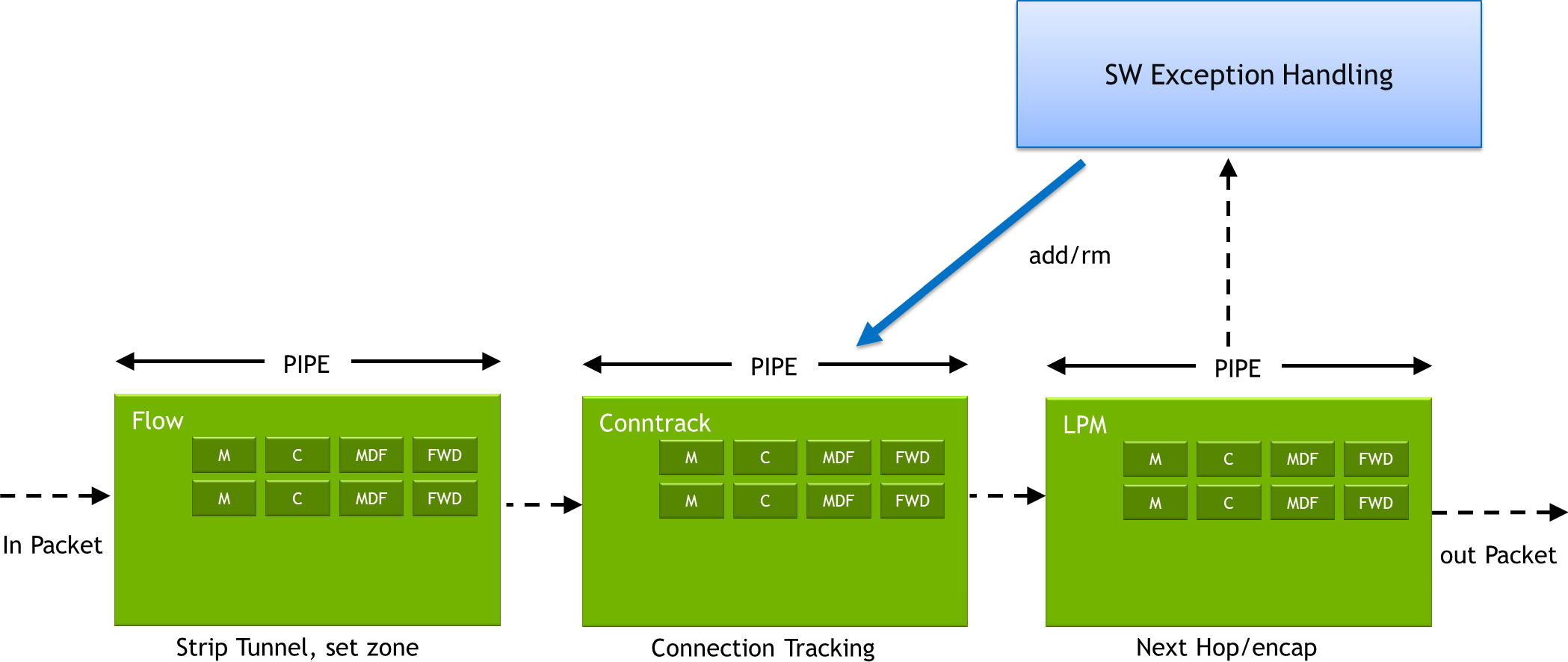
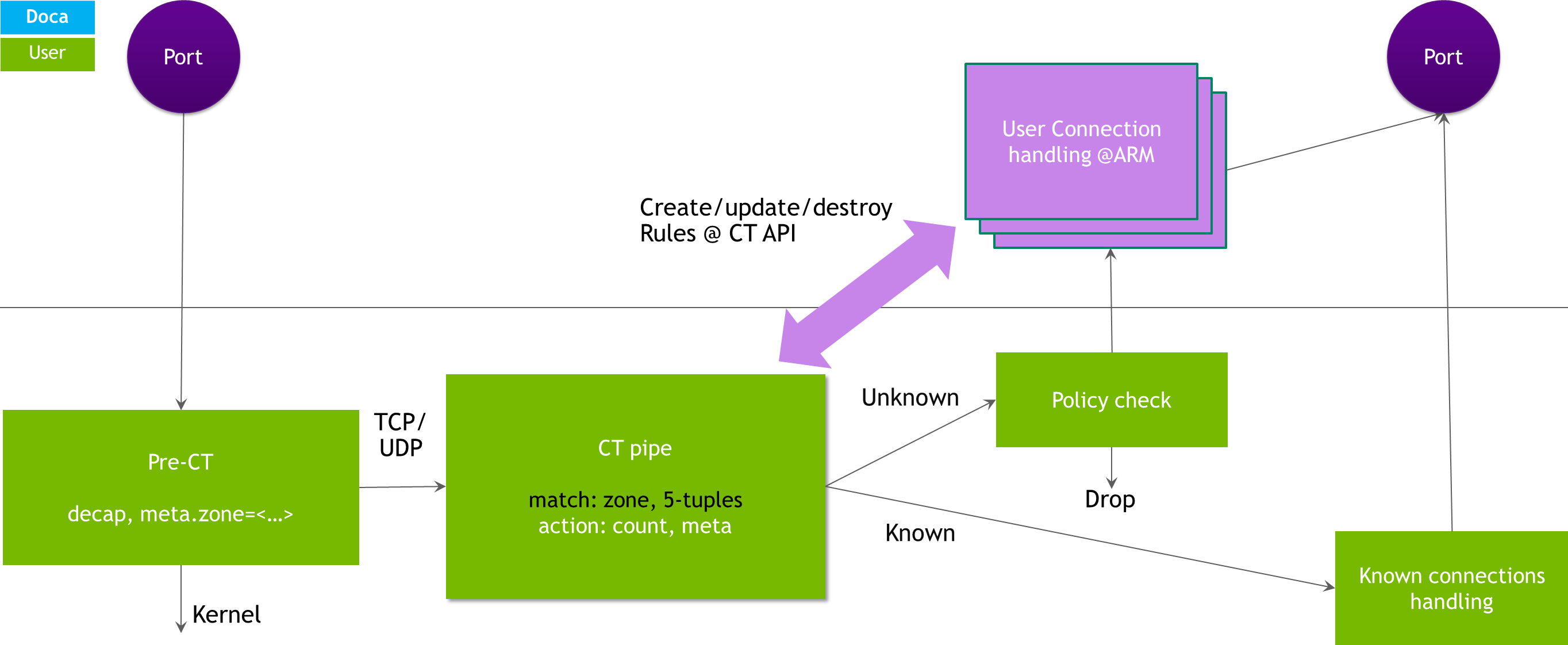
The DOCA Flow CT Pipe is designed to handle non-encapsulated TCP and UDP packets. It supports two primary actions:
-
Forward to next pipe – For packets that match a known 6-tuple connection (5-tuple + zone)
-
Miss to next pipe – For packets without a matching connection entry
The application is responsible for handling packets based on these outcomes.
The DOCA Flow CT API consists of four major components:
-
CT module manipulation – Configure and manage resources within the CT module
-
CT connection entry manipulation – Add, remove, or update connection entries efficiently
-
Callbacks – Handle asynchronous processing results for connection entries
-
Pipe and entry statistics – Monitor connection tracking performance using pipe-level and entry-level statistics
These components provide flexible control over connection tracking and monitoring, allowing applications to adapt to various network scenarios effectively.
Aging
Aging time refers to the maximum duration (in seconds) a session can remain active without detecting any packets. If no packets are observed within this period, the session is terminated.
To support aging, a dedicated aging thread is launched. This thread polls and checks counters for all active connections, ensuring that stale sessions are removed efficiently.
When aging is enabled, either the counter flag or a non-zero timeout must be set for at least one connection entry to trigger session expiration.
Managed Mode
In Managed Mode, the application is responsible for:
-
Managing worker threads
-
Parsing and handling connection lifecycles
This mode utilizes DOCA Flow CT management APIs for creating and destroying connections.
The CT aging module automatically notifies the application of aged-out connections by invoking callbacks.
Connection Rules and Management
Users have the flexibility to create connection rules with different patterns, metadata (meta), or counters which can be applied separately for each packet direction.
Users must manually define the appropriate meta and mask values for matching (match) and modifying (modify) packets.
To create rules in stages:
-
Create one rule for a connection using the standard API.
-
Add a second rule for the opposite packet direction using the
doca_flow_ct_entry_add_dir()API.
Processing CT Entries
DOCA Flow provides specialized APIs to process CT entries using a dedicated queue:
-
doca_flow_entries_process– Processes pipe entries in the queue -
doca_flow_aging_handle– Handles the aging of pipe entries
Some APIs, such as CT entry status queries and pipe miss queries, are not supported in Managed Mode.
Prerequisites
DPU
To enable DOCA Flow CT on the DPU, perform the following on the Arm:
-
Enable
iommu.passthroughin Linux boot commands (or disable SMMU from the DPU BIOS):-
Run:
sudo vim /etc/default/grub
-
Set
GRUB_CMDLINE_LINUX="iommu.passthrough=1". -
Run:
sudo update-grub
sudo reboot
-
-
Configure DPU firmware with
LAG_RESOURCE_ALLOCATION=1:sudo mlxconfig -d <device-id> s LAG_RESOURCE_ALLOCATION=1
Retrieve
device-idfrom the output of themst status -vcommand. If, under the MST tab, the value is N/A, run themst startcommand.
-
Update
/etc/mellanox/mlnx-bf.confas follows:ALLOW_SHARED_RQ="no"
-
Perform power cycle on the host and Arm sides.
-
If working with a single port, set the DPU into e-switch mode:
sudo devlink dev eswitch set pci/<pcie-address> mode switchdev
sudo devlink dev param set pci/<pcie-address> name esw_multiport value false cmode runtime
Retrieve
pcie-addressfrom the output of themst status -vcommand.
-
If working with two PF ports, set the DPU into multi-port e-switch mode (for the 2 PCIe devices):
sudo devlink dev param set pci/<pcie-address> name esw_multiport value true cmode runtime
Retrieve
pcie-addressfrom the output of themst status -vcommand.
-
Define huge pages (see DOCA Flow prerequisites).
ConnectX
To enable DOCA Flow CT on the NVIDIA® ConnectX®, perform the following:
-
Configure firmware with
LAG_RESOURCE_ALLOCATION=1:sudo mlxconfig -d <device-id> s LAG_RESOURCE_ALLOCATION=1
Retrieve
device-idfrom the output of themst status -vcommand. If, under the MST tab, the value is N/A, run themst startcommand.
-
Perform power cycle.
-
If working with a single port:
sudo devlink dev eswitch set pci/<pcie-address> mode switchdev
sudo devlink dev param set pci/<pcie-address> name esw_multiport value false cmode runtime
Retrieve
pcie-addressfrom the output of themst status -vcommand.
-
If working with two PF ports:
sudo devlink dev eswitch set pci/<pcie-address0> mode switchdev
sudo devlink dev eswitch set pci/<pcie-address1> mode switchdev
sudo devlink dev param set pci/<pcie-address0> name esw_multiport value true cmode runtime
sudo devlink dev param set pci/<pcie-address1> name esw_multiport value true cmode runtime
Retrieve
pcie-addressfrom the output of themst status -vcommand.
-
Define huge pages (see DOCA Flow prerequisites).
Actions
DOCA Flow CT supports actions based on meta and NAT operations. Each action can be defined as either shared or non-shared.
Action descriptors are not supported.
Shared Actions
Actions that can be shared between entries. Shared actions are predefined and reused in multiple entries.
The user gets a handle per shared action created and uses this handle as a reference to the action where required.
It is user responsibility to track shared actions and to remove them when they become irrelevant.
Shared actions are defined using a control queue (see DOCA Flow Connection Tracking | struct doca_flow_ct_cfg).
Non-shared Actions
Actions provided with their data during entry create/update.
These actions are completely managed by DOCA Flow CT and cannot be reused in multiple flows (i.e., NAT operations).
Action Sets in Pipe Creation
When creating a DOCA Flow CT pipe, users must define action sets, just as they would for any other pipe.
Fields in the CT pipe must be marked as CHANGEABLE during pipe creation. This allows the actual criteria for these fields to be specified later during entry creation.
Only actions related to meta and NAT, as defined in DOCA Flow Connection Tracking | struct doca_flow_ct_actions, are supported.
During entry creation or update, different actions can be specified for each direction, allowing variations in action content and/or action type.
Feature Enable
To enable user actions, administrators must configure the following parameters:
-
User action templates must be configured during the DOCA Flow CT pipe creation phase.
-
The maximum memory allocated for user actions (
actions_mem_size) must be defined during DOCA Flow CT initialization.
Using Actions in Managed Mode
Init
When calling doca_flow_ct_init(), you must configure the following parameters:
-
nb_ctrl_queues: The total number of control queues dedicated to defining shared actions. -
actions_mem_size: The maximum amount of memory (in bytes) allocated for user actions. This value must be strictly 64-byte aligned, and NVIDIA highly recommends utilizing a power of 2.
Create DOCA Flow CT Pipe
Configure actions sets on doca_flow_pipe_create().
Create Shared Actions
Use doca_flow_ct_actions_add_shared() with one of the control queues.
Shared actions can be added at any time before use.
Add Entry
Entry can be created in one of the following ways:
-
Using an action handle of a predefined shared action
-
Using action data, which is specific to the flow, not sharable (e.g., for NAT operations)
The entry can have different actions and/or different action types per direction.
Remove Entry
Non-shared actions associated with an entry are implicitly destroyed by DOCA Flow CT.
Shared actions are not destroyed. They can be used by the user until they decide to remove them.
Update Entry
Entry actions can be updated per direction. All combinations of shared/non-shared actions are applicable (e.g., update from shared to non-shared).
Changeable Forward
DOCA Flow CT permits the use of a different forward pipe for each flow direction. The module operates at one of two mutually exclusive forwarding levels:
-
Pipe level – A single forward pipe is defined during DOCA Flow CT pipe creation and applies to all entries universally.
-
Entry level – The forward pipe is defined dynamically during entry creation.
Entry-level forwarding characteristics:
-
It exclusively supports
DOCA_FLOW_FWD_PIPEandDOCA_FLOW_FWD_ORDERED_LIST_PIPE(fixed pipe, changeable index). -
It supports defining a distinct forward pipe per flow direction (both directions can utilize the same or different forward pipes).
-
Because there is no default forward pipe, forwarding destinations must be explicitly set upon each entry creation.
Enabling Changeable Forwarding
To enable this feature, create the DOCA Flow CT pipe using one of the following configurations:
-
Standard pipe:
-
Set forward type to
DOCA_FLOW_FWD_PIPE -
Set
next_pipetoNULL
-
-
Ordered list pipe:
-
Set forward type to
DOCA_FLOW_FWD_ORDERED_LIST_PIPE -
Set
ordered_list_pipe.pipeto<ol_pipe> -
Set
ordered_list_pipe.idxtoUINT32_MAX
-
Using Changeable Forward in Managed Mode
To utilize changeable forwarding in Managed Mode, execute the following sequence:
-
Initialize CT by calling
doca_flow_ct_init(). -
Create pipe by calling
doca_flow_pipe_create()using the changeable forwarding configurations described above. -
Add entry by calling
doca_flow_ct_add_entry(). During this step, setfwd_originand/orfwd_replyto your desired targets. -
Update entry by calling
doca_flow_ct_update_entry()to update the forwarding for a specific entry direction.
When updating the forward destination, you must explicitly pass all other parameters with their previously existing values.
Entry Iterator
When iterator support is enabled, DOCA Flow CT can traverse all entries on a CT pipe using a registered callback. For each invocation, the application retrieves full entry data (match, hash, flags) via doca_flow_ct_get_entry() and can recreate or mirror those entries.
A primary use case for this is High-Availability (HA) Synchronization: the application reads every active entry from the CT on the active node and programs matching entries on the standby node to preserve connection state during failovers. Iteration is incremental; the application drives progress by calling doca_flow_ct_entries_process() per queue, and the registered callback executes as entries are dispatched.
Enabling Iterator
-
Create or configure the CT with the
DOCA_FLOW_CT_FLAG_ITERATORflag.The CT duplication filter is backed by a hash table of active entries to prevent duplicate insertions while iteration and forwarding run concurrently.
-
Start pipe-level iteration by calling
doca_flow_ct_pipe_iterate(ct_pipe, iterate_cb, iterate_usr_ctx). This schedules the iteration across all queues for the given pipe. -
For each CT queue, call
doca_flow_ct_entries_process()and pass themax_processed_entrieslimit. This processes the hardware steering queue and invokesiterate_cbas entries are delivered.-
Inside the callback, read the entry details via
doca_flow_ct_get_entry()to obtain the matcher, hash, and flags for standby replication. -
If the number of processed entries returned is less than the requested
max_processed_entries, the iteration for that specific queue has reached its end for the current pass.
-
-
Pipe iteration formally completes once all participating queues have finished the incremental processing steps and no further callbacks are pending.
Iterator Limitations
-
Action exclusion: Entry actions are not exported through the iterator path. The application must manually retain or reconstruct CT entry actions on the standby node.
-
Incomplete passes: New entries created during or immediately after a walk are not guaranteed to be captured in a single iterator pass. Applications should track new entries independently and not rely solely on the iterator for complete HA synchronization.
API
For the library API reference, refer to DOCA Flow and CT API documentation in the .
DOCA Flow CT is in the DOCA Flow library.
The following sections provide additional details about the library API.
enum doca_flow_ct_flags
Optional DOCA Flow CT configuration flags.
|
Flag |
Description |
|---|---|
|
|
Enables internal pipe counters for packet tracking. Call |
|
|
Enables the periodic dump of worker thread internal debug counters. |
|
|
Disables aging. |
|
|
Allows utilizing tunnel or non-tunnel configurations in different directions. |
|
|
Disables counters and aging entirely to save aging-thread CPU cycles. |
|
|
Enables the entry iterator. |
|
|
Applies the connection duplication filter strictly for UDP connections. |
|
|
Indicates origin traffic will arrive from the wire. If set, mark actions can be utilized in the origin direction. |
|
|
Indicates reply traffic will arrive from the wire. If set, mark actions can be utilized in the reply direction. |
enum doca_flow_ct doca_flow_ct_entry_flags
Optional DOCA Flow CT entry flags.
|
Flag |
Description |
|---|---|
|
|
Entry is not buffered; send to hardware immediately |
|
|
Apply flags to origin direction |
|
|
Apply flags to reply direction |
|
|
Origin direction is IPv6; origin match union in struct |
|
|
Reply direction is IPv6; reply match union in struct |
|
|
Apply counter to origin direction |
|
|
Apply counter to reply direction |
|
|
Counter is shared for both direction (origin and reply) |
|
|
Enable flow log on entry removed |
|
|
Allocate on entry not found when calling |
|
|
Enable duplication filter on origin direction |
|
|
Enable duplication filter on reply direction |
enum doca_flow_ct_rule_opr
Options for handling flows in autonomous mode with shared actions. The decision is taken on the first flow packet.
|
Operation |
Description |
|---|---|
|
|
Flow should be defined in the CT pipe using the required shared actions handles |
|
|
Flow should not be defined in the CT pipe. The packet should be dropped. |
|
|
Flow should not be defined in the CT pipe. The packet should be transmitted. |
struct direction_cfg
Managed mode configuration for origin or reply direction.
|
Field |
Description |
|---|---|
|
|
5-tuple match pattern applies to packet inner layer |
|
|
Mask to indicate meta field and bits to match |
|
|
Mask to indicate meta field and bits to modify on connection packet match |
doca_flow_ct_cfg
DOCA Flow CT configuration lifecycle manipulation:
struct doca_flow_ct_cfg *ct_cfg;
ret = doca_flow_ct_cfg_create(&ct_cfg);
doca_flow_ct_cfg_set_flags(ct_cfg, flags);
doca_flow_ct_cfg_set_queues(ct_cfg, n_queues);
/* ... */
ret = doca_flow_ct_init(ct_cfg);

final:
ret = doca_flow_ct_cfg_destroy(ct_cfg);
Configuration API methods:
|
Function |
Description |
|---|---|
|
|
Creates the CT configuration object. |
|
|
Destroys the CT configuration object. |
|
|
Sets the CT flags (refer to |
|
|
Sets the number of hardware queues utilized to manipulate connections. |
|
|
Sets the queue depth (defaults to 512 rules). |
|
|
Sets the number of CT control queues used for defining shared actions. |
|
|
Sets the total CT actions memory size in bytes. |
|
|
Sets the size of user private data allocated per connection. |
|
|
Sets the entry finalize callback to query final connection statistics. |
|
|
Sets the status update callback to notify the application of counter changes. |
|
|
Defines the specific CPU core ID to bind the CT aging thread to. |
|
|
Sets the CT aging query delay for newly created connections. |
|
|
Defines custom aging logic callbacks (falls back to default logic if omitted). |
|
|
Configures the origin and reply directions. |
Additional configuration notes:
-
CT session-related fields are governed by
doca_flow_pipe_cfgand are configured via:-
doca_flow_pipe_cfg_set_ct_connections() -
doca_flow_pipe_cfg_set_ct_max_connections_per_zone() -
doca_flow_pipe_cfg_set_ct_dup_filter_size()
-
-
CT counter configuration: DOCA Flow must be configured in per-port mode using
doca_flow_cfg_set_resource_mode(cfg, DOCA_FLOW_RESOURCE_MODE_PORT). Define the number of CT counters viadoca_flow_port_cfg_set_nr_resources(port_cfg, DOCA_FLOW_RESOURCE_COUNTER_CT, <n>).
struct doca_flow_ct_actions
This structure is used in the following cases:
-
For defining shared actions. In this case, action data is provided by the user. The action handle is returned by DOCA Flow CT.
-
For defining an entry with actions. The structure can be filled with two options:
-
With action handle of a previously created shared action
-
With non-shared action data
-
DOCA Flow CT action structure.
enum doca_flow_resource_type  resource_type;
union {
			   /* Used when creating an entry with a shared action. */
               uint32_t action_handle;

               /* Used when creating an entry with non-shared action or when creating a shared action. */
               struct {
                          uint32_t action_idx;
                          struct doca_flow_meta meta;
                          struct doca_flow_header_l4_port l4_port;
                          union {
                                    struct doca_flow_ct_ip4 ip4;
                                    struct doca_flow_ct_ip6 ip6;
                           };
               } data;
       };
Where:
|
Field |
Description |
|---|---|
|
|
Shared/non-shared action |
|
|
Shared action handle |
|
|
Actions template index |
|
|
Modify meta values |
|
|
UDP or TCP source and destination port |
|
|
Source and destination IPv4 addresses |
|
|
Source and destination IPv6 addresses |
The value in meta, l4_port, ip4, and ip6 should start from bit0, the least significant bit, regardless of which bits are set in mask. For example, action_val.meta.u32[0] = DOCA_HTOBE32(0x12), action_mask.meta.u32[0] = DOCA_HTOBE32(0x0000FF00) sets bits 15-8 to 0x12.
DOCA Flow Connection Tracking Samples
This section describes DOCA Flow CT samples based on the DOCA Flow CT pipe.
The samples illustrate how to use the library API to manage TCP/UDP connections.
All the DOCA samples described in this section are governed under the BSD-3 software license agreement.
Running the Samples
-
Refer to the following documents:
-
DOCA Installation Guide for Linux for details on how to install BlueField-related software.
-
NVIDIA BlueField Platform Software Troubleshooting Guide for any issue you may encounter with the installation, compilation, or execution of DOCA samples.
-
-
To build a given sample, run the following command. If you downloaded the sample from GitHub, update the path in the first line to reflect the location of the sample file:
cd /opt/mellanox/doca/samples/doca_flow/flow_ct_udp
meson /tmp/build
ninja -C /tmp/build
The binary
doca_flow_ct_udpis created under/tmp/build/samples/. -
Sample (e.g.,
doca_flow_ct_udp) usage:Usage: doca_<sample_name> [DOCA Flags] [Program Flags] DOCA Flags: -h, --help Print a help synopsis -v, --version Print program version information -l, --log-level Set the (numeric) log level for the program <10=DISABLE, 20=CRITICAL, 30=ERROR, 40=WARNING, 50=INFO, 60=DEBUG, 70=TRACE> --sdk-log-level Set the SDK (numeric) log level for the program <10=DISABLE, 20=CRITICAL, 30=ERROR, 40=WARNING, 50=INFO, 60=DEBUG, 70=TRACE> -j, --json <path> Parse command line flags from an input json file Program Flags: -p, --pci_addr <PCI-ADDRESS> PCIe device address -
For additional information per sample, use the
-hoption:/tmp/build/samples/<sample_name> -h
The following is a CLI example for running the samples when port 08:00.0 is configured (multi-port e-switch) as manager port:
/tmp/build/samples/doca_<sample_name> -- -r pci/08:00.0,pf0vf0 -l 60
The following is a CLI example for running the samples when port 08:00.0 is configured (multi-port e-switch) as manager port and 08:00.1is configured as the representor of the second uplink:
/tmp/build/samples/doca_<sample_name> -- -r pci/08:00.1 -l 60
To avoid the test being impacted by unexpected packets, it only accepts packets like the following examples:
-
IPv4 destination address is
1.1.1.1 -
IPv6 destination address is
0101:0101:0101:0101:0101:0101:0101:0101
Samples List
|
Sample Name |
Description |
|---|---|
|
|
Deploys two independent e-switches, each maintaining its own distinct CT state and pipeline. |
|
|
Demonstrates CT aging using a pipe with entries that feature variable aging times and custom user data. |
|
|
Iterates through the CT pipe across two standalone e-switches. |
|
|
Utilizes CT in conjunction with TCP flags for robust session handling. |
|
|
Attaches both shared and non-shared actions to a TCP CT implementation. |
|
|
Leverages the CT entry finalize callback when sessions terminate or are manually removed. |
|
|
Handles complex flows where each packet direction utilizes a different IP version. |
|
|
Executes a mark action on the CT for a strictly wire-to-wire TCP path. |
|
|
Deploys a basic UDP pipeline that natively incorporates a CT pipe. |
|
|
Queries the Flow CT UDP session state based on the origin or reply direction. |
|
|
Creates a hardware CT entry applying a single-direction match within |
|
|
Implements an asymmetric tunnel mode for Flow CT (an extension of the core UDP query sample). |
|
|
Dynamically updates CT entries post-creation, allowing inactive UDP sessions to receive updated aging timeouts. |
Last updated: