

This document provides an overview and configuration instructions for DOCA GPUNetIO API.
Introduction
The quality status of DOCA libraries is listed here.
DOCA GPUNetIO enables real-time GPU processing for network packets, making it ideal for application domains such as:
-
Signal processing
-
Network security
-
Information gathering
-
Input reconstruction
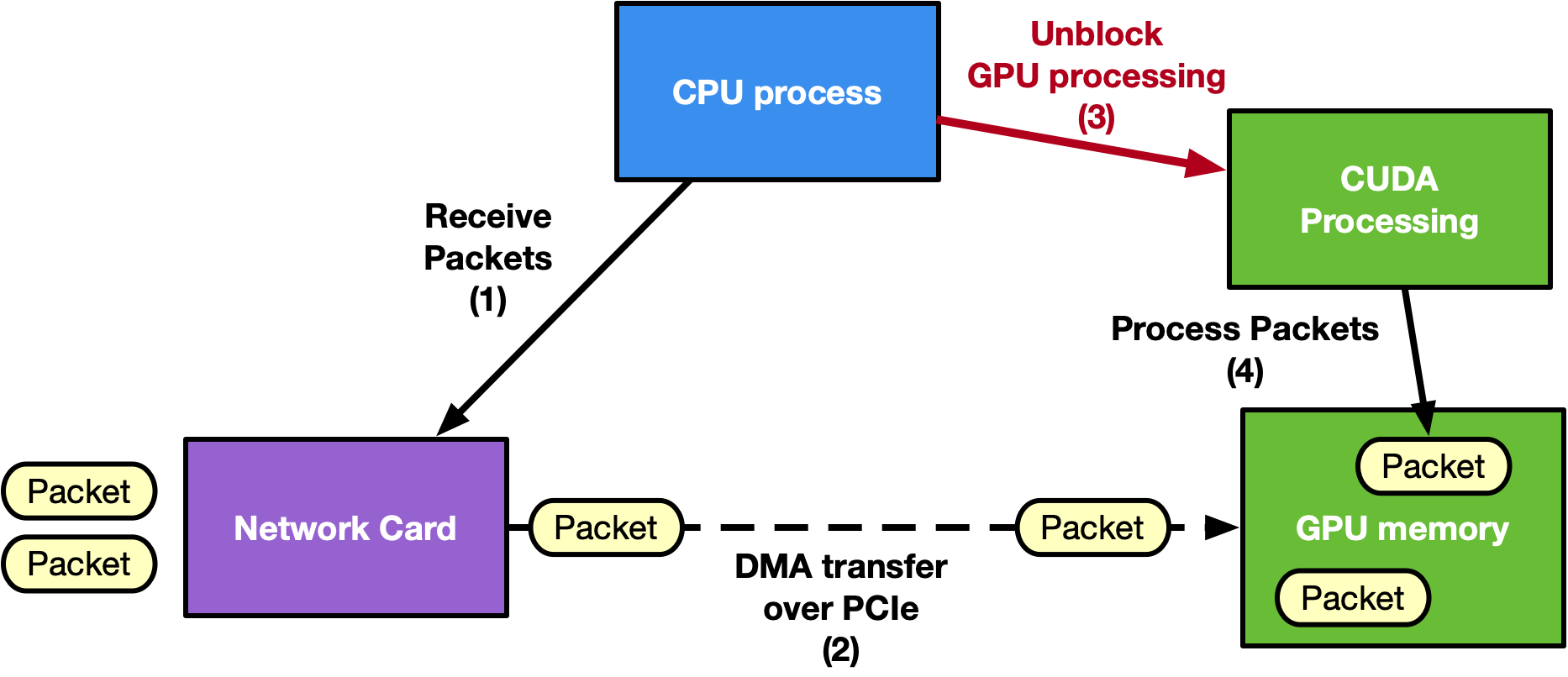
Traditional approaches often rely on a CPU-centric model, where the CPU coordinates with the NIC to receive packets in GPU memory using GPUDirect RDMA. Afterward, the CPU notifies a CUDA kernel on the GPU to process the packets. However, on low-power platforms, this CPU dependency can become a bottleneck, limiting GPU performance and increasing latency.
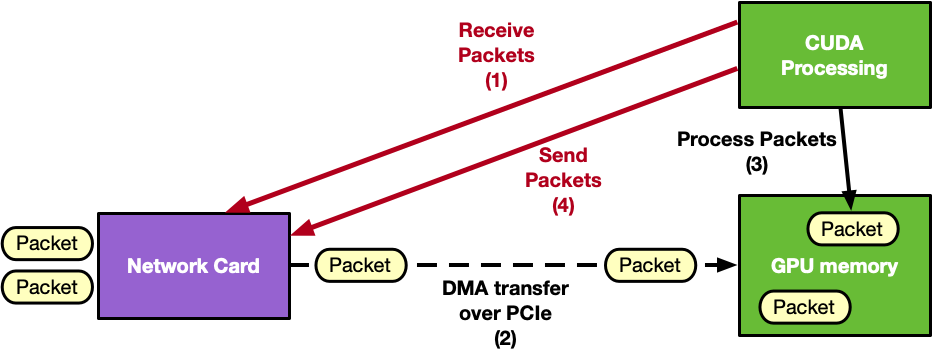
DOCA GPUNetIO addresses this challenge by offering a GPU-centric solution that removes the CPU from the critical path. By combining multiple NVIDIA technologies, it provides a highly efficient and scalable method for network packet processing.
Technologies integrated with DOCA GPUNetIO:
-
GPUDirect RDMA – Enables direct packet transfer between the NIC and GPU memory, eliminating unnecessary memory copies
-
GPUDirect Async Kernel-Initiated (GDAKI) – Allows CUDA kernels to control network operations without CPU intervention
-
GDAKI is also named IBGDA when used with the RDMA protocol
-
-
GDRCopy Library – Allows the CPU to access GPU memory directly
-
NVIDIA BlueField DMA Engine – Supports GPU-triggered memory copies
The following is an example diagram of a CPU-centric approach:
The following is an example diagram of a GPU-centric approach:
Key features of DOCA GPUNetIO include:
-
GPUDirect Async Kernel-Initiated (GDAKI)
-
GDAKI network communications – a GPU CUDA kernel can control network communications to send or receive data
-
GPU can control Ethernet communications (Ethernet/IP/UDP/TCP/ICMP)
-
GPU can control RDMA communications (InfiniBand or RoCE are supported)
-
CPU intervention is unnecessary in the application critical path
-
-
-
-
Enables direct data transfers to and from GPU memory without CPU staging copies.
-
-
DMA Engine Control
-
CUDA kernels can initiate memory copies using BlueField's DMA engine
-
-
Semaphores for Low-Latency Communication
-
Supports efficient message passing between CUDA kernels or between CUDA kernels and CPU threads
-
-
Smart Memory Allocation
-
Allocates aligned GPU memory buffers, optimizing memory access
-
GDRCopy library to allocate a GPU memory buffer accessible from the CPU
-
-
Accurate Send Scheduling
-
Provides precise control over Ethernet packet transmission based on user-defined timestamps.
-
NVIDIA applications that use DOCA GPUNetIO include:
-
Aerial 5G SDK – For ultra-low latency 5G network operations
-
NIXL
– NVIDIA Inference Xfer Library (NIXL) is targeted for accelerating point to point communications in AI inference frameworks (e.g., NVIDIA Dynamo)
-
Holoscan Advanced Network Operator
– Powering real-time data processing in edge AI environments
-
NVQLink – New GPU RoCE transceiver Holoscan sensor bridge operator
-
UCX – new GDAKI module via GPUNetIO functions
-
NCCL – GIN transport enabled via GPUNetIO GPU communications
-
NVSHMEM – GPUNetIO transport for GPU communications replacing the IBGDA transport
For more information about DOCA GPUNetIO, refer to the following NVIDIA blog posts:
Changes From Previous Releases
Changes in 3.4.0
-
GPUNetIO Verbs:
-
New unreliable BlueFlame mode introduced in
doca_gpu_dev_verbs_submit_bffunction viaDOCA_GPUNETIO_VERBS_GPU_CODE_OPT_BF_UNRELIABLEcode_opt template parameter -
Improved
gpunetio_verbs_write_latexample -
New extended atomic wqe introduced
doca_gpu_dev_verbs_wqe_prepare_atomic_ext -
Lighter fence introduced in poll_cq functions
doca_gpu_dev_verbs_fence_acquire_nvidia_nic -
Various enhancements to CUDA device
doca_gpu_dev_verbs_getand relatedgpunetIo_verbs_get_bwexample -
Introduced standalone
doca_gpu_dev_verbs_mcstfunction to enable MCST in case of Ampere or older GPU
-
-
All GPUNetIO Verbs Bandwidth examples now returns performance in Gbps
General Performance and Best Practices
Adhere to the following guidelines to maximize performance and streamline development with DOCA GPUNetIO.
Build Configuration
-
Use release builds: Always compile applications and samples by setting
buildtype = 'release'in themeson.buildfile. This ensures maximum throughput and minimal latency compared to the default debug mode.
Hardware and System Setup
-
Driver Selection for
dmabuf: Install thenvidia-opendrivers to utilizedmabuf. If the environment relies on the closed-source NVIDIA drivers (cuda-drivers), the system does not supportdmabuf; usenvidia-peermeminstead. -
Optimize PCIe topology: For peak throughput, ensure the GPU and NIC share a PIX or PXB topology (connected via a single PCIe bridge). Avoid NODE or SYS topologies, as routing data across NUMA nodes or SMP interconnects reduces efficiency.
-
Expand BAR1 size: If an application fails to map memory buffers to the NIC, verify the GPU's BAR1 size using
nvidia-smi -q. Enable Resizable BAR in the system BIOS to allocate sufficient space. -
Systems Without GPUDirect RDMA: For hardware that does not support GPUDirect RDMA (such as DGX Spark), use the
DOCA_GPU_MEM_TYPE_CPU_GPUmemory type and enable CPU proxy mode for transmissions.
Programming Guidelines
-
CUDA context initialization: Ensure an active CUDA context exists on the target device before calling DOCA GPUNetIO functions (such as
doca_gpu_create). Initialize this context effectively by callingcudaFree(0). -
Optimize execution scopes: When utilizing high-level Ethernet APIs, select the widest possible execution scope (Warp or Block) rather than Thread scope. This minimizes contention on atomic operations and significantly increases doorbell ringing efficiency.
-
Strict pointer management: Strictly separate memory access boundaries to prevent segmentation faults. Use
memptr_gpuexclusively within CUDA kernels, and usememptr_cpusolely for CPU-side management.
Permissions
-
Root requirements: Execute all Ethernet samples and applications with
sudoor root privileges, as they rely on DOCA Flow. -
Non-root alternatives: Verbs, RDMA, and DMA operations can run without root access. To enable this functionality, configure the NVIDIA driver with the option
NVreg_RegistryDwords="PeerMappingOverride=1;".
Navigation Hub
Choose the path that matches your current goal:
|
Goal |
Description |
Link |
|---|---|---|
|
Set up my system |
Install packages, configure NIC firmware (ConnectX/BlueField), and verify PCIe topology |
Installation and Setup |
|
Learn the concepts |
Understand GDAKI, CPU vs. GPU control paths, and the GPUNetIO memory model |
Architecture and Design |
|
Start coding |
Reference CPU and GPU functions for Ethernet, RDMA, Verbs, and DMA |
API Reference |
|
Run a demo |
Walk through build instructions and execute provided sample applications |
Sample Guide |
Last updated: