

This document describes DOCA Socket Relay architecture, usage, etc.
Introduction
DOCA Socket Relay allows Unix Domain Socket (AF_UNIX family) server applications to be offloaded to the DPU while communication between the two sides is proxied by DOCA Comch.
Socket relay only supports SOCK_STREAM communication with a limit of 512 AF_UNIX application clients.
The tool is coupled to the client AF_UNIX server application. That is, a socket relay instance should be initiated per AF_UNIX server application.
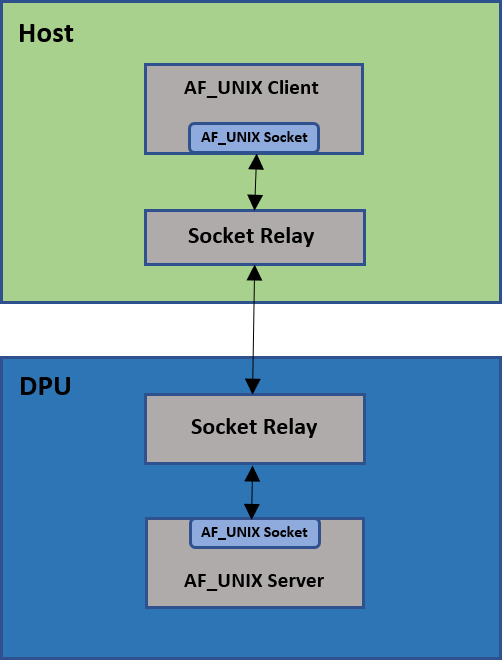
Socket relay is transparent to the application except for the following TCP flows:
-
Connection termination must be done by the host side application only
-
Once a FIN packet (shutdown system call has been made) is sent by the host side application, data cannot be transferred between the DPU and the host, and the connection must be closed.
The following details the communication flow between the client and server:
-
The AF_UNIX client application connects to the socket relay AF_UNIX server in the same way as in the original flow
-
The AF_UNIX client application sends SOCK_STREAM packets
-
The socket relay (host) AF_UNIX server receives the client application packets, and the Comm Channel client sends them on the channel
-
The socket relay (DPU) Comm Channel server receives the client application packets and the AF_UNIX client sends them to the user's AF_UNIX server application
Prerequisites
Windows 10 build 17063 is the minimal Windows version to run DOCA Socket Relay on a Windows host.
Dependencies
NVIDIA® BlueField®-2 firmware version 24.35.1012 or higher.
Execution
To execute DOCA Socket Relay:
Usage: doca_socket_relay [DOCA Flags] [Program Flags]

DOCA Flags:
  -h, --help                 Print a help synopsis
  -v, --version              Print program version information
  -l, --log-level            Set the (numeric) log level for the program <10=DISABLE, 20=CRITICAL, 30=ERROR, 40=WARNING, 50=INFO, 60=DEBUG, 70=TRACE>
  --sdk-log-level            Set the SDK (numeric) log level for the program <10=DISABLE, 20=CRITICAL, 30=ERROR, 40=WARNING, 50=INFO, 60=DEBUG, 70=TRACE>
  --log-filter               Filter logs from specific modules, separated by comma
  -j, --json <path>          Parse command line flags from an input json file

Program Flags:
  -s, --socket               Unix domain socket path, host side will bind to and DPU connect to
  -n, --cc-name              Comm Channel service name
  -p, --pci-addr             DOCA Comm Channel device PCI address
  -r, --rep-pci              DOCA Comm Channel device representor PCI address (needed only on DPU)
For example (DPU side):
doca_socket_relay -s /tmp/sr_server.socket -n cc_channel -p 03:00.0 -r b1:00.0
Arg Parser DOCA Flags
Refer to the DOCA Arg Parser for more information.
General Flags
| Short Flag | Long Flag | Description |
|---|---|---|
-h |
--help |
Prints a help synopsis and exits |
-v |
--version |
Prints program version information and exits |
-l |
--log-level |
Sets the numeric log level for the application:
|
| N/A | --sdk-log-level |
Sets the SDK numeric log level using the same 10-70 scale as above |
| N/A | --log-filter |
Filters logs from specific modules (comma-separated list) |
-j |
--json |
Parses command-line flags from a specified input JSON file |
Program Flags
|
Short Flag |
Long Flag |
Description |
|---|---|---|
|
|
|
AF_UNIX ( This flag is mandatory. |
|
|
|
Comm Channel service name This flag is mandatory. |
|
|
|
DOCA Comm Channel device PCIe address This flag is mandatory. |
|
|
|
DOCA Comm Channel device representor PCIe address This flag is available and mandatory only on the DPU. |
Last updated: