

This guide provides instructions for building and developing applications that require telemetry data collection from NVIDIA® BlueField® and NVIDIA® ConnectX® families of networking platforms.
Introduction
The doca_telemetry_adp_retx library provides statistics on Adaptive Retransmission Algorithm timeouts that have been configured on a given DOCA device, corresponding to an NVIDIA® BlueField® or NVIDIA® ConnectX® network card.
The library includes mechanisms for configuring and reading Adaptive Retransmissions in a histogram format. Each histogram read provides a series of bins, where each bin corresponds to a specific time range. The value of the bin is a count of the retransmissions that occurred due to a timeout falling within that time range.
The histogram can return information about events on all QPs of functions associated with the DOCA device, or it can be configured to track the QPs of a single VHCA ID.
DOCA Telemetry Adp Retx is supported at an alpha level.
Prerequisites
To utilize DOCA Telemetry Adp Retx, your system must meet the following baseline requirements:
-
Firmware: Version
>=28/32/40.43.1000is required for ConnectX-7, BlueField-3, and ConnectX-8 devices. -
Driver: The
fwctldriver must be fully installed and actively loaded on the system.
Verifying the fwctl Driver
To verify that the fwctl driver is successfully loaded, check the device directories:
$ ls /sys/class/fwctl/
$ ls /dev/fwctl
The expected output for a standard 2-port device is fwctl0 fwctl1.
Manually Loading the Driver
If the directories /sys/class/fwctl or /dev/fwctl do not exist or are empty, the module may be installed but inactive.
Check for the module's presence:
$ grep fwctl -R /lib/modules/$(uname -r)/
If the output confirms the presence of fwctl.ko and mlx5_fwctl.ko, manually load the module and verify its status:
$ sudo modprobe mlx5_fwctl
$ lsmod | grep fwctl
Reinstalling the DOCA Host Package
If you cannot locate the installed fwctl module while manually loading the driver, or if the modprobe command fails to load it successfully, you must reinstall the DOCA Host package.
-
Download the package (DOCA 3.3.0 example):
$ wget https://www.mellanox.com/downloads/DOCA/DOCA_v3.3.0/host/doca-host_3.3.0-088000-26.01-ubuntu2204_amd64.deb
-
Purge existing DOCA and OFED modules:
$ sudo for f in $( dpkg --list | grep doca | awk '{print $2}' ); do echo $f ; apt remove --purge $f -y ; done $ sudo for f in $( dpkg --list | grep mlnx | awk '{print $2}' ); do echo $f ; apt remove --purge $f -y ; done $ sudo for f in $( dpkg --list | grep dpdk | awk '{print $2}' ); do echo $f ; apt remove --purge $f -y ; done $ sudo for f in $( dpkg --list | grep ofed | awk '{print $2}' ); do echo $f ; apt remove --purge $f -y ; done $ sudo /usr/sbin/ofed_uninstall.sh --force $ sudo apt-get autoremove -
Install the new package and restart services:
Once the reinstallation is complete, confirm the module is successfully loaded according to section "DOCA Telemetry Adp Retx | Verifying the fwctl Driver".$ sudo dpkg -i doca-host_3.3.0-088000-26.01-ubuntu2204_amd64.deb $ sudo apt-get update $ sudo apt-get -y install doca-all $ sudo /etc/init.d/openibd restart
Environment
DOCA Telemetry-based applications can run on either the host machine (ConnectX-7 or BlueField-3 and newer) or on the DPU (BlueField-3 and newer).
Architecture
The doca_telemetry_adp_retx library provides statistics on Adaptive Retransmission configured devices, including the number of retransmissions and their timeout ranges in a histogram format.
To interact with a device (typically corresponding to a specific NIC port), you must create a doca_telemetry_adp_retx context using doca_telemetry_adp_retx_create().
Configuration Phase
Device Support
A DOCA device is required for the library to operate. For guidance on selecting a device, refer to the "DOCA Core Device Discovery" documentation.
Device support for doca_telemetry_adp_retx and its features can be checked with the following capability calls:
-
doca_telemetry_adp_retx_cap_is_supported() -
doca_telemetry_adp_retx_cap_histogram_is_supported()
The maximum number of bins and the supported time units can be queried using:
-
doca_telemetry_adp_retx_cap_get_hist_max_bins() -
doca_telemetry_adp_retx_cap_get_hist_time_units()
Histogram Configuration
The histogram divides retransmission events into bins, each representing a time range. If a retransmission timeout falls within a bin's range, that bin's counter is incremented. The number of bins and their time ranges are configurable.
The bin widths and timespans are determined by five main configuration options:
|
API Configuration |
Description |
|---|---|
|
|
Number of bins to use in the histogram |
|
|
Width (in time units) of the first bin |
|
|
Width (in time units) of the second bin; also used as the base for calculating subsequent bins |
|
|
The time unit for bin0 and bin1 widths (e.g., |
|
|
The calculation mode for bins after bin1: either |
Example:
-
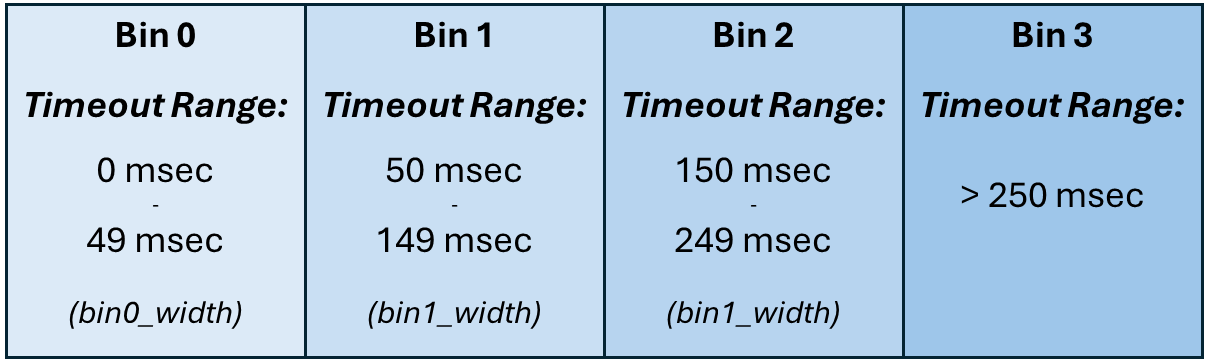
Fixed Mode: 4 bins,
bin0_width=50,bin1_width=100,time_unit=msec,width_mode=fixed.-
Bin 0: 0-50 msec
-
Bin 1: 50-150 msec (base + 100)
-
Bin 2: 150-250 msec (base + 100)
-
Bin 3: 250-350 msec (base + 100)
-
-
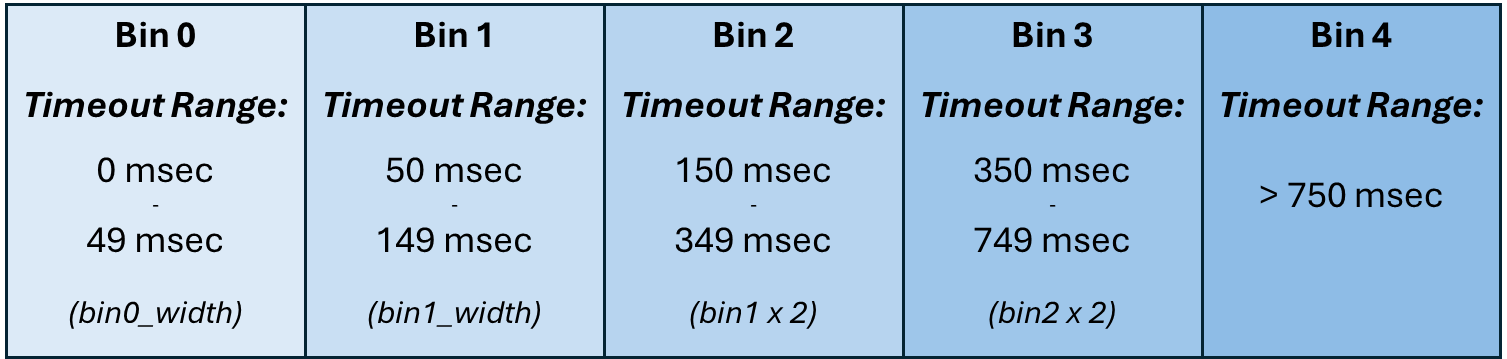
Double Mode: 5 bins,
bin0_width=50,bin1_width=100,time_unit=msec,width_mode=double.-
Bin 0: 0-50 msec
-
Bin 1: 50-150 msec (base + 100)
-
Bin 2: 150-350 msec (base + 200)
-
Bin 3: 350-750 msec (base + 400)
-
Bin 4: 750-1550 msec (base + 800)
-
Further options control how the histogram is populated:
|
API Configuration |
Description |
|---|---|
|
|
Populates the histogram with retransmissions from a single VHCA ID only |
|
|
Clears (resets to 0) the histogram bin counters after each read |
|
|
Enables the counters. This must be set for the histogram to start gathering statistics. |
Execution Phase
After configuration, the histogram is loaded and begins running on the device when doca_telemetry_adp_retx_start() is called. The bin counters can then be read from the device.
doca_telemetry_adp_retx contexts do not have sole ownership or a locking mechanism on the device histogram. It is possible for another process to update the histogram's configuration while your context is in the execution phase, which can lead to misinterpretation of the bin counters.
The user is responsible for ensuring sole ownership of the histogram and verifying data integrity. An API function is provided to help detect these external changes.
The following functions are used during the execution phase:
|
API Datapath Functions |
Description |
|---|---|
|
|
Reads the configured N histogram bin counters as an array of N 64-bit values |
|
|
Indicates if the device's active histogram configuration matches the one defined in the context |
State Machine
This section outlines the states of the doca_telemetry_adp_retx context.
Idle
The context has been created and is Idle.
In this state, it is expected for the application to:
-
Destroy the context.
-
Start the context for processing.
Allowed operations:
-
Configuring the context according to section "Configuration".
It is possible to reach this state as follows:
|
Previous State |
Transition Action |
|---|---|
|
None |
Create the context |
|
Running |
Call stop |
Running
In this state it is expected for the application to:
-
Stop the context.
Allowed operations:
-
Reading data from the device according to section "Execution".
It is possible to reach this state as follows:
|
Previous State |
Transition Action |
|---|---|
|
Idle |
Successfully start the context |
Alternative Datapath Options
DOCA Telemetry Adp Retx supports only CPU-based datapaths.
DOCA Telemetry Adp Retx Sample
The doca_telemetry_adp_retx sample demonstrates how to configure the histogram from command-line arguments, run for a set period, and then print the values of the configured bin counters. This sample is also available on GitHub.
Running the Sample
-
Before you begin, refer to the following documents:
-
DOCA Installation Guide for Linux: For details on installing BlueField-related software.
-
NVIDIA BlueField Platform Software Troubleshooting Guide: For any issues with installation, compilation, or execution.
-
-
To build a given sample:
# Update path if you downloaded from GitHub
cd /opt/mellanox/doca/samples/doca_telemetry/telemetry_adp_retx
meson /tmp/build
ninja -C /tmp/build
The binary
doca_telemetry_adp_retxis created under/tmp/build/. -
Sample usage:
Usage: doca_telemetry_adp_retx [DOCA Flags] [Program Flags]

DOCA Flags:
  -h, --help                        Print a help synopsis
  -v, --version                     Print program version information
  -l, --log-level                   Set the (numeric) log level for the program <10=DISABLE, 20=CRITICAL, 30=ERROR, 40=WARNING, 50=INFO, 60=DEBUG, 70=TRACE>
  --sdk-log-level                   Set the SDK (numeric) log level for the program <10=DISABLE, 20=CRITICAL, 30=ERROR, 40=WARNING, 50=INFO, 60=DEBUG, 70=TRACE>
  -j, --json <path>                 Parse all command flags from an input json file

Program Flags:
  -p, --pci-addr                    DOCA device PCI device address
  -u, --time-unit                   Time unit to use - 'nsec', 'usec', 'usec_100', or 'msec'
  -w, --width-mode                  Bin width mode to use - 'fixed', or 'double'
  -n, --number-bins                 The number of bins to configure the histogram for
  -vid, --vhca-id                   VHCA ID to get histogram events from
  -b0, --bin-0-width                Width of bin 0 to configure histogram
  -b1, --bin-1-width                Width of bin 1 to configure histogram
  -t, --wait-time                   Time in seconds to wait before reading histogram bins
The sample includes:
-
Locates and opens a DOCA device.
-
Creates a
doca_telemetry_adp_retxinstance. -
Queries the device for histogram support, max bins, and time unit capabilities.
-
Configures the histogram with the values provided via command line (number of bins, bin widths, time unit, width mode, VHCA ID, clear on read, and counter enable).
-
Waits for the specified time, then reads and displays the value of each bin.
-
Destroys the
doca_telemetry_adp_retxcontext.
Last updated: