

This guide provides instructions on how to use the DOCA virtio-net service container on top of NVIDIA® BlueField®-3 networking platform.
Introduction
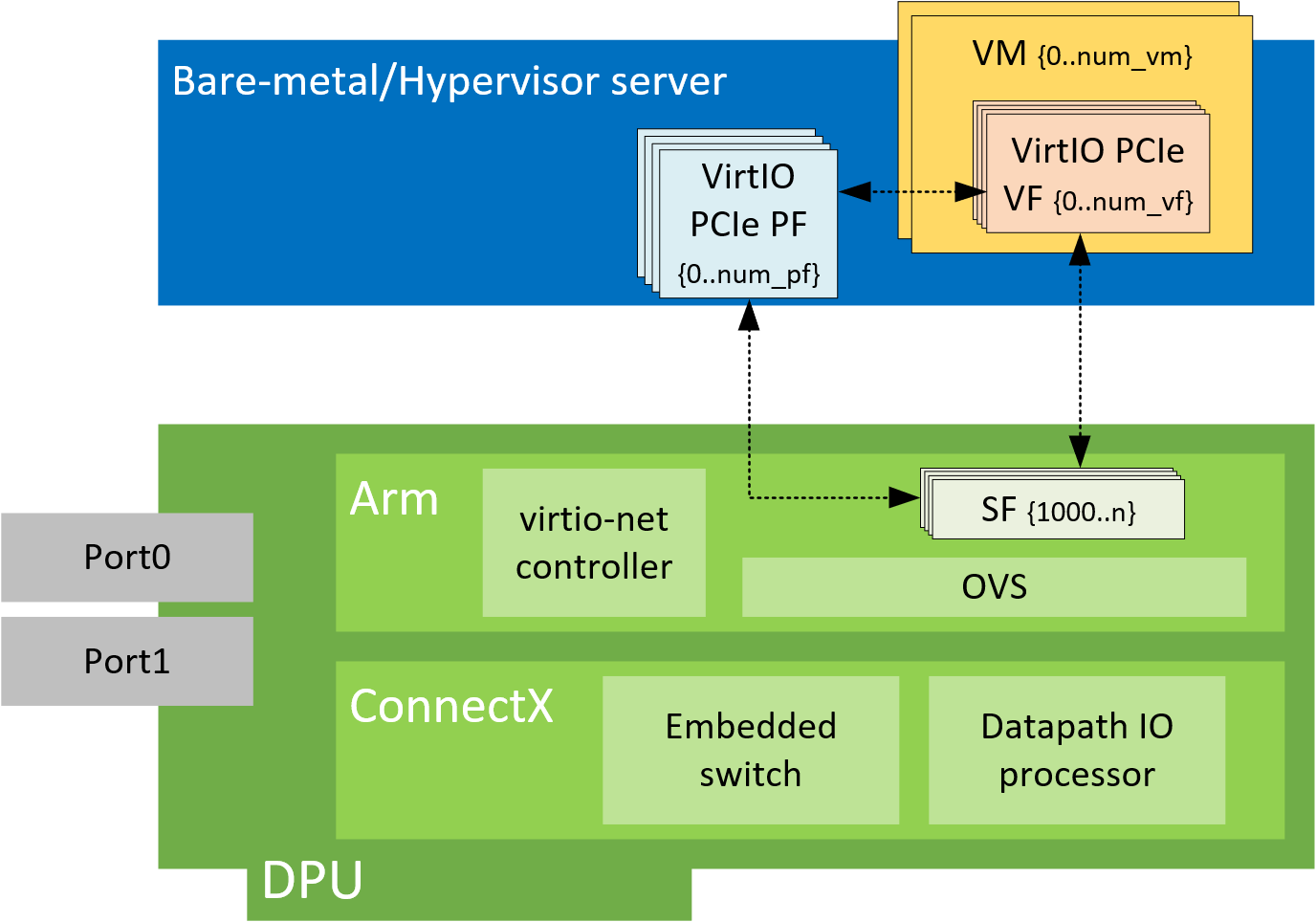
NVIDIA® BlueField® virtio-net enables users to create virtio-net PCIe devices in the system where the BlueField is connected. In a traditional virtualization environment, virtio-net devices can be emulated by QEMU from the hypervisor, or offloading part of the work (e.g., dataplane) to the NIC (e.g., vDPA). Compared to those solutions, virtio-net PCIe devices offload both data and control plane to the BlueField networking device. The PCIe virtio-net devices exposed to the hypervisor do not depend on QEMU or other software emulators/vendor drivers from the guest OS.
The solution is based on BlueField family technology on top of virtual switch and OVS, so that virtio-net devices can benefit from the full SDN and hardware offload methodologies.
Virtio-net Controller SystemD Service
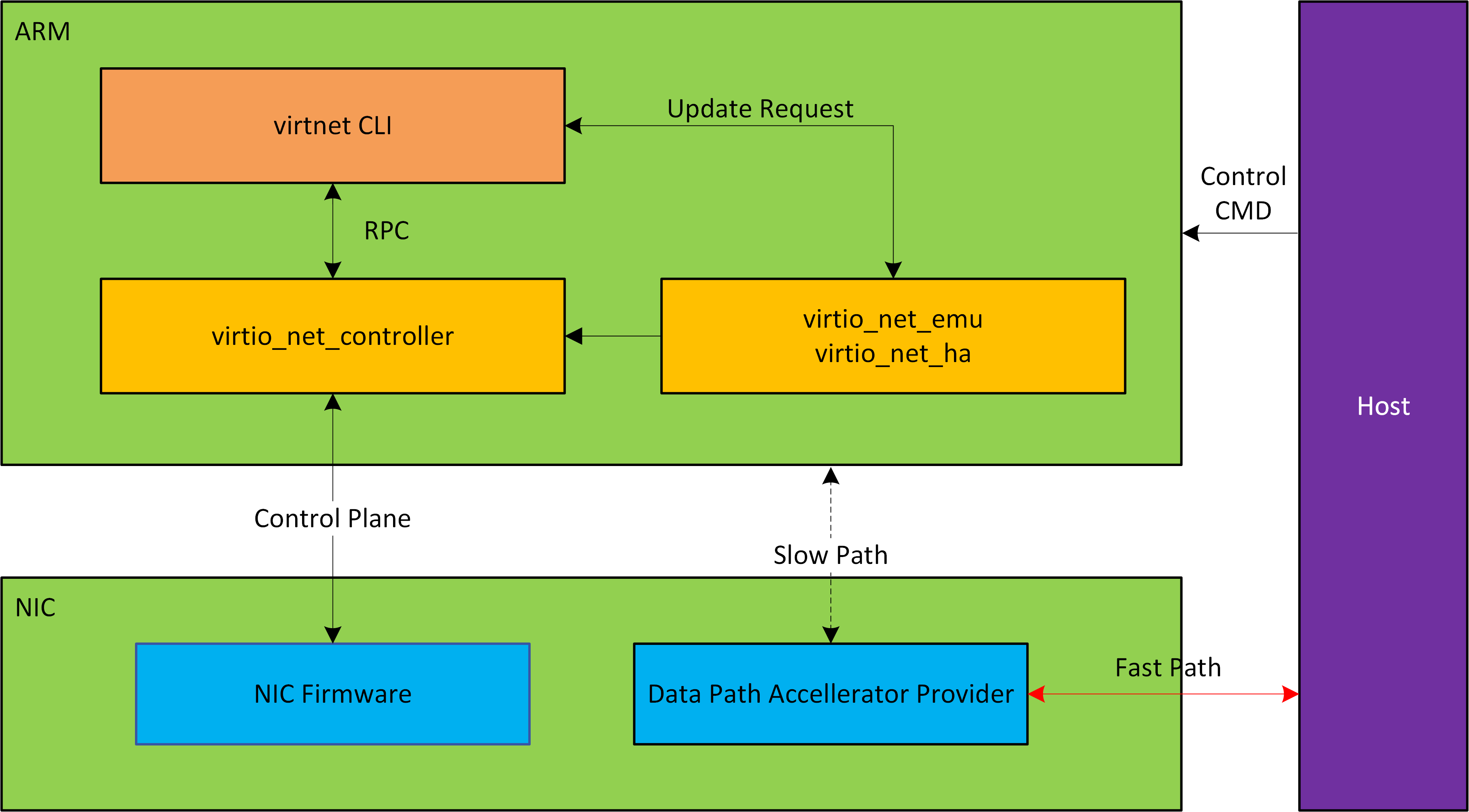
Virtio-net-controller is a systemd service which runs the BlueField with a command-line interface (CLI) frontend to communicate with the service running in the background. The controller systemd service is enabled by default and runs automatically after certain firmware configurations are deployed.
Refer to "DOCA Virtio-net Service Guide | Virtio net Deployment" for more information.
The processes virtio_net_emu and virtio_net_ha are created to manage live update and high availability.
Virtio-net Deployment
Updating OS Image on BlueField
To install the BFB bundle on the NVIDIA® BlueField®, run the following command from the Linux hypervisor:
[host]# sudo bfb-install --rshim <rshimN> --bfb <image_path.bfb>
For more information, refer to section "Deploying BlueField Software Using BFB from Host" in the NVIDIA BlueField DPU BSP documentation.
Updating NIC Firmware
From the BlueField networking platform, run:
[dpu]# sudo /opt/mellanox/mlnx-fw-updater/mlnx_fw_updater.pl --force-fw-update
For more information, refer to section "Upgrading Firmware" in the NVIDIA DOCA Installation Guide for Linux.
Configuring NIC Firmware
As default, DPU should be configured in DPU mode. A simple way to confirm DPU is running at DPU mode is to log into the BlueField Arm system and check if p0 and pf0hpf both exists by running command below.
[dpu]# ip link show
Virtio-net full emulation only works in DPU mode. For more information about DPU mode configuration, please refer to BlueField Modes of Operation.
Before enabling the virtio-net service, configure firmware via mlxconfig tool is required. There are examples on typical configurations, the table listed relevant mlxconfig entry descriptions.
For mlxconfig configuration changes to take effect, perform a BlueField system-level reset.
|
Mlxconfig Entries |
Description |
|---|---|
|
|
Must be set to |
|
|
Total number of PCIe functions (PFs) exposed by the device for virtio-net emulation. Those functions are persistent along with host/BlueField power cycle. |
|
|
The max number of virtual functions (VFs) that can be supported for each virtio-net PF |
|
|
Number of MSI-X vectors assigned for each PF of the virtio-net emulation device, minimal is |
|
|
Number of MSI-X vectors assigned for each VF of the virtio-net emulation device, minimal is |
|
|
When |
|
|
The maximum number of emulated switch ports. Each port can hold a single PCIe device (emulated or not). This determines the supported maximum number of hot-plug virtio-net devices. The maximum number depends on hypervisor PCIe resource and cannot exceed 31. Check system PCIe resource. Changing this entry to a big number may result in the host not booting up, which would necessitate disabling the BlueField device and clearing the host NVRAM. |
|
|
When |
|
|
The total number of scalable function (SF) partitions that can be supported for the current PF. Valid only when This entry differs between the BlueField and host side |
|
|
Log (base 2) of the BAR size of a single SF, given in KB. Valid only when |
|
|
When |
|
|
Enable single-root I/O virtualization (SR-IOV) for virtio-net and native PFs |
|
|
Enable expansion ROM option for PXE for virtio-net functions All virtio |
|
|
Enable expansion ROM option for UEFI for Arm based host for virtio-net functions |
|
|
Enable expansion ROM option for UEFI for x86 based host for virtio-net functions |
The maximum number of supported devices is listed below. It does not apply when there are hot-plug and VF created at the same time.
|
Static PF |
Hot-plug PF |
VF |
|---|---|---|
|
31 |
31 |
1008 |
The maximum supported number of hotplug PFs depends on the host PCI resource, it may support less or none on specific systems. Refer to host BIOS specification.
Static PF
Static PF is defined as virtio-net PFs which are persistent even after DPU or host power cycle. It also supports creating SR-IOV VFs.
The following is an example for enabling the system with 4 static PFs (VIRTIO_NET_EMULATION_NUM_PF) only:
10 SFs (PF_TOTAL_SF) are reserved to take into account other application using the SFs.
[dpu]# mlxconfig -d 03:00.0 s \
VIRTIO_NET_EMULATION_ENABLE=1 \
VIRTIO_NET_EMULATION_NUM_PF=4 \
VIRTIO_NET_EMULATION_NUM_VF=0 \
VIRTIO_NET_EMULATION_NUM_MSIX=64 \
PCI_SWITCH_EMULATION_ENABLE=0 \
PCI_SWITCH_EMULATION_NUM_PORT=0 \
PER_PF_NUM_SF=1 \
PF_TOTAL_SF=64 \
PF_BAR2_ENABLE=0 \
PF_SF_BAR_SIZE=8 \
SRIOV_EN=0
Hotplug PF
Hotplug PF is defined as virtio-net PFs which can be hotplugged or unplugged dynamically after the system comes up.
Hotplug PF does not support creating SR-IOV VFs.
The following is an example for enabling 16 hotplug PFs (PCI_SWITCH_EMULATION_NUM_PORT):
[dpu]# mlxconfig -d 03:00.0 s \
VIRTIO_NET_EMULATION_ENABLE=1 \
VIRTIO_NET_EMULATION_NUM_PF=0 \
VIRTIO_NET_EMULATION_NUM_VF=0 \
VIRTIO_NET_EMULATION_NUM_MSIX=64 \
PCI_SWITCH_EMULATION_ENABLE=1 \
PCI_SWITCH_EMULATION_NUM_PORT=16 \
PER_PF_NUM_SF=1 \
PF_TOTAL_SF=64 \
PF_BAR2_ENABLE=0 \
PF_SF_BAR_SIZE=8 \
SRIOV_EN=0
SR-IOV VF
SR-IOV VF is defined as virtio-net VFs created on top of PFs. Each VF gets an individual virtio-net PCIe devices.
VFs cannot be dynamically created or destroyed, they can only change from X to 0, or from 0 to X.
VFs will be destroyed when reboot host or unbind PF from virtio-net kernel driver.
The following is an example for enabling 126 VFs per static PF—504 (4 PF x 126) VFs in total:
[dpu]# mlxconfig -d 03:00.0 s \
VIRTIO_NET_EMULATION_ENABLE=1 \
VIRTIO_NET_EMULATION_NUM_PF=4 \
VIRTIO_NET_EMULATION_NUM_VF=126 \
VIRTIO_NET_EMULATION_NUM_MSIX=64 \
VIRTIO_NET_EMULATION_NUM_VF_MSIX=6 \
PCI_SWITCH_EMULATION_ENABLE=0 \
PCI_SWITCH_EMULATION_NUM_PORT=0 \
PER_PF_NUM_SF=1 \
PF_TOTAL_SF=512 \
PF_BAR2_ENABLE=0 \
PF_SF_BAR_SIZE=8 \
NUM_VF_MSIX=0 \
SRIOV_EN=1
PF/VF Combinations
Creating static/hotplug PFs and VFs at the same time is supported.
The total sum of PCIe functions to the external host must not exceed 1008. For example:
-
If there are 2 PFs with no VFs (
NUM_OF_VFS=0) and there is 1 RShim, then the remaining static functions is 1005 (1008-3). -
If 1 virtio-net PF is configured (
VIRTIO_NET_EMULATION_NUM_PF=1), then up to 1004 virtio-net VFs can be configured (VIRTIO_NET_EMULATION_NUM_VF=1004) -
If 2 virtio-net PF (
VIRTIO_NET_EMULATION_NUM_PF=2), then up to 502 virtio-net VFs can be configured (VIRTIO_NET_EMULATION_NUM_VF=502)
The following is an example for enabling 15 hotplug PFs, 2 static PFs, and 200 VFs (2 PFs x 100):
[dpu]# mlxconfig -d 03:00.0 s \
VIRTIO_NET_EMULATION_ENABLE=1 \
VIRTIO_NET_EMULATION_NUM_PF=2 \
VIRTIO_NET_EMULATION_NUM_VF=100 \
VIRTIO_NET_EMULATION_NUM_MSIX=10 \
VIRTIO_NET_EMULATION_NUM_VF_MSIX=6 \
PCI_SWITCH_EMULATION_ENABLE=1 \
PCI_SWITCH_EMULATION_NUM_PORT=15 \
PER_PF_NUM_SF=1 \
PF_TOTAL_SF=256 \
PF_BAR2_ENABLE=0 \
PF_SF_BAR_SIZE=8 \
NUM_VF_MSIX=0 \
SRIOV_EN=1
In hotplug virtio-net PFs and virtio-net SR-IOV VFs setups, only up to 15 hotplug devices are supported.
System Configuration
Host System Configuration
For hotplug device configuration, it is recommended to modify the hypervisor OS kernel boot parameters and add the options below:
pci=realloc
For SR-IOV configuration, first enable SR-IOV from the host.
Refer to MLNX_OFED documentation under Features Overview and Configuration > Virtualization > Single Root IO Virtualization (SR-IOV) > Setting Up SR-IOV for instructions on how to do that.
Make sure to add the following options to Linux boot parameter.
intel_iommu=on iommu=pt
Add pci=assign-busses to the boot command line when creating more than 127 VFs. Without this option, the following errors may trigger from the host and the virtio driver would not probe those devices.
pci 0000:84:00.0: [1af4:1041] type 7f class 0xffffff
pci 0000:84:00.0: unknown header type 7f, ignoring device
Because the controller from the BlueField side provides hardware resources and acknowledges (ACKs) the request from the host's virtio-net driver, it is mandatory to reboot the host OS (or unload the virtio-net driver) first and the BlueField afterwards. This also applies to reconfiguring a controller from the BlueField platform (e.g., reconfiguring LAG). Unloading the virtio-net driver from host OS side is recommended.
BlueField System Configuration
Virtio-net full emulation is based on ASAP^2. For each virtio-net device created from host side, there is an SF representor created to represent the device from the BlueField side. It is necessary to have the SF representor in the same OVS bridge of the uplink representor.
The SF representor name is designed in a fixed pattern to map different type of devices.
|
|
Static PF |
Hotplug PF |
SR-IOV VF |
|---|---|---|---|
|
SF Range |
1000-1999 |
2000-2999 |
3000 and above |
For example, the first static PF gets the SF representor of en3f0pf0sf1000 and the second hotplug PF gets the SF representor of en3f0pf0sf2001. It is recommended to verify the name of the SF representor from the sf_rep_net_device field in the output of virtnet list.
[dpu]# virtnet list
{
  ...
  "devices": [
    {
      "pf_id": 0,
      "function_type": "static PF",
      "transitional": 0,
      "vuid": "MT2151X03152VNETS0D0F2",
      "pci_bdf": "14:00.2",
      "pci_vhca_id": "0x2",
      "pci_max_vfs": "0",
      "enabled_vfs": "0",
      "msix_num_pool_size": 0,
      "min_msix_num": 0,
      "max_msix_num": 32,
      "min_num_of_qp": 0,
      "max_num_of_qp": 15,
      "qp_pool_size": 0,
      "num_msix": "64",
      "num_queues": "8",
      "enabled_queues": "7",
      "max_queue_size": "256",
      "msix_config_vector": "0x0",
      "mac": "D6:67:E7:09:47:D5",
      "link_status": "1",
      "max_queue_pairs": "3",
      "mtu": "1500",
      "speed": "25000",
      "rss_max_key_size": "0",
      "supported_hash_types": "0x0",
      "ctrl_mac": "D6:67:E7:09:47:D5",
      "ctrl_mq": "3",
      "sf_num": 1000,
      "sf_parent_device": "mlx5_0",
      "sf_parent_device_pci_addr": "0000:03:00.0",
      "sf_rep_net_device": "en3f0pf0sf1000",
      "sf_rep_net_ifindex": 15,
      "sf_rdma_device": "mlx5_4",
      "sf_cross_mkey": "0x18A42",
      "sf_vhca_id": "0x8C",
      "sf_rqt_num": "0x0",
      "aarfs": "disabled",
      "dim": "disabled"
    }
  ]
 }
Once SF representor name is located, add it to the same OVS bridge of the corresponding uplink representor and make sure the SF representor is up:
[dpu]# ovs-vsctl show
f2c431e5-f8df-4f37-95ce-aa0c7da738e0
    Bridge ovsbr1
        Port ovsbr1
            Interface ovsbr1
                type: internal
        Port en3f0pf0sf0
            Interface en3f0pf0sf0
        Port p0
            Interface p0
[dpu]# ovs-vsctl add-port ovsbr1 en3f0pf0sf1000
[dpu]# ovs-vsctl show
f2c431e5-f8df-4f37-95ce-aa0c7da738e0
    Bridge ovsbr1
        Port ovsbr1
            Interface ovsbr1
                type: internal
        Port en3f0pf0sf0
            Interface en3f0pf0sf0
        Port en3f0pf0sf1000
            Interface en3f0pf0sf1000
        Port p0
            Interface p0
[dpu]# ip link set dev en3f0pf0sf1000 up
Usage
After firmware/system configuration and after system power cycle, the virtio-net devices should be ready to deploy.
First, make sure that mlxconfig options take effect correctly by issuing the following command:
The output has a list with 3 columns: default configuration, current configuration, and next-boot configuration. Verify that the values under the 2nd column match the expected configuration.
[dpu]# mlxconfig -d 03:00.0 -e q | grep -i \*
*        PER_PF_NUM_SF                               False(0)        True(1)         True(1)
*        NUM_OF_VFS                                  16              0               0
*        PF_BAR2_ENABLE                              True(1)         False(0)        False(0)
*        PCI_SWITCH_EMULATION_NUM_PORT               0               8               8
*        PCI_SWITCH_EMULATION_ENABLE                 False(0)        True(1)         True(1)
*        VIRTIO_NET_EMULATION_ENABLE                 False(0)        True(1)         True(1)
*        VIRTIO_NET_EMULATION_NUM_VF                 0               126             126
*        VIRTIO_NET_EMULATION_NUM_PF                 0               1               1
*        VIRTIO_NET_EMULATION_NUM_MSIX               2               64              64
*        VIRTIO_NET_EMULATION_NUM_VF_MSIX            0               64              64
*        PF_TOTAL_SF                                 0               508             508
*        PF_SF_BAR_SIZE                              0               8               8
If the system is configured correctly, virtio-net-controller service should be up and running. If the service does not appear as active, double check the firmware/system configurations above.
[dpu]# systemctl status virtio-net-controller.service
● virtio-net-controller.service - Nvidia VirtIO Net Controller Daemon
   Loaded: loaded (/etc/systemd/system/virtio-net-controller.service; enabled; vendor preset: disabled)
   Active: active (running)
     Docs: file:/opt/mellanox/mlnx_virtnet/README.md
 Main PID: 30715 (virtio_net_cont)
    Tasks: 55
   Memory: 11.7M
   CGroup: /system.slice/virtio-net-controller.service
           ├─30715 /usr/sbin/virtio_net_controller
           ├─30859 virtio_net_emu
           └─30860 virtio_net_ha
To reload or restart the service, run:
[dpu]# systemctl restart virtio-net-controller.service
When using "force kill" (i.e., kill -9 or kill -SIGKILL) for the virtio-net-controller service, users should use kill -9 -<pid of virtio_net_controller process, i.e. 30715 in previous example> (note the dash "-" before the pid).
Hotplug PF Devices
Creating PF Devices
-
To create a hotplug virtio-net device, run:
[dpu]# virtnet hotplug -i mlx5_0 -f 0x0 -m 0C:C4:7A:FF:22:93 -t 1500 -n 3 -s 1024
Refer to "Virtnet CLI Commands" for full usage.
This command creates one hotplug virtio-net device with MAC address
0C:C4:7A:FF:22:93, MTU 1500, and 3 virtio queues with a depth of 1024 entries. The device is created on the physical port ofmlx5_0. The device is uniquely identified by its index. This index is used to query and update device attributes. If the device is created successfully, an output similar to the following appears:{ "bdf": "15:00.0", "vuid": "MT2151X03152VNETS1D0F0", "id": 0, "transitional": 0, "sf_rep_net_device": "en3f0pf0sf2000", "mac": "0C:C4:7A:FF:22:93", "errno": 0, "errstr": "Success" } -
Add the representor port of the device to the OVS bridge and bring it up. Run:
[dpu]# ovs-vsctl add-port <bridge> en3f0pf0sf2000 [dpu]# ip link set dev en3f0pf0sf2000 upOnce steps 1-2 are completed, the virtio-net PCIe device should be available from hypervisor OS with the same PCIe BDF.
[host]# lspci | grep -i virtio 15:00.0 Ethernet controller: Red Hat, Inc. Virtio network device (rev 01) -
Probe virtio-net driver (e.g., kernel driver):
[host]# modprobe -v virtio-pci && modprobe -v virtio-net
-
The virtio-net device should be created. There are two ways to locate the net device:
-
Check the dmesg from the host side for the corresponding PCIe BDF:
[host]# dmesg | tail -20 | grep 15:00.0 -A 10 | grep virtio_net [3908051.494493] virtio_net virtio2 ens2f0: renamed from eth0
-
Check all net devices and find the corresponding MAC address:
[host]# ip link show | grep -i "0c:c4:7a:ff:22:93" -B 1 31: ens2f0: <BROADCAST,MULTICAST,UP,LOWER_UP> mtu 1500 qdisc fq_codel state UP mode DEFAULT group default qlen 1000 link/ether 0c:c4:7a:ff:22:93 brd ff:ff:ff:ff:ff:ff
-
-
Check that the probed driver and its BDF match the output of the hotplug device:
[host]# ethtool -i ens2f0 driver: virtio_net version: 1.0.0 firmware-version: expansion-rom-version: bus-info: 0000:15:00.0 supports-statistics: yes supports-test: no supports-eeprom-access: no supports-register-dump: no supports-priv-flags: no
Now the hotplug virtio-net device is ready to use as a common network device.
Destroying PF Devices
To hot-unplug a virtio-net device, run:
[dpu]# virtnet unplug -p 0
{'id': '0x1'}
{
"errno": 0,
"errstr": "Success"
}
The hotplug device and its representor are destroyed.
Host-Aware Attention Button Mode (AB Mode)
The Host-Aware Attention Button (AB) mode provides a coordinated mechanism for device removal utilizing the PCIe Attention Button. This mode ensures the host operating system has the opportunity to gracefully shut down the device driver prior to physical or logical removal.
When utilizing AB mode (-w 3), the hotplug and unplug lifecycle operates as follows:
-
Hotplug initiation: The device is created with AB mode awareness, a state that persists for the lifetime of the device.
-
Unplug notification: Upon an unplug request, the controller sends an Attention Button notification to the host, signaling a pending device removal.
-
Host acknowledgment: The host OS receives the notification and gracefully shuts down the associated driver.
-
Clean removal: Once the host acknowledges the shutdown, the device is cleanly removed from the system.
Usage Commands
Creating a device with AB mode:
[dpu]# virtnet hotplug -i mlx5_0 -f 0x0 -m 0C:C4:7A:FF:22:93 -t 1500 -n 3 -s 1024 -w 3
Removing a device with AB mode:
[dpu]# virtnet unplug -p 0 -w 3
Devices hotplugged using AB mode (-w 3) strictly require the same AB mode flag (-w 3) during the unplug operation. Attempting to unplug an AB-mode device without specifying -w 3 will fail and return a mode mismatch error.
Verification and Querying
Checking AB Mode Support
Run the virtnet list command to verify if the underlying controller supports AB mode. Look for the hp_host_aware_ab_supported key in the JSON output.
{
"controller": {
"hp_host_awareness_supported": "1",
"hp_host_aware_ab_supported": "1"
}
}
Querying Device HP Mode
To verify which hotplug mode a specific device was created with, use the virtnet query command. An awareness mode of 3 indicates AB mode.
{
"hp_host_awareness_mode": 3
}
Default AB Mode Configuration
To automate AB mode for all hotplug and unplug operations without manually specifying the -w 3 flag on the CLI, configure the virtnet.conf file:
force_ab_hotplug_default=1
Behavior when enabled:
-
Hotplug operations automatically default to AB mode (
-w 3). -
Unplug operations automatically default to AB mode (
-w 3). -
Explicit
-wCLI options will always override this configuration. -
If the underlying Host Channel Adapter (HCA) does not support AB mode, the controller will safely fall back to mode
0.
SR-IOV VF Devices
Creating SR-IOV VF Devices
After configuring the firmware and BlueField/host system with correct configuration, users can create SR-IOV VFs.
The following procedure provides an example of creating one VF on top of one static PF:
-
Locate the virtio-net PFs exposed to the host side:
[host]# lspci | grep -i virtio 14:00.2 Network controller: Red Hat, Inc. Virtio network device -
Verify that the PCIe BDF matches the backend device from the BlueField side:
[dpu]# virtnet list { ... "devices": [ { "pf_id": 0, "function_type": "static PF", "transitional": 0, "vuid": "MT2151X03152VNETS0D0F2", "pci_bdf": "14:00.2", "pci_vhca_id": "0x2", "pci_max_vfs": "0", "enabled_vfs": "0", "msix_num_pool_size": 0, "min_msix_num": 0, "max_msix_num": 32, "min_num_of_qp": 0, "max_num_of_qp": 15, "qp_pool_size": 0, "num_msix": "64", "num_queues": "8", "enabled_queues": "7", "max_queue_size": "256", "msix_config_vector": "0x0", "mac": "D6:67:E7:09:47:D5", "link_status": "1", "max_queue_pairs": "3", "mtu": "1500", "speed": "25000", "rss_max_key_size": "0", "supported_hash_types": "0x0", "ctrl_mac": "D6:67:E7:09:47:D5", "ctrl_mq": "3", "sf_num": 1000, "sf_parent_device": "mlx5_0", "sf_parent_device_pci_addr": "0000:03:00.0", "sf_rep_net_device": "en3f0pf0sf1000", "sf_rep_net_ifindex": 15, "sf_rdma_device": "mlx5_4", "sf_cross_mkey": "0x18A42", "sf_vhca_id": "0x8C", "sf_rqt_num": "0x0", "aarfs": "disabled", "dim": "disabled" } ] } -
Probe
virtio_pciandvirtio_netmodules from the host:[host]# modprobe -v virtio-pci && modprobe -v virtio-netThe PF net device should be created.
[host]# ip link show | grep -i "4A:82:E3:2E:96:AB" -B 1 21: ens2f2: <BROADCAST,MULTICAST,UP,LOWER_UP> mtu 1500 qdisc mq state UP mode DEFAULT group default qlen 1000 link/ether 4a:82:e3:2e:96:ab brd ff:ff:ff:ff:ff:ffThe MAC address and PCIe BDF should match between the BlueField side (
virtnet list) and host side (ethtool).[host]# ethtool -i ens2f2 driver: virtio_net version: 1.0.0 firmware-version: expansion-rom-version: bus-info: 0000:14:00.2 supports-statistics: yes supports-test: no supports-eeprom-access: no supports-register-dump: no supports-priv-flags: no -
To create SR-IOV VF devices on the host, run the following command with the PF PCIe BDF (
0000:14:00.2in this example):[host]# echo 1 > /sys/bus/pci/drivers/virtio-pci/0000\:14\:00.2/sriov_numvfs1 extra virtio-net device is created from the host:
[host]# lspci | grep -i virtio 14:00.2 Ethernet controller: Red Hat, Inc. Virtio network device (rev 01) 14:00.4 Ethernet controller: Red Hat, Inc. Virtio network device (rev 01)The BlueField side shows the VF information from
virtnet listas well:[dpu]# virtnet list ... { "vf_id": 0, "parent_pf_id": 0, "function_type": "VF", "transitional": 0, "vuid": "MT2151X03152VNETS0D0F2VF1", "pci_bdf": "14:00.4", "pci_vhca_id": "0xD", "pci_max_vfs": "0", "enabled_vfs": "0", "num_msix": "12", "num_queues": "8", "enabled_queues": "7", "max_queue_size": "256", "msix_config_vector": "0x0", "mac": "16:FF:A2:6E:6D:A9", "link_status": "1", "max_queue_pairs": "3", "mtu": "1500", "speed": "25000", "rss_max_key_size": "0", "supported_hash_types": "0x0", "ctrl_mac": "16:FF:A2:6E:6D:A9", "ctrl_mq": "3", "sf_num": 3000, "sf_parent_device": "mlx5_0", "sf_parent_device_pci_addr": "0000:03:00.0", "sf_rep_net_device": "en3f0pf0sf3000", "sf_rep_net_ifindex": 18, "sf_rdma_device": "mlx5_5", "sf_cross_mkey": "0x58A42", "sf_vhca_id": "0x8D", "sf_rqt_num": "0x0", "aarfs": "disabled", "dim": "disabled" } -
Add the corresponding SF representor to the OVS bridge as the virtio-net PF and bring it up. Run:
[dpu]# ovs-vsctl add-port <bridge> en3f0pf0sf3000 [dpu]# ip link set dev en3f0pf0sf3000 up
Now the VF is functional.
SR-IOV enablement from the host side takes a few minutes. For example, it may take 5 minutes to create 504 VFs.
It is recommended to disable VF autoprobe before creating VFs.
[host]# echo 0 > /sys/bus/pci/drivers/virtio-pci/<virtio_pf_bdf>/sriov_drivers_autoprobe
[host]# echo <num_vfs> > /sys/bus/pci/drivers/virtio-pci/<virtio_pf_bdf>/sriov_numvfs
Users can pass through the VFs directly to the VM after finishing. If using the VFs inside the hypervisor OS is required, bind the VF PCIe BDF:
[host]# echo <virtio_vf_bdf> > /sys/bus/pci/drivers/virtio-pci/bind
Keep in mind to reenable the autoprobe for other use cases:
[host]# echo 1 > /sys/bus/pci/drivers/virtio-pci/<virtio_pf_bdf>/sriov_drivers_autoprobe
MAC addresses are randomly generated for the new virtual functions (VFs).
Creating VFs for the same PF on different threads may cause the hypervisor OS to hang.
Destroying SR-IOV VF Devices
To destroy SR-IOV VF devices on the host, run:
[host]# echo 0 > /sys/bus/pci/drivers/virtio-pci/<virtio_pf_bdf>/sriov_numvfs
When the echo command returns from the host OS, it does not necessarily mean the BlueField side has finished its operations. To verify that the BlueField is done, and it is safe to recreate the VFs, either:
-
Check controller log from the BlueField and make sure you see a log entry similar to the following:
[dpu]# journalctl -u virtio-net-controller.service -n 3 -f virtio-net-controller[5602]: [INFO] virtnet.c:675:virtnet_device_vfs_unload: static PF[0], Unload (1) VFs finished -
Query the last VF from the BlueField side:
[dpu]# virtnet query -p 0 -v 0 -b {'all': '0x0', 'vf': '0x0', 'pf': '0x0', 'dbg_stats': '0x0', 'brief': '0x1', 'latency_stats': '0x0', 'stats_clear': '0x0'} { "Error": "Device doesn't exist" }
Once VFs are destroyed, SFs created for virtio-net from the BlueField side are not destroyed but are saved into the SF pool for reuse later.
Restarting virtio-net-controller service while performing device create/destroy for either hotplug or VF is unsupported.
Assigning Virtio-net Device to VM
All virtio-net devices (static/hotplug PF and VF) support PCIe passthrough to a VM. PCIe passthrough allows the device to get better performance in the VM.
Assigning a virtio-net device to a VM can be done via virt-manager or virsh command.
Locating Virtio-net Devices
All virtio-net devices can be scanned by the PCIe subsystem in hypervisor OS and displayed as a standard PCIe device. Run the following command to locate the virtio-net devices devices with its PCIe BDF.
[host]# lspci | grep 'Virtio network'
00:09.1 Ethernet controller: Red Hat, Inc. Virtio network device (rev 01)
Using virt-manager
Start virt-manager, run the following command:
[host]# virt-manager
Make sure your system has xterm enabled to show the virt-manager GUI.
Double-click the virtual machine and open its Properties. Navigate to Details → Add hardware → PCIe host device.
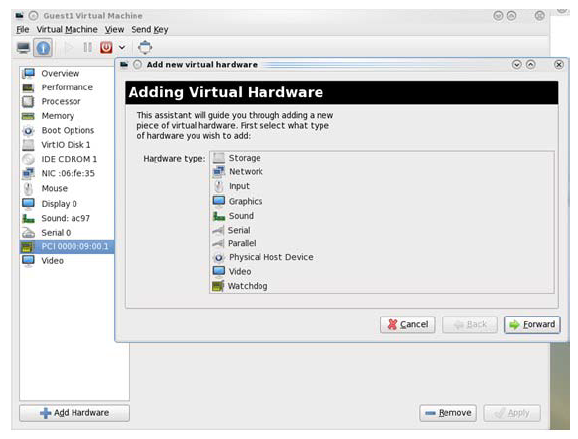
Choose a virtio-net device virtual function according to its PCIe device (e.g., 00:09.1), reboot or start the VM.
Using virsh Command
-
Run the following command to get the VM list and select the target VM by
Namefield:[host]# virsh list --all Id Name State ---------------------------------------------- 1 host-101-CentOS-8.5 running -
Edit the VMs XML file, run:
[host]# virsh edit <VM_NAME> -
Assign the target virtio-net device PCIe BDF to the VM, using
vfioas driver, replaceBUS/SLOT/FUNCTION/BUS_IN_VM/SLOT_IN_VM/FUNCTION_IN_VMwith corresponding settings.XML<hostdev mode='subsystem' type='pci' managed='no'> <driver name='vfio'/> <source> <address domain='0x0000' bus='<#BUS>' slot='<#SLOT>' function='<#FUNCTION>'/> </source> <address type='pci' domain='0x0000' bus='<#BUS_IN_VM>' slot='<#SLOT_IN_VM>' function='<#FUNCTION_IN_VM>'/> </hostdev>For example, assign target device
00.09.1to the VM and its PCIe BDF within the VM is01:00.0:<hostdev mode='subsystem' type='pci' managed='no'> <driver name='vfio'/> <source> <address domain='0x0000' bus='0x00' slot='0x09' function='0x1'/> </source> <address type='pci' domain='0x0000' bus='0x01' slot='0x00' function='0x0'/> </hostdev> -
Destroy the VM if it is already started:
[host]# virsh destory <VM_NAME> -
Start the VM with new XML configuration:
[host]# virsh start <VM_NAME>
Configuration File
Configuration File Options
The controller service has an optional JSON format configuration file which allows users to customize several parameters. The configuration file should be defined on the DPU at /opt/mellanox/mlnx_virtnet/virtnet.conf. This file is read every time the controller starts.
Controller systemd service should be restarted when there is configuration file change. Dynamic change of virtnet.conf is not supported.
In DOCA 3.3.0, the mrg_rxbuf and packed_vq parameters will no longer be supported in the virtnet.conf configuration file. Configuration of the mrg_rxbuf and packed_vq features must now be performed using the CLI modify device option.
|
Parameter |
Default Value |
Type |
Description |
||||||||||||||||||||||||||||
|---|---|---|---|---|---|---|---|---|---|---|---|---|---|---|---|---|---|---|---|---|---|---|---|---|---|---|---|---|---|---|---|
|
|
|
String |
RDMA device (e.g., |
||||||||||||||||||||||||||||
|
|
|
String |
RDMA device (e.g., |
||||||||||||||||||||||||||||
|
|
|
String |
The RDMA device (e.g., |
||||||||||||||||||||||||||||
|
|
|
String |
RDMA LAG device (e.g., |
||||||||||||||||||||||||||||
|
|
|
List |
The following sub-parameters can be used to configure the static PF:
|
||||||||||||||||||||||||||||
|
|
|
Number |
Specifies whether LAG is used If LAG is used, make sure to use the correct IB dev for static PF |
||||||||||||||||||||||||||||
|
|
|
Number |
Specifies whether the DPU is a single port device. It is mutually exclusive with |
||||||||||||||||||||||||||||
|
|
|
Number |
Specifies whether recovery is enabled. If unspecified, recovery is enabled by default. To disable it, set |
||||||||||||||||||||||||||||
|
|
|
Number |
Determines the initial SF pool size as the percentage of
|
||||||||||||||||||||||||||||
|
|
|
Number |
Specifies whether to destroy the SF pool. When set to 1, the controller destroys the SF pool when stopped/restarted (and the SF pool is recreated if |
||||||||||||||||||||||||||||
|
|
|
Number |
Specifies the start DPA core for virtnet application. Valid only for NVIDIA® BlueField®-3 and up. Value must be greater than 0 and less than 11. Together with This is advanced options when there are multiple DPA applications running at the same time. Regular user should keep this option as default. The number of cores/EUs impacts the maximum number of VQs that can be created. |
||||||||||||||||||||||||||||
|
|
|
Number |
Specifies the end DPA core for virtnet application. Valid only for BlueField-3 and up. Value must be greater than |
||||||||||||||||||||||||||||
|
|
|
List |
The following sub-parameters can be used to configure the VF:
|
||||||||||||||||||||||||||||
|
|
|
Number |
Enable |
||||||||||||||||||||||||||||
|
|
|
Number |
Enable |
||||||||||||||||||||||||||||
|
|
|
String |
DPA partition configuration file full path. Refer to section "DOCA Virtio-net Service Guide | DPA Configuration (SPRD)" for more information. The DPA partition conf file is generated by the DOCA dpa-resource-mgmt tool. Refer to DOCA DPA Tools Configuration requirements:
Example of For Specifying a The number of cores/EUs impacts the maximum number of VQs that can be created. |
||||||||||||||||||||||||||||
|
|
|
Number |
Specifies the number of worker threads allocated for Ethernet Virtual Queue (VQ) lifecycle operations, such as queue creation and destruction.
|
||||||||||||||||||||||||||||
|
|
|
Number |
Specifies the number of worker threads allocated for administrative command operations.
|
||||||||||||||||||||||||||||
|
|
|
Number |
To automate AB mode for all hotplug and unplug operations without manually specifying the |
||||||||||||||||||||||||||||
|
|
|
JSON object |
Configuration for virtio-net event notifications.
If the |
Configuration File Examples
Validate the JSON format of the configuration file before restarting the controller, especially the syntax and symbols. Otherwise, the controller may fail to start.
Configuring LAG on Dual Port BlueField
Refer to "Link Aggregation" documentation for information on configuring BlueField in LAG mode.
Refer to the "Link Aggregation" page for information on configuring virtio-net in LAG mode.
Configuring Static PF on Dual Port BlueField
The following configures all static PFs to use mlx5_0 (port 0) as the data path device in a non-LAG configuration, and the default MAC and features for the PF:
{
"ib_dev_p0": "mlx5_0",
"ib_dev_p1": "mlx5_1",
"ib_dev_for_static_pf": "mlx5_0",
"is_lag": 0,
"static_pf": {
"mac_base": "08:11:22:33:44:55",
"features": "0x230047082b"
}
}
Configuring VF Specific Options
The following configures VFs with default parameters. With this configuration, each PF assigns the MAC based on mac_base up to 126 VFs. Each VF creates 4 queue pairs, with each queue having a depth of 256.
If vfs_per_pf is less than the VIRTIO_NET_EMULATION_NUM_VF in mlxconfig, and more VFs are created, duplicated MACs would be assigned to different VFs.
{
"vf": {
"mac_base": "06:11:22:33:44:55",
"features": "0x230047082b",
"vfs_per_pf": 126,
"max_queue_pairs": 4,
"max_queue_size": 256
}
}
Virtio Live Migration Settings
The following table provides an example of configurations for the new options introduced for VirtIO Live Migration:
|
virtio_spec_admin_legacy |
virtio_spec_admin_lm |
Expected Result |
|---|---|---|
|
|
|
Enables both legacy interface and VFIO kernel Live Migration commands |
|
|
|
Enables legacy interface commands only |
|
|
|
Enables VFIO kernel Live Migration commands only |
|
|
|
Disable both legacy interface and VFIO kernel live migration commands |
|
|
|
Supports VDPA Live Migration solutions |
DPA Configuration (SPRD)
The Single Point of Resource Distribution (SPRD) is a centralized orchestration system that manages Data Path Accelerator (DPA) Execution Unit (EU) allocation across applications and Virtual HCAs (VHCAs). By centralizing this process, SPRD prevents ad-hoc per-application sizing and eliminates resource over-commitment.
Administrators define EU assignments to partitions and applications within a single YAML configuration file. The SPRD system validates this configuration, programs the hardware partitions and EU groups accordingly, and generates per-partition configuration files for the applications to consume.
Control and Integration
-
CLI utility: The system is managed using the
dpa-resource-mgmtcommand-line tool. -
Virtio-net integration: The
virtio-netcontroller consumes the SPRD-generated output file via thedpa_partitionconfiguration option to inherit its managed EU affinity.
SPRD Configuration Workflow for Virtio-net
Inspect Available Resources
Query the DPU to verify the ROOT partition and determine the set of free EUs before assigning them to virtio-net.
dpa-resource-mgmt query -t resources -d mlx5_0
Create an Input SPRD YAML
Create an input file (e.g., input_vnet.yaml) that explicitly maps the virtio-net application to the ROOT partition and defines the required EUs per core.
Example for a virtio-net "solo app" deployment:
version: 26.01
DPA_APPS:
"virtio-net":
- partition: ROOT
affinity_core:
- core: 0
num_EUs: 16
- core: 1
num_EUs: 16
- core: 2
num_EUs: 16
- core: 3
num_EUs: 16
- core: 4
num_EUs: 16
- core: 5
num_EUs: 16
- core: 6
num_EUs: 16
- core: 7
num_EUs: 16
- core: 8
num_EUs: 16
- core: 9
num_EUs: 16
Generate the SPRD Output YAML
Run the configuration command to generate the output file.
dpa-resource-mgmt config -d mlx5_0 -f input_vnet.yaml -v
When utilizing the ROOT partition on a DPU, the generated output file automatically inherits the partition name (e.g., ROOT.yaml). This is the exact file you must reference in the virtio-net controller using the dpa_partition configuration option.
Example SPRD Output & Validation
The generation command produces a parsed YAML file utilized by the application. The affinity_EUs list contains the absolute EU IDs reserved for virtio-net. During execution, SPRD converts these absolute IDs into partition-relative indices.
Example ROOT.yaml Output:
version: 26.01
DPA_APPS:
- name: virtio-net
number_of_affinity_EUs: 160
affinity_EUs: [0, 1, 2, 4, 5, 6, 8, 9, 10, 11, 12, 13, 15, 16, 17, 19, 21, 22,
23, 24, 26, 27, 28, 29, 30, 31, 33, 34, 36, 37, 39, 40, 41, 42, 43, 44, 45,
48, 49, 50, 51, 52, 53, 54, 55, 56, 57, 58, 60, 61, 62, 63, 65, 66, 67, 69,
70, 71, 72, 73, 74, 75, 76, 78, 79, 80, 81, 82, 83, 84, 85, 86, 87, 89, 90,
92, 93, 94, 95, 96, 97, 98, 99, 101, 102, 103, 104, 105, 106, 107, 108, 109,
110, 111, 112, 113, 114, 116, 117, 118, 119, 120, 121, 122, 123, 124, 125,
126, 127, 129, 131, 132, 133, 134, 135, 136, 137, 138, 139, 140, 141, 143,
144, 145, 147, 148, 149, 150, 151, 152, 154, 155, 156, 157, 158, 159, 160,
161, 162, 163, 165, 166, 167, 168, 169, 172, 173, 174, 175, 177, 178, 179,
181, 182, 183, 184, 185, 187, 188, 189]
Performance Validation (BlueField-3 DPU)
This specific SPRD configuration was validated in a "solo app" scenario (where virtio-net was the exclusive DPA application assigned EUs) to ensure all data-plane threads ran optimally across the 160 managed EUs.
Hardware and test profile:
-
Devices: 32 full emulation virtio-net VFs (16 TX, 16 RX)
-
Queue Configuration: Virtqueue (VQ) depth of 1024; 31 Queue Pairs (QPs) per device.
-
CQE Moderation: Count = 32, Period = 32
-
Traffic Profile:
testpmdUDP, 16 streams, 64-byte message size.
Measured aggregate performance:
-
RX-Only: 72.6 Mpps
-
TX-Only: 81.05 Mpps
-
Bidirectional (RX + TX): 100.36 Mpps total
Virtnet CLI Commands
User Front End CLI
To communicate with the virtio-net-controller backend service, a user frontend program, virtnet, is installed on the BlueField which is based on remote procedure call (RPC) protocol with JSON format output.
Hotplug
This command hotplugs a virtio-net PCIe PF device exposed to the host side.
Syntax
virtnet hotplug -i IB_DEVICE -m MAC -t MTU -n MAX_QUEUES -s MAX_QUEUE_SIZE [-h] [-u SF_NUM] [-f FEATURES] [-l] [-w HP_HOST_AWARENESS]
|
Option |
Abbr |
Argument Type |
Required |
Description |
|||||||||||||||
|---|---|---|---|---|---|---|---|---|---|---|---|---|---|---|---|---|---|---|---|
|
|
|
N/A |
No |
Show the help message and exit |
|||||||||||||||
|
|
|
String |
Yes |
RDMA device (e.g., Options:
|
|||||||||||||||
|
|
|
Hex Number |
No |
Feature bits to be enabled in hex format. Refer to the "Virtio-net Feature Bits" page. Note that some features are enabled by default. Query the device to show the supported bits. |
|||||||||||||||
|
|
|
Number |
Yes |
MAC address of the virtio-net device. Controller does not validate the MAC address (other than its length). The user must ensure MAC is valid and unique. |
|||||||||||||||
|
|
|
Number |
Yes |
Maximum transmission unit (MTU) size of the virtio-net device. It must be less than the uplink rep MTU size. |
|||||||||||||||
|
|
|
Number |
Yes |
Mutually exclusive with Max number of virt queues could be created for the virtio-net device. TX, RX, ctrl queues are counted separately (e.g., 3 has 1 TX VQ, 1 RX VQ, 1 Ctrl VQ). This option will be depreciated in the future. |
|||||||||||||||
|
|
|
Number |
Yes |
Mutually exclusive with Number of data VQ pairs. One VQ pair has one TX queue and one RX queue. It does not count control or admin VQ. From the host side, it appears as |
|||||||||||||||
|
|
|
Number |
Yes |
Maximum number of buffers in the virt queue, between 0x4 and 0x8000. Must be power of 2. |
|||||||||||||||
|
|
|
Number |
No |
SF number to be used for this hotplug device, must between 2000 and 2999. |
|||||||||||||||
|
|
|
N/A |
No |
Create legacy (transitional) hotplug device Relevant for BlueField-2 only. |
|||||||||||||||
|
|
|
Number |
No |
This setting determines how the device interacts with the host during hot plug operations. The following modes are available:
For optimal stability and compatibility, it is recommended to use either the device default mode ( Always ensure that your system's BIOS and OS are up to date to avoid compatibility issues with hot plug features. The |
Output
|
Entry |
Type |
Description |
|---|---|---|
|
bdf |
String |
The PCIe BDF (bus:device:function) number enumerated by host. The user should see this PCIe device from host side. |
|
vuid |
String |
Unique device SN. It can be used as an index to query/modify/unplug this device. |
|
id |
Num |
Unique device ID. It can be used as an index to query/modify/unplug this device. |
|
transitional |
Num |
Is the current device a transitional hotplug device.
|
|
sf_rep_net_device |
String |
The SF representor name represents the virtio-net device. It should be added into the OVS bridge. |
|
mac |
String |
The hotplug virtio-net device MAC address |
|
|
Num |
Error number if hotplug failed.
|
|
|
String |
Explanation of the error number |
Example
The following example of hot plugging one device with MAC address 0C:C4:7A:FF:22:93, MTU 1500, and 1 pair of virtual queue (QP) pair with a depth of 1024 entries. The device is created on the physical port of mlx5_0.
# virtnet hotplug -i mlx5_0 -m 0C:C4:7A:FF:22:93 -t 1500 -qp 1 -s 1024
{
  "bdf": "15:00.0",
  "vuid": "MT2151X03152VNETS1D0F0",
  "id": 0,
  "transitional": 0,
  "sf_rep_net_device": "en3f0pf0sf2000",
  "mac": "0C:C4:7A:FF:22:93",
  "errno": 0,
  "errstr": "Success"
}
Unplug
This command unplugs a virtio-net PCIe PF device.
Syntax
virtnet unplug [-h] [-p PF | -u VUID] [-w HP_HOST_AWARENESS] [-T HOTPLUG_POWER_OFF_TIMEOUT]
Only one of --pf and --vuid is needed to unplug the device.
|
Option |
Abbr |
Argument Type |
Required |
Description |
||||||||||||
|---|---|---|---|---|---|---|---|---|---|---|---|---|---|---|---|---|
|
|
|
N/A |
No |
Show the help message and exit |
||||||||||||
|
|
|
Number |
Yes |
Unique device ID returned when doing hotplug. Can be retrieved by using |
||||||||||||
|
|
|
String |
Yes |
Unique device SN returned when doing hotplug. Can be retrieved by using |
||||||||||||
|
|
|
Number |
No |
This setting determines how the device interacts with the host during hot unplug operations. The following modes are available:
For optimal stability and compatibility, it is recommended to use either the device default mode ( Always ensure that your system's BIOS and OS are up to date to avoid compatibility issues with hot unplug features. The |
||||||||||||
|
|
|
Number |
No |
Specifies the duration (in seconds) the controller waits for the host OS to power off during an unplug operation before executing a forced unplug.
|
Output
|
Entry |
Type |
Description |
|---|---|---|
|
|
Num |
Error number if operation failed
|
|
|
String |
Explanation of the error number |
Example
Unplug-hotplug device using the PF ID:
# virtnet unplug -p 0
{'id': '0x1'}
{
  "errno": 0,
  "errstr": "Success"
}
List
This command lists all existing virtio-net devices, with global information and individual information for each device.
Syntax
virtnet list [-h]
|
Option |
Abbr |
Argument Type |
Required |
Description |
|---|---|---|---|---|
|
|
|
N/A |
No |
Show the help message and exit |
Output
The output has two main sections. The first section wrapped by the controller are global configurations and capabilities.
|
Entry |
Type |
Description |
|---|---|---|
|
|
String |
Entries under this section is global information for the controller |
|
|
String |
The RDMA device manager used to manage internal resources. Should be default |
|
max_hotplug_devices |
String |
Maximum number of devices that can be hotpluged |
|
max_virt_net_devices |
String |
Total number of emulated devices managed by the device emulation manager |
|
max_virt_queues |
String |
Maximum number of virt queues supported per device |
|
max_tunnel_descriptors |
String |
Maximum number of descriptors the device can send in a single tunnel request |
|
supported_features |
String |
Total list of features supported by device |
|
supported_virt_queue_types |
String |
Currently supported virt queue types: Packed and Split |
|
|
String |
Currently supported event modes: |
|
|
String |
Indicates whether hot plug host awareness is supported |
Each device has its own section under devices.
|
Entry |
Type |
Description |
|---|---|---|
|
|
String |
Entries under this section is per device information |
|
|
Number |
Physical function ID |
|
|
String |
Function type: Static PF, hotplug PF, VF |
|
transitional |
Number |
The current device a transitional hotplug device:
|
|
vuid |
String |
Unique device SN, it can be used as an index to query/modify/unplug a device |
|
pci_bdf |
String |
Bus:device:function to describe the virtio-net PCIe device |
|
|
Number |
Virtual HCA identifier for the general virtio-net device. For debug purposes only. |
|
|
Number |
Maximum number of virtio-net VFs that can be created for this PF. Valid only for PFs. |
|
enabled_vfs |
Number |
Currently enabled number of virtio-net VFs for this PF |
|
msix_num_pool_size |
Number |
Number of free dynamic MSIX available for the VFs on this PF |
|
min_msix_num |
Number |
The minimum number of dynamic MSI-Xs that can be set for an virtio-net VF |
|
max_msix_num |
Number |
The maximum number of dynamic MSI-Xs that can be set for an virtio-net VF |
|
min_num_of_qp |
Number |
The minimum number of dynamic data VQ pairs (i.e., each pair has one TX and 1 RX queue) that can be set for an virtio-net VF |
|
max_num_of_qp |
Number |
The minimum number of dynamic data VQ pairs (i.e., each pair has one TX and 1 RX queue) that can be set for an virtio-net VF |
|
qp_pool_size |
Number |
Number of free dynamic data VQ pairs (i.e., each pair has one TX and 1 RX queue) available for the VFs on this PF |
|
|
Number |
Maximum number of MSI-X available for this device |
|
|
Number |
Maximum virtual queues can be created for this device, driver can choose to create less |
|
|
Number |
Currently enabled number of virtual queues by the driver |
|
max_queues_size |
Number |
Maximum virtual queue depth in byte can be created for each VQ, driver can use less |
|
msix_config_vector |
String |
MSIX vector number used by the driver for the virtio config space. 0xFFFF means that no vector is requested. |
|
mac |
String |
The virtio-net device permanent MAC address, can be only changed from controller side via modify command |
|
|
Number |
Link status of the virtio-net device on the driver side
|
|
|
Number |
Number of data VQ pairs. One VQ pair has one TX queue and one RX queue. Control or admin VQ are not counted. From the host side, it appears as |
|
mtu |
Number |
The virtio-net device MTU. Default is 1500. |
|
speed |
Number |
The virtio-net device link speed in Mb/s |
|
rss_max_key_size |
Number |
The maximum supported length of the RSS key. Only applicable when |
|
supported_hash_types |
Number |
Supported hash types for this device in hex. Only applicable when
|
|
ctrl_mac |
String |
Admin MAC address configured by driver. Not persistent with driver reload or host reboot. |
|
|
Number |
Number of queue pairs/channels configured by the driver. From the host side, it appears as |
|
|
Number |
Scalable function number used for this virtio-net device |
|
|
String |
The RDMA device to use to create the SF |
|
sf_parent_device_pci_addr |
String |
The PCIe device address (bus:device:function) to use to create the SF |
|
sf_rep_net_device |
String |
Represents the virtio-net device |
|
sf_rep_net_ifindex |
Number |
The SF representor network interface index |
|
sf_rdma_device |
String |
The SF RDMA device interface name |
|
|
Number |
The cross-device MKEY created for the SF. For debug purposes only. |
|
|
Number |
Virtual HCA identifier for the SF. For debug purposes only. |
|
|
Number |
The RQ table ID used for this virtio-net device. For debug purposes only. |
|
|
String |
Whether Accelerated Receive Flow Steering configuration is enabled or disabled |
|
|
String |
Whether dynamic interrupt moderation (DIM) is enabled or disabled |
Example
The following is an example of a list with 1 static PF created:
# virtnet list
{
  "controller": {
    "emulation_manager": "mlx5_0",
    "max_hotplug_devices": "0",
    "max_virt_net_devices": "1",
    "max_virt_queues": "256",
    "max_tunnel_descriptors": "6",
    "supported_features": {
      "value": "0x8b00037700ef982f",
      "    0": "VIRTIO_NET_F_CSUM",
      "    1": "VIRTIO_NET_F_GUEST_CSUM",
      "    2": "VIRTIO_NET_F_CTRL_GUEST_OFFLOADS",
      "    3": "VIRTIO_NET_F_MTU",
      "    5": "VIRTIO_NET_F_MAC",
      "   11": "VIRTIO_NET_F_HOST_TSO4",
      "   12": "VIRTIO_NET_F_HOST_TSO6",
      "   15": "VIRTIO_NET_F_MRG_RXBUF",
      "   16": "VIRTIO_NET_F_STATUS",
      "   17": "VIRTIO_NET_F_CTRL_VQ",
      "   18": "VIRTIO_NET_F_CTRL_RX",
      "   19": "VIRTIO_NET_F_CTRL_VLAN",
      "   21": "VIRTIO_NET_F_GUEST_ANNOUNCE",
      "   22": "VIRTIO_NET_F_MQ",
      "   23": "VIRTIO_NET_F_CTRL_MAC_ADDR",
      "   32": "VIRTIO_F_VERSION_1",
      "   33": "VIRTIO_F_IOMMU_PLATFORM",
      "   34": "VIRTIO_F_RING_PACKED",
      "   36": "VIRTIO_F_ORDER_PLATFORM",
      "   37": "VIRTIO_F_SR_IOV",
      "   38": "VIRTIO_F_NOTIFICATION_DATA",
      "   40": "VIRTIO_F_RING_RESET",
      "   41": "VIRTIO_F_ADMIN_VQ",
      "   56": "VIRTIO_NET_F_HOST_USO",
      "   57": "VIRTIO_NET_F_HASH_REPORT",
      "   59": "VIRTIO_NET_F_GUEST_HDRLEN",
      "   63": "VIRTIO_NET_F_SPEED_DUPLEX"
    },
    "supported_virt_queue_types": {
      "value": "0x1",
      "    0": "SPLIT"
    },
    "supported_event_modes": {
      "value": "0x5",
      "    0": "NO_MSIX_MODE",
      "    2": "MSIX_MODE"
    }
  },
  "devices": [
    {
      "pf_id": 0,
      "function_type": "static PF",
      "transitional": 0,
      "vuid": "MT2306XZ00BNVNETS0D0F2",
      "pci_bdf": "e2:00.2",
      "pci_vhca_id": "0x2",
      "pci_max_vfs": "0",
      "enabled_vfs": "0",
      "msix_num_pool_size": 0,
      "min_msix_num": 0,
      "max_msix_num": 256,
      "min_num_of_qp": 0,
      "max_num_of_qp": 127,
      "qp_pool_size": 0,
      "num_msix": "256",
      "num_queues": "255",
      "enabled_queues": "0",
      "max_queue_size": "256",
      "msix_config_vector": "0xFFFF",
      "mac": "16:B0:E0:41:B8:0D",
      "link_status": "1",
      "max_queue_pairs": "127",
      "mtu": "1500",
      "speed": "100000",
      "rss_max_key_size": "0",
      "supported_hash_types": "0x0",
      "ctrl_mac": "00:00:00:00:00:00",
      "ctrl_mq": "0",
      "sf_num": 1000,
      "sf_parent_device": "mlx5_0",
      "sf_parent_device_pci_addr": "0000:03:00.0",
      "sf_rep_net_device": "en3f0pf0sf1000",
      "sf_rep_net_ifindex": 10,
      "sf_rdma_device": "mlx5_3",
      "sf_cross_mkey": "0x12642",
      "sf_vhca_id": "0x124",
      "sf_rqt_num": "0x0",
      "aarfs": "disabled",
      "dim": "disabled"
    }
  ]
}
Query
This command queries detailed information for a given device, including all VQ information if created.
Syntax
virtnet query [-h] {[-a] | [-p PF] [-v VF] | [-u VUID]} [--dbg_stats] [-b] [--latency_stats] [-q QUEUE_ID] [--stats_clear] [rx_drops [status|--drops-only]]
The options --pf, --vf , --vuid, and --all are mutually exclusive (except --pf and --vf which can be used together), but one of them must be applied.
|
Option |
Abbr |
Argument Type |
Required |
Description |
|---|---|---|---|---|
|
|
|
N/A |
No |
Show the help message and exit |
|
|
|
N/A |
No |
Query all the detailed information for all available devices. It can be time consuming if a large number of devices is available. |
|
|
|
Number |
No |
Unique device ID for the PF. Can be retrieved by using |
|
|
|
Number |
No |
Unique device ID for the VF. Can be retrieved by using |
|
|
|
String |
No |
Unique device SN for the device (PF/VF). Can be retrieved by using |
|
|
|
Number |
No |
Queue index of the device VQs |
|
|
|
N/A |
No |
Query brief information of the device (does not print VQ information) |
|
|
N/A |
N/A |
No |
Print debug counters and information This option will be depreciated in the future. |
|
|
N/A |
N/A |
No |
Clear all the debug counter stats This option will be depreciated in the future. |
|
|
N/A |
N/A |
No |
Query RX drop counters. Shows total drops across all devices with a list of devices that have non-zero drops. Works in both sync and async modes.
When used with |
|
|
N/A |
N/A |
No |
Show current async polling mode configuration. |
|
|
N/A |
N/A |
No |
Show devices with drops, including per-RQ breakdown for each device. |
Output
Output has two main sections.
-
The first section, wrapped by
devices, are configuration and capabilities on the device level, the majority of which are the same as thelistcommand. This section only covers the differences between the two.Entry
Type
Description
devicesString
Entries under this section is per-device information
pci_dev_id
String
Virtio-net PCIe device ID. Default: 0x1041.
This option will be depreciated in the future.
pci_vendor_id
String
Virtio-net PCIe vendor ID. Default: 0x1af4.
This option will be depreciated in the future.
pci_class_code
String
Virtio-net PCIe device class code. Default: 0x20000.
This option will be depreciated in the future.
pci_subsys_id
String
Virtio-net PCIe vendor ID. Default: 0x1041.
This option will be depreciated in the future.
pci_subsys_vendor_id
String
Virtio-net PCIe subsystem vendor ID. Default: 0x1af4.
This option will be depreciated in the future.
pci_revision_id
String
Virtio-net PCIe revision ID. Default: 1.
This option will be depreciated in the future.
device_features
String
Enabled device feature bits according to the virtio spec. Refer to section "
DOCA Virtio-net Service Guide | Feature Bits".
driver_features
String
Enabled driver feature bits according to the virtio spec. Valid only when the driver probes the device. Refer to "
DOCA Virtio-net Service Guide | Feature Bits".
status
String
Device status field bit masks according to the virtio spec:
-
ACKNOWLEDGE (bit 0) -
DRIVER (bit 1) -
DRIVER_OK (bit 2) -
FEATURES_OK (bit 3) -
DEVICE_NEEDS_RESET (bit 6) -
FAILED (bit 7)
resetNumber
Shows if the current virtio-net device undergoing reset:
-
0 – not undergoing reset
-
1 – undergoing reset
enabledNumber
Shows if the current virtio-net device is enabled:
-
0 – disabled, likely FLR has occurred
-
1 – enabled
-
-
The second section, wrapped by
enabled-queues-info, provides per-VQ information:Entry
Type
Description
indexNumber
VQ index starting from 0 to
enabled_queuessizeNumber
Driver VQ depth in bytes. It is bound by device
max_queues_size.msix_vector
Number
The MSI-X vector number used for this VQ
enable
Number
If current VQ is enabled or not
-
0 – disabled
-
1 – enabled
notify_offset
Number
Driver reads this to calculate the offset from start of notification structure at which this virtqueue is located
descriptor_address
Number
The physical address of the descriptor area
driver_address
Number
The physical address of the driver area
device_address
Number
The physical address of the device area
received_descNumber
Total number of received descriptors by the device on this VQ
This option will be depreciated in the future.
completed_descNumber
Total number of completed descriptors by the device on this VQ
This option will be depreciated in the future.
bad_desc_errorsNumber
Total number of bad descriptors received on this VQ
This option will be depreciated in the future.
error_cqes
Number
Total number of error CQ entries on this VQ
This option will be depreciated in the future.
exceed_max_chain
Number
Total number of chained descriptors received that exceed the maximum allowed chain by device
This option will be depreciated in the future.
invalid_buffer
Number
Total number of times the device tried to read or write buffer that is not registered to the device
This option will be depreciated in the future.
batch_number
Number
The number of RX descriptors for the last received packet. Relevant for BlueField-3 only.
This option will be depreciated in the future.
dma_q_used_number
Number
The DMA q index used for this VQ. Relevant for BlueField-3 only.
This option will be depreciated in the future.
handler_schd_number
Number
Scheduler number for this VQ. Relevant for BlueField-3 only.
This option will be depreciated in the future.
aux_handler_schd_numberNumber
Aux scheduler number for this VQ. Relevant for BlueField-3 only.
This option will be depreciated in the future.
max_post_desc_numberNumber
Maximum number of posted descriptors on this VQ. Relevant for DPA.
This option will be depreciated in the future.
total_bytesNumber
Total number of bytes handled by this VQ. Relevant for BlueField-3 only
This option will be depreciated in the future.
rq_cq_max_countNumber
Event generation moderation counter of the queue. Relevant for RQ.
This option will be depreciated in the future.
rq_cq_periodNumber
Event generation moderation timer for the queue in 1µsec granularity. Relevant for RQ.
This option will be depreciated in the future.
rq_cq_period_modeNumber
Current period mode for RQ
-
0x0 –
default_mode– use device best defaults -
0x1 –
upon_event–queue_periodtimer restarts upon event generation -
0x2 –
upon_cqe–queue_periodtimer restarts upon completion generation
This option will be depreciated in the future.
-
Example
The following is an example of querying the information of the first PF:
# virtnet query -p 0
{
  "devices": [
    {
      "pf_id": 0,
      "function_type": "static PF",
      "transitional": 0,
      "vuid": "MT2349X00018VNETS0D0F1",
      "pci_bdf": "23:00.1",
      "pci_vhca_id": "0x1",
      "pci_max_vfs": "0",
      "enabled_vfs": "0",
      "pci_dev_id": "0x1041",
      "pci_vendor_id": "0x1af4",
      "pci_class_code": "0x20000",
      "pci_subsys_id": "0x1041",
      "pci_subsys_vendor_id": "0x1af4",
      "pci_revision_id": "1",
       "device_feature": {
        "value": "0x8930032300ef182f",
        "    0": "VIRTIO_NET_F_CSUM",
        "    1": "VIRTIO_NET_F_GUEST_CSUM",
        "    2": "VIRTIO_NET_F_CTRL_GUEST_OFFLOADS",
        "    3": "VIRTIO_NET_F_MTU",
        "    5": "VIRTIO_NET_F_MAC",
        "   11": "VIRTIO_NET_F_HOST_TSO4",
        "   12": "VIRTIO_NET_F_HOST_TSO6",
        "   16": "VIRTIO_NET_F_STATUS",
        "   17": "VIRTIO_NET_F_CTRL_VQ",
        "   18": "VIRTIO_NET_F_CTRL_RX",
        "   19": "VIRTIO_NET_F_CTRL_VLAN",
        "   21": "VIRTIO_NET_F_GUEST_ANNOUNCE",
        "   22": "VIRTIO_NET_F_MQ",
        "   23": "VIRTIO_NET_F_CTRL_MAC_ADDR",
        "   32": "VIRTIO_F_VERSION_1",
        "   33": "VIRTIO_F_IOMMU_PLATFORM",
        "   37": "VIRTIO_F_SR_IOV",
        "   40": "VIRTIO_F_RING_RESET",
        "   41": "VIRTIO_F_ADMIN_VQ",
        "   52": "VIRTIO_NET_F_VQ_NOTF_COAL",
        "   53": "VIRTIO_NET_F_NOTF_COAL",
        "   56": "VIRTIO_NET_F_HOST_USO",
        "   59": "VIRTIO_NET_F_GUEST_HDRLEN",
        "   63": "VIRTIO_NET_F_SPEED_DUPLEX"
      },
      "driver_feature": {
        "value": "0x8000002300ef182f",
        "    0": "VIRTIO_NET_F_CSUM",
        "    1": "VIRTIO_NET_F_GUEST_CSUM",
        "    2": "VIRTIO_NET_F_CTRL_GUEST_OFFLOADS",
        "    3": "VIRTIO_NET_F_MTU",
        "    5": "VIRTIO_NET_F_MAC",
        "   11": "VIRTIO_NET_F_HOST_TSO4",
        "   12": "VIRTIO_NET_F_HOST_TSO6",
        "   16": "VIRTIO_NET_F_STATUS",
        "   17": "VIRTIO_NET_F_CTRL_VQ",
        "   18": "VIRTIO_NET_F_CTRL_RX",
        "   19": "VIRTIO_NET_F_CTRL_VLAN",
        "   21": "VIRTIO_NET_F_GUEST_ANNOUNCE",
        "   22": "VIRTIO_NET_F_MQ",
        "   23": "VIRTIO_NET_F_CTRL_MAC_ADDR",
        "   32": "VIRTIO_F_VERSION_1",
        "   33": "VIRTIO_F_IOMMU_PLATFORM",
        "   37": "VIRTIO_F_SR_IOV",
        "   63": "VIRTIO_NET_F_SPEED_DUPLEX"
      },
      "status": {
        "value": "0xf",
        "    0": "ACK",
        "    1": "DRIVER",
        "    2": "DRIVER_OK",
        "    3": "FEATURES_OK"
      },
      "reset": "0",
      "enabled": "1",
      "num_msix": "64",
      "num_queues": "63",
      "enabled_queues": "63",
      "max_queue_size": "256",
      "msix_config_vector": "0x0",
      "mac": "4E:6A:E1:41:D8:BE",
      "link_status": "1",
      "max_queue_pairs": "31",
      "mtu": "1500",
      "speed": "200000",
      "rss_max_key_size": "0",
      "supported_hash_types": "0x0",
      "ctrl_mac": "4E:6A:E1:41:D8:BE",
      "ctrl_mq": "31",
      "sf_num": 1000,
      "sf_parent_device": "mlx5_0",
      "sf_parent_device_pci_addr": "0000:03:00.0",
      "sf_rep_net_device": "en3f0pf0sf1000",
      "sf_rep_net_ifindex": 12,
      "sf_rdma_device": "mlx5_2",
      "sf_cross_mkey": "0xC042",
      "sf_vhca_id": "0x7E8",
      "sf_rqt_num": "0x0",
      "aarfs": "disabled",
      "dim": "disabled",
      "enabled-queues-info": [
        {
          "index": "0",
          "size": "256",
          "msix_vector": "0x1",
          "enable": "1",
          "notify_offset": "0",
          "descriptor_address": "0x10cece000",
          "driver_address": "0x10cecf000",
          "device_address": "0x10cecf240",
          "received_desc": "256",
          "completed_desc": "0",
          "bad_desc_errors": "0",
          "error_cqes": "0",
          "exceed_max_chain": "0",
          "invalid_buffer": "0",
          "batch_number": "64",
          "dma_q_used_number": "6",
          "handler_schd_number": "4",
          "aux_handler_schd_number": "3",
          "max_post_desc_number": "0",
          "total_bytes": "0",
          "rq_cq_max_count": "0",
          "rq_cq_period": "0",
          "rq_cq_period_mode": "1"
        },
        ......
        }
      ]
    }
  ]
}
Stats
This command is recommended for obtaining all packet counter information. The existing packet counter information available using the virtnet list and virtnet query commands, but will be deprecated in the future.
This command retrieves the packet counters for a specified device, including detailed information for all Rx and Tx virtqueues (VQs).
To enable/disable byte wise packet counters for each Rx queue, use the following command:
virtnet modify {[-p PF] [-v VF]} device -pkt_cnt {enable,disable}
-
When enabled, byte-wise packet counters are initialized to zero.
-
When disabled, the previous values are retained for debugging purposes. The command will still return these old, disabled counter values.
Packet counters are attached to an RQ. Thus, RQ must be created first. This means that the virtio-net device should be probed by the driver on the host OS before running the commands above.
Syntax
virtnet stats [-h] {[-p PF] [-v VF] | [-u VUID]} [-q QUEUE_ID]
The options --pf, --vf, and --vuid are mutually exclusive (except --pf and --vf which can be used together), but one of them must be applied.
|
Option |
Abbr |
Argument Type |
Required |
Description |
|---|---|---|---|---|
|
|
|
N/A |
No |
Show the help message and exit |
|
|
|
Number |
No |
Unique device ID for the PF. Can be retrieved by using |
|
|
|
Number |
No |
Unique device ID for the VF. Can be retrieved by using |
|
|
|
String |
No |
Unique device SN for the device (PF/VF). Can be retrieved by using |
|
|
|
Number |
No |
Queue index of the device RQs or SQs |
Output
The output has two sections.
-
The first section wrapped by
deviceare device details along with the packet counter statics enable state.Entry
Type
Description
deviceString
Entries under this section is per-device information
pf_idString
Physical function ID
packet_countersString
Indicates whether the packet counters feature is enabled or disabled
-
The second section wrapped by queues-stats are information for each receive VQ.
Entry
Type
Description
VQ IndexNumber
The VQ index starts at 0 (the first RQ) and continues up to the last SQ
rx_64_or_less_octet_packetsNumber
The number of packets received with a size of 0 to 64 bytes. Relevant for BlueField-3 RQ.
rx_65_to_127_octet_packets
Number
The number of packets received with a size of 65 to 127 bytes. Relevant for BlueField-3 RQ.
rx_128_to_255_octet_packets
Number
The number of packets received with a size of 128 to 255 bytes. Relevant for BlueField-3 RQ.
rx_256_to_511_octet_packets
Number
The number of packets received with a size of 256 to 511 bytes. Relevant for BlueField-3 RQ.
rx_512_to_1023_octet_packets
Number
The number of packets received with a size of 512 to 1023 bytes. Relevant for BlueField-3 RQ.
rx_1024_to_1522_octet_packets
Number
The number of packets received with a size of 1024 to 1522 bytes. Relevant for BlueField-3 RQ.
rx_1523_to_2047_octet_packets
Number
The number of packets received with a size of 1523 to 2047 bytes. Relevant for BlueField-3 RQ.
rx_2048_to_4095_octet_packetsNumber
The number of packets received with a size of 2048 to 4095 bytes. Relevant for BlueField-3 RQ.
rx_4096_to_8191_octet_packetsNumber
The number of packets received with a size of 4096 to 8191 bytes. Relevant for BlueField-3 RQ.
rx_8192_to_9022_octet_packetsNumber
The number of packets received with a size of 8192 to 9022 bytes. Relevant for BlueField-3 RQ.
received_descNumber
Total number of received descriptors by the device on this VQ
completed_descNumber
Total number of completed descriptors by the device on this VQ
bad_desc_errorsNumber
Total number of bad descriptors received on this VQ
error_cqes
Number
Total number of error CQ entries on this VQ
exceed_max_chain
Number
Total number of chained descriptors received that exceed the max allowed chain by device
invalid_buffer
Number
Total number of times the device tried to read or write a buffer which is not registered to the device
batch_number
Number
The number of RX descriptors for the last received packet. Relevant for BlueField-3.
dma_q_used_number
Number
The DMA q index used for this VQ. Relevant for BlueField-3.
handler_schd_number
Number
Scheduler number for this VQ. Relevant for BlueField-3.
aux_handler_schd_numberNumber
Aux scheduler number for this VQ. Relevant for BlueField-3.
max_post_desc_numberNumber
Maximum number of posted descriptors on this VQ. Relevant for DPA.
total_bytesNumber
Total number of bytes handled by this VQ. Relevant for BlueField-3.
rq_cq_max_countNumber
Event generation moderation counter of the queue. Relevant for RQ.
rq_cq_periodNumber
Event generation moderation timer for the queue in 1µsec granularity. Relevant for RQ.
rq_cq_period_modeNumber
Current period mode for RQ
-
0x0 –
default_mode– use device best defaults -
0x1 –
upon_event–queue_periodtimer restarts upon event generation -
0x2 –
upon_cqe–queue_periodtimer restarts upon completion generation
-
Example
The following is an example of querying the packet statistics information of PF 0 and VQ 0 (i.e., RQ):
# virtnet stats -p 0 -q 0
{'pf': '0x0', 'queue_id': '0x0'}
{
  "device": {
    "pf_id": 0,
    "packet_counters": "Enabled",
    "queues-stats": [
      {
        "VQ Index": 0,
        "rx_64_or_less_octet_packets": 0,
        "rx_65_to_127_octet_packets": 259,
        "rx_128_to_255_octet_packets": 0,
        "rx_256_to_511_octet_packets": 0,
        "rx_512_to_1023_octet_packets": 0,
        "rx_1024_to_1522_octet_packets": 0,
        "rx_1523_to_2047_octet_packets": 0,
        "rx_2048_to_4095_octet_packets": 199,
        "rx_4096_to_8191_octet_packets": 0,
        "rx_8192_to_9022_octet_packets": 0,
        "received_desc": "4096",
        "completed_desc": "0",
        "bad_desc_errors": "0",
        "error_cqes": "0",
        "exceed_max_chain": "0",
        "invalid_buffer": "0",
        "batch_number": "64",
        "dma_q_used_number": "0",
        "handler_schd_number": "44",
        "aux_handler_schd_number": "43",
        "max_post_desc_number": "0",
        "total_bytes": "0",
        "err_handler_schd_num": "0",
        "rq_cq_max_count": "0",
        "rq_cq_period": "0",
        "rq_cq_period_mode": "1"
      }
    ]
  }
}
Modify Device
This command modifies the attributes of a given device.
When dynamic MSI-X mode is enabled, the user should provision the VF from the DPU side before attaching a VF to the VM.
When dynamic MSI-X mode is disabled, the default number of MSI-X vectors is according to VIRTIO_NET_EMULATION_NUM_VF_MSIX value.
Syntax
The modify command supports three subcommands: device, queue, and global.
virtnet modify [-h] [-p PF] [-v VF] [-u VUID] [-a] {device,queue,global} ...
The options --pf, --vf , --vuid, and --all are mutually exclusive (except --pf and --vf which can be used together), but one of them must be applied.
|
Option |
Abbr |
Argument Type |
Required |
Description |
|---|---|---|---|---|
|
|
|
N/A |
No |
Show the help message and exit |
|
|
|
N/A |
No |
Modify all available device attributes depending on the selection of |
|
|
|
Number |
No |
Unique device ID for the PF. May be retrieved using |
|
|
|
Number |
No |
Unique device ID for the VF. May be retrieved using |
|
|
|
String |
No |
Unique device SN for the device (PF/VF). May be retrieved by using |
|
|
N/A |
Number |
No |
Modify device specific options |
|
|
N/A |
N/A |
No |
Modify queue specific options |
|
|
N/A |
N/A |
No |
Modify global controller settings |
Device Options
virtnet modify device [-h] [-m MAC] [-t MTU] [-e SPEED] [-l LINK]
                           [-s STATE] [-f FEATURES]
                           [-o SUPPORTED_HASH_TYPES] [-k RSS_MAX_KEY_SIZE]
                           [-r RX_MODE] [-n MSIX_NUM] [-q MAX_QUEUE_SIZE]
                           [-b RX_DMA_Q_NUM] [-dc {enable,disable}]
                           [-pkt_cnt {enable,disable}] [-aarfs {enable,disable}]
                           [-qp MAX_QUEUE_PAIRS] [-dim {enable,disable}]
|
Option |
Abbr |
Argument Type |
Required |
Description |
|---|---|---|---|---|
|
|
|
String |
No |
Show the help message and exit |
|
|
|
Number |
No |
The virtio-net device MAC address |
|
|
|
Number |
No |
The virtio-net device MTU |
|
|
|
Number |
No |
The virtio-net device link speed in Mb/s |
|
|
|
Number |
No |
The virtio-net device link status
|
|
|
|
Number |
No |
The virtio-net device status field bit masks according to the virtio spec:
|
|
|
|
Hex Number / Feature Name / Pattern |
No |
Configures the Supported syntax and patterns:
|
|
|
|
Hex Number |
No |
Supported hash types for this device in hex. Only applicable when
|
|
|
|
Number |
No |
The maximum supported length of RSS key. Only applicable when |
|
|
|
Hex Number |
No |
The RX mode exposed to the driver:
|
|
|
|
Number |
No |
Maximum number of VQs (both data and ctrl/admin VQ). It is bound by the cap of |
|
|
|
Number |
No |
Maximum number of buffers in the VQ. The queue size value is always a power of 2. The maximum queue size value is 32768. |
|
|
|
Number |
No |
Number of data VQ pairs. One VQ pair has one TX queue and one RX queue. Control or admin VQs are not counted. From the host side, it appears as |
|
|
|
Number |
No |
Modify max RX DMA queue number |
|
|
|
String |
No |
Enable/disable virtio-net drop counter |
|
|
|
String |
No |
Enable/disable virtio-net device packet counter stats |
|
|
|
String |
No |
Enable/disable auto-AARFS. Only applicable for PF devices (static PF and hotplug PF). |
|
|
|
String |
No |
Enable/disable dynamic interrupt moderation (DIM) |
The following modify options require unbinding the virtio device from virtio-net driver in the guest OS:
-
mac -
mtu -
features -
msix_num -
max_queue_size -
max_queue_pairs
For example:
-
On the guest OS:
[host]# echo "bdf of virtio-dev" > /sys/bus/pci/drivers/virtio-pci/unbind -
On the DPU side:
-
Modify the max queue size of device:
[dpu]# virtnet modify -p 0 -v 0 device -q 2048 -
Modify the MSI-X number of VF device:
[dpu]# virtnet modify -p 0 -v 0 device -n 8 -
Modify the MAC address of virtio physical device ID 0 (or with its "VUID string", which can be obtained through virtnet list/query):
[dpu]# virtnet modify -p 0 device -m 0C:C4:7A:FF:22:93 -
Modify the maximum number of queue pairs of VF device:
[dpu]# virtnet modify -p 0 -v 0 device -qp 2
-
-
On the guest OS:
[host]# echo "bdf of virtio-dev" > /sys/bus/pci/drivers/virtio-pci/bind
Enabling and Disabling Virtio-net Features
Configuring virtio-net features involves verifying what the DPU supports, modifying the device configuration, and confirming that the host driver successfully negotiated the new features.
Verify Supported Features
Check the full list of features supported by the underlying controller using the virtnet list command.
virtnet list
Example JSON output:
"supported_features": {
    "value":        "0x8b00037700ef982f",
    "    0":        "VIRTIO_NET_F_CSUM",
    "    1":        "VIRTIO_NET_F_GUEST_CSUM",
    "    2":        "VIRTIO_NET_F_CTRL_GUEST_OFFLOADS",
    "    3":        "VIRTIO_NET_F_MTU",
    "    5":        "VIRTIO_NET_F_MAC",
    "   11":        "VIRTIO_NET_F_HOST_TSO4",
    "   12":        "VIRTIO_NET_F_HOST_TSO6",
    "   15":        "VIRTIO_NET_F_MRG_RXBUF",
    "   34":        "VIRTIO_F_RING_PACKED",
    "   63":        "VIRTIO_NET_F_SPEED_DUPLEX"
}
-
Feature names and bit numbers strictly follow the virtio-net specification.
-
The specific list of supported features will vary depending on the device type, driver capabilities, and current application version.
Check Currently Enabled Device Features
Verify which features are currently enabled on your target device (e.g., Physical Function 0) by inspecting the device_feature section of the query output.
virtnet query -p 0 -b
Example JSON output:
"pci_bdf": "0f:00.2",
"device_feature": {
    "value":        "0x8100032300ef982f",
    "    0":        "VIRTIO_NET_F_CSUM",
    "   32":        "VIRTIO_F_VERSION_1",
    "   33":        "VIRTIO_F_IOMMU_PLATFORM",
    "   63":        "VIRTIO_NET_F_SPEED_DUPLEX"
}
Modify Device Features
You cannot modify device features while the device driver is actively bound. You must unbind the device driver before executing any virtnet modify device commands. Refer to the "Modify Device" section for exact unbinding steps.
Once unbound, use the -f flag to enable, disable, or explicitly set the feature bitmask.
-
To enable a feature (
+):# Syntax: virtnet modify -p <pf> device -f +<feature_name> virtnet modify -p 0 device -f +VIRTIO_F_RING_PACKED -
To disable a feature (
-):# Syntax: virtnet modify -p <pf> device -f -<feature_name> virtnet modify -p 0 device -f -VIRTIO_F_RING_PACKED
-
To set an explicit feature vector (bitmask) – You can overwrite the entire feature vector using a hex mask. For example, to add
VIRTIO_F_RING_PACKED(bit 34) to a base vector of0x8100032300EF182F, you calculate the logical OR (0x8100032300EF182F | 0x400000000 = 0x8100032700EF182F) and apply it:# Syntax: virtnet modify -p <pf> device -f <features_bitmask> virtnet modify -p 0 device -f 0x8100032700EF182F
Verify Driver Negotiation
After modifying the features and rebonding the driver, you must verify that the host operating system successfully negotiated the new features.
A feature is only fully active if it appears in both the device_feature and driver_feature lists.
virtnet query -p 0 -b
Example output confirming VIRTIO_F_RING_PACKED (bit 34) was successfully negotiated:
"pci_bdf": "0f:00.2",

"device_feature": {
    "   34":        "VIRTIO_F_RING_PACKED"
},
"driver_feature": {
    "   34":        "VIRTIO_F_RING_PACKED"
}
Queue Options
virtnet modify queue [-h] -e {event,cqe} -n PERIOD -c MAX_COUNT
|
Option |
Abbr |
Argument Type |
Required |
Description |
|---|---|---|---|---|
|
|
|
String |
No |
Show the help message and exit |
|
|
|
String |
No |
RQ period mode: |
|
|
|
Number |
No |
The event generation moderation timer for the queue in 1µsec granularity |
|
|
|
Number |
No |
The max event generation moderation counter of the queue |
Global Options
virtnet modify global dc -mode <async|sync> --poll_freq <seconds>
|
Option |
Abbr |
Argument Type |
Required |
Description |
|---|---|---|---|---|
|
|
|
String |
No |
Show the help message and exit |
|
|
N/A |
String |
Yes |
Set the drop counter query mode. |
|
|
N/A |
Number |
No |
Polling interval in seconds when using |
Global output:
|
Entry |
Type |
Description |
|---|---|---|
|
|
String |
Current drop counter query mode: |
|
|
Number |
Polling interval in seconds (only shown when |
Global examples:
-
Enable async mode with default polling interval:
[dpu]# virtnet modify global dc -mode=async { "dc_mode": "async", "poll_freq_sec": 5 } -
Enable async mode with custom polling interval:
[dpu]# virtnet modify global dc -mode=async -poll_freq 10
{
    "dc_mode": "async",
    "poll_freq_sec": 10
}
-
Disable async mode (return to sync):
[dpu]# virtnet modify global dc -mode=sync
{
    "dc_mode": "sync"
}
The async mode setting is persisted across controller restarts. No manual action is needed to restore it after a restart.
Output
|
Entry |
Type |
Description |
|---|---|---|
|
|
Number |
Error number:
|
|
|
String |
Explanation of the error number |
Example
To modify the link status of the first VF on the first PF to be down:
# virtnet modify -p 0 device -l 0
{'pf': '0x0', 'all': '0x0', 'subcmd': '0x0', 'link': '0x0'}
{
  "errno": 0,
  "errstr": "Success"
}
Log
This command manages the log level of virtio-net-controller.
Syntax
virtnet log [-h] -l {info,err,debug}
|
Option |
Abbr |
Argument Type |
Required |
Description |
|---|---|---|---|---|
|
|
|
N/A |
No |
Show the help message and exit |
|
|
|
String |
Yes |
Change the log level of |
Output
|
Entry |
Type |
Description |
|---|---|---|
|
|
String |
Success or failed with message |
Example
To change the log level to info:
# virtnet log -l info
{'level': 'info'}
"Success"
To monitor current log output of the controller service with the latest 100 lines printed out:
$ journalctl -u virtio-net-controller -f -n 100
Validate
This command validates configurations of virtio-net-controller.
Syntax
virtnet validate [-h] -f PATH_TO_FILE
|
Option |
Abbr |
Argument Type |
Required |
Description |
|---|---|---|---|---|
|
|
|
N/A |
No |
Show the help message and exit |
|
|
|
String |
No |
Validate the JSON format of the |
Output
|
Entry |
Type |
Description |
|---|---|---|
|
|
String |
Success or failed with message |
Example
To check if virtnet.conf is a valid JSON file:
# virtnet validate -f /opt/mellanox/mlnx_virtnet/virtnet.conf
/opt/mellanox/mlnx_virtnet/virtnet.conf is valid
Version
This command prints current and updated version of virtio-net-controller.
Syntax
virtnet version [-h]
|
Option |
Abbr |
Argument Type |
Required |
Description |
|---|---|---|---|---|
|
|
|
N/A |
No |
Show the help message and exit |
Output
|
Entry |
Type |
Description |
|---|---|---|
|
|
String |
The original controller version |
|
|
String |
The to be updated controller version |
Example
Check current and next available controller version:
# virtnet version
[
  {
    "Original Controller": "v24.10.17"
  },
  {
    "Destination Controller": "v24.10.19"
  }
]
Update
This command performs a live update to another version installed on the OS. Instead of a complete shutdown and recreating all existing devices, this procedure updates to the new version with minimal down time.
Syntax
virtnet update [-h] [-s | -t]
|
Option |
Abbr |
Argument Type |
Required |
Description |
|---|---|---|---|---|
|
|
|
N/A |
No |
Show the help message and exit |
|
|
|
N/A |
No |
Start live update virtio-net-controller |
|
|
|
N/A |
No |
Check live update status |
Output
|
Entry |
Type |
Description |
|---|---|---|
|
|
String |
If the update started successfully |
Example
To start the live update process, run:
# virtnet update -s
{'start': '0x1'}
"Update started, use 'virtnet update -t' or check logs for status"
To check the update status during the update process:
# virtnet update -t
{'status': '0x1'}
{
  "status": "inactive",
  "last live update status": "success",
  "time_used (s)": 0.604152
}
Restart
This command performs a fast restart of the virtio-net-controller service. Compared to regular restart (using systemctl restart virtio-net-controller) this command has shorter down time per device.
Syntax
virtnet restart [-h]
|
Option |
Abbr |
Argument Type |
Required |
Description |
|---|---|---|---|---|
|
|
|
N/A |
No |
Show the help message and exit |
Output
|
Entry |
Type |
Description |
|---|---|---|
|
|
String |
If the fast restart finishes successfully
|
Example
To start the live update process, run:
# virtnet restart
SUCCESS
Health
This command shows health information for given devices.
The virtio-net driver must be loaded for this command to show valid information.
Syntax
virtnet health [-h] {[-a] | [-p PF] [-v VF] | [-u VUID]} [show]
The options --pf, --vf , --vuid, and --all are mutually exclusive (except --pf and --vf which can be used together), but one of them must be applied.
|
Option |
Abbr |
Argument Type |
Required |
Description |
|---|---|---|---|---|
|
|
|
N/A |
No |
Show the help message and exit |
|
|
|
N/A |
No |
Query all the detailed information for all available devices. It can be time consuming if a large number of devices is available. |
|
|
|
Number |
No |
Unique device ID for the PF. Can be retrieved by using |
|
|
|
Number |
No |
Unique device ID for the VF. Can be retrieved by using |
|
|
|
String |
No |
Unique device SN for the device (PF/VF). Can be retrieved by using |
|
Sub-command |
Required |
Description |
|---|---|---|
|
|
Yes |
Show health information for given devices |
Output
|
Entry |
Type |
Description |
|---|---|---|
|
|
Number |
Physical function ID |
|
|
String |
Function type: Static PF, hotplug PF, VF |
|
vuid |
String |
Unique device SN, it can be used as an index to query/modify/unplug a device |
|
dev_status |
String |
Device status field bit masks according to the virtio spec:
|
|
health_status |
String |
|
|
health_recover_counter |
Number |
The number of recoveries has been performed |
|
dev_health_details |
Dictionary |
Two types of health information are included: where
and
Detailed descriptions of each error can be found in Health Statistics. |
Example
The following is an example of showing the information of the first PF:
# virtnet health -p 0 show
{'pf': '0x0', 'all': '0x0', 'subcmd': '0x0'}
{
  "pf_id": 0,
  "type": "static PF",
  "vuid": "MT2306XZ00BPVNETS0D0F1",
  "dev_status": {
    "value": "0xf",
    "    0": "ACK",
    "    1": "DRIVER",
    "    2": "DRIVER_OK",
    "    3": "FEATURES_OK"
  },
  "health_status": "Good",
  "health_recover_counter": 0,
  "dev_health_details": {
    "control_plane_errors": {
      "sf_rqt_update_err": 0,
      "sf_drop_create_err": 0,
      "sf_tir_create_err": 0,
      "steer_rx_domain_err": 0,
      "steer_rx_table_err": 0,
      "sf_flows_apply_err": 0,
      "aarfs_flow_init_err": 0,
      "vlan_flow_init_err": 0,
      "drop_cnt_config_err": 0
    },
    "data_plane_errors": {
      "sq_stall": 0,
      "dma_q_stall": 0,
      "spurious_db_invoke": 0,
      "aux_not_invoked": 0,
      "dma_q_errors": 0,
      "host_read_errors": 0
    }
  }
}
Error Code
CLI commands will return non-zero error code upon failure. All error numbers are negative. When an error occurs from the log, it could return an error number as well.
If the error number is greater than -1000, it is standard error. Please refer to Linux error code at errno
If the error number is less or equal -1000, please refer to the table below for the explanation.
|
Errno |
Error Name |
Error Description |
|---|---|---|
|
|
|
Failed to validate device feature |
|
|
|
Failed to find device |
|
|
|
Failed - Device is not hotplugged |
|
|
|
Failed - Device did not start |
|
|
|
Failed - Virtio driver should not be loaded |
|
|
|
Failed to add epoll |
|
|
|
Failed - ID input exceeds the max range |
|
|
|
Failed - VUID is invalid |
|
|
|
Failed - MAC is invalid |
|
|
|
Failed - MSIX is invalid |
|
|
|
Failed - MTU is invalid |
|
|
|
Failed to find port context |
|
|
|
Failed to load config from recovery file |
|
|
|
Failed to save config into recovery file |
|
|
|
Failed to create recovery file |
|
|
|
Failed to delete MAC in recovery file |
|
|
|
Failed to load MAC from recovery file |
|
|
|
Failed to save MAC into recovery file |
|
|
|
Failed to save MQ into recovery file |
|
|
|
Failed to load PF number from recovery file |
|
|
|
Failed to save RX mode into recovery file |
|
|
|
Failed to save PF and SF number into recovery file |
|
|
|
Failed to load SF number from recovery file |
|
|
|
Failed to apply MAC flow by SF |
|
|
|
Failed to update MQ by SF |
|
|
|
Failed to set RX mode by SF |
|
|
|
Failed to open SNAP device control |
|
|
|
Failed to create SNAP cross mkey |
|
|
|
Failed to create SNAP DMA Q |
|
|
|
Failed to query SNAP device |
|
|
|
Failed to modify SNAP device |
|
|
|
Failed to hotplug SNAP PF |
|
|
|
Failed to update VQ period |
|
|
|
Failed - Queue size is invalid |
|
|
|
Failed to add SF port |
|
|
|
Failed to alloc workqueue |
|
|
|
Failed to alloc eth VQS operation |
|
|
|
Failed to complete eth VQS operation |
|
|
|
Failed - JSON obj does not exist |
|
|
|
Failed to prepare device load |
|
|
|
Failed to sw migrate a device |
|
|
|
Failed - Device is migrating |
|
|
|
Error - queue size must be greater than 2 and is power of 2 |
|
|
|
Warning - this device won't function, don't try to probe with virtio driver |
|
|
|
SF pool is creating try again later |
|
|
|
Option is not supported |
|
|
|
Failed to create SF |
|
|
|
SF number for hotplug device should be between 2000 and 2999 |
|
|
|
SF number is already used |
|
|
|
Queue index is invalid |
|
|
|
Invalid speed please check help menu for supported link speeds |
|
|
|
Invalid hash types please check help menu for supported hash types |
|
|
|
Invalid rss max key size supported key size is 40 |
|
|
|
Failed to save OFFLOADS into recovery file |
|
|
|
Failed to update OFFLOADS by SF |
|
|
|
Failed to readlink |
|
|
|
Error - Path format is invalid |
|
|
|
Failed to alloc q counter |
|
|
|
Failed to save dirty log |
|
|
|
Failed to delete dirty log |
|
|
|
Failed to save LM status |
|
|
|
Failed to found LM status record |
|
|
|
Failed to save dev mode |
|
|
|
Failed to found dev mode record |
|
|
|
Error - Device is not ready to be unplugged please check host and retry |
|
|
|
Failed to delete MAC table in recovery file |
|
|
|
Failed to load MAC table from recovery file |
|
|
|
Failed to save MAC table into recovery file |
|
|
|
Failed to delete hash cfg in recovery file |
|
|
|
Failed to load hash cfg from recovery file |
|
|
|
Failed to save hash cfg into recovery file |
|
|
|
Failed to get VF device |
|
|
|
Failed - QUEUES is invalid |
|
|
|
Failed to save into debugfs file |
|
|
|
Failed to delete from debugfs file |
Debug
The virtnet_cli tool provides debug commands for the event publisher.
-
To view publisher configuration:
virtnet debug vnet_event config
-
To view publisher counters:
CounterMeaningenqueuedTotal events successfully enqueued to the publish ring buffer.dropped_queue_fullEvents dropped because the queue was at max_queue_depth.json_encode_failEvents that failed JSON serialization (should always be 0).transport_publish_failEvents that the worker thread failed to publish to NATS.reconnect_attemptsNumber of times the worker attempted to reconnect to the broker.last_errorLast negative errno from a failed operation (0 = no error).virtnet debug vnet_event stats
-
To enable verbose debug logging (runtime):
virtnet debug vnet_event --log_level 1This enables per-event syslog traces showing the NATS subject, JSON preview, and publish outcome. Set back to
0to disable.
Feature Guidance
Counters
Packet Statistics
To query the packet counters, use stats command.
[dpu]# virtnet stats [-h] {[-p PF] [-v VF] | [-u VUID]} [-q QUEUE_ID]
The options --pf, --vf and --vuid are mutually exclusive, but one of them must be applied.
|
Option |
Abbr |
Argument Type |
Required |
Description |
|---|---|---|---|---|
|
|
|
N/A |
No |
Show the help message and exit |
|
|
|
Number |
No |
Unique device ID for the PF. Can be retrieved by using |
|
|
|
Number |
No |
Unique device ID for the VF. Can be retrieved by using |
|
|
|
String |
No |
Unique device SN for the device (PF/VF). Can be retrieved by using |
|
|
|
Number |
No |
Queue index of the device RQs or SQs |
This command is recommended for obtaining all packet counter information. The existing packet counter information available through the virtnet list and virtnet query commands will be deprecated in the future.
The following command queries PF 0 and VQ 0 (i.e., RQ):
[dpu]# virtnet stats -p 0 -q 0
Output:
# virtnet stats -p 0 -q 0
{'pf': '0x0', 'queue_id': '0x0'}
{
  "device": {
    "pf_id": 0,
    "packet_counters": "Enabled",
    "queues-stats": [
      {
        "VQ Index": 0,
        "rx_64_or_less_octet_packets": 0,
        "rx_65_to_127_octet_packets": 259,
        "rx_128_to_255_octet_packets": 0,
        "rx_256_to_511_octet_packets": 0,
        "rx_512_to_1023_octet_packets": 0,
        "rx_1024_to_1522_octet_packets": 0,
        "rx_1523_to_2047_octet_packets": 0,
        "rx_2048_to_4095_octet_packets": 199,
        "rx_4096_to_8191_octet_packets": 0,
        "rx_8192_to_9022_octet_packets": 0,
        "received_desc": "4096",
        "completed_desc": "0",
        "bad_desc_errors": "0",
        "error_cqes": "0",
        "exceed_max_chain": "0",
        "invalid_buffer": "0",
        "batch_number": "64",
        "dma_q_used_number": "0",
        "handler_schd_number": "44",
        "aux_handler_schd_number": "43",
        "max_post_desc_number": "0",
        "total_bytes": "0",
        "err_handler_schd_num": "0",
        "rq_cq_max_count": "0",
        "rq_cq_period": "0",
        "rq_cq_period_mode": "1"
      }
    ]
  }
}
The output has two sections.
-
The first section, wrapped by
device, are device details along with the packet counter statics enable state.Entry
Type
Description
deviceString
Entries under this section is per device information
pf_idString
Physical function ID
packet_countersString
packet counters feature: enabled/disabled
-
The second section, wrapped by
queues-stats, are information for each receive VQ.Entry
Type
Description
VQ IndexNumber
The VQ index starts at 0 (the first RQ) and continues up to the last SQ
rx_64_or_less_octet_packetsNumber
The number of packets received with a size of 0 to 64 bytes. Relevant for BlueField-3 RQ when
packet counter
is enabled.
rx_65_to_127_octet_packets
Number
The number of packets received with a size of 65 to 127 bytes. Relevant for BlueField-3 RQ when
packet counter
is enabled.
rx_128_to_255_octet_packets
Number
The number of packets received with a size of 128 to 255 bytes. Relevant for BlueField-3 RQ when packet counter is enabled.
rx_256_to_511_octet_packets
Number
The number of packets received with a size of 256 to 511 bytes. Relevant for BlueField-3 RQ when
packet counter
is enabled.
rx_512_to_1023_octet_packets
Number
The number of packets received with a size of 512 to 1023 bytes. Relevant for BlueField-3 RQ when
packet counter
is enabled.
rx_1024_to_1522_octet_packets
Number
The number of packets received with a size of 1024 to 1522 bytes. Relevant for BlueField-3 RQ when
packet counter
is enabled.
rx_1523_to_2047_octet_packets
Number
The number of packets received with a size of 1523 to 2047 bytes. Relevant for BlueField-3 RQ when
packet counter
is enabled.
rx_2048_to_4095_octet_packetsNumber
The number of packets received with a size of 2048 to 4095 bytes. Relevant for BlueField-3 RQ when
packet counter
is enabled.
rx_4096_to_8191_octet_packetsNumber
The number of packets received with a size of 4096 to 8191 bytes. Relevant for BlueField-3 RQ when
packet counter
is enabled.
rx_8192_to_9022_octet_packetsNumber
The number of packets received with a size of 8192 to 9022 bytes. Relevant for BlueField-3 RQ when packet counter is enabled.
received_descNumber
Total number of received descriptors by the device on this VQ
completed_descNumber
Total number of completed descriptors by the device on this VQ
bad_desc_errorsNumber
Total number of bad descriptors received on this VQ
error_cqes
Number
Total number of errors CQ entries on this VQ
exceed_max_chain
Number
Total number of chained descriptors received that exceed the max allowed chain by the device
invalid_buffer
Number
Total number of times device tried to read or write buffer that is not registered to the device
batch_number
Number
The number of RX descriptors for the last received packet. Relevant for BlueField-3.
dma_q_used_number
Number
The DMA q index used for this VQ. Relevant for BlueField-3.
handler_schd_number
Number
Scheduler number for this VQ. Relevant for BlueField-3.
aux_handler_schd_numberNumber
Aux scheduler number for this VQ. Relevant for BlueField-3.
max_post_desc_numberNumber
Maximum number of posted descriptors on this VQ. Relevant for DPA.
total_bytesNumber
Total number of bytes handled by this VQ. Relevant for BlueField-3.
rq_cq_max_countNumber
Event generation moderation counter of the queue. Relevant for RQ.
rq_cq_periodNumber
Event generation moderation timer for the queue in 1µsec granularity. Relevant for RQ.
rq_cq_period_modeNumber
Current period mode for RQ
-
0x0 –
default_mode– use device best defaults -
0x1 –
upon_event–queue_periodtimer restarts upon event generation -
0x2 –
upon_cqe–queue_periodtimer restarts upon completion generation
The second section wrapped by queues-stats IS information for each receive VQ.
-
VQ Statistics
To query Rx VQ statistics, use the corresponding VQ index. For example, If there are 3 queues configured then to query Rx, VQ uses queue 0, Tx VQ uses queue 1, and Ctrl VQ uses queue 2.
The following is the command to query PF 0, VF 0, and VQ 0 (i.e., Rx).
[dpu]# virtnet query -p 0 -v 0 -q 0
Output:
"enabled-queues-info": [
  {
    "index": "0",
    "size": "256",
    "msix_vector": "0x1",
    "enable": "1",
    "notify_offset": "0",
    "descriptor_address": "0xffffe000",
    "driver_address": "0xfffff000",
    "device_address": "0xfffff240",
    "received_desc": "256",
    "completed_desc": "19",
    "bad_desc_errors": "0",
    "error_cqes": "0",
    "exceed_max_chain": "0",
    "invalid_buffer": "0",
    "batch_number": "64",
    "dma_q_used_number": "0",
    "handler_schd_number": "4",
    "aux_handler_schd_number": "3",
    "max_post_desc_number": "0",
    "total_bytes": "6460",
    "rq_cq_max_count": "0",
    "rq_cq_period": "0",
    "rq_cq_period_mode": "1"
  }
The following are some of the important VQ counters:
|
Counter Name |
Description |
|---|---|
|
|
Number of bytes received |
|
|
Number of available descriptors received by device |
|
|
Number of available descriptors completed by the device |
|
|
Number of error CQEs received on the queue |
|
|
Number of bad descriptors received |
|
|
Number of chained descriptors received that exceed the max allowed chain by device |
|
|
Number of times device tried to read or write buffer that is not registered to the device |
RQ Drop Counter
When DPA is the data path provider, each RQ has its corresponding drop counter, which counts the number of packets dropped inside the DPA virtio RQs.
The drop could also happen from the uplink or SF.
The drop counter only increments (initial value being 0), and its value gets reset to 0 when disabled.
Enabling/Disabling Drop Counters
RQ drop counter can be enabled and disabled per device as follows (using VF 0 on PF 0):
[dpu]# virtnet modify -p 0 -v 0 device -dc enable
[dpu]# virtnet modify -p 0 -v 0 device -dc disable
Drop counter is attached to a RQ, thus RQ must be created first. This means that the virtio-net device should be probed by the driver on the host OS before running the commands above.
Querying Drop Counters
Per-device Query
To query the drop counter value(s) for a specific device, run:
[dpu]# virtnet query -p 0 -v 0 | grep num_desc_drop_pkts
If there is more than one RQ for a device, the drop count is the sum of all RQs' values.
Global Drop Counter Summary
To query the total drop count across all devices with a single command:
virtnet query rx_drops
Output:
|
Entry |
Type |
Description |
|---|---|---|
|
|
Number |
Total RX drop count across all devices |
|
|
Array |
List of devices with non-zero drop counts. Each entry contains |
Examples:
-
Query total drops across all devices:
JSON output:[dpu]# virtnet query -p 0 -v 0 | grep num_desc_drop_pkts
{ "packets": 98777777, "devices_with_drops": [ { "pf": 0, "type": "PF", "packets": 12345 }, { "pf": 0, "vf": 3, "type": "VF", "packets": 45678 }, { "pf": 0, "vf": 17, "type": "VF", "packets": 23456 } ] } -
Query with no drops present:
JSON output:[dpu]# virtnet query -p 0 -v 0 | grep num_desc_drop_pkts
{
    "packets": 0,
    "devices_with_drops": []
}
Per-device Total Query
To query the total drop count for a single PF or VF (sum of all its RQs):
virtnet query -p <PF> [-v <VF>] rx_drops
Output:
|
Entry |
Type |
Description |
|---|---|---|
|
|
Number |
PF index |
|
|
Number |
VF index (only present for VF devices) |
|
|
String |
|
|
|
Number |
Total RX drop count for this device (sum of all RQs) |
Examples:
-
Query total drops for a specific VF:
JSON output:[dpu]# virtnet query -p 0 -v 3 rx_drops
{ "pf": 0, "vf": 3, "type": "VF", "packets": 45678 } -
Query total drops for a PF (includes the PF's own drops only; does not include VFs):
JSON output:[dpu]# virtnet query -p 0 rx_drops
{
    "pf": 0,
    "type": "PF",
    "packets": 12345
}
Devices with Drops and Per-queue Detail
To list only devices that have drops, with per-RQ breakdown:
virtnet query rx_drops --drops-only
Example:
[dpu]# virtnet query rx_drops --drops-only
JSON output:
{
    "packets": 69134,
    "devices_with_drops": [
        {
            "pf": 0, "vf": 3, "type": "VF", "packets": 45678,
            "queues": [
                { "index": 0, "packets": 12345 },
                { "index": 2, "packets": 23456 },
                { "index": 4, "packets": 9877 },
                { "index": 6, "packets": 0 }
            ]
        },
        {
            "pf": 0, "vf": 17, "type": "VF", "packets": 23456,
            "queues": [
                { "index": 0, "packets": 23456 },
                { "index": 2, "packets": 0 }
            ]
        }
    ]
}
Check Async Polling Status
virtnet query rx_drops status
Output:
|
Entry |
Type |
Description |
|---|---|---|
|
|
String |
Current drop counter query mode: |
|
|
Number |
Polling interval in seconds (only shown when |
|
|
Number |
Timestamp of last completed poll cycle in milliseconds (only shown when |
Example:
[dpu]# virtnet query rx_drops status
JSON output:
{
    "dc_mode": "async",
    "poll_freq_sec": 5,
    "last_poll_time_ms": 1740394532123
}
Async Drop Counter Mode
By default, drop counter queries are performed synchronously — each query reads the counter value directly from hardware firmware. This is accurate but can be slow in large-scale deployments with hundreds of VFs.
Async mode starts a background polling thread that periodically queries hardware and caches the results. When async mode is enabled, all drop counter queries (including virtnet query and virtnet query rx_drops) return cached values instantly.
Enable Async Mode
virtnet modify global dc --mode=<async|sync> --poll_freq <seconds>
Parameters:
|
Option |
Argument Type |
Required |
Description |
|---|---|---|---|
|
|
sync> |
String |
Yes |
|
|
Number |
No |
Polling interval in seconds when using |
Output:
|
Entry |
Type |
Description |
|---|---|---|
|
|
String |
Current drop counter query mode: |
|
|
Number |
Polling interval in seconds (only shown when |
Examples:
-
Enable with default polling interval:
JSON output:[dpu]# virtnet modify global dc -mode=async
{ "mode": "async", "poll_freq_sec": 5 } -
Enable with custom polling interval:
JSON output:[dpu]# virtnet modify global dc --mode=async --poll_freq 10
IntervalTrade-off1–5 secondsNear real-time, slightly higher CPU5–30 secondsGood balance for most deployments30–600 secondsMinimal CPU, suitable for infrequent monitoring{ "mode": "async", "poll_freq_sec": 10 }
Disable Async Mode (Return to Sync)
[dpu]# virtnet modify global dc --mode=sync
JSON output:
{
    "dc_mode": "sync"
}
Check Current Mode
[dpu]# virtnet query rx_drops status
Output when async:
{
    "dc_mode": "async",
    "poll_freq_sec": 5,
    "last_poll_time_ms": 1740394532123
}
Output when sync:
{
    "dc_mode": "sync"
}
The async mode setting is persisted across controller restarts via the recovery file at /opt/mellanox/mlnx_virtnet/recovery/global_config. No manual action is needed to restore the setting after a restart.
Large-scale Deployment Example
For deployments with many VFs (e.g., 576), use async mode to avoid performance bottlenecks:
# Step 1: Enable drop counters on all VFs
for vf in $(seq 0 575); do
    virtnet modify -p 0 -v $vf device -dc enable
done

# Step 2: Enable async polling
virtnet modify global dc --mode=async --poll_freq 5

# Step 3: Monitor drops — single command replaces 576 individual queries
virtnet query rx_drops

# Step 4: Drill down to a specific VF if needed
virtnet query -p 0 -v 3 rx_drops
Packet Counter
Relevant for BlueField-3 only.
The packet counter feature helps the user query the byte-wise packet counters for each Rx queue.
By default, byte-wise packet counters are disabled as that negatively impacts performance. When the user is interested in the debug, enable the packet counter feature using the below command
Packet counter can be enabled and disabled as follows (using VF 0 on PF 0):
[dpu]# virtnet modify -p 0 -v 0 device -pkt_cnt enable
[dpu]# virtnet modify -p 0 -v 0 device -pkt_cnt disable
-
When enabled, byte-wise packet counters are initialized to zero.
-
When disabled, the previous values are retained for debugging purposes. The command will still return these old, disabled counter values.
Packet counters are attached to an RQ. Thus, RQ must be created first. This means that the virtio-net device should be probed by the driver on the host OS before running the commands above.
Health Statistics
Relevant for BlueField-3 only.
The health statistics are for displaying real-time health information of a specific device.
Output example (using VF 0 on PF 0):
[dpu]# virtnet health -p 0 -v 0 show
{
  "pf_id": 0,
  "vf_id": 0,
  "type": "VF",
  "vuid": "MT2306XZ00BPVNETS0D0F2",
  "dev_status": {
    "value": "0xf",
    "    0": "ACK",
    "    1": "DRIVER",
    "    2": "DRIVER_OK",
    "    3": "FEATURES_OK"
  },
  "health_status": "Good",
  "health_recover_counter": 0,
  "dev_health_details": {
    "control_plane_errors": {
      "sf_rqt_update_err": 0,
      "sf_drop_create_err": 0,
      "sf_tir_create_err": 0,
      "steer_rx_domain_err": 0,
      "steer_rx_table_err": 0,
      "sf_flows_apply_err": 0,
      "aarfs_flow_init_err": 0,
      "vlan_flow_init_err": 0,
      "drop_cnt_config_err": 0
    },
    "data_plane_errors": {
      "sq_stall": 0,
      "dma_q_stall": 0,
      "spurious_db_invoke": 0,
      "aux_not_invoked": 0,
      "dma_q_errors": 0,
      "host_read_errors": 0
    }
  }
Where:
-
health_statusrepresents the overall status of the device (GoodorFatal) -
dev_health_detailshas two sections,control_plane_errorsanddata_plane_errors, as explained in the following table:Counter Name
Description
Control Plane Errors
sf_rqt_update_errCounter tallying receive queue table update failures
sf_drop_create_errCounter tallying drop RQ creation failures
sf_tir_create_errCounter tallying TIR create failures
steer_rx_domain_errCounter tallying RX steering rule creation failures
steer_rx_table_errCounter tallying RX table creation failures
sf_flows_apply_errCounter tallying packet flow rule creation failures
aarfs_flow_init_errCounter tallying packet flow initialization failures
vlan_flow_init_errCounter tallying VLAN flow rule initialization failures
drop_cnt_config_errCounter tallying drop counter configuration failures
Data Plane Errors
sq_stallOne or more network send queues stalled without getting completions. This leads traffic stalling for packets flowing over this VQ.
dma_q_stallQP which is paired to itself issues a read request from the DPA to the host to read either available index or descriptor table. This request does not result in a completion and hangs in a loop waiting for a response.
spurious_db_invokeDoorbell handler is repeatedly invoked but DPA finds no new data to be read and posted. This could be due to a faulty driver or issue on the DPA side.
aux_not_invokedTo speed up descriptor processing, an auxiliary execution (EU) unit is used if available. The primary thread invokes this EU and waits for the expected thread to run on the auxiliary execution unit. If this EU is not invoked, the primary thread hangs.
dma_q_errorsQP which is paired to itself issues a read request from the DPA to the host to read either an available index or the descriptor table. This request results in an error and the QP becomes unavailable. An internal mechanism detects this error QP and recycles it for use at later stage.
Dynamic Interruption Moderation
Dynamic Interrupt Moderation (DIM) adjusts the interrupt moderation settings to optimize packet processing. For guest OS kernels older than version 6.8, DIM offloads this function to the DPU, reducing the interrupt rate from the guest OS.
By lowering the interrupt rate in high-bandwidth traffic scenarios, DIM enhances CPU utilization for both the hypervisor and guest VMs, while maintaining nearly the same bandwidth.
DIM is only supported on BlueField-3.
For example, the following table shows the benefit of using DIM:
|
|
Tx Interrupt Rate (K irq/s) |
Rx Interrupt Rate (K irq/s) |
Tx Throughput (Gb/s) |
Rx Throughput (Gb/s) |
|---|---|---|---|---|
|
DIM Enabled |
7.3 |
7.5 |
171 |
181 |
|
DIM Disabled |
7.5 |
23.7 |
175 |
181 |
The following test parameters:
-
Guest OS kernel version – 5.11.0
-
Number of virtio-net device – 1
-
Number of QPs – 31
-
Queue depth – 1024
-
MTU – 1500
-
Benchmark – iPerf with 31 streams
Configuring DIM
DIM is a per-device configuration. To enable or disable it, use this command:
[dpu]# virtnet modify -p <pf> [-v <vf>] device -dim {enable | disable}
Configuration example:
-
Unload drivers from the guest-OS side:
[host]# modprobe -rv virtio_net && modprobe -rv virtio_pci -
Enable DIM:
[dpu]# virtnet modify -p 0 device -dim enable
{'pf': '0x0', 'all': '0x0', 'subcmd': '0x0', 'dim_config': 'enable'}
{
  "errno": 0,
  "errstr": "Success"
}
Using
disabledisables DIM. -
Load the drivers:
[host]# modprobe -v virtio_pci && modprobe -v virtio_net -
Query the device to verify
dimis enabled:[dpu]# virtnet query -p 0 -b | grep -i dim "dim": "enabled"
High Availability
High availability (HA) is essential in network infrastructure to ensure continuous performance with minimal downtime, even during failures.
To support HA, the virtio-net-controller process creates the auxiliary processes virtio-net-emu and virtio-net-ha. The virtio-net-emu process handles primary controller functions, while virtio-net-ha manages HA. virtio-net-ha saves and oversees critical resources from virtio-net-emu and restores it to a working state if a failure occurs. The two processes communicate through IPC messages.
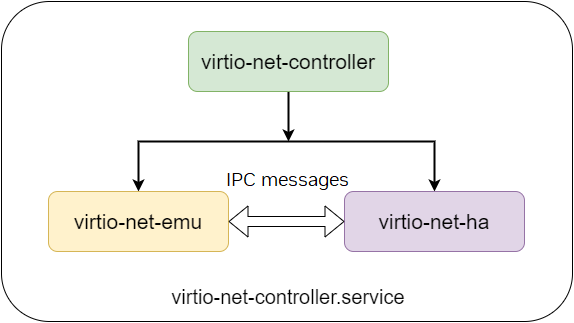
High availability is only supported on BlueField-3 and after.
The following table provides possible expected behaviors:
|
Scenarios |
Behavior |
Downtime Per Device (sec) |
Fallback Action |
|---|---|---|---|
|
Virtio-net-emu process crashes (e.g., Segfault) |
The |
< 1 |
The command if recovery failed |
|
Device/VQ/SF create/destroy failures |
HA makes sure the existing device is not affected |
N/A |
Retry or restart service |
|
DPA command timeout |
No action from HA; DPA is likely stuck |
N/A |
The command |
Jumbo MTU
Jumbo MTU is critical for increasing the efficiency of Ethernet and network processing by reducing the protocol overhead (ratio of headers and payload size).
To enable support for jumbo MTU, run the following virtnet command:
[dpu]# virtnet modify -p 0 -v 0 device -t 9216
The example sets the MTU to 9126 for VF 0 on PF 0.
Jumbo MTU is only supported starting from the following version:
|
|
Release |
|---|---|
|
Upstream |
VM kernel: 4.18.0-193.el8.x86_64 (VM Linux version supports big MTU after 4.11 ) |
|
Ubuntu |
DOCA_2.5.0_BSP_4.5.0_Ubuntu_22.04 |
|
Virtnet controller |
v1.7 or v1.6.26 |
To configure jumbo MTU (e.g., using VF 0 on PF 0):
-
Change the MTU of the uplink and SF representor from the BlueField:
[dpu]# ifconfig p0 mtu 9216
[dpu]# ifconfig en3f0pf0sf3000 mtu 9216
If a bond is configured, change the MTU of the bond rather than
p0:[dpu]# ifconfig bond0 mtu 9216 [dpu]# ifconfig en3f0pf0sf3000 mtu 9216 -
Restart the virtio-net-controller from the BlueField:
[dpu]# systemctl restart virtio-net-controller -
Unload the virtio driver from the host OS:
[host]# modprobe -rv virtio-net -
Change the corresponding device MTU on the BlueField:
[dpu]# virtnet modify -p 0 -v 0 device -t 9216 -
Reload virtio driver from the host OS:
[host]# modprobe -v virtio-net -
Check virtqueue MTU configuration is correct on the BlueField:
[dpu]# virtnet query -p 0 -v 0 --dbg_stats | grep jumbo_mtu "jumbo_mtu": 1 "jumbo_mtu": 1 -
Change the MTU of virtio-net interface from the host OS:
[host]# ifconfig <vnet> mtu 9216
Link Aggregation
It is common to use link aggregation (LAG) or bond interfaces to increase reliability, availability, or bandwidth of networking devices. Virtio-net devices support this mode via DPU-side LAG configurations.
To configure the virtio-net-controller in LAG mode must follow a specific procedure due to the dependency on mlx5 RDMA device:
-
Stop the virtio-net-controller to avoid resource leakage (which would be caused by LAG destroying the existing mlx5 RDMA device and creating a new bond RDMA device).
[dpu]# systemctl stop virtio-net-controller.service -
Configure the LAG interface for two uplink interfaces from the DPU side. Refer to the "Link Aggregation" page for detailed steps.
The virtio-net-controller service starts by default. If DPU is rebooted during LAG configuration, it is necessary to stop the controller before creating a bond interfaces from the DPU side.
-
Update the controller configuration file to use bond interface.
[dpu]# cat /opt/mellanox/mlnx_virtnet/virtnet.conf
{
  "ib_dev_lag": "mlx5_bond_0",
  "ib_dev_for_static_pf": "mlx5_bond_0",
  "is_lag": 1,
}
Refer to page "DOCA Virtio-net Service Guide | Configuration File" for details.
-
Start the controller for the new configuration to take effect.
[dpu]# systemctl start virtio-net-controller.service
Live Migration
Live Migration Using vHost Acceleration Software Stack
Virtio VF PCIe devices can be attached to the guest VM using the vhost acceleration software stack. This enables performing live migration of guest VMs.
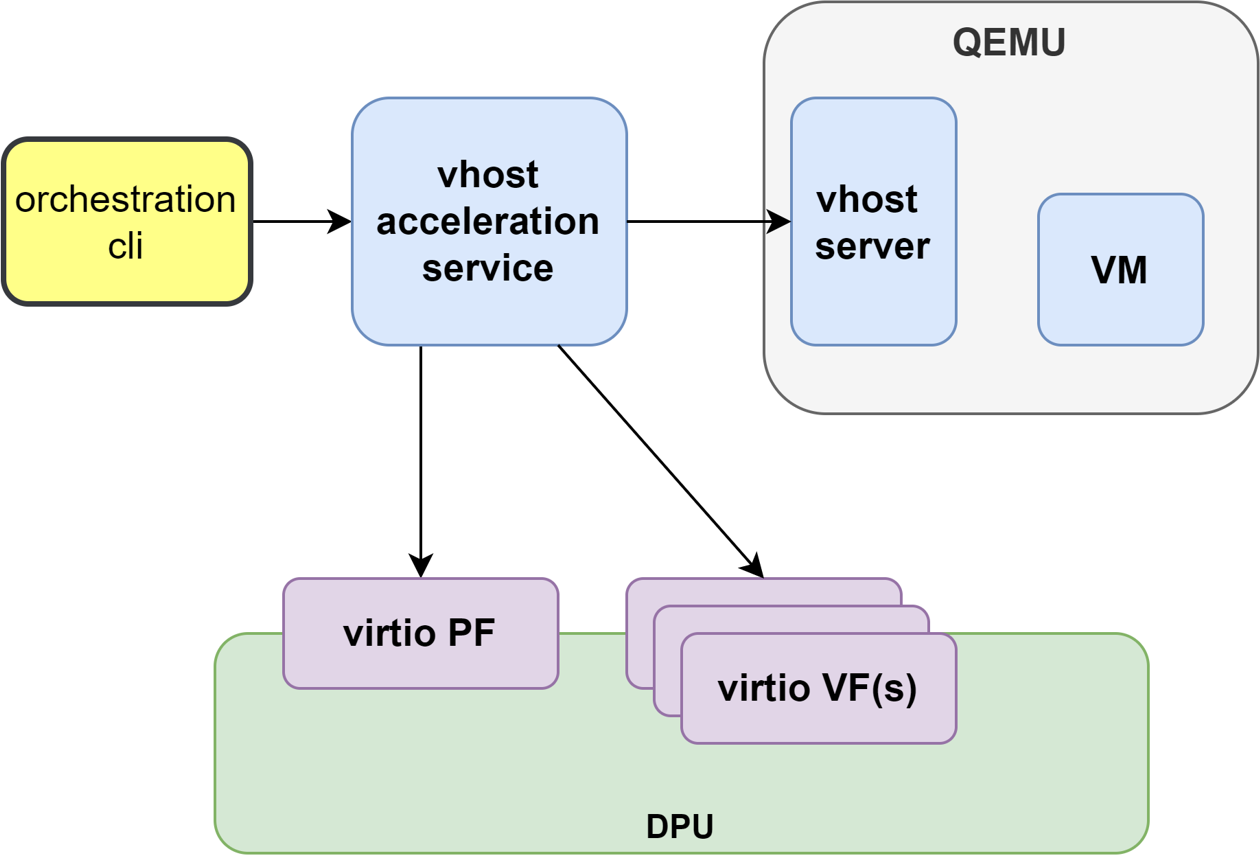
This section provides the steps to enable VM live migration using virtio VF PCIe devices along with vhost acceleration software.
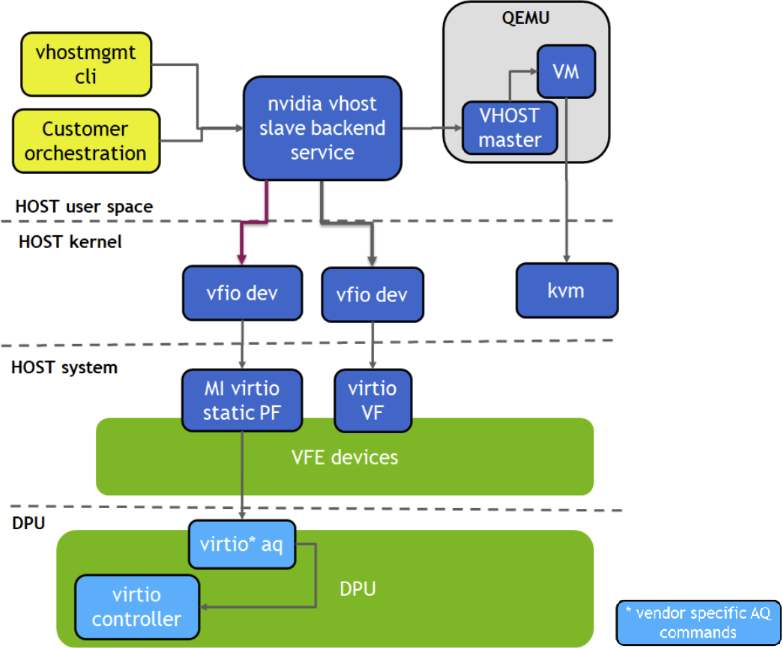
Prerequisites
-
Minimum hypervisor kernel version – Linux kernel 5.15 (for VFIO SR-IOV support)
-
To use high-availability (the additional
vfe-vhostd-haservice which can persist datapath whenvfe-vhostdcrashes), this kernel patch must be applied.
Install vHost Acceleration Software Stack
Vhost acceleration software stack is built using open-source BSD licensed DPDK.
-
To install vhost acceleration software:
-
-
Clone the software source code:
[host]# git clone https://github.com/Mellanox/dpdk-vhost-vfeThe latest release tag is
vfe-24.10.0-rc2. -
Build software:
[host]# apt-get install libev-dev -y
[host]# apt-get install libev-libevent-dev  -y
[host]# apt-get install uuid-dev  -y
[host]# apt-get install libnuma-dev -y
[host]# meson build --debug -Denable_drivers=vdpa/virtio,common/virtio,common/virtio_mi,common/virtio_ha
[host]# ninja -C build install
-
-
To install QEMU:
Upstream QEMU later than 8.1 can be used or the following NVIDIA QEMU.
-
-
Clone NVIDIA QEMU sources.
[host]# git clone git@github.com:Mellanox/qemu.git -b stable-8.1-presetup
[host]# git checkout 24aaba9255
Latest stable commit is
24aaba9255. -
Build NVIDIA QEMU.
[host]# mkdir bin
[host]# cd bin
[host]# ../configure --target-list=x86_64-softmmu --enable-kvm
[host]# make -j24
-
Configure vHost on Hypervisor
-
-
Configure 1G huge pages:
[host]# mkdir /dev/hugepages1G [host]# mount -t hugetlbfs -o pagesize=1G none /dev/hugepages1G [host]# echo 16 > /sys/devices/system/node/node0/hugepages/hugepages-1048576kB/nr_hugepages [host]# echo 16 > /sys/devices/system/node/node1/hugepages/hugepages-1048576kB/nr_hugepages -
Enable
qemu:commandlinein VM XML by adding thexmlns:qemuoption:XML<domain type='kvm' xmlns:qemu='http://libvirt.org/schemas/domain/qemu/1.0'> -
Assign a memory amount and use 1GB page size for huge pages in VM XML:
XML<memory unit='GiB'>4</memory> <currentMemory unit='GiB'>4</currentMemory> <memoryBacking> <hugepages> <page size='1' unit='GiB'/> </hugepages> </memoryBacking> -
Set the memory access for the CPUs to be shared:
XML<cpu mode='custom' match='exact' check='partial'> <model fallback='allow'>Skylake-Server-IBRS</model> <numa> <cell id='0' cpus='0-1' memory='4' unit='GiB' memAccess='shared'/> </numa> </cpu> -
Add a virtio-net interface in VM XML:
XML<qemu:commandline> <qemu:arg value='-chardev'/> <qemu:arg value='socket,id=char0,path=/tmp/vhost-net0,server=on'/> <qemu:arg value='-netdev'/> <qemu:arg value='type=vhost-user,id=vhost1,chardev=char0,queues=4'/> <qemu:arg value='-device'/> <qemu:arg value='virtio-net-pci,netdev=vhost1,mac=00:00:00:00:33:00,vectors=10,page-per-vq=on,rx_queue_size=1024,tx_queue_size=1024,mq=on,disable-legacy=on,disable-modern=off'/> </qemu:commandline>
-
Run vHost Acceleration Service
-
Bind the virtio PF devices to the
vfio-pcidriver:[host]# modprobe vfio vfio_pci [host]# echo 1 > /sys/module/vfio_pci/parameters/enable_sriov [host]# echo 0x1af4 0x1041 > /sys/bus/pci/drivers/vfio-pci/new_id [host]# echo 0x1af4 0x1042 > /sys/bus/pci/drivers/vfio-pci/new_id [host]# echo <pf_bdf> > /sys/bus/pci/drivers/virtio-pci/unbind [host]# echo <vf_bdf> > /sys/bus/pci/drivers/virtio-pci/unbind [host]# echo <pf_bdf> > /sys/bus/pci/drivers/vfio-pci/bind [host]# echo <vf_bdf> > /sys/bus/pci/drivers/vfio-pci/bind [host]# lspci -vvv -s <pf_bdf> | grep "Kernel driver" Kernel driver in use: vfio-pci [host]# lspci -vvv -s <vf_bdf> | grep "Kernel driver" Kernel driver in use: vfio-pciExample of
<pf_bdf>or<vf_bdf>format:0000:af:00.3 -
Run the vhost acceleration software service by starting the
vfe-vhostdservice:[host]# systemctl start vfe-vhostdA log of the service can be viewed by running the following:
[host]# journalctl -u vfe-vhostd -
Provision the virtio-net PF:
[host]# /usr/local/bin/vfe-vhost-cli mgmtpf -a <pf_bdf>Wait on the virtio-net-controller to finish handling PF FLR.
-
Enable SR-IOV and create a VF (or more):
[host]# echo 1 > /sys/bus/pci/devices/<pf_bdf>/sriov_numvfs [host]# lspci | grep Virtio 0000:af:00.1 Ethernet controller: Red Hat, Inc. Virtio network device 0000:af:00.3 Ethernet controller: Red Hat, Inc. Virtio network device -
Add a VF representor to the OVS bridge on the BlueField:
[dpu]# virtnet query -p 0 -v 0 | grep sf_rep_net_device "sf_rep_net_device": "en3f0pf0sf3000", [dpu]# ovs-vsctl add-port ovsbr1 en3f0pf0sf3000 -
Provision the virtio-net VF:
-
On BlueField, change VF MAC address or other device options:
[dpu]# virtnet modify -p 0 -v 0 device -m 00:00:00:00:33:00 -
Add VF into vfe-dpdk
[host]# /usr/local/bin/vfe-vhost-cli vf -a <vf_bdf> -v /tmp/vhost-net0If the SR-IOV is disabled and reenabled, the user must re-provision the VFs.
00:00:00:00:33:00is a virtual MAC address used in VM XML.
-
Start the VM
[host]# virsh start <vm_name>
HA Service
Running the vfe-vhostd-ha service allows the datapath to persist should vfe-vhostd crash:
[host]# systemctl start vfe-vhostd-ha
Simple Live Migration
-
Prepare two identical hosts and perform the provisioning of the virtio device to DPDK on both.
-
Boot the VM on one server:
[host]# virsh migrate --verbose --live --persistent <vm_name> qemu+ssh://<dest_node_ip_addr>/system --unsafe
Remove Device
When finished with the virtio devices, use following commands to remove them from DPDK:
[host]# /usr/local/bin/vfe-vhost-cli vf -r <vf_bdf>
[host]# /usr/local/bin/vfe-vhost-cli mgmtpf -r <pf_bdf>
During live migration, the device state may change temporarily. As a result, Linux NetworkManager may reset the associated network interface properties (e.g., IP address).
To prevent NetworkManager from managing a specific interface, run:
nmcli device set {device-interface} managed no
Live Migration Using VFIO With Full Emulation
Virtio VF PCIe devices can be attached to the guest VM using the virtio-vfio-pci driver. This enables performing live migration of guest VMs.
This section demonstrates how to perform basic live migration of a QEMU VM with a virtio VF assigned to it. It does not explain how to create VMs using libvirt or directly via QEMU.
Prerequisites
-
Minimum Hypervisor kernel version - Linux kernel 6.13-rc2 with
virtio_vfio_pciand IOMMU dirty page tracking -
Minimum qemu version - 9.1
-
Minimum libvirt version - 9.2
DPU Configuration
-
Install new
virtio-net-controller(version25.04or newer) on source and destination systems. -
Add the following flags on the source and destination systems.
[dpu]# vim /opt/mellanox/mlnx_virtnet/virtnet.conf { ... "virtio_spec_admin_legacy": 1, "virtio_spec_admin_lm": 1 } -
Restart the controller
-
Provision device attributes. [After loading
virtio-pci-vfiodriver and before starting the VM] -
Get the MAC of the source device
[dpu]# virtnet query -p $pf_id -v $vf_id | grep "\"mac"
-
Set the MAC of the destination device
[dpu]# virtnet modify -p $dst_pf_id -v $dst_vf_id device -m $mac
Kernel Configuration
Needs to be compiled with the driver virtio_vfio_pci enabled. (i.e. CONFIG_VIRTIO_VFIO_PCI).
To load the driver, run:
[host]# modprobe virtio_vfio_pci
QEMU Configuration
-
Needs to be compiled with VFIO_PCI enabled (this is enabled by default).
-
Add the following to qemu.conf:
user = "root" group = "root" cgroup_device_acl = [ "/dev/null", "/dev/full", "/dev/zero", "/dev/random", "/dev/urandom", "/dev/ptmx", "/dev/kvm", "/dev/iommu", "/dev/vfio/devices/vfio0", "/dev/vfio/devices/vfio1" ] -
Restart libvirt
Host Preparation
As stated earlier, creating the VMs is beyond the scope of this guide, and we assume that they have already been created. However, the VM configuration should be a migratable configuration, similarly to how it is done without virtio VFs.
The steps below should be done before running the VMs.
-
Create the VFs that will be assigned to the VMs.
[host]# echo "<NUM_OF_VFS>" > /sys/bus/pci/devices/<PF_BDF>/sriov_numvfs
-
Unbind the VFs from
virtio-pci, run:[host]# echo '<VF_BDF>' > /sys/bus/pci/drivers/virtio-pci/unbind
-
Assign the VFs to the VMs
-
Edit the VMs XML file, run:
[host]# virsh edit <VM_NAME>
-
Enable
qemu:commandlinein VM XML by adding thexmlns:qemuoption:<domain type='kvm' xmlns:qemu='http://libvirt.org/schemas/domain/qemu/1.0'>
-
Assign the VFs to the VM by adding the following under the
devicetag:<hostdev mode='subsystem' type='pci' managed='no'> <driver name='vfio'/> <source> <address domain='0x0000' bus='0xb1' slot='0x00' function='0x4'/> </source> <alias name='hostdev0'/> <address type='pci' domain='0x0000' bus='0x01' slot='0x01' function='0x0'/> </hostdev>
-
-
Set the source VM
-
Edit the source VM XML file, run:
[host]# virsh edit <VM_NAME>
-
Set up the source VM by adding the following under
domaintag:<qemu:commandline> <qemu:arg value='-object'/> <qemu:arg value='iommufd,id=iommufd0'/> <qemu:arg value='-snapshot'/> </qemu:commandline> <qemu:override> <qemu:device alias='hostdev0'> <qemu:frontend> <qemu:property name='enable-migration' type='string' value='on'/> <qemu:property name='iommufd' type='string' value='iommufd0'/> </qemu:frontend> </qemu:device> </qemu:override>
-
-
Set the destination VM in incoming mode
-
Edit the destination VM XML file, run:
[host]# virsh edit <VM_NAME>
-
Set the destination VM in migration incoming mode by adding the following under the
domaintag:<domain type='kvm' xmlns:qemu='http://libvirt.org/schemas/domain/qemu/1.0'> [...] <qemu:commandline> <qemu:arg value='--incoming'/> <qemu:arg value='tcp:<DEST_IP>:<DEST_PORT>'/> <qemu:arg value='-object'/> <qemu:arg value='iommufd,id=iommufd0'/> </qemu:commandline> <qemu:override> <qemu:device alias='hostdev0'> <qemu:frontend> <qemu:property name='enable-migration' type='string' value='on'/> <qemu:property name='iommufd' type='string' value='iommufd0'/> </qemu:frontend> </qemu:device> </qemu:override> </domain>
-
-
Bind the VFs to
virtio_vfio_pcidriver-
Detach the VFs from
libvirtmanagement, run:[host]# virsh nodedev-detach pci_<VF_BDF>
-
Unbind the VFs from
vfio-pcidriver (the VFs are automatically bound to it after running "virsh nodedev-detach"), run:[host]# echo '<VF_BDF>' > /sys/bus/pci/drivers/vfio-pci/unbind
-
Set driver override, run:
[host]# echo 'virtio_vfio_pci' > /sys/bus/pci/devices/<VF_BDF>/driver_override
-
Bind the VFs to
virtio_vfio_pcidriver, run:[host]# echo '<VF_BDF>' > /sys/bus/pci/drivers/virtio_vfio_pci/bind
-
Running the Migration
-
Start the VMs in source and in destination, run:
[host]# virsh start <VM_NAME>
-
Enable
switchover-ackQEMU migration capability. Run the following commands both in the source and the destination:[host]# virsh qemu-monitor-command <VM_NAME> --hmp "migrate_set_capability return-path on" [host]# virsh qemu-monitor-command <VM_NAME> --hmp "migrate_set_capability switchover-ack on"
-
[Optional] Configure the migration bandwidth and downtime limit on the source side:
[host]# virsh qemu-monitor-command <VM_NAME> --hmp "migrate_set_parameter max-bandwidth <VALUE>"
[host]# virsh qemu-monitor-command <VM_NAME> --hmp "migrate_set_parameter downtime-limit <VALUE>"
-
Start migration by running the migration command on the source side:
[host]# virsh qemu-monitor-command <VM_NAME> --hmp "migrate -d tcp:<DEST_IP>:<DEST_PORT>"
-
Check the migration status by running the info command on the source side:
[host]# virsh qemu-monitor-command <VM_NAME> --hmp "info migrate"
When the migration status is completed it means the migration has finished successfully.
During live migration, the device state may change temporarily. As a result, Linux NetworkManager may reset the associated network interface properties (e.g., IP address).
To prevent NetworkManager from managing a specific interface, run:
nmcli device set {device-interface} managed no
Live Update
Live update minimizes network interface downtime by performing online upgrade of the virtio-net controller without necessitating a full restart.
Requirements
To perform a live update, the user must install a newer version of the controller either using the rpm or deb package (depending on the OS distro used). Run:
|
For Ubuntu/Debian |
|
|---|---|
|
For CentOS/RedHat |
|
Check Versions
Before staring live update, the following command can be used to check the version of the original and destination controllers:
[dpu]# virtnet version
  {
    "Original Controller": "v24.10.13"
  },
  {
    "Destination Controller": "v24.10.16"
  }
Start Updating
If no errors occur, issue the following command to start the live update process:
[dpu]# virtnet update -s
If an error indicates that the update command is unsupported, this means the controller version you are attempting to install is outdated. Reinstalling the correct version resolves the issue.
Check Status
During the update process, the following command may be used to check the update status:
[dpu]# virtnet update -t
Example output:
{
  "status": "inactive",                       # updating status, whether live update is finished or ongoing
  "last live update status": "success",       # last live update status
  "time_used (s)": 1.655439                   # time cost for last live update
}
During the update, it is recommended to not issue any virtnet CLI command.
When the update process completes successfully, the command virtnet update status reflects the status accordingly
If a device is actively migrating, the existing virtnet commands appear as "migrating" for that specific device so that the user can retry later.
When live update is in progress, hotplug/unplug and VF creation/deletion are not supported.
Mergeable Rx Buffer
The Mergeable Rx Buffer is a receive-side-only performance enhancement. When successfully negotiated with the driver, this feature allows the device to utilize multiple descriptors to accommodate a single jumbo-sized packet received from the network. It significantly improves memory utilization and throughput in environments configured for large Maximum Transmission Units (MTUs), such as 9K jumbo frames.
Configuration
Administrators control this feature using the VIRTIO_NET_F_MRG_RXBUF (bit 15) feature flag.
-
Default State: Disabled.
-
Scope: Can be enabled on a per-device basis.
Refer to the "DOCA Virtio-net Service Guide | Enabling and Disabling Virtio net Features" section for the exact virtnet modify command syntax.
Limitations
Before enabling the Mergeable Rx Buffer, carefully review the following environmental constraints:
|
Limitation |
Description |
|---|---|
|
Strict MTU ceiling |
The absolute maximum supported MTU when utilizing this feature is 9000. The feature will fail to operate if the MTU is set to 9216. |
|
Performance degradation (standard MTU) |
Because the number of descriptors per Work Queue Entry (WQE) depends on the MTU size, enabling this feature with a default MTU (1500) is not recommended and will negatively impact performance. |
|
Performance degradation (small packets) |
The system will experience a performance drop when processing high rates of small-sized packets (e.g., 64 bytes) from the wire. Reserve this feature exclusively for heavy jumbo-frame traffic. |
|
Feature Incompatibility |
The Mergeable Rx Buffer feature is strictly incompatible with the Packed Virtqueue feature ( |
Performance Tuning
Number of Queues and MSIX
Driver Configuration
The virtio-net driver can configure the number of combined channels via ethtool. This determines how many virtqueues (VQs) can be used for the netdev. Normally, more VQs result in better overall throughput when multi-threaded (e.g., iPerf with multiple streams).
[host]# ethtool -l eth0
Channel parameters for eth0:
Pre-set maximums:
RX:             n/a
TX:             n/a
Other:          n/a
Combined:       31
Current hardware settings:
RX:             n/a
TX:             n/a
Other:          n/a
Combined:       15
Therefore, it is common to pick a larger number (less than pre-set maximums) of channels using the following command.
Normally, configuring the combined number of channels to be the same as number of CPUs available on the guest OS will yield good performance.
[host]# ethtool -L eth0 combined 31
[host]# ethtool -l eth0
Channel parameters for eth0:
Pre-set maximums:
RX:             n/a
TX:             n/a
Other:          n/a
Combined:       31
Current hardware settings:
RX:             n/a
TX:             n/a
Other:          n/a
Combined:       31
Device Configuration
To reach the best performance, it is required to make sure each tx/rx queue has an assigned MSIX. Check the information of a particular device and make sure num_queues is less than num_msix.
[dpu]# virtnet query -p 0 -b | grep -i num_
      "num_msix": "64",
      "num_queues": "8",
If num_queues is greater than num_msix, it is necessary to change mlxconfig to reserve more MSIX than queues. It is determined by the VIRTIO_NET_EMULATION_NUM_VF_MSIX and VIRTIO_NET_EMULATION_NUM_MSIX. Please refer to the "DOCA Virtio-net Service Guide | Virtio net Deployment" page for more information.
Queue Depth
By default, queue depth is set to 256. It is common to use a larger queue depth (e.g., 1024). This cannot be requested from the driver side but must be done from the device side.
Refer to the "DOCA Virtio-net Service Guide | Virtnet CLI Commands" page to learn how to modify device max_queue_size.
MTU
To improve performance, the user can use jumbo MTU. Refer to "DOCA Virtio-net Service Guide | Jumbo MTU" page for information regarding MTU configuration.
Device State Recovery
The recovery process is critical for restoring both control plane and data plane statuses during disruptive events, such as a controller restart, a live update, or a live migration.
The system relies on persistent JSON files stored in the /opt/mellanox/mlnx_virtnet/recovery directory. Each physical function (PF) or virtual function (VF) device maintains a corresponding recovery file, uniquely named after the device's VUID.
Recovery File Structure
The controller saves the following configuration states to the recovery file and automatically restores them when necessary:
|
Entry Name |
Type |
Description |
|---|---|---|
|
|
String |
The RDMA device name on which the |
|
|
Number |
The ID of the Physical Function (PF). |
|
|
Number |
The ID of the Virtual Function (VF). (Valid for VFs only). |
|
|
String |
Identifies the function as either a |
|
|
Number |
The |
|
|
String |
Specifies if the device is |
|
|
String |
The MAC address of the device. |
|
|
Number |
The PCIe function number. |
|
|
Number |
The Sub-Function (SF) number utilized for this |
|
|
Number |
The number of multi-queues created for this |
|
|
Number |
A 32-bit value representing reception modes. Bits 0–5 correspond to:
|
|
|
Array |
An array storing VLAN IDs (0–4095) configured for VLAN filtering. |
|
|
Array |
Contains MAC addresses for filtering, alongside metadata (e.g., entry count, first multicast index, and overflow flags). |
|
|
Number |
Stores the active state of hardware offload features (e.g., |
|
|
String |
The Sub-Function (SF) parent device identifier. |
|
|
Number |
The RX mode command state. |
|
|
Number |
The MAC command state. |
|
|
Number |
The VLAN table command state. |
|
|
Number |
The Announce command state. |
|
|
Number |
The Announce flag status. |
|
|
Number |
The current Live Migration status. |
|
|
Number |
The operational device mode. |
|
|
String |
Dirty log tracking information (vital for live migration). |
|
|
Number |
Transitional mode flags. |
|
|
String |
The system path required for SF restoration. |
|
|
String |
The system name required for SF restoration. |
|
|
Object |
The active Hash configuration. |
|
|
Number |
Packet count mode flags. |
|
|
Number |
Net-DIM (Dynamic Interrupt Moderation) mode flags. |
|
|
Number |
aRFS (Accelerated Receive Flow Steering) mode flags. |
|
|
Number |
Hotplug host awareness mode configuration (e.g., AB mode status). |
Example Recovery File
The following JSON payload illustrates a standard recovery file for a hotplugged PF device:
{
  "port_ib_dev": "mlx5_0",
  "pf_id": 0,
  "function_type": "pf",
  "bdf_raw": 57611,
  "device_type": "hotplug",
  "mac": "0c:c4:7a:ff:22:93",
  "pf_num": 0,
  "sf_num": 2000,
  "mq": 3
}
Use Cases
Depending on the actions of the BlueField or host, recovery may or may not be performed. Please refer to the following table for individual scenarios:
|
|
DPU Actions |
Host Actions |
||||||
|---|---|---|---|---|---|---|---|---|
|
Restart Controller |
Live Update |
Hot Unplug |
Destroy VFs |
Unload Driver |
Power Cycle Host & DPU |
Warm Reboot |
Live Migration |
|
|
|
Recover |
Recover |
N/A |
N/A |
Recover |
No recover |
Recover |
Recover |
|
|
Recover |
Recover |
No recover |
N/A |
Recover |
No recover |
Recover |
Recover |
|
|
Recover |
Recover |
N/A |
Recovery file deleted |
No Recover |
No recover |
No recover |
Recover |
These recovery files are internal to the controller and should not be modified.
Controller recovery is enabled by default and does not need user configuration or intervention. When the mlxconfig settings used by the controller take effect, the newly started controller service automatically deletes all recovery files.
During startup, the controller strictly validates the integrity of all stored JSON recovery files before applying any state restorations. If the controller detects corrupted, malformed, or invalid data in any single recovery file during the startup sequence, it will automatically purge all recovery files in the directory and perform a fresh restart.
Transitional Device
A transitional device is a virtio device which supports drivers conforming to virtio specification 1.x and legacy drivers operating under virtio specification 0.95 (i.e., legacy mode) so servers with old Linux kernels can still utilize virtio-based technology.
Currently, only transitional VF devices are supported.
Host kernel version must be newer than v6.9.
When using this feature, vfe-vdpa-dpdk solutions cannot be used anymore, including vfe-vdpa-dpdk live migration.
Libvirt does not support the virtio_vfio_pci kernel driver. Use the QEMU command line to start the VM instead.
Transitional Virtio-net VF Device
-
Configure virtio-net SR-IOV. Refer to "DOCA Virtio-net Service Guide | Virtio net Deployment" for details.
-
Modify the configuration file to add the
"virtio_spec_admin_legacy": 1option.[dpu]# cat /opt/mellanox/mlnx_virtnet/virtnet.conf { ... "virtio_spec_admin_legacy": 1, ... }
-
Restart the virtio-net controller for the configuration to take effect:
[dpu]# systemctl restart virtio-net-controller.service
-
Create virtio-net VF devices on the host:
[host]# modprobe -r virtio_net
[host]# modprobe -r virtio_pci
[host]# modprobe virtio_net
[host]# modprobe virtio_pci
[host]# echo <vf_num> > /sys/bus/pci/devices/<pf_bdf>/sriov_numvfs
-
Bind the VF devices with the
virtio_vfio_pcikernel driver:[host]# echo <vf_bdf> > /sys/bus/pci/devices/<vf_bdf>/driver/unbind [host]# echo 0x1af4 0x1041 > /sys/bus/pci/drivers/virtio_vfio_pci/new_id [host]# modprobe -v virtio_vfio_pci [host]# lspci -s <vf_bdf> -vvv | grep -i virtio_vfio_pci Kernel driver in use: virtio_vfio_pci
-
Add the following option into the QEMU command line to passthrough the VF device into the VM:
-device vfio-pci,host=<vf_bdf>,id=hostdev0,bus=pci.<#BUS_IN_VM>,addr=<#FUNC_IN_VM>
-
Load virtio-net driver as legacy mode inside the VM:
[vm]# modprobe -r virtio_net
[vm]# modprobe -r virtio_pci
[vm]# modprobe virtio_pci force_legacy=1
[vm]# modprobe virtio_net
[vm]# lspci -s <vf_bdf_in_vm> -n
00:0a.0 0200: 1af4:1000
-
Verify that the VF is a transitional device:
[dpu]# virtnet query -p <pf_id> -v <vf_id> | grep transitional
      "transitional": 1,
VF Dynamic MSIX
In virtio-net controller, each VF gets the same number of MSIX and virtqueues (VQs) so that each data VQ has a MSIX assigned. This means that changing the number of MSIX updates the number of VQs.
By default, each VF is assigned with the same number of MSIX, the default number is determined by the minimum of NUM_VF_MSIX and VIRTIO_NET_EMULATION_NUM_MSIX.
Using dynamic VF MSIX, a VF can be assigned with more MSIX/queues than its default. MSIX hardware resources of all VF devices are managed by PF via a shared MSIX pool. The user can reduce the MSIX of one VF, thus releasing its MSIX resources to the shared pool. On the other hand, another VF can be assigned with more MSIX than its default to gain more performance.
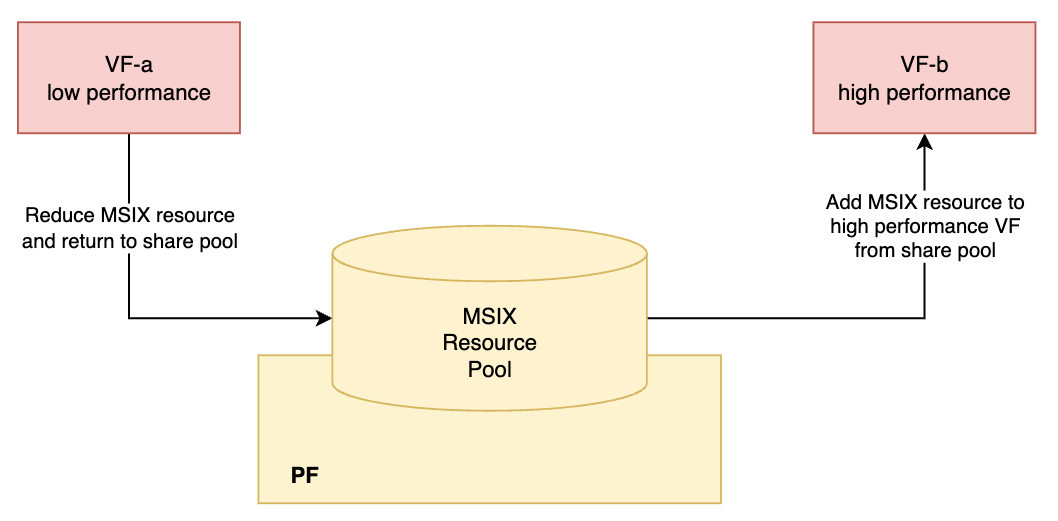
Firmware Configuration
The emulation VF device uses VIRTIO_NET_EMULATION_NUM_VF_MSIX to set the MSIX number.
VIRTIO_NET_EMULATION_NUM_VF_MSIX is available to set the MSIX number of the emulation VF device. For the emulation VF device, uses the new configuration VIRTIO_NET_EMULATION_NUM_VF_MSIX instead of the old configuration NUM_VF_MSIX.
-
If
VIRTIO_NET_EMULATION_NUM_VF_MSIX!=0,VIRTIO_NET_EMULATION_NUM_ MSIXis used for the PF only, and VF usesVIRTIO_NET_EMULATION_NUM_VF_MSIX.For example, to configure the default MSIX number for a VF to 32:
[dpu]# mlxconfig -y -d 03:00.0 s VIRTIO_NET_EMULATION_NUM_ MSIX=32 VIRTIO_NET_EMULATION_NUM_VF_MSIX=32
-
If
VIRTIO_NET_EMULATION_NUM_VF_MSIX==0,VIRTIO_NET_EMULATION_NUM_ MSIXis used for the PF and VF.
The default number of MSIX for each VF is determined by minimum(NUM_VF_MSIX, VIRTIO_NET_EMULATION_NUM_MSIX). For example, to configure the default MSIX number for a VF to 32:
[dpu]# mlxconfig -y -d 03:00.0 s VIRTIO_NET_EMULATION_NUM_MSIX=32 NUM_VF_MSIX=32
Power cycle the BlueField and host to have the mlxconfig taking effect.
MSIX
MSIX Capability
The MSIX pool for VFs is managed by their PF. To check the share pool size, run the following command (using PF 0 as example):
[dpu]# virtnet list | grep -i '"pf_id": 0' -A 8 | grep -i msix_num_pool_size
By default, the share pool size is empty (0), since all MSIX resources have already been allocated to VFs evenly. Upon reducing the MSIX of one or more VFs, the reduced MSIX is released back to the pool.
However, the number of MSIX can be assigned to a given VF is also bound by capability. To check those caps, run the following command:
[dpu]# virtnet list | grep -i '"pf_id": 0' -A 10 | grep -i max_msix_num
[dpu]# virtnet list | grep -i '"pf_id": 0' -A 10 | grep -i min_msix_num
To check the currently assigned number of MSIX, run the following command:
[dpu]# virtnet query -p 0 -v 0 | grep num_msix
If num_msix is less than max_msix_num cap, more MSIX can be assigned to the VF.
Reallocating VF MSIX
To allocate more MSIX to one VF, there should be MSIX available from the pool. This is done by reducing the MSIX from another VF(s).
The following example shows the steps to reallocate MSIX from VF1 to VF0, assuming that each VF has 32 MSIX available as default:
-
Unbind both VF devices from host driver.
[host]# echo <vf0_bdf> > /sys/bus/pci/drivers/virtio-pci/unbind [host]# echo <vf1_bdf> > /sys/bus/pci/drivers/virtio-pci/unbind -
Reduce the MSIX of VF1.
[dpu]# virtnet modify -p 0 -v 1 device -n 4 -
Check pool size of PF0.
[dpu]# virtnet list | grep -i '"pf_id": 0' -A 8 | grep -i msix_num_pool_sizeConfirm the reduced MSIX are added to the share pool.
-
Increase the MSIX of VF0.
[dpu]# virtnet modify -p 0 -v 0 device -n 48 -
Check the MSIX of VF0.
[dpu]# virtnet query -p 0 -v 0 | grep -i num_msix -
Bind both VF devices to host driver.
[host]# echo <vf0_bdf> > /sys/bus/pci/drivers/virtio-pci/bind
[host]# echo <vf1_bdf> > /sys/bus/pci/drivers/virtio-pci/bind
The number of MSIX must be an even number greater than 4.
MSIX Limitations
-
MSIX and QP configuration is mutually exclusive (i.e., only one of them can be configured at a time). For example, the following
modifycommand should result in failure:[dpu]# virtnet modify -p 0 -v 1 device -qp 2 -n 6 -
To use a VF, make sure to assign a valid MSIX number:
[dpu]# virtnet modify -p 0 -v 1 device -n 10The minimum number of MSIX resources required for the VF to load the host driver is 4 if
VIRTIO_NET_F_CTRL_VQis negotiated, or 2 if it is not. -
The MSIX resources of a VF can be reduced to 0, but doing so prevents the VF from functioning.
[dpu]# virtnet modify -p 0 -v 1 device -n 0
Queue Pairs
Queue pairs (QPs) are the number of data virtio queue (VQ) pairs. Each VQ pair has one transmit (TX) queue and one receive (RX) queue. These pairs are dedicated to handling data traffic and do not include control or admin VQs.
QP Capability
The QP pool for VFs is managed by their PF.
To check the shared pool size, run the following command (using PF 0 as example):
[dpu]# virtnet list | grep -i '"pf_id": 0' -A 13 | grep -i qp_pool_size
By default, the shared pool size is empty (0), since all QP resources have already been allocated to VFs evenly. Upon reducing the QP of one or more VFs, the reduced QP is released back into the pool.
However, the number of QPs assignable to a VF depends on its supported capabilities. To verify these capabilities, run the following command:
[dpu]# virtnet list | grep -i '"pf_id": 0' -A 12 | grep -i max_num_of_qp
[dpu]# virtnet list | grep -i '"pf_id": 0' -A 12 | grep -i min_num_of_qp
To check the currently assigned number of QPs, run the following command:
[dpu]# virtnet query -p 0 -v 0 | grep max_queue_pairs
If max_queue_pairs is less than max_num_of_qp cap, then more QPs can be assigned to the VF.
Reallocating VF QPs
To allocate more QPs to one VF, there should be QPs available from the pool as explained in the previous section.
The following example illustrates the process of reallocating a QP from VF1 to VF0, assuming that each VF initially has 32 QPs available by default:
-
Unbind both VF devices from the host driver:
[host]# echo <vf0_bdf> > /sys/bus/pci/drivers/virtio-pci/unbind [host]# echo <vf1_bdf> > /sys/bus/pci/drivers/virtio-pci/unbind -
Reduce the number of QPs VF1 has:
[dpu]# virtnet modify -p 0 -v 1 device -qp 1 -
Check the pool size of PF0 and confirm that the reduced number of QPs are added to the shared pool:
[dpu]# virtnet list | grep -i '"pf_id": 0' -A 13 | grep -i qp_pool_size -
Increase the number of QPs VF0 has:
[dpu]# virtnet modify -p 0 -v 0 device -qp 23 -
Check the number of QPs VF0 has:
[dpu]# virtnet query -p 0 -v 0 | grep -i max_queue_pairs -
Bind both VF devices to the host driver:
[host]# echo <vf0_bdf> > /sys/bus/pci/drivers/virtio-pci/bind
[host]# echo <vf1_bdf> > /sys/bus/pci/drivers/virtio-pci/bind
The number of QPs must be greater than 0.
QP Limitations
-
QP and MSIX configuration is mutually exclusive (i.e., only one of them can be configured at a time). For example, the following
modifycommand should result in failure:[dpu]# virtnet modify -p 0 -v 1 device -qp 2 -n 6 -
To use a VF, assign it with a valid QP number:
[dpu]# virtnet modify -p 0 -v 1 device -n 4The minimum number of QP resources which allows the VF to load the host driver is 1.
-
The QP resources of a VF can be reduced to 0. However, the VF would not be functional in this case.
[dpu]# virtnet modify -p 0 -v 1 device -qp 0
Virt Queue Types
Virt queues (VQs) are the mechanism for bulk data transport on virtio devices. Each device can have zero or more VQs.
VQs can be in one of the following modes:
-
Split
-
Packed
When changing the supported VQ types, make sure to unload the guest driver first so the device can modify the supported feature bits.
Split VQ
Currently the default VQ type. Split VQ format is the only format supported by version 1.0 of the virtio spec.
In split VQ mode, each VQ is separated into three parts:
-
Descriptor table – occupies the descriptor area
-
Available ring – occupies the driver area
-
Used ring – occupies the device area
Each of these parts is physically-contiguous in guest memory. Split VQ has a very simple design, but its sparse memory usage puts pressure on CPU cache utilization and requires several PCIe transactions for each descriptor.
Configuration
The following shows how the output of the virtnet list command appears only when split VQ mode is enabled:
 "supported_virt_queue_types": {
      "value": "0x1",
      "    0": "SPLIT"
    },
Packed VQ
Packed Virtqueue addresses the inherent limitations of the legacy Split VQ design by merging the three separate descriptor rings into a single, contiguous location within the virtual environment's guest memory.
This streamlined memory layout significantly reduces the number of PCIe transactions required and improves CPU cache utilization per descriptor access, leading to better overall network performance.
Prerequisites
Packed VQ is supported from kernel 5.0 onwards, specifically requiring the virtio-support-packed-ring commit within the guest operating system.
Configuration
Administrators control this feature using the VIRTIO_F_RING_PACKED (bit 34) feature flag.
-
Default State: Disabled.
-
Scope: Can be enabled on a per-device basis.
Refer to the "DOCA Virtio-net Service Guide | Enabling and Disabling Virtio net Features" section for the exact virtnet modify command syntax.
Limitations
The following features are not currently supported when packed VQ is enabled:
-
Mergeable Rx buffer
-
Jumbo MTU
-
UDP segmentation offload (USO)
-
RSS hash report
Virtio-net Feature Bits
Per virtio spec, virtio the device negotiates with the virtio driver on the supported features when the driver probes the device. The final negotiated features are a subset of the features supported by the device.
From the controller's perspective, all feature bits can be supported by a device are populated by virtnet list. Each individual virtio-net device is able to choose the feature bits supported by itself.
The following is a list of the feature bits currently supported by controller:
-
VIRTIO_NET_F_CSUM -
VIRTIO_NET_F_GUEST_CSUM -
VIRTIO_NET_F_CTRL_GUEST_OFFLOADS -
VIRTIO_NET_F_MTU -
VIRTIO_NET_F_MAC -
VIRTIO_NET_F_HOST_TSO4 -
VIRTIO_NET_F_HOST_TSO6 -
VIRTIO_NET_F_MRG_RXBUF -
VIRTIO_NET_F_STATUS -
VIRTIO_NET_F_CTRL_VQ -
VIRTIO_NET_F_CTRL_RX -
VIRTIO_NET_F_CTRL_VLAN -
VIRTIO_NET_F_GUEST_ANNOUNCE -
VIRTIO_NET_F_MQ -
VIRTIO_NET_F_CTRL_MAC_ADDR -
VIRTIO_F_VERSION_1 -
VIRTIO_F_IOMMU_PLATFORM -
VIRTIO_F_RING_PACKED -
VIRTIO_F_ORDER_PLATFORM -
VIRTIO_F_SR_IOV -
VIRTIO_F_NOTIFICATION_DATA -
VIRTIO_F_RING_RESET -
VIRTIO_F_ADMIN_VQ -
VIRTIO_NET_F_HOST_USO -
VIRTIO_NET_F_HASH_REPORT -
VIRTIO_NET_F_GUEST_HDRLEN -
VIRTIO_NET_F_SPEED_DUPLEX
For more information on these bits, refer to the VIRTIO Version 1.2 Specifications.
Virtio-net Event Notifications
Virtio-net Event Notifications provide real-time, asynchronous notifications of VF lifecycle and state changes from the virtio-net-controller on the DPU to external consumers, such as orchestrators, monitoring systems, and management agents.
Events are published as JSON messages over a NATS message broker. The design is best-effort with bounded queues, meaning the controller's critical data-path and Live Migration (LM) paths are never blocked by event delivery.
Supported Event Types
|
Event Type |
When Emitted |
|---|---|
|
|
VF device successfully opened |
|
|
VF device closed/torn down |
|
|
VF suspended (LM quiesce) |
|
|
VF resumed (LM un-quiesce) |
|
|
VF driver state transition (de-duplicated) |
|
|
LM state transition |
Prerequisites
-
The
virtio-net-controllerRPM package (provided by NVIDIA). NATS support is built-in by default; no additional build-time setup is required. -
A running NATS broker on the same DPU (localhost), listening on
127.0.0.1:4222. Thenats-serverbinary is not included in the BFB image and must be installed separately by the user. -
Tested versions:
Component
Version
Notes
nats-server
2.12.4
Broker binary (user-installed)
nats.c (C client)
3.12.0
Build-time dependency (pre-installed in BFB)
The feature relies only on basic NATS publish/subscribe functionality. Newer compatible versions of nats-server are expected to work but have not been validated.
The NATS broker must run on the same DPU as the virtio-net-controller. Remote broker connections are not supported at this time. The event channel does not currently implement TLS encryption or authentication, so NVIDIA does not take responsibility for securing remote connections. Binding the broker to
127.0.0.1ensures that event traffic stays local to the DPU.
Setting Up the NATS Broker
The NATS broker (nats-server) is a lightweight, standalone binary. It is not included in the BFB image and must be installed by the user. It must run on the DPU itself, bound to 127.0.0.1 (localhost only).
-
Install nats-server:
-
Option A: Package manager (recommended for production)
# Ubuntu / Debian
sudo apt-get install nats-server

# RHEL / Rocky / CentOS
sudo dnf install nats-server
-
Option B: Download prebuilt binary
NATS_VER=2.12.4
ARCH=linux-arm64   # or linux-amd64

curl -fL -o nats-server.tar.gz \
  "https://github.com/nats-io/nats-server/releases/download/v${NATS_VER}/nats-server-v${NATS_VER}-${ARCH}.tar.gz"

tar -xzf nats-server.tar.gz
sudo cp nats-server-v${NATS_VER}-${ARCH}/nats-server /usr/local/bin/
-
-
Start the broker:
nats-server -a 127.0.0.1 -p 4222 &
-
Verify the broker is running:
# Quick check -- NATS exposes a monitoring HTTP endpoint:
curl http://localhost:8222/varz 2>/dev/null | head -5

# Or simply:
nats-server --help  # Confirms the binary is installed
-
For production, run
nats-serveras a systemd service:# /etc/systemd/system/nats-server.service [Unit] Description=NATS messaging server After=network.target [Service] ExecStart=/usr/local/bin/nats-server -a 127.0.0.1 -p 4222 Restart=always RestartSec=5 [Install] WantedBy=multi-user.target
sudo systemctl daemon-reload
sudo systemctl enable --now nats-server
sudo systemctl status nats-server
NATS Subject Scheme
Events are published to NATS subjects with the following structure:
<subject_prefix>.<pf_index>.<vf_index>.<category>.<name>
Subject Mapping
|
Event Type |
Subject Suffix |
|---|---|
|
|
|
|
|
|
|
|
|
|
|
|
|
|
|
|
|
|
Example:
virtio.vf.0.1.lifecycle.created       # PF 0, VF 1 created
virtio.vf.0.3.lm.suspended           # PF 0, VF 3 suspended for LM
virtio.vf.1.0.driverstate.changed     # PF 1, VF 0 driver state change
Subscribing with Wildcards
NATS wildcard subjects allow flexible filtering:
virtio.vf.>              # All events, all VFs
virtio.vf.0.>            # All events for PF 0
virtio.vf.0.2.lifecycle.* # All lifecycle events for PF 0, VF 2
virtio.vf.*.*.lm.* # All LM events across all PFs/VFs
JSON Event Schema (v1)
Every event is published as a single JSON object. Schema version is 1.
-
Example: VF created
{ "schema_version": 1, "type": "VF_CREATED", "timestamp_ns": "123456789012345", "vuid": "MT2333ABCDEF0123", "pf_index": 0, "vf_index": 1, "driver_state": "UNKNOWN" } -
Example: VF suspended (LM)
{ "schema_version": 1, "type": "VF_SUSPENDED", "timestamp_ns": "223456789012345", "vuid": "MT2333ABCDEF0123", "pf_index": 0, "vf_index": 1, "lm_state": "SUSPENDED", "driver_state": "DRIVER_OK" } -
Example: Driver state changed
{
  "schema_version": 1,
  "type": "VF_DRIVER_STATE_CHANGED",
  "timestamp_ns": "323456789012345",
  "vuid": "MT2333ABCDEF0123",
  "pf_index": 0,
  "vf_index": 1,
  "driver_state": "DRIVER_OK"
}
Field reference:
|
Field |
Type |
Always Present |
Description |
|---|---|---|---|
|
|
number |
Yes |
Always |
|
|
string |
Yes |
Event type name |
|
|
string |
Yes |
|
|
|
string |
Yes |
VF unique identifier |
|
|
number |
Yes |
Physical function index |
|
|
number |
Yes |
Virtual function index |
|
|
string |
No |
Present only when relevant. Values: |
|
|
string |
Yes |
Values: |
Consuming Events
There are two ways to consume VF events from the NATS broker:
-
Native NATS client – use any NATS client library (Go, Python, C, Java, etc.) to subscribe directly to the broker. This is the recommended approach for most integrations.
-
vnet-event subscriber API (
libvnet_event) – a C library provided with the virtio-net-controller that handles NATS transport, JSON decoding, bounded queuing, and delivers parsedstruct vnet_eventto a callback. Useful for C/C++ consumers that want structured event access.
Option A: Native NATS Client (any language)
Any standard NATS client library can subscribe to the event subjects. The consumer receives raw JSON and parses it according to the schema.
Python example (using the nats-py package):
import asyncio
import json
import nats

async def main():
    nc = await nats.connect("nats://127.0.0.1:4222")

    async def on_event(msg):
        event = json.loads(msg.data.decode())
        print(f"[{msg.subject}] type={event['type']} "
              f"vuid={event['vuid']} pf={event['pf_index']} vf={event['vf_index']} "
              f"driver_state={event.get('driver_state', 'N/A')} "
              f"lm_state={event.get('lm_state', 'N/A')}")

    # Subscribe to all VF events:
    await nc.subscribe("virtio.vf.>", cb=on_event)

    # Or subscribe to specific events:
    # await nc.subscribe("virtio.vf.0.*.lm.*", cb=on_event)

    # Run until interrupted
    try:
        await asyncio.Event().wait()
    except KeyboardInterrupt:
        pass
    finally:
        await nc.drain()

asyncio.run(main())
Go example (using the nats.go package):
package main

import (
    "encoding/json"
    "fmt"
    "log"
    "os"
    "os/signal"

    "github.com/nats-io/nats.go"
)

type VNetEvent struct {
    SchemaVersion int    `json:"schema_version"`
    Type          string `json:"type"`
    TimestampNs   string `json:"timestamp_ns"`
    VUID          string `json:"vuid"`
    PFIndex       int    `json:"pf_index"`
    VFIndex       int    `json:"vf_index"`
    LMState       string `json:"lm_state,omitempty"`
    DriverState   string `json:"driver_state"`
}

func main() {
	nc, err := nats.Connect("nats://127.0.0.1:4222")
    if err != nil {
        log.Fatal(err)
    }
    defer nc.Drain()

    nc.Subscribe("virtio.vf.>", func(msg *nats.Msg) {
        var ev VNetEvent
        if err := json.Unmarshal(msg.Data, &ev); err != nil {
            log.Printf("decode error: %v", err)
            return
        }
        fmt.Printf("[%s] type=%s vuid=%s pf=%d vf=%d driver_state=%s\n",
            msg.Subject, ev.Type, ev.VUID, ev.PFIndex, ev.VFIndex, ev.DriverState)
    })

    sig := make(chan os.Signal, 1)
    signal.Notify(sig, os.Interrupt)
    <-sig
}
Option B: Vnet-event Subscriber API (C Library)
The libvnet_event library provides a C subscriber API that handles NATS transport internally and delivers events via a callback. The library manages connection retry, bounded queuing, and optional JSON-to-struct parsing.
Installed paths:
-
Library:
/usr/lib/libvnet_event.a(or/usr/lib64/) -
Header:
/usr/include/vnet_event.h -
Reference subscriber tool:
/usr/sbin/vnet_event_subscriber
API lifecycle:
vnet_event_sub_create()   -- allocate handle, configure broker/filter/queue
        |
vnet_event_sub_start()    -- start worker + transport threads, register callback
        |
   (callback invoked for each received event)
        |
vnet_event_sub_destroy()  -- stop threads, free resources
Key types:
#include "vnet_event.h"

/* Opaque subscriber handle. */
typedef struct vnet_event_sub *vnet_event_sub_t;

/* Subscriber configuration. */
struct vnet_event_sub_cfg {
    char     broker_url[256];       /* NATS broker URL */
    char     subject_filter[128];   /* NATS subject filter */
    uint32_t connect_timeout_ms;    /* 0 => 2000; range 100..30000 */
    uint32_t reconnect_backoff_ms;  /* 0 => 1000; range 100..60000 */
    uint32_t max_queue_depth;       /* 0 => 4096; range 16..65536 */
    bool     deliver_parsed;        /* true: parse JSON into struct */
};

/* Callback signature. */
typedef void (*vnet_event_cb)(const struct vnet_event *ev,   /* parsed (or NULL) */
                              const char *json,              /* raw JSON */
                              size_t json_len,               /* JSON length */
                              void *cb_arg);                 /* user context */
C example – subscribe and print events:
#include <stdio.h>
#include <string.h>
#include <signal.h>
#include <unistd.h>

#include "vnet_event.h"

static volatile sig_atomic_t g_stop;

static void on_signal(int sig) { (void)sig; g_stop = 1; }

static void on_event(const struct vnet_event *ev,
                     const char *json, size_t json_len, void *arg)
{
    (void)arg;

    if (ev) {
        printf("type=%-24s vuid=%-20s pf=%u vf=%u driver_state=%u\n",
               ev->type == 1 ? "VF_CREATED" :
               ev->type == 2 ? "VF_DESTROYED" :
               ev->type == 3 ? "VF_SUSPENDED" :
               ev->type == 4 ? "VF_RESUMED" : "OTHER",
               ev->vuid, ev->pf_index, ev->vf_index, ev->driver_state);
    }

    /* Raw JSON is always available: */
    printf("  json(%zu): %.*s\n", json_len, (int)json_len, json);
}

int main(void)
{
    struct vnet_event_sub_cfg cfg = {};
    vnet_event_sub_t sub = NULL;
    int ret;

    signal(SIGINT, on_signal);
    signal(SIGTERM, on_signal);

    /* Configure the subscriber. */
    snprintf(cfg.broker_url, sizeof(cfg.broker_url),
             "nats://127.0.0.1:4222");
    snprintf(cfg.subject_filter, sizeof(cfg.subject_filter),
             "virtio.vf.>");
    cfg.max_queue_depth = 1024;
    cfg.deliver_parsed  = true;

    ret = vnet_event_sub_create(&cfg, &sub);
    if (ret) {
        fprintf(stderr, "sub_create failed: %d\n", ret);
        return 1;
    }

    ret = vnet_event_sub_start(sub, on_event, NULL);
    if (ret) {
        fprintf(stderr, "sub_start failed: %d\n", ret);
        vnet_event_sub_destroy(sub);
        return 1;
    }

    printf("Listening on %s filter='%s' ... Ctrl+C to stop\n",
           cfg.broker_url, cfg.subject_filter);

    while (!g_stop)
        sleep(1);

    /* Query subscriber health before shutdown. */
    {
        struct vnet_event_sub_stats st = {};

        if (vnet_event_sub_stats_get(sub, &st) == 0) {
            printf("stats: enq=%lu drop=%lu decode_fail=%lu"
                   " conn_fail=%lu sub_fail=%lu"
                   " nextmsg_fail=%lu reconnect=%lu"
                   " last_err=%d depth=%u queued=%u\n",
                   st.enqueued, st.dropped_queue_full,
                   st.decode_fail, st.connect_fail,
                   st.subscribe_fail, st.next_msg_fail,
                   st.reconnect_attempts, st.last_error,
                   st.max_queue_depth,
                   st.current_queue_count);
        }
    }

    vnet_event_sub_destroy(sub);
    return 0;
}
Subscriber Stats API
The subscriber exposes runtime health counters via vnet_event_sub_stats_get(). This function is thread-safe while the subscription is active.
|
Counter |
What to Look For |
|---|---|
|
|
Consumer callback is too slow, or queue depth is too small. |
|
|
Broker is unreachable. Check |
|
|
Subject filter may be invalid, or broker rejected the subscription. |
|
|
Connection was lost after a successful connect. |
|
|
Transport is cycling through connect/backoff retries. |
|
|
Consumer is falling behind; drops are imminent. |
Reference Subscriber Tool
The package includes a ready-to-use subscriber at /usr/sbin/vnet_event_subscriber.
vnet_event_subscriber [options]

Options:
  --broker-url URL         (default: nats://127.0.0.1:4222)
  --subject-filter FILTER  (default: virtio.vf.>)
  --parsed                 Print parsed event fields (default)
  --raw                    Print raw JSON
  --count N                Exit after N events (0 = run forever)
  --timeout-sec SEC        Exit after SEC seconds (0 = no timeout)
Examples:
# Watch all events with parsed output + raw JSON:
vnet_event_subscriber --parsed --raw

# Watch only LM events for PF 0:
vnet_event_subscriber --subject-filter 'virtio.vf.0.*.lm.*'

# Capture 10 events then exit:
vnet_event_subscriber --parsed --count 10
On exit, the tool prints subscriber stats (enqueued, drops, errors) to stderr.
Troubleshooting
Syslog Messages
All event subsystem messages are prefixed with vnet_event: in syslog.
|
Level |
Message Pattern |
Meaning |
|---|---|---|
|
|
|
Worker thread is running. |
|
|
|
Worker thread exited cleanly during shutdown. |
|
|
|
Queue overflow; consider increasing |
|
|
|
NATS publish failed (broker unreachable). Worker will retry. |
|
|
|
Internal serialization error (should not happen). |
|
|
|
Per-event trace (only when |
Common Scenarios
-
dropped_queue_fullincreasing: The controller is generating events faster than the worker can publish. Possible causes include a slow or unreachable NATS broker (checkreconnect_attempts),max_queue_depthbeing too small for the workload, or a standard burst of VF operations during mass hotplug. -
transport_publish_failincreasing: The NATS broker is unreachable or rejecting messages. Check ifnats-serveris running (systemctl status nats-serverorpgrep nats-server), verify thebroker_urlis correct and reachable (ping <broker-host>), and review firewall rules on port 4222. -
reconnect_attemptsgrowing steadily: The worker is repeatedly failing to connect. The backoff interval isreconnect_backoff_ms(default 1000ms). Verify broker availability and network path. -
No events received by subscriber:
-
Confirm
enabledistrueinvirtnet.confand the controller was restarted. -
Check
virtnet debug vnet_event statsto see ifenqueuedis incrementing. -
Verify the subscriber's
subject_filtermatches the publisher'ssubject_prefix. -
Confirm subscriber is connected to the same NATS broker as the publisher.
-
Last updated: