

This page explains how to deploy, configure, and operate the DOCA Pipeline Language (DPL) Runtime Service on NVIDIA® BlueField® DPUs and SuperNICs. The service enables runtime management of data plane pipelines compiled using DPL.
Introduction
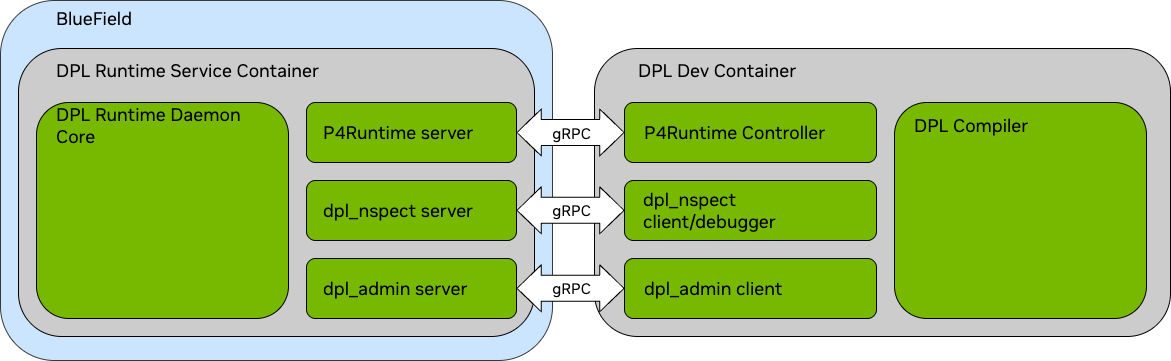
The DPL Runtime Service programs and manages the DPU / NIC datapath at runtime. It supports dynamic rule insertion, packet monitoring, and forwarding logic using both standard and proprietary APIs.
The service consists of the following core components:
|
Component |
Description |
|---|---|
|
Runtime core |
Manages requests from all interfaces and programs hardware resources |
|
P4Runtime server |
gRPC server implementing the P4Runtime 1.4.1 API for remote pipeline configuration and table control. |
|
Nspect server |
Provides runtime visibility and debugging through the |
|
Admin server |
Offers administrative and configuration control over the daemon via gRPC |
High-level system illustration:
Requirements
Supported Platforms
-
DPL is supported on the following BlueField SKUs:NVIDIA SKULegacy OPNPSIDDescription900-9D3B6-00CV-AA0N/AMT_0000000884BlueField-3 B3220 P-Series FHHL DPU; 200GbE (default mode) / NDR200 IB; Dual-port QSFP112; PCIe Gen5.0 x16 with x16 PCIe extension option; 16 Arm cores; 32GB on-board DDR; integrated BMC; Crypto Enabled900-9D3B6-00SV-AA0N/AMT_0000000965BlueField-3 B3220 P-Series FHHL DPU; 200GbE (default mode) / NDR200 IB; Dual-port QSFP112; PCIe Gen5.0 x16 with x16 PCIe extension option; 16 Arm cores; 32GB on-board DDR; integrated BMC; Crypto Disabled900-9D3B6-00CC-AA0N/AMT_0000001024BlueField-3 B3210 P-Series FHHL DPU; 100GbE (default mode) / HDR100 IB; Dual-port QSFP112; PCIe Gen5.0 x16 with x16 PCIe extension option; 16 Arm cores; 32GB on-board DDR; integrated BMC; Crypto Enabled900-9D3B6-00SC-AA0N/AMT_0000001025BlueField-3 B3210 P-Series FHHL DPU; 100GbE (default mode) / HDR100 IB; Dual-port QSFP112; PCIe Gen5.0 x16 with x16 PCIe extension option; 16 Arm cores; 32GB on-board DDR; integrated BMC; Crypto Disabled
-
These NVIDIA DPUs are supported with DOCA on the host
-
DPL is supported on the following NIC SKU:NVIDIA SKULegacy OPNPSIDDescription900-9X91Q-00CN-ST0N/A-NVIDIA ConnectX-9 C9240 HHHL SuperNIC, Dual-port 400GbE (default) / 400Gb/s IB, QSFP112, PCIe 6 x16 with x16 PCIe SocketDirect extension option, Crypto Enabled, Secure Boot Enabled, Tall bracket
Hardware Prerequisites
-
For DPU system requirements, see DPU's hardware user guide.
-
For SuperNIC system requirements, see adapter's user guide.
Software Prerequisites
DPU Software Prerequisites
|
Component |
Minimum Version |
|---|---|
|
Ubuntu OS |
24.04 |
|
DOCA BFB Bundle |
3.2.0+ |
|
DOCA Networking |
3.2.0+ |
|
Firmware |
32.47.1000+ |
Firmware is included in the BFB bundle available on the NVIDIA DOCA Downloads page. Use bfb-install to install the bundle. For example:
bfb-install --bfb bf-bundle-x.x.x-x_x.x_ubuntu-24.04_prod.bfb --rshim rshim0
SuperNIC Software Prerequisites
|
Component |
Minimum Version |
|---|---|
|
Ubuntu OS |
24.04 |
|
DOCA Networking |
3.2.0+ |
|
Firmware |
82.47.0000+ |
Firmware can be found on the NVIDIA DOCA Downloads page.
Helpful resources:
- DOCA Installation Guide for Linux
-
Setting Up DPU Management Access and Updating BlueField-Bundle
-
DOCA Container Deployment Guide
Firmware Settings
The following firmware configuration is required and applied by the dpl_system_setup.sh script documented at DPL Container Deployment:
FLEX_PARSER_PROFILE_ENABLE=4
PROG_PARSE_GRAPH=true
SRIOV_EN=1  # Required only if using VFs
To enable multi-port eSwitch mode, also set:
LAG_RESOURCE_ALLOCATION=1
Supported Port Forwarding
The following table lists the possible ingress and egress ports for a given packet that is processed by a BlueField (DPU mode) pipeline/SuperNIC pipeline:
|
Ingress Port |
Egress Port |
|||
|---|---|---|---|---|
|
Wire Port P0 |
|
|
|
|
|
Wire port P0 |
Allowed |
Allowed |
Allowed |
Allowed |
|
|
Allowed |
Disabled |
Allowed |
Allowed |
|
|
Allowed |
Allowed |
Disabled |
Allowed |
|
|
Allowed |
Allowed |
Allowed |
Disabled |
All forwarding combinations supported for SR-IOV VFs are also supported for scalable functions (SFs).
Deploying the DPL Runtime Service
Prerequisites
-
BlueField must be in DPU Mode.
-
SR-IOV or SFs must be enabled and created on the host.
-
DOCA must be installed on the host and BlueField.
-
Ensure
doca-rt-serviceconfiguration files are available. Refer to DPL Service Configuration for details.
Installation
Refer to the DPL Container Deployment for detailed steps on deploying the DPL Runtime Service container.
If the DPL Runtime Service container is to be deployed on the host, refer to DOCA Container Deployment Guide (DOCA Services for Host).
DPL Dev Container
The dpl-dev container provides essential developer tools for compiling, loading, and debugging DPL programs, including:
-
DPL Compiler
-
Nspect CLI
-
Admin CLI
-
DPL Debugger
-
Runtime Controller SDK
Refer to the DPL Installation Guide for installation instructions.
Proceeding with DPL
Once the dpl-rt-service is running and the dpl-dev container is installed, you can:
-
Compile your DPL programs. Refer to Compiling DPL Applications.
-
Load the compiled program into the runtime. Refer to Loading DPL Applications.
-
(Optional) Use DOCA Pipeline Language Developer Tools for debugging and verification.
Implementing Your Own P4Runtime Controller
Advanced users may implement their own controller to communicate with the DPL Runtime via P4Runtime 1.3.0 over gRPC (TCP port 9559).
Resources:
-
Protobuf definitions available at
p4lang/p4runtimeGitHub -
Local Path (container):
/opt/mellanox/third_party/dpl_rt_service/p4runtime/ -
Toolchain: Use standard
gRPC+protobuftoolchains (e.g., IN C++)
Last updated: