

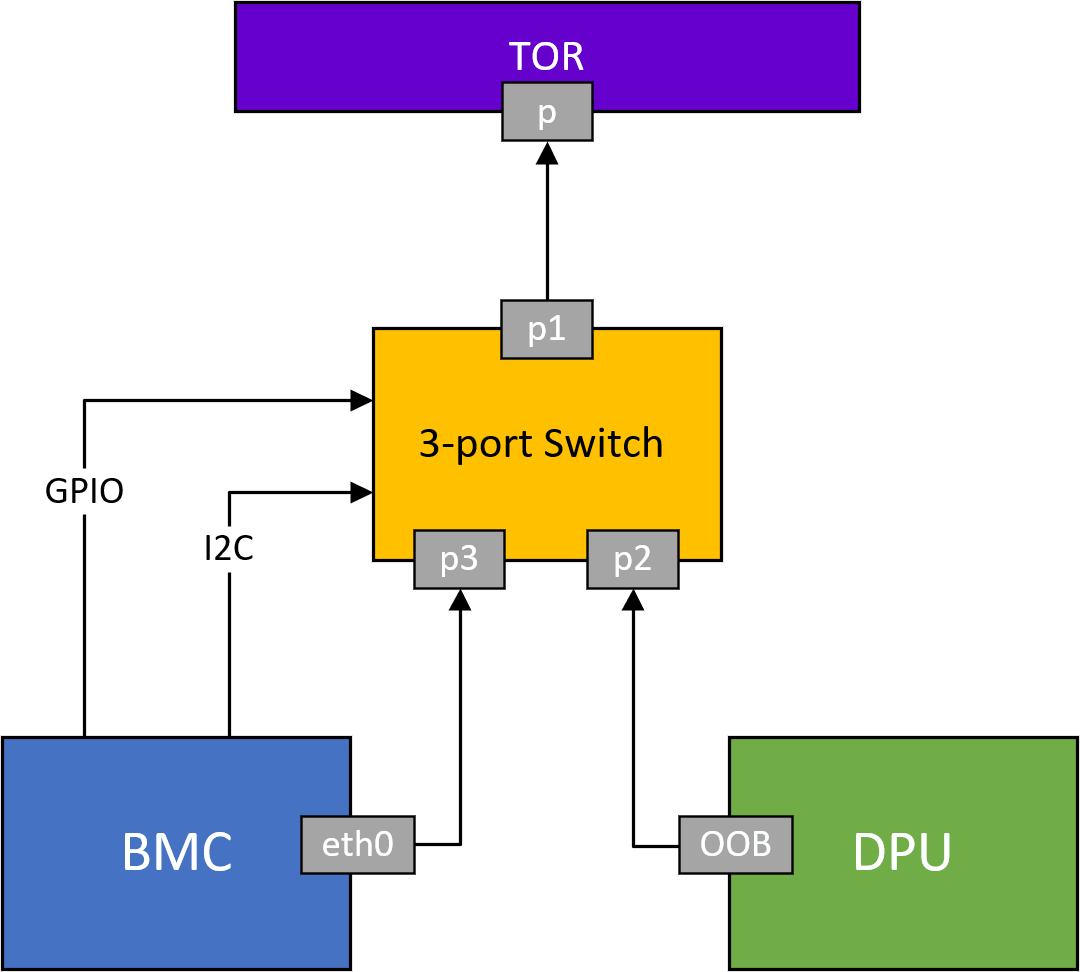
To enable both the BMC and the Arm on NVIDIA® BlueField® to access the out-of-band (OOB) network management interface, an L2, 3-port switch has been incorporated into the system. This switch acts as a bridge, connecting the RJ45 port (OOB), the BMC, and the Arm in BlueField. It is important to note that the switch is exclusively managed by BlueField's BMC through a dedicated I2C line and a GPIO signal that controls the switch's reset function.
3-Port Switch IPMI Commands
|
netfunc |
cmd |
data |
Description |
|---|---|---|---|
|
0x32 |
0x97 |
N/A |
Get 3-port switch ports mode. On success, it returns:
|
|
0x32 |
0x98 |
|
Set 3-port switch ports mode. Note:
|
|
0x32 |
0xA1 |
0x3 |
Reset on-board 3-port switch |
In all these use cases, the internal pathway connecting BlueField and the BMC remains operational. This enables communication between the BMC and BlueField over the internal network.
Example for disabling the OOB network of the BlueField Arm:
#bmc> ipmitool raw 0x32 0x98 0x1
3-Port Switch Redfish Commands
Get 3-port Switch Ports Mode
curl -k -u root:'<password>' -H 'Content-Type: application/json' -X GET https://<bmc_ip>/redfish/v1/Systems/Bluefield/Oem/Nvidia/Switch
Example output:
{
  "TorSwitchMode": {
    "BmcOobEnabled": true,
    "DpuOobEnabled": true
  }
}
Where:
-
BmcOobEnabled– Enable the BMC to access the out-of-band network -
DpuOobEnabled– Enable the BlueField to access the out-of-band network
Set 3-port Switch Port Mode
curl -k -u root:'<password>' -H 'Content-Type: application/json' -X PATCH -d '{"TorSwitchMode": {"BmcOobEnabled": <Port State>, "DpuOobEnabled": <Port State>}}' https://<bmc_ip>/redfish/v1/Systems/Bluefield/Oem/Nvidia/Switch
Where Port State:
-
True – Enable the port to access the out-of-band network
-
False – Disable the port to access the out-of-band network
The internal pathway connecting the BMC and RJ45 is not allowed to be disabled using a Redfish command. Therefore, the parameter BmcOobEnabled should be set as true when setting 3-port switch ports mode, otherwise the Redfish command would return an error.
For the patch command request, both BmcOobEnabled and DpuOobEnabled must be set.
The following is an example of how to set only BMC is allowed access to RJ45:
curl -k -u root:'<password>' -H 'Content-Type: application/json' -X PATCH -d '{"TorSwitchMode": {"BmcOobEnabled": true, "DpuOobEnabled": false}}' https://<bmc_ip>/redfish/v1/Systems/Bluefield/Oem/Nvidia/Switch
Example output:
{
  "@Message.ExtendedInfo": [
    {
      "@odata.type": "#Message.v1_1_1.Message",
      "Message": "The request completed successfully.",
      "MessageArgs": [],
      "MessageId": "Base.1.15.0.Success",
      "MessageSeverity": "OK",
      "Resolution": "None"
    }
  ]
}
Reset On-board 3-port Switch
curl -k -u root:'<password>' -H 'Content-Type: application/json' -X POST https://<bmc_ip>/redfish/v1/Systems/Bluefield/Oem/Nvidia/Switch.Reset
Example output:
{
  "@Message.ExtendedInfo": [
    {
      "@odata.type": "#Message.v1_1_1.Message",
      "Message": "The request completed successfully.",
      "MessageArgs": [],
      "MessageId": "Base.1.15.0.Success",
      "MessageSeverity": "OK",
      "Resolution": "None"
    }
  ]
}
Last updated: