

The NVIDIA® BlueField® BMC is capable of establishing a designated VLAN interface to forward IPMI or HTTPS traffic from an external source to a specific IP address within that VLAN. Users can set a specific IP address for their server BMC, which allows for the management of their server BMC via the BlueField BMC.
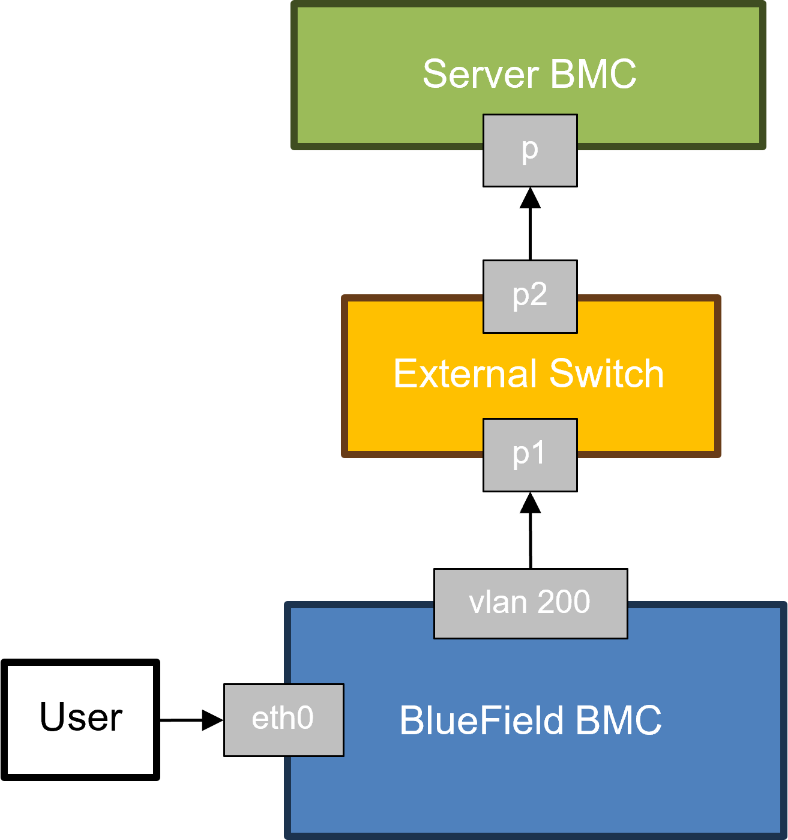
To enable this feature, users must configure their network according to the following:
-
Assign the remote server's BMC IP address as 192.168.1.10 to enable traffic forwarding
-
The VLAN ID for the guest tunnel is 200, thus the external switch linked to the BlueField RJ45 port (OOB) must be set up to accept packets tagged with VLAN 200
The BlueField BMC currently supports the following ports, which act as source ports to accept messages sent by users and forward them to the server BMC within the guest tunnel:
-
8443 – Port on BlueField BMC for accepting HTTPS messages
-
8623 – Port on BlueField BMC for accepting IPMI messages
The guest tunnel is intended solely for debugging purposes. Users should refrain from sending large amounts of network traffic through the guest tunnel, as it may impact the performance of the BlueField BMC.
Querying Guest Tunnel Status
|
netfunc |
cmd |
data |
Notes |
|---|---|---|---|
|
0x3E |
0xFD |
0x0 |
Displays the current configuration:
|
Disabling Guest Tunnel
|
netfunc |
cmd |
data |
Notes |
|---|---|---|---|
|
0x3E |
0xFD |
0x1 |
On success, returns:
|
Enabling Guest Tunnel
|
netfunc |
cmd |
data |
Notes |
|---|---|---|---|
|
0x3E |
0xFD |
0x2 |
On success, returns:
|
Example for enabling the guest tunnel on BlueField BMC:
#bmc> ipmitool raw 0x3e 0xfd 0x2
Example for sending the Redfish command to the guest tunnel:
#localhost> curl -k -u <bluefield_bmc_username>:<bluefield_bmc_password> -H 'content-type: application/json' -X GET https://<bluefield_bmc_ip>:8443/redfish/v1/Systems/Bluefield
Example for sending the IPMI command to the guest tunnel:
#localhost> ipmitool -p 8623 -C 17 -I lanplus -H <bluefield_bmc_ip> -U <bluefield_bmc_username> -P <bluefield_bmc_password> mc info
After receiving the responses from the Redfish and IPMI commands, the content of these responses originates from the server BMC, not the BlueField BMC.
Last updated: