

It is possible to dynamically configure rsyslog servers to receive system event log (SEL) messages and/or the BlueField SoC UART console printout (SOL) messages.
SEL and SOL Message Reception Format
SEL messages are received on the rsyslog server in the following format:
<Timestamp> <host> <EntryID-hex> | <Date> | <Time> | <Sensor-Type> | <Event-Type> | <Event-Direction> | <Description>
For example:
"2024-06-18T11:05:45.926095+03:00 ldev-platform-12-244.exam 75 | 06/18/24 | 08:05:45 UTC | Voltage #0x08 | Lower Non-critical going low | Asserted"
SOL messages are received on the rsyslog server exactly as they appear in the BlueField console, including a timestamp and the hostname:
<Timestamp> <host> <message>
For example:
"2024-06-18T15:16:28.240538+03:00 ldev-platform-12-244 systemd[1]: Starting RDMA Node Description Daemon"
$EscapeControlCharactersOnReceive and $Escape8BitCharactersOnReceive should be turned off on the rsyslog server side.
Rsyslog Servers Configurations
The rsyslog configurations define data streams. Each of them includes:
-
Configuration identifier – An index (ranging from 0x00 to 0x09) AND a log type (SEL 0x01 or SOL 0x03)
-
Status – Enable/disable
-
Transport protocol – TCP/UDP
-
Network protocol – IPv4/IPv6
-
Server address
-
Port
Note that configurations with the same index but different log types are considered to be different configurations. For example, 0x01-SOL and 0x01-SEL are distinct configurations.
The following diagram illustrates an example of three rsyslog servers receiving four data streams:
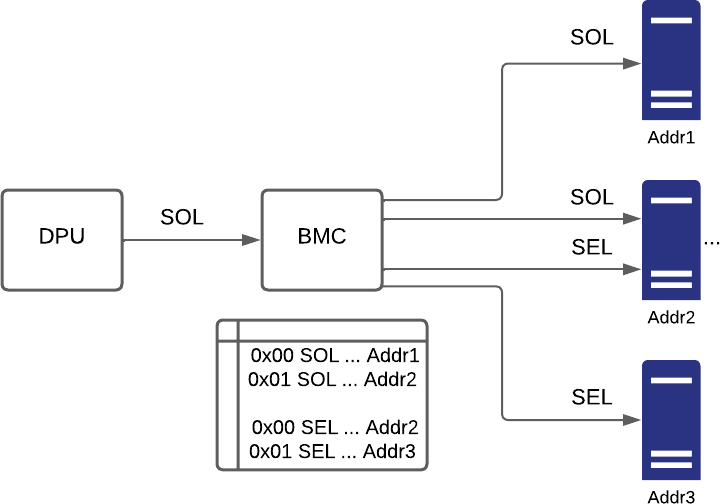
This setup requires four configurations:
-
Configuration 0x00-SOL – Server1 receives SOL
-
Configuration 0x01-SOL – Server2 receives SOL
-
Configuration 0x00-SEL – Server2 receives SEL
-
Configuration 0x01-SEL – Server3 receives SEL
The BMC rsyslog configuration files located under /etc/rsyslog.d are automatically generated and are read-only. These files can only be modified using the IPMI commands listed later on this page.
IPMI Commands
The following table lists the IPMI commands for setting and getting rsyslog servers configurations:
|
netfunc |
cmd |
data |
Description |
|---|---|---|---|
|
|
|
|
Get rsyslog status – Displays information of the configured rsyslog server The request contains the index and the log type of the rsyslog server configuration, and it is 2 bytes long. The response contains the following information:
The response is 12 bytes long for IPv4 and 24 bytes long for IPv6. |
|
|
|
|
Set rsyslog status –
The command contains the following information:
The command data is 11 bytes long for of IPv4 and 23 bytes log for IPv6. The response contains the completion code and is 1 byte long. The success completion code does not appear in IPMI textual response. |
Usage Examples
Setting Rsyslog Status of Two Configurations
The following commands create or modify two different rsyslog configurations with Index 0x00 and LogTypes SEL/SOL :
netfunc: 0x32, cmd: 0xD4, Indx: 0x00, LogType: 0x01(SEL) / 0x03(SOL), status: 0x01 (Enabled), TP: 0x01 (TCP), NP: 0x00 (IPv4) Address: 0x0A 0xED 0x33 0xF4 (10.237.51.244) Port: 0xFA 0x13 (5114)
root@dpu-bmc:~# ipmitool raw 0x32 0xD4 0x00 0x01 0x01 0x01 0x00 0x0A 0xED 0x33 0xF4 0xFA 0x13
root@dpu-bmc:~# ipmitool raw 0x32 0xD4 0x00 0x03 0x01 0x01 0x00 0x0a 0xed 0x33 0xf4 0xfa 0x13
Now the same rsyslog server receives both SEL and SOL messages.
The following command disables the rsyslog configurations with Index 0x00 and LogTypes SOL:
netfunc: 0x32, cmd: 0xD4, Indx: 0x00, LogType: 0x03 (SOL), status: 0x00 (Disabled), TP: 0x01 (TCP), NP: 0x00 (IPv4) Address: 0x0A 0xED 0x33 0xF4 (10.237.51.244) Port: 0xFA 0x13 (5114)
root@dpu-bmc:~# ipmitool raw 0x32 0xD4 0x00 0x03 0x00 0x01 0x00 0x0A 0xED 0x33 0xF4 0xFA 0x13
Now the rsyslog server receives only SEL messages as the SOL configuration is disabled:
netfunc: 0x32, cmd: 0xD3, Indx: 0x00, LogType: 0x01(SEL) / 0x03(SOL)
root@dpu-bmc:~# ipmitool raw 0x32 0xD3 0x00 0x01
 00 01 01 01 00 0a ed 33 f4 fa 13
root@dpu-bmc:~# ipmitool raw 0x32 0xD3 0x00 0x03
 00 03 00 01 00 0a ed 33 f4 fa 13
Setting Rsyslog Status with IPv6 Address
The following command creates or modified an rsyslog configuration with an IPv6 address:
netfunc: 0x32, cmd: 0xD4, Indx: 0x07, LogType: 0x01 (SEL), status: 0x01 (Enabled), TP: 0x01 (TCP), NP: 0x01 (IPv6) Address: 0xFD 0xFD 0xFD 0xFD 0x00 0x10 0x02 0x37 0x02 0x50 0x56 0xFF 0xFE 0x30 0x33 0xF4 (FDFD:FDFD:10:237:250:56FF:FE30:33F4) Port: 0xFA 0x13 (5114)
root@dpu-bmc:~# ipmitool raw 0x32 0xD4 0x07 0x01 0x01 0x01 0x01 0xfd 0xfd 0xfd 0xfd 0x00 0x10 0x02 0x37 0x02 0x50 0x56 0xff 0xfe 0x30 0x33 0xf4 0xfa 0x13
Setting Rsyslog Status with Invalid Argument
The following command attempts to create an rsyslog server configuration with an invalid index 0x0A (Valid indexes are 0x00-0x09):
netfunc: 0x32, cmd: 0xD4, Indx: 0x0A, LogType: 0x01 (SEL), status: 0x01 (Enabled), TP: 0x01 (TCP), NP: 0x00 (IPv4) Address: 0x0A 0xED 0x33 0xF4 (10.237.51.244) Port: 0xFA 0x13 (5114)
root@dpu-bmc:~# ipmitool raw 0x32 0xD4 0x0A 0x01 0x01 0x01 0x00 0x0A 0xED 0x33 0xF4 0xFA 0x13
Unable to send RAW command (channel=0x0 netfn=0x32 lun=0x0 cmd=0xd4 rsp=0xcc): Invalid data field in request
Getting Rsyslog Status Information
The following command displays the information of the rsyslog configuration with index 0 and LogType SEL :
netfunc: 0x32, cmd: 0xD3, Indx: 0x00, LogType: 0x01(SEL)
root@dpu-bmc:~# ipmitool raw 0x32 0xD3 0x00 0x01
 00 01 01 01 00 0a ed 33 f4 fa 13
Getting Non-existing Rsyslog Server Information
The following command attempts to receive an information of a non-existing rsyslog configuration with index 0x06 and LogType SEL :
netfunc: 0x32, cmd: 0xD3, Indx: 0x06, LogType: 0x01(SEL)
root@dpu-bmc:~# ipmitool raw 0x32 0xD3 0x06 0x01
Unable to send RAW command (channel=0x0 netfn=0x32 lun=0x0 cmd=0xd3 rsp=0xcc): Invalid data field in request
Last updated: