

Network Drivers
BlueField Windows support from the host-side is facilitated by the WinOF-2 driver. For more information on WinOF-2 (including installation), please refer to the WinOF-2 Documentation.
RShim Drivers
RShim drivers provide functionalities like resetting the Arm cores, pushing a bootstream image, as well as some networking and console functionalities. For more information on RShim driver usage, please refer to WinOF-2 Documentation > Features Overview and Configuration > RShim Drivers and Usage.
Accessing BlueField DPU From Host
The BlueField DPU can be accessed via PuTTY or any other network utility application to communicate via virtual COM or virtual Ethernet adapter. To use COM:
-
Open Putty.
-
Change connection type to Serial.
-
Run the following command in order to know what to set the "Serial line" field to:
C:\Users\username\Desktop> reg query HKLM\HARDWARE\DEVICEMAP\SERIALCOMM | findstr MlxRshim
	\MlxRshim\COM3		REG-SZ		COM3
In this case use COM3. This name can also be found via Device Manager under "Ports (Com & LPT)".
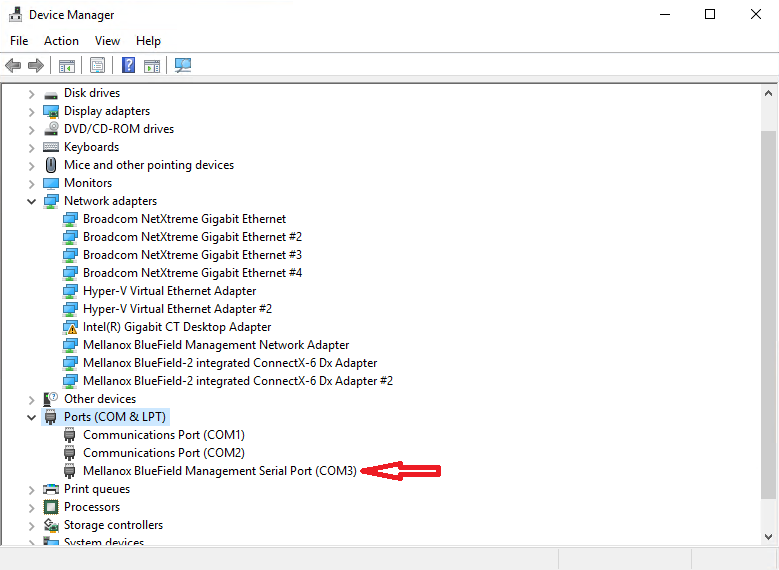
-
Press Open and hit Enter.
Unknown Attachment
To access via BlueField management network adapter, configure an IP address as shown in the example below and run a ping test to confirm configuration.
Unknown Attachment
RShim Ethernet Driver
The device does not support any type of stateful or stateless offloads. This is indicated to the Operating System accordingly when the driver loads. The MAC address is a pre-defined MAC address (CA-FE-01-CA-FE-02). The following registry keys can be used to change basic settings such as MAC address.
|
Registry Name |
Description |
Valid Values |
|---|---|---|
|
HKLM\SYSTEM\CurrentControlSet\Control\Class\{4d36e972-e325-11ce-bfc1-08002be10318}\<nn>\*JumboPacket |
The size, in bytes, of the largest supported Jumbo Packet (an Ethernet frame that is greater than 1514 bytes) that the hardware can support. |
1514 (default) - 2048 |
|
HKLM\SYSTEM\CurrentControlSet\Control\Class\{4d36e972-e325-11ce-bfc1-08002be10318}\<nn>\*NetworkAddress |
The network address of the device. The format for a MAC address is: XX-XX-XX-XX-XX-XX. |
CA-FE-01-CA-FE-02 (default) |
|
HKLM\SYSTEM\CurrentControlSet\Control\Class\{4d36e972-e325-11ce-bfc1-08002be10318}\<nn>\ReceiveBuffers |
The number of receive descriptors used by the miniport adapter. |
16 – 64 (Default) |
For instructions on how to find interface index in the registry (nn), please refer to section "Finding the Index Value of the Network Interface" in the WinOF-2 User Manual under Features Overview and Configuration > Configuring the Driver Registry Keys.
Last updated: