

Table
All tables in the tool contain a general functionality, this chapter will describe them.
Filter
The tables provide advanced search capabilities, offering users two primary ways to utilize the search mechanism:
-
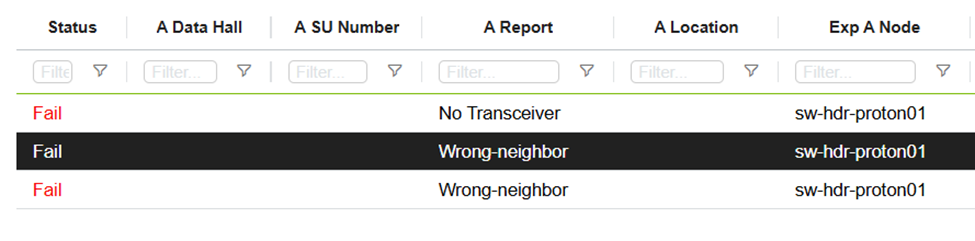
Search Input Field Below the Table Name:
A straightforward search field located beneath the table name allows users to quickly filter table content based on their input and selected filter type.
-
Search Menu via the Column Search Icon:
Clicking the search icon beside the search input opens a dedicated search menu. This menu provides additional options and customization for filtering data.
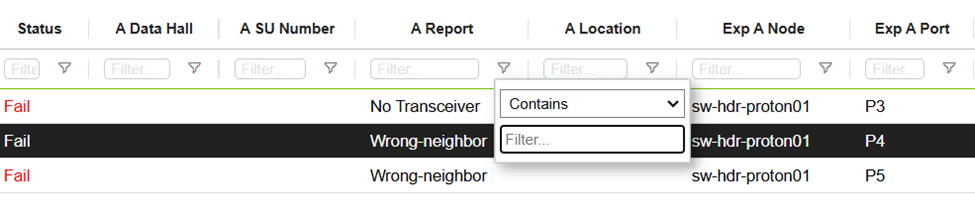
Users can change the search type only through the search menu accessible via the column search icon.
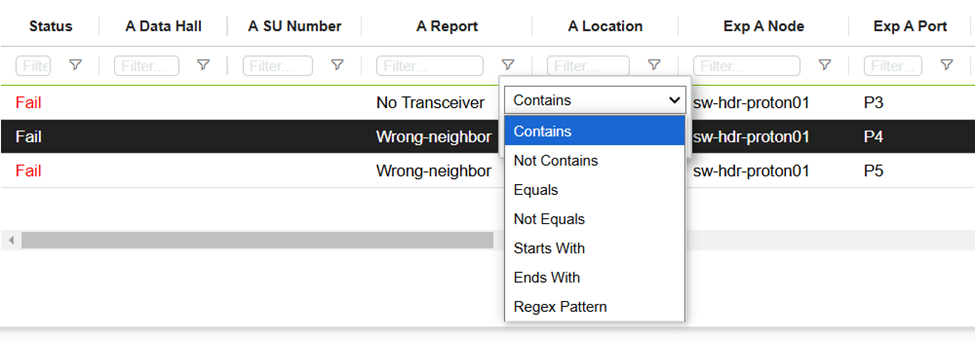
Supported Filter Types:
The table supports the following types of filters to refine search results:
-
Contains: Finds records that include the specified text.
-
Does Not Contain: Excludes records that include the specified text.
-
Equals: Displays records that exactly match the specified value.
-
Does Not Equal: Excludes records that exactly match the specified value.
-
Starts With: Finds records that begin with the specified text.
-
Ends With: Finds records that end with the specified text.
-
Regular Expression (Regex) Pattern: Enables advanced searches using custom regular expressions for precise filtering.
Last updated: