

InfiniBand and Ethernet Switches
InfiniBand and Ethernet switches have one MST device for which Amber file is collected. Following command can be used to collect amber file:
-
Find the MST device by running the command:
# sudo mst status -v -
Run mlxlink command to collect the amber:
Example:# mlxlink -d <mst device name> --amber_collect <path to save the amber file>
mlxlink –d /dev/mst/mt54000_pciconf0 –amber_collect /tmp/amber.csv
XDR Switches
On XDR switches there are four devices - one per ASIC.
-
To get the amber for all the ASICs, create a planarized device. To do so, run the following command:
Expected output:# sudo mst start --planarized_device_pci
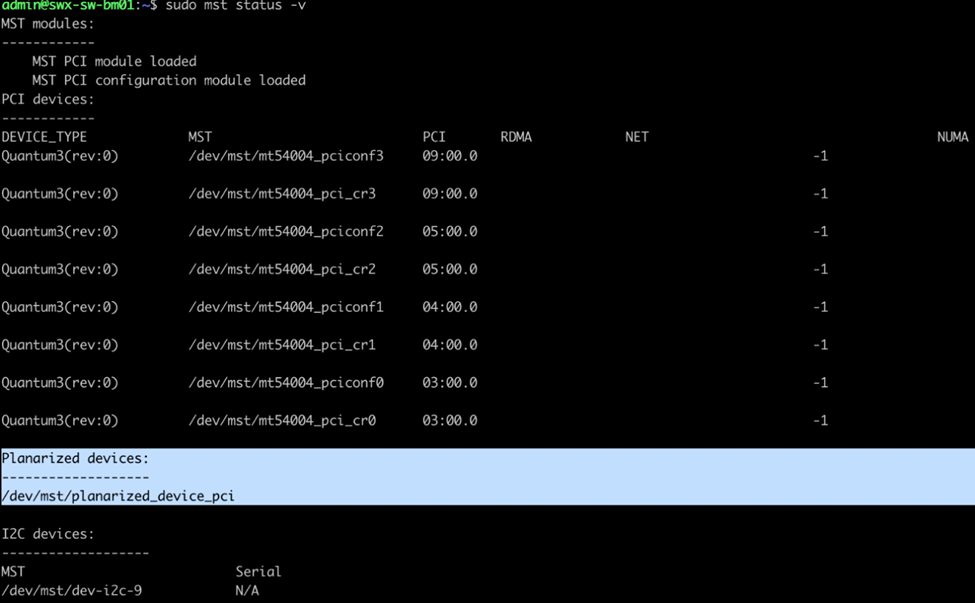
-
Run mlxlink command for the planarized device:
Example:sudo mlxlink -d /dev/mst/planarized_device_pci --amber_collect <path to save the amber file>
This command creates four amber files – one per ASIC and labels the file name as:sudo mlxlink -d /dev/mst/planarized_device_pci --amber_collect /tmp/amber.csv
amber_ASIC_0.csv, amber_ASIC_1.csv, amber_ASIC_2.csv, amber_ASIC_3.csv
Each amber file will have information for a particular split port.
Last updated: