

This document provides a file compression implementation on top of the NVIDIA® BlueField® DPU.
Introduction
The file compression application exhibits how to use the DOCA Compress API to compress and decompress data using hardware acceleration as well as sending and receiving it using the DOCA Comm Channel API.
The application's logic includes both a client and a server:
-
Client side – the application opens a file, compresses it, and sends the checksum of the source file with the compressed data to the server
-
Server side – the application saves the received file in a buffer, decompresses it, and compares the received checksum with the calculated one
System Design
The file compression application client runs on the host and the server runs on the DPU.
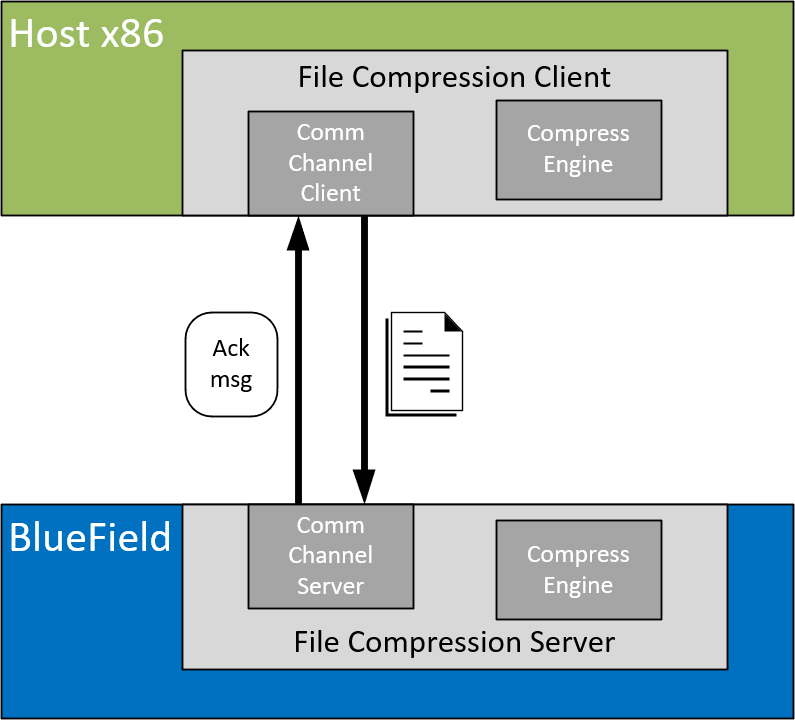
Application Architecture
The file compression application runs on top of the DOCA Comm Channel API to send and receive the file from the host and to the DPU.
-
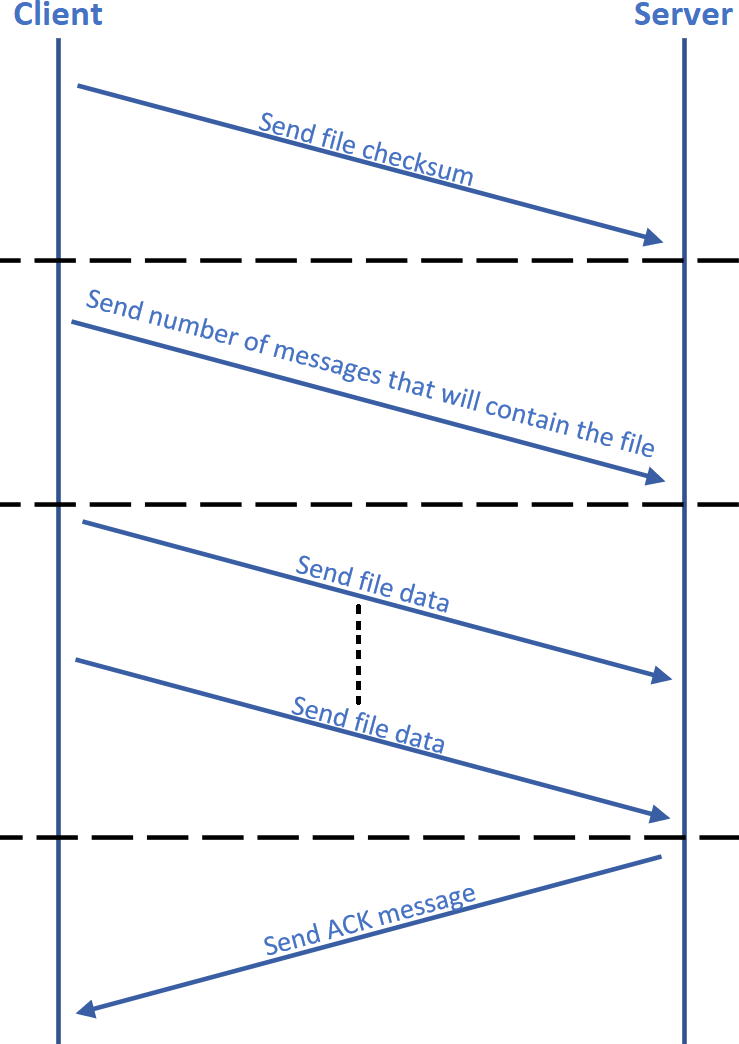
Connection is established on both sides by DOCA Comm Channel API.
-
Client compresses the data:
-
When compress engine is available – submits compress job with DOCA Compress API and sends the result to the server
-
When compress engine is unavailable – compresses the data in software
-
-
Client sends the number of messages needed to send the compressed content of the file.
-
Client sends data segments in size of up to 4080 bytes.
-
Server saves the received data in a buffer and submits a decompress job.
-
Server sends an ACK message to the client when all parts of the file are received successfully.
-
Server compares the received checksum to the calculated checksum.
-
Server writes the decompressed data to an output file.
DOCA Libraries
This application leverages the following DOCA libraries:
Refer to their respective programming guide for more information.
Running the Application
Installation
Refer to the NVIDIA DOCA Installation Guide for Linux for details on how to install BlueField-related software.
Application Execution
The file compression application is provided in both source and binary forms. The binary is located under /opt/mellanox/doca/applications/file_compression/bin/doca_file_compression.
-
Application usage instructions:
Usage: doca_file_compression [DOCA Flags] [Program Flags]

DOCA Flags:
  -h, --help                        Print a help synopsis
  -v, --version                     Print program version information
  -l, --log-level                   Set the (numeric) log level for the program <10=DISABLE, 20=CRITICAL, 30=ERROR, 40=WARNING, 50=INFO, 60=DEBUG, 70=TRACE>
  --sdk-log-level                   Set the SDK (numeric) log level for the program <10=DISABLE, 20=CRITICAL, 30=ERROR, 40=WARNING, 50=INFO, 60=DEBUG, 70=TRACE>
  -j, --json <path>                 Parse all command flags from an input json file

Program Flags:
  -p, --pci-addr                    DOCA Comm Channel device PCI address
  -r, --rep-pci                     DOCA Comm Channel device representor PCI address
  -f, --file                        File to send by the client / File to write by the server
  -t, --timeout                     Application timeout for receiving file content messages, default is 5 sec
This usage printout can be printed to the command line using the
-h(or--help) options:/opt/mellanox/doca/applications/file_compression/bin/doca_file_compression -h
For additional information, refer to section "NVIDIA DOCA File Compression Application Guide | id (2.6.0)NVIDIADOCAFileCompressionApplicationGuide CommandLineFlags".
-
CLI example for running the application on BlueField:
/opt/mellanox/doca/applications/file_compression/bin/doca_file_compression -p 03:00.0 -r 3b:00.0 -f received.txt
Both the DOCA Comm Channel device PCIe address (
03:00.0) and the DOCA Comm Channel device representor PCIe address (3b:00.0) should match the addresses of the desired PCIe devices.
-
CLI example for running the application on the host:
/opt/mellanox/doca/applications/file_compression/bin/doca_file_compression -p 3b:00.0 -f send.txt
The DOCA Comm Channel device PCIe address (
3b:00.0) should match the address of the desired PCIe device.
-
The application also supports a JSON-based deployment mode, in which all command-line arguments are provided through a JSON file:
doca_file_compression --json [json_file]For example:
cd /opt/mellanox/doca/applications/file_compression/bin
./doca_file_compression --json ./file_compression_params.json
Before execution, ensure that the used JSON file contains the correct configuration parameters, and especially the PCIe addresses necessary for the deployment.
Command Line Flags
|
Flag Type |
Short Flag |
Long Flag/JSON Key |
Description |
JSON Content |
|---|---|---|---|---|
|
General flags |
|
|
Prints a help synopsis |
N/A |
|
|
|
Prints program version information |
N/A |
|
|
|
|
Set the log level for the application:
|
|
|
|
N/A |
|
Sets the log level for the program:
|
|
|
|
|
|
Parse all command flags from an input JSON file |
N/A |
|
|
Program flags |
|
|
For client – path to the file to be sent For server – path to write the file into This is a mandatory flag.
|
|
|
|
|
Comm Channel DOCA device PCIe address This is a mandatory flag.
|
|
|
|
|
|
Comm Channel DOCA device representor PCIe address This flag is mandatory only on the DPU.
|
|
Refer to DOCA Arg Parser for more information regarding the supported flags and execution modes.
Troubleshooting
Refer to the NVIDIA DOCA Troubleshooting Guide for any issue encountered with the installation or execution of the DOCA applications.
Recompiling the Application
The sources of the application can be found under the /opt/mellanox/doca/applications/file_compression/src directory.
Recompiling All Applications
The applications are all defined under a single meson project, so the default compilation recompiles all the DOCA applications.
To build all the applications together, run:
cd /opt/mellanox/doca/applications/
meson /tmp/build
ninja -C /tmp/build
doca_file_compression is created under /tmp/build/file_compression/src/.
Recompiling File Compression Application Only
To directly build only the file compression application:
cd /opt/mellanox/doca/applications/
meson /tmp/build -Denable_all_applications=false -Denable_file_compression=true
ninja -C /tmp/build
doca_file_compression is created under /tmp/build/file_compression/src/.
Alternatively, the user may set the desired flags in the meson_options.txt file instead of providing them in the compilation command line:
-
Edit the following flags in
/opt/mellanox/doca/applications/meson_options.txt:-
Set
enable_all_applicationstofalse -
Set
enable_file_compressiontotrue
-
-
Run the following compilation commands:
cd /opt/mellanox/doca/applications/
meson /tmp/build
ninja -C /tmp/build
doca_file_compressionis created under/tmp/build/file_compression/src/.
Troubleshooting
Refer to the NVIDIA DOCA Troubleshooting Guide for any issue encountered with the compilation of the application.
Application Code Flow
-
Parse application argument.
-
Initialize arg parser resources and register DOCA general parameters.
doca_argp_init();
-
Register file compression application parameters.
register_file_compression_params();
-
Parse the arguments.
doca_argp_start();-
Parse app parameters.
-
-
-
Set endpoint attributes.
set_endpoint_properties();-
Set maximum message size of 4080 bytes.
-
Set maximum number of messages allowed.
-
-
Create comm channel endpoint.
doca_comm_channel_ep_create();-
Create endpoint for client/server.
-
-
Run client/server main logic.
file_compression_client/server();
-
Clean up the file compression application.
file_compression_cleanup();-
Free all application resources.
-
-
Arg parser destroy.
doca_argp_destroy()
References
-
/opt/mellanox/doca/applications/file_compression/src -
/opt/mellanox/doca/applications/file_compression/bin/file_compression_params.json
Last updated: