

This guide provides an overview and configuration instructions for DOCA Flow Tune Server API.
Introduction
DOCA Flow Tune Server (TS), DOCA Flow subcomponent, exposes an API to collect predefined internal key performance indicators (KPIs) and pipeline visualization of a running DOCA Flow application.
Supported port KPIs:
-
Total add operations across all queues
-
Total update operations across all queues
-
Total remove operations across all queues
-
Pending operations number across all queues
-
Number of
NO_WAITflag operations across all queues -
Number of shared resources and counters
-
Number of pipes
Supported application KPIs:
-
Number of ports
-
Number of queues
-
Queues depth
Pipeline information is saved to a JSON file to simplify its structure. Visualization is supported for the following DOCA Flow pipes:
-
Basic
-
Control
Each pipe contains the following fields:
-
Type
-
Name
-
Domain
-
Is root
-
Match
-
Match mask
-
FWD
-
FWD miss
Supported entry information:
-
Basic
-
FWD
-
-
Control
-
FWD
-
Match
-
Match mask
-
Priority
-
Prerequisites
DOCA Flow Tune Server API is available only by using the DOCA Flow and DOCA Flow Tune Server trace libraries.
For more detailed information, refer to section "DOCA Flow Debug and Trace" under DOCA Flow.
API
For more detailed information on DOCA Flow API, refer to NVIDIA DOCA Library APIs.
The following subsections provide additional details about the library API.
enum doca_flow_tune_server_kpi_type
DOCA Flow TS KPI flags.
|
Flag |
Description |
|---|---|
|
|
Retrieve port number |
|
|
Retrieve queue number |
|
|
Retrieve queue depth |
|
|
Retrieve shared resource and counter numbers |
|
|
Retrieve number of pipes per port |
|
|
Retrieve entry add operations per port |
|
|
Retrieve entry update operations per port |
|
|
Retrieve entry remove operations per port |
|
|
Retrieve entry pending operations per port |
|
|
Retrieve entry |
struct doca_flow_tune_server_shared_resources_kpi_res
Holds the number of each shared resources and counters per port.
|
Field |
Description |
|---|---|
|
|
Number of meters |
|
|
Number of counters |
|
|
Number of RSS |
|
|
Number of mirrors |
|
|
Number of PSP |
|
|
Number of encap |
|
|
Number of decap |
struct doca_flow_tune_server_kpi_res
Holds the KPI result.
This structure is required when calling doca_flow_tune_server_get_kpi or doca_flow_tune_server_get_port_kpi.
|
Field |
Description |
|---|---|
|
|
KPI result type |
|
|
Shared resource result values |
|
|
Result value |
doca_flow_tune_server_init
Initializes DOCA Flow Tune Server internal structures.
doca_error_t doca_flow_tune_server_init(void);
doca_flow_tune_server_destroy
Destroys DOCA Flow Tune Server internal structures.
void doca_flow_tune_server_destroy(void);
doca_flow_tune_server_query_pipe_line
Queries and dumps pipeline info for all ports to a JSON file pointed by fp.
doca_error_t doca_flow_tune_server_query_pipe_line(FILE *fp);
doca_flow_tune_server_get_port_ids
Retrieves ports identification numbers.
doca_error_t doca_flow_tune_server_get_port_ids(uint16_t *port_id_arr, uint16_t port_id_arr_len, uint16_t *nr_ports);
doca_flow_tune_server_get_kpi
Retrieves application scope KPI.
doca_error_t doca_flow_tune_server_get_kpi(enum doca_flow_tune_server_kpi_type kpi_type,
                       struct doca_flow_tune_server_kpi_res *res)
doca_flow_tune_server_get_port_kpi
Retrieves port scope KPI.
doca_error_t doca_flow_tune_server_get_port_kpi(uint16_t port_id,
                        enum doca_flow_tune_server_kpi_type kpi_type,
                        struct doca_flow_tune_server_kpi_res *res);
DOCA Flow Tune Server Samples
This section describes DOCA Flow Tune Server samples.
The samples illustrate how to use the library API to retrieve KPIs or save pipeline information into a JSON file.
Running the Samples
-
Refer to the following documents:
-
NVIDIA DOCA Installation Guide for Linux for details on how to install BlueField-related software.
-
NVIDIA DOCA Troubleshooting Guide for any issue you may encounter with the installation, compilation, or execution of DOCA samples.
-
-
To build a given sample:
cd /opt/mellanox/doca/samples/doca_flow/flow_tune_server_dump_pipeline
meson /tmp/build
ninja -C /tmp/build
The binary
doca_flow_tune_server_dump_pipelineis created under/tmp/build/samples/.
-
Sample (e.g.,
doca_flow_tune_server_dump_pipeline) usage:Usage: doca_<sample_name> [DOCA Flags] [Program Flags] DOCA Flags: -h, --help Print a help synopsis -v, --version Print program version information -l, --log-level Set the (numeric) log level for the program <10=DISABLE, 20=CRITICAL, 30=ERROR, 40=WARNING, 50=INFO, 60=DEBUG, 70=TRACE> --sdk-log-level Set the SDK (numeric) log level for the program <10=DISABLE, 20=CRITICAL, 30=ERROR, 40=WARNING, 50=INFO, 60=DEBUG, 70=TRACE> -j, --json <path> Parse all command flags from an input json file
-
For additional information per sample, use the
-hoption:/tmp/build/samples/<sample_name> -h
-
The following is a CLI example for running the samples:
Bash/tmp/build/doca_<sample_name> -a auxiliary:mlx5_core.sf.2,dv_flow_en=2 -a auxiliary:mlx5_core.sf.3,dv_flow_en=2 -- -l 60
Samples
Flow Tune Server KPI
This sample illustrates how to use DOCA Flow Tune Server API to retrieve KPIs.
The sample logic includes:
-
Initializing DOCA Flow by indicating
mode_args="vnf,hws"in thedoca_flow_cfgstruct. -
Starting a single DOCA Flow port.
-
Initializing DOCA Flow server using the
doca_flow_tune_server_initfunction. This must be done after calling thedoca_flow_port_startfunction (or theinit_doca_flow_portshelper function). -
Querying existing port IDs using the
doca_flow_tune_server_get_port_idsfunction. -
Querying application level KPIs using
doca_flow_tune_server_get_kpifunction. The following KPI are read:-
Number of queues
-
Queue depth
-
-
KPIs per port on which the basic pipe is created:
-
Add operation entries.
-
-
Adding 20 entries followed by a second call to query entries add operations.
Reference:
-
/opt/mellanox/doca/samples/doca_flow/flow_tune_server_kpi/flow_tune_server_kpi_sample.c -
/opt/mellanox/doca/samples/doca_flow/flow_tune_server_kpi/flow_tune_server_kpi_main.c -
/opt/mellanox/doca/samples/doca_flow/flow_tune_server_kpi/meson.build
Flow Tune Server Dump Pipeline
This sample illustrates how to use DOCA Flow Tune Server API to dump pipeline information into a JSON file.
The sample logic includes:
-
Initializing DOCA Flow by indicating
mode_args="vnf,hws"in thedoca_flow_cfgstruct. -
Starting two DOCA Flow ports.
-
Initializing DOCA Flow server using
doca_flow_tune_server_initfunction.This must be done after calling
init_foca_flow_portsfunction.
-
Opening a file called
sample_pipeline.jsonfor writing. -
For each port:
-
Creating a pipe to drop all traffic.
-
Creating a pipe to hairpin traffic from port 0 to port 1
-
Creating FWD pipe to forward traffic based on 5-tuple.
-
Adding two entries to FWD pipe, each entry with different 5-tuple.
-
Creating a control pipe and adding the FWD pipe as an entry.
-
-
Dumping the pipeline information into a file.
Reference:
-
/opt/mellanox/doca/samples/doca_flow/flow_tune_server_dump_pipeline/flow_tune_server_dump_pipeline_sample.c -
/opt/mellanox/doca/samples/doca_flow/flow_tune_server_dump_pipeline/flow_tune_server_dump_pipeline_main.c -
/opt/mellanox/doca/samples/doca_flow/flow_tune_server_dump_pipeline/meson.build
Flow Visualization
Once a DOCA Flow application pipeline has been exported to a JSON file, it is easy to visualize it using tools such as Mermaid.
-
Save the following Python script locally to a file named
doca-flow-viz.py(or similar). This script converts a given JSON file produced by DOCA Flow TS to a Mermaid diagram embedded in a markdown document.Python#!/usr/bin/python3 # # Copyright (c) 2024 NVIDIA CORPORATION & AFFILIATES, ALL RIGHTS RESERVED. # # This software product is a proprietary product of NVIDIA CORPORATION & # AFFILIATES (the "Company") and all right, title, and interest in and to the # software product, including all associated intellectual property rights, are # and shall remain exclusively with the Company. # # This software product is governed by the End User License Agreement # provided with the software product. # import glob import json import sys import os.path class MermaidConfig: def __init__(self): self.prefix_pipe_name_with_port_id = False self.show_match_criteria = False self.show_actions = False class MermaidFormatter: def __init__(self, cfg): self.cfg = cfg self.syntax = '' self.prefix_pipe_name_with_port_id = cfg.prefix_pipe_name_with_port_id def format(self, data): self.prefix_pipe_name_with_port_id = self.cfg.prefix_pipe_name_with_port_id and len(data.get('ports', [])) > 0 if not 'ports' in data: port_id = data.get('port_id', 0) data = { 'ports': [ { 'port_id': port_id, 'pipes': data['pipes'] } ] } self.syntax = '' self.append('```mermaid') self.append('graph LR') self.declare_terminal_states(data) for port in data['ports']: self.process_port(port) self.append('```') return self.syntax def append(self, text, endline = "\n"): self.syntax += text + endline def declare_terminal_states(self, data): all_fwd_types = self.get_all_fwd_types(data) if 'drop' in all_fwd_types: self.append(' drop[[drop]]') if 'rss' in all_fwd_types: self.append(' RSS[[RSS]]') def get_all_fwd_types(self, data): # Gather all 'fwd' and 'fwd_miss' types from pipes and 'fwd' types from entries all_fwd_types = { fwd_type for port in data.get('ports', []) for pipe in port.get('pipes', []) for tag in ['fwd', 'fwd_miss'] # Process both 'fwd' and 'fwd_miss' for each pipe for fwd_type in [pipe.get(tag, {}).get('type', None)] # Extract the 'type' if fwd_type } | { fwd_type for port in data.get('ports', []) for pipe in port.get('pipes', []) for tag in ['fwd'] for entry in pipe.get('entries', []) # Process all entries in each pipe for fwd_type in [entry.get(tag, {}).get('type', None)] if fwd_type } return all_fwd_types def process_port(self, port): port_id = port['port_id'] pipe_names = self.resolve_pipe_names(port) self.declare_pipes(port, pipe_names) for pipe in port.get('pipes', []): self.process_pipe(pipe, port_id) def resolve_pipe_names(self, port): pipe_names = {} port_id = port['port_id'] for pipe in port.get('pipes', []): id = pipe['pipe_id'] name = pipe['attributes'].get('name', f"pipe_{id}") if self.prefix_pipe_name_with_port_id: name = f"p{port_id}.{name}" pipe_names[id] = name return pipe_names def declare_pipes(self, port, pipe_names): port_id = port['port_id'] for pipe in port.get('pipes', []): id = pipe['pipe_id'] name = pipe_names[id] self.declare_pipe(port_id, pipe, name) def declare_pipe(self, port_id, pipe, pipe_name): id = pipe['pipe_id'] attr = "\n(root)" if self.pipe_is_root(pipe) else "" if self.cfg.show_match_criteria and not self.pipe_is_ctrl(pipe): fields_matched = self.pipe_match_criteria(pipe, 'match') attr += f"\nmatch: {fields_matched}" self.append(f' p{port_id}.pipe_{id}{{{{"{pipe_name}{attr}"}}}}') def pipe_match_criteria(self, pipe, key: ['match', 'match_mask']): return "\n".join(self.extract_match_criteria_paths(None, pipe.get(key, {}))) or 'None' def extract_match_criteria_paths(self, prefix, match): for k,v in match.items(): if isinstance(v, dict): new_prefix = f"{prefix}.{k}" if prefix else k for x in self.extract_match_criteria_paths(new_prefix, v): yield x else: # ignore v, the match value yield f"{prefix}.{k}" if prefix else k def pipe_is_ctrl(self, pipe): return pipe['attributes']['type'] == 'control' def pipe_is_root(self, pipe): return pipe['attributes'].get('is_root', False) def process_pipe(self, pipe, port_id): pipe_id = f"pipe_{pipe['pipe_id']}" is_ctrl = self.pipe_is_ctrl(pipe) self.declare_fwd(port_id, pipe_id, '-->', self.get_fwd_target(pipe.get('fwd', {}), port_id)) self.declare_fwd(port_id, pipe_id, '-.->', self.get_fwd_target(pipe.get('fwd_miss', {}), port_id)) for entry in pipe.get('entries', []): fields_matched = self.pipe_match_criteria(entry, 'match') if is_ctrl else None fields_matched = f'|"{fields_matched}"|' if fields_matched else '' self.declare_fwd(port_id, pipe_id, f'-->{fields_matched}', self.get_fwd_target(entry.get('fwd', {}), port_id)) if self.pipe_is_root(pipe): self.declare_fwd(port_id, None, '-->', f"p{port_id}.{pipe_id}") def get_fwd_target(self, fwd, port_id): fwd_type = fwd.get('type', None) if not fwd_type: return None if fwd_type == 'changeable': return None elif fwd_type == 'pipe': pipe_id = fwd.get('pipe_id', fwd.get('value', None)) target = f"p{port_id}.pipe_{pipe_id}" elif fwd_type == 'port': port_id = fwd.get('port_id', fwd.get('value', None)) target = f"p{port_id}.egress" else: target = f"{fwd_type}" return target def declare_fwd(self, port_id, pipe_id, arrow, target): if target: src = f"p{port_id}.{pipe_id}" if pipe_id else f"p{port_id}.ingress" self.append(f" {src} {arrow} {target}") def json_to_md(infile, outfile, cfg): formatter = MermaidFormatter(cfg) data = json.load(infile) mermaid_syntax = formatter.format(data) outfile.write(mermaid_syntax) def json_dir_to_md_inplace(dir, cfg): for infile in glob.glob(dir + '/**/*.json', recursive=True): outfile = os.path.splitext(infile)[0] + '.md' print(f"{infile} --> {outfile}") json_to_md(open(infile, 'r'), open(outfile, 'w'), cfg) def main() -> int: cfg = MermaidConfig() cfg.show_match_criteria = True if len(sys.argv) == 2 and os.path.isdir(sys.argv[1]): json_dir_to_md_inplace(sys.argv[1], cfg) else: infile = open(sys.argv[1], 'r') if len(sys.argv) > 1 else sys.stdin outfile = open(sys.argv[2], 'w') if len(sys.argv) > 2 else sys.stdout json_to_md(infile, outfile, cfg) if __name__ == '__main__': sys.exit(main())
-
The resulting Markdown can be viewed in several ways, including:
-
Microsoft Visual Studio Code (using an available Mermaid plugin, such as this one)
-
In the GitHub and GitLab built-in Markdown renderer (after committing the output to a Git repo)
-
By pasting only the Flowchart content into the Online FlowChart and Diagram Editor
-
-
The Python script can be invoked as follows:
Bashpython3 doca-flow-viz.py sample_pipeline.json sample_pipeline.mdIn the case of the
flow_tune_server_dump_pipelinesample, the script produces the following diagram: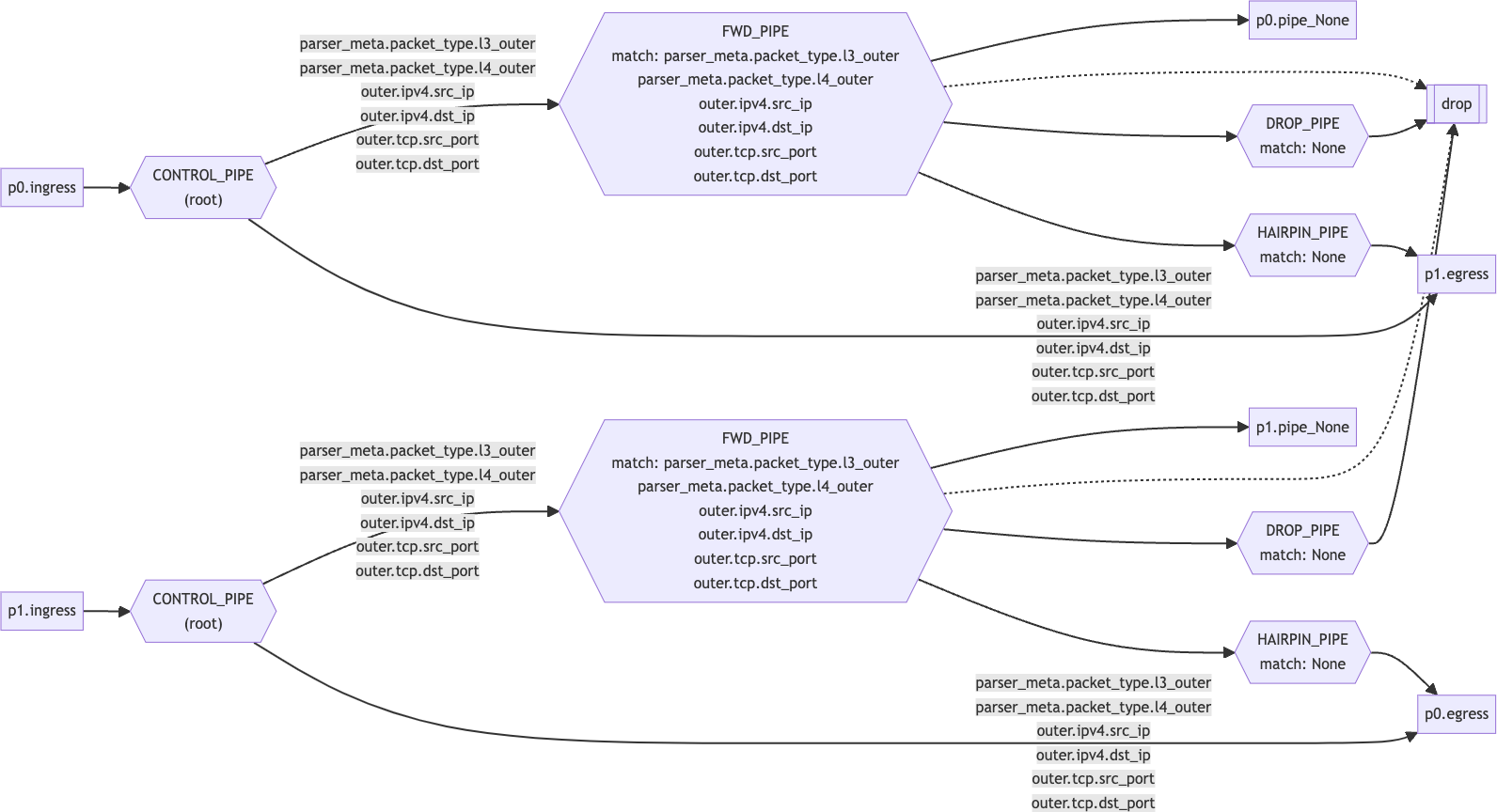
Last updated: