

Introduction
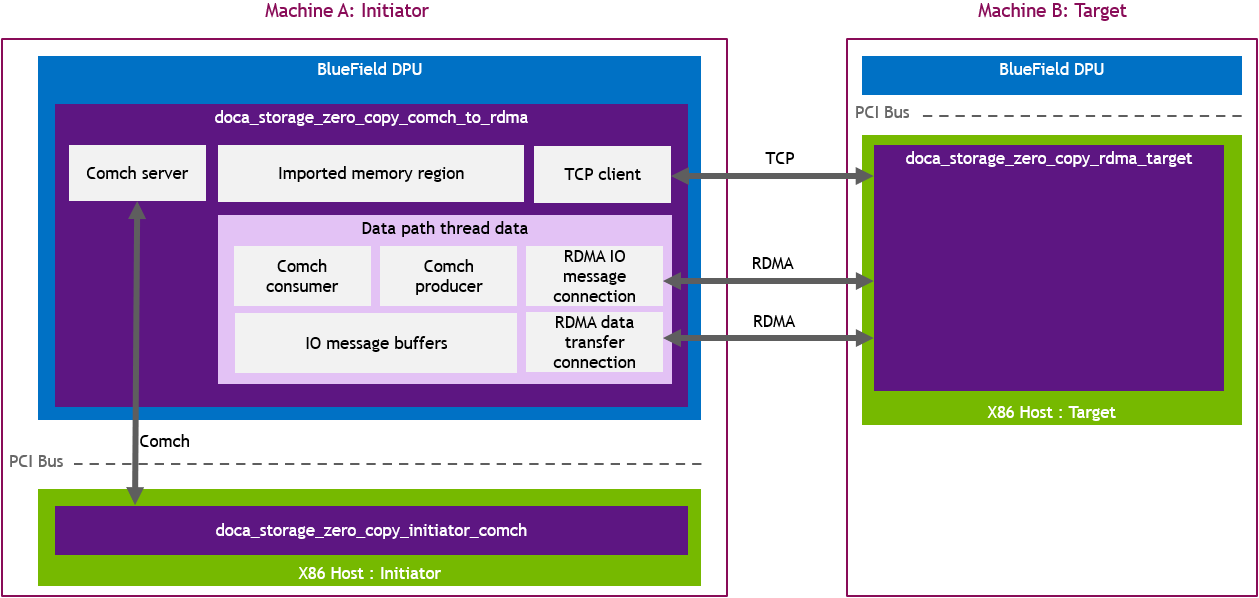
DOCA Storage Zero Copy Comch to RDMA (comch_to_rdma) is a communications bridge between the doca_storage_zero_copy_initiator_comch (initiator_comch) and the doca_storage_zero_copy_target_rdma (target_rdma). This keeps the initiator_comch insulated from the details of target_rdma.
System Design
-
Comch_to_rdma connects to target_rdma via TCP.
-
Comch_to_rdma creates a comch server and waits for the initiator_comch to connect.
-
Comch_to_rdma waits for control messages from the initiator_comch and reacts to them appropriately.
Two RDMA connections are made per thread to avoid the large RDMA data transfers interfering with or introducing latency to the smaller IO messages.
Application Architecture
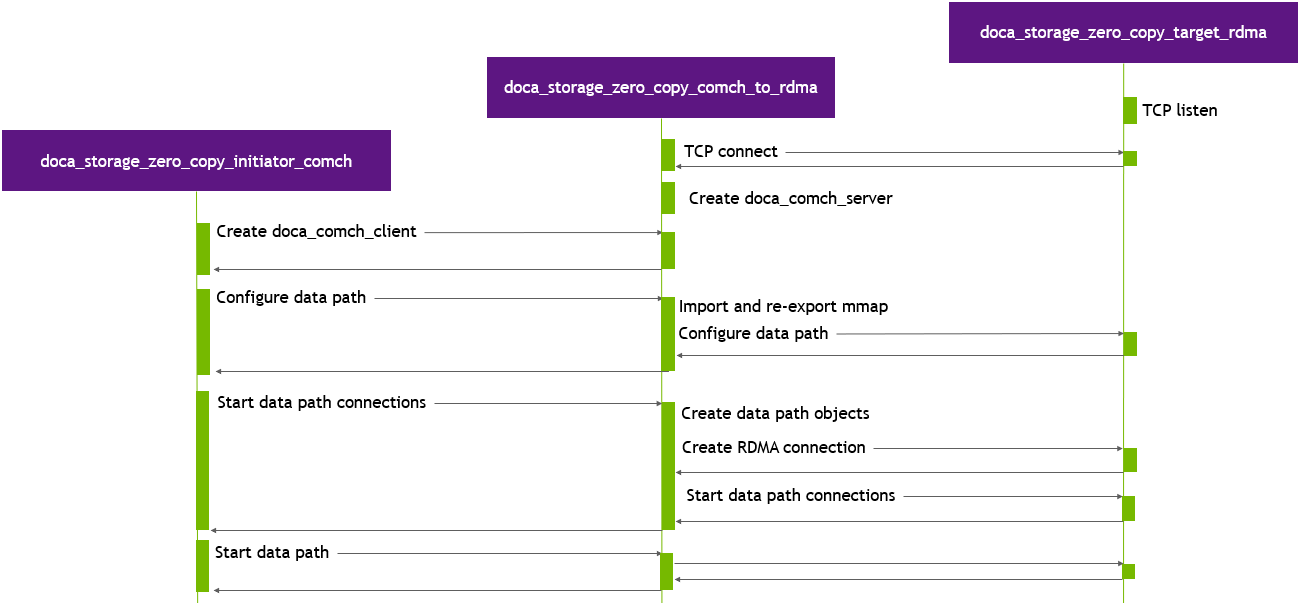
DOCA Storage Zero Copy Comch to RDMA executes in three stages:
Preparation Stage
During this stage, the application performs the following:
-
Connects to target_rdma via TCP.
-
Creates a DOCA Comch server and waits for a client connection.
-
Waits for a "configure data path" control message from initiator_comch (including buffer count, buffer size, doca_mmap export details).
-
Create a doca_mmap using the exported details from initiator_comch then re-export it to provide access to target_rdma.
-
Send a configure data path control message to target_rdma.
-
Wait for a configure data path control message response with a success status from target_rdma.
-
Send a configure data path control message response to initiator_comch.
-
-
Waits for a "start data path connections" control message from initiator_comch.
-
Create comch data path objects.
-
Create
NRDMA connections, exchanging connection details with target_rdma. -
Relay the start data path connections control message to target_rdma.
-
Wait for a start data path connections control message response with a success status from target_rdma.
-
Send a start data path connections control message response to initiator_comch.
-
-
Waits for a "start storage" control message from initiator_comch.
-
Verify that all RDMA and Comch connections are ready to use.
-
Send a start storage control message to target_rdma.
-
Wait for a start storage control message response with a success status from target_rdma.
-
Start data path threads.
-
Send a start storage control message response to initiator_comch.
-
Data Path Stage
This stage starts the data path threads. Each thread begins by submitting receive comch and RDMA tasks, then executing a tight loop polling the progress engine (PE) as quickly as possible until a "data path stop" IO message is received. The work of the data path threads is reactive, so is performed in task completion callbacks. As each IO message is received from initiator_comch, it is forwarded to the storage application. Similarily, as each IO message response is received from target_rdma, it is relayed back to initiator_comch.
Teardown Stage
In this stage, the application performs the following:
-
Wait for a destroy objects control message from initiator_comch.
-
Send a destroy objects control message to target_rdma.
-
Wait for a destroy objects control message response from target_rdma.
-
Destroy data path objects.
-
Send a destroy objects control message response to initiator_comch.
-
Destroy control path objects.
DOCA Libraries
This application leverages the following DOCA libraries:
Compiling the Application
This application is compiled as part of the set of storage zero copy applications. For compilation instructions, refer to NVIDIA DOCA Storage Zero Copy.
Running the Application
Application Execution
This application can only be run on the host.
DOCA Storage Zero Copy Comch to RDMA is provided in source form. Therefore, compilation is required before the application can be executed.
-
Application usage instructions:
Usage: doca_storage_zero_copy_comch_to_rdma [DOCA Flags] [Program Flags]

DOCA Flags:
  -h, --help                        Print a help synopsis
  -v, --version                     Print program version information
  -l, --log-level                   Set the (numeric) log level for the program <10=DISABLE, 20=CRITICAL, 30=ERROR, 40=WARNING, 50=INFO, 60=DEBUG, 70=TRACE>
  --sdk-log-level                   Set the SDK (numeric) log level for the program <10=DISABLE, 20=CRITICAL, 30=ERROR, 40=WARNING, 50=INFO, 60=DEBUG, 70=TRACE>
  -j, --json <path>                 Parse all command flags from an input json file

Program Flags:
  -d, --device                      Device identifier
  -r, --representor                 Device host side representor identifier
  --cpu                             CPU core to which the process affinity can be set
  --storage-server                  One or more storage server addresses in <ip_addr>:<port> format
  --command-channel-name            Name of the channel used by the doca_comch_server. Default: storage_zero_copy_comch
This usage printout can be printed to the command line using the
-h(or--help) options:./doca_storage_zero_copy_comch_to_rdma -hFor additional information, refer to section "DOCA Storage Zero Copy Comch to RDMA Application Guide | id (2.9.2 LTS)DOCAStorageZeroCopyComchtoRDMAApplicationGuide CommandLineFlags".
-
CLI example for running the application on the BlueField:
./doca_storage_zero_copy_comch_to_rdma -d 03:00.0 -r 3b:00.0 --storage-server 172.17.0.1:12345 --cpu 12
Both the DOCA Comch device PCIe address (
03:00.0) and the DOCA Comch device representor PCIe address (3b:00.0) should match the addresses of the desired PCIe devices.
-
The application also supports a JSON-based deployment mode in which all command-line arguments are provided through a JSON file:
./doca_storage_zero_copy_comch_to_rdma --json [json_file]For example:
./doca_storage_zero_copy_comch_to_rdma --json doca_storage_zero_copy_comch_to_rdma_params.json
Before execution, ensure that the used JSON file contains the correct configuration parameters, and especially the PCIe addresses necessary for the deployment.
Command Line Flags
|
Flag Type |
Short Flag |
Long Flag/JSON Key |
Description |
JSON Content |
|---|---|---|---|---|
|
General flags |
|
|
Print a help synopsis |
N/A |
|
|
|
Print program version information |
N/A |
|
|
|
|
Set the log level for the application:
|
|
|
|
N/A |
|
Set the log level for the program:
|
|
|
|
|
|
Parse all command flags from an input JSON file |
N/A |
|
|
Program flags |
|
|
DOCA device identifier. One of:
This flag is a mandatory.
|
|
|
|
|
DOCA Comch device representor PCIe address This flag is a mandatory.
|
|
|
|
N/A |
|
Index of CPU to use. One data path thread is spawned per CPU. Index starts at 0. The user can specify this argument multiple times to create more threads.
This flag is a mandatory.
|
|
|
|
N/A |
|
IP Address and port to use to establish the control TCP connection to the target. This flag is a mandatory.
|
|
|
|
N/A |
|
Allows customizing the server name used for this application instance if multiple comch servers exist on the same device. |
|
Troubleshooting
Refer to the DOCA Troubleshooting for any issue encountered with the installation or execution of the DOCA applications.
Application Code Flow
Control Thread Flow
-
Parse application arguments:
C++auto const cfg = parse_cli_args(argc, argv);-
Prepare the parser (
doca_argp_init). -
Register parameters (
doca_argp_param_create). -
Parse the arguments (
doca_argp_start). -
Destroy the parser (
doca_argp_destroy).
-
-
Display the configuration:
C++print_config(cfg);
-
Create application instance:
C++g_app.reset(storage::zero_copy::make_dpu_application(cfg));
-
Run the application:
C++g_app->run()-
Find and open the specified device:
C++m_dev = storage::common::open_device(m_cfg.device_id);
-
Find and open the selected representor:
C++m_dev_rep = storage::common::open_representor(m_dev, m_cfg.representor_id);
-
Create control path progress engine:
C++doca_pe_create(&m_ctrl_pe);
-
Connect to target_rdma:
C++connect_storage_server();-
Create a TCP socket.
-
Connect the TCP socket.
-
-
Create comch server and wait for comch client to connect:
C++create_comch_server(); while (m_client_connection == nullptr) { static_cast<void>(doca_pe_progress(m_ctrl_pe)); if (m_abort_flag) return; }
-
Wait for configure storage control message.
-
Configure storage:
C++configure_storage();-
Create mmap using the exported details provided by initiator_comch.
-
Export the mmap to allow RDMA access.
-
-
Send "configure storage" control message to target_rdma with re-exported mmap details.
-
Wait for configure storage control message response from target_rdma.
-
Send configure storage control message response to initiator_comch.
-
Wait for "start data path" control message.
-
Prepare data path:
C++for (uint32_t ii = 0; ii != m_cfg.cpu_set.size(); ++ii) { prepare_storage_context(ii, msg.correlation_id); }-
Create per thread data context:
-
Create IO messages.
-
Create progress engine.
-
Create mmap for IO message buffers.
-
Create comch producer.
-
Create comch consumer.
-
Create RDMA contexts.
-
Create RDMA connections:
-
Export RDMA connection details (
doca_rdma_export). -
Send "create RDMA connection" control message.
-
Wait for create RDMA connection control message.
-
Start connection using remote RDMA connection details
doca_rdma_connect.
-
-
-
Send data path control message to target_rdma.
-
Wait for data path control message response from target_rdma.
-
Send data path control message response to initiator_comch.
-
-
Wait for start storage control message.
-
Verify all connections are ready (comch and RDMA):
C++wait_for_connections_to_establish();
-
Send start storage control message to target_rdma.
-
Create threads:
C++if (op_type == io_message_type::read) { m_thread_contexts[ii].thread = std::thread{&thread_hot_data::non_validated_test, std::addressof(m_thread_contexts[ii].hot_context)}; } else if (op_type == io_message_type::write) { if (m_cfg.validate_writes) { m_thread_contexts[ii].thread = std::thread{&thread_hot_data::validated_test, std::addressof(m_thread_contexts[ii].hot_context)}; } else { m_thread_contexts[ii].thread = std::thread{&thread_hot_data::non_validated_test, std::addressof(m_thread_contexts[ii].hot_context)}; } }
-
Wait for "start storage" control message response from target_rdma.
-
Start data path threads.
-
Send start storage control message response to initiator_comch.
-
Run all threads until completion.
-
Wait for "destroy objects" control message.
-
Send destroy objects control message to target_rdma.
-
Wait for destroy objects control message response from target_rdma.
-
Destroy data path objects.
-
Send destroy objects control message response to initiator_comch.
-
-
Display stats:
C++printf("+================================================+\n"); printf("| Stats\n"); printf("+================================================+\n"); for (uint32_t ii = 0; ii != stats.size(); ++ii) { printf("| Thread[%u]\n", ii); auto const pe_hit_rate_pct = (static_cast<double>(stats[ii].pe_hit_count) / (static_cast<double>(stats[ii].pe_hit_count) + static_cast<double>(stats[ii].pe_miss_count))) * 100.; printf("| PE hit rate: %2.03lf%% (%lu:%lu)\n", pe_hit_rate_pct, stats[ii].pe_hit_count, stats[ii].pe_miss_count); printf("+------------------------------------------------+\n"); } printf("+================================================+\n");
-
Destroy control path objects.
Performance Data Path Thread Flow
The data path involves polling the PE as quickly as possible; to receive IO messages from either initiator_comch or target_rdma.
-
Run until initiator_comch sends a stop IO message:
C++while (hot_data->running_flag) { doca_pe_progress(pe) ? ++(hot_data->pe_hit_count) : ++(hot_data->pe_miss_count); }
-
Handle IO message from initiator_comch:
C++auto *const hot_data = static_cast<thread_hot_data *>(ctx_user_data.ptr); ... doca_task_submit(static_cast<doca_task *>(task_user_data.ptr));
-
Handle IO message from target_rdma:
C++auto *const hot_data = static_cast<thread_hot_data *>(ctx_user_data.ptr); doca_error_t ret; auto *const io_message = storage::common::get_buffer_bytes(doca_rdma_task_receive_get_dst_buf(task)); if (io_message_view::get_type(io_message) != io_message_type::stop) { io_message_view::set_type(io_message_type::result, io_message); io_message_view::set_result(DOCA_SUCCESS, io_message); } else { hot_data->app_impl->stop_all_threads(); } do { ret = doca_task_submit(static_cast<doca_task *>(task_user_data.ptr)); } while (ret == DOCA_ERROR_AGAIN);
References
-
/opt/mellanox/doca/applications/storage/
Last updated: