

This document introduces and compares the different NVIDIA DOCA™ Host installation profiles, helping users select the most suitable configuration for their workloads and environments.
Introduction
NVIDIA DOCA™ can be installed on host machines to support a range of NVIDIA® BlueField® DPUs and NVIDIA® ConnectX® SmartNICs. To meet the needs of different deployment scenarios, DOCA offers installation profiles—validated packages that streamline setup based on the desired functionality.
The following are the available DOCA profiles:
-
doca-all -
doca-networking -
doca-ofed -
doca-roce
DOCA functionality is limited by the specific device capabilities.
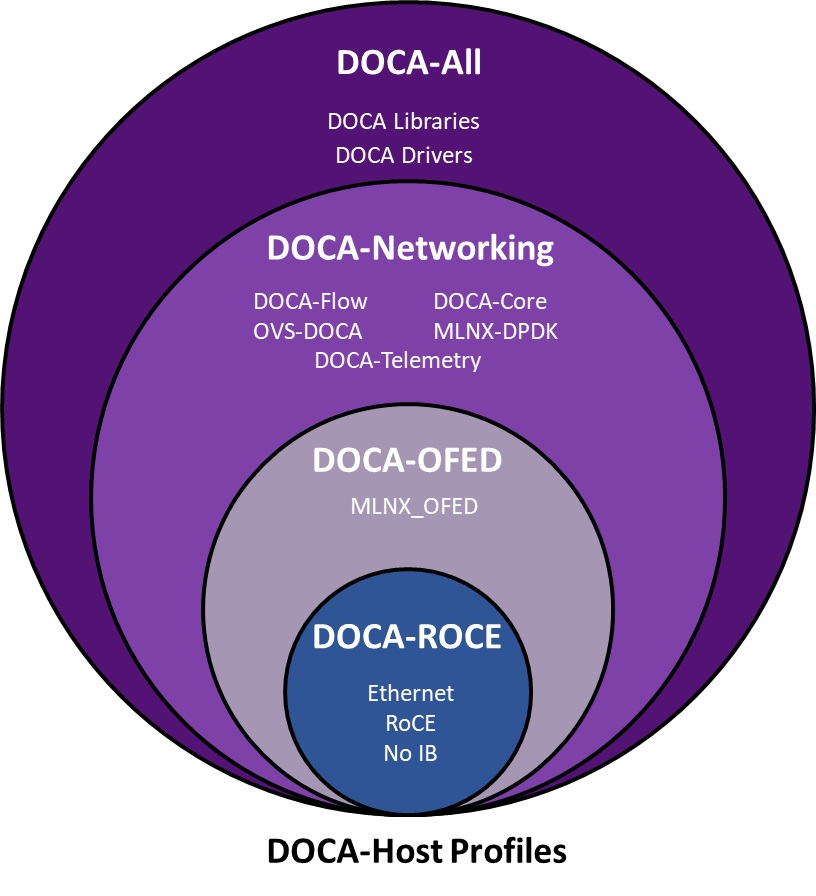
Which Profile to Install?
Selecting the right DOCA-Host installation profile is important to fully utilize the capabilities of your BlueField Platforms or ConnectX.
The functionality of DOCA-Host is limited by the device capabilities (e.g., ConnectX devices cannot utilize DOCA libs such as DPA, even if doca-all is installed on the host).
For BlueField devices:
-
It is recommended to use
doca-all -
If you require the smallest installation package for networking-only purposes, use
doca-networking -
For MLNX_OFED-like installation, use
doca-ofed(no additional DOCA functionality) -
For ROCE functionality only, install
doca-roce
For ConnectX devices:
-
It is recommended to use
doca-networking -
For future-proof and mixed BlueField/ConnectX deployments, use
doca-all -
For MLNX_OFED-like installation use
doca-ofed(no additional DOCA functionality) -
For ROCE functionality only, install
doca-roce
Profile Details
doca-all
|
Purpose |
Install the full DOCA suite, including all libraries, drivers, and tools |
|---|---|
|
Includes |
|
|
Recommended for |
|
Some components may require manual installation after the default package.
doca-networking
|
Purpose |
Networking-specific installation without full DOCA library overhead |
|---|---|
|
Includes |
|
|
Recommended for |
|
doca-ofed
|
Purpose |
Driver-only installation equivalent to MLNX_OFED |
|---|---|
|
Includes |
|
|
Recommended for |
|
doca-roce
|
Purpose |
Lightweight RDMA-over-Ethernet (ROCE) functionality |
|---|---|
|
Includes |
|
|
Recommended for |
|
Supported Devices
All profiles support the following NVIDIA hardware:
-
BlueField-3
-
BlueField-2
-
ConnectX-7
-
ConnectX-6 DX / LX / standard
-
ConnectX-5
-
ConnectX-4 LX
DOCA functionality is limited by the specific device capabilities. For example, ConnectX devices cannot use certain DOCA libraries such as DPA.
Profile Installation Notes
Each DOCA-Host profile is supported on a subset of operating systems. Refer to the "DOCA Profiles | id (3.0.0)DOCAProfiles SupportedHostOSperDOCA HostInstallationProfile" section in the DOCA Host Installation and Upgrade Guide.
Follow the installation steps under "Installing Software on Host" in the DOCA-HOST Installation and Upgrade for details on how to install the selected profile.
Supported Host OS per DOCA-Host Installation Profile
Refer to the "General Support" page of the release notes for information.
Last updated: