

This page describes the DPL Nspect tool, which is used to inspect DPL programs loaded onto the NVIDIA BlueField DPU.
Introduction
DPL Nspect is a CLI tool that allows you to:
-
View the dynamic state of DPL program components, including tables, entries, keys, actions, and counters
-
Record a debug session and generate an archive that can be opened in the DPL Debugger
-
Dump the state of a DPL program into an archive for offline analysis
DPL Nspect Execution
Running dpl_nspect.sh without arguments displays the basic usage information. For a more detailed usage guide, use the -h or --help arguments. This argument also provides command-specific usage details (for example, dpl_nspect.sh [command] -h).
Connecting to a Host
DPL Nspect requires a connection to a local or remote host where the dpl_nspect_server is running. The host address and port can be configured using the environment variable. For example: DPL_NSPECT_SERVER_ADDRESS=127.0.0.1:9560.
Command Output
The output format of executed commands varies depending on the command. In some cases, the output can be modified using additional arguments to enable integration with automated scripts.
DPL Nspect Commands and Flags
dpl_nspect offers various commands for interacting with the DPL program and BlueField:
-
system-info– Displays BlueField system information, including hardware model, OS name and version, and OFED version -
devices– Lists all configured devices on BlueField, including their ID, name, virtual devices, and the loaded DPL program nameVirtual devices are software abstractions representing real or emulated hardware components. They provide a standardized interface for applications to interact with BlueField resources, regardless of the underlying physical hardware. For example:
-
Virtual network interfaces (VNIs) – Logical representations of physical NICs, allowing multiple virtual networks to share a single physical interface
-
Virtual processing units (VPUs) – Software-defined processing units within BlueField that can be allocated to applications for tasks like packet processing or security offloading
-
Virtual storage devices – Software-defined representations of physical storage, offering flexibility in managing and allocating storage resources
-
-
counters– Displays details and values of DPL counters, including the associated table, offset, and value -
tables– Lists the P4 tables of DPL programs loaded on BlueField, detailing their keys, actions, counters, and references to the program's source location -
query– Lists P4 table entries, showing keys, actions, and the priority of each key set -
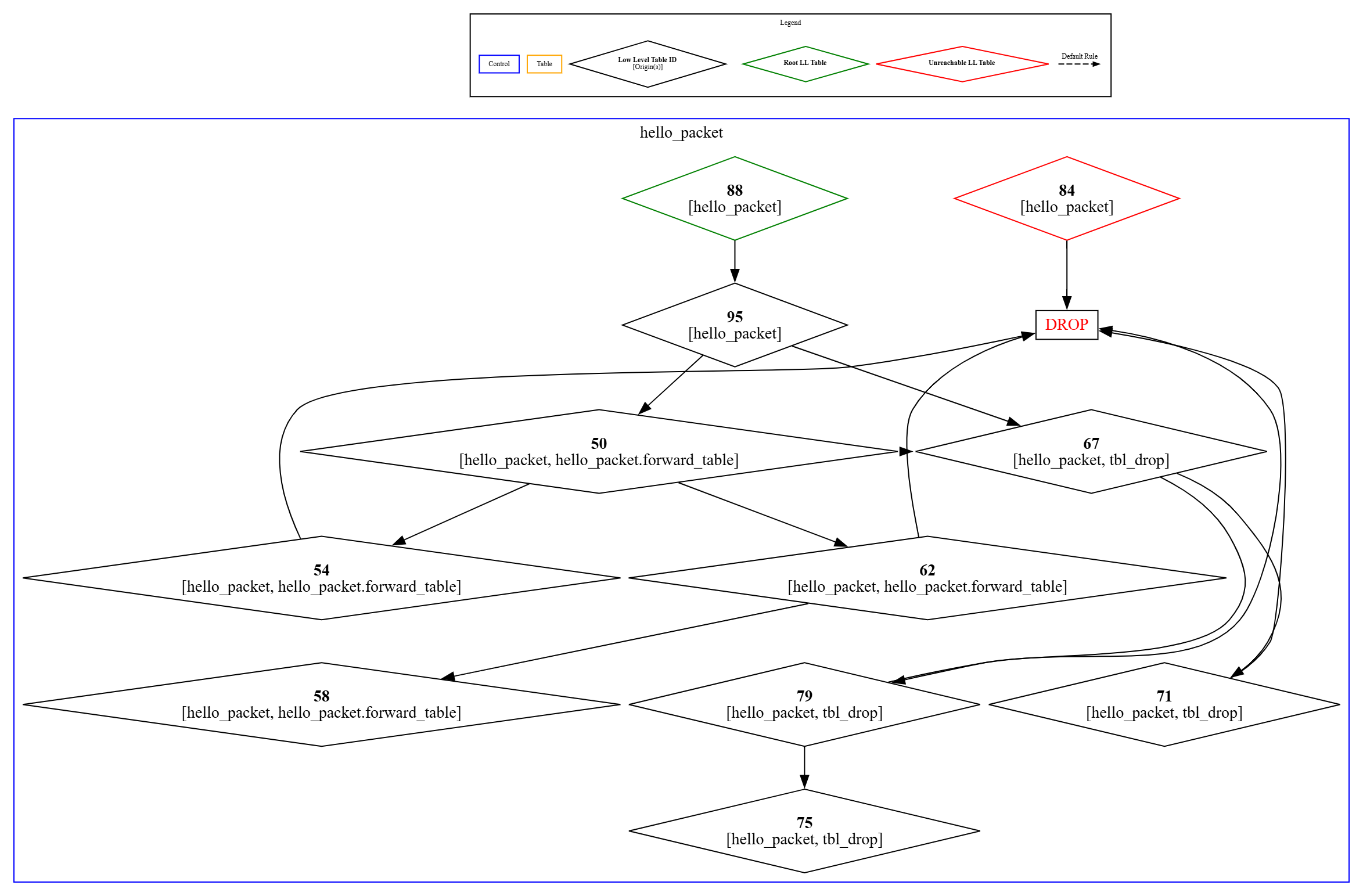
graph– Generates a DPL pipeline graph using DOT language, which can be rendered with DOT-compatible visualization tools -
hw-steering– Displays a hardware steering rules dump, providing a low-level view of hardware entries -
debug– starts a debug session
Help Flags
To display details of dpl_nspect options usage use any of the following flags:
-
help,-h,--help– Displays the help message and exits
Output Control Flags
The following optional flags can be used independently to modify command output format and behavior:
-
-ll,--low-level(default: false) – Displays low-level internal information (DOCA HWS implementation) -
-ni,--non-interactive(default: false) – Disables interactive output mode. Interactive mode outputs data in chunks similar to the Linuxlesscommand, making it easier to analyze large outputs. Disabling this mode may be necessary when runningdpl_nspectcommands in automated scripts. -
-nh,--no-hints– Disables hints for additional information -
--csv(default: false) – Outputs command results in CSV format -
--json(default: false) – Outputs command results in JSON format -
Flags for the
dpl_nspect counterscommand:-
--top-packets TOP_PACKETS(default: false) – Displays the top entries with the highest packet counter values -
--top-bytes TOP_BYTES(default: false) – Displays the top entries with the highest byte counter values
-
-
Flags for the
dpl_nspect graphcounters command:-
--url(default: false) – Encodes the output as a URL that can be directly pasted into a web browser for quick rendering using online visualization tools -
--type– Specifies the type of graph to generate
-
Filter Control Flags
The following flags allow filtering of data based on specific criteria:
-
-d DEVICE_IDS, --device_ids DEVICE_IDS(default: None) – Specifies a comma-separated list of device IDs to filter, e.g.,1000,2000. If not specified, data is retrieved for all devices. -
--table_ids TABLE_IDS(default:[]) – Filters results by specific table IDs -
--table_names TABLE_NAMES(default:[]) – Filters results by specific table names -
--counter-names COUNTER_NAMES(default:[]) – Filters results by specific counter names -
--indices INDICES(default:[]) – Filters results by specific entry indices
Control Flags for Connecting to BlueField
-
-a ADDRESS,--address ADDRESS– Specifies thedpl_nspect_serversocket address in the format[IPv4/IPv6][:port].For IPv6 addresses, if a port is specified, the address must be enclosed in square brackets. Examples:
-
ipv6:[2607:f8b0:400e:c00::ef]:443 -
ipv6:[::]:1234
-
-
This parameter is mandatory, unless the environment variable
DPL_NSPECT_SERVER_ADDRESSis set with the address and port. For example:DPL_NSPECT_SERVER_ADDRESS=127.0.0.1:9560 -
--timeout TIMEOUT(default:0) – Specifies the connectivity timeout (optional)
Misc Flags
-
--version,-V– Displays the program's version number and exits
DPL Nspect Commands
This section provides examples of commands and their respective outputs.
dpl_nspect --low-level graph --url
--url – generates an HTTP URL link to the graph, in dot format, rendered using GraphvizOnline.
Commands and Flags Summary
Some command flags are universally applicable to all commands, while others are applicable to only specific commands.
The following table outlines commands and applicable flags:
|
|
system-info |
devices |
counters |
tables |
query |
graph |
hw-steering |
debug |
|---|---|---|---|---|---|---|---|---|
|
--address |
✔ |
✔ |
✔ |
✔ |
✔ |
✔ |
✔ |
✔ |
|
--time-out |
✔ |
✔ |
✔ |
✔ |
✔ |
✔ |
✔ |
✔ |
|
--non-interactive |
✔ |
✔ |
✔ |
✔ |
✔ |
✔ |
✔ |
✔ |
|
--no-hints |
✔ |
✔ |
✔ |
✔ |
✔ |
✔ |
✔ |
✔ |
|
--csv |
✔ |
✔ |
✔ |
✔ |
✔ |
✔ |
✔ |
✔ |
|
--json |
✔ |
✔ |
✔ |
✔ |
✔ |
✔ |
✔ |
✔ |
|
--device-ids |
✔ |
✔ |
✔ |
✔ |
✔ |
✔ |
✔ |
✔ |
|
--low-level |
✔ |
✔ |
✔ |
✔ |
✔ |
✔ |
✔ |
✔ |
|
--table-ids |
|
|
✔ |
✔ |
✔ |
|
|
|
|
--table_names |
|
|
✔ |
✔ |
✔ |
|
|
|
|
--counter-names |
|
|
✔ |
|
|
|
|
|
|
--indices |
|
|
✔ |
|
|
|
|
|
|
--top-packets |
|
|
✔ |
|
|
|
|
|
|
--top-bytes |
|
|
✔ |
|
|
|
|
|
|
--url |
|
|
|
|
|
✔ |
|
|
|
--type |
|
|
|
|
|
✔ |
|
|
|
--output-file |
|
|
|
|
|
|
|
✔ |
|
--debug-device-id |
|
|
|
|
|
|
|
✔ |
Last updated: