

Introduction
The doca_storage_target_rdma application provides a simple, volatile memory-backed RDMA storage target. It is designed to interact with a DOCA storage service, offering direct read and write access to a dedicated memory region using RDMA.
System Design
The doca_storage_target_rdma application performs the following core functions:
-
Exposes a memory-backed storage region for use by the storage service client.
-
Handles RDMA-based I/O operations (reads and writes) using the DOCA RDMA library.
To perform these tasks, the application acts as a TCP server, waiting for an incoming connection from a storage service initiator. Once connected, it handles control and data path interactions as in this page.
Application architecture
The application is divided into two main functional areas:
-
Control-Time and Shared Resources – Includes TCP server setup, memory registration, and RDMA connection handling.
-
Per-Thread Data Path Resources – Includes thread-local RDMA resources and task management structures.
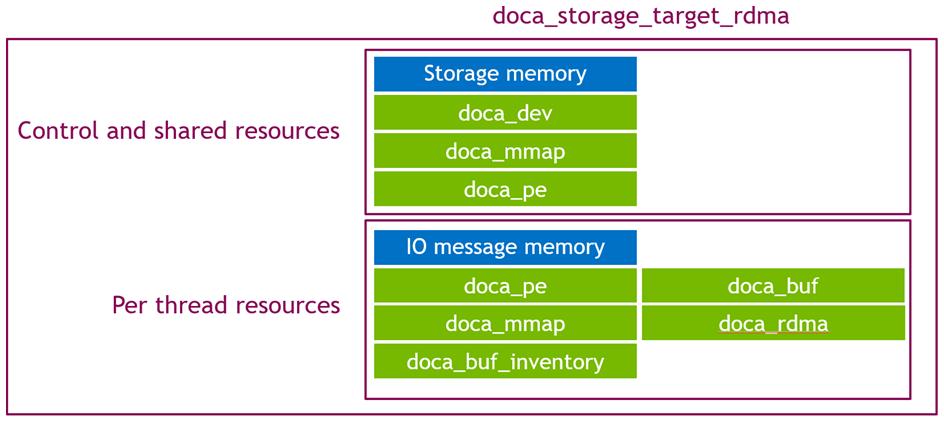
The application executes in two main phases:
-
Control Phase
-
Data Path Phase
Control Phase
This phase begins when a connection is established with a storage service over TCP. The application then processes a sequence of control commands:
-
Query Storage
-
Reports the size and layout of the exposed storage region.
-
-
Init Storage
-
Validates the requested number of worker threads.
-
Allocates and registers local memory for RDMA operations.
-
Imports remote memory handles provided by the initiator.
-
Creates internal worker objects for task execution.
-
-
Wait for RDMA Connection Requests
-
Waits for one RDMA connection per requested core/thread.
-
Ensures each RDMA session is fully established before proceeding.
-
-
Start Storage
-
Waits for all RDMA connections to be ready.
-
Submits initial tasks to prepare the data path phase.
-
Launches the data path threads.
-
Once the Start Storage command is received and all threads are active, the application transitions to the data path phase. The main thread remains active, waiting for final control commands:
-
Stop Storage
-
Terminates active data threads cleanly.
-
-
Shutdown
-
Performs cleanup and resource deallocation, shutting down the application.
-
Data Path Phase
Each data path thread performs I/O processing independently based on client requests. The typical per-thread flow is:
-
Receive I/O Request
-
Handle incoming requests from the initiator via RDMA.
-
-
Perform RDMA Operation
-
Depending on the request type, either:
-
Execute an RDMA read from the local memory region.
-
Execute an RDMA write to the local memory region.
-
-
-
Send I/O Response
-
Return a response back to the initiator, indicating success or failure of the operation.
-
DOCA Libraries
This application leverages the following DOCA libraries:
Compiling the Application
This application is compiled as part of the set of storage applications. For compilation instructions, refer to the DOCA Storage Applications page.
Running the Application
Application Execution
DOCA Storage Target RDMA is provided in source form. Therefore, compilation is required before the application can be executed.
-
Application usage instructions:
Usage: doca_storage_target_rdma [DOCA Flags] [Program Flags]

DOCA Flags:
  -h, --help                        Print a help synopsis
  -v, --version                     Print program version information
  -l, --log-level                   Set the (numeric) log level for the program <10=DISABLE, 20=CRITICAL, 30=ERROR, 40=WARNING, 50=INFO, 60=DEBUG, 70=TRACE>
  --sdk-log-level                   Set the SDK (numeric) log level for the program <10=DISABLE, 20=CRITICAL, 30=ERROR, 40=WARNING, 50=INFO, 60=DEBUG, 70=TRACE>

Program Flags:
  -d, --device                      Device identifier
  --cpu                             CPU core to which the process affinity can be set
  --listen-port                     TCP listen port number
  --binary-content                  Path to binary .sbc file containing the initial content to be represented by this storage instance
  --block-count                     Number of available storage blocks. (Ignored when using content binary file) Default: 128
  --block-size                      Block size used by the storage. (Ignored when using content binary file) Default: 4096
This usage printout can be printed to the command line using the
-h(or--help) options:./doca_storage_target_rdma -hFor additional information, refer to section "DOCA Storage Target RDMA Application Guide | id (3.1.0 core update)DOCAStorageTargetRDMAApplicationGuide Command lineFlags".
-
CLI example for running the application:
./doca_storage_target_rdma -d 3b:00.0 --listen-port 12345 --block-size 4096 --block-count 64 --cpu 0The user DOCA device PCIe address (
3b:00.0) should match the addresses of the desired PCIe device.
Command-line Flags
|
Flag Type |
Short Flag |
Long Flag |
Description |
|---|---|---|---|
|
General flags |
|
|
Print a help synopsis |
|
|
|
Print program version information |
|
|
|
|
Set the log level for the application:
|
|
|
N/A |
|
Set the log level for the program:
|
|
|
Program flags |
|
|
DOCA device identifier. One of:
This flag is a mandatory. |
|
N/A |
|
Index of CPU to use. One data path thread is spawned per CPU. Index starts at 0. The user can specify this argument multiple times to create more threads.
This flag is a mandatory. |
|
|
N/A |
|
Port to listen upon for incomming TCP connections This flag is a mandatory. |
|
|
N/A |
|
Path to a file to be used to provide initial content to the storage instance.
|
|
|
N/A |
|
Number of storage blocks to provide |
|
|
N/A |
|
Size of each storage block |
A user should provide one of:
-
--binary-content: Where the file is a .sbc file-
The sbc file provides storage dimmensions and data to populate the blocks
-
OR (Random / uninitialisaed bytes with a user defined dimmension)
-
--block-count -
--block-size
OR (Initialised bytes with a user defined dimmension)
-
--block-count -
--block-size -
--binary-content: Where the file is plain content to be distributed across the storage and its size == block count * block size
Troubleshooting
Refer to the NVIDIA BlueField Platform Software Troubleshooting Guide for any issue encountered with the installation or execution of the DOCA applications.
Application Code Flow
Control Phase
The doca_storage_target_rdma application proceeds through the following control phase steps:
-
Parse CLI arguments and initialize the application:
target_rdma_app app{parse_target_rdma_app_cli_args(argc, argv)};-
Parses command-line arguments.
-
Applies default values.
-
Constructs the application instance.
-
-
Wait for client connection (TCP):
app.wait_for_client_connection();-
Blocks until a connection is established from the storage service application.
-
-
Process "Query Storage" request:
app.wait_for_and_process_query_storage();-
Waits for a
query_storagecontrol message. -
Sends a response with the dimensions (e.g., size, block size) of the storage region.
-
-
Process "Init Storage" request:
app.wait_for_and_process_init_storage();-
Waits for an
init_storagecontrol message. -
Performs the following:
-
Validates the requested core count does not exceed local resources.
-
Creates the local storage memory (
doca_mmap). -
Imports the remote memory provided by the initiator.
-
Initializes per-thread data path resources:
-
Worker objects
-
I/O message memory regions
-
doca_pe(progress engine) objects -
doca_rdmaobjects
-
-
Sends an
init_storageresponse.
-
-
Establish RDMA connections:
app.wait_for_and_process_create_rdma_connections();-
Waits for a series of
create_rdma_connectioncontrol messages (one per thread). -
For each:
-
Creates an exported connection descriptor using the local
doca_rdmacontext. -
Establishes the connection using the received remote connection details.
-
-
-
Start storage session:
app.wait_for_and_process_start_storage();-
Waits for a
start_storagecontrol message. -
Ensures all RDMA connections are ready (fully negotiated).
-
Allocates task objects.
-
Submits receive tasks.
-
Launches worker threads.
-
-
Stop storage session:
app.wait_for_and_process_stop_storage();-
Waits for a
stop_storagecontrol message (signaling test completion). -
Signals worker threads to stop.
-
Joins all worker threads.
-
-
Shutdown session:
app.wait_for_and_process_shutdown();-
Waits for a
shutdowncontrol message. -
Collects and stores run-time statistics.
-
Cleans up and destroys all data path resources.
-
Sends a
shutdownresponse.
-
-
Display results and cleanup:
app.display_stats();-
Outputs collected statistics (e.g., throughput, latency).
-
Destroys remaining control path resources.
-
Control Phase
-
Parse CLI arguments, apply default values, and create the application instance.
target_rdma_app app{parse_target_rdma_app_cli_args(argc, argv)}; -
C
app.wait_for_client_connection();Wait for a storage service app to connect via TCP.
-
C
app.wait_for_and_process_query_storage();Wait for the storage service to send a query storage control message, then:
-
Send a query storage response with the dimmensions of this storage instance
-
-
C
app.wait_for_and_process_init_storage();Wait for the storage service to send an init storage control message, then:
-
Verify that the requested core count does not exceed the available cores
-
Create local storage
doca_mmap -
Import remote memory
doca_mmap -
Create data path resources:
-
Worker objects
-
IO message memory regions
-
doca_peobjects -
doca_rdmaobjects
-
-
Send an init storage response
-
-
C
app.wait_for_and_process_create_rdma_connections();Wait for the storage service to send a number of create rdma connection control messages Processing each by:
-
Create a connection by creating an exported connection details using
doca_rdmacontext specified in the command -
Starting the connection using the provided remote connection details
-
-
C
app.wait_for_and_process_start_storage();Wait for the storage service to send a start storage control message, then:
-
Wait until all doca_rdma contexts are ready to execute tasks (both sides have started their respective connections)
-
Allocate task objects
-
Submit receive tasks
-
Create and start worker threads
-
-
C
app.wait_for_and_process_stop_storage();Wait for the storage service to send a stop storage control message (test complete), then:
-
Signal worker threads to stop
-
Join worker threads
-
-
C
app.wait_for_and_process_shutdown();Wait for the storage service to send a shutdown control message, then:
-
Collect and store run statistics
-
Destroy data path objects
-
Send a shutdown response
-
-
C
app.display_stats();Display collected statistics and destroy all control path objects.
References
-
/opt/mellanox/doca/applications/storage/
Last updated: