

This document introduces and compares the different NVIDIA DOCA Host installation profiles, helping users select the most suitable configuration for their workloads and environments.
Introduction
NVIDIA DOCA can be installed on host machines to support a range of NVIDIA BlueField DPUs and ConnectX SmartNICs. To meet the needs of different deployment scenarios, DOCA offers installation profiles—validated packages that streamline setup based on the desired functionality.
The following are the available DOCA profiles:
-
doca-all -
doca-networking -
doca-ofed -
doca-roce -
doca-host-basic
DOCA functionality is limited by the specific device capabilities.
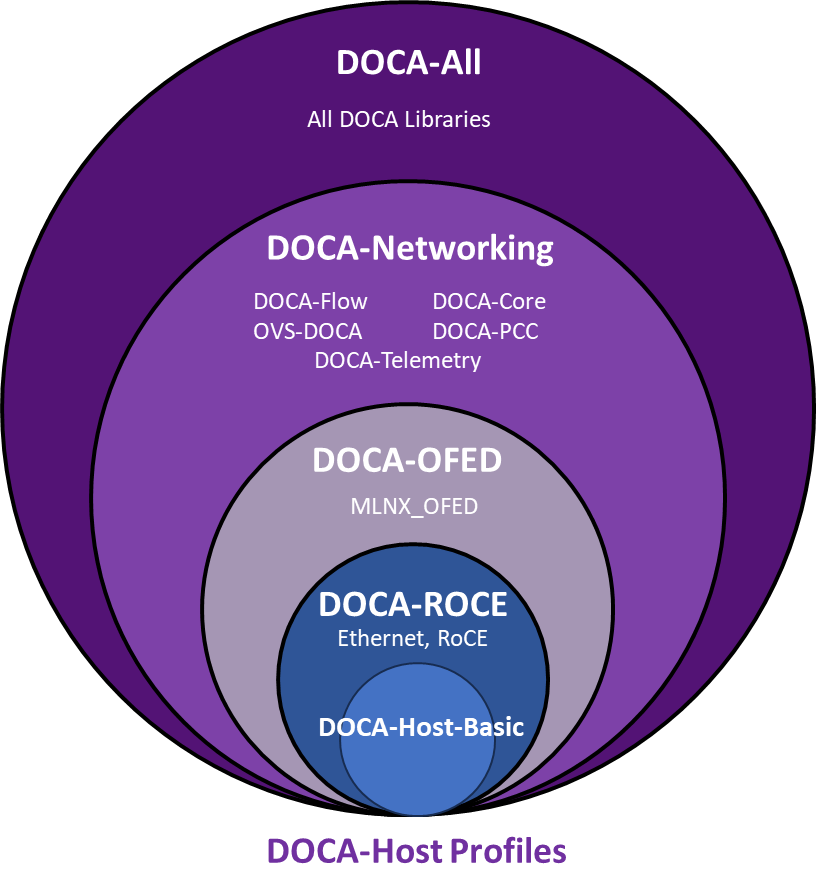
Which Profile to Install?
The functionality of DOCA-Host is limited by the device capabilities (for example, ConnectX devices cannot utilize DOCA libraries such as DPA, even if doca-all is installed on the host).
For BlueField devices:
-
NVIDIA recommends the
doca-allprofile -
If you require the smallest installation package for networking-only purposes, use
doca-networking -
For MLNX_OFED-like installations, use
doca-ofed(no additional DOCA functionality) -
For RoCE functionality only, install
doca-roce -
doca-host-basic will provide the common basic networking functionality, similar to doca-roce but without MFT and FW-Updater
For ConnectX devices:
-
NVIDIA recommends the
doca-networkingprofile -
For deployments with both BlueField and ConnectX devices, use
doca-all. This is also a good, scalable option for deployments that do not currently use either BlueField or ConnectX devices but eventually might. -
For MLNX_OFED-like installation use
doca-ofed(no additional DOCA functionality) -
For RoCE functionality only, install
doca-roce -
For common networking functionality without the added Tools, install doca-host-basic
Profile Details
doca-all
|
Purpose |
Install the full DOCA suite, including all libraries, drivers, and tools |
|---|---|
|
Includes |
|
|
Recommended for |
|
Some components may require additional manual installation after the default package is installed.
doca-networking
|
Purpose |
Networking-specific installation without full DOCA library overhead |
|---|---|
|
Includes |
|
|
Recommended for |
|
doca-ofed
|
Purpose |
Driver-only installation equivalent to MLNX_OFED |
|---|---|
|
Includes |
|
|
Recommended for |
|
doca-roce
|
Purpose |
Lightweight RDMA-over-Ethernet (RoCE) functionality |
|---|---|
|
Includes |
|
|
Recommended for |
|
doca-host-basic
|
Purpose |
Lightweight Ethernet only functionality |
|---|---|
|
Includes |
|
|
Recommended for |
|
Supported Devices
All profiles support the following NVIDIA hardware:
-
BlueField-3
-
BlueField-2
-
ConnectX-8
-
ConnectX-7
-
ConnectX-6 DX / LX / standard
-
ConnectX-5
-
ConnectX-4 LX
DOCA functionality is limited by the specific device capabilities. For example, ConnectX devices cannot use certain DOCA libraries, such as DPA.
Profile Installation Notes
Each DOCA-Host profile is supported on a subset of operating systems. Refer to Supported Host OS per DOCA-Host Installation Profile for device-specific compatibility information. To install a profile, follow the installation steps in DOCA-Host Installation and Upgrade .
Last updated: