

This guide describes the DOCA Virtio-blk Emulation Application, which emulates virtio-blk PCIe functions on NVIDIA® BlueField® DPUs. The application leverages DOCA DevEmu PCI TLP APIs to construct a full software-defined PCI switch topology, presenting one or more standard virtio-blk devices to the host. The data path is hardware-accelerated on the DPU's DPA (Data Path Accelerator) or DPU Arm cores.
This feature is currently supported at alpha level.
Introduction
The DOCA Virtio Block (virtio-blk) Emulation Application demonstrates how to use the DOCA DevEmu PCI TLP and DOCA DevEmu Virtio-blk libraries to emulate virtio-blk PCIe functions with full PCIe configuration space emulation, multi-queue support, hotplug capabilities, and DMA-based data transfers. The emulated block devices appear as standard virtio-blk devices to the host operating system.
System Design
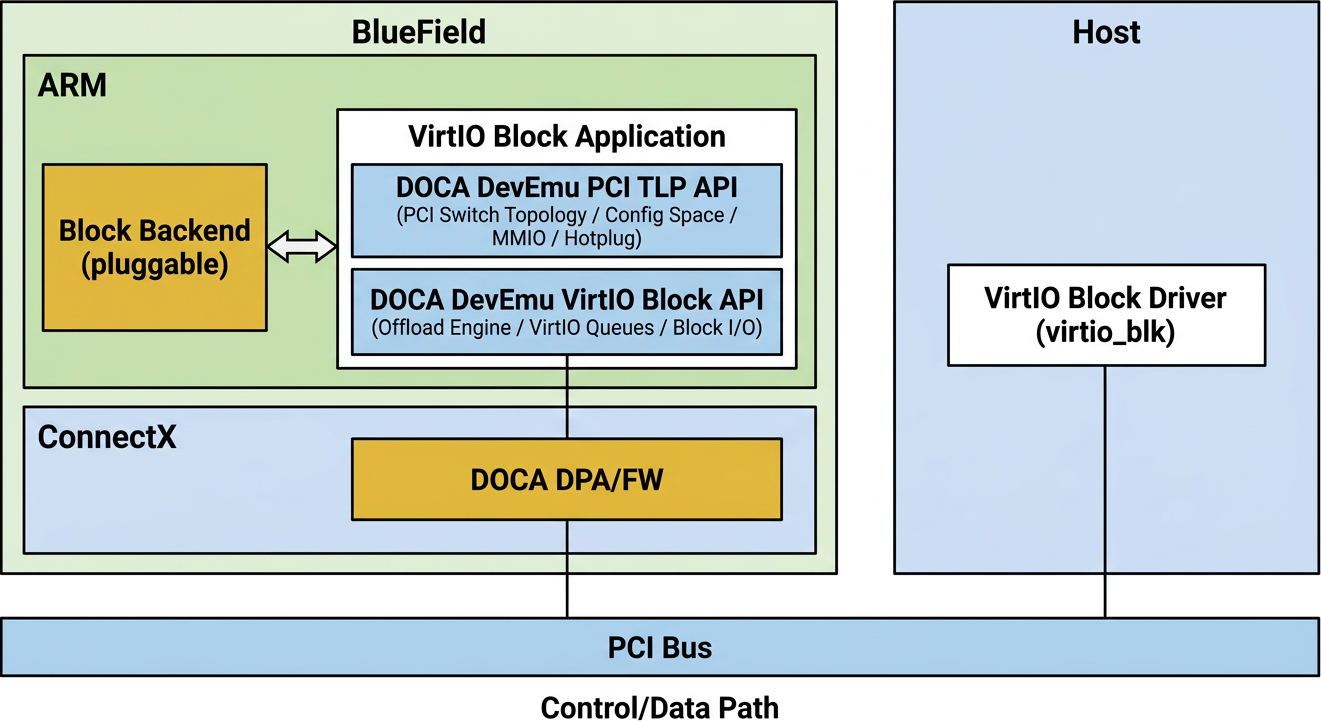
Host Side (Virtio-blk Client Driver)
-
Runs a standard
virtio_blkclient driver in the host operating system. -
Host applications issue block I/O operations (e.g., read, write, flush, get device ID).
-
The
virtio_blkdriver translates these into virtio-blk protocol I/O requests submitted through virtio queues.
BlueField DPU (DOCA Virtio-blk Emulation Application)
-
Runs the DOCA Virtio-blk Emulation Application.
-
Constructs a software PCI switch topology (USP + DSPs + Endpoints) visible to the host.
-
Handles PCIe TLP (Transaction Layer Packets) for configuration space emulation and MMIO processing, and configures doorbell and MSI-X regions for hardware-accelerated notification.
-
Decodes virtio-blk I/O requests (
VBLK_T_IN,VBLK_T_OUT,VBLK_T_GET_ID, etc.) from the host via virtio queues. -
Performs DMA data transfers between host and DPU memory using
doca_dmamemcpy operations.
Data Path Provider (DPA or DPU)
The application supports two data path providers:
-
DPA (default) – Offloads virtio queue processing to the DPU's Data Path Accelerator for hardware-accelerated, low-latency operation.
-
DPU – Processes virtio queues on the DPU Arm cores for maximum flexibility and debugging.
End-to-End Flow
-
Host application initiates a block I/O operation (e.g., disk read/write).
-
The
virtio_blkdriver submits the request through a virtio queue. -
The DPU's offload engine detects the new request and dispatches it to an IO context thread.
-
The IO context thread processes the request, performing DMA data transfers as needed.
-
Upon completion, the DPU sends the response back to the host through the virtio queue.
This architecture offloads block device emulation from the host to the DPU, enabling hardware-accelerated storage device virtualization without requiring physical block devices on the host.
Application Architecture
Core Components
Virtio-blk Device Model
Virtio-blk is a para-virtualized block storage device defined in the Virtio Specification. It enables high-performance block device emulation using the virtio framework. Key parameters include:
-
capacity– Device capacity in 512-byte sectors. -
seg_max– Maximum number of scatter-gather segments per request. -
num_queues– Number of virtio queues for parallel I/O processing. -
size_max– Maximum size of any single segment.
Virtio Queues
Virtio-blk uses one or more request queues to communicate between host and device:
-
Request queues – The host submits block I/O requests (read, write, flush, get ID, etc.) through descriptor chains.
-
Multi-queue support – Up to 255 queues can be configured for parallel I/O processing across multiple CPU cores.
-
Queue lifecycle – Each queue transitions through states:
DESTROYED → STARTING → BINDING → RUNNING → STOPPING → UNBINDING → DESTROYED.
PCIe TLP Emulation
Unlike higher-level DevEmu APIs, this application operates at the PCIe Transaction Layer Packet (TLP) level:
-
Configuration space emulation – The application intercepts and responds to PCIe Configuration Read/Write TLPs, emulating the full PCI configuration space for each device in the topology.
-
MMIO emulation – Memory-mapped I/O requests (BAR accesses) are handled to emulate virtio PCI common configuration, device configuration, ISR, and MSI-X tables. Doorbell regions are configured in the BAR layout but processed by hardware/DPA at runtime.
-
Software PCI switch – A complete PCI switch topology is constructed in software, consisting of an Upstream Port (USP), multiple Downstream Ports (DSPs), and Endpoints (EPs).
PCI Switch Topology
The application constructs the following topology:
USP (idx=0)
  ├── DSP[0] (idx=1)   → EP[0]  (virtio-blk device)
  ├── DSP[1] (idx=2)   → EP[1]  (virtio-blk device)
  ├── ...
  └── DSP[N] (idx=N+1) → EP[N]  (virtio-blk device)
|
Compnent |
Description |
|---|---|
|
USP |
Upstream Switch Port, the root of the PCI switch. |
|
DSP |
Downstream Switch Port, one per endpoint, supporting hotplug capabilities. |
|
EP |
Virtio-blk endpoint, appearing as a |
|
DUMMY |
A catch-all device for unmatched BDF routing. When the host probes a BDF that does not map to any USP/DSP/EP, the TLP handler returns Unsupported Request (UR) via this device, which is standard PCIe enumeration behavior for non-existent devices. |
Initialization Process
The virtio-blk initialization process involves:
-
Creating the PCI type with
doca_devemu_vblk_pci_tlp_type_create(). -
Configuring PCI capabilities (Express, MSI-X) for endpoints; VPD and PM are configured for bridge devices.
-
Setting up the TLP channel for PCIe transaction handling.
-
Constructing the PCI switch topology with USP, DSPs, and EPs.
-
Creating virtio-blk offload engines and binding them to endpoints.
-
Starting worker threads for TLP processing and I/O handling.
Reset and Shutdown
Proper reset and shutdown procedures ensure device integrity and resource cleanup:
|
Procedure |
Description |
|---|---|
|
Virtio reset |
Triggered by the host writing |
|
Shutdown |
Gracefully terminates all threads, stops all contexts, destroys offload engines, and releases hardware resources. |
DOCA Libraries
This application leverages the following DOCA libraries:
-
DOCA DevEmu PCI TLP – PCIe TLP-level device emulation
-
DOCA DevEmu Virtio-blk – virtio Block offload engine, I/O contexts, and request handling
-
DOCA DMA – DMA memcpy for host-DPU data transfers
-
DOCA Arg Parser – Command-line argument parsing
For additional information about the used DOCA libraries, please refer to the respective programming guides.
Dependencies
The following software components are required to build and run the DOCA Virtio-blk Emulation Application:
-
BlueField-3 DPU
-
DOCA SDK with DevEmu, DMA, and DPA support
-
Huge page allocation configured on the DPU
In some setups, the following dependencies may be missing and must be installed before compiling the application:
-
libjson-c-dev -
libjsoncpp-dev
Compiling the Application
Please refer to the DOCA Installation Guide for Linux for details on how to install BlueField-related software.
DOCA reference applications are distributed with their source code and build instructions. This allows you to compile the applications as-is or modify the source code and rebuild custom versions.
For more information on DOCA applications, development workflows, and build guidance, see the DOCA Reference Applications documentation page.
The source code for the application is located at:
/opt/mellanox/doca/applications/vblk_pci_dev/
Compiling All Applications
All DOCA reference applications are part of a unified meson project. By default, building the project compiles all available applications.
To build all applications:
cd /opt/mellanox/doca/applications/
meson setup /tmp/build
ninja -C /tmp/build
doca_vblk_pci_dev is created under /tmp/build/vblk_pci_dev/.
Compiling Only the Current Application
To build only the virtio-blk application, use the following command to disable all other applications:
cd /opt/mellanox/doca/applications/
meson /tmp/build -Denable_all_applications=false -Denable_vblk_pci_dev=true
ninja -C /tmp/build
doca_vblk_pci_dev is created under /tmp/build/vblk_pci_dev/.
Alternatively, you can configure build flags directly in the meson_options.txt file rather than passing them as command-line arguments:
-
Edit the following file
/opt/mellanox/doca/applications/meson_options.txt. -
Modify the flags:
-
Set
enable_all_applicationstofalse -
Set
enable_vblk_pci_devtotrue
-
-
Run the standard build commands:
cd /opt/mellanox/doca/applications/
meson /tmp/build
ninja -C /tmp/build
Build Outputs
The build produces the following executables:
|
Executable |
Description |
|---|---|
|
|
Single-process virtio-blk device (TLP + I/O in one process) |
|
|
Live Upgrade TLP manager process (manages TLP and spawns EMU) |
|
|
Live Upgrade EMU worker process (offload engine and I/O) |
Running the Application
Prerequisites
-
Enable the firmware configuration with virtio-blk emulation PF. A cold reboot is required after updating the firmware configuration:
[dpu] mlxconfig -y -d /dev/mst/mt41692_pciconf0 reset mlxconfig -y -d /dev/mst/mt41692_pciconf0 set TLP_EMULATION_NUM_PF=32 mlxconfig -y -d /dev/mst/mt41692_pciconf0 set TLP_EMULATION_ENABLE=1 mlxconfig -y -d /dev/mst/mt41692_pciconf0 set PCI_SWITCH_EMULATION_ENABLE=1 mlxconfig -y -d /dev/mst/mt41692_pciconf0 set PCI_SWITCH_EMULATION_NUM_TLP_PORT=1 mlxconfig -y -d /dev/mst/mt41692_pciconf0 set PCI_SWITCH_EMULATION_NUM_PORT=2 -
This application requires huge page allocation. Ensure huge pages are configured on the DPU:
echo 3072 > /sys/kernel/mm/hugepages/hugepages-2048kB/nr_hugepages
Application Execution
This application is provided in source form; therefore, compilation is required before execution. Refer to the "Compiling the Application" section for build instructions.
Application Usage
Usage: doca_vblk_pci_dev [DOCA Flags] [Program Flags]

DOCA Flags:
  -h, --help                        Print a help synopsis
  -v, --version                     Print program version information
  -l, --log-level                   Set the (numeric) log level for the program <10=DISABLE, 20=CRITICAL, 30=ERROR, 40=WARNING, 50=INFO, 60=DEBUG, 70=TRACE>
  --sdk-log-level                   Set the SDK (numeric) log level for the program <10=DISABLE, 20=CRITICAL, 30=ERROR, 40=WARNING, 50=INFO, 60=DEBUG, 70=TRACE>
  --log-filter                      Filter logs from specific modules, separated by comma
  -j, --json <path>                 Parse command line flags from an input json file

Program Flags:
  -d, --emulation-manager <mlx5 device name> mlx5 device that manages tlp emulation devices
  -q, --num-queues <1-255>          Number of virtio queues per endpoint, must be >= IO context count (default: 255)
  --io-ctx-mask <mask>              IO contexts CPU mask, up to 15 cores; TLP core must not be included (default: 0x00FF = cores 0-7)
  --tlp-core-idx <core>             TLP core, must not be in io-ctx-mask (default: 15)
  --offload-engine-core-idx <core>  Offload engine core, must be in io-ctx-mask (default: 0)
  --stats-ios-period <ios-period>   Stats are queried after every <ios-period> requests are handled. The default value of 0 means stats are not queried
  --seg-max <seg_max>               seg_max PCI register value, should be [1, max{queue_size - 2, 128}] (default: 126)
  --indirect                        enable use indirect descriptor feature, default: disabled
  -n, --num-ep <1-32>               Number of endpoints to create (1-32, default: 1), some host BIOS does not support large number of endpoints. Suggest to use number <= 20
  -H, --hotplug-mode <0|1>          Set hotplug mode: 1 for hotplug mode (default), 0 for static mode. In hotplug mode, enter commands to control devices:
  plug <DSP_IDX>   - Plug device to DSP slot
  unplug <DSP_IDX> - Unplug device from DSP slot
Example: plug 0
  --provider <datapath provider name> Set data path provider, {DPA or DPU, default: DPA}
Use the -h or --help flag to print this usage information at runtime:
./doca_vblk_pci_dev -h
For additional information, refer to the "Command Line Flags" section.
Example Command Line Execution
Run the application on BlueField with default settings (8 IO cores, TLP on core 15, hotplug mode):
./doca_vblk_pci_dev -d mlx5_0
Run the application with enabling indirect_desc feature
./doca_vblk_pci_dev -d mlx5_0 --indirect
Run the application with querying stats counter (such as host and device avail_idx & used_idx. The example code querying the stats in IO path which hit the performance)
./doca_vblk_pci_dev -d mlx5_0 --indirect --stats-ios-period 1024
Run with custom configuration (4 endpoints, 64 queues per endpoint, static mode):
./doca_vblk_pci_dev -d mlx5_0 -n 4 -q 64 -H 0 --io-ctx-mask 0x0f --tlp-core-idx 8
Run with DPU data path provider:
./doca_vblk_pci_dev -d mlx5_0 --provider DPU
Runtime Commands
The application accepts interactive commands via stdin during operation:
|
Command |
Description |
Availability |
|---|---|---|
|
|
Set block device capacity in GB (e.g., |
All modes |
|
|
Plug a virtio-blk device into the specified DSP slot |
Hotplug mode only |
|
|
Unplug the virtio-blk device from the specified DSP slot |
Hotplug mode only |
Verifying the Device (Host Side)
After starting the application, boot up the host. The virtio-blk driver probes the device on the host and the virtio-blk device should appear:
# Verify the device is visible
lspci | grep -i virtio

# Check block device
lsblk
Command Line Flags
General Flags
|
Short Flag |
Long Flag |
Description |
|---|---|---|
|
|
|
Prints a help synopsis and exits |
|
|
|
Prints program version information and exits |
|
|
|
Sets the numeric log level for the application:
|
|
N/A |
|
Sets the SDK numeric log level using the same 10-70 scale as above |
|
N/A |
|
Filters logs from specific modules (comma-separated list) |
|
|
|
Parses command-line flags from a specified input JSON file |
Refer to DOCA Arg Parser for more information regarding the supported flags and execution modes.
Program Flags
|
Short Flag |
Long Flag / JSON Key |
Description |
Default |
|---|---|---|---|
|
|
|
Mandatory: mlx5 device that manages TLP emulation devices |
– |
|
|
|
Number of virtio queues per endpoint [1–255]. Must be ≥ the number of IO contexts. |
255 |
|
|
|
Number of endpoints to create [1–32]. Some host BIOS may not support large numbers; recommended ≤ 20. |
1 |
|
|
|
Hotplug mode: 1 = hotplug (dynamic plug/unplug via stdin), 0 = static (all EPs created at startup). |
1 (hotplug) |
|
N/A |
|
IO contexts CPU mask, up to 15 cores. The TLP core must not be included. |
0x00FF (cores 0–7) |
|
N/A |
|
Dedicated CPU core for TLP processing. Must not be in |
15 |
|
N/A |
|
CPU core for the offload engine. Must be included in |
0 |
|
N/A |
|
|
126 |
|
N/A |
|
Enable the virtio indirect descriptor feature ( |
disabled |
|
N/A |
|
Stats are queried after every N requests. 0 = disabled. |
0 (disabled) |
|
N/A |
|
Data path provider: |
DPA |
Refer to DOCA Arg Parser for more information regarding the supported flags and execution modes.
The default num-queues is 255, which is designed for the default single endpoint (num-ep=1). When increasing the number of endpoints, reduce num-queues accordingly (e.g., -q 8) to decrease memory usage, as each queue consumes DMA task pool entries and offload engine resources per endpoint.
Troubleshooting
Please refer to the NVIDIA BlueField Platform Software Troubleshooting Guide for any issue you may encounter with the installation or execution of the DOCA applications.
Application Code Flow
This section provides a comprehensive guide to implementing a virtio-blk device emulation application using the DOCA library. The DOCA Virtio-blk Emulation Reference Application demonstrates how to leverage hardware acceleration on a Data Processing Unit (DPU) to emulate fully functional block storage devices, appearing to the host as standard virtio-blk PCIe devices.
The implementation provides hardware-accelerated block device emulation, utilizing DPU resources for high-performance I/O processing. The multi-threaded architecture, with explicit CPU core affinity, ensures optimal resource utilization and minimizes contention between worker threads. Asynchronous processing throughout the pipeline maintains high throughput by avoiding blocking operations that could degrade system performance.
The design supports multiple endpoints (up to 32), each with up to 255 virtio queues, enabling massive parallel I/O processing. Both static and hotplug deployment modes are supported: static mode creates all endpoints at startup, while hotplug mode allows dynamic addition and removal of endpoints at runtime.
This modular approach allows developers to understand each phase of the application flow independently while appreciating how they integrate into a complete virtio-blk emulation solution using DOCA libraries and hardware acceleration.
Framework Initialization
This section outlines the essential APIs and data structures required to initialize the DOCA virtio-blk emulation framework before creating and managing block devices.
Initialization Flow
-
Create logging backends
-
Create the application log backend using
doca_log_backend_create_standard(), which handles logs produced by the application viaDOCA_LOG_*macros. -
Create a separate SDK internal log backend using
doca_log_backend_create_with_file_sdk(stderr, &sdk_log), which captures logs produced inside the DOCA SDK libraries. -
Set the SDK log level to WARNING using
doca_log_backend_set_sdk_level()to suppress verbose SDK internals.
-
-
Parse application arguments
-
Initialize the argument parser framework using
doca_argp_init(). -
Register application-specific parameters via
register_vblk_pci_dev_params(). -
Store parsed values in
struct vblk_pci_dev_config.
-
-
Start argument parsing
-
Parse command-line arguments using
doca_argp_start(). -
Validate arguments and populate the configuration structure with parsed values.
-
-
Set up signal handlers
-
Register
SIGINTandSIGTERMhandlers to set the globalforce_quitflag for graceful shutdown.
-
-
Validate configuration
-
Verify that
num_queuesis within [1, 255] and is ≥ the number of IO contexts. -
Ensure
tlp_core_idxis not included inio_ctx_mask. -
Ensure
offload_engine_core_idxis included inio_ctx_mask. -
Build the
io_ctx_coresarray from the CPU mask.
-
-
Set data path provider
-
Configure the data path provider (DPA or DPU) using
doca_devemu_vblk_set_datapath_on_dpa().
-
-
Initialize virtio-blk subsystem
-
Open the DOCA device by IB device name using
open_doca_device_with_ibdev_name(). -
Add the device for virtio-blk emulation using
doca_devemu_vblk_add_dev(). -
Set per-request user data size using
doca_devemu_vblk_set_vblk_req_user_data_size(), sized tostruct vblk_io_request. -
Configure
seg_maxusingvblk_ctrl_manager_set_max_seg_max(). -
If
--indirectis enabled, verify device capability withdoca_devemu_vblk_cap_is_indir_descs_supported(). -
Initialize the virtio-blk framework using
doca_devemu_vblk_init().
-
Key Points
-
Configuration validation –
vblk_app_cfg_validate()enforces several constraints before the application proceeds:-
num_queuesmust be in [1, 255] and must be ≥ the number of IO context cores (derived fromio_ctx_mask). -
tlp_core_idxmust not overlap withio_ctx_mask– the TLP thread and IO threads run on separate cores. -
offload_engine_core_idxmust be included inio_ctx_mask– the offload engine shares a core with one IO context. -
num_epmust not exceedMAX_NUM_EP(32).
-
-
Capability check before init –
vblk_ctrl_manager_set_max_seg_max()queries the device's hardware-supportedseg_maxviadoca_devemu_vblk_cap_get_max_seg_max()and fails if the configured value exceeds hardware capability. Similarly, indirect descriptor support is verified viadoca_devemu_vblk_cap_is_indir_descs_supported()before enabling the feature. -
Error recovery in
vblk_init()– If any step afterdoca_devemu_vblk_add_dev()fails, the device is removed viadoca_devemu_vblk_rm_dev()before returning the error, preventing resource leaks. -
Default configuration – The application ships with sensible defaults: 8 IO cores (mask
0x00FF, cores 0–7), TLP on core 15, offload engine on core 0, 255 queues/EP, 1 EP, hotplug enabled, DPA datapath. These defaults target a BlueField-3 with 16 Arm cores. -
force_quitsignal flag –SIGINT/SIGTERMset a globalvolatile bool force_quitflag. All worker threads poll this flag in their progress loops to coordinate graceful shutdown without requiring inter-thread synchronization primitives.
Resource Management
This section describes the setup and initialization of core resources required for virtio-blk operation after the framework initialization is complete. These resources include progress engines, memory pools, worker threads, and thread-local configurations necessary for high-performance block device emulation.
Resource Management Flow
-
Initialize application resources
-
Allocate PE (Progress Engine) context arrays for IO threads using
vblk_pci_dev_resources_init(). -
Allocate per-endpoint controller arrays (
struct vblk_ctrl) and hotplug state arrays (struct vblk_ep_hotplug_state). -
Allocate per-IO-context thread configuration array (
struct vblk_io_ctx_cfg), which holds each IO thread's bound core index, progress engine, memory pool set, and other per-thread state.
-
-
Create progress engines
-
For each IO context thread, create a progress engine using
doca_pe_create(). -
Create a dedicated progress engine for the TLP thread.
-
Progress engine handles are stored in
struct vblk_pci_dev_pe_context.
-
-
Set up shared memory pools
-
Create per-IO-context shared memory pool sets using
vblk_mpool_set_create(). -
Each pool set contains multiple tiers of buffer sizes for efficient allocation:
Buffer Size
Count
Use Case
4 KB
1024
Small I/O requests
8 KB
1024
Standard I/O requests
64 KB
512
Medium I/O requests
256 KB
512
Large I/O requests
512 KB
256
Very large I/O requests
-
Memory pools use
doca_mmapfor memory registration anddoca_buf_poolfor buffer management. -
Huge pages are utilized for large contiguous memory allocations.
-
-
Create TLP thread
-
Spawn a dedicated TLP processing thread, bound to
tlp_core_idx. -
The TLP thread handles all PCIe TLP events: configuration reads/writes, MMIO, and MSI-X. Doorbell notifications are handled by hardware/DPA.
-
-
Create IO worker threads
-
For each IO context core (determined by
io_ctx_mask), spawn a worker thread usingpthread_create(). -
Bind each thread to its designated CPU core using
pthread_setaffinity_np(). -
Thread handles are stored in
struct vblk_pci_dev_pe_context.
-
-
Configure thread roles
-
TLP thread – Handles PCIe TLP processing, PCI configuration space emulation, hotplug events, and stdin commands.
-
IO threads – Process virtio-blk I/O requests and manage DMA transfers.
-
Offload Engine thread – The IO thread whose core matches
offload_engine_core_idxadditionally runs the virtio offload engine for queue lifecycle management (create, bind, enable, disable, unbind, destroy).
-
-
Wait for thread readiness
-
After spawning TLP and IO threads, the main thread (which called
main() → vblk_pci_dev_run() → progress_contexts_start()) synchronously spins on two barriers using atomic state variables:-
app_wait_io_ready()– Spins (sched_yield()loop) until all IO threads signal ready. Each IO thread increments the atomic countervblk_app_io_readyafter completing its per-thread initialization; when the count reachesnum_io_ctx, the state transitions toVBLK_APP_IO_READY. -
app_wait_ctrl_enabled()– Spins until the offload engine thread signals that the virtio controller is enabled (state transitions toVBLK_APP_CTRL_ENABLED).
-
-
If any thread reports an error via the atomic
vblk_app_errflag, orforce_quitis set, the wait returns immediately with an error. -
After all threads are ready, the main thread calls
vblk_app_join_io_and_tlp_threads()topthread_joinall worker threads, blocking until shutdown. The main thread itself does not participate in TLP or IO processing.
-
-
If it needs to query virtio queue statistics info
-
Create doca_devemu_virtio_queue_dbg_state with calling doca_devemu_virtio_offload_engine_queue_dbg_state_create_list.
-
Issue the request to request for queue statistics info with calling doca_devemu_virtio_queue_dbg_state_populate_list.
-
Query whether the request has been completed with calling doca_devemu_virtio_queue_dbg_state_is_populated.
-
After the querying has been completed, call the corresponding API to get the statistics info
API name
purpose
doca_devemu_virtio_queue_dbg_state_get_id
queue idx
doca_devemu_virtio_queue_dbg_state_get_enabled
queue enabled/disabled
doca_devemu_virtio_queue_dbg_state_get_size
queue_size
doca_devemu_virtio_queue_dbg_state_get_inflights
num of inflight IOs
doca_devemu_virtio_queue_dbg_state_get_hw_avail_idx
device side avail_idx
doca_devemu_virtio_queue_dbg_state_get_driver_avail_idx
host driver avail_idx
doca_devemu_virtio_queue_dbg_state_get_hw_used_idx
device side used_idx
doca_devemu_virtio_queue_dbg_state_get_driver_used_idx
host driver used_idx
-
Key Points
-
Thread affinity – Each worker thread must be bound to a dedicated CPU core to ensure optimal performance and minimize scheduling overhead.
-
Offload engine role – One IO thread (on the offload engine core) is responsible for virtio queue lifecycle operations, while other IO threads focus solely on I/O processing.
-
Memory pool sizing – Memory pool sizes and tiers should be configured based on anticipated workload and expected I/O sizes. The multi-tier design allows efficient buffer allocation across varying request sizes.
-
Progress engines – Each worker thread requires its own progress engine to independently handle asynchronous operations and maintain high throughput.
-
Resource isolation – Each IO context has its own dedicated memory pool set and DMA context, created independently to avoid cross-thread contention.
shared_mpools_create()allocates onevblk_mpool_setper IO context (res->shared_mpools[ctx_id]), andvblk_ctrl_io_ctx_init()creates a separatedoca_dmainstance per IO context. No locks are needed for buffer allocation or DMA submission within a single thread. -
Error recovery – If resource creation fails at any stage, the application must perform cleanup of already-initialized resources to avoid leaks and maintain system stability.
-
Scalability – Resource allocation logic scales with the number of configured CPU cores, allowing the application to adapt to various deployment environments.
PCI Switch Topology and Device Configuration
This section describes the process of constructing the software PCI switch topology, configuring PCI device types, and creating virtio-blk device instances. Unlike higher-level DevEmu approaches, this application operates at the TLP level, providing full control over the PCIe configuration space and device behavior.
PCI Switch Topology Flow
The following steps correspond to the call chain in vblk_pci_init():
-
Build switch topology
-
Allocate device configuration structures for all devices: USP + DSPs + EPs + DUMMY.
-
Initialize USP (Upstream Switch Port) configuration space:
-
Type 1 header (bridge), class code
0x060400. -
PCIe Express capability as Upstream Port.
-
PM and VPD capabilities via
init_usp_capabilities().
-
-
Initialize DSP (Downstream Switch Port) configuration spaces:
-
Type 1 header (bridge) with hotplug slot capabilities.
-
PCIe Express capability as Downstream Port.
-
Hotplug slot capabilities including power control and surprise removal.
-
PM and VPD capabilities via
init_dsp_capabilities().
-
-
Initialize EP (Endpoint) configuration spaces:
-
Type 0 header (endpoint), virtio vendor ID
0x1AF4. -
MSI-X capability, PCIe Express capability as Endpoint.
-
-
-
Set up TLP channel
-
Create a TLP channel using
doca_devemu_pci_tlp_channel_create(). -
Register TLP request event handlers with
doca_devemu_pci_tlp_channel_event_req_register(). -
Enable ACG (Asynchronous Credit Grant) on the channel with
doca_devemu_pci_tlp_channel_set_acg_enabled(). -
Start the TLP channel context using
doca_ctx_start().
-
-
Initialize ACG queue (hotplug mode only)
-
Pre-allocate ACG request slots for sending MSI TLPs to the host during hotplug events.
-
-
Create PCI TLP type and configure capabilities
-
Create the virtio-blk PCI TLP type using
doca_devemu_vblk_pci_tlp_type_create(). -
Attach the DOCA device using
doca_devemu_pci_type_set_dev(). -
Register endpoint PCI capabilities using
doca_devemu_pci_tlp_type_set_pci_cap_conf():-
PCI Express – PCIe Capability structure (offset 0x60, 60 bytes).
-
MSI-X – Message Signaled Interrupts eXtended (offset 0x9C, 12 bytes).
-
-
Configure MSI-X and doorbell counts:
doca_devemu_pci_type_set_num_msix(),doca_devemu_pci_type_set_num_db(). -
Start the PCI type with
doca_devemu_pci_type_start().
-
-
Configure BAR layout and virtio capabilities
-
Set default virtio PCI capability structures (common config, notify, ISR, device config, MSI-X).
-
Set BAR offsets based on runtime PCI type info by querying four region info lists:
-
doca_devemu_pci_type_create_transaction_region_info_list()– MMIO transaction regions (common config, ISR, device config). -
doca_devemu_pci_type_create_db_region_by_data_info_list()– Doorbell regions. -
doca_devemu_pci_type_create_msix_table_region_info_list()– MSI-X Table region. -
doca_devemu_pci_type_create_msix_pba_region_info_list()– MSI-X PBA region.
-
-
A single BAR (BAR 0, 32KB) is used with the following layout:
Region
Offset
Length
Description
PCI Config
0x0000
0x100
Virtio PCI Common Configuration
ISR Config
0x0100
0x1
Interrupt Status Register
Device Config
0x0200
0x100
Virtio-blk Device Configuration
MSI-X Table
0x2000
0x1000
MSI-X Table entries
MSI-X PBA
0x3000
0x1000
MSI-X Pending Bit Array
Doorbells
0x4000
0x1000
Virtio queue notification doorbells
-
-
Create virtio device instances (runtime)
-
For each endpoint, create a representor with
doca_devemu_pci_type_create_rep(). -
Create TLP device instances using
doca_devemu_pci_tlp_dev_create(). -
Start TLP device with
doca_devemu_pci_tlp_dev_start(). -
In static mode, all endpoints are created at startup; in hotplug mode, endpoints are created on
plugcommand via the controller initialization path.
-
-
BDF (Bus/Device/Function) mapping (runtime, dynamic)
-
BDF addresses are assigned dynamically as the host enumerates the PCI bus via Config Read/Write TLPs.
-
A hash map (
bdf_entries) provides fast BDF-to-device lookup. -
find_device_by_bdf()walks the topology (USP → DSPs → EPs) on first access and caches the mapping.
-
Key Points
-
TLP-level emulation – Full PCIe configuration space is emulated in software, providing complete control over device behavior and topology.
-
Multi-device topology – The software PCI switch supports up to 32 endpoints, each presented as an independent virtio-blk device.
-
Hotplug support – DSP configurations include hotplug slot capabilities, enabling runtime device addition and removal.
-
ACG – Enables the application to asynchronously send TLPs (e.g., MSI memory writes for hotplug) to the host without waiting for a host-initiated request.
-
BDF dynamic assignment – Device BDF addresses are assigned during host PCI enumeration and tracked dynamically.
-
Capability configuration – Endpoint capabilities (Express, MSI-X) are registered via
doca_devemu_pci_tlp_type_set_pci_cap_conf(). Bridge capabilities (PM, VPD) are set directly inpci_device_capsstructures.
Virtio-blk Controller
This section describes the virtio-blk controller (struct vblk_ctrl), which manages the lifecycle and I/O processing for each emulated block device endpoint. Each endpoint has one controller that coordinates between the offload engine, I/O contexts, and virtio queues.
Controller Initialization Flow
Steps 1-2 happen in vblk_ctrl_init() (called by the offload engine thread). Steps 3-5 happen per IO thread via vblk_ctrl_init_io_ctx_on_thread(). All threads run vblk_io_ctx_thread() and synchronize via atomic signal/wait callbacks:
OE thread                    Non-OE threads
  │                              │
  ├─ vblk_ctrl_init()            ├─ wait_ctrl_created() [spin]
  │  (steps 1-2)                 │
  ├─ signal_ctrl_created() ─────→│  (unblocked)
  │                              │
  ├─ init_io_ctx_on_thread()     ├─ init_io_ctx_on_thread()
  │  (steps 3-4, own ctx_id)     │  (steps 3-4, own ctx_id)
  │                              │
  ├─ signal_io_ready()           ├─ signal_io_ready()
  │                              │
  ├─ wait_io_ready() [spin]      ├─ enter progress loop
  │  (wait all threads ready)    │
  ├─ vblk_ctrl_enable()          │
  │  (step 5)                    │
  ├─ enter progress loop         │
-
Create PCI endpoint and VQ array
-
Allocate per-queue state array (
ctrl->vqs), and assign queues to IO contexts round-robin viavblk_qid_to_io_ctx_id(). -
Build device attributes: device features (
VBLK_F_MQ,F_SEG_MAX,F_SIZE_MAX, optionallyF_INDIRECT_DESC), block device config (capacity,seg_max,size_max), and callbacks (virtio_ctrl_change_cbfor host state transitions,virtio_ctrl_tlp_poll_cbfor TLP polling). -
Create the virtio-blk PCI endpoint using
vblk_pci_virtio_dev_create(&pci_attr).
-
-
Create and configure offload engine
-
Instantiate the virtio-blk offload engine using
doca_devemu_vblk_offload_engine_create(), bound to the PCI endpoint's TLP device. -
Configure
seg_maxusingdoca_devemu_vblk_offload_engine_set_seg_max(). -
Cast to virtio offload engine via
doca_devemu_vblk_offload_engine_as_virtio_offload(). -
Enable indirect descriptor support (if configured) using
doca_devemu_virtio_offload_engine_set_indir_descs_enabled(). -
Set the number of queues using
doca_devemu_virtio_offload_engine_set_num_queues(). -
Start the offload engine with
doca_devemu_virtio_offload_engine_start().
-
-
Initialize I/O contexts (per thread)
-
Assign the shared memory pool (or create a per-IO-context pool if none is provided).
-
Create a
doca_devemu_vblk_ioinstance (stored asio_ctx->vq_io_ctx) from the offload engine usingdoca_devemu_vblk_io_create_from_offload_engine(). This DOCA SDK object receives virtio-blk requests dispatched by the offload engine to this thread. -
Create a DMA context using
doca_dma_create()for host-DPU data transfers. -
Configure DMA memcpy task pool size (
num_queues * VBLK_CTRL_MAX_QUEUE_SIZE) and callbacks viadoca_dma_task_memcpy_set_conf(). -
Disable ordered completions with
doca_dma_set_ordered_completions(0)to maximize DMA throughput. -
Register virtio-blk request event handler using
doca_devemu_vblk_io_event_vblk_req_register(vblk_io_handler).
-
-
Connect and start contexts
-
Connect both the
doca_devemu_vblk_iocontext and DMA context to the thread's progress engine usingdoca_pe_connect_ctx(). -
Start DMA context, then start IO context with
doca_ctx_start(). -
IO context start may be asynchronous (
DOCA_ERROR_IN_PROGRESS); the thread spins ondoca_pe_progress()until the context reaches RUNNING state.
-
-
Enable offload engine
-
Once all I/O contexts across all threads are created and started, enable the offload engine using
doca_devemu_virtio_offload_engine_enable(). -
The device is now ready to process virtio-blk requests from the host.
-
Virtio Queue Lifecycle State Machine
Each virtio queue transitions through the following states:
DESTROYED ──→ STARTING ──→ BINDING ──→ RUNNING
    ↑                                     │
    └──── UNBINDING ←── STOPPING ←────────┘
|
State |
Description |
Managed By |
|---|---|---|
|
|
VQ does not exist. Initial state or after |
– |
|
|
|
Offload Engine thread |
|
|
|
IO thread |
|
|
VQ fully operational. |
IO thread |
|
|
OE thread calls |
OE thread |
|
|
|
IO thread |
Queue state transitions are triggered by:
-
Host driver writes
DRIVER_OK– Queues transition fromDESTROYEDtoSTARTING, then throughBINDINGtoRUNNING. -
Host driver resets device – Queues transition from
RUNNINGthroughSTOPPING,UNBINDING, back toDESTROYED.
Key Points
-
Per-endpoint controller – Each endpoint has its own
struct vblk_ctrlmanaging its offload engine, I/O contexts, and virtio queues. -
Thread-specific I/O contexts – Each IO thread has its own DMA and virtio-blk I/O contexts to avoid contention.
-
Atomic state tracking – Virtio queue states are tracked using atomic variables for lock-free cross-thread coordination.
-
Poll-based state machine – Queue state transitions are driven by poll counter tracking. A compile-time fallback (
VBLK_POLL_FALLBACK_ENABLE=1) can be enabled for debugging stuck queues – it forces state polling even when counters are inaccurate, at the cost of increased latency. -
Queue-to-IO-context mapping – Queues are distributed across I/O contexts using round-robin assignment based on
queue_index % num_io_ctx.
I/O Request Processing
This section describes the core operational phase where the application processes incoming virtio-blk requests from the host, executes corresponding block operations, and manages DMA data transfers between the host and DPU.
I/O Request Processing Flow
-
Receive virtio-blk requests from host
-
The DOCA SDK invokes the registered callback
vblk_io_handler(req, type, sector, req_user_data)when a virtio-blk request arrives. -
type(request type) andsector(LBA) are passed directly as callback parameters; data buffer length and scatter-gather list are obtained viadoca_devemu_vblk_req_get_data_len()/doca_devemu_vblk_req_get_data()in the per-command handlers.
-
-
Dispatch by request type
-
vblk_io_handler()switches ontype:-
VBLK_T_IN(read) →vblk_cmd_read() -
VBLK_T_OUT(write) →vblk_cmd_write() -
VBLK_T_GET_ID→vblk_cmd_get_id() -
Unknown types → complete with
VBLK_S_UNSUPP
-
-
-
Allocate DMA buffers
-
Obtain a DMA buffer from the shared memory pool using
vblk_mpool_set_buf_get(). -
The buffer size is selected from the appropriate tier based on the request data size.
-
-
Process by request type
Request Type
Operation
DMA Direction
VBLK_T_IN(Read)Read data from block device, DMA to host
DPU → Host
VBLK_T_OUT(Write)DMA from host, write data to block device
Host → DPU
VBLK_T_GET_IDReturn device ID string (20 bytes)
DPU → Host
-
Execute DMA transfers
-
For read operations: Populate the DPU buffer with data, then submit a DMA memcpy task using
doca_dma_task_memcpy_alloc_init()anddoca_task_submit()to transfer data to host memory. -
For write operations: Submit a DMA memcpy task to transfer data from host memory to the DPU buffer, then process the write.
-
DMA completion is handled asynchronously via registered callbacks.
-
-
Complete requests
-
Upon DMA completion, the registered callback is invoked.
-
Complete the virtio-blk request using
doca_devemu_vblk_req_complete()with the appropriate status:-
VBLK_S_OK– Success. -
VBLK_S_IOERR– I/O error. -
VBLK_S_UNSUPP– Unsupported operation.
-
-
Release DMA buffers back to the memory pool.
-
-
Update statistics
-
If
stats_ios_periodis configured, track request counts. -
Periodically query queue debug state using
doca_devemu_virtio_queue_dbg_statefor performance monitoring.
-
Key Points
-
Zero-copy transfers – DMA operations enable efficient data transfers between host and DPU memory without involving the CPU for data movement.
-
Asynchronous processing – All DMA operations are handled asynchronously to prevent thread blocking and maintain system responsiveness.
-
Multi-tier buffer pools – The multi-tier memory pool design (4 KB to 512 KB) allows efficient buffer allocation matching the actual request data size.
-
Error propagation – All errors (DMA failures via
vblk_ctrl_dma_error(), command failures invblk_io_handler()) are reported to the host asVBLK_S_IOERRviadoca_devemu_vblk_req_complete(). -
Thread isolation – Each IO thread processes requests independently with its own DMA context and memory pool, avoiding shared resource contention.
-
Performance monitoring – Optional periodic statistics collection provides visibility into system health and performance.
Device Lifecycle Management
This section describes the procedures for managing device state transitions, handling hotplug events, and implementing virtio device reset.
Device Lifecycle State Machine
The application maintains a state machine for each endpoint:
INIT ──→ CTRL_CREATED ──→ IO_READY ──→ CTRL_ENABLED ──→ [Running]
  │           │                │              │
  └───────────┴────────────────┴──────────────┴──→ ERROR
|
State |
Description |
|---|---|
|
|
Initial state before any resources are created. |
|
|
Controller and offload engine are created and started. |
|
|
All IO context threads have initialized their contexts. |
|
|
Offload engine is enabled; device is operational. |
|
|
An error occurred; |
Hotplug Management Flow
-
Receive hotplug command
-
In hotplug mode, the TLP thread reads stdin commands (
plug <DSP_IDX>/unplug <DSP_IDX>). -
The TLP thread sets
plug_requestedorunplug_requestedin the per-EPstruct vblk_ep_hotplug_state.
-
-
Plug operation (TLP thread → OE thread → IO threads)
-
The OE thread detects
plug_requestedand initiates controller creation (vblk_ctrl_init()). -
Once the controller is created, the OE thread signals IO threads to create their I/O contexts (
need_io_ctx = true). -
Each IO thread creates its I/O context on its own thread and signals readiness.
-
When all IO contexts are ready, the OE thread enables the offload engine.
-
The TLP thread triggers PCI hotplug notification via
vblk_pci_trigger_hotplug(), which sends an MSI to the host to signal presence detect and link active changes. -
(Host side) The host PCI subsystem enumerates the new device and loads the
virtio_blkdriver. This happens outside the application.
-
-
Unplug operation (TLP thread → OE thread → all IO threads → OE thread)
-
The TLP thread receives the
unplugcommand and enqueues the EP index intounplug_queue(FIFO). In its progress loop, the TLP thread dequeues one entry at a time (unplug_active) and setsunplug_requested = true. This ensures unplugs are serialized (i.e., only one EP is being unplugged at a time). -
The OE thread detects
unplug_requestedinoe_check_unplug_requests(), setspending_unplug = true, and sends an MSI to the host viavblk_pci_trigger_hotplug(ep, false)to signal link-down. -
(Host side) The host responds by powering off the DSP slot. The TLP thread detects this in
bridge_cap_write()and setshost_power_off = true. -
The OE thread detects
host_power_offinoe_check_host_power_off()and setsneed_io_ctx_shutdown = true. -
All IO threads (including OE) detect
need_io_ctx_shutdowninio_check_need_io_ctx_shutdown()and shut down their own I/O contexts, incrementingio_ctx_shutdown_done. -
The OE thread detects all IO contexts are shut down in
oe_check_unplug_complete(), then performs controller cleanup (vblk_ctrl_cleanup()) and destroys the PCI device (vblk_pci_destroy_device()).
-
-
Virtio device reset
-
Triggered when the host driver writes
device_status = 0, detected invirtio_ctrl_change_cb()on the TLP thread. -
The TLP thread transitions queues based on their current state:
-
RUNNING / BINDING → UNBINDING
-
STARTING → STOPPING (no VQ object to unbind)
-
UNBINDING / STOPPING → already being torn down, just increment
pending_vqs
-
-
After state transitions, cached VQ configs are cleared (
memset) to prevent OE from reading stale data. -
If
pending_vqs > 0,device_statusis held atNEEDS_RESET(0x40). The host polls untildevice_status == 0before reinitializing, guaranteeingDRIVER_OKonly arrives after all VQs are destroyed. -
IO threads progress UNBINDING → STOPPING (disable + flush + unbind VQ).
-
OE thread progresses STOPPING → DESTROYED (stop + destroy VQ), decrementing
pending_vqsatomically via CAS invblk_ctrl_reset_vq_done(). -
When the last VQ is destroyed (
pending_vqsreaches 0), the OE thread directly setsdevice_status = 0, allowing the host to reinitialize.
-
Key Points
-
Cross-thread coordination – Hotplug operations require careful coordination between the TLP thread, OE thread, and IO threads using atomic flags.
-
Host visibility – The device becomes visible to the host after the PCI switch DSP signals presence and link-active status.
-
Standard hotplug signaling – The application emulates standard PCIe hotplug signaling (slot status, link status, MSI interrupts via
send_msi_via_memory_write_tlp()) for host driver compatibility. -
Reset Synchronization — Device reset uses
NEEDS_RESET(0x40) to holddevice_statusnon-zero while VQs are torn down. The OE thread atomically decrementspending_vqsvia CAS and clearsdevice_statusto 0 when the last VQ is destroyed, allowing the host to reinitialize safely. -
State atomicity – Per-EP hotplug states use atomic variables for lock-free cross-thread communication.
Cleanup and Shutdown
This section describes the procedures for gracefully shutting down the application, freeing allocated resources, and ensuring clean termination.
Cleanup and Shutdown Flow
Shutdown happens in two phases:
-
Phase 1 inside each worker thread (before
pthread_joinreturns), and -
Phase 2 in
vblk_pci_dev_run()after all threads have exited (resources are freed in reverse order of creation)
Phase 1 – Thread-internal cleanup (inside vblk_io_ctx_thread())
All threads exit their while (!force_quit) main loop when SIGINT/SIGTERM sets force_quit = true.
-
Each IO thread shuts down its own IO contexts:
-
For each enabled EP, call
vblk_ctrl_shutdown_io_ctx_on_thread():-
For each queue mapped to this
ctx_idin RUNNING, UNBINDING, or BINDING state: callvblk_ctrl_queue_stop()(spins withdoca_pe_progress()onDOCA_ERROR_AGAIN), thendoca_devemu_virtio_io_flush_vq()+doca_devemu_virtio_io_unbind_vq(). Queues in DESTROYED, STOPPING, or STARTING are skipped (handled by OE thread). -
Stop DMA and IO contexts with
doca_ctx_stop(), wait for IDLE viavblk_wait_ctx_idle().
-
-
-
OE thread (after its own IO ctx shutdown) additionally:
-
wait_all_io_exited()– waits for all non-OE IO threads to signal exit. -
wait_pci_stopped()– waits for TLP thread to signal PCI stopped. -
For each enabled EP, call
vblk_ctrl_cleanup():-
vblk_ctrl_vqs_destroy()– iterate all queues and callvblk_ctrl_vq_stop_destroy()for each non-NULL VQ object. -
vblk_ctrl_io_ctxs_reset()– reset IO contexts. -
Disable → stop → destroy offload engine.
-
vblk_pci_virtio_dev_destroy()– destroy virtio-blk PCI endpoint. -
free(ctrl->vqs).
-
-
-
TLP thread exits its own
while (!force_quit)loop:-
vblk_pci_stop()– flush all pending ACG credits (DOCA_DEVEMU_PCI_TLP_ACG_COMP_OPMODE_FLUSH), then stop TLP channel context (doca_ctx_stop()). -
Wait for TLP channel to reach IDLE via
vblk_wait_ctx_idle(). -
signal_pci_stopped().
-
-
All IO threads (including OE) call
signal_io_exited()before returning.
Phase 2 – Reverse-order resource cleanup (in vblk_pci_dev_run() after pthread_join)
After all threads are joined, resources are freed in reverse order of creation:
-
vblk_pci_reset()– defensive cleanup of any residual PCI resources: destroy remaining TLP devices and representors, stop and destroy PCI type, destroy TLP channel, free ACG queue / virtio_devs / BDF map / device configs, zero the TLP context. -
vblk_reset()– tear down virtio-blk framework viadoca_devemu_vblk_teardown(). -
shared_mpools_destroy()– destroy each per-IO-context memory pool set. -
progress_contexts_destroy()+doca_libs_close()– destroy all progress engines, close DOCA device. -
vblk_pci_dev_resources_cleanup()– free PE context arrays, controller arrays, hotplug state arrays. -
free(io_cfgs)– free IO context thread configs. -
doca_argp_destroy()– destroy argument parser (inmain()).
Key Points
-
Ordered cleanup – Resources are released in reverse order of creation, respecting dependencies.
-
Thread synchronization during shutdown – Three synchronization barriers coordinate the shutdown:
-
OE thread calls
wait_all_io_exited()to wait for all non-OE IO threads to finish their per-EP IO context shutdown and callsignal_io_exited(). -
OE thread calls
wait_pci_stopped()to wait for TLP thread to flush ACG, stop TLP channel, and callsignal_pci_stopped(). -
Main thread
pthread_joins all worker threads (IO + TLP) before entering Phase 2 resource cleanup.
-
-
Graceful queue teardown – Virtio queues are disabled, flushed, and unbound before destroying offload engines.
-
Signal handling –
SIGINT/SIGTERMonly setforce_quit = true. Threads exit at the next loop iteration boundary. After exiting the loop, each thread proceeds to stop its DMA and IO contexts viadoca_ctx_stop()and waits for them to reach IDLE viavblk_wait_ctx_idle(). -
Error resilience – Cleanup proceeds even if individual steps encounter errors (cleanup functions use
(void)to ignore return values and continue).
Virtio-blk Operations Support Summary
The following table summarizes the virtio-blk operations supported by the reference application:
|
Virtio-blk Operation |
Type Code |
Status |
Description |
|---|---|---|---|
|
Read |
|
✅ Supported |
Read data from block device |
|
Write |
|
✅ Supported |
Write data to block device |
|
Flush |
|
❌ Not Implemented |
Flush cached data to persistent storage |
|
Get Device ID |
|
✅ Supported |
Return 20-byte device serial number |
|
Get Lifetime |
|
❌ Not Implemented |
Query device lifetime statistics |
|
Discard |
|
❌ Not Implemented |
Discard (TRIM/UNMAP) a range of sectors |
|
Write Zeroes |
|
❌ Not Implemented |
Write zeroes to a range of sectors |
|
Secure Erase |
|
❌ Not Implemented |
Securely erase a range of sectors |
Virtio Feature Bits Support Summary
|
Feature Bit |
Status |
Description |
|---|---|---|
|
|
✅ Supported |
Virtio-blk 1.0 compliance |
|
|
✅ Supported |
Device access restricted to platform IOMMU |
|
|
✅ Supported |
Maximum segment size is reported |
|
|
✅ Supported |
Maximum segments per request is reported |
|
|
✅ Supported |
Multi-queue support |
|
|
✅ Supported (optional) |
Indirect descriptor support (enabled via |
Last updated: