

This guide provides an overview and configuration instructions for the DOCA ETH API.
Overview
The quality status of DOCA libraries is listed here.
DOCA ETH is a high-performance library for transmitting and receiving Ethernet packets directly on NVIDIA networking devices, with hardware acceleration and flexible queue management.
It is built from two independent components - DOCA ETH RXQ (receive) and DOCA ETH TXQ (transmit) - and runs on either the Linux host or the NVIDIA® BlueField® DPU.
The control path (configuration and queue management) always runs on the CPU, while the data path (the actual packet processing) runs either on the CPU with DOCA ETH or on the GPU with DOCA GPUNetIO.
Key Features
-
High-performance Ethernet send/receive with direct hardware acceleration.
-
Choice of CPU or GPU datapath (GPU via DOCA GPUNetIO) for low-latency packet processing.
-
Four receive buffer-management modes to trade off control and performance.
-
Rich hardware offloads - LSO, L3/L4 checksum, RX hash, metadata, flow tag, timestamping, CQE compression, and inline data.
-
Batching of sends and receives for higher throughput.
-
Native packet steering with DOCA Flow and direct hand-off of received packets to other DOCA libraries.
High Level Usage Flow
-
Open a device - discover and open a
doca_devthat supports the modes and offloads you need. -
Create & configure - create the RXQ/TXQ context and set the mandatory parameters plus any optional offloads.
-
Provide buffers / enable operations - register packet memory (
doca_mmap/doca_buf) or attach a shared mempool and enable the tasks/events you will use. -
Start - start the context; connect it to a Progress Engine.
-
Steer - use DOCA Flow to route packets to the queue (apply the queue ID).
-
Run the datapath - submit send/receive tasks (or handle events) and poll the Progress Engine; when finished, stop and destroy the context.
Key Concepts
DOCA ETH builds on standard DOCA Core building blocks. The following are quick reminders - see the linked pages for the full definitions.
|
Term |
In one line |
Reference |
|
Context |
A configured, startable instance of the library (an RXQ or TXQ) that follows a state machine. |
|
|
Task |
An asynchronous operation you allocate, submit, and later retrieve on completion (e.g., send/receive). |
|
|
Event |
An asynchronous notification delivered through a callback you register (e.g., managed receive). |
|
|
Progress Engine (PE) |
The object you poll to advance tasks and deliver event callbacks on the CPU datapath. |
|
|
doca_buf |
A buffer descriptor that points into mapped memory and holds a packet's data. |
|
|
doca_mmap |
A memory map that registers application memory with the device so it can be used for packets. |
|
|
Batch (task / event batch) |
A single submit/completion or callback that carries many packets, amortizing per-operation overhead for higher throughput. |
Execution Phase (this guide) |
Prerequisites & Environment
DOCA ETH follows the DOCA Core Context architecture and can run on either the Linux host or the NVIDIA® BlueField® DPU.
Recommended reading
-
DOCA GPUNetIO (for GPU datapath)
Requirements
Before running an application, please ensure the following requirements are met:
-
Root privileges – Applications must be run with root privileges.
-
Packet steering – DOCA Flow is required to ensure packets are steered correctly to the ETH queues. Refer to the DOCA Flow documentation and the DOCA ETH samples for implementation examples.
-
Timestamping – Applications that need to retrieve timestamps in the ETH RXQ must enable the device's real-time clock. This is done using
mlxconfig:mlxconfig -d <device_id> s REAL_TIME_CLOCK_ENABLE=1
Changes From Previous Releases
Changes in 3.5.0
Added
ETH RXQ
CQE Compression
-
doca_error_t doca_eth_rxq_set_cqe_format(struct doca_eth_rxq *eth_rxq, enum doca_eth_rxq_cqe_format format); -
doca_error_t doca_eth_rxq_cap_is_cqe_format_supported(const struct doca_devinfo *devinfo, enum doca_eth_rxq_cqe_format format);
Shared Mempool
-
doca_eth_rxq_set_shared_mempool() -
doca_eth_rxq_event_batch_shared_mempool_recv_register() -
doca_eth_rxq_shared_mempool_create/destroy() -
doca_eth_rxq_shared_mempool_start/stop() -
doca_eth_rxq_shared_mempool_allocate_non_library_buffer() -
doca_eth_rxq_shared_mempool_free_buf/free_buf_bulk() -
doca_eth_rxq_event_batch_shared_mempool_recv_get_ctx/l3_ok/_l4_ok/metadata/flow_tag/rx_hash/timestamp_array() -
doca_eth_rxq_shared_mempool_set_headroom_size/tailroom_size/log_pkts_per_wqe_hint/user_extra_size_for_buf/non_library_buffers_count/mmap_cbs() -
doca_eth_rxq_shared_mempool_get_headroom_size//tailroom_size/log_pkts_per_wqe_hint/user_extra_size_for_buf/non_library_buffers_count/mmap_cbs()
ETH TXQ
Inline Data
-
doca_error_t doca_eth_txq_set_max_inline_data_size(struct doca_eth_txq *eth_txq, uint16_t max_inline_data_size); -
doca_error_t doca_eth_txq_cap_get_max_inline_data_size(const struct doca_devinfo *devinfo, uint16_t *max_inline_data_size);
Architecture
DOCA ETH is comprised of two parts: DOCA ETH RXQ and DOCA ETH TXQ.
DOCA ETH RXQ
Operating Modes
DOCA ETH RXQ can operate in one of four modes, each with a different datapath and buffer-management model. Use the matrix below to pick a mode, then see its short description and data-flow diagram. The mode is selected with doca_eth_rxq_set_type(), and support can be checked with doca_eth_rxq_cap_is_type_supported().
|
Mode |
Datapath |
Buffer owner |
If the app can't keep up |
Forward to other DOCA libraries |
Best when |
|
Regular Receive |
CPU |
Application |
App-driven - library never overwrites |
Yes |
You need control over the exact memory placement of each packet. |
|
Cyclic Receive |
GPU |
Library (cyclic) |
Packets may be overwritten |
No |
You want the best performance on GPU with deterministic processing. |
|
Managed Memory Pool Receive |
CPU |
Library |
Pool exhausts → packets dropped |
Yes |
You want high performance on CPU and to forward packets to other DOCA libraries. |
|
Shared Memory Pool Receive |
CPU |
Library (shared across RXQs) |
Pool exhausts → packets dropped |
Yes |
Many RX queues should share one pool at a high packet rate. |
Regular Receive
This mode is supported only for CPU datapath.
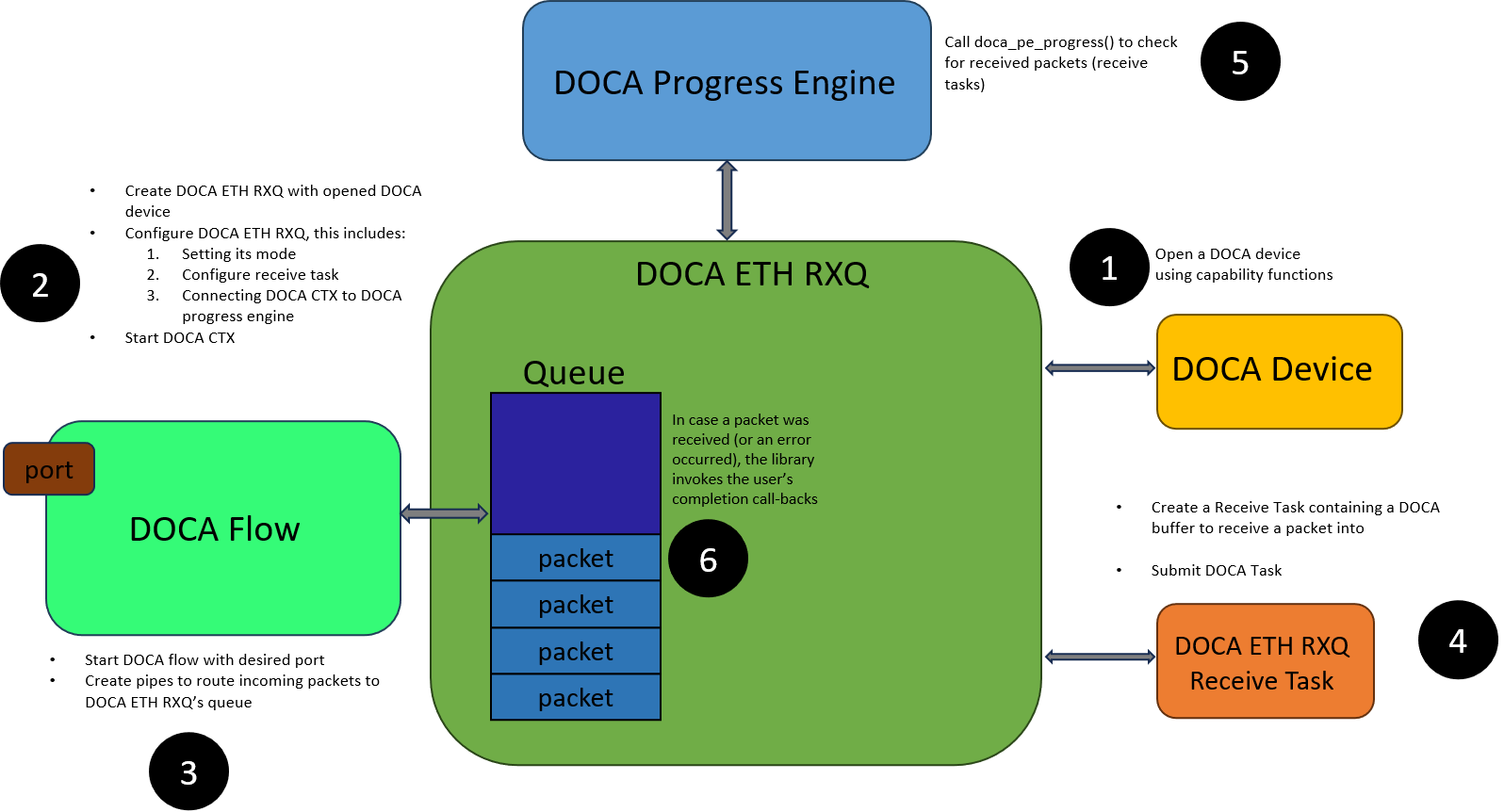
The application owns the packet memory. To receive, you submit a Receive Task containing a doca_buf that the library writes the packet into, so you control exactly where each packet lands and can forward it to other DOCA libraries. Delivered via the Receive Task (see Execution Phase).
Cyclic Receive
This mode is supported only for GPU datapath.
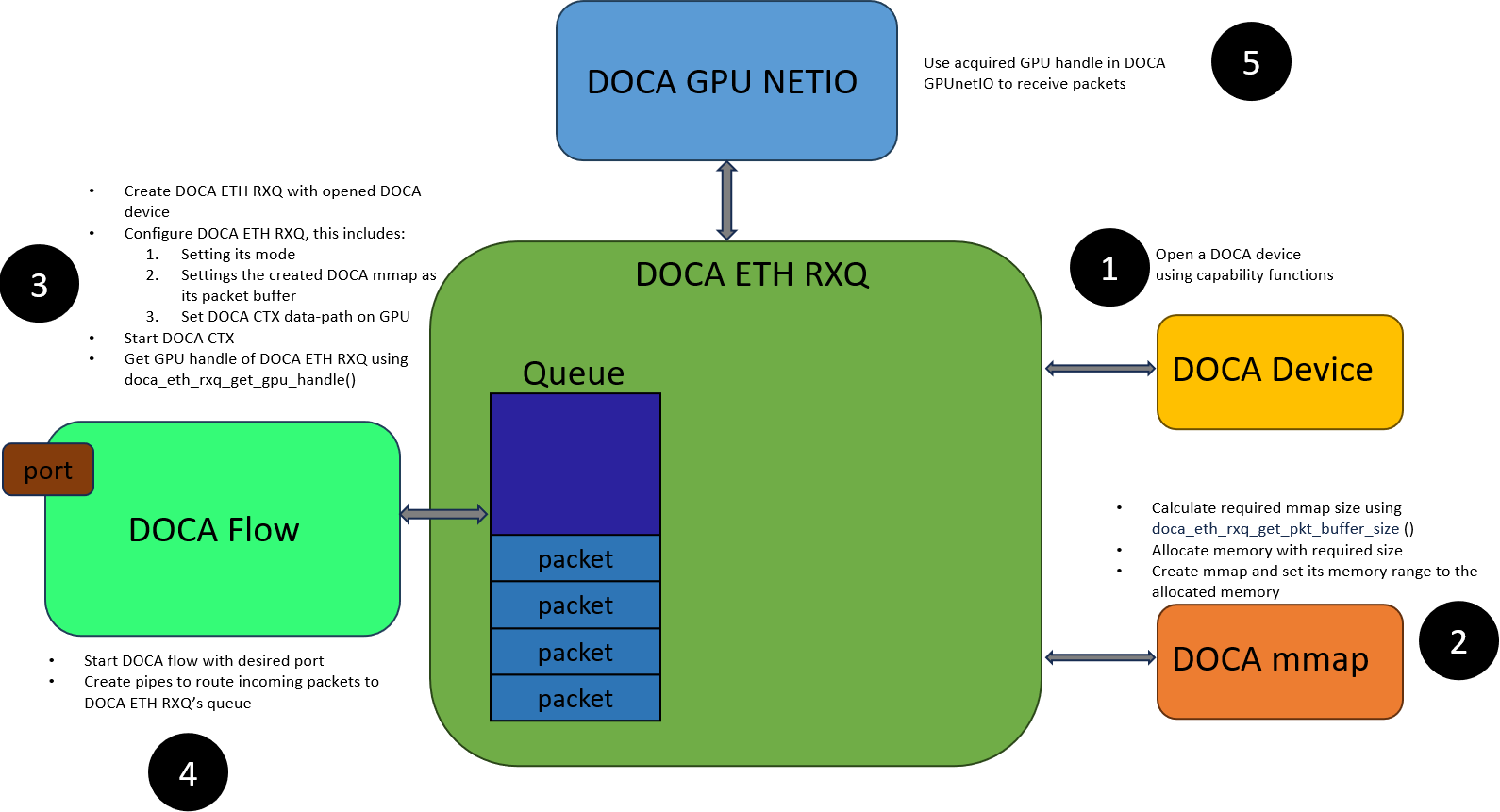
The library scatters packets cyclically into a packet buffer you supply as a doca_mmap (set it with doca_eth_rxq_set_pkt_buf(), sized with doca_eth_rxq_estimate_packet_buf_size()). An acquired packet may be overwritten if it is not processed in time.
This makes Cyclic Receive best for deterministic, low-latency GPU processing where each packet is consumed before reuse, and it offers the best raw performance (see DOCA GPUNetIO).
Managed Memory Pool Receive
This mode is supported only for CPU datapath.
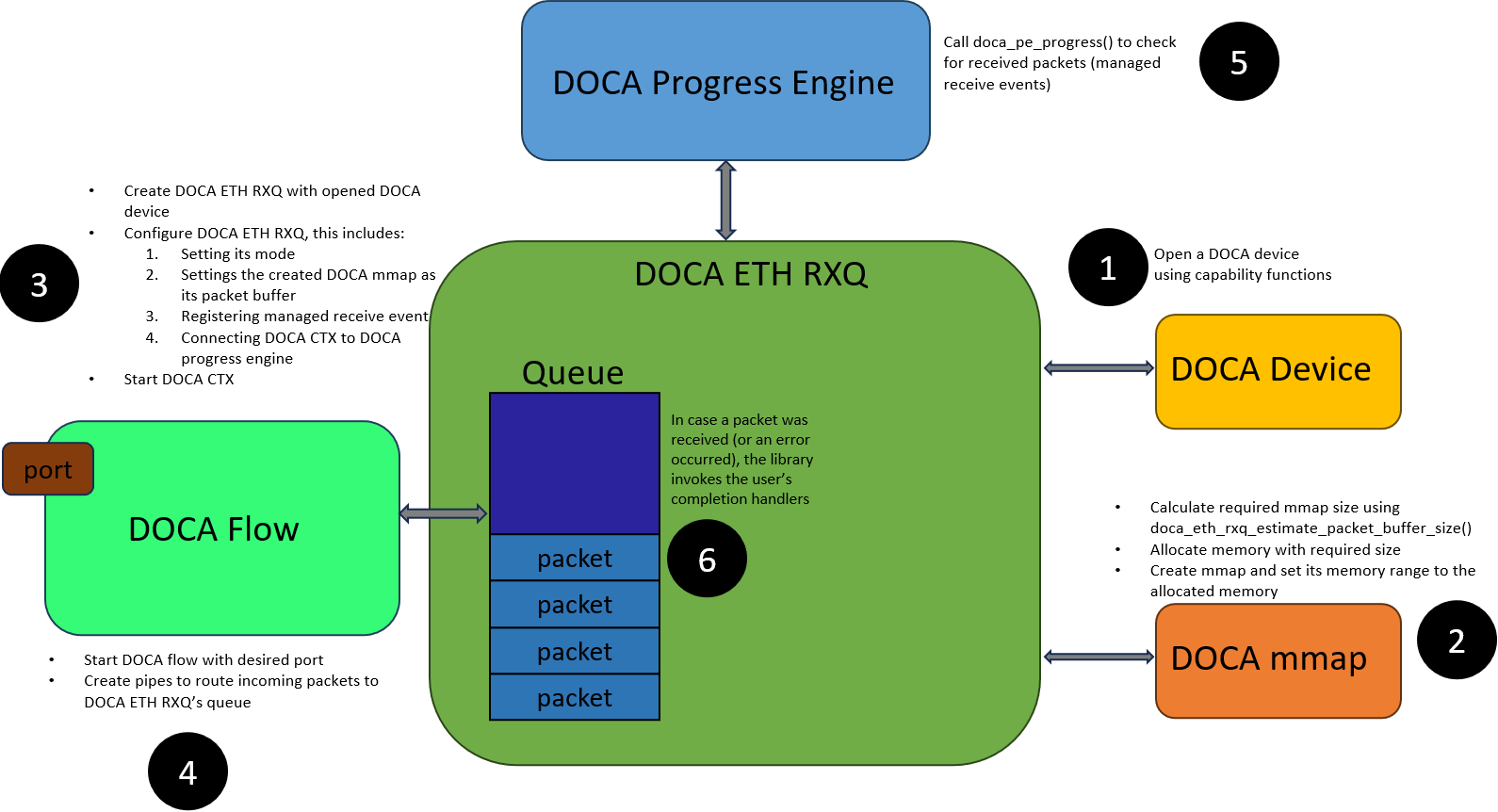
The library manages the packet buffers (you still supply the backing memory via doca_eth_rxq_set_pkt_buf(), sized with doca_eth_rxq_estimate_packet_buf_size()) and will not overwrite an acquired packet until you free it, so packets can be safely forwarded to other DOCA libraries. If buffers are not freed fast enough the pool is exhausted and packets are dropped. Delivered via the Managed Receive Event (see Execution Phase).
Shared Memory Pool Receive
This mode is supported only for CPU datapath.
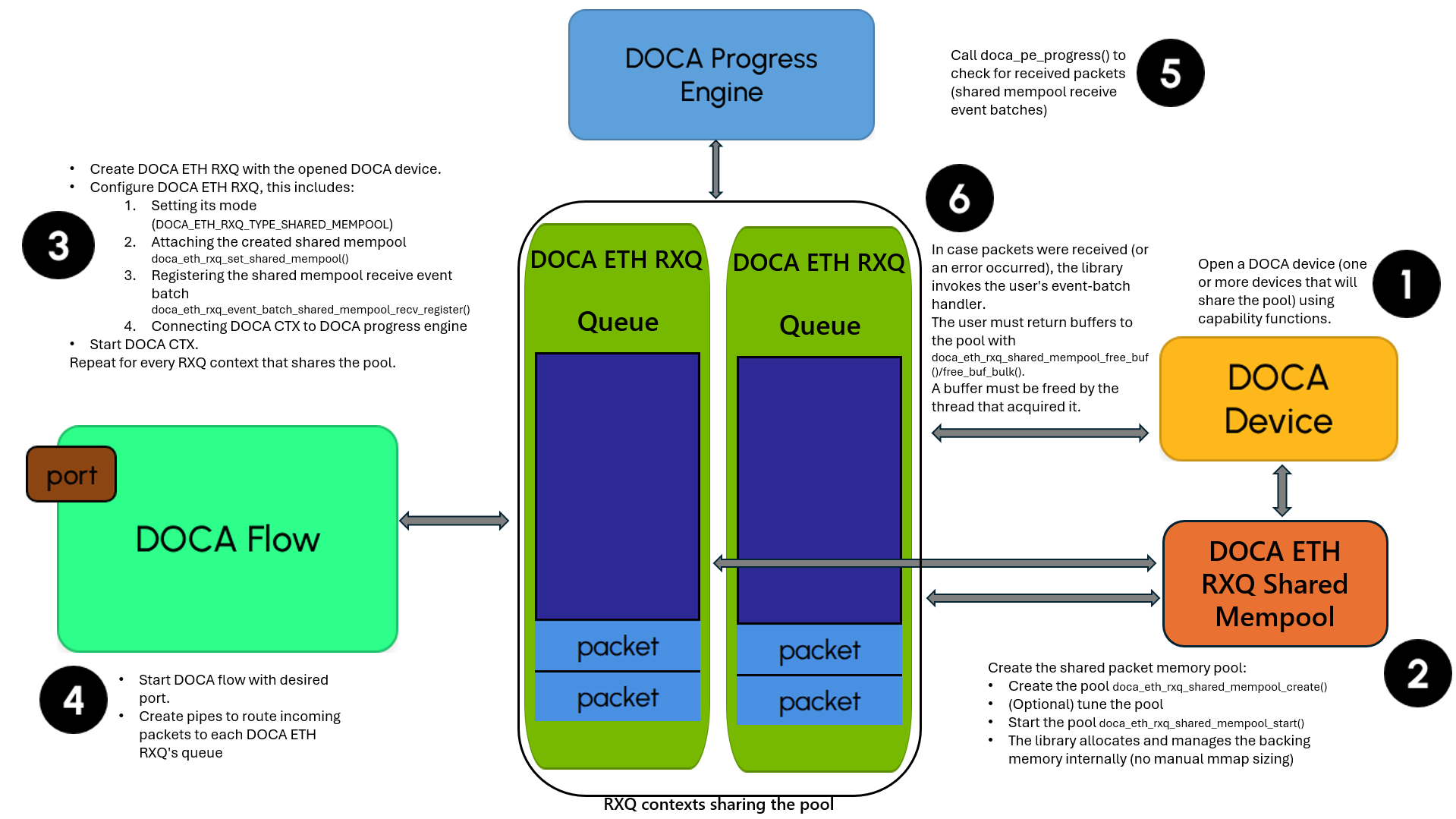
Multiple RXQ contexts draw buffers from one shared pool, while sustaining a high packet rate. As in Managed mode, an acquired packet is not overwritten until you free it and can be forwarded to other DOCA libraries.
Create the pool once with doca_eth_rxq_shared_mempool_create() and start it with doca_eth_rxq_shared_mempool_start(); attach it to each RXQ with doca_eth_rxq_set_shared_mempool() and return buffers with doca_eth_rxq_shared_mempool_free_buf() (or ..._free_buf_bulk() for better performance). A buffer must be freed by the thread that acquired it. Delivered via the Shared Mempool Receive Event Batch (see Execution Phase).
Receive Offloads
The DOCA ETH RXQ supports several hardware offloads:
-
Metadata – Supports retrieving the metadata value collected during packet flow table processing. (See
doca_eth_rxq_set_metadata_num()). -
Flow Tag – Supports retrieving the flow tag value that was set by software (e.g., DOCA Flow) when the flow entry was created. (See
doca_eth_rxq_set_flow_tag()). -
RX Hash – Supports retrieving the calculated RX hash value of the packet. (See
doca_eth_rxq_set_rx_hash()). -
Packet Headroom/Tailroom - Reserve user-requested space in each packet's
doca_bufheadroom and tailroom. In Managed Memory Pool mode, set it on the RXQ context viadoca_eth_rxq_set_packet_headroom() anddoca_eth_rxq_set_packet_tailroom().
In Shared Memory Pool mode, set it on the pool viadoca_eth_rxq_shared_mempool_set_headroom_size() anddoca_eth_rxq_shared_mempool_set_tailroom_size(). -
Packet Timestamp – Supports retrieving the timestamp (time since epoch, in nanoseconds) of when the packet was received. (See
doca_eth_rxq_set_timestamp()). -
CQE Compression – The hardware can pack multiple completions (CQEs) into a compact format, reducing the PCIe bandwidth consumed by completions and increasing the achievable packet rate (See
doca_eth_rxq_set_cqe_format()).
Working with DOCA Flow
To route incoming packets to the desired DOCA ETH RXQ, applications need to use DOCA Flow. Applications need to do the following:
-
Create and start DOCA Flow on the appropriate port (device)
-
Create pipes to route packets into
-
Apply unique queue ID of the queue (inside DOCA ETH RXQ) using
doca_eth_rxq_apply_queue_id() -
Add an entry to a pipe which routes packets into the RX queue (using the queue ID we applied)
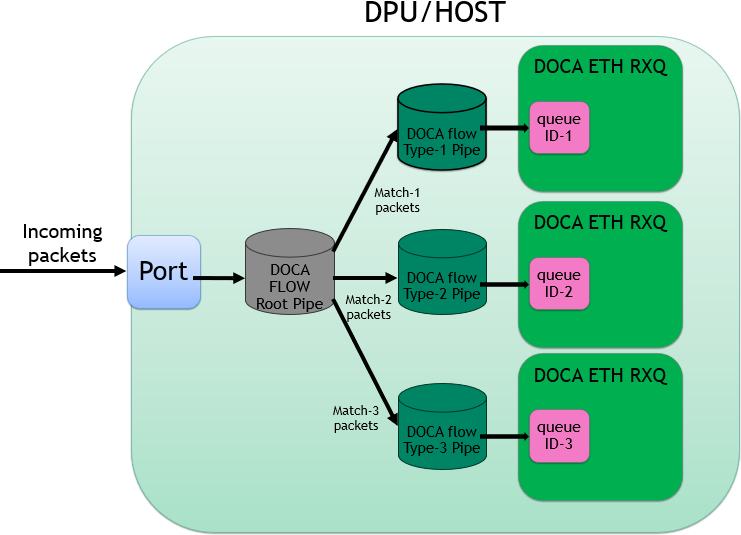
For more details see DOCA ETH RXQ samples and DOCA Flow.
DOCA ETH TXQ
Operating Mode
DOCA ETH TXQ operates in a single mode, Regular Send. On the CPU datapath, submit a Send Task containing the packet's doca_buf.
For the GPU datapath, see DOCA GPUNetIO.
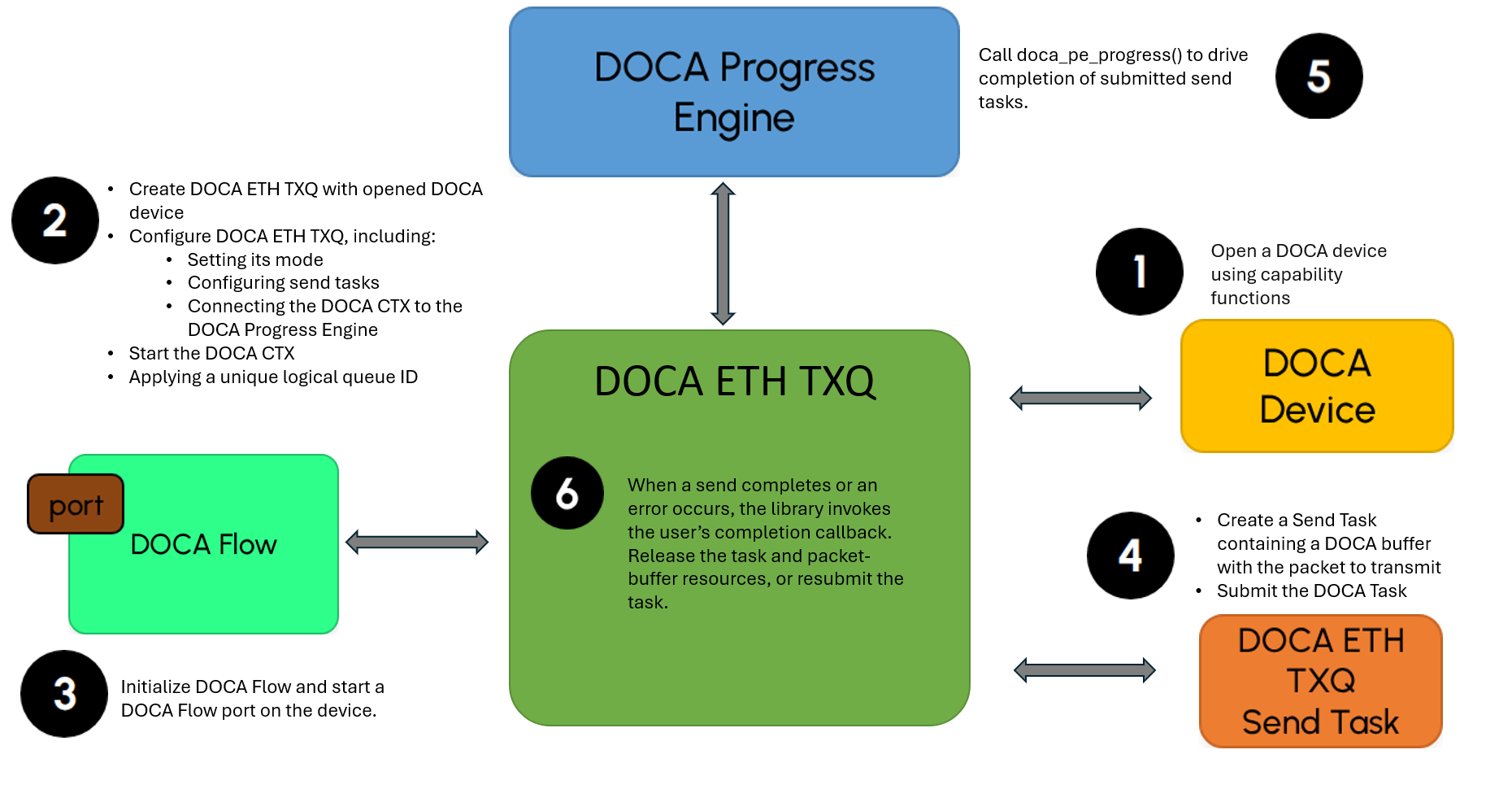
Transmit Offloads
The DOCA ETH TXQ supports several hardware offloads:
-
Large segment offloading (LSO) – The hardware can segment large TCP messages (over IPv4 or IPv6) into multiple valid TCP segments. The application provides a header template, which the hardware automatically replicates and updates (e.g., sequence numbers) for each generated segment (see LSO Send Task).
-
L3/L4 checksum offloading – The hardware calculates L3 (IP) and L4 (TCP/UDP) checksums for outgoing IPv4/IPv6 packets - in tunneling scenarios, for the outer header - overwriting any value already present in the checksum fields (see
doca_eth_txq_set_l3_chksum_offload() anddoca_eth_txq_set_l4_chksum_offload()). -
Metadata – Supports attaching a metadata value to the packet, which is then carried into the transmit flow table processing (see
doca_eth_txq_set_metadata_num()). -
Inline data – For small packets, the hardware can copy the packet data directly into the send queue entry instead of referencing it by pointer, reducing latency. The decision is made per packet according to its length (See
doca_eth_txq_set_max_inline_data_size()). -
Wait-on-time (scheduled send) - On the GPU datapath, the hardware can transmit a packet at a precise time instead of immediately. Enable it with
doca_eth_txq_set_wait_on_time_offload(); it requires the device's real-time clock (see Prerequisites & Environment); compute the send time withdoca_eth_txq_calculate_timestamp().
Working with DOCA Flow
To transmit packets through the desired port, applications need to use DOCA Flow. Applications need to:
-
Create and start DOCA Flow on the appropriate port (device)
-
Apply a unique queue ID to the DOCA ETH TXQ send queue using
doca_eth_txq_apply_queue_id()
Unlike RXQ, TXQ does not require DOCA Flow pipes or entries because packets are transmitted directly through the selected port.
For more details, see the DOCA ETH TXQ samples and DOCA Flow.
Configuration Phase
To start using the library, the application first goes through the configuration phase described in DOCA Core Context Configuration Phase. This section covers how to configure and start the context so it can execute tasks and deliver events.
Configure the context to match your use case. To check whether a configuration is supported (and its min/max), see Device Support.
On the GPU datapath, the context is not associated with a DOCA PE, since the datapath does not run on the CPU.
Mandatory Configurations
These configurations are mandatory and must be set by the application before attempting to start the context.
DOCA ETH RXQ
-
At least one task/event/event_batch type must be configured. Refer to Receiving Packets (Execution Phase) for more information.
-
Max packet size (the maximum size of packet that can be received) must be provided at creation time of the DOCA ETH RXQ context (see
max_packet_sizeindoca_eth_rxq_create()). -
Max burst size (the maximum number of packets that the library can handle at the same time) must be provided at creation time of the DOCA ETH RXQ context (see
max_burst_sizeindoca_eth_rxq_create()). -
A device with appropriate support must be provided upon creation (see
devindoca_eth_rxq_create()). -
When in Cyclic Receive or Managed Memory Pool Receive modes, a
doca_mmapmust be provided in-order write the received packets into (seedoca_eth_rxq_set_pkt_buf()). -
When in Shared Memory Pool Receive mode, a started
doca_eth_rxq_shared_mempoolmust be provided (instead of a packet buffer) usingdoca_eth_rxq_set_shared_mempool(). -
In case of a GPU datapath, A DOCA GPU sub-device must be provided using
doca_ctx_set_datapath_on_gpu().
DOCA ETH TXQ
-
At least one
task/task_batchtype must be configured. Refer to Sending Packets (Execution Phase) for more information. -
Max burst size (the maximum number of packets that the library can handle at the same time) must be provided at creation time of the DOCA ETH TXQ context (see
max_burst_sizeindoca_eth_txq_create()). -
A device with appropriate support must be provided on creation (see
devindoca_eth_txq_create()). -
In case of a GPU datapath, a DOCA GPU sub-device must be provided using
doca_ctx_set_datapath_on_gpu()
Optional Configurations
The following configurations are optional. If they are not set, a default value is used.
DOCA ETH RXQ
|
Setting |
API Function |
Default Value |
Affected Operations |
|
RXQ Mode |
|
|
N/A |
|
Max. Receive Buffer List Length |
|
|
Receive Task |
|
Metadata Retrieval |
|
|
Receive Task / Managed Receive Event / Managed Receive Event Batch / Shared Mempool Receive Event Batch |
|
Flow Tag Retrieval |
|
Disabled |
Receive Task / Managed Receive Event / Managed Receive Event Batch / Shared Mempool Receive Event Batch |
|
RX Hash Retrieval |
|
Disabled |
Receive Task / Managed Receive Event / Managed Receive Event Batch / Shared Mempool Receive Event Batch |
|
*Packet Headroom |
|
|
Managed Receive Event / Managed Receive Event Batch |
|
*Packet Tailroom |
|
|
Managed Receive Event / Managed Receive Event Batch |
|
Timestamp Retrieval |
|
Disabled |
Receive Task / Managed Receive Event / Managed Receive Event Batch / Shared Mempool Receive Event Batch |
|
CQE Format |
|
|
Receive Task / Managed Receive Event / Managed Receive Event Batch / Shared Mempool Receive Event Batch |
* Note: In Shared Memory Pool Receive mode, packet headroom/tailroom are configured on the pool via doca_eth_rxq_shared_mempool_set_headroom_size() / doca_eth_rxq_shared_mempool_set_tailroom_size(), not through the RXQ setters above.
DOCA ETH TXQ
|
Setting |
API Function |
Default Value |
Affected Operations |
|
TXQ Mode |
|
|
N/A |
|
Max. Send Buffer List Length |
|
|
Send Task / Send Task Batch / LSO Send Task / LSO Send Task Batch |
|
L3 Checksum Offload |
|
Disabled |
Send Task / Send Task Batch / LSO Send Task / LSO Send Task Batch |
|
L4 Checksum Offload |
|
Disabled |
Send Task / Send Task Batch / LSO Send Task / LSO Send Task Batch |
|
LSO Default MSS |
|
|
LSO Send Task / LSO Send Task Batch |
|
LSO Max Header Size |
|
|
LSO Send Task / LSO Send Task Batch |
|
Metadata Attachment |
|
|
Send Task / Send Task Batch / LSO Send Task / LSO Send Task Batch |
|
Max Inline Data Size |
|
|
Send Task / Send Task Batch |
Device Support
DOCA ETH requires a device to operate. For picking a device, see DOCA Core Device Discovery.
To check if a device supports a specific mode, use the type capabilities functions (see doca_eth_rxq_cap_is_type_supported() and doca_eth_txq_cap_is_type_supported()).
Devices can allow the following capabilities:
-
The maximum burst size
-
The maximum buffer chain list (only for Regular Receive/Regular Send modes)
-
The maximum packet size (only for DOCA ETH RXQ)
-
L3/L4 checksum offloading capability (only for DOCA ETH TXQ)
-
Maximum LSO message/header size (only for DOCA ETH TXQ)
-
Wait-on-time offloading capability (only for DOCA ETH TXQ in GPU datapath)
-
Max metadata number capability (only for CPU datapath)
-
CQE compression capability (only for DOCA ETH RXQ in CPU datapath)
-
Maximum inline data size (only for DOCA ETH TXQ in CPU datapath)
Buffer Support
DOCA ETH supports buffers (doca_mmap or doca_buf) with the following features:
|
Buffer Type |
Send Task |
LSO Send Task |
Receive Task |
Managed Receive Event |
Shared Receive Event |
|
Local mmap buffer |
Yes |
Yes |
Yes |
Yes |
Yes |
|
Mmap from PCIe export buffer |
Yes |
Yes |
Yes |
Yes |
Yes |
|
Mmap from RDMA export buffer |
No |
No |
No |
No |
No |
|
Linked list buffer |
Yes |
Yes |
Yes |
No |
No |
For buffer support in the case of GPU datapath, see DOCA GPUNetIO Programming Guide.
Execution Phase
This section describes execution on the CPU datapath using the DOCA Core Progress Engine (PE).
For the GPU datapath, see GPU Datapath and the DOCA GPUNetIO Programming Guide.
Common Behaviour
The following applies to every task and event below:
-
You either submit a task and poll the PE for its completion or register an event and the PE invokes your callback when it triggers. See DOCA Core Task and DOCA Core Event.
-
Operations are not atomic. Once a buffer is submitted (task) or held by the library (event), do not read or write it until it is completed or returned to you.
-
On failure, the context moves to the Stopping state (see State Machine); the buffer object itself is not modified.
-
Task/event input and output follow the common DOCA Core definitions; only the ETH-specific additions are listed below.
Receiving Packets
DOCA ETH RXQ exposes one task and two events. Which one you use is determined by the RXQ mode you selected (see Architecture → Operating Modes).
|
|
Receive Task (task) |
Managed Receive Event (event, + batch) |
Shared Mempool Receive Event (event batch) |
|
Purpose |
Receive into an application-provided buffer (Regular Receive mode). |
Receive into a library-managed buffer (Managed Memory Pool mode); not overwritten until freed. |
Receive into one pool shared by multiple RXQs (Shared Memory Pool mode) at high rate. |
|
Enable |
|
|
|
|
Input |
A packet |
—
|
—
|
|
On success |
Poll the PE → task completes; packet written and data segment extended. |
Per-packet success callback; process pkt, then free it (return to library). Not freeing causes packet loss. |
Batch success callback; process packets, then return each buffer with |
|
On failure |
Context → Stopping; |
Failure callback; context → Stopping; pkt is NULL. |
Batch failure callback; context → Stopping. |
|
Batch variant |
—
|
Yes - |
This mechanism is batch-only. |
-
Reading a received packet – Get the packet's
doca_buf(doca_eth_rxq_task_recv_get_pkt() for the Receive Task, or the buffer handed to your event callback), read it withdoca_buf_get_data() /doca_buf_get_data_len(), then release it: decrement its refcount for a Receive Task, or free it back to the pool for the Managed/Shared events. A shared-mempool buffer must be freed by the same thread that acquired it. -
Per-packet fields (when enabled via the matching Optional Configuration) - L3/L4 checksum result, metadata, flow tag, RX hash, and timestamp - are read with the matching getter family:
doca_eth_rxq_task_recv_get_* (Receive Task),doca_eth_rxq_event_managed_recv_get_* (Managed Event; the batch variant exposes the _array getters), anddoca_eth_rxq_event_batch_shared_mempool_recv_get_*_array (Shared batch). -
See DOCA ETH Samples for end-to-end Regular Receive and Managed Receive examples.
Sending Packets
DOCA ETH TXQ exposes two send tasks; both support a batch variant for higher throughput.
|
|
Send Task (+ batch) |
LSO Send Task (+ batch) |
|
Purpose |
Send a single packet (≤ MTU). |
Send a large packet (> MTU); the hardware segments it into MTU-sized packets. |
|
Enable |
|
|
|
Input |
A packet |
A payload |
|
On success |
Packet has entered the device's TX hardware and the |
Same as Send Task; the payload buffer and headers gather list are released. |
|
On failure |
Context → Stopping; |
Context → Stopping; payload |
|
Batch variant |
Submit an array of buffers (pkt_array); one completion per batch. |
Submit a payload array (pkt_payload_array) + headers array (headers_array); one completion per batch. |
The task pools can grow at runtime: doca_eth_txq_task_send_num_expand() / doca_eth_txq_task_lso_send_num_expand() (and ..._task_batch_send_num_expand() / ..._task_batch_lso_send_num_expand() for batches).
On the GPU datapath, send errors and completions are reported via the Error Send Packet (doca_eth_txq_gpu_event_error_send_packet_register()) and Notify Send Packet (doca_eth_txq_gpu_event_notify_send_packet_register()) events - see GPU Datapath.
See DOCA ETH Samples for Send, LSO Send, and their batch variants.
Typical Call Sequence
These are the CPU-datapath call sequences behind the samples.
Transmit (TXQ)
/* Prerequisites (see DOCA Core): doca_dev *dev, doca_mmap *mmap,
 * doca_buf_inventory *inv, and doca_pe *pe are already created. */
{
    /* (1) Create & configure - context is Idle here */
    doca_eth_txq_create(dev, max_burst_size, &txq);
    doca_eth_txq_set_type(txq, DOCA_ETH_TXQ_TYPE_REGULAR);
    doca_eth_txq_task_send_set_conf(txq, send_cb, send_cb, task_send_num);
    /* optional offloads, e.g. doca_eth_txq_set_l3_chksum_offload(txq, 1);  */

    /* (2) Start - view TXQ as a doca_ctx, connect to the PE, start */
    ctx = doca_eth_txq_as_doca_ctx(txq);
    doca_pe_connect_ctx(pe, ctx);
    doca_ctx_start(ctx);
    doca_eth_txq_apply_queue_id(txq, queue_id);   /* logical SQ id (after start) */

    /* (3) Steer - start a DOCA Flow port on the device, no pipe/entry needed (see Working with DOCA Flow) */

    /* (4) Run - fill a buffer, allocate a task, submit, poll */
    doca_buf_inventory_buf_get_by_data(inv, mmap, pkt_addr, pkt_len, &pkt);
    doca_eth_txq_task_send_allocate_init(txq, pkt, user_data, &task);
    doca_task_submit(doca_eth_txq_task_send_as_doca_task(task));   /* eth task -> doca_task */
    while (inflight)
        doca_pe_progress(pe);                     /* drives send_cb on completion */

    /* (6) Teardown */
    doca_ctx_stop(ctx);                           /* keep polling doca_pe_progress() until Idle */
    doca_eth_txq_destroy(txq);
}

/* (5) Send completion/error callback - invoked from doca_pe_progress() */
static void send_cb(struct doca_eth_txq_task_send *task, union doca_data task_ud, union doca_data ctx_ud)
{
    doca_eth_txq_task_send_get_pkt(task, &pkt);   /* packet handed back to you */
    doca_buf_dec_refcount(pkt, NULL);             /* release the packet buffer */
    doca_task_free(doca_eth_txq_task_send_as_doca_task(task));
}
Receive (RXQ, Regular Receive)
/* Prerequisites (see DOCA Core): dev, mmap, inv, pe already set up. */

{
    /* (1) Create & configure - context is Idle here */
    doca_eth_rxq_create(dev, max_burst_size, max_packet_size, &rxq);
    doca_eth_rxq_set_type(rxq, DOCA_ETH_RXQ_TYPE_REGULAR);
    doca_eth_rxq_task_recv_set_conf(rxq, recv_cb, recv_cb, task_recv_num);
    /* optional offloads: doca_eth_rxq_set_metadata_num(), _set_rx_hash(), _set_timestamp() */

    /* (2) Start */
    ctx = doca_eth_rxq_as_doca_ctx(rxq);
    doca_pe_connect_ctx(pe, ctx);
    doca_ctx_start(ctx);
    doca_eth_rxq_apply_queue_id(rxq, queue_id);    /* reuse this id in DOCA Flow */

    /* (3) Steer - route packets to queue_id via DOCA Flow (see Working with DOCA Flow) */

    /* (4) Run - hand the library an empty buffer, submit, poll */
    doca_buf_inventory_buf_get_by_addr(inv, mmap, buf_addr, buf_len, &buf);
    doca_eth_rxq_task_recv_allocate_init(rxq, buf, user_data, &task);
    doca_task_submit(doca_eth_rxq_task_recv_as_doca_task(task));
    while (running)
        doca_pe_progress(pe);                      /* drives recv_cb per packet */

    /* (6) Teardown - stop DOCA Flow first, then the context */
    doca_ctx_stop(ctx);                            /* keep polling until Idle */
    doca_eth_rxq_destroy(rxq);
}

/* (5) Receive completion/error callback - invoked from doca_pe_progress() */
static void recv_cb(struct doca_eth_rxq_task_recv *task, union doca_data task_ud, union doca_data ctx_ud)
{
    doca_eth_rxq_task_recv_get_pkt(task, &pkt);   /* the received packet */
    doca_buf_get_data(pkt, &data);            /* pointer to packet bytes */
    /* process data; read metadata/rx_hash/timestamp here if enabled     */
    doca_buf_dec_refcount(pkt, NULL);             /* return the buffer */
    doca_task_free(doca_eth_rxq_task_recv_as_doca_task(task));
}
For Managed / Shared Memory Pool modes, skip the per-packet Receive Task: register an event/event-batch (see Receiving Packets) and free each delivered buffer after processing.
State Machine
DOCA ETH follows the standard DOCA Core context state machine (see DOCA Core Context State Machine). It uses three of the four states - Idle, Running, and Stopping; the Starting state is not used.
States at a glance
-
Idle - Configured but not running. Allowed: configure the context, start it, or destroy it.
-
Starting - Not used by DOCA ETH (cannot be reached).
-
Running - Datapath is active. Allowed: allocate and submit tasks, drive completions/events by calling progress, call
doca_eth_rxq_apply_queue_id() to connect an RX queue to DOCA Flow, and call stop. -
Stopping - Draining. Allowed: call progress to complete all inflight tasks (which finish with failure), free completed tasks, and free any
doca_bufreturned by the Managed or Shared Mempool receive callbacks.
Transitions
|
From |
To |
Trigger / condition |
|
(none) |
Idle |
Create the context |
|
Idle |
Running |
Call start (after configuration) |
|
Running |
Idle |
Call stop after all tasks are completed & freed and all |
|
Running |
Stopping |
Call stop while tasks or returned |
|
Stopping |
Idle |
Call progress until all tasks are completed & freed and all returned |
|
Idle |
(destroyed) |
Destroy the context |
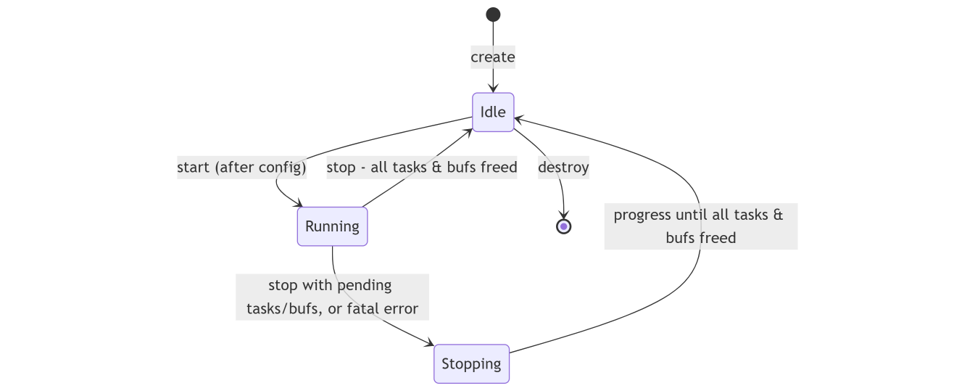
GPU Datapath
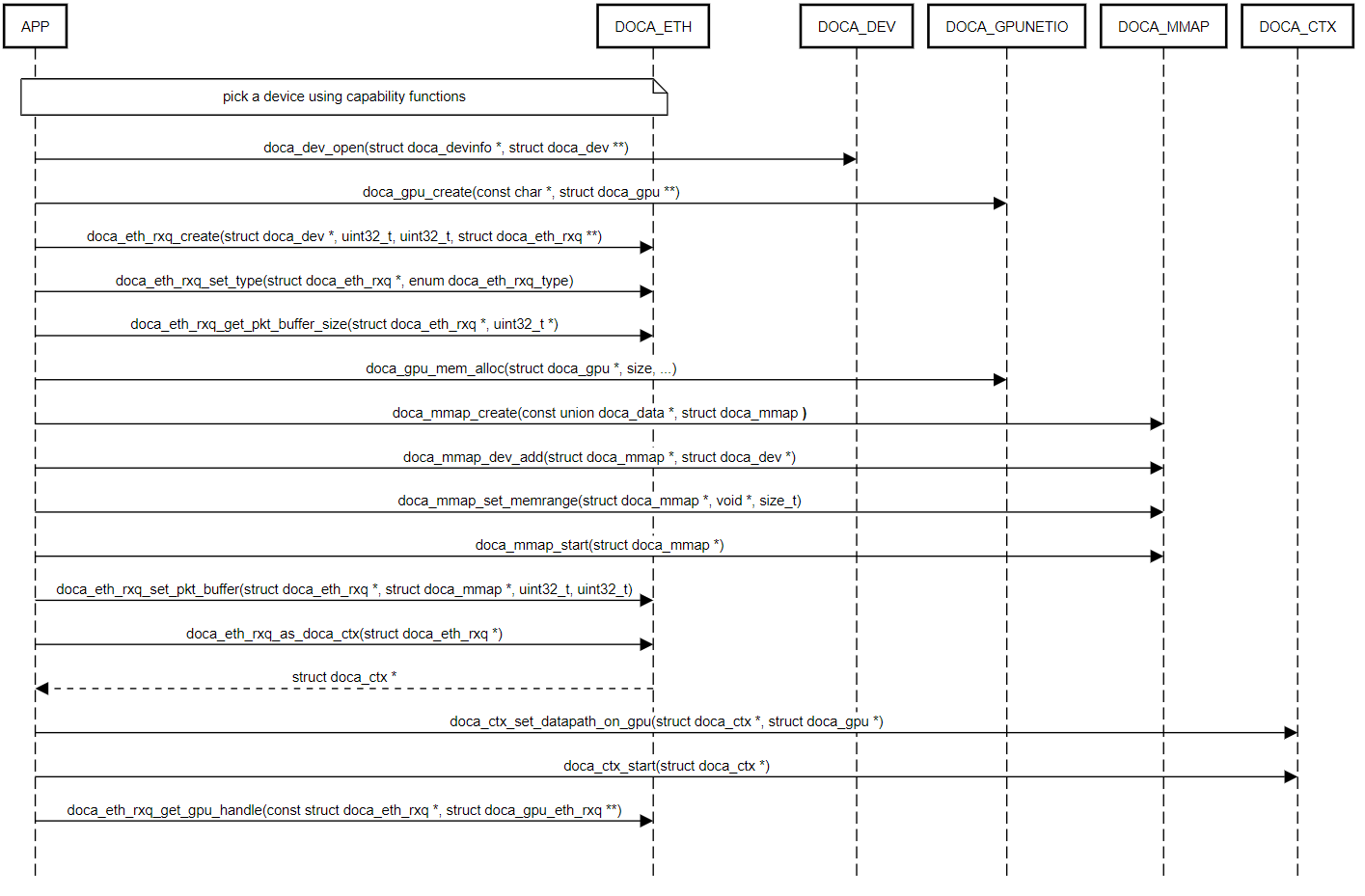
In addition to the CPU datapath (see Execution Phase), DOCA ETH can run its data path on the GPU. This frees the CPU from data-path management and enables low-latency GPU processing of network traffic. The control path (configuration) still runs on the CPU; only the data path moves to the GPU. The data path cannot be managed by the CPU and GPU at the same time.
To set up a GPU-operated context:
-
Create a DOCA GPU device handle.
-
Create the
doca_eth_rxq/doca_eth_txqand configure its parameters. -
Call
doca_ctx_set_datapath_on_gpu() beforedoca_ctx_start(). -
Start the context.
-
Get the GPU handle with
doca_eth_rxq_get_gpu_handle() (ordoca_eth_txq_get_gpu_handle() for TX); it points into GPU memory space.
The DOCA ETH context is configured on the CPU and then exported to the GPU:
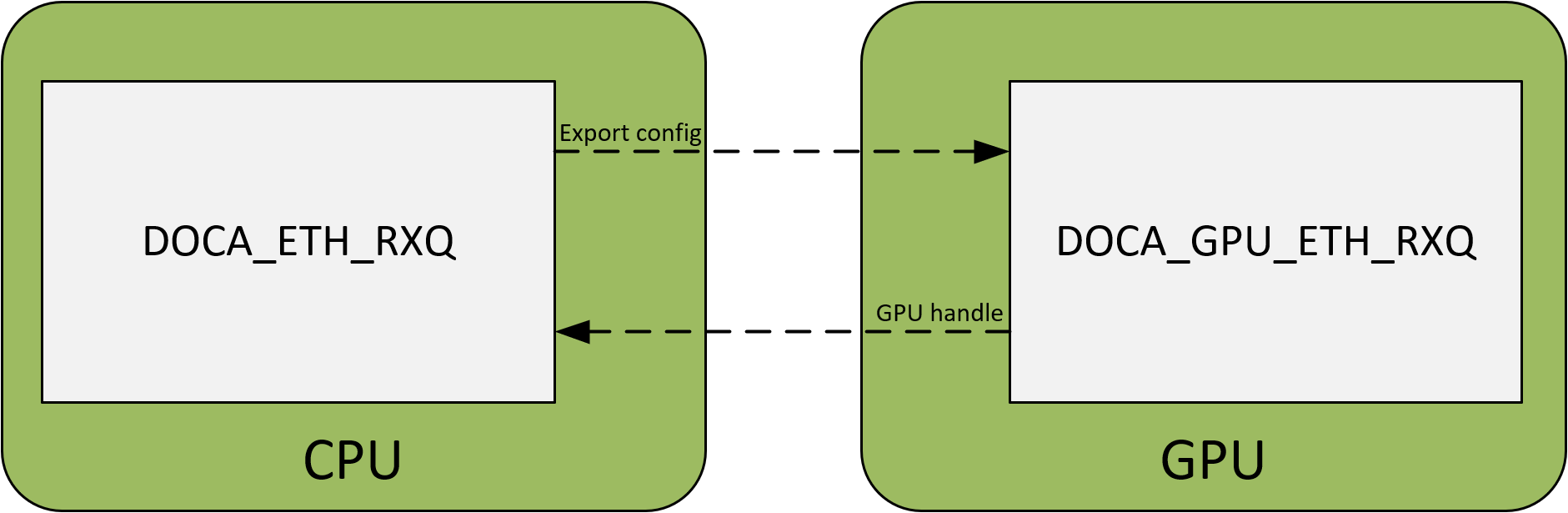
The following example shows the expected flow for a GPU-managed datapath with packets being scattered to GPU memory (for doca_eth_rxq):
Send Events
On the GPU datapath, send outcomes are reported through events you register before doca_ctx_start():
|
|
Error Send Packet |
Notify Send Packet |
|
Purpose |
Detect a failed packet send |
Receive notify/completion info for a sent packet |
|
Register |
|
|
|
Handler |
Callback fires on a send error; get the failing packet's send-queue index via |
Callback fires with notify info; get the packet's send-queue index via |
|
Availability |
DOCA ETH TXQ on GPU datapath only |
DOCA ETH TXQ on GPU datapath only. |
For more information regarding the GPU datapath see DOCA GPUNetIO.
Performance Considerations
The following knobs help you get the most out of DOCA ETH. Measure with your own workload to choose the right combination.
-
Batch operations. Use Send/LSO Send Task Batches and Managed/Shared Receive Event Batches to amortize per-operation cost and move many packets per Progress Engine call.
-
Right-size max_burst_size. It bounds how many packets the queue handles concurrently; set it to your real in-flight needs.
-
Keep buffer-list length at 1 unless you need scatter/gather. Longer Max Receive/Send Buffer List Lengths disable some fast paths (e.g., TX inline data).
-
Enable CQE compression on RX (
doca_eth_rxq_set_cqe_format()) to reduce the PCIe bandwidth spent on completions and raise the achievable packet rate (CPU datapath). -
Use inline data for small sends (
doca_eth_txq_set_max_inline_data_size()) to cut latency by copying small payloads into the work-queue entry (CPU datapath; mutually exclusive with scatter/gather). -
Use Managed Memory Pool Receive for higher packet rate.
-
Enable only the offloads you consume. Flow tag, RX hash, timestamp, and metadata each add per-packet work and are disabled by default.
-
Free received buffers promptly. Prefer bulk free (
doca_eth_rxq_shared_mempool_free_buf_bulk()) to avoid pool exhaustion and packet drops. -
Tune the Progress Engine polling loop (tight poll vs. backoff) to match your latency/CPU trade-off.
-
Offload the data path to the GPU (see GPU Datapath) for the lowest CPU involvement and latency.
DOCA ETH Samples
This section describes DOCA ETH samples based on the DOCA ETH library. The samples illustrate how to use the DOCA ETH API to do the following:
-
Send "regular" packets (smaller than MTU) using DOCA ETH TXQ
-
Send "large" packets (larger than MTU) using DOCA ETH TXQ
-
Receive packets using DOCA ETH RXQ in Regular Receive mode
-
Receive packets using DOCA ETH RXQ in Managed/Shared Memory Pool Receive mode
All the DOCA samples described in this section are governed under the BSD-3 software license agreement.
-
The following samples are for the CPU datapath. For GPU datapath samples, see DOCA GPUNetIO.
-
These samples are also available on GitHub.
Running the Samples
-
Refer to the following documents:
-
DOCA Installation Guide for Linux for details on how to install BlueField-related software.
-
DOCA Troubleshooting for any issue you may encounter with the installation, compilation, or execution of DOCA samples.
-
-
To build a given sample (in this case,
eth_txq_send_ethernet_frames) run the following command. If you downloaded the sample from GitHub, update the path in the first line to reflect the location of the sample file:cd /opt/mellanox/doca/samples/doca_eth/eth_txq_send_ethernet_frames meson /tmp/build ninja -C /tmp/buildThe binary
eth_txq_send_ethernet_framesis created under/tmp/build/.
-
Sample (e.g.,
eth_txq_send_ethernet_frames) usage:Usage: doca_eth_txq_send_ethernet_frames [DOCA Flags] [Program Flags] DOCA Flags: -h, --help Print a help synopsis -v, --version Print program version information -l, --log-level Set the (numeric) log level for the program <10=DISABLE, 20=CRITICAL, 30=ERROR, 40=WARNING, 50=INFO, 60=DEBUG, 70=TRACE> --sdk-log-level Set the SDK (numeric) log level for the program <10=DISABLE, 20=CRITICAL, 30=ERROR, 40=WARNING, 50=INFO, 60=DEBUG, 70=TRACE> -j, --json <path> Parse command line flags from an input json file Program Flags: -d, --device IB device name - default: mlx5_0 -m, --mac-addr Destination MAC address to associate with the ethernet frames - default: FF:FF:FF:FF:FF:FF -
For additional information per sample, use the
-hoption:/tmp/build/<sample_name> -h
Common Sample Skeleton
All samples follow the end-to-end call sequence in §1.2 (High level usage flow), §7.4 (Typical Call Sequence) and use the operations described in §7.2 (Receiving Packets) and §7.3 (Sending Packets). Only each sample's differences are listed below.
TXQ Samples
ETH TXQ Send Ethernet Frames
This sample illustrates how to send a "regular" packet (smaller than MTU) using DOCA ETH TXQ.
Unique to this sample:
-
Configure a single Send Task pool with
doca_eth_txq_task_send_set_conf(). -
Take one
doca_buffrom the inventory over your mmap (doca_buf_inventory_buf_get_by_data()) and write the full Ethernet frame (header + payload) into it. -
Allocate the task with
doca_eth_txq_task_send_allocate_init(), thendoca_task_submit(). -
In the completion callback:
doca_eth_txq_task_send_get_pkt(), checkdoca_task_get_status(), then release the buffer (doca_buf_dec_refcount()) and the task (doca_task_free()).
Reference:
-
/opt/mellanox/doca/samples/doca_eth/eth_txq_send_ethernet_frames/eth_txq_send_ethernet_frames_sample.c -
/opt/mellanox/doca/samples/doca_eth/eth_txq_send_ethernet_frames/eth_txq_send_ethernet_frames_main.c -
/opt/mellanox/doca/samples/doca_eth/eth_txq_send_ethernet_frames/meson.build
ETH TXQ LSO Send Ethernet Frames
This sample illustrates how to send a "large" packet (larger than MTU) using DOCA ETH TXQ.
Unique to this sample:
-
Configure LSO: set the segment size with
doca_eth_txq_set_mss() and the header-template limit withdoca_eth_txq_set_max_lso_header_size(); register the LSO pool withdoca_eth_txq_task_lso_send_set_conf(). -
Split payload and headers: put the payload only in a
doca_buffrom the inventory; put the headers in adoca_gather_listnode (set its addr/len/next) - the headers are a gather list, not adoca_buf. -
Allocate with
doca_eth_txq_task_lso_send_allocate_init(). The hardware replicates the header template and emits MSS-sized segments. -
In the callback:
doca_eth_txq_task_lso_send_get_pkt_payload(), check status, release the payload buffer, free the task, and free the headers gather list.
Reference:
-
/opt/mellanox/doca/samples/doca_eth/eth_txq_lso_send_ethernet_frames/eth_txq_lso_send_ethernet_frames_sample.c -
/opt/mellanox/doca/samples/doca_eth/eth_txq_lso_send_ethernet_frames/eth_txq_lso_send_ethernet_frames_main.c -
/opt/mellanox/doca/samples/doca_eth/eth_txq_lso_send_ethernet_frames/meson.build
ETH TXQ Batch Send Ethernet Frames
This sample illustrates how to send a batch of "regular" packets (smaller than MTU) with one submit/one completion using DOCA ETH TXQ.
Unique to this sample:
-
Configure a batch pool with
doca_eth_txq_task_batch_send_set_conf(), choosing the max tasks per batch and the number of task batches. -
Build an array of
doca_buf(one per packet) carved from the mmap. -
Allocate the batch with
doca_eth_txq_task_batch_send_allocate(), which hands back pkt_array and task_user_data_array; fill pkt_array[i] with each packet buffer (and a per-task user data), thendoca_task_batch_submit(). -
In the batch callback: loop over tasks_num, check the per-packet status_array[i], read each pkt_array[i], release every buffer, then
doca_task_batch_free().
Reference:
-
/opt/mellanox/doca/samples/doca_eth/eth_txq_batch_send_ethernet_frames/eth_txq_batch_send_ethernet_frames_sample.c -
/opt/mellanox/doca/samples/doca_eth/eth_txq_batch_send_ethernet_frames/eth_txq_batch_send_ethernet_frames_main.c -
/opt/mellanox/doca/samples/doca_eth/eth_txq_batch_send_ethernet_frames/meson.build
ETH TXQ Batch LSO Send Ethernet Frames
This sample illustrates how to send a batch of "large" packets (larger than MTU) using DOCA ETH TXQ.
Unique to this sample:
-
Configure both LSO (
doca_eth_txq_set_mss(),doca_eth_txq_set_max_lso_header_size()) and the LSO batch pool (doca_eth_txq_task_batch_lso_send_set_conf()). -
Build two arrays: payload
doca_bufsand headerdoca_gather_lists(one of each per packet). -
Allocate with
doca_eth_txq_task_batch_lso_send_allocate(), which returns pkt_payload_array, headers_array, and task_user_data_array; populate every entry, thendoca_task_batch_submit(). -
In the batch callback: loop over tasks_num, check status_array[i], release each payload buffer, free each headers gather list, then
doca_task_batch_free().
Reference:
-
/opt/mellanox/doca/samples/doca_eth/eth_txq_batch_lso_send_ethernet_frames/eth_txq_batch_lso_send_ethernet_frames_sample.c -
/opt/mellanox/doca/samples/doca_eth/eth_txq_batch_lso_send_ethernet_frames/eth_txq_batch_lso_send_ethernet_frames_main.c -
/opt/mellanox/doca/samples/doca_eth/eth_txq_batch_lso_send_ethernet_frames/meson.build
RXQ Samples
ETH RXQ Regular Receive
This sample illustrates how to receive a packet into an application-owned buffer using DOCA ETH RXQ in Regular Receive mode.
Unique to this sample:
-
Create the RXQ with both max_burst_size and max_packet_size; set type
DOCA_ETH_RXQ_TYPE_REGULAR; register the receive-task pool withdoca_eth_rxq_task_recv_set_conf(); optionally enable offloads (doca_eth_rxq_set_metadata_num(), ..._set_rx_hash(), ..._set_timestamp()). -
After start, apply the queue ID and create a DOCA Flow pipe that steers packets to it.
-
Provide the target buffer yourself: take an empty
doca_buffrom the inventory (doca_buf_inventory_buf_get_by_addr()) and submit it withdoca_eth_rxq_task_recv_allocate_init(); the library writes the packet into it. -
In the completion callback:
doca_eth_rxq_task_recv_get_pkt(), check status, read the packet (data length, plus any enabled metadata/rx_hash/timestamp), then release the buffer and free the task.
Reference:
-
/opt/mellanox/doca/samples/doca_eth/eth_rxq_regular_receive/eth_rxq_regular_receive_sample.c -
/opt/mellanox/doca/samples/doca_eth/eth_rxq_regular_receive/eth_rxq_regular_receive_main.c -
/opt/mellanox/doca/samples/doca_eth/eth_rxq_regular_receive/meson.build
ETH RXQ Managed Mempool Receive
This sample illustrates how to receive packets into library-managed buffers using DOCA ETH RXQ in Managed Memory Pool Receive mode.
Unique to this sample:
-
Size the pool first: compute the packet-buffer size with
doca_eth_rxq_estimate_packet_buf_size() and back it with an mmap. -
Set type
DOCA_ETH_RXQ_TYPE_MANAGED_MEMPOOL; hand the backing memory to the library withdoca_eth_rxq_set_pkt_buf(); register the event withdoca_eth_rxq_event_managed_recv_register(). There is no receive task and no per-packet buffer from the inventory - the library owns the buffers. -
Run by polling the PE; the success callback receives the packet's
doca_bufdirectly, exposes per-packet getters (doca_eth_rxq_event_managed_recv_get_metadata_array(), ..._get_rx_hash(), ..._get_timestamp()), and you must return the buffer withdoca_buf_dec_refcount() when done - otherwise the pool exhausts and packets drop. -
The error callback is invoked with a NULL packet; query
doca_eth_rxq_event_managed_recv_get_status().
Reference:
-
/opt/mellanox/doca/samples/doca_eth/eth_rxq_managed_mempool_receive/eth_rxq_managed_mempool_receive_sample.c -
/opt/mellanox/doca/samples/doca_eth/eth_rxq_managed_mempool_receive/eth_rxq_managed_mempool_receive_main.c -
/opt/mellanox/doca/samples/doca_eth/eth_rxq_managed_mempool_receive/meson.build
ETH RXQ Batch Managed Mempool Receive
This sample illustrates how to receive batches of packets using DOCA ETH RXQ in Managed Memory Pool Receive mode, delivering many packets per callback.
Unique to this sample:
-
Register a batch event with
doca_eth_rxq_event_batch_managed_recv_register(), choosing the max/min events per batch. -
The success callback delivers a whole batch at once: events_number and a
pkt_array[], with array getters for the per-packet fields (..._get_metadata_array(), ..._get_rx_hash_array(), ..._get_timestamp_array()). -
Process all packets in the loop, then free the entire array in one call with
doca_eth_rxq_event_batch_managed_recv_pkt_array_free().
Reference:
-
/opt/mellanox/doca/samples/doca_eth/eth_rxq_batch_managed_mempool_receive/eth_rxq_batch_managed_mempool_receive_sample.c -
/opt/mellanox/doca/samples/doca_eth/eth_rxq_batch_managed_mempool_receive/eth_rxq_batch_managed_mempool_receive_main.c -
/opt/mellanox/doca/samples/doca_eth/eth_rxq_batch_managed_mempool_receive/meson.build
ETH RXQ Batch Shared Mempool Receive
This sample illustrates how to receive batches of packets using DOCA ETH RXQ in Shared Memory Pool Receive mode, where a single memory pool is shared between multiple DOCA ETH RXQ context.
Unique to this sample:
-
Create one shared pool for a configurable number of RXQs with
doca_eth_rxq_shared_mempool_create(), thendoca_eth_rxq_shared_mempool_start() - the pool owns the backing memory. -
Set each RXQ to type
DOCA_ETH_RXQ_TYPE_SHARED_MEMPOOL, attach it withdoca_eth_rxq_set_shared_mempool(), register a batch event withdoca_eth_rxq_event_batch_shared_mempool_recv_register(), and apply a unique queue ID. -
The success callback delivers a whole batch (packets_number and
buf_array[]) with array getters (..._get_metadata_array(), ..._get_rx_hash_array(), ..._get_timestamp_array()). -
Return the whole batch to the pool with
doca_eth_rxq_shared_mempool_free_buf_bulk() and destroy the RXQ contexts before stopping/destroying the shared pool.
Reference:
-
/opt/mellanox/doca/samples/doca_eth/eth_rxq_batch_shared_mempool_receive/eth_rxq_batch_shared_mempool_receive_sample.c -
/opt/mellanox/doca/samples/doca_eth/eth_rxq_batch_shared_mempool_receive/eth_rxq_batch_shared_mempool_receive_main.c -
/opt/mellanox/doca/samples/doca_eth/eth_rxq_batch_shared_mempool_receive/meson.build
Last updated: