

This guide explains all-to-all collective operation example when accelerated using the DPA in NVIDIA® BlueField®-3 DPU.
Introduction
This reference application shows how the message passing interface (MPI) all-to-all collective can be accelerated on the Data Path Accelerator (DPA). In an MPI collective, all processes in the same job call the collective routine.
Given a communicator of n ranks, the application performs a collective operation in which all processes send and receive the same amount of data from all processes (hence all-to-all).
This document describes how to run the all-to-all example using the DOCA DPA API.
System Design
All-to-all is an MPI method. MPI is a standardized and portable message passing standard designed to function on parallel computing architectures. An MPI program is one where several processes run in parallel.
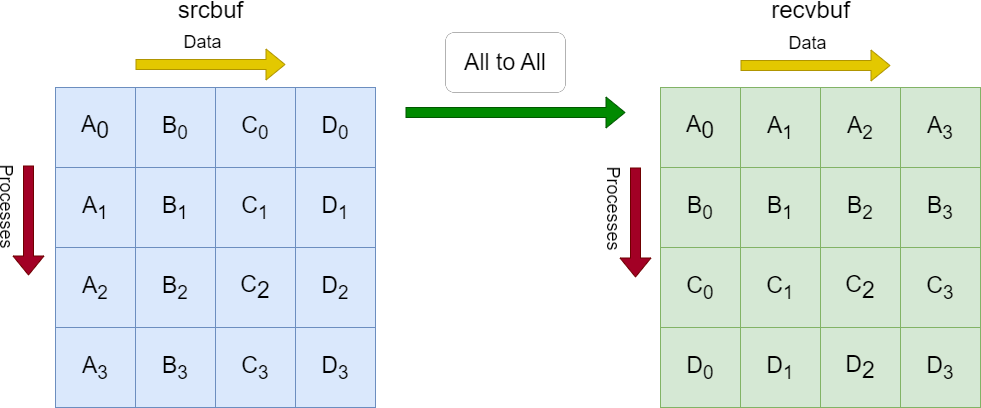
Each process in the diagram divides its local sendbuf into n blocks (4 in this example), each containing sendcount elements (4 in this example). Process i sends the k-th block of its local sendbuf to process k which places the data in the i-th block of its local recvbuf.
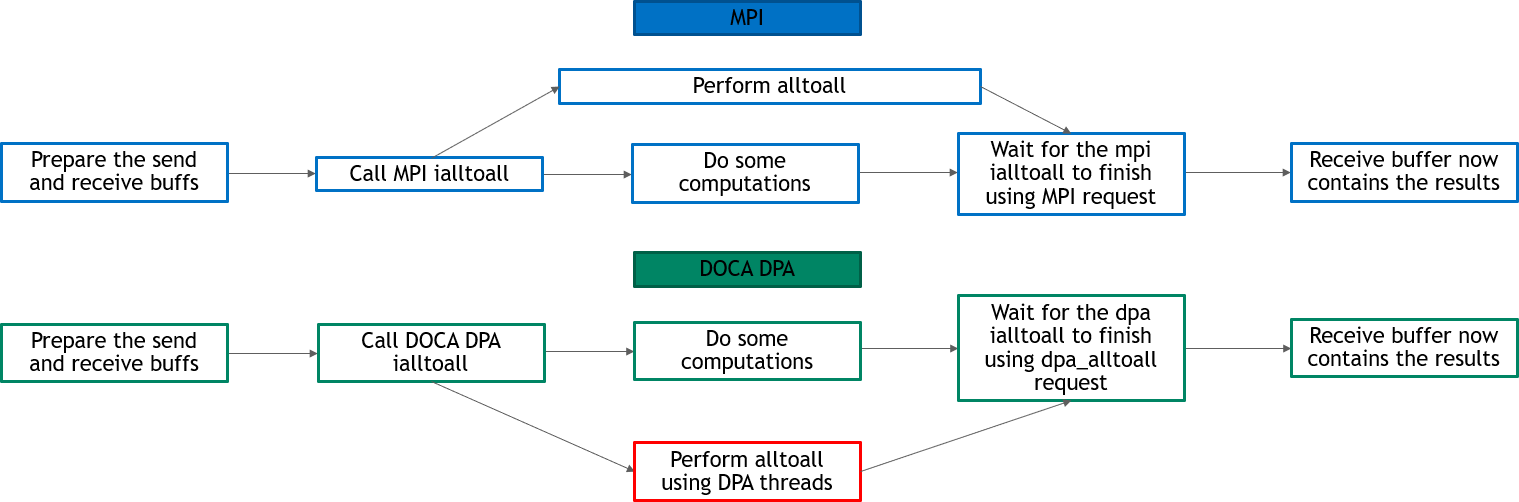
Implementing all-to-all method using DOCA DPA offloads the copying of the elements from the srcbuf to the recvbufs to the DPA, and leaves the CPU free to perform other computations.
Application Architecture
The following diagram describes the differences between host-based all-to-all and DPA all-to-all.
-
In DPA all-to-all, DPA threads perform all-to-all and the CPU is free to do other computations
-
In host-based all-to-all, CPU must still perform all-to-all at some point and is not completely free for other computations
DOCA Libraries
This application leverages the following DOCA library:
Refer to its programming guide for more information.
Dependencies
-
NVIDIA BlueField-3 platform is required
-
The application can be run on target BlueField or on host.
-
Open MPI version 4.1.5rc2 or greater (included in DOCA's installation).
Compiling the Application
Please refer to the DOCA Installation Guide for Linux for details on how to install BlueField-related software.
DOCA reference applications are installed with full source code and build instructions. This allows you to compile them as-is or modify the source code to create custom versions.
For more information about the applications as well as development and compilation tips, refer to the DOCA Reference Applications page.
The source code for the application is located in the following directory:
/opt/mellanox/doca/applications/dpa_all_to_all/
Compiling All Applications
All DOCA applications are defined under a single meson project. So, by default, the compilation includes all of them.
MPI is used for the compilation of this application. Make sure that MPI is installed on your setup (openmpi is provided as part of the installation of DOCA, as part of the doca-all and doca-ofed meta-packages).
Compiling the application requires updating the LD_LIBRARY_PATH and PATH environment variable to include MPI. For example, if openmpi is installed under /usr/mpi/gcc/openmpi-4.1.7rc1, then updating the environment variables should be like the following
export PATH=/usr/mpi/gcc/openmpi-4.1.7rc1/bin:${PATH}
export LD_LIBRARY_PATH=/usr/mpi/gcc/openmpi-4.1.7rc1/lib:${LD_LIBRARY_PATH}
To build all applications together, run:
cd /opt/mellanox/doca/applications/
meson /tmp/build
ninja -C /tmp/build
doca_dpa_all_to_all is created under /tmp/build/dpa_all_to_all/.
Compiling DPA All-to-all Application Only
To directly build only all-to-all application:
cd /opt/mellanox/doca/applications/
meson /tmp/build -Denable_all_applications=false -Denable_dpa_all_to_all=true
ninja -C /tmp/build
doca_dpa_all_to_all is created under /tmp/build/dpa_all_to_all/.
Alternatively, one can set the desired flags in meson_options.txt file instead of providing them in the compilation command line:
-
Edit the following flags in
/opt/mellanox/doca/applications/meson_options.txt:-
Set
enable_all_applicationstofalse -
Set
enable_dpa_all_to_alltotrue
-
-
Run the following compilation commands:
cd /opt/mellanox/doca/applications/ meson /tmp/build ninja -C /tmp/builddoca_dpa_all_to_allis created under/tmp/build/dpa_all_to_all/.
Running the Application
Prerequisites
MPI is used to run this application. Make sure that MPI is installed on your setup (openmpi is provided as part of the installation of DOCA on the host, as part of the doca-all and doca-ofed meta-packages).
Running the application requires updating the LD_LIBRARY_PATH and PATH environment variable to include MPI. For example, if openmpi is installed under /usr/mpi/gcc/openmpi-4.1.7rc1, then updating the environment variables should be like the following:
export PATH=/usr/mpi/gcc/openmpi-4.1.7rc1/bin:${PATH}
export LD_LIBRARY_PATH=/usr/mpi/gcc/openmpi-4.1.7rc1/lib:${LD_LIBRARY_PATH}
Application Execution
DPA all-to-all application is provided in source form. Therefore, a compilation is required before application can be executed.
-
Application usage instructions:
Usage: doca_dpa_all_to_all [DOCA Flags] [Program Flags]

DOCA Flags:
  -h, --help                        Print a help synopsis
  -v, --version                     Print program version information
  -l, --log-level                   Set the (numeric) log level for the program <10=DISABLE, 20=CRITICAL, 30=ERROR, 40=WARNING, 50=INFO, 60=DEBUG, 70=TRACE>
  --sdk-log-level                   Set the SDK (numeric) log level for the program <10=DISABLE, 20=CRITICAL, 30=ERROR, 40=WARNING, 50=INFO, 60=DEBUG, 70=TRACE>
  --log-filter                      Filter logs from specific modules, separated by comma
  -j, --json <path>                 Parse command line flags from an input json file

Program Flags:
  -m, --msgsize <Message size>      The message size - the size of the sendbuf and recvbuf (in bytes). Must be in multiplies of integer size. Default is size of one integer times the number of processes.
  -pf_devs, --pf-devices <PF device name> PF devices names that supports DPA, separated by comma without spaces (max of two devices). If not provided then a random device will be chosen.
This usage printout can be printed to the command line using the
-h(or--help) option:./doca_dpa_all_to_all -h
The
rdma_devsflag is only available when running the application from the target BlueField.For additional information, please refer to section "Command Line Flags".
-
CLI example for running the application on host:
This is an MPI program, so use
mpirunto run the application (with the-npflag to specify the number of processes to run).-
The following runs the DPA all-to-all application with 8 processes using the default message size (the number of processes, which is 8, times the size of 1 integer) with a random InfiniBand device:
mpirun -np 8 ./doca_dpa_all_to_all -
The following runs DPA all-to-all application with 8 processes, with 128 bytes as message size, and with
mlx5_0andmlx5_1as the InfiniBand devices:mpirun -np 8 ./doca_dpa_all_to_all -m 128 -pf_devs "mlx5_0,mlx5_1"The application supports running with a maximum of 16 processes. If you try to run with more processes, an error is printed and the application exits.
-
Command Line Flags
General Flags
|
Short Flag |
Long Flag |
Description |
|---|---|---|
|
|
|
Prints a help synopsis and exits |
|
|
|
Prints program version information and exits |
|
|
|
Sets the numeric log level for the application:
|
|
N/A |
|
Sets the SDK numeric log level using the same 10-70 scale as above |
|
N/A |
|
Filters logs from specific modules (comma-separated list) |
|
|
|
Parses command-line flags from a specified input JSON file |
Refer to DOCA Arg Parser for more information regarding the supported flags and execution modes.
Program Flags
|
Flag Type |
Short Flag |
Long Flag |
Description |
|---|---|---|---|
|
Program flags |
|
|
The message size. The size of the sendbuf and recvbuf (in bytes). Must be in multiples of an integer. The default is size of 1 integer times the number of processes. |
|
|
|
InfiniBand devices names that support DPA, separated by comma without spaces (max of two devices). If |
Troubleshooting
Refer to the NVIDIA BlueField Platform Software Troubleshooting Guide for any issue encountered with the compilation, installation, or execution of the DOCA applications.
Application Code Flow
-
Initialize MPI.
MPI_Init(&argc, &argv); -
Parse application arguments.
-
Initialize arg parser resources and register DOCA general parameters.
doca_argp_init(); -
Register the application's parameters.
register_all_to_all_params(); -
Parse the arguments.
doca_argp_start();-
The
msgsizeparameter is the size of the sendbuf and recvbuf (in bytes). It must be in multiples of an integer and at least the number of processes times an integer size. -
The
pf_devices_paramparameter is the names of the InfiniBand devices to use (must support DPA). It can include up to two devices names.
-
-
Only let the first process (of rank 0) parse the parameters to then broadcast them to the rest of the processes.
-
-
Check and prepare the needed resources for the
all_to_allcall:-
Check the number of processes (maximum is 16).
-
Check the
msgsize. It must be in multiples of integer size and at least the number of processes times integer size. -
Allocate the sendbuf and recvbuf according to
msgsize.
-
-
Prepare the resources required to perform all-to-all method using DOCA DPA:
The application uses MPI without an additional security layer. The data exported (for sync event, RDMA, and MMAP), as described in this step, should be passed over a secure channel in a production deployment.
-
Initialize DOCA DPA context(s):
-
Open DOCA DPA device(s) (DOCA device that supports DPA).
open_dpa_devices(); -
Initialize DOCA DPA context using the opened device.
extern struct doca_dpa_app *dpa_all2all_app; doca_dpa_create(pf_doca_device, &pf_doca_dpa); doca_dpa_set_app(pf_doca_dpa, dpa_all2all_app); doca_dpa_start(pf_doca_dpa);-
When running from target BlueField: Initialize Extended DOCA DPA context using the opened RDMA device.
#ifdef DOCA_ARCH_DPU
	doca_dpa_device_extend(pf_doca_dpa, rdma_doca_device, &rdma_doca_dpa);
#else
	*rdma_doca_device = *pf_doca_device;
#endif
-
-
-
Initialize the required DOCA Sync Events for the all-to-all:
-
One completion event for the kernel launch where the subscriber is CPU and the publisher is DPA.
-
Kernel events, published by remote peer and subscribed to by DPA, as the number of processes.
create_dpa_a2a_events() {
	// initialize completion event
	doca_sync_event_create(&comp_event);

	doca_sync_event_add_publisher_location_dpa(comp_event);

	doca_sync_event_add_subscriber_location_cpu(comp_event);

	doca_sync_event_start(comp_event);

	// initialize kernels events
	for (i = 0; i < resources->num_ranks; i++) {
 		doca_sync_event_create(&(kernel_events[i]));

		doca_sync_event_add_publisher_location_remote_net(kernel_events[i]);

		doca_sync_event_add_subscriber_location_dpa(kernel_events[i]);

		doca_sync_event_start(kernel_events[i]);
	}
}
-
-
Prepare DOCA RDMAs and set them to work on DPA:
-
Create DOCA RDMAs as the number of processes/ranks.
for (i = 0; i < resources->num_ranks; i++) { doca_rdma_create(&rdma); rdma_as_doca_ctx = doca_rdma_as_ctx(rdma); doca_rdma_set_permissions(rdma); doca_rdma_set_grh_enabled(rdma); doca_ctx_set_datapath_on_dpa(rdma_as_doca_ctx, rdma_doca_dpa); doca_ctx_start(rdma_as_doca_ctx); } -
Connect local DOCA RDMAs to the remote DOCA RDMAs.
connect_dpa_a2a_rdmas(); -
Get DPA handles for local DOCA RDMAs (so they can be used by DPA kernel) and copy them to DPA heap memory.
for (int i = 0; i < resources->num_ranks; i++) {
	doca_rdma_get_dpa_handle(rdmas[i], &(rdma_handles[i]));
}

doca_dpa_mem_alloc(&dev_ptr_rdma_handles);

doca_dpa_h2d_memcpy(dev_ptr_rdma_handles, rdma_handles);
-
-
Prepare the memory required to perform all-to-all method using DOCA Mmap. This includes creating DPA memory handles for sendbuf and recvbuf, getting other processes recvbufs handles, and copying these memory handles and their remote keys and events handlers to DPA heap memory.
prepare_dpa_a2a_memory();
-
-
Launch
alltoall_kernelusing DOCA DPA kernel launch with all required parameters:-
Every MPI rank launches a kernel of up to
MAX_NUM_THREADS. This example definesMAX_NUM_THREADSas 16. -
Launch
alltoall_kernelusingkernel_launch.doca_dpa_kernel_launch_update_set(); -
Each process should perform
num_ranksRDMA write operations, with local and remote buffers calculated based on the rank of the process that is performing the RDMA write operation and the rank of the remote process that is being written to. The application iterates over the rank of the remote process.iEach process runs
num_threadsthreads on this kernel, therefore the number of RDMA write operations (which is the number of processes) is divided by the number of threads.
Each thread should wait on its local events to make sure that the remote processes have finished RDMA write operations.for (i = thread_rank; i < num_ranks; i += num_threads) { doca_dpa_dev_rdma_post_write(); doca_dpa_dev_rdma_signal_set(); } for (i = thread_rank; i < num_ranks; i += num_threads) { doca_dpa_dev_sync_event_wait_gt(); }RDMA operations should be executed over a secure channel in a production deployment, given the sensitivity arising from the nature of the protocol.
-
Wait until
alltoall_kernelhas finished.doca_sync_event_wait_gt();Add an MPI barrier after waiting for the event to make sure that all of the processes have finished executing
alltoall_kernel.MPI_Barrier();
After
alltoall_kernelis finished, the recvbuf of all processes contains the expected output of all-to-all method.
-
-
Destroy
a2a_resources:-
Free all DOCA DPA memories.
doca_dpa_mem_free(); -
Destroy all DOCA Mmaps
doca_mmap_destroy(); -
Destroy all DOCA RDMAs.
doca_ctx_stop(); doca_rdma_destroy(); -
Destroy all DOCA Sync Events.
doca_sync_event_destroy(); -
Destroy DOCA DPA context.
doca_dpa_destroy(); -
Close DOCA device.
doca_dev_close();
-
References
-
/opt/mellanox/doca/applications/dpa_all_to_all/
Last updated: