

This document provides a DOCA PCC implementation on top of NVIDIA® BlueField® networking platform.
Introduction
Programmable Congestion Control (PCC) allows users to design and implement their own congestion control (CC) algorithm, giving them the flexibility to work out an optimal solution to handle congestion in their clusters. On BlueField-3 networking platforms, PCC is provided as a component of DOCA.
The application leverages the DOCA PCC API to provide users the flexibility to manage allocation of DPA resources according to their requirements.
Typical DOCA application includes App running on host/Arm and App running on DPA. Developers are advised to use the host/Arm application with minimal changes and focus on developing their algorithm and integrating it into the DPA application.
System Design
DOCA PCC application consists of two parts:
-
Host/Arm app is the control plane. It is responsible for allocating all resources and handover to the DPA app initially, then destroying everything when the DPA app finishes its operation. The host app must always be alive to stay in control while the device app is working.
-
Device/DPA app is the data plane.
-
The default mode of the data plane is running as a reaction point (RP). When the first thread is activated, DPA App initialization is done in the DOCA PCC library by calling the algorithm initialization function implemented by the user in the app. Moreover, the user algorithm execution function is called when a CC event arrives. The user algorithm takes event data as input and performs a calculation, using per-flow context, and replies with the updated rate value and a flag to send an RTT request. The following is an illustration of the general RP application flow:
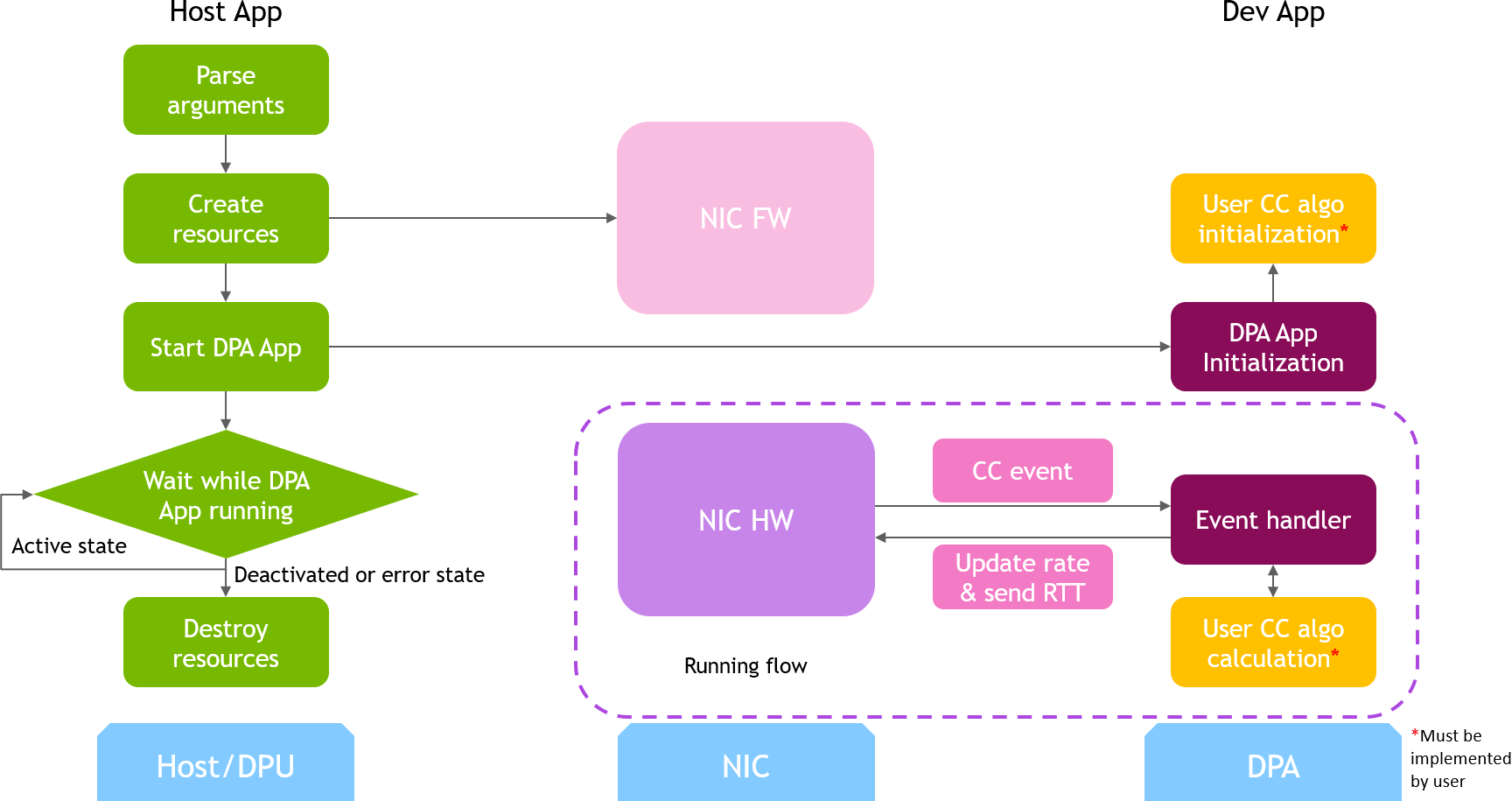
The host/Arm application sends a command to the BlueField platform firmware when allocating or destroying resources. CC events are generated by the BlueField platform hardware automatically when sending data or receiving ACK/NACK/CNP/RTT packets, then the device application handles these events by calling the user algorithm. After the DPA application replies to hardware, handling of current event is done, and the next event can arrive.
The device/DPA app can also run different algorithms for the RP program, which users can configure as a runtime option.
-
The device/DPA app can function as a notification point (NP). When a new probe request packet arrives, the user handler can read and analyze the data and send a probe response back. The following is an illustration of the general NP application flow:
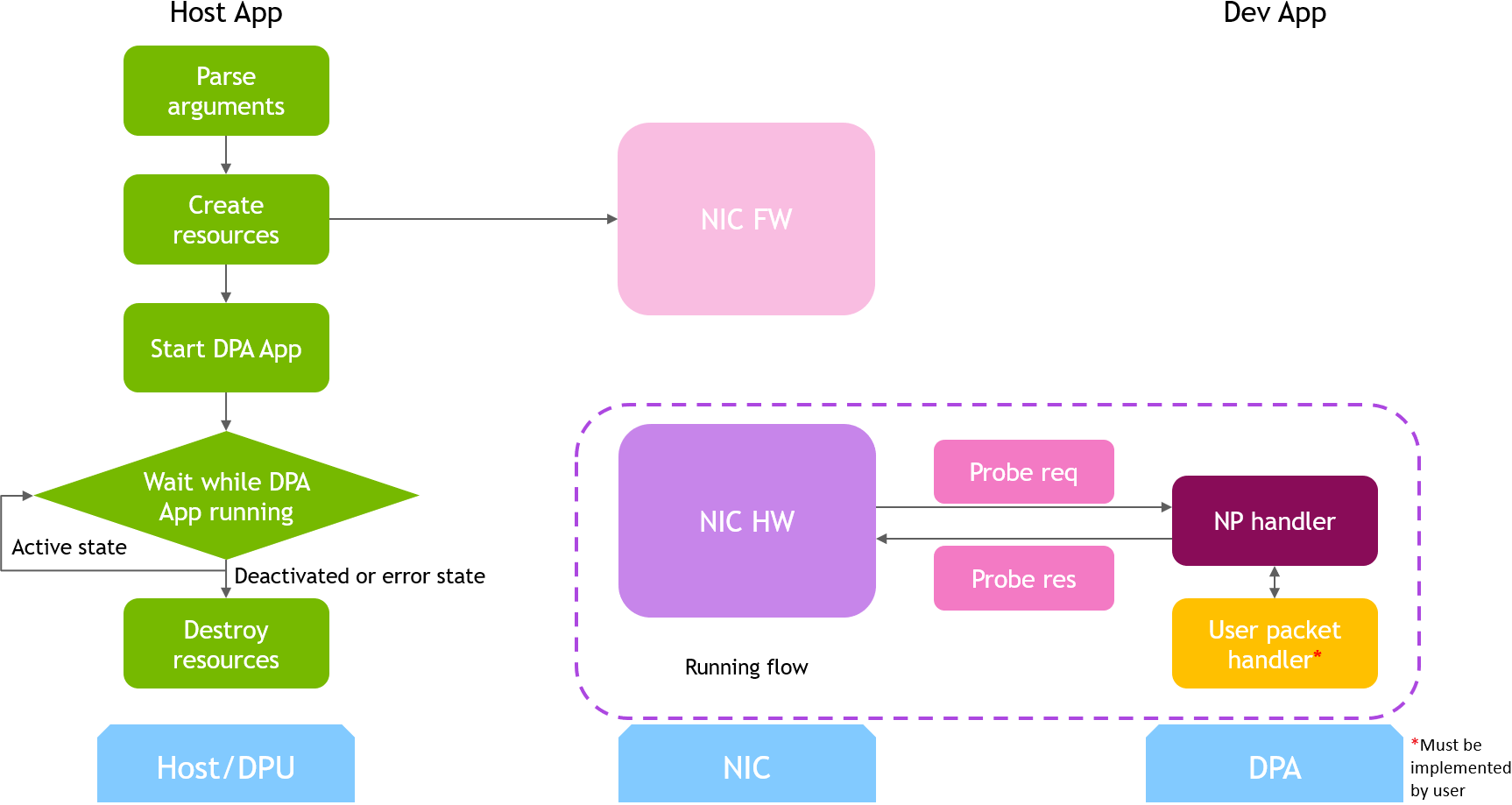
The device/DPA app is as well capable of functioning as a telemetry program for a NP switch operation, which users can configure as a runtime option.
-
Application Architecture
/opt/mellanox/doca/applications/pcc/
├── host
│    ├── pcc.c
│    ├── pcc_core.c
│    └── pcc_core.h
└── device
     ├── pcc_common_dev.h
     ├── rp
     │    ├── rtt_template
     │    │         ├── algo
     │    │         │    ├── rtt_template.h
	 │    │         │    ├── rtt_template_algo_params.h
     │    │         │    ├── rtt_template_ctxt.h
     │    │         │    └── rtt_template.c
     │    │         └── rp_rtt_template_dev_main.c
     │    └── switch_telemetry
     │              ├── algo
     │              │    ├── telem_template.h
	 │              │    ├── telem_template_algo_params.h
     │              │    ├── telem_template_ctxt.h
     │              │    └── telem_template.c
     │              └── rp_switch_telemetry_dev_main.c
	 └── np
         └── switch_telemetry
				 	└── np_switch_telemetry_dev_main.c
The main content of the reference DOCA PCC application files are the following:
-
host/pcc.c– entry point to entire application -
host/pcc_core.c– host functions to initialize and destroy the PCC application resources, parsers for PCC command line parameters -
device/pcc_common_dev.h– common util calls and definitions for device programs -
device/rp/rtt_template/rp_rtt_template_dev_main.c– callbacks for user CC algorithm initialization, user CC algorithm calculation and algorithm parameter change notification of the RTT template algorithm reference -
device/rp/rtt_template/algo/*– user CC algorithm reference for RTT template. Put user algorithm code here -
device/rp/switch_telemetry/rp_switch_telemetry_dev_main.c– callbacks for user CC algorithm initialization, user CC algorithm calculation, and algorithm parameter change notification of the switch telemetry algorithm reference -
device/rp/switch_telemetry/algo/*– user CC algorithm reference for switch telemetry. Put user algorithm code here. -
device/np/switch_telemetry/np_switch_telemetry_dev_main.c– callback for user NP handling, implemented as a switch telemetry program to observe last hop switch metadata
DOCA Libraries
This application leverages the following DOCA library:
Refer to its respective programming guide for more information.
Dependencies
-
NVIDIA BlueField-3 Platform is required
-
Firmware 32.38.1000 and higher
-
MFT 4.25 and higher
Compiling the Application
Please refer to the DOCA Installation Guide for Linux for details on how to install BlueField-related software.
DOCA reference applications are installed with full source code and build instructions. This allows you to compile them as-is or modify the source code to create custom versions.
For more information about the applications as well as development and compilation tips, refer to the DOCA Reference Applications page.
The source code for the application is located in the following directory:
/opt/mellanox/doca/applications/pcc/
Compiling All Applications
All DOCA applications are defined under a single meson project. So, by default, the compilation includes all of them.
To build all the applications together, run:
cd /opt/mellanox/doca/applications/
meson /tmp/build
ninja -C /tmp/build
doca_pcc is created under /tmp/build/pcc/.
Compiling Only the Current Application
To directly build only the PCC application:
cd /opt/mellanox/doca/applications/
meson /tmp/build -Denable_all_applications=false -Denable_pcc=true
ninja -C /tmp/build
doca_pcc is created under /tmp/build/pcc/.
Alternatively, one can set the desired flags in the meson_options.txt file instead of providing them in the compilation command line:
-
Edit the following flags in
/opt/mellanox/doca/applications/meson_options.txt:-
Set
enable_all_applicationstofalse -
Set
enable_pcctotrue
-
-
Run the following compilation commands:
cd /opt/mellanox/doca/applications/
meson /tmp/build
ninja -C /tmp/build
doca_pccis created under/tmp/build/pcc/.
Compilation Options
The application offers specific compilation flags which one can set for a desired behavior in the device/DPA program.
In the meson_options.txt file, one can find the following options:
-
enable_pcc_application_tx_counter_sampling: set totrueto use TX counters sampled at runtime in the RP CC handling algorithm.
Running the Application
Prerequisites
Enable USER_PROGRAMMABLE_CC in mlxconfig:
mlxconfig -y -d /dev/mst/mt41692_pciconf0 set USER_PROGRAMMABLE_CC=1
Perform a BlueField system reboot for the mlxconfig settings to take effect.
Application Execution
The PCC application is provided in source form. Therefore, a compilation is required before the application can be executed.
-
Application usage instructions:
Usage: doca_pcc [DOCA Flags] [Program Flags]

DOCA Flags:
  -h, --help                        Print a help synopsis
  -v, --version                     Print program version information
  -l, --log-level                   Set the (numeric) log level for the program <10=DISABLE, 20=CRITICAL, 30=ERROR, 40=WARNING, 50=INFO, 60=DEBUG, 70=TRACE>
  --sdk-log-level                   Set the SDK (numeric) log level for the program <10=DISABLE, 20=CRITICAL, 30=ERROR, 40=WARNING, 50=INFO, 60=DEBUG, 70=TRACE>
  --log-filter                      Filter logs from specific modules, separated by comma
  -j, --json <path>                 Parse command line flags from an input json file

Program Flags:
  -d, --device <RDMA device names> RDMA device name that supports PCC (mandatory).
  -rp-st, --rp-switch-telemetry <PCC Reaction Point Switch Telemetry> Flag to indicate running as a Reaction Point Switch Telemetry (optional). The application will generate IFA2 probe packets. By default the flag is set to false.
  -np-st, --np-switch-telemetry <PCC Notification Point Switch Telemetry> Flag to indicate running as a Notification Point Switch Telemetry (optional). The application will generate IFA2 probe packets. By default the flag is set to false.
  -t, --threads <PCC threads list>  A list of the PCC threads numbers to be chosen for the DOCA PCC context to run on (optional). Must be provided as a string, such that the number are separated by a space.
  -w, --wait-time <PCC wait time>   The duration of the DOCA PCC wait (optional), can provide negative values which means infinity. If not provided then -1 will be chosen.
  -r-handler, --remote-sw-handler <CCMAD remote SW handler> CCMAD remote SW handler flag (optional). If not provided then false will be chosen.
  -hl, --hop-limit <IFA2 hop limit> The IFA2 probe packet hop limit (optional). If not provided then 0XFE will be chosen.
  -gns, --global-namespace <IFA2 global namespace> The IFA2 probe packet global namespace (optional). If not provided then 0XF will be chosen.
  -gns-ignore-mask, --global-namespace-ignore-mask <IFA2 global namespace ignore mask> The IFA2 probe packet global namespace ignore mask (optional). If not provided then 0 will be chosen.
  -gns-ignore-val, --global-namespace-ignore-value <IFA2 global namespace ignore value> The IFA2 probe packet global namespace ignore value (optional). If not provided then 0 will be chosen.
  -f, --coredump-file <PCC coredump file> A pathname to the file to write coredump data in case of unrecoverable error on the device (optional). Must be provided as a string.
 --dpa-resources <DPA resources file> Path to a DPA resources .yaml file (optional). Must be provided together with DPA application key.
 --dpa-app-key <DPA application key> Application key in specified DPA resources .yaml file (optional). Must be provided together with DPA resources file.
  -tlm-ex, --enable-telemetry-export <Telemetry exporter enablement> Flag to enable exporting telemetry data gathered by pcc algorithem (optional). By default the flag is set to false.
This usage printout can be printed to the command line using the
-h(or--help) options:./doca_pcc -h
For additional information, refer to section "DOCA PCC Application Guide | Command Line Flags".
-
CLI example for running the application on the BlueField Platform or the host:
./doca_pcc -d mlx5_0
The RDMA device identifier (
mlx5_0) should match the identifier of the desired RDMA device.
Command Line Flags
General Flags
|
Short Flag |
Long Flag |
Description |
|---|---|---|
|
|
|
Prints a help synopsis and exits |
|
|
|
Prints program version information and exits |
|
|
|
Sets the numeric log level for the application:
|
|
N/A |
|
Sets the SDK numeric log level using the same 10-70 scale as above |
|
N/A |
|
Filters logs from specific modules (comma-separated list) |
|
|
|
Parses command-line flags from a specified input JSON file |
Refer to DOCA Arg Parser for more information regarding the supported flags and execution modes.
Program Flags
|
Short Flag |
Long Flag |
Description |
|---|---|---|
|
|
|
RDMA device name that supports PCC |
|
|
|
(Optional) Flag to indicate running as a RP switch telemetry. The DOCA PCC application can run as a RP switch telemetry program. If this flag is used, the application loads a program to run on the DPA of a switch telemetry algorithm which receives metadata from the last hop switch congestion point from the NP node. |
|
|
|
(Optional) Flag to indicate running as a NP switch telemetry. The DOCA PCC application can run as a NP switch telemetry program. If this flag is used, the application loads a program to run on the DPA to sample metadata from the last hop switch congestion point and send them in response packet. |
|
|
|
(Optional) A list of the PCC EU indexes to be chosen for the DOCA PCC event handler threads to run on. Must be provided as a string, such that the numbers are separated by a space. The placement of the PCC threads per core can be controlled using the EU indexes. Utilizing a large number of EUs, while limiting the number of threads per core, gives the best event handling rate and lowest event latency. The last EU is used for communication with the BlueField Platform while all others are for data path CC event handling. |
|
|
|
(Optional) In seconds, the duration of the DOCA PCC wait. Negative values mean infinity. |
|
|
|
(Optional) CCMAD remote SW handler flag. Relevant for RP contexts. This flag indicates whether the expected CCMAD probe packet responses are generated by a remote DOCA NP process or not. If using other probe types than CCMAD, probe packet responses are always expected to be generated from a remote DOCA NP process.
|
|
|
|
(Optional) The IFA2 probe packet hop limit Relevant for RP contexts.
|
|
|
|
(Optional) The IFA2 probe packet global namespace Relevant for RP contexts.
|
|
|
|
(Optional) The IFA2 probe packet global namespace ignore mask Relevant for NP contexts.
|
|
|
|
(Optional) The IFA2 probe packet global namespace ignore value Relevant for NP contexts.
|
|
|
|
(Optional) A pathname to the file to write core dump data if an unrecoverable error occurs on the device |
|
N/A |
|
(Optional) Path to a DPA resources |
|
N/A |
|
(Optional) Application key in specified DPA resources |
Troubleshooting
Refer to the NVIDIA BlueField Platform Software Troubleshooting Guide for any issue encountered with the compilation, installation, or execution of the DOCA applications.
Application Code Flow
This section lists the application's configuration flow, explaining the different DOCA function calls and wrappers.
-
Parse application argument.
-
Initialize arg parser resources and register DOCA general parameters.
doca_argp_init();
-
Register PCC application parameters.
register_pcc_params();
-
Parse the arguments.
doca_argp_start();-
Parse DOCA flags.
-
Parse DOCA PCC parameters.
-
-
-
PCC initialization.
pcc_init();-
Open DOCA device that supports PCC.
-
Create DOCA PCC context.
-
Configure affinity of threads handling CC events.
-
-
Start DOCA PCC.
doca_pcc_start();-
Create PCC process and other resources.
-
Trigger initialization of PCC on device.
-
Register the PCC in the BlueField Platform hardware so CC events can be generated and an event handler can be triggered.
-
-
Process state monitor loop.
doca_pcc_get_process_state(); doca_pcc_wait();-
Get the state of the process:
State
Description
DOCA_PCC_PS_ACTIVE = 0The process handles CC events (only one process is active at a given time)
DOCA_PCC_PS_STANDBY = 1The process is in standby mode (another process is already
ACTIVE)DOCA_PCC_PS_DEACTIVATED = 2The process has been deactivated by the BlueField Platform firmware and should be destroyed
DOCA_PCC_PS_ERROR = 3The process is in error state and should be destroyed
-
Wait on process events from the device.
-
-
PCC destroy.
doca_pcc_destroy();-
Destroy PCC resources. The process stops handling PCC events.
-
Close DOCA device.
-
-
Arg parser destroy.
doca_argp_destroy()
Port Programmable Congestion Control Register
The Port Programmable Congestion Control (PPCC) register allows the user to configure and read PCC algorithms and their parameters/counters.
It supports the following functionalities:
-
Enabling different algorithms on different ports
-
Querying information of both algorithms and tunable parameters/counters
-
Changing algorithm parameters without compiling and reburning user image
-
Querying or clearing programmable counters
Usage
The PPCC register can be accessed using a string similar to the following:
sudo mlxreg -d /dev/mst/mt41692_pciconf0 -y --get --op "cmd_type=0" --reg_name PPCC --indexes "local_port=1,pnat=0,lp_msb=0,algo_slot=0,algo_param_index=0,target_app=0"
sudo mlxreg -d /dev/mst/mt41692_pciconf0 -y --set "cmd_type=1" --reg_name PPCC --indexes "local_port=1,pnat=0,lp_msb=0,algo_slot=0,algo_param_index=0,target_app=0"
Where you must:
-
Set the
cmd_typeand the indexes -
Give values for
algo_slot,algo_param_index -
Keep
local_port=1,pnat=0,lp_msb=0 -
Set
target_app = 0for PCC -
Keep
doca_pccapplication running
|
Command ( |
Description |
Method |
Index |
Input (in |
Output |
|---|---|---|---|---|---|
|
|
Get algorithm info |
Get |
|
N/A |
|
|
|
Enable algorithm |
Set |
|
Optional:
|
N/A |
|
|
Disable algorithm |
Set |
|
N/A |
N/A |
|
|
Get algorithm enabling status |
Get |
|
N/A |
|
|
|
Get number of parameters |
Get |
|
N/A |
|
|
|
Get parameter info |
Get |
|
N/A |
|
|
|
Get parameter value |
Get |
|
N/A |
|
|
|
Get and clear parameter |
Get |
|
N/A |
|
|
|
Set parameter value |
Set |
|
Silently ignored if outside min..max range or if param is not RW. |
N/A |
|
|
Bulk get parameters |
Get |
|
N/A |
|
|
|
Bulk set parameters |
Set |
|
|
N/A |
|
|
Bulk get counters |
Get |
|
Optional:
|
|
|
|
Bulk get and clear counters |
Get |
|
Optional:
|
|
|
|
Get number of counters |
Get |
|
N/A |
|
|
|
Get counter info |
Get |
|
N/A |
|
|
|
Get algorithm info array |
Get |
N/A |
N/A |
|
|
|
Get histogram IDs for algo slot |
Get |
|
N/A |
|
|
|
Histogram get description |
Get |
|
N/A |
|
|
|
Histogram get |
Get |
|
N/A |
|
|
|
Histogram set |
Set |
|
|
N/A |
Internal Default Algorithm
The internal default algorithm is used when enhanced connection establishment (ECE) negotiation fails. It is mainly used for backward compatibility and can be disabled using "force mode". Otherwise, users may change doca_pcc_dev_user_algo() in the device app to run a specific algorithm without considering the algorithm negotiation.
The force mode command is per port:
sudo mlxreg -d /dev/mst/mt41692_pciconf0 -y --get --op "cmd_type=2" --reg_name PPCC --indexes "local_port=1,pnat=0,lp_msb=0,algo_slot=15,algo_param_index=0,target_app=0"
sudo mlxreg -d /dev/mst/mt41692_pciconf0.1 -y --get --op "cmd_type=2" --reg_name PPCC --indexes "local_port=1,pnat=0,lp_msb=0,algo_slot=15,algo_param_index=0,target_app=0"
Counters
Each port supports multiple counter groups. The total number of available counter groups is returned by executing cmd_type=0xE, which populates the param_value1 field with the maximum counter group ID (0-indexed).
Enabling Counters
Counters are enabled per algorithm slot using cmd_type=0x1 (enable algorithm) and setting counter_en=1. Optionally, you can assign a specific counter group to the algorithm slot by setting cfg_counter_group_en=1 and providing a counter_group_id.
If cfg_counter_group_en=0 (or is omitted), the algorithm code sets the counter group ID, otherwise the default group (Group 0) is used.
To enable the algorithm with counters on the default counter group (Group 0), execute:
sudo mlxreg -d /dev/mst/mt41692_pciconf0 -y --set "cmd_type=1,counter_en=1" --reg_name PPCC --indexes "local_port=1,pnat=0,lp_msb=0,algo_slot=0,algo_param_index=0,target_app=0"
To enable the algorithm with counters on a specific counter group (e.g., Group 2), execute:
sudo mlxreg -d /dev/mst/mt41692_pciconf0 -y --set "cmd_type=1,counter_en=1,cfg_counter_group_en=1,counter_group_id=2" --reg_name PPCC --indexes "local_port=1,pnat=0,lp_msb=0,algo_slot=0,algo_param_index=0,target_app=0"
Querying Counters
After counters are enabled on an algorithm slot, they can be queried using cmd_type=0xC (bulk get counters) or cmd_type=0xD (bulk get and clear counters).
To execute a bulk get of counters on the default group:
sudo mlxreg -d /dev/mst/mt41692_pciconf0 -y --get --op "cmd_type=0xC" --reg_name PPCC --indexes "local_port=1,pnat=0,lp_msb=0,algo_slot=0,algo_param_index=0,target_app=0"
To query a specific counter group, append cfg_counter_group_en=1 and provide the desired counter_group_id. For example, to query Group 2:
sudo mlxreg -d /dev/mst/mt41692_pciconf0 -y --get --op "cmd_type=0xC,cfg_counter_group_en=1,counter_group_id=2" --reg_name PPCC --indexes "local_port=1,pnat=0,lp_msb=0,algo_slot=0,algo_param_index=0,target_app=0"
To execute a bulk get and clear the counters, use cmd_type=0xD:
sudo mlxreg -d /dev/mst/mt41692_pciconf0 -y --get --op "cmd_type=0xD" --reg_name PPCC --indexes "local_port=1,pnat=0,lp_msb=0,algo_slot=0,algo_param_index=0,target_app=0"
Getting Counter Information
Use cmd_type=0xE to query the total number of counters and the maximum available counter group ID:
sudo mlxreg -d /dev/mst/mt41692_pciconf0 -y --get --op "cmd_type=0xE" --reg_name PPCC --indexes "local_port=1,pnat=0,lp_msb=0,algo_slot=0,algo_param_index=0,target_app=0"
-
value: The number of counters the algorithm possesses. -
param_value1: The maximum counter group ID (0-indexed).
Use cmd_type=0xF to retrieve information about an individual counter:
sudo mlxreg -d /dev/mst/mt41692_pciconf0 -y --get --op "cmd_type=0xF" --reg_name PPCC --indexes "local_port=1,pnat=0,lp_msb=0,algo_slot=0,algo_param_index=0,target_app=0"
-
param_value3: The maximum counter value (wraps to 0 when exceeded). -
prm: The permissions flag (0 = read-only, 1 = read-write, 2 = read-only + clearable). -
text: The ASCII counter name and description.
References
-
/opt/mellanox/doca/applications/pcc/
Last updated: