

This document describes the usage of the NVIDIA DOCA PSP Gateway sample application on top of an NVIDIA® BlueField® networking platform or NVIDIA® ConnectX® SmartNIC.
Introduction
DOCA PSP Gateway is supported only on BlueField-3 or ConnectX-7 and later.
The DOCA PSP Gateway application leverages the BlueField or ConnectX hardware capability for fully offloaded secure network communication using the PSP security protocol. The application demonstrates how to exchange keys between application instances and insert rules controlling PSP encryption and decryption using the DOCA Flow library.
The application exchanges keys using an unencrypted gRPC channel. If your environment requires the protection of encryption keys, you must modify the application to create the gRPC channel using the applicable certificates.
The PSP Gateway application supports only the PSP tunnel protocol. The PSP transport protocol is not supported by the application in this release, although it is supported by the underlying DOCA Flow library.
The PSP Gateway application supports only IPv4 inner and IPv6 outer headers. Other combinations are not supported by the application in the current release, although they are supported by the underlying DOCA Flow library.
The application can be configured to establish out-bound PSP tunnel connections via individual command-line arguments, or via a text file configured via a command-line argument. The connections are established on-demand by default, but can also be configured to connect at startup.
System Design
The DOCA PSP Gateway is designed to run with three ports:
-
A secure (encrypted) uplink netdev (i.e.,
p0) -
An unsecured (plaintext) netdev representor (VF or SF)
-
An out-of-bound (OOB) management port, used to communicate with peer instances using standard sockets
Whether the DOCA PSP Gateway is deployed to a BlueField or a ConnectX device, the functionality is the same. The Out of Bounds (OOB) network device carries PSP parameters between peers, the Uplink port carries secure (encrypted) traffic, and the VF carries the unencrypted traffic.
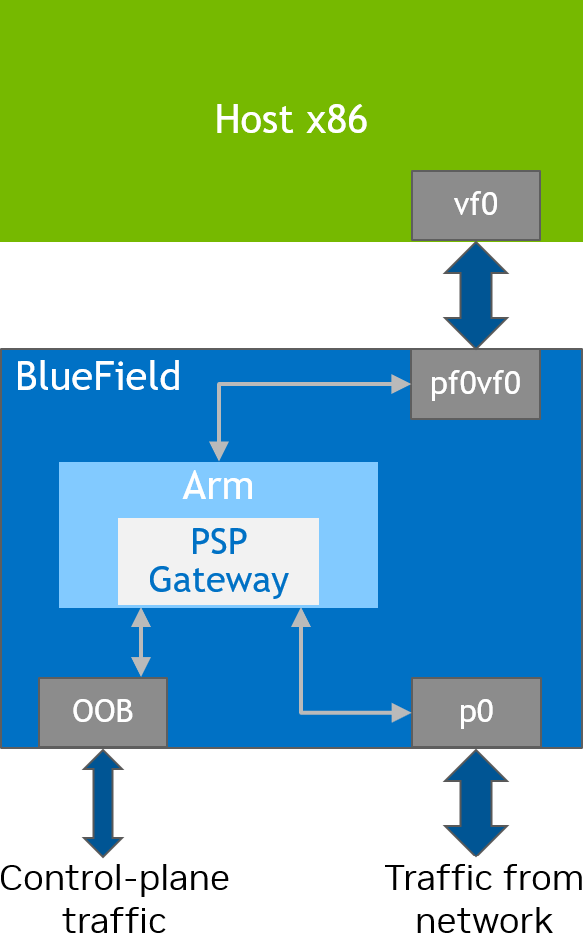
When the application is deployed to a DPU, the operation of the PSP encryption protocol is entirely transparent to the Host. All the resources required to manage the PSP connections are physically located on the DPU.
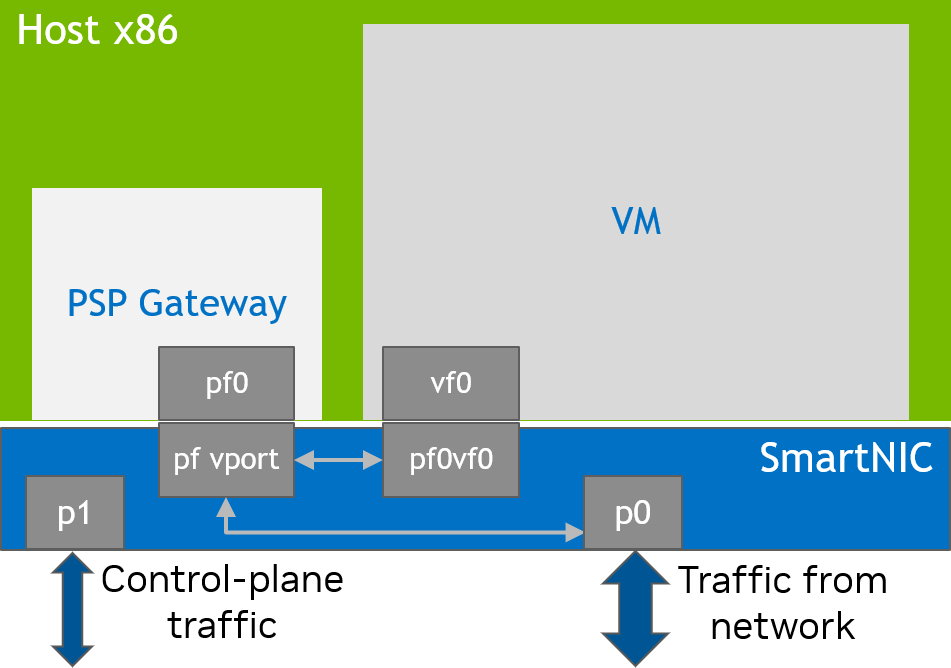
When the application is deployed to the host, the operation of the PSP encryption protocol is the responsibility of the host, and resources are allocated from the host. However, the operation of the PSP encryption protocol is entirely transparent to any virtual machines and containers attached to the VF network devices.
Application Architecture
The creation of PSP tunnel connections requires two-way communication between peers. Each "sender" must request a unique security parameters index (SPI) and encryption key from the intended "receiver". The receiver derives sequential SPIs and encryption keys using the hardware resources inside the BlueField or ConnectX device, which manages a secret pair of master keys to produce the SPIs and encryption keys.
One key architectural benefit of PSP over similar protocols (e.g., IPsec) is that the receiver does not incur any additional resource utilization whenever it creates a new SPI and encryption key. This is because the decryption key associated with the SPI is computed on the fly, based on the SPI and master key, for each received packet. This lack of requirement for additional context memory for each additional decryption rule is partly responsible for the ability of the PSP protocol to scale to many thousands of peers.
Startup vs. On-Demand Tunnel Creation
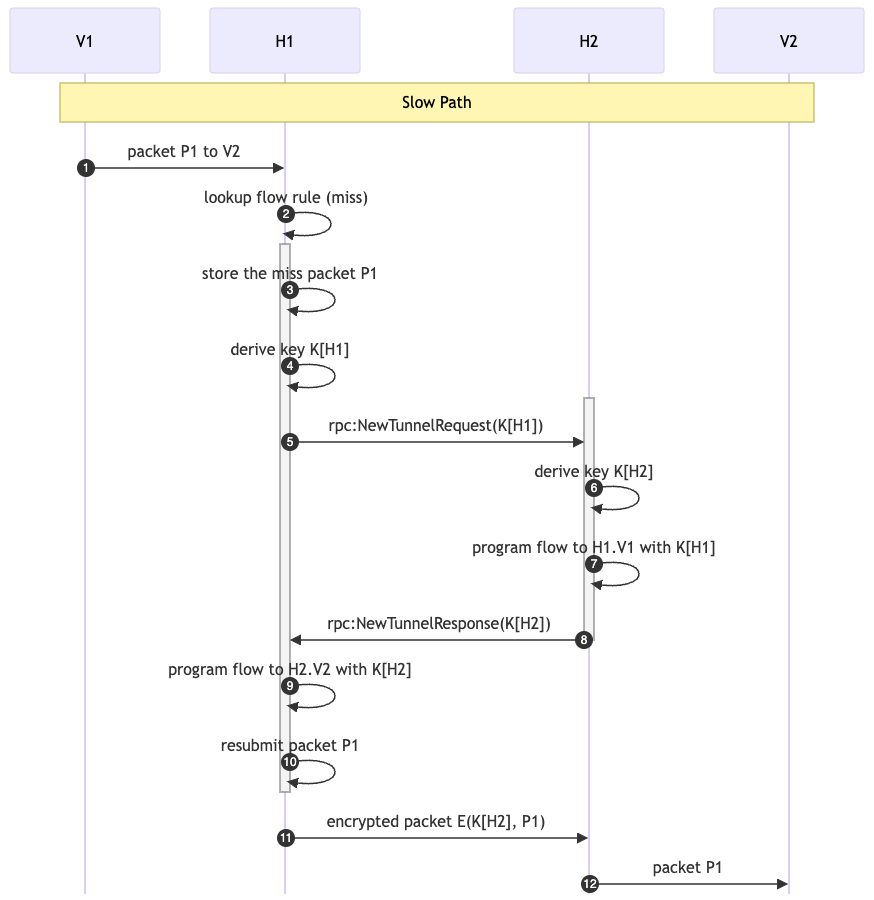
The default mode of operation is on-demand tunnel creation. That is, when a packet is received from the unsecured port for which the flow pipeline does not have an encryption rule, the packet misses to RSS, where the CPU must decide how to handle the packet. If the destination IP address in the packet belongs to a known peer’s virtual network, the CPU uses gRPC on the OOB network connection to attempt a key exchange with the peer. If the key exchange is successful and a new encryption flow is created successfully, then the packet is then resubmitted to the pipeline, where it is encrypted and sent just as any of the following packets having the same destination IP address.
The following diagram illustrates this sequence (the "Slow Path"), for Virtual Machine V1 which intends to send a packet to Virtual Machine V2. In this case, V1 is hosted on physical host H1 and V2 on physical host H2. The first packet sent (1) results in a miss (2), so the packet is retained (3) while the keys are exchanged in both directions (4-8). Then the pipeline is updated (9) and the original packet is resubmitted (10). From there, the packet follows the same logic as the fast path, below.
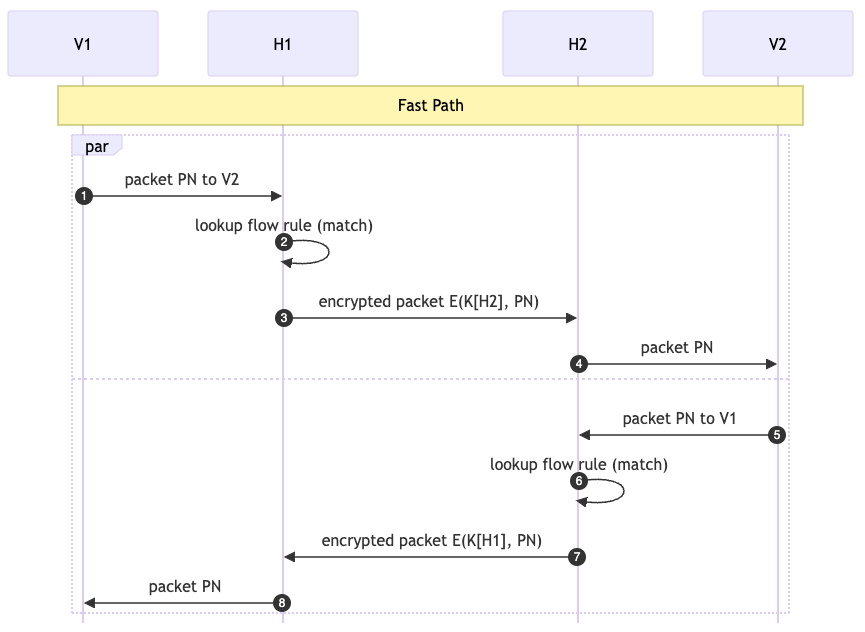
Once the tunnel is established, and packets received from the VF (1) match a rule (2) and are encrypted and sent (3-4) without any intervention from the CPU ("Fast Path").
In the case of on-startup tunnel creation, the application's main thread repeatedly attempts to perform the key exchange for each of the peers specified on the command line until the list is completed. Each peer is connected only once and, if a connection to one peer fails, the loop continues onto the next peer and retries the failed connection after all the others have been attempted.
Sampling
The PSP gateway application supports the sample-at-receiver (S) bit in the PSP header. If sampling is enabled, then packets marked with the S bit are mirrored to the RSS queues and logged to the console. In addition, on transmit, the S bit of a random subset of packets (1 out of 2^N for command-line parameter N) is set to 1, and those packets are mirrored to RSS.
To avoid out-of-sequence indication in ROCE traffic, the --maintain-order flag can be used. When used, the application creates two mirror resources for egress sampling:
-
One for when the sample bit is on – mirror is to RSS
-
One for when the sample bit is off – mirror with fwd type drop
Sampling packets on transmit is currently supported only following encryption. Sampling of egress packets before encryption will be supported in a future release.
Pipelines
Host-to-Network Flows
Traffic sent from the local, unsecured port (host-to-net) without sampling enabled travels through the pipeline as shown in the diagrams that follow. Note that the Ingress Root Pipe is the first destination for packets arriving from either the VF or the secured uplink port. However, the Egress ACL pipe is the first destination for packets sent via tx_burst on the PF (in the switch model's expert mode).
The Empty Pipe is a vestigial transition from the Default Domain, in which the Ingress Root Pipe is created, to the Secure Egress Domain, where the Egress ACL pipe performs encryption.
This pipe may be removed in a future release.
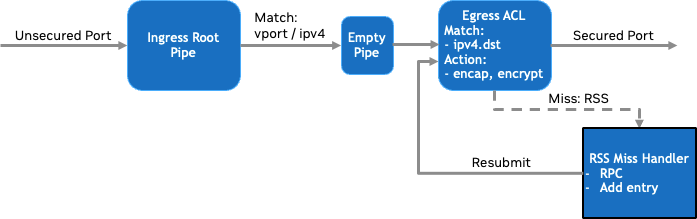
If sampling is enabled, the host-to-net pipeline is modified as shown in the following:
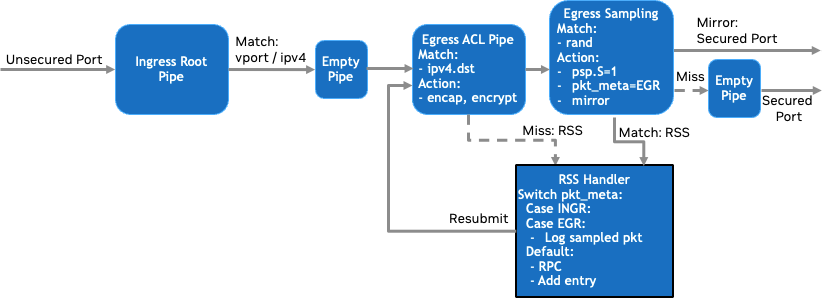
Here, an Egress Sampling Pipe is added between the Egress ACL Pipe and the Secured Port. It performs a match of the random metadata, masked according to command-line parameters, and then:
-
On match, the following actions occur:
-
Packet modifications:
-
The S bit in the PSP header is set to
true. -
The
pkt_metafield is set to a sentinel value to indicate to CPU software why the packet was sent to RSS.
-
-
The original packet is forwarded to RSS.
-
The mirror action forwards the packet to the secured port.
-
-
On miss, the following actions occur:
-
No packet modifications are made.
-
The packet is forwarded to a vestigial pipe which can then forward the packet to the wire.
A
fwd_misscannot target a port.
This pipe may be removed in a future release.
-
Network-to-Host Flows
When a packet arrives from the secured port, the following flows are executed.
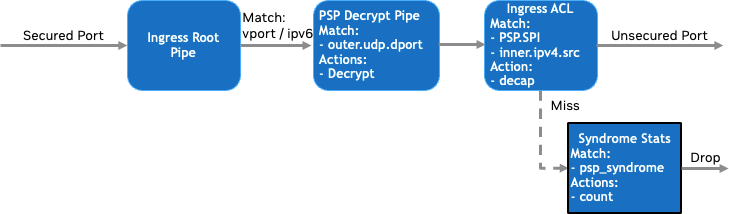
As before, the Ingress Root Pipe is the first destination and, here, the secured port ID as well as IPv6 outer L3 type are matched for. Matching packets flow to the decryption pipe, which matches the outer UDP port number against 1000, the constant specified in the PSP specification. On match, the packet is decrypted, but not yet de-capped. Then the Ingress ACL pipe checks the following:
-
PSP_Syndrome – did the packet decrypt correctly and pass its ICV check?
-
PSP SPI and inner IP src address – was this packet encrypted with the key associated with the given source?
If the packet passes the syndrome and ACL check, it is forwarded to the VF. Otherwise, the Syndrome Stats pipe counts the occurrences of the different bits in the PSP Syndrome word.
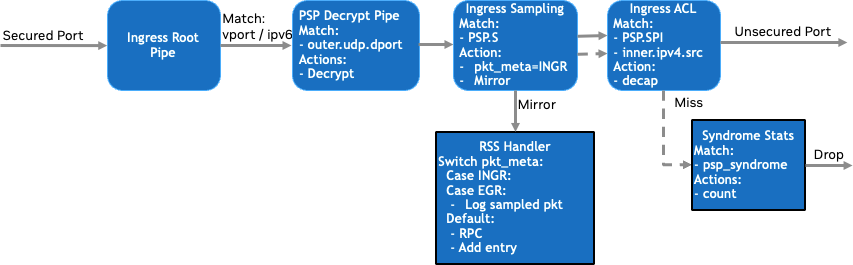
When sampling is enabled, the Ingress Sampling Pipe is inserted before the ACL. Unlike the Egress Sampling Pipe, no randomness is involved; the match criteria is the sample-on-receive flag in the PSP header. On a match, the incoming packet are mirrored to RSS with pkt_meta indicating the reason for forwarding the packet to RSS. On match or miss, the next pipe is the Ingress ACL Pipe.
DOCA Libraries
This application leverages the following DOCA libraries:
Refer to their respective programming guide for more information.
Compiling the Application
Please refer to the NVIDIA DOCA Installation Guide for Linux for details on how to install BlueField-related software.
DOCA reference applications are installed with full source code and build instructions. This allows you to compile them as-is or modify the source code to create custom versions.
For more information about the applications as well as development and compilation tips, refer to the DOCA Applications page.
The source code for the application is located in the following directory:
/opt/mellanox/doca/applications/psp_gateway/
Prerequisites
-
The application relies on the
json-copen source, requiring the following to be installed:-
Ubuntu/Debian:
$ sudo apt install libjson-c-dev
-
CentOS/RHEL:
$ sudo yum install json-c-devel
-
-
Installing the
gRPCopen source.gRPCcan be installed either from upstream packages or by building it directly from source. Due to build changes ongRPC's side, if building new versions directly from source, the following DOCA applications build flag will also be required:$ meson -Dupstream_grpc=false /tmp/build
Compiling All Applications
All DOCA applications are defined under a single meson project. So, by default, the compilation includes all of them.
To build all the applications together, run:
cd /opt/mellanox/doca/applications/
meson /tmp/build
ninja -C /tmp/build
doca_psp_gateway is created under /tmp/build/psp_gateway/.
Compiling Only the Current Application
To directly build only the PSP Gateway application:
cd /opt/mellanox/doca/applications/
meson /tmp/build -Denable_all_applications=false -Denable_psp_gateway=true
ninja -C /tmp/build
doca_psp_gateway is created under /tmp/build/psp_gateway/.
Alternatively, users can set the desired flags in the meson_options.txt file instead of providing them in the compilation command line:
-
Edit the following flags in
/opt/mellanox/doca/applications/meson_options.txt:-
Set
enable_all_applicationstofalse -
Set
enable_psp_gatewaytotrue
-
-
Run the following compilation commands:
Bashcd /opt/mellanox/doca/applications/ meson /tmp/build ninja -C /tmp/builddoca_psp_gatewayis created under/tmp/build/psp_gateway/.
Running the Application
Prerequisites
The PSP gateway application is based on DOCA Flow. Therefore, the user is required to allocate huge pages:
$ echo '2048' | sudo tee -a /sys/kernel/mm/hugepages/hugepages-2048kB/nr_hugepages
$ sudo mkdir /mnt/huge
$ sudo mount -t hugetlbfs -o pagesize=2M nodev /mnt/huge
Application Execution
The PSP Gateway application is provided in source form. Therefore, a compilation is required before the application can be executed.
-
Application usage instructions:
BashUsage: doca_psp_gateway [DOCA Flags] [Program Flags] DOCA Flags: -h, --help Print a help synopsis -v, --version Print program version information -l, --log-level Set the (numeric) log level for the program <10=DISABLE, 20=CRITICAL, 30=ERROR, 40=WARNING, 50=INFO, 60=DEBUG, 70=TRACE> --sdk-log-level Set the SDK (numeric) log level for the program <10=DISABLE, 20=CRITICAL, 30=ERROR, 40=WARNING, 50=INFO, 60=DEBUG, 70=TRACE> --log-filter Filter logs from specific modules, separated by comma -j, --json <path> Parse command line flags from an input json file Program Flags: -s, --device Device identifier (required) -r, --repr Device representor (required) -m, --core-mask EAL Core Mask --decap-dmac mac_dst addr of the decapped packets -d, --vf-name Name of the virtual function device / unsecured port -n, --nexthop-dmac next-hop mac_dst addr of the encapped packets --cookie Enable use of PSP virtualization cookies -a, --disable-ingress-acl Allows any ingress packet that successfully decrypts --sample-rate Sets the log2 sample rate: 0: disabled, 1: 50%, ... 16: 1.5e-3% -x, --max-tunnels Specify the max number of PSP tunnels -o, --crypt-offset Specify the PSP crypt offset --psp-version Specify the PSP version for outgoing connections (0 or 1) -z, --static-tunnels Create tunnels at startup -k, --debug-keys Enable debug keys --stat-print Enable printing statistics --perf-print Enable printing performance metrics (key-gen, insertion, all) --show-rss-rx-packets Show RSS rx packets --outer-ip-type outer IP type --inner-ip-type inner IP type -c, --config Path to the JSON file with application configuration --mode tunnel or transport mode
-
This usage printout can be printed to the command line using the
-h(or--help) options:Bash./doca_psp_gateway -h
For additional information, refer to section "DOCA PSP Gateway Application Guide | Command Line Flags".
-
CLI example for running the application on the BlueField or host:
Bash./doca_psp_gateway -s pci/03:00.0 -r pci/03:00.0,pf0vf0 -d ens2f0v0 -c /tmp/psp_gw_config.json-
The device identifier (
-sflag) should match the addresses of the desired PCIe device -
The
-dflag indicates the vf that is used to extract MAC address and local IP. It should match the MAC address of the virtual function specified by the-rargument. -
The
-cflag is the path to json configuration file that includes all info about tunnels.
-
For additional information regarding the command line syntax of the device and device representor identifiers, please referr to the matching section in the DOCA Arg Parser Guide.
Command Line Flags
General Flags
|
Short Flag |
Long Flag |
Description |
|---|---|---|
|
|
|
Prints a help synopsis and exits |
|
|
|
Prints program version information and exits |
|
|
|
Sets the numeric log level for the application:
|
|
N/A |
|
Sets the SDK numeric log level using the same 10-70 scale as above |
|
N/A |
|
Filters logs from specific modules (comma-separated list) |
|
|
|
Parses command-line flags from a specified input JSON file |
Refer to DOCA Arg Parser for more information regarding the supported flags and execution modes.
Program Flags
|
Short Flag |
Long Flag |
Description |
|---|---|---|
|
|
|
Device identifier of the desired device |
|
|
|
Device representor identifier of the desired representor |
|
|
|
EAL core mask |
|
N/A |
|
|
|
N/A |
|
Name of the VF device/unsecured port (Host only. Automatically detects MAC/VIP. Requires IP address bound to VF.) |
|
|
|
Next-hop |
|
N/A |
|
Enable use of PSP virtualization cookies |
|
|
|
Allows any ingress packet that successfully decrypts |
|
N/A |
|
Sets the log2 sample rate:
|
|
|
|
Specify the max number of PSP tunnels |
|
|
|
Specify the PSP crypt offset |
|
N/A |
|
Specify the PSP version for outgoing connections ( |
|
|
|
Create tunnels at startup using the given local IP address |
|
|
|
Enable debug keys |
|
N/A |
|
Print statistics regarding active sessions |
|
N/A |
|
Print performance metrics of key generation of key-SPI pairs ( |
|
N/A |
|
Print RX packets that got to RSS queues (i.e., to software) |
|
N/A |
|
Outer IP tunnel type ( |
|
N/A |
|
Inner IP tunnel type ( |
|
c |
|
Path to JSON file that includes tunnel information See section "DOCA PSP Gateway Application Guide | Config File JSON Format" for specifics on the JSON file format.
|
|
N/A |
|
Force maintaining original packet ordering |
Config File JSON Format
The JSON configuration file maps an OOB network address (gRPC server) to a list of virtual IP addresses behind that physical address. Each "peer" in the list contains information about a remote gRPC server to which the pairs of local-vip and remote-vip are mapped to.
The following is a template of the JSON file structure:
{
    "config": {
        "local-grpc-address": <local gRPC server ip address to listen for connections on, possible with port>
    },
    "peers": [ /* list of peers (differentiated by remote gRPC server) */
        {
            "remote-grpc-address": <remote gRPC server address to connect to for connections of given sessions> ,
            "sessions": [ /* list of sessions allowed with peer (differentiated by local vip) */
                {
                    "local-vip": <local virtual ip>, /* if not present, take the value from vf interface's IP ("--vf-name" flag) */
                    "remote-vips": [
                        <ip address, possible with prefix mask>,
						/* [<more ip addresses>...] */
                    ]
                },
				/* [<more sessions>... ] */
            ]
        },
		/* [<more peers>...] */
    ]
}
When a packet from the VF does not match any existing flows, this table defines the physical peer which should provide the tunnel to the given (virtual) src-ip, dst-ip 2-tuple.
Example JSON:
{
    "config": {
        "local-grpc-address": "10.237.113.143:3000"
    },
    "peers": [
        {
            "remote-grpc-address": "10.237.113.144",
            "sessions": [
                {
                    "local-vip": "6.6.6.5",
                    "remote-vips": [
                        "8.8.8.0/24",
                        "7.7.7.7"
                    ]
                },
                {
                    "local-vip": "6.6.6.4",
                    "remote-vips": [
                        "9.9.9.9"
                    ]
                }
            ]
        },
        {
            "remote-grpc-address": "10.237.1.1",
            "sessions": [
                {
                    // "local vip" not present - default value from vf interface's IP (Must run application with "--vf-name" param)
                    "remote-vips": [
                        "11.11.11.11/24"
                    ]
                }
            ]
        }
    ]
}
Troubleshooting
Refer to the NVIDIA BlueField Platform Software Troubleshooting Guide for any issue encountered with the compilation, installation, or execution of the DOCA applications.
Application Code Flow
-
Main loop code flow
-
Initialize the logger facility.
-
The standard logger and the SDK logger are created, and the SDK logger default log level is selected.
C++doca_log_backend_create_standard(); doca_log_backend_create_with_file_sdk(stdout, &sdk_log); doca_log_backend_set_sdk_level(sdk_log, DOCA_LOG_LEVEL_WARNING); -
The signal handler is connected to enable a clean shutdown.
C++signal(SIGINT, signal_handler); signal(SIGTERM, signal_handler);
-
-
Parse application arguments. The main function invokes
psp_gw_argp_exec(), which initializes the arg parser resources and registers DOCA general parameters, and then registers the PSP application-specific parameters. Then the parser is invoked.C++doca_argp_init(); psp_gw_register_params(); doca_argp_start();
-
Parse input configuration JSON file. This will include all information about peers and their sessions.
C++psp_gw_parse_config_file();
-
DPDK initialization. Call
rte_eal_init()to initialize EAL resources with the provided EAL flags for not probing the ports (-a00:0.0).Bashrte_eal_init(n_eal_args, (char **)eal_args);
-
Initialize devices and ports.
-
Open DOCA devices with input PCIe addresses/interface names.
-
Probe DPDK port from each opened device.
Bashopen_doca_device_with_pci(...); // not part of doca_flow; see doca/samples/common.c doca_dpdk_port_probe(...);
-
The MAC and IP addresses of the PF are queried and logged.
C++rte_eth_macaddr_get(...); doca_devinfo_get_ipv6_addr(...); DOCA_LOG_INFO("Port %d: Detected PF mac addr: %s, IPv6 addr: %s, total ports: %d", ...);
-
-
Initialize and start DPDK ports. Initialize DPDK ports, including mempool allocation. No hairpin queues are created.
Bashdpdk_queues_and_ports_init(); // not part of doca_flow; see doca/applications/common/dpdk_utils.c -
Initialize DOCA Flow objects used by the PSP Gateway application. The DOCA Flow library is initialized with the string
"switch,hws,isolated,expert", because it is desirable for the application to act as an intermediary between the uplink physical port and some number of VF representors (switch mode), andhws(hardware steering mode) andisolatedmode are mandatory for switch mode. The optionalexpertflag prevents DOCA Flow from automating certain packet operations and gives more control to the application, as described in the DOCA Flow page.BashPSP_GatewayFlows psp_flows(&pf_dev, vf_port_id, &app_config); psp_flows.init();-
Initialize DOCA Flow library.
-
Start the ports.
-
Allocate shared resources (PSP crypto objects and Mirror actions).
-
Create the ingress and egress pipes.
-
-
Create the gRPC service.
BashPSP_GatewayImpl psp_svc(&app_config, &psp_flows);
-
Launch the L-Core threads to handle RSS packets.
Bashrte_eal_remote_launch(lcore_pkt_proc_func, &lcore_params, lcore_id);
-
Launch the gRPC service.
-
This implementation uses
InsecureServerCredentials. Update as needed.Bashgrpc::ServerBuilder builder; builder.AddListeningPort(server_address, grpc::InsecureServerCredentials()); builder.RegisterService(&psp_svc); auto server_instance = builder.BuildAndStart();
-
-
Wait for traffic. If configured to connect at startup, process the list of remaining connections. Then display the flow pipe counters.
Bashwhile (!force_quit) { psp_svc.try_connect(remotes_to_connect, local_vf_addr); ... psp_flows.show_static_flow_counts(); psp_svc.show_flow_counts(); }-
Wait in a loop until the user terminates the program.
-
-
PSP Gateway cleanup:
-
Destroy DPDK ports and queues.
Bashdpdk_queues_and_ports_fini();
-
DPDK finish.
Bashdpdk_fini();Calls
rte_eal_destroy()to destroy initialized EAL resources. -
Arg parser destroy.
Bashdoca_argp_destroy()
-
-
-
Miss-packet code flow.
-
The L-Core launch routine from the main loop pointed to the
lcore_pkt_proc_funcroutine. -
The
force_quitflag is polled to respond to the signal handler.C++while (!*params->force_quit) { ... }
-
The
rte_eth_rx_burstfunction polls the PF queue for received packets.nb_rx_packets = rte_eth_rx_burst(port_id, queue_id, rx_packets, MAX_RX_BURST_SIZE);
-
Inside
handle_packet(), the packet metadata is inspected to detect whether this packet is sampled on ingress, sampled on egress, or a miss packet.uint32_t pkt_meta = rte_flow_dynf_metadata_get(packet);-
Sampled packets are simply logged using the
rte_pktmbuf_dumpfunction.
-
-
Miss packets are passed to the
handle_miss_packetmethod of the gRPC service. This method handles cases where an application attached to the VF wishes to send a packet to another virtual address, but a PSP tunnel must first be established by exchanging SPI and key information between hosts. -
The service acts as a gRPC client, and the appropriate server is looked up from the
config->net_config.hostsvector, which is comprised of hosts passed via the-ttunnels arguments or the-ftunnels file argument. -
Once the client connection exists, the
request_tunnel_to_hostmethod takes care of invoking the theRequestTunnelParamsoperation defined in the schema.-
Optionally, this function generates a corresponding set of tunnel parameters appropriate for the server host to send traffic back via
generate_tunnel_params().doca_flow_crypto_psp_spi_key_bulk_generate(bulk_key_gen); doca_flow_crypto_psp_spi_key_bulk_get(bulk_key_gen, 0, &spi, key); doca_flow_crypto_psp_spi_key_wipe(bulk_key_gen, 0);
-
-
The RPC operation is invoked, and if successful,
create_tunnel_flowis called to create the egress flow:status = stub->RequestTunnelParams(&context, request, &response);
-
The
create_tunnel_flowmethod translates the resulting Protobuf objects to application-specific data structures and passes them to theadd_encrypt_entrymethod of the flows object. Here, the PSP SPI and key are programmed into an availablecrypto_idindex as follows.SPI and
crypto_idare two independent concepts:-
The SPI value in the PSP packet header indicates to the receiver which key was used by the sender to encrypt the data. Each receiver computes an SPI and key to provide to a sender. Since each receiver is responsible for tracking its next SPI, multiple receivers may provide the same SPI to a sender, so one sender may send the same SPI to multiple different peers. This is allowed, as each of the receiving peers has its own decryption key to handle that SPI.
-
The
crypto_idacts as an index into the bucket of PSP keys allocated by DOCA Flow. Thedoca_flow_shared_resource_cfg()function writes a given PSP encryption key to a given slot in the bucket of keys in NIC memory. These slots can be overwritten as needed by the application. -
There is no explicit association between
crypto_idand SPI. Thedoca_flow_shared_resource_cfg()function writes a key at the slot provided by thecrypto_idargument, then the flow pipe entryactions.crypto.crypto_idreferences this key, andactions.crypto_encap.encap_dataincludes a PSP header with the desired SPI.
struct doca_flow_shared_resource_cfg res_cfg = {};
res_cfg.domain = DOCA_FLOW_PIPE_DOMAIN_SECURE_EGRESS;
res_cfg.psp_cfg.key_cfg.key_type = DOCA_FLOW_CRYPTO_KEY_256;
res_cfg.psp_cfg.key_cfg.key = (uint32_t *)encrypt_key;
doca_flow_shared_resource_cfg(DOCA_FLOW_SHARED_RESOURCE_PSP, session->crypto_id, &res_cfg);
-
-
A flow pipe entry which references the newly programmed PSP encryption key (via its index
crypto.crypto_id) must be inserted. Additionally, this pipe entry must specify all the outer Ethernet, IP, UDP, and PSP header fields to insert.format_encap_data(session, actions.crypto_encap.encap_data); actions.crypto.action_type = DOCA_FLOW_CRYPTO_ACTION_ENCRYPT; actions.crypto.resource_type = DOCA_FLOW_CRYPTO_RESOURCE_PSP; actions.crypto.crypto_id = session->crypto_id; ... doca_flow_pipe_add_entry(pipe_queue, pipe, match, actions, mon, fwd, flags, &status, entry); ... doca_flow_entries_process(port, 0, DEFAULT_TIMEOUT_US, num_of_entries);
-
The original packet received via
rte_ethdev_rx_burstis sent back through the newly updated pipelines viarte_ethdev_tx_burst. Since theport_idargument is that of the PF, and since DOCA Flow has been initialized inexpertmode, the packet is transferred to the root of the egress domain (the "empty pipe" beforeegress_acl_pipe).nsent = rte_eth_tx_burst(port_id, queue_id, &packet, 1);
-
-
Tunnel parameter request handling
-
The gRPC service provided by the PSP Gateway implements the
RequestTunnelParamsoperation referenced above. A client uses this operation to request an SPI and key to encrypt traffic to send to the server's NIC device. The request indicates the virtual remote address for which the tunnel will be created. -
This operation begins by generating a new SPI and key inside
generate_tunnel_params()as described previously. -
The operation creates an ACL entry permitting the new SPI and the remote virtual address using the
add_ingress_acl_entrymethod of the Flows object.doca_flow_match match = {}; match.parser_meta.psp_syndrome = 0; match.tun.type = DOCA_FLOW_TUN_PSP; match.tun.psp.spi = RTE_BE32(session->spi_ingress); match.inner.l3_type = DOCA_FLOW_L3_TYPE_IP4; match.inner.ip4.src_ip = session->src_vip; ... doca_flow_pipe_add_entry(pipe_queue, pipe, match, actions, mon, fwd, flags, &status, entry); ... doca_flow_entries_process(port, 0, DEFAULT_TIMEOUT_US, num_of_entries);
-
If the request included parameters for traffic in the reverse direction (traffic to encrypt and send to the client), these parameters are translated and passed to the Flows object by calling
create_tunnel_flowdescribed above.
-
References
Last updated: