

This guide provides a Simple Forward implementation on top of NVIDIA® BlueField® DPU.
Introduction
Simple forward is a forwarding application that leverages the DOCA Flow API to take either VXLAN, GRE, or GTP traffic from a single RX port and transmits it on a single TX port.
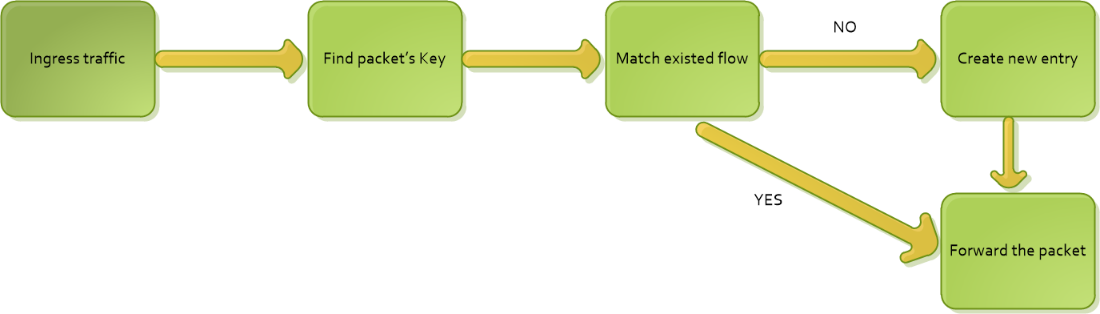
For every packet received on an RX queue on a given port, DOCA Simple Forward checks the packet's key, which consists of the inner 5-tuple. If it finds that the packet matches an existing flow, then it does not create a new one. Otherwise, a new flow is created with a FORWARDING component. Finally, the packet is forwarded to the TX queue of the egress port if the "rx-only" mode is not set.
The FORWARDING component type depends on the flags delivered when running the application. For example, if the hairpinq flag is provided, then the FORWARDING component would be hairpin. Otherwise, it would be RSS'd to software, and hence every VXLAN, GTP, or GRE packet would be received on RX queues.
Simple forward should be run with dual ports. By using a traffic generator, the RX port receives the VXLAN, GRE, or GTP packets and forwarding forwards them back to the traffic generator.
System Design
The following diagram illustrates simple forward's packet flows. It receives traffic coming from the wire and passes it to the other port.
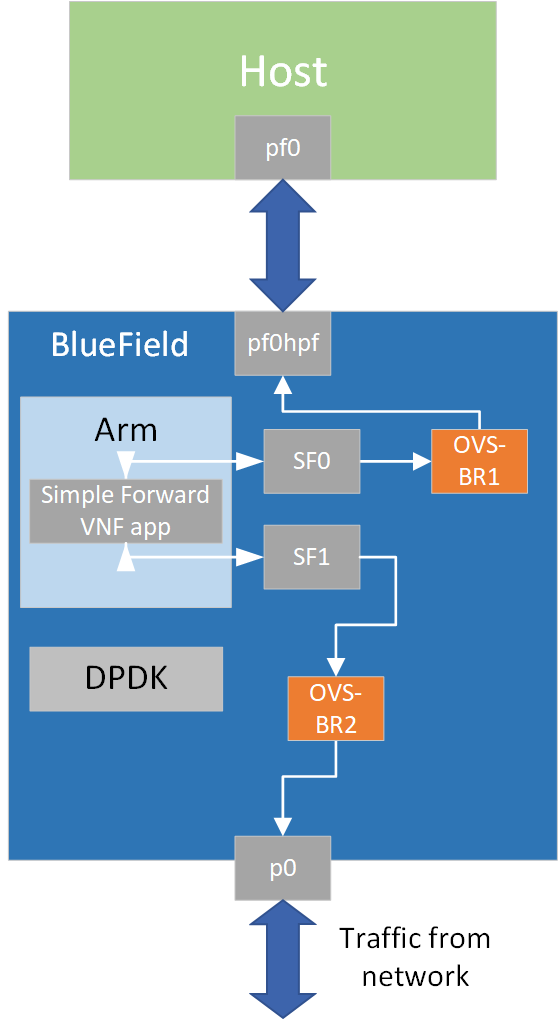
Application Architecture
Simple forward first initializes DPDK, after which the application handles the incoming packets.
The following diagram illustrates the initialization process.

-
Init_DPDK– EAL init, parse argument from command line and register signal. -
Start port –
mbuf_create,dev_configure, rx/tx/hairpin queue setup and start the port. -
Simple_fwd INIT– create flow tables, build default forward pipes.
The following diagram illustrates how to process the packet.
-
Based on the packet's info, find the key values based on the inner headers (e.g. src/dst IP, src/dst port, etc).
-
Traverse the inner flow tables, check if the keys exist or not.
-
If yes, update inner counter
-
If no, a new flow table is added to the DPU
-
-
Forward the packet to the other port.
DOCA Libraries
This application leverages the following DOCA library:
Refer to its respective programming guide for more information.
Compiling the Application
Please refer to the DOCA Installation Guide for Linux for details on how to install BlueField-related software.
DOCA reference applications are installed with full source code and build instructions. This allows you to compile them as-is or modify the source code to create custom versions.
For more information about the applications as well as development and compilation tips, refer to the DOCA Reference Applications page.
The source code for the application is located in the following directory:
/opt/mellanox/doca/applications/simple_fwd_vnf/
Compiling All Applications
All DOCA applications are defined under a single meson project. So, by default, the compilation includes all of them.
To build all the applications together, run:
cd /opt/mellanox/doca/applications/
meson /tmp/build
ninja -C /tmp/build
doca_simple_fwd_vnf is created under /tmp/build/simple_fwd_vnf/.
Compiling Simple Forward Application Only
To directly build only the simple forward application:
cd /opt/mellanox/doca/applications/
meson /tmp/build -Denable_all_applications=false -Denable_simple_fwd_vnf=true
ninja -C /tmp/build
doca_simple_fwd_vnf is created under /tmp/build/simple_fwd_vnf/.
Alternatively, users can set the desired flags in the meson_options.txt file instead of providing them in the compilation command line:
-
Edit the following flags in
/opt/mellanox/doca/applications/meson_options.txt:-
Set
enable_all_applicationstofalse -
Set
enable_simple_fwd_vnftotrue
-
-
Run the following compilation commands:
cd /opt/mellanox/doca/applications/
meson /tmp/build
ninja -C /tmp/build
doca_simple_fwd_vnfis created under/tmp/build/simple_fwd_vnf/.
Running the Application
Prerequisites
-
A FLEX profile number should be manually set to 3 on the system for the application to build the GRE, standard VXLAN and GRE pipes.
-
Set FLEX profile number to 3 from the DPU.
sudo mlxconfig -d <pcie_address> s FLEX_PARSER_PROFILE_ENABLE=3
-
Perform a BlueField system reboot for the
mlxconfigsettings to take effect.Resetting the firmware can be done from the BlueField as well. For more information, refer to step 3.b of the "Upgrading Firmware" section of the DOCA Installation Guide for Linux.
-
-
The Simple Forward application is based on DOCA Flow. Therefore, the user is required to allocate huge pages.
$ echo '2048' | sudo tee -a /sys/kernel/mm/hugepages/hugepages-2048kB/nr_hugepages
$ sudo mkdir /mnt/huge
$ sudo mount -t hugetlbfs -o pagesize=2M nodev /mnt/huge
Application Execution
The simple forward application is provided in source form. Therefore, a compilation is required before the application can be executed.
-
Application usage instructions:
Usage: doca_simple_fwd_vnf [DPDK Flags] -- [DOCA Flags] [Program Flags]

DOCA Flags:
  -h, --help                        Print a help synopsis
  -v, --version                     Print program version information
  -l, --log-level                   Set the (numeric) log level for the program <10=DISABLE, 20=CRITICAL, 30=ERROR, 40=WARNING, 50=INFO, 60=DEBUG, 70=TRACE>
  --sdk-log-level                   Set the SDK (numeric) log level for the program <10=DISABLE, 20=CRITICAL, 30=ERROR, 40=WARNING, 50=INFO, 60=DEBUG, 70=TRACE>
  --log-filter                      Filter logs from specific modules, separated by comma
  -j, --json <path>                 Parse command line flags from an input json file

Program Flags:
  -a, --device                      device
  -r, --rep                         device representor
  -t, --stats-timer <time>          Set interval to dump stats information
  -q, --nr-queues <num>             Set queues number
  -rx, --rx-only                    Set rx only
  -o, --hw-offload                  Set PCI address of the RXP engine to use
  -hq, --hairpinq                   Set forwarding to hairpin queue
  -g, --age-thread                  Start thread to do aging
This usage printout can be printed to the command line using the
-h(or--help) options:./doca_simple_fwd_vnf -- -h
For additional information, refer to section "DOCA Simple Forward VNF Application Guide | Command Line Flags".
-
CLI example for running the application on the BlueField:
./doca_simple_fwd_vnf -- -a aux/4 -a aux/5 -l 60
SFs must be enabled according to the BlueField Scalable Functions.
Before creating SFs on a specific physical port, it is important to verify the encap mode on the respective PF FDB. The default mode is
basic. To check the encap mode, run:Bashcat /sys/class/net/p0/compat/devlink/encapIn this case, disable encap on the PF FDB before creating the SFs by running:
Bash/opt/mellanox/iproute2/sbin/devlink dev eswitch set pci/0000:03:00.0 mode legacy /opt/mellanox/iproute2/sbin/devlink dev eswitch set pci/0000:03:00.1 mode legacy echo none > /sys/class/net/p0/compat/devlink/encap echo none > /sys/class/net/p1/compat/devlink/encap /opt/mellanox/iproute2/sbin/devlink dev eswitch set pci/0000:03:00.0 mode switchdev /opt/mellanox/iproute2/sbin/devlink dev eswitch set pci/0000:03:00.1 mode switchdevIf the encap mode is set to
basicthen the application fails upon initialization.
The flag
-a aux/4 -a aux/5is mandatory for proper usage of the application.-
Modifying this flag will result in an unexpected behavior as only 2 ports are supported.
-
The SF number is arbitrary and configurable.
The SF numbers must match the desired SF devices.
-
-
CLI example for running the application on the host:
./doca_simple_fwd_vnf -- -a pci/04:00.3 -a pci/04:00.4 -l 60
The device identifiers must match the desired network devices.
For additional information regarding the command line syntax of the device and device representor identifiers, please referr to the matching section in the DOCA Arg Parser Guide.
For more information, refer to section "Running DOCA Application on Host" in DOCA Virtual Functions.
Command Line Flags
General Flags
|
Short Flag |
Long Flag |
Description |
|---|---|---|
|
|
|
Prints a help synopsis and exits |
|
|
|
Prints program version information and exits |
|
|
|
Sets the numeric log level for the application:
|
|
N/A |
|
Sets the SDK numeric log level using the same 10-70 scale as above |
|
N/A |
|
Filters logs from specific modules (comma-separated list) |
|
|
|
Parses command-line flags from a specified input JSON file |
Refer to DOCA Arg Parser for more information regarding the supported flags and execution modes.
Host Program Flags
|
Short Flag |
Long Flag |
Description |
|---|---|---|
|
|
|
Device identifier |
|
|
|
Device representor identifiers |
|
|
|
Set interval to dump stats information. |
|
|
|
Set queues number. |
|
|
|
Set RX only. When set, the packets will not be sent to the TX queues. |
|
|
|
Set HW offload of the RXP engine to use. |
|
|
|
Set forwarding to hairpin queue. |
|
|
|
Start a dedicated thread that handles the aged flows. |
Troubleshooting
Refer to the NVIDIA BlueField Platform Software Troubleshooting Guide for any issue encountered with the compilation, installation, or execution of the DOCA applications.
Application Code Flow
-
Parse application argument.
-
Initialize arg parser resources and register DOCA general parameters.
doca_argp_init();
-
Register application parameters.
register_simple_fwd_params();
-
Parse the arguments.
doca_argp_start();-
Parse DPDK flags and invoke handler for calling the
rte_eal_init()function. -
Parse app parameters.
-
-
-
DPDK initialization.
dpdk_init();Calls
rte_eal_init()to initialize EAL resources with the provided EAL flags.
-
DPDK port initialization and start.
dpdk_queues_and_ports_init();-
Initialize DPDK ports.
-
Create mbuf pool using
rte_pktmbuf_pool_create. -
Driver initialization – use
rte_eth_dev_configureto configure the number of queues. -
Rx/Tx queue initialization – use
rte_eth_rx_queue_setupandrte_eth_tx_queue_setupto initialize the queues. -
Rx hairpin queue initialization – use
rte_eth_rx_hairpin_queue_setupto initialize the queues. -
Start the port using
rte_eth_dev_start.
-
-
Simple forward initialization.
simple_fwd_init();-
simple_fwd_create_ins– create flow tables usingsimple_fwd_ft_create. -
simple_fwd_init_ports_and_pipes– initialize DOCA port usingsimple_fwd_init_doca_portand build default pipes for each port.
-
-
Main loop.
simple_fwd_process_pkts();-
Receive packets using
rte_eth_rx_burstin a loop. -
Process packets using
simple_fwd_process_offload. -
Transmit the packets on the other port by calling
rte_eth_tx_burst. Or free the packet mbuf ifrx_onlyis set totrue.
-
-
Process packets.
simple_fwd_process_offload();-
Parse the packet's
rte_mbufusingsimple_fwd_pkt_info. -
Handle the packet using
simple_fwd_handle_packet. If the packet's key does not match the existed the flow entry, create a new flow entry and PIPE usingsimple_fwd_handle_new_flow. Otherwise, increase the total packet's counter.
-
-
Simple forward destroy.
simple_fwd_destroy();Simple forward close port and clean the flow resources.
-
DPDK ports and queues destruction.
dpdk_queues_and_ports_fini();
-
DPDK finish.
dpdk_fini();Calls
rte_eal_destroy()to destroy initialized EAL resources. -
Arg parser destroy.
doca_argp_destroy();-
Free DPDK resources by call
rte_eal_cleanup()function.
-
References
-
/opt/mellanox/doca/applications/simple_fwd_vnf/
Last updated: