

Introduction
The doca_storage_gga_offload_sbc_generator application provides a utility for generating storage-ready binary content files for use with DOCA storage target applications in the GGA offload use case.
This tool processes a single input file, breaks it into chunks, compresses the data, generates parity, and outputs three .sbc files suitable for use by the GGA Offload pipeline.
System Design
The application performs the following operations in sequence:
-
Load input data from disk.
-
Compress data using the LZ4 compression algorithm.
-
Generate parity data via error correction coding (2:1 ratio).
-
Write the resulting binary output files to disk, organized into three partitions.
Architecture
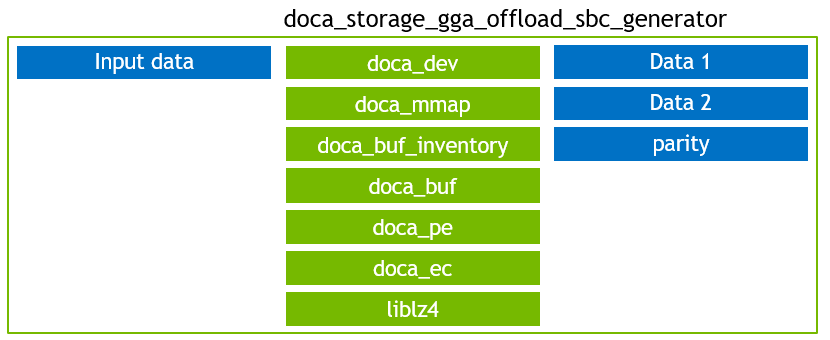
The doca_storage_gga_offload_sbc_generator is not performance-critical and follows a straightforward, linear processing flow. The application comprises the following key steps:
-
Load the source file from disk.
-
Divide the file content into chunks.
-
Compress each chunk using the LZ4 library.
-
If a chunk is not compressible enough (i.e., it cannot be reduced by at least the size of the metadata header and trailer), the application reports an error and exits.
-
-
Wrap each compressed chunk with a metadata header and trailer to form a storage block.
-
This metadata enables the GGA Offload application to correctly reconstruct decompression tasks.
-
-
Generate EC (Erasure Coding) parity for each storage block.
-
The parity is generated at a 2:1 ratio: for every 2 bytes of data, 1 byte of parity is produced. This allows for 50% of the data to be lost and still be recoverable using the parity.
-
-
Split the content into three logical partitions:
-
Data 1 and Data 2 are currently identical copies.
-
Parity contains duplicated parity data.
This replication strategy is for simplicity and does not reflect a realistic storage deployment.
-
-
Write each partition to disk, including high-level metadata such as:
-
Storage block size
-
Number of storage blocks
-
DOCA Libraries
This application leverages the following DOCA libraries:
Compiling the Application
This application is compiled as part of the set of storage applications. For compilation instructions, refer to the DOCA Storage page.
Running the Application
Application Execution
DOCA Storage GGA Offload SBC Generator is provided in source form. Therefore, compilation is required before the application can be executed.
-
Application usage instructions:
Usage: doca_storage_gga_offload_sbc_generator [DOCA Flags] [Program Flags]

DOCA Flags:
  -h, --help                        Print a help synopsis
  -v, --version                     Print program version information
  -l, --log-level                   Set the (numeric) log level for the program <10=DISABLE, 20=CRITICAL, 30=ERROR, 40=WARNING, 50=INFO, 60=DEBUG, 70=TRACE>
  --sdk-log-level                   Set the SDK (numeric) log level for the program <10=DISABLE, 20=CRITICAL, 30=ERROR, 40=WARNING, 50=INFO, 60=DEBUG, 70=TRACE>
  -j, --json <path>                 Parse command line flags from an input json file

Program Flags:
  -d, --device                      Device identifier
  --original-input-data             File containing the original data that is represented by the storage
  --block-size                      Size of each block. Default: 4096
  --matrix-type                     Type of matrix to use. One of: cauchy, vandermonde Default: vandermonde
  --data-1                          First half of the data in storage
  --data-2                          Second half of the data in storage
  --data-p                          Parity data (used to perform recovery flow)
This usage printout can be printed to the command line using the
-h(or--help) options:./doca_storage_gga_offload_sbc_generator -hFor additional information, refer to section "DOCA Storage GGA Offload SBC Generator Application Guide | Command line Flags".
-
CLI example for running the application on the BlueField:
./doca_storage_gga_offload_sbc_generator -d 03:00.0 --original-input-data original_data.txt --block-size 4096 --data-1 data_1.sbc --data-2 data_2.sbc --data-p data_p.sbcThe device PCIe address (
03:00.0) should match the addresses of the desired PCIe device.
Command-line Flags
General Flags
|
Short Flag |
Long Flag |
Description |
|---|---|---|
|
|
|
Prints a help synopsis and exits |
|
|
|
Prints program version information and exits |
|
|
|
Sets the numeric log level for the application:
|
|
N/A |
|
Sets the SDK numeric log level using the same 10-70 scale as above |
|
N/A |
|
Filters logs from specific modules (comma-separated list) |
|
|
|
Parses command-line flags from a specified input JSON file |
Refer to DOCA Arg Parser for more information regarding the supported flags and execution modes.
Program Flags
|
Short Flag |
Long Flag |
Description |
|---|---|---|
|
|
|
DOCA device identifier. One of:
This flag is a mandatory. |
|
N/A |
|
File containing the original data that is represented by the storage This flag is a mandatory. |
|
N/A |
|
IP address and port to use to establish the control TCP connection to the target. This flag is a mandatory. |
|
N/A |
|
File in which to store the data 1 partition This flag is a mandatory. |
|
N/A |
|
File in which to store the data 2 partition This flag is a mandatory. |
|
N/A |
|
File in which to store the parity partition This flag is a mandatory. |
|
N/A |
|
Type of matrix to use. One of:
|
Troubleshooting
Refer to the NVIDIA BlueField Platform Software Troubleshooting Guide for any issue encountered with the compilation, installation, or execution of the DOCA applications.
Application Code Flow
General Application Flow
The high-level flow of the doca_storage_gga_offload_sbc_generator application proceeds as follows:
-
The high level application flow is as follows:
auto const cfg = parse_cli_args(argc, argv); gga_offload_sbc_gen_app app{cfg.device_id, cfg.ec_matrix_type, cfg.block_size}; -
Load input data from disk:
auto input_data = storage::load_file_bytes(cfg.original_data_file_name);
-
Pad input data to ensure it aligns with the block size:
pad_input_to_multiple_of_block_size(input_data, cfg.block_size);
-
Transform the data (compression, metadata wrapping, parity generation):
app.generate_binary_content(input_data);
-
Write the output partitions to disk:
storage::write_binary_content_to_file(
    cfg.data_1_file_name,
    storage::binary_content{cfg.block_size, results.block_count, std::move(results.data_1_content)}
);

storage::write_binary_content_to_file(
    cfg.data_2_file_name,
    storage::binary_content{cfg.block_size, results.block_count, std::move(results.data_2_content)}
);

storage::write_binary_content_to_file(
    cfg.data_p_file_name,
    storage::binary_content{cfg.block_size, results.block_count, std::move(results.data_p_content)}
);
Transform Process
-
Compress the chunk using LZ4:
auto const compresed_size = m_lz4_ctx.compress( input_data.data() + (ii * m_block_size), m_block_size, m_compressed_bytes_buffer.data() + metadata_header_size, m_compressed_bytes_buffer.size() - metadata_overhead_size ); -
Create and insert the metadata header:
storage::compressed_block_header const hdr{ htobe32(m_block_size), htobe32(compresed_size), }; std::copy( reinterpret_cast<char const *>(&hdr), reinterpret_cast<char const *>(&hdr) + sizeof(hdr), m_compressed_bytes_buffer.data() ); -
Set input buffer for parity generation and reset the output buffer:
doca_buf_set_data(m_input_buf, m_compressed_bytes_buffer.data(), m_block_size);
doca_buf_reset_data_len(m_output_buf);
-
Submit the parity generation task to the DOCA EC engine:
doca_task_submit(doca_ec_task_create_as_task(m_ec_task));
References
-
/opt/mellanox/doca/applications/storage/
Last updated: