

Introduction
The doca_storage_initiator_comch application functions as a client to the DOCA storage service. It benchmarks the performance of data transfers over the ComCh interface, providing detailed measurements of throughput, bandwidth, and latency.
System Design
The doca_storage_initiator_comch application performs the following key tasks:
-
Initiates a sequence of I/O requests to exercise the DOCA storage service.
-
Measures and reports storage performance, including:
-
Millions of I/O operations per second (IOPS)
-
Effective data bandwidth
-
I/O operation latency:
-
Minimum latency
-
Maximum latency
-
Mean latency
-
-
The application establishes a connection to the storage service running on an NVIDIA® BlueField® platform using the doca_comch_client interface.
Architecture
The application is logically divided into two functional areas:
-
Control-time and shared resources
-
Per-thread data path resources
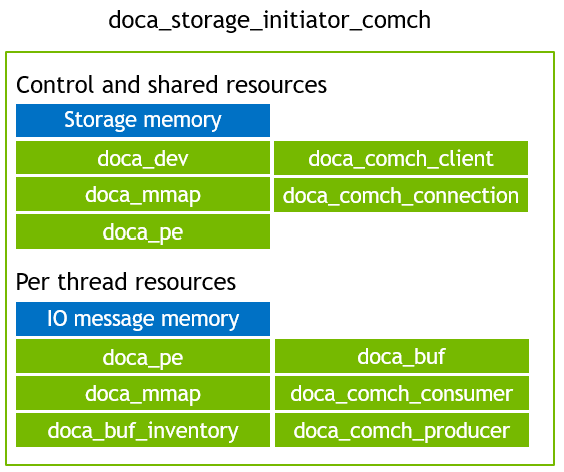
The execution consists of two main phases:
-
Control Phase
-
Data Path Phase
Control Phase
The control phase is responsible for establishing and managing the storage session lifecycle. It performs the following steps:
-
Query storage – Retrieve storage service metadata.
-
Init storage – Initialize the storage window and prepare for data transfers.
-
Start storage – Begin the data path phase and launch data threads.
Once the data phase is initiated, the main thread waits for test completion. Afterward, it issues final cleanup commands:
-
Stop storage – Stop data movement.
-
Shutdown – Tear down the session and release resources.
Data Path Phase
The selected --execution-strategy is used to pre-initialise a set of per task flags. These flags are used to decide which action the task should take next. This allows the task to perform any combination of; read, write, memory set, memory clear, and validate. The order of exectuion of each action is hard coded for simplicity. The order of actions is:
-
Initialise transaction:
-
Set actions bitmask to match
--execution-strategy. -
Get a local memory address from the pool (of initiator IO blocks assigned to this thread).
-
Get a remote address from the pool (of storage IO blocks assigned to this thread).
-
-
Set memory to initial value:
-
Copy content from the data provided by
--storage-plain-contentat the address defined by the storage IO block and place it in the memory defined by initiator IO block.
-
-
Start an IO write:
-
Send an IO write operation request.
-
Wait for the IO response.
-
-
Clear current memory content:
-
Clear the Initiator memory defined by initiator IO block.
-
-
Start an IO read:
-
Send an IO write operation request.
-
Wait for the IO response.
-
-
Validate memory content:
-
Compare the content of the initiator IO block against the expected value in
--storage-plain-content.
-
-
Finish transaction:
-
Calculate and record stats.
-
Return initiator IO block and storage IO block to the pool.
-
End the test if the
--run-limit-operation-counthas been reached. -
Recycle the transaction (go back to step 1).
-
DOCA Libraries
This application leverages the following DOCA libraries:
Compiling the Application
This application is compiled as part of the set of storage applications. For compilation instructions, refer to the DOCA Storage page.
Running the Application
Application Execution
This application can only run from the host.
DOCA Storage Initiator Comch is provided in source form. Therefore, compilation is required before the application can be executed.
-
Application usage instructions:
Usage: doca_storage_initiator_comch [DOCA Flags] [Program Flags]

DOCA Flags:
  -h, --help                        Print a help synopsis
  -v, --version                     Print program version information
  -l, --log-level                   Set the (numeric) log level for the program <10=DISABLE, 20=CRITICAL, 30=ERROR, 40=WARNING, 50=INFO, 60=DEBUG, 70=TRACE>
  --sdk-log-level                   Set the SDK (numeric) log level for the program <10=DISABLE, 20=CRITICAL, 30=ERROR, 40=WARNING, 50=INFO, 60=DEBUG, 70=TRACE>
  -j, --json <path>                 Parse command line flags from an input json file

Program Flags:
  -d, --device                      Device identifier
  --cpu                             CPU core to which the process affinity can be set
  --storage-plain-content           File containing the plain data that is represented by the storage
  --execution-strategy              Define what to run. One of: read_throughput_test | write_throughput_test | read_write_data_validity_test | read_only_data_validity_test
  --run-limit-operation-count       Run N operations (per thread) then stop. Default: 1000000
  --transaction-count               Number of concurrent IO transactions (per thread) to use. Default: 64
  --command-channel-name            Name of the channel used by the doca_comch_client. Default: "doca_storage_comch"
  --control-timeout                 Time (in seconds) to wait while performing control operations. Default: 5
  --local-io-region-size            Size in bytes of the local region. Value can be 0 meaning automatically size to the same size as the storage target. Default: 0
  --blocks-per-io                   Use multiple blocks per IO request. Default: 1
This usage printout can be printed to the command line using the
-h(or--help) options:./doca_storage_initiator_comch -hFor additional information, refer to section "DOCA Storage Initiator ComCh Application Guide | Command line Flags".
-
CLI example for running the application on the BlueField:
./doca_storage_initiator_comch -d 3b:00.0 --execution-strategy read_throughput_test --run-limit-operation-count 1000000 --cpu 0Both the DOCA Comch device PCIe address (
3b:00.0) should match the addresses of the desired PCIe devices.
Command-line Flags
General Flags
|
Short Flag |
Long Flag |
Description |
|---|---|---|
|
|
|
Prints a help synopsis and exits |
|
|
|
Prints program version information and exits |
|
|
|
Sets the numeric log level for the application:
|
|
N/A |
|
Sets the SDK numeric log level using the same 10-70 scale as above |
|
N/A |
|
Filters logs from specific modules (comma-separated list) |
|
|
|
Parses command-line flags from a specified input JSON file |
Refer to DOCA Arg Parser for more information regarding the supported flags and execution modes.
Program Flags
|
Short Flag |
Long Flag |
Description |
|---|---|---|
|
|
|
DOCA device identifier. One of:
This flag is a mandatory. |
|
N/A |
|
The data path routine to run. One of:
This flag is a mandatory. |
|
N/A |
|
Index of CPU to use. One data path thread is spawned per CPU. Index starts at 0. The user can specify this argument multiple times to create more threads.
This flag is a mandatory. |
|
N/A |
|
Expected plain content that is expected to be read from storage during a |
|
N/A |
|
Number of IO operations to perform when performing a throughput test |
|
N/A |
|
Number of parallel tasks per thread to use |
|
N/A |
|
Allows customizing the server name used for this application instance if multiple comch servers exist on the same device. |
|
N/A |
|
Time, in seconds, to wait while performing control operations |
|
N/A |
|
Set the size of the local memory region size, allows for asymetric memory setups where the local application using the storage engine has more or less memory thatn the storage target. |
|
N/A |
|
Allow for testing the case where multiple sequential data blocks are read or written in a single IO operation. |
Troubleshooting
Refer to the NVIDIA BlueField Platform Software Troubleshooting Guide for any issue encountered with the compilation, installation, or execution of the DOCA applications.
Application Code Flow
The flow of the application is broken down into key functions / steps:
initiator_comch_app app{parse_cli_args(argc, argv)};

storage::install_ctrl_c_handler([&app]() {
    app.abort("User requested abort");
});

app.connect_to_storage_service();
app.query_storage();
app.init_storage();
app.prepare_threads();
app.start_storage();
auto const run_success = app.run();
app.join_threads();
app.stop_storage();

if (run_success) {
    app.display_stats();
} else {
    exit_value = EXIT_FAILURE;
    fprintf(stderr, "+================================================+\n");
    fprintf(stderr, "| Test failed!!\n");
    fprintf(stderr, "+================================================+\n");
}

app.shutdown();
Main/Control Thread Flow
-
C
initiator_comch_app app{parse_cli_args(argc, argv)};Parse CLI arguments and use these to create the application instance. Initial resources are also created at this stage:
-
Open a
DOCA_LOG_INFO("Open doca_dev: %s", m_cfg.device_id.c_str()); m_dev = storage::open_device(m_cfg.device_id);doca_devas specified by the CLI argument:-dor--device -
Create a comch client control channel (Containing a
m_service_control_channel = storage::control::make_comch_client_control_channel(m_dev, m_cfg.command_channel_name.c_str(), this, new_comch_consumer_callback, expired_comch_consumer_callback);doca_comch_clientinstance) using the device and channel name as specified by the CLI argument--command-channel-nameor the default value if none was specified. (Control channel objects provide a unified API so that a TCP client, TCP server,doca_comch_client, anddoca_comch_serverall have a consistent API)
See
storage_common/control_channel.hppfor more information about the control channel abstraction.
-
-
Set a signal handler for control+c keyboard inputs so the app can shutdown gracefully.
storage::install_ctrl_c_handler([&app]() { app.abort("User requested abort"); }); -
Connect to the
app.connect_to_storage_service();
doca_comch_serverin the service. -
C
app.query_storage();Query the storage details:
-
Send a
query_storage_requestto the service. -
Wait for the service to respond.
-
Set the iop size (
m_effective_block_size) based on the reported storage block size and the--blocks-per-ioCLI argument. -
If performing a
read_write_data_validity_testcreate storage for the "expected content" (if--storage-plain-contentCLI argument was not provided). -
Verify that the size of the "expected content" matches the size of the reported storage capacity.
-
-
C
app.init_storage();Prepare to use the storage:
-
Allocate IO block memory.
-
Create IO block
doca_mmap. -
Export IO block
doca_mmap. -
Send
init_storage_requestto the service. -
Wait for the service to respond.
-
Create worker thread objects.
-
Configure the ops actions mask based on the
--execution-strategyCLI argument -
Partition local and storage IO blocks so that each worker gets a unique region of the IO blocks. This avoids race conditions when performing data validation. In a real use-case each thread could be allowed to access any region of the memory delegating the responsibility for the neccessary concurrency control to a higher level.
-
Perform the first stages of the worker threads initialization. These steps are carried out for each thread, but only one thread performs the steps at any time this simplifies the sending and receiving of control messages, the user could modify this flow to execute in parallell if they so desired.
-
Create thread bound to the Nth CPU provided to the service via the
--cpuCLI arguments -
Init the worker thread:
Init actions are performed by the thread itself after its core affinity has been set to improve memory allocation efficiency as the memory allocator is NUMA aware so allocating from the core that will be using the memory allows the allocator to pick memory that is local / closest to that core
-
Create local IO address pool.
-
Create remote IO address pool.
-
Allocation IO messages memory.
-
Allocate N transaction contexts.
-
Create IO messages
doca_mmap. -
Create
doca_buf_inventory. -
Create
doca_pe. -
Create
doca_comch_consumer. -
Create
doca_comch_producer.
-
-
-
Wait for all threads to be ready:
-
Consumer and producer contexts are connected.
-
-
-
C
app.prepare_threads();Prepare thread for data path operations:
-
Prepare
doca_bufobjects. -
Prepare
doca_taskobjects. -
Initialise IO message content.
-
-
C
app.start_storage();Start the storage service:
-
Send a
start_storage_requestto the service. -
Wait for the service to respond.
-
-
C
app.run();Run the initiator data path:
-
Signal all worker threads to end configuration phase and begin data path phase.
-
Data path execution takes place now until either the user abort the program or a stop message is received.
-
Infinitly loop; polling workers utill all workers have finished performing data path operations.
-
Collect workers exit codes.
-
If all workers completed successfully collect runtime stats.
-
-
Join the worker threads.
app.join_threads();
-
C
app.stop_storage();Stop the storage service:
-
Send a
stop_storage_requestto the service. -
Wait for the service to respond.
-
-
If the worker threads all succeeded (encountered no errors while running data path operations) display stats, else display an error banner
if (run_success) { app.display_stats(); } else { exit_value = EXIT_FAILURE; fprintf(stderr, "+================================================+\n"); fprintf(stderr, "| Test failed!!\n"); fprintf(stderr, "+================================================+\n"); } -
C
app.shutdown();Destroy resources:
-
Destroy worker objects.
-
Send
shutdown_requestto the service. -
Wait for storage consumers to complete de-registration (Don't tear down the
comch_client↔comch_serveryet as they use that to de-register)
-
-
Application destructor is triggered:
-
IO
doca_mmapis destroyed -
IO blocks memory is destroyed
-
Comch client control channel is destroyed (
doca_comch_client is destroyed) -
Close
doca_dev
-
-
Application exits
References
-
/opt/mellanox/doca/applications/storage/
Last updated: