

This guide provides an example of a Time Sync implementation on top of NVIDIA® BlueField® DPU.
Introduction
The DOCA Time Sync reference application demonstrates how to trigger and correlate events across processors operating on different clock domains within a BlueField DPU environment.
The application triggers events on the x86 host, the BlueField Arm cores, and the Data Path Accelerator (DPA) subsystem. It then leverages the DOCA Clock cross-timestamping functionality (available in DOCA Core) to correlate these events against the NVIDIA® ConnectX® real-time clock (RTC). This allows the application to determine the precise chronological ordering of events occurring across the different subsystems.
The application will use the common ConnectX clock to sync events to. It will automatically detect whether the ConnectX has Real-Time clock or Free Running clock enabled.
The application uses the common ConnectX clock to synchronize events. It will automatically detect whether the ConnectX device has the real-time clock or the free-running clock enabled.
To manually verify if the real-time clock is enabled on the device (if disabled, it defaults to free-running mode), use the following command, replacing <device> with your specific PCIe address or MST device:
sudo mlxconfig -d <device> --enable_verbosity q | grep REAL_TIME_CLOCK_ENABLE
System Design
The DOCA Time Sync architecture consists of two distinct applications:
-
DPU application (
doca_time_sync_dpu) – Runs on the BlueField DPU Arm cores. -
Host application (
doca_time_sync_host) – Runs on the x86 host system.
Operational workflow:
-
The DPU application must be started first. It establishes a DOCA Comch server to listen for incoming connections.
-
The Host application connects to the Comch server on the DPU.
-
Event triggering:
-
Host to Arm: The Host application sends a message via the Comch connection to the DPU Arm cores, triggering the first event.
-
Arm to DPA: The DPU application loads a DOCA DPA kernel and communicates with it to trigger a second event on the DPA subsystem.
-
-
All event timestamps are relayed back to the Host application, where they are correlated and ordered based on the common DOCA Clock.
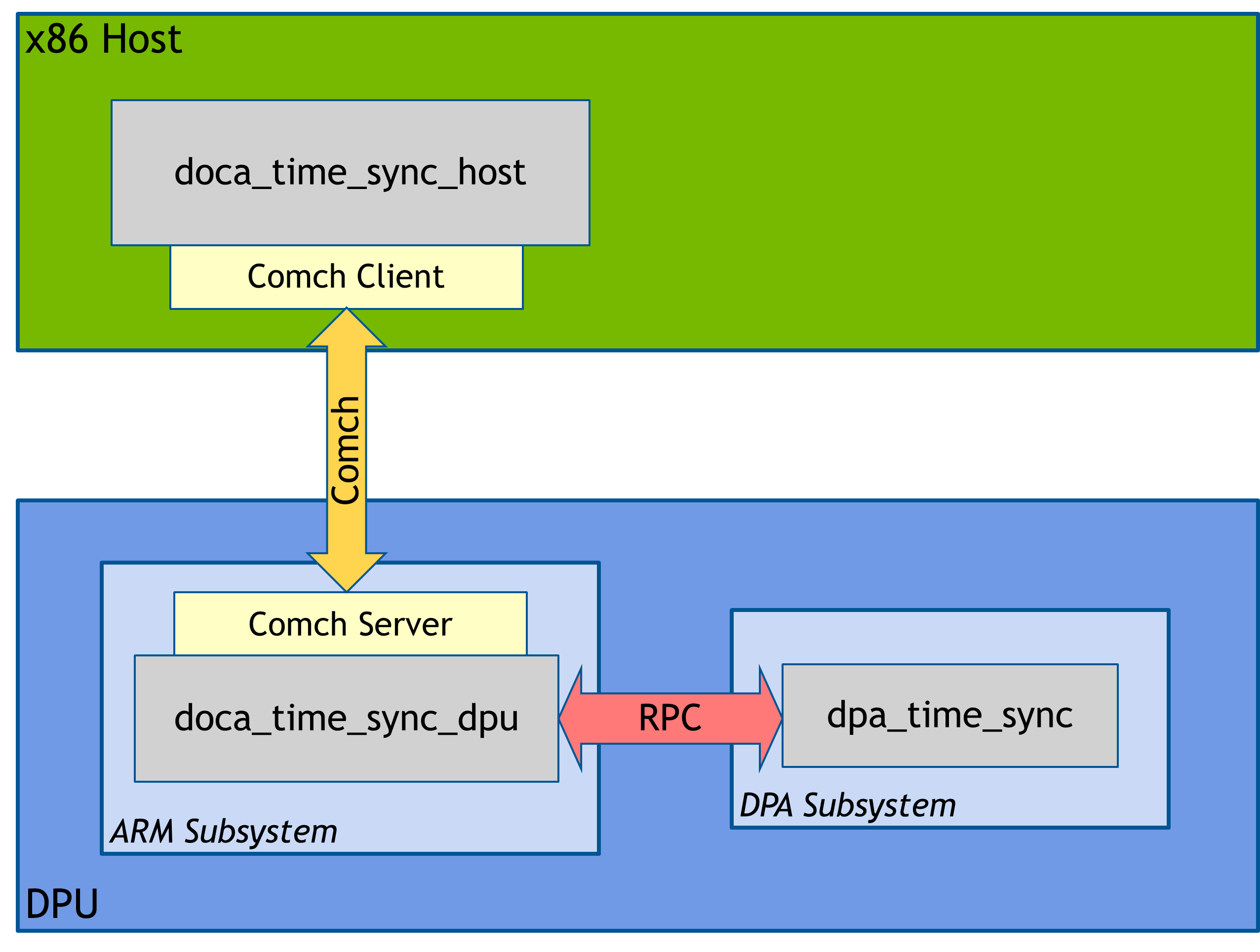
Application Architecture
The DOCA Time Sync application generates a sequence of four events across three distinct processors, inserting variable delays between each step to simulate real-world processing latency.
Event Sequence
The application tracks the following four events:
-
x86 Host: Packages and sends a request message to the DPU
-
BlueField Arm Cores: Receives the message from the Host
-
DPA Subsystem: Executes a Remote Procedure Call (RPC) triggered by the Arm cores
-
x86 Host: Receives the response message from the DPU
Clock Synchronization and Correlation
Each event records a timestamp using its processor's local clock:
-
x86 Host & Arm Cores: Use the system RTC.
-
DPA Subsystem: Uses its internal local timer.
To order these events chronologically, all timestamps are correlated against a single common reference clock: the ConnectX NIC clock embedded in the BlueField DPU.
Host and Arm Core Synchronization
Both the x86 and DPU applications utilize the DOCA Clock cross-timestamping library (part of DOCA Core). This library captures the local clock time and the common NIC clock time simultaneously to establish a precise correlation.
DPA Subsystem Synchronization
The DPA kernel can only capture time using its local timer. To synchronize this local DPA timestamp with the common NIC clock, the Host application performs a retrospective calculation:
-
Uses DOCA Clock to capture the current relationship between the NIC clock and the DPA timer.
-
Determines the duration (in seconds/nanoseconds) between the current DPA time and the recorded event time.
-
Subtracts this delta from the current NIC time to derive the precise NIC time when the DPA event occurred.
Output Logging
The Host application aggregates all data and outputs it to a log file (time_sync.log). Each entry includes:
-
Synchronized time: The calculated time on the common NIC clock.
-
Local time: The raw timestamp from the processor's local clock.
-
Accuracy: The margin of error for the synchronization.
-
Event description: A label identifying the specific event step.
DOCA Libraries
This application leverages the following DOCA libraries:
Refer to their respective programming guide for more information.
Compiling the Application
Please refer to the DOCA Installation Guide for Linux for details on how to install BlueField-related software.
DOCA reference applications are installed with full source code and build instructions. This allows you to compile them as-is or modify the source code to create custom versions.
For more information about the applications as well as development and compilation tips, refer to the DOCA Reference Applications page.
The source code for the application is located in the following directory:
/opt/mellanox/doca/applications/time_sync/
Compiling All Applications
All DOCA applications are defined under a single Meson project. By default, the build process compiles all of them.
MPI is used for the compilation of this application. Make sure that MPI is installed on your setup (openmpi is provided as part of the installation of DOCA, as part of the doca-all and doca-ofed meta-packages).
Compiling the application requires updating the LD_LIBRARY_PATH and PATH environment variable to include MPI. For example, if openmpi is installed under /usr/mpi/gcc/openmpi-4.1.7rc1, then updating the environment variables should be like the following
export PATH=/usr/mpi/gcc/openmpi-4.1.7rc1/bin:${PATH}
export LD_LIBRARY_PATH=/usr/mpi/gcc/openmpi-4.1.7rc1/lib:${LD_LIBRARY_PATH}
To build all applications:
cd /opt/mellanox/doca/applications/
meson /tmp/build
ninja -C /tmp/build
The build system automatically detects the platform architecture.
-
On x86 Host, it generates
doca_time_sync_host -
On BlueField DPU, it generates
doca_time_sync_dpu
The binary is created in /tmp/build/time_sync/.
Compiling Only the Current Application
To reduce build time, you can configure Meson to build only the Time Sync application.
Regardless of the method used, the binary (doca_time_sync_host or doca_time_sync_dpu) is created in /tmp/build/time_sync/.
Option 1: Command Line Configuration
Run the following commands to disable all applications and explicitly enable Time Sync:
cd /opt/mellanox/doca/applications/
meson /tmp/build -Denable_all_applications=false -Denable_time_sync=true
ninja -C /tmp/build
Option 2: Configuration File
edit the configuration file directly:
-
Edit
/opt/mellanox/doca/applications/meson_options.txt.-
Set
enable_all_applicationstofalse -
Set
enable_time_synctotrue
-
-
Run the standard compilation commands:
cd /opt/mellanox/doca/applications/
meson /tmp/build
ninja -C /tmp/build
Running the Application
Application Execution
The Time Sync application is distributed as source code and must be compiled before execution.
Running on x86 Host
-
Usage syntax:
Usage: doca_time_sync_host [DOCA Flags] [Program Flags]

DOCA Flags:
  -h, --help                        Print a help synopsis
  -v, --version                     Print program version information
  -l, --log-level                   Set the (numeric) log level for the program <10=DISABLE, 20=CRITICAL, 30=ERROR, 40=WARNING, 50=INFO, 60=DEBUG, 70=TRACE>
  --sdk-log-level                   Set the SDK (numeric) log level for the program <10=DISABLE, 20=CRITICAL, 30=ERROR, 40=WARNING, 50=INFO, 60=DEBUG, 70=TRACE>
  --log-filter                      Filter logs from specific modules, separated by comma
  -j, --json <path>                 Parse command line flags from an input json file

Program Flags:
  -p, --pci-addr                    DOCA device PCI address
  -d, --delay                       Delay (msecs) to insert between event triggers (optional)
-
Example execution:
sudo ./doca_time_sync_host -p 3b:00.0 -d 1000
Root Privileges
The application requires
sudo(root privileges) to access cross-timestamping system calls.PCIe Addresses
Ensure
3b:00.0matches your specific device's PCIe address.
Running on BlueField DPU
-
Usage syntax:
Usage: doca_time_sync_dpu [DOCA Flags] [Program Flags]

DOCA Flags:
  -h, --help                        Print a help synopsis
  -v, --version                     Print program version information
  -l, --log-level                   Set the (numeric) log level for the program <10=DISABLE, 20=CRITICAL, 30=ERROR, 40=WARNING, 50=INFO, 60=DEBUG, 70=TRACE>
  --sdk-log-level                   Set the SDK (numeric) log level for the program <10=DISABLE, 20=CRITICAL, 30=ERROR, 40=WARNING, 50=INFO, 60=DEBUG, 70=TRACE>
  --log-filter                      Filter logs from specific modules, separated by comma
  -j, --json <path>                 Parse command line flags from an input json file

Program Flags:
  -p, --pci-addr                    DOCA device PCI address
  -r, --repr-addr                   DOCA device representor PCI address (optional)
-
Example execution:
sudo ./doca_time_sync_dpu -p 03:00.0 -r 3b:00.0
Root Privileges
The application requires
sudo(root privileges) to access cross-timestamping system calls.PCIe Addresses
Ensure the device address (
03:00.0) and representor address (3b:00.0) match your system configuration.
Command Line Flags
General Flags
|
Short Flag |
Long Flag |
Description |
|---|---|---|
|
|
|
Prints a help synopsis and exits |
|
|
|
Prints program version information and exits |
|
|
|
Sets the numeric log level for the application:
|
|
N/A |
|
Sets the SDK numeric log level using the same 10-70 scale as above |
|
N/A |
|
Filters logs from specific modules (comma-separated list) |
|
|
|
Parses command-line flags from a specified input JSON file |
Refer to DOCA Arg Parser for more information regarding the supported flags and execution modes.
Host Program Flags
|
Short Flag |
Long Flag |
Description |
|---|---|---|
|
|
|
PCIe address of device to connect DOCA Comch client to, and to cross-timestamp against. This is a mandatory flag. |
|
|
|
Value in milliseconds of a delay to insert between the triggering of events. The parameter is optional. A default of 1 second (1000 msecs) will be used if excluded. |
DPU Program Flags
|
Short Flag |
Long Flag |
Description |
|---|---|---|
|
|
|
PCIe address of device to setup DOCA Comch server on, and to cross-timestamp against.
This is a mandatory flag. |
|
|
|
Representor address of the DOCA Comch device to use. This is an optional flag. If excluded, the first found representor associated with PCIe address will be used. |
Troubleshooting
Refer to the NVIDIA BlueField Platform Software Troubleshooting Guide for any issue encountered with the compilation, installation, or execution of the DOCA applications.
Application Code Flow
Common
-
Parse application argument.
-
Initialize arg parser resources and register DOCA general parameters.
doca_argp_init(); -
Register Time Sync application parameters.
time_sync_common_reg_params(); -
Parse the arguments.
doca_argp_start();
-
-
Open DOCA devices for use in the application:
time_sync_common_open_dev_with_caps(); // DPU only time_sync_common_open_repr();-
Parse PCIe address for associated DOCA device
-
Verify the selected device has the required capabilities
-
Comch support
-
DPA timer support
-
DOCA DPA support (DPU only)
-
Repr Support (DPU only)
-
-
Open valid device
-
On DPU, parse and open repr device
-
-
Create a DOCA Clock Context:
time_sync_common_create_clock();
-
Run Host or DPU-specific code.
-
Destroy DOCA Clock Context:
time_sync_common_destroy_clock();
-
Close DOCA devices:
time_sync_common_close_devs();
-
Destroy Arg Parser:
doca_argp_destroy();
Host (x86) App
-
Initialize Comch client.
time_sync_host_init_comch_client();-
Create progress engine
-
Create DOCA Comch Client context
-
Configure taskpool/callbacks for sending and receiving messages
-
Start Comch Client
-
-
Run main loop.
time_sync_host_main_loop();-
Progress until Client is fully connected to Comch Server on DPU
-
Get event time (on host and NIC) before sending a message
-
Create and send a message to DPU containing the input delay time in milliseconds
-
Wait to receive a response from the DPU containing DPU and DPA event times
-
Get event time (on host and NIC) of message receive
-
Convert received DPA time to NIC time using cross-timestamping functions
-
Log the local and synchronized time of all events to 'time_sync.log'
-
-
Clean up Comch Client
time_sync_host_close_comch_client();-
Stop the DOCA Comch Client
-
Progress until connection is fully shut down and context is IDLE
-
Destroy Client context and progress engine
-
DPU App
-
Load DPA application.
time_sync_dpu_load_dpa_app();-
Create a new DOCA DPA context
-
Add an app to the context (app with given name is compiled alongside DPU app - source in /opt/mellanox/doca/applications/time_sync/dpu_device/time_sync_dev.c)
-
Start the DPA context
-
-
Initiate Comch Server.
time_sync_dpu_init_comch_server();-
Create progress engine
-
Create DOCA Comch Server context
-
Configure taskpool/callbacks for sending and receiving messages
-
Configure callback for connection events
-
Start Comch Server
-
-
Run main loop.
time_sync_dpu_main_loop();-
Progress until an x86 client has established a connection to the Comch Server
-
Receive a message from Client
-
Extract the delay from request message
-
Sleep for 'delay' milliseconds
-
Get event time (on ARM and NIC) of message receive
-
Sleep for 'delay' milliseconds
-
Trigger a remote procedure call to the loaded DPA app which will return its local time from running kernel
-
Sleep for 'delay' milliseconds
-
package event times from ARM/DPA and send response message back to host
-
-
Progress until x86 has finished and closed Client Comch connection
-
-
Clean up Comch Server
time_sync_dpu_close_comch_server();-
Stop the DOCA Comch Server
-
Progress until context is IDLE
-
Destroy Server context and progress engine
-
-
Clean up DPA application
time_sync_dpu_unload_dpa_app();-
Stop the DOCA DPA context
-
Destroy DPA context
-
References
-
/opt/mellanox/doca/applications/time_sync/
Last updated: