

This guide provides YARA inspection implementation on top of NVIDIA® BlueField® DPU.
Introduction
YARA inspection monitors all processes in the host system for specific YARA rules using the DOCA App Shield library.
This security capability helps identify malware detection patterns in host processes from an independent and trusted DPU. This is an innovative Intrusion Detection System (IDS) as it is designed to run independently on the DPU's Arm cores without hindering the host.
This DOCA App Shield based application provides the capability to read, analyze, and authenticate the host (bare metal/VM) memory directly from the DPU.
Using the library, this application scans host processes and looks for pre-defined YARA rules. After every scan iteration, the application indicates if any of the rules matched. Once there is a match, the application reports which rules were detected in which process. The reports are both printed to the console and exported to the DOCA Telemetry Service (DTS) using inter-process communication (IPC).
This guide describes how to build YARA inspection using the DOCA App Shield library which leverages DPU abilities such as hardware-based DMA, integrity, and more.
As the DOCA App Shield library only supports the YARA API for Windows hosts, this application can only be used to inspect Windows hosts.
System Design
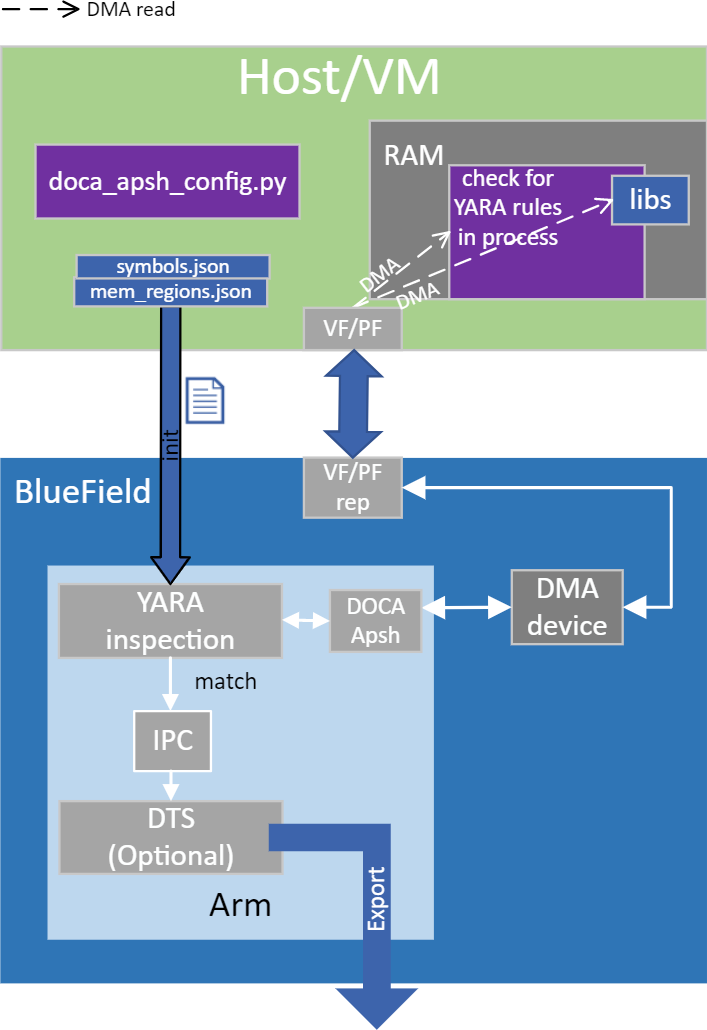
The host's involvement is limited to generating the required ZIP and JSON files to pass to the DPU. This is done before the app is triggered, when the host is still in a "safe" state.
Generating the needed files can be done by running DOCA App Shield's doca_apsh_config.py tool on the host. See DOCA App Shield for more info.
Application Architecture
The user creates the ZIP and JSON files using the DOCA tool doca_apsh_config.py and copies them to the DPU.
The application can report YARA rules detection to the:
-
File
-
Terminal
-
DTS
-
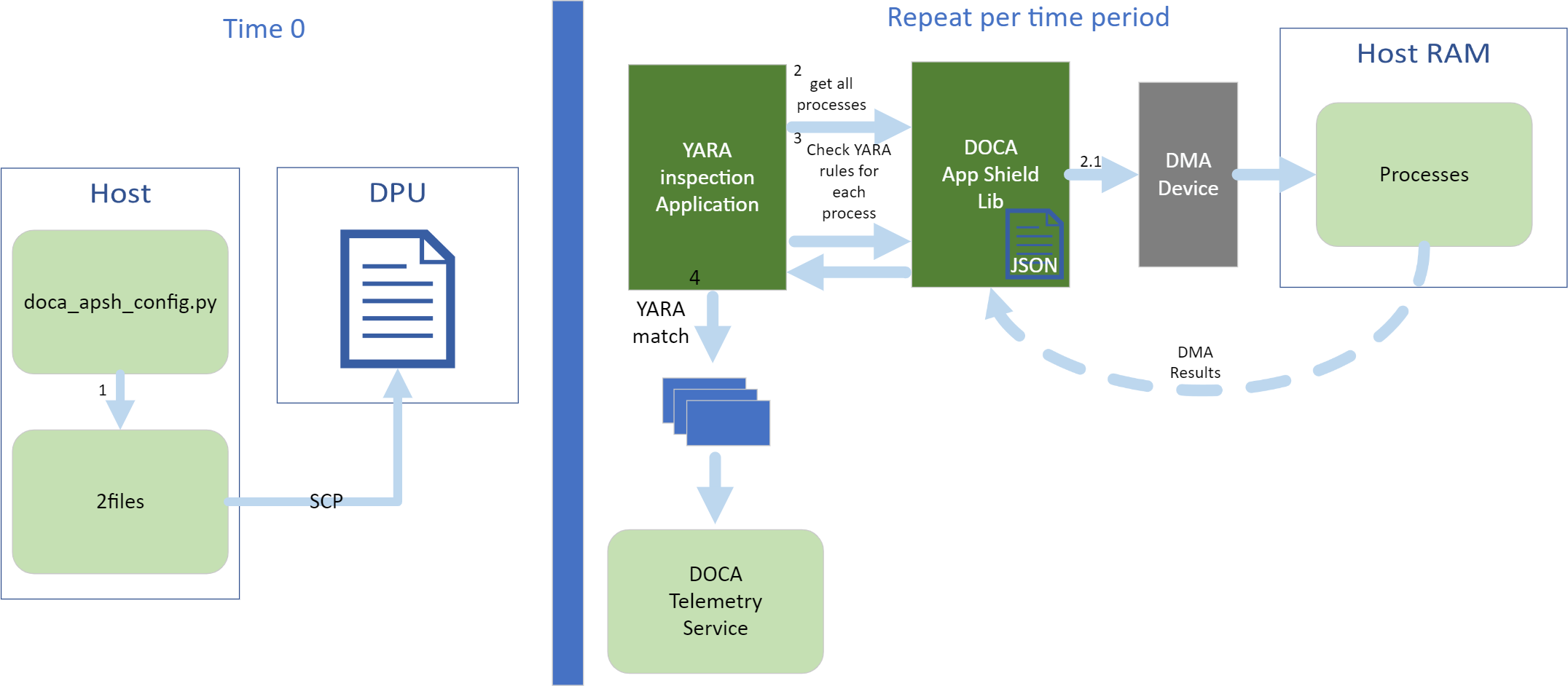
The files are generated by running
doca_apsh_config.pyon the host against the process at time zero. -
The following steps recur at regular time intervals:
-
The YARA inspection app requests a list of all apps from the DOCA App Shield library.
-
The app loops over all processes and checks for YARA rules match using the DOCA App Shield library.
-
If YARA rules are found (1 or more), the YARA attestation app reports results with a timestamp and details about the process and rules to:
-
Local telemetry files – a folder and files representing the data a real DTS would have received
These files are used for the purpose of this example only as normally this data is not exported into user-readable files.
-
DOCA log
-
DTS IPC interface (even if no DTS is active)
-
-
-
The App Shield agent exits on first YARA rule detection.
DOCA Libraries
This application leverages the following DOCA libraries:
Refer to their respective programming guide for more information.
Limitations
-
The application is only available on Ubuntu 22.04 environments
-
The application only supports the inspection of Windows hosts
Compiling the Application
Please refer to the DOCA Installation Guide for Linux for details on how to install BlueField-related software.
The installation of DOCA's reference applications contains the sources of the applications, alongside the matching compilation instructions. This allows for compiling the applications "as-is" and provides the ability to modify the sources, then compile a new version of the application.
For more information about the applications as well as development and compilation tips, refer to the DOCA Reference Applications page.
The sources of the application can be found under the application's directory: /opt/mellanox/doca/applications/yara_inspection/.
Compiling All Applications
All DOCA applications are defined under a single meson project. So, by default, the compilation includes all of them.
To build all the applications together, run:
cd /opt/mellanox/doca/applications/
meson /tmp/build
ninja -C /tmp/build
doca_yara_inspection is created under /tmp/build/yara_inspection/.
Compiling Only the Current Application
To directly build only the YARA inspection application:
cd /opt/mellanox/doca/applications/
meson /tmp/build -Denable_all_applications=false -Denable_yara_inspection=true
ninja -C /tmp/build
doca_yara_inspection is created under /tmp/build/yara_inspection/.
Alternatively, one can set the desired flags in the meson_options.txt file instead of providing them in the compilation command line:
-
Edit the following flags in
/opt/mellanox/doca/applications/meson_options.txt:-
Set
enable_all_applicationstofalse -
Set
enable_yara_inspectiontotrue
-
-
Run the following compilation commands:
cd /opt/mellanox/doca/applications/ meson /tmp/build ninja -C /tmp/builddoca_yara_inspectionis created under/tmp/build/yara_inspection/.
Running the Application
Prerequisites
-
Configure the BlueField's firmware
-
On the BlueField system, configure the PF base address register and NVME emulation. Run:
dpu> mlxconfig -d /dev/mst/mt41686_pciconf0 s PF_BAR2_SIZE=2 PF_BAR2_ENABLE=1 NVME_EMULATION_ENABLE=1
-
Perform a BlueField system reboot for the
mlxconfigsettings to take effect. -
This configuration can be verified using the following command:
dpu> mlxconfig -d /dev/mst/mt41686_pciconf0 q | grep -E "NVME|BAR"
-
-
Download target system (host/VM) symbols.
-
For Ubuntu:
host> sudo tee /etc/apt/sources.list.d/ddebs.list << EOF
deb http://ddebs.ubuntu.com/ $(lsb_release -cs) main restricted universe multiverse
deb http://ddebs.ubuntu.com/ $(lsb_release -cs)-updates main restricted universe multiverse
deb http://ddebs.ubuntu.com/ $(lsb_release -cs)-proposed main restricted universe multiverse
EOF
host> sudo apt install ubuntu-dbgsym-keyring
host> sudo apt-get update
host> sudo apt-get install linux-image-$(uname -r)-dbgsym
-
For CentOS:
host> yum install --enablerepo=base-debuginfo kernel-devel-$(uname -r) kernel-debuginfo-$(uname -r) kernel-debuginfo-common-$(uname -m)-$(uname -r)
-
No action is needed for Windows
-
-
Perform IOMMU passthrough. This stage is only needed on some of the cases where IOMMU is not enabled by default (e.g., when the host is using an AMD CPU).
Skip this step if you are not sure whether you need it. Return to it only if DMA fails with a message in
dmesgsimilar to the following:host> dmesg [ 3839.822897] mlx5_core 0000:81:00.0: AMD-Vi: Event logged [IO_PAGE_FAULT domain=0x0047 address=0x2a0aff8 flags=0x0000]
-
Locate your OS's grub file (most likely
/boot/grub/grub.conf,/boot/grub2/grub.cfg, or/etc/default/grub) and open it for editing. Run:host> vim /etc/default/grub
-
Search for the line defining
GRUB_CMDLINE_LINUX_DEFAULTand add the argumentiommu=pt. For example:GRUB_CMDLINE_LINUX_DEFAULT="iommu=pt <intel/amd>_iommu=on"
-
Run:
Prior to performing a power cycle, make sure to do a graceful shutdown.
-
For Ubuntu:
host> sudo update-grub
host> ipmitool power cycle
-
For CentOS:
host> grub2-mkconfig -o /boot/grub2/grub.cfg
host> ipmitool power cycle
-
For Windows targets: Turn off Hyper-V capability.
-
-
-
The DOCA App Shield library uses hugepages for DMA buffers. Therefore, the user must allocate 42 huge pages.
-
Run:
dpu> nr_huge=$(cat /sys/devices/system/node/node0/hugepages/hugepages-2048kB/nr_hugepages)
     nr_huge=$((42+$nr_huge))
     echo $nr_huge | sudo tee -a /sys/devices/system/node/node0/hugepages/hugepages-2048kB/nr_hugepages
-
Create the ZIP and JSON files. Run:
target-system> cd /opt/mellanox/doca/tools/
target-system> python3 doca_apsh_config.py <pid-of-process-to-monitor> --os <windows/linux> --path <path to dwarf2json executable  or pdbparse-to-json.py>
target-system> cp /opt/mellanox/doca/tools/*.* <shared-folder-with-baremetal>
dpu> scp <shared-folder-with-baremetal>/* <path-to-app-shield-binary>
If the target system does not have DOCA installed, the script can be copied from the BlueField.
The required
dwaf2jsonandpdbparse-to-json.pyare not provided with DOCA.If the kernel and process
.exehave not changed, there no need to redo this step.
-
Application Execution
The YARA inspection application is provided in source form. Therefore, a compilation is required before the application can be executed.
-
Application usage instructions:
Usage: doca_yara_inspection [DOCA Flags] [Program Flags]

DOCA Flags:
  -h, --help                        Print a help synopsis
  -v, --version                     Print program version information
  -l, --log-level                   Set the (numeric) log level for the program <10=DISABLE, 20=CRITICAL, 30=ERROR, 40=WARNING, 50=INFO, 60=DEBUG, 70=TRACE>
  --sdk-log-level                   Set the SDK (numeric) log level for the program <10=DISABLE, 20=CRITICAL, 30=ERROR, 40=WARNING, 50=INFO, 60=DEBUG, 70=TRACE>
  --log-filter                      Filter logs from specific modules, separated by comma
  -j, --json <path>                 Parse command line flags from an input json file

Program Flags:
  -m, --memr <path>                 System memory regions map
  -f, --vuid                        VUID of the System device
  -d, --dma                         DMA device name
  -o, --osym <path>                 System OS symbol map path
  -t, --time <seconds>              Scan time interval in seconds
This usage printout can be printed to the command line using the
-h(or--help) options:./doca_yara_inspection -h
For additional information, refer to section "DOCA YARA Inspection Application Guide | Command Line Flags".
-
CLI example for running the application on the BlueField:
./doca_yara_inspection -m mem_regions.json -o symbols.json -f MT2125X03335MLNXS0D0F0VF1 -d mlx5_0 -t 3All used identifiers (
-fand-dflags) should match the identifier of the desired devices.
Command Line Flags
General Flags
|
Short Flag |
Long Flag |
Description |
|---|---|---|
|
|
|
Prints a help synopsis and exits |
|
|
|
Prints program version information and exits |
|
|
|
Sets the numeric log level for the application:
|
|
N/A |
|
Sets the SDK numeric log level using the same 10-70 scale as above |
|
N/A |
|
Filters logs from specific modules (comma-separated list) |
|
|
|
Parses command-line flags from a specified input JSON file |
Refer to DOCA Arg Parser for more information regarding the supported flags and execution modes.
Program Flags
|
Short Flag |
Long Flag |
Description |
|---|---|---|
|
|
|
Path to the pre-generated |
|
|
|
System PCIe function vendor unique identifier (VUID) of the VF/PF exposed to the target system. Used for DMA operations. To obtain this argument, run: Example output: Two VUIDs are printed for each DPU connected to the target system. The first is of the DPU on Running this command on the DPU outputs VUIDs with an additional "EC" string in the middle. You must remove the "EC" to arrive at the correct VUID. The VUID of a VF allocated on PF0/1 is the VUID of the PF with an additional suffix, For example, for the output in the example above:
VUIDs are persistent even on reset. |
|
|
|
DMA device name to use |
|
|
|
Path to the pre-generated |
|
|
|
Number of seconds to sleep between scans |
Troubleshooting
Refer to the NVIDIA BlueField Platform Software Troubleshooting Guide for any issue encountered with the compilation, installation, or execution of the DOCA applications.
Application Code Flow
-
Parse application argument.
-
Initialize arg parser resources and register DOCA general parameters.
doca_argp_init();
-
Register application parameters.
register_apsh_params();
-
Parse the arguments.
doca_argp_start();
-
-
Initialize DOCA App Shield lib context.
-
Create lib context.
doca_apsh_create();
-
Set DMA device for lib.
open_doca_device_with_ibdev_name();
doca_apsh_dma_dev_set();
-
Start the context
doca_apsh_start();
apsh_system_init();
-
-
Initialize DOCA App Shield lib system context handler.
-
Get the representor of the remote PCIe function exposed to the system.
open_doca_device_rep_with_vuid();
-
Create and start the system context handler.
doca_apsh_system_create();
doca_apsh_sys_os_symbol_map_set();
doca_apsh_sys_mem_region_set();
doca_apsh_sys_dev_set();
doca_apsh_sys_os_type_set();
doca_apsh_system_start();
-
-
Telemetry initialization.
telemetry_start();-
Initialize a new telemetry schema.
-
Register YARA type event.
-
Set up output to file (in addition to default IPC).
-
Start the telemetry schema.
-
Initialize and start a new DTS source with the
gethostname()name as source ID.
-
-
Loop until YARA rule is matched.
-
Get all processes from the host.
doca_apsh_processes_get();
-
Check for YARA rule identification and send a DTS event if there is a match.
doca_apsh_yara_get();
if (yara_matches_size != 0) {
	/* event fill logic
	doca_telemetry_exporter_source_report();
DOCA_LOG_INFO();
sleep();
-
-
Telemetry destroy.
telemetry_destroy();
-
YARA inspection clean-up.
doca_apsh_system_destroy();
doca_apsh_destroy();
doca_dev_close();
doca_dev_rep_close();
-
Arg parser destroy.
doca_argp_destroy();
References
-
/opt/mellanox/doca/applications/yara_inspection/
Last updated: