

This documentation explains configuration and deployment of DOCA Firefly service as DPUService in DPF.
Main Firefly concepts are explained in the official DOCA Firefly documentation.
While the official documentation provides a more comprehensive overview, DPUService users should consult it for detailed explanation of PTP configuration and monitoring options.
The DOCA Firefly usecase in DPF is mainly to provide PTP time synchronization for the host system clocks.
We split the service into two components: one running on the DPU, which is running the PTP software stack, and the other on the host.
A high-level overview of the Firefly DPF service architecture is shown below.
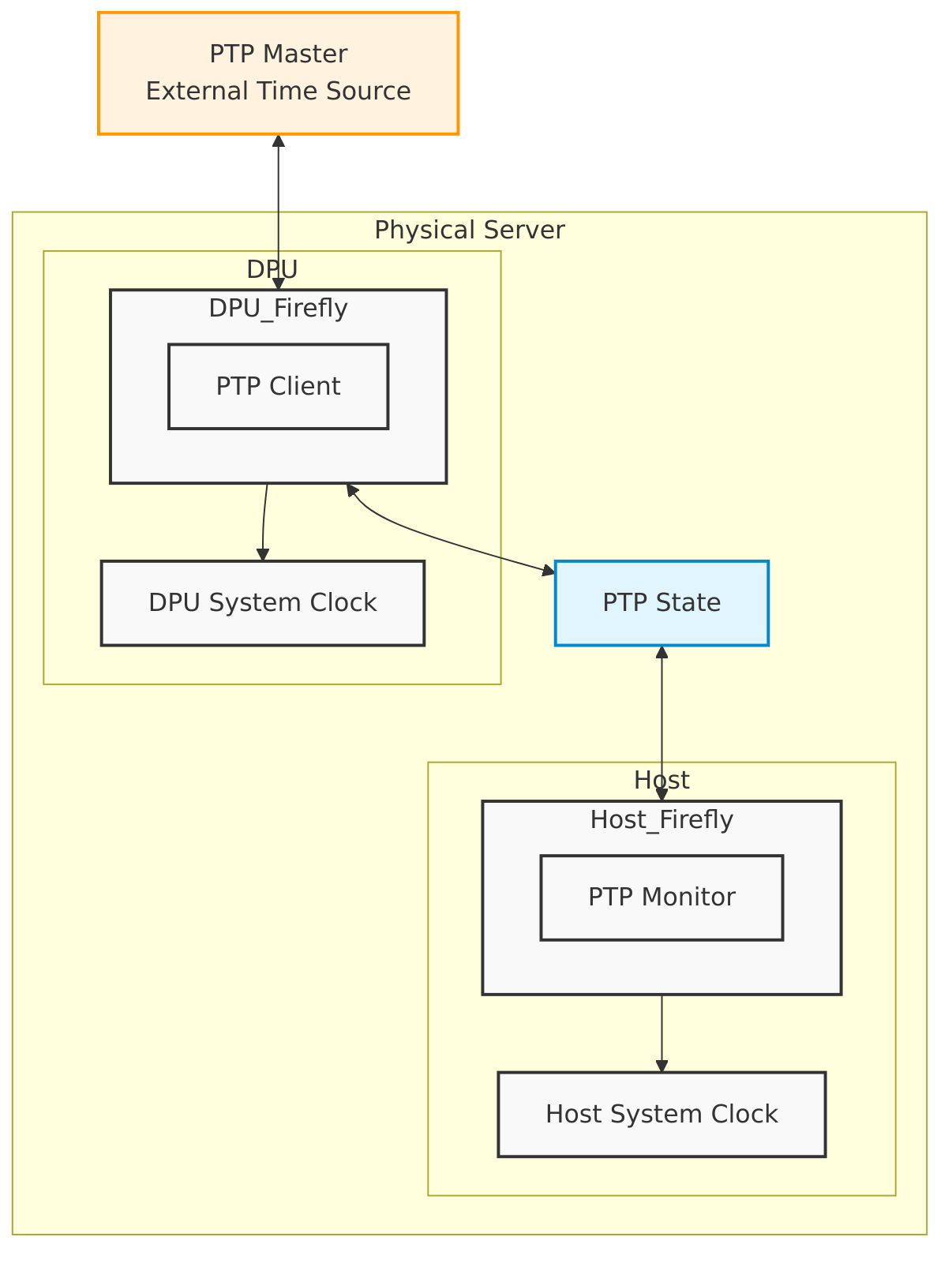
Service Components
Firefly consists of two main components:
-
DPU Component:
-
Runs on the DPU
-
Acts as the PTP client
-
Handles PTP time synchronization
-
Sets DPU system clock
-
Configuration files:
DPUServiceConfiguration-dpu
apiVersion: svc.dpu.nvidia.com/v1alpha1
kind: DPUServiceConfiguration
metadata:
  name: firefly-dpu
  namespace: dpf-operator-system
spec:
  deploymentServiceName: firefly-dpu
  interfaces:
    - name: fireflyiface
      network: mybrsfc-firefly
  serviceConfiguration:
    serviceDaemonSet:
      labels:
        svc.dpu.nvidia.com/custom-flows: firefly
    configPorts:
      ports:
        - name: monitor
          port: 25600
          protocol: TCP
      serviceType: ClusterIP
    helmChart:
      values:
        exposedPorts:
          ports:
            monitor: true
        ptpConfig: ptp.conf
        ptpInterfaces: fireflyiface
        config:
          content:
            ptp.conf: |
              [global]
              domainNumber                    24
              clientOnly                      1
              verbose                         1
              logging_level                   6
              dataset_comparison              G.8275.x
              G.8275.defaultDS.localPriority  128
              maxStepsRemoved                 255
              logAnnounceInterval             -3
              logSyncInterval                 -4
              logMinDelayReqInterval          -4
              G.8275.portDS.localPriority     128
              ptp_dst_mac                     01:80:C2:00:00:0E
              network_transport               L2
              fault_reset_interval            1
              hybrid_e2e                      0

              [fireflyiface]
DPUServiceTemplate-dpu
apiVersion: svc.dpu.nvidia.com/v1alpha1
kind: DPUServiceTemplate
metadata:
  name: firefly-dpu
  namespace: dpf-operator-system
spec:
  deploymentServiceName: firefly-dpu
  helmChart:
    source:
      chart: doca-firefly
      repoURL: https://helm.ngc.nvidia.com/nvidia/doca
      version: 1.1.5
    values:
      containerImage: nvcr.io/nvidia/doca/doca_firefly:1.7.1-doca3.0.0
      hostNetwork: false
      enableTXPortTimestampOffloading: true
      monitorState: 0.0.0.0
      phc2sysArgs: -a -r -l 6
      config:
        isLocalPath: false
  resourceRequirements:
    memory: 512Mi
-
Host Component:
-
Runs on the host
-
Monitors PTP time synchronization
-
Sets host system clock
-
Configuration files:
DPUServiceConfiguration-host.yaml
apiVersion: svc.dpu.nvidia.com/v1alpha1
kind: DPUServiceConfiguration
metadata:
  name: firefly-host
  namespace: dpf-operator-system
spec:
  deploymentServiceName: firefly-host
  upgradePolicy:
    applyNodeEffect: false
  serviceConfiguration:
    deployInCluster: true
    helmChart:
      values:
        monitorStateFromDPUService: firefly-dpu
DPUServiceTemplate-host
apiVersion: svc.dpu.nvidia.com/v1alpha1
kind: DPUServiceTemplate
metadata:
  name: firefly-host
  namespace: dpf-operator-system
spec:
  deploymentServiceName: firefly-host
  helmChart:
    source:
      chart: doca-firefly
      repoURL: https://helm.ngc.nvidia.com/nvidia/doca
      version: 1.1.5
    values:
      containerImage: nvcr.io/nvidia/doca/doca_firefly:1.7.1-doca3.0.0-host
      hostNetwork: false
      monitorClientPhc2sysInterface: eth0
      monitorClientType: phc2sys
      phc2sysState: disable
      ppsDevice: disable
      ppsState: do_nothing
      ptpState: disable
      tolerations:
        - effect: NoSchedule
          key: k8s.ovn.org/network-unavailable
          operator: Exists
  resourceRequirements:
    memory: 512Mi
The general resources are:
DPUFlavor
Defines the DPU flavor for the Firefly service.
DPUServiceTemplate-host
apiVersion: provisioning.dpu.nvidia.com/v1alpha1
kind: DPUFlavor
metadata:
  annotations:
    provisioning.dpu.nvidia.com/num-of-trusted-sfs: "5"
  name: dpf-provisioning-firefly
  namespace: dpf-operator-system
spec:
  bfcfgParameters:
    - UPDATE_ATF_UEFI=yes
    - UPDATE_DPU_OS=yes
    - WITH_NIC_FW_UPDATE=yes
  configFiles:
    - operation: override
      path: /etc/mellanox/mlnx-bf.conf
      permissions: "0644"
      raw: |
        ALLOW_SHARED_RQ="no"
        IPSEC_FULL_OFFLOAD="no"
        ENABLE_ESWITCH_MULTIPORT="yes"
    - operation: override
      path: /etc/mellanox/mlnx-ovs.conf
      permissions: "0644"
      raw: |
        CREATE_OVS_BRIDGES="no"
        OVS_DOCA="yes"
    - operation: override
      path: /etc/mellanox/mlnx-sf.conf
      permissions: "0644"
      raw: ""
  grub:
    kernelParameters:
      - console=hvc0
      - console=ttyAMA0
      - earlycon=pl011,0x13010000
      - fixrttc
      - net.ifnames=0
      - biosdevname=0
      - iommu.passthrough=1
      - cgroup_no_v1=net_prio,net_cls
      - hugepagesz=2048kB
      - hugepages=3072
  nvconfig:
    - device: '*'
      parameters:
        - PF_BAR2_ENABLE=0
        - PER_PF_NUM_SF=1
        - PF_TOTAL_SF=20
        - PF_SF_BAR_SIZE=10
        - NUM_PF_MSIX_VALID=0
        - PF_NUM_PF_MSIX_VALID=1
        - PF_NUM_PF_MSIX=228
        - INTERNAL_CPU_MODEL=1
        - INTERNAL_CPU_OFFLOAD_ENGINE=0
        - SRIOV_EN=1
        - NUM_OF_VFS=46
        - LAG_RESOURCE_ALLOCATION=1
        - REAL_TIME_CLOCK_ENABLE=1
  ovs:
    rawConfigScript: |
      _ovs-vsctl() {
        ovs-vsctl --no-wait --timeout 15 "$@"
      }

      _ovs-vsctl set Open_vSwitch . other_config:doca-init=true
      _ovs-vsctl set Open_vSwitch . other_config:dpdk-max-memzones=50000
      _ovs-vsctl set Open_vSwitch . other_config:hw-offload=true
      _ovs-vsctl set Open_vSwitch . other_config:pmd-quiet-idle=true
      _ovs-vsctl set Open_vSwitch . other_config:max-idle=20000
      _ovs-vsctl set Open_vSwitch . other_config:max-revalidator=5000
      _ovs-vsctl set Open_vSwitch . other_config:ctl-pipe-size=1024
      _ovs-vsctl --if-exists del-br ovsbr1
      _ovs-vsctl --if-exists del-br ovsbr2
      _ovs-vsctl --may-exist add-br br-sfc
      _ovs-vsctl set bridge br-sfc datapath_type=netdev
      _ovs-vsctl set bridge br-sfc fail_mode=secure
      _ovs-vsctl --may-exist add-port br-sfc p0
      _ovs-vsctl set Interface p0 type=dpdk
      _ovs-vsctl set Port p0 external_ids:dpf-type=physical

      _ovs-vsctl set Open_vSwitch . external-ids:ovn-bridge-datapath-type=netdev
      _ovs-vsctl --may-exist add-br br-ovn
      _ovs-vsctl set bridge br-ovn datapath_type=netdev
      _ovs-vsctl --may-exist add-port br-ovn pf0hpf
      _ovs-vsctl set Interface pf0hpf type=dpdk

      # Disabling DPU NTP. Requires functional PTP setup.
      systemctl disable ntpsec --now
DPUServiceNAD
Defines the trusted Scalable Function (SF) for the Firefly service.
DPUServiceNAD
apiVersion: svc.dpu.nvidia.com/v1alpha1
kind: DPUServiceNAD
metadata:
  name: mybrsfc-firefly
  namespace: dpf-operator-system
  annotations:
    dpuservicenad.svc.dpu.nvidia.com/use-trusted-sfs: ""
spec:
  resourceType: sf
  ipam: false
  bridge: "br-sfc"
  mtu: 1500
DPUDeployment
Defines the DPUDeployment for the Firefly service.
DPUDeployment
apiVersion: svc.dpu.nvidia.com/v1alpha1
kind: DPUDeployment
metadata:
  name: ovn-firefly
  namespace: dpf-operator-system
spec:
  dpus:
    bfb: bf-bundle
    dpuSets:
      - nameSuffix: dpuset1
        nodeSelector:
          matchLabels:
            feature.node.kubernetes.io/dpu-enabled: "true"
    flavor: dpf-provisioning-firefly
  serviceChains:
    switches:
      - ports:
          - serviceInterface:
              matchLabels:
                uplink: p0
          - serviceInterface:
              matchLabels:
                port: ovn
          - service:
              interface: fireflyiface
              name: firefly-dpu
  services:
    firefly-dpu:
      serviceConfiguration: firefly-dpu
      serviceTemplate: firefly-dpu
    firefly-host:
      serviceConfiguration: firefly-host
      serviceTemplate: firefly-host
    ovn:
      serviceConfiguration: ovn
      serviceTemplate: ovn
For information about OVN Kubernetes configuration see the OVN-only user guide
Configuration
Official Firefly documentation explains configuration options.
General note: In the official documentation, all options should be specified in the ptp.conf file.
In DPF the same options should be set via the DPUServiceConfiguration.
Preconfiguration
Our referenced example DPUServiceConfigration includes G.8275.1 PTP Profile configuration. You can set all necessary configurations to your needs.
Network Configuration
The Firefly service requires a trusted Scalable Function (SF) to enable secure PTP communication. This interface is added to the SFC bridge using a DPUServiceNAD (Network Attachment Definition). The DPUService controller takes care of injecting the correct resource to the Pod using that DPUServiceNAD.yaml.
DPUDeployment
The complete DPUDeployment configuration is in DPUDeployment.yaml.
Toleration Configuration
The Firefly service includes a special configuration (toleration) that ensures it always runs on the host system. This is important because:
-
The service needs to run on the host to properly synchronize the system time
-
Without proper time synchronization, other system components might not work correctly
-
The toleration prevents the service from being blocked from running on the host
This configuration is automatically handled in the DPUServiceTemplate and does not require any user configuration.
Check the Status
You can check the status of the Firefly service using the following command:
$ kubectl -n dpf-operator-system exec deploy/dpf-operator-controller-manager -- /dpfctl describe all --grouping=false --show-conditions=dpuservices
NAME                                                        NAMESPACE            STATUS        REASON             SINCE  MESSAGE
DPFOperatorConfig/dpfoperatorconfig                         dpf-operator-system  Ready: Trye   Success            31s
├─DPUClusters
│ └─DPUCluster/dpu-cplane-tenant1                           dpu-cplane-tenant1   Ready: True   HealthCheckPassed  27h
├─DPUDeployments
│ └─DPUDeployment/firefly                                   dpf-operator-system  Ready: True   Success            12m
│   ├─DPUServices
│   │ ├─DPUService/firefly-dpu-v6pbk                        dpf-operator-system
│   │ │             ├─Ready                                                      True          Success            8m24s
│   │ │             ├─ApplicationPrereqsReconciled                               True          Success            3h7m
│   │ │             ├─ApplicationsReady                                          True          Success            8m24s
│   │ │             ├─ApplicationsReconciled                                     True          Success            3h7m
│   │ │             ├─ConfigPortsReconciled                                      True          Success            3h7m
│   │ │             └─DPUServiceInterfaceReconciled                              True          Success            3h7m
│   │ ├─DPUService/firefly-host-jj98d                       dpf-operator-system
│   │ │             ├─Ready                                                      True          Success            4m46s
│   │ │             ├─ApplicationPrereqsReconciled                               True          Success            27h
│   │ │             ├─ApplicationsReady                                          True          Success            4m46s
│   │ │             ├─ApplicationsReconciled                                     True          Success            27h
│   │ │             ├─ConfigPortsReconciled                                      True          Success            27h
│   │ │             └─DPUServiceInterfaceReconciled                              True          Success            27h
...
Last updated: