

This document describes how a user can work with the DPUDeployment Custom Resource. A DPUDeployment describes a set of DPUServices and a DPUServiceChain that run on a set of DPUs with a given BFB and DPUFlavor.
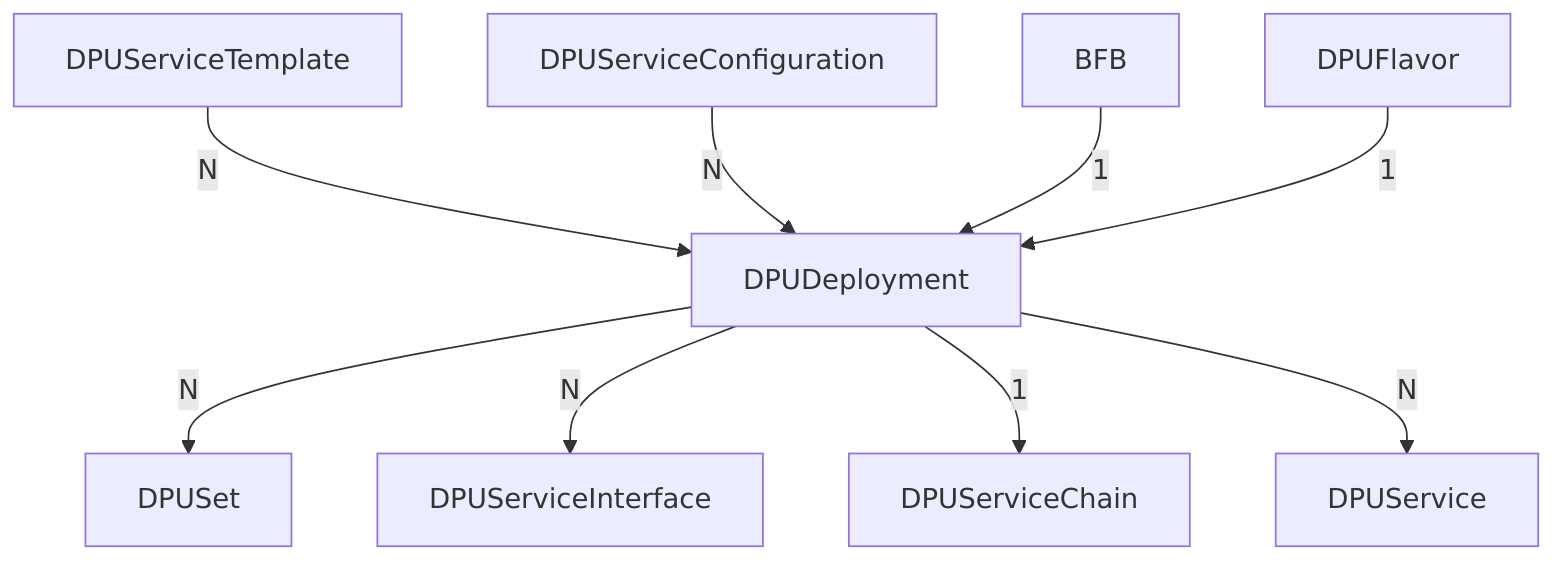
Throughout this document, there are examples for the required Custom Resources that end up building a valid DPUDeployment Custom Resource. These examples contain comments related to fields that are set for more context. The theoretical example is about 2 services, one of them producing work and the other one executing work (producer-consumer problem).
Capabilities
-
Validates dependencies to ensure that they are configured correctly and reports errors in the
DPUDeploymentstatus conditions accordingly -
Validates that requested
DPUServiceresources fit the DPUs they are targeting and report errors in theDPUDeploymentstatus conditions accordingly -
Validates that the version requirements of the
DPUServicefit the versions found in the givenBFBand reports errors in theDPUDeploymentstatus conditions accordingly -
Gracefully handles synchronized disruptive and non-disruptive updates of the underlying objects
Created Child Custom Resources
When applying a valid DPUDeployment that has all of its dependencies set correctly and available, there will be a couple of objects that are going to be created automatically:
-
DPUSet: Deploys a givenBFBwith configuration provided by the givenDPUFlavorto the targetDPUs. ADPUDeploymentmay create multiple such objects, depending on what is specified in itsspec -
DPUServiceInterface: Used to construct a Service Chain on the DPU. ADPUDeploymentmay create multiple such objects, depending on what is specified in the DPUServiceConfiguration -
DPUServiceChain: Used to define a Service Chain on the DPU that references the interfaces created above. ADPUDeploymentcreates a singleDPUServiceChain -
DPUService: Deploys a service as Pod in each DPU. ADPUDeploymentmay create multiple such objects, depending on what is specified in itsspec
Prerequisite Custom Resources with Examples
There are several Custom Resources that are required in order to make use of the DPUDeployment. These are:
DPUServiceTemplate
A DPUServiceTemplate contains configuration options related to resources required by the DPUService to be deployed. This Custom Resource is usually provided by NVIDIA for the supported DPUServices that are published. It helps generate the underlying DPUService. It is the base configuration for the DPUService that is getting merged with configuration provided by the DPUServiceConfiguration. If there is a conflict, settings in DPUServiceConfiguration take precedence.
A user must create as many DPUServiceTemplate Custom Resources as the number of services they aim to deploy using a DPUDeployment. In this example, we will need to create 2 of those since we have 2 DPUServices.
---
apiVersion: svc.dpu.nvidia.com/v1alpha1
kind: DPUServiceTemplate
metadata:
  name: producer
  namespace: customer-namespace
spec:
  deploymentServiceName: "producer" # Must match the key in the `dpudeployment.spec.services`
  helmChart:
    source:
      repoURL: https://example.com/charts
      path: producer
      version: v0.0.1
    # The `DPUServiceTemplate` owner should specify requests and limits for the actual containers. The
    # `DPUServiceTemplate` owner is responsible to ensure that those resources are not exceeding the specified
    # `resourceRequirements` field. Notice that setting resources on containers may be different per Helm Chart
    # implementation.
    values:
      container1:
        resources:
          requests:
            cpu: 0.2
            memory: 0.2Gi
            nvidia.com/sf: 1
          limits:
            cpu: 0.4
            memory: 0.4Gi
            nvidia.com/sf: 1
      container2:
        resources:
          limits:
            cpu: 0.6
            memory: 0.6Gi
  # resourceRequirements contains the overall resources required by this particular service to run on a single node
  # This is the field that is considered when scheduling a `DPUDeployment`.
  resourceRequirements:
    cpu: 1
    memory: 1Gi
    nvidia.com/sf: 1
---
apiVersion: svc.dpu.nvidia.com/v1alpha1
kind: DPUServiceTemplate
metadata:
  name: consumer
  namespace: customer-namespace
spec:
  deploymentServiceName: "consumer"
  helmChart:
    source:
      repoURL: https://example.com/charts
      path: consumer
      version: v0.0.1
    values:
      worker:
        parallelization: 5
        resources:
          requests:
            cpu: 1
            memory: 1Gi
            nvidia.com/sf: 1
          limits:
            cpu: 1
            memory: 2Gi
            nvidia.com/sf: 1
  resourceRequirements:
    cpu: 2
    memory: 4Gi
    nvidia.com/sf: 1
DPUServiceConfiguration
A DPUServiceConfiguration contains all configuration options from the user to be provided to the DPUService via the Helm values. This Custom Resource is usually crafted by the user according to their environment and intended use of the DPUService. It helps generate the underlying DPUService. It is a layer on top of the configuration defined in the DPUServiceTemplate. This configuration is getting merged with configuration provided by the DPUServiceTemplate. If there is a conflict, settings in DPUServiceConfiguration take precedence.
A user must create as many DPUServiceConfiguration Custom Resources as the number of services they aim to deploy using a DPUDeployment. In this example, we will need to create 2 of those since we have 2 DPUServices.
---
apiVersion: svc.dpu.nvidia.com/v1alpha1
kind: DPUServiceConfiguration
metadata:
  name: producer
  namespace: customer-namespace
spec:
  deploymentServiceName: "producer" # Must match the key in the `dpudeployment.spec.services`
  serviceConfiguration:
    serviceDaemonSet:
      labels:
        sre.nvidia.com/service-tier: "t1"
      annotations:
        sre.nvidia.com/page: "false"
  interfaces:
  - name: app-iface
    network: mynad
---
apiVersion: svc.dpu.nvidia.com/v1alpha1
kind: DPUServiceConfiguration
metadata:
  name: consumer
  namespace: customer-namespace
spec:
  deploymentServiceName: "consumer"
  serviceConfiguration:
    # The `DPUServiceConfiguration` owner may choose to override some of the settings defined by the
    # `DPUServiceTemplate` or add new. It is not recommended to change container resources in this resource but rather
    # in DPUServiceTemplate.
    helmChart:
      values:
        worker:
          parallelization: 10
    serviceDaemonSet:
      labels:
        sre.nvidia.com/service-tier: "t1"
      annotations:
        sre.nvidia.com/page: "true"
  # interfaces describes the network each interface of this application needs to be attached to so that it can function
  # and be available for use in the Service Chain framework.
  interfaces:
  - name: app-iface
    network: mynad
spec.deploymentServiceName must match the key in the spec.services field of the DPUDeployment.
spec.Interfaces is a list of interfaces that the DPUService should have. They can be referenced in the spec.serviceChains of the DPUDeployment.
spec.upgradePolicy.applyNodeEffect is a boolean that indicates whether the service update should be disruptive or not. The default is true, which means that a new version of the service is created for every new version of the DPUServiceConfiguration and the node effect defined in the dpuset is triggered for the relevant nodes for the update to happen. If set to false, the service is updated non-disruptively.
DPUFlavor
A DPUFlavor describes the configuration to be applied on the DPU during the provisioning. This is a very minimal DPUFlavor as the purpose of this document is to demonstrate the capabilities of the DPUDeployment. Given that, there are 2 fields set that are related to the DPUDeployment.
apiVersion: provisioning.dpu.nvidia.com/v1alpha1
kind: DPUFlavor
metadata:
  name: producer-consumer
  namespace: customer-namespace
spec:
  # dpuResources indicates the minimum amount of resources needed for a BFB with that flavor to be installed on a
  # DPU. Using this field, the controller can understand if that flavor can be installed on a particular DPU. It
  # should be set to the total amount of resources the system needs + the resources that should be made available for
  # DPUServices to consume.
  dpuResources:
    cpu: 16
    memory: 16Gi
    nvidia.com/sf: 20
  # systemReservedResources indicates the resources that are consumed by the system (OS, OVS, DPF system etc) and are
  # not made available for DPUServices to consume. DPUServices can consume the difference between DPUResources and
  # SystemReservedResources. This field must not be specified if dpuResources are not specified.
  systemReservedResources:
    cpu: 4
    memory: 4Gi
    nvidia.com/sf: 4
The above configuration translates to the following resources being available for the DPUServices deployed by the DPUDeployment.
allocatableResources:
  cpu: 12
  memory: 12Gi
  nvidia.com/sf: 16
BFB
A BFB describes the BFB to be flashed on the DPU during the provisioning.
apiVersion: provisioning.dpu.nvidia.com/v1alpha1
kind: BFB
metadata:
  name: bfb-2.9
  namespace: customer-namespace
spec:
  fileName: "bfb-2.9.0.bfb"
  url: "http://internal-nfs/bf-bundle-2.9.0-33_24.04_ubuntu-22.04_unsigned.bfb"
DPUDeployment Example
The following DPUDeployment example is based on the Custom Resources found above. It describes a DPUDeployment which targets 2 sets of DPUs, provisioned with a specific DPUFlavor and BFB, and all of them running 2 DPUServices.
apiVersion: svc.dpu.nvidia.com/v1alpha1
kind: DPUDeployment
metadata:
  name: producer-consumer
  namespace: customer-namespace
spec:
  dpus:
    # bfb references the `BFB` object
    bfb: "bfb-2.9"
    # flavor references the `DPUFlavor` Custom Resource
    flavor: "producer-consumer"
    # dpuSets enables the user to select the DPUs this `DPUDeployment` should deploy to. It's a list so that the user
    # can be as flexible as possible. In this example, we theoretical target Hosts in 2 different racks, and we target
    # the DPUs that have the specified PCI address.
    dpuSets:
    - nameSuffix: "dpuset1"
      nodeSelector:
        matchLabels:
          datacenter.nvidia.com/rack: "b-100"
      dpuSelector:
        pciAddr: "0000:0e:00.0"
    - nameSuffix: "dpuset2"
      nodeSelector:
        matchLabels:
          datacenter.nvidia.com/rack: "b-101"
      dpuSelector:
        pciAddr: "0000:1a:00.0"
  # services reflects the `DPUServices` that should be deployed on those DPUs. The key of this map is the service name
  # and the value is referencing the respective `DPUServiceTemplate` and `DPUServiceConfiguration` for that each service.
  services:
    producer:
      serviceTemplate: "producer"
      serviceConfiguration: "producer"
    consumer:
      serviceTemplate: "consumer"
      serviceConfiguration: "consumer"
  # serviceChains defines the `DPUServiceChain` that should be created as part of this `DPUDeployment`.
  serviceChains:
  - ports:
    - service:
        name: producer # The value must match the key in the `spec.services`
        interface: app-iface # The value must match the `dpuserviceconfiguration.spec.interfaces[].name`
    - service:
        name: consumer
        interface: app-iface
   #  Notice that the user can also reference other DPUServiceInterfaces that may already exist or are created manually
   #  by the user by specifying an entry like the one that follows:
   # - serviceInterface:
   #     matchLabels:
   #       svc.dpu.nvidia.com/interface: p0
As mentioned in the Created Child Custom Resources section, after applying this manifest, the following objects are created:
$ kubectl get dpuset -A
NAMESPACE            NAME                      AGE
customer-namespace   producer-consumer-dpuset1   36m
customer-namespace   producer-consumer-dpuset2   36m

$ kubectl get dpuset -n customer-namespace
NAME                      AGE
producer-consumer-dpuset1   36m
producer-consumer-dpuset2  36m

$ kubectl get dpuserviceinterface -n customer-namespace
NAME                       READY   PHASE     IFTYPE     IFNAME      AGE
consumer-app-iface-w6tgf   True    Success   service    app-iface   36m
producer-app-iface-vqvs4   True    Success   service    app-iface   36m

$ kubectl get dpuservicechain -n customer-namespace
NAME                      READY   PHASE     AGE
producer-consumer-vpn7w   True    Success   36m

$ kubectl get dpuservice -n customer-namespace
NAME            READY   PHASE     AGE
consumer-fjfh8  True    Success   36m
producer-ln2kk  True    Success   36m
Writing a DPUDeployment Spec
DPUs Configuration
The spec.dpus contains the configuration for the DPUs that the DPUDeployment should target.
spec:
  dpus:
    bfb: "bfb-2.9"
    flavor: "producer-consumer"
    dpuSets:
    - nameSuffix: "dpuset1"
      nodeSelector:
        matchLabels:
          datacenter.nvidia.com/rack: "b-100"
      dpuSelector:
        pciAddr: "0000:0e:00.0"
    - nameSuffix: "dpuset2"
      nodeSelector:
        matchLabels:
          datacenter.nvidia.com/rack: "b-101"
      dpuSelector:
        pciAddr: "0000:1a:00.0"
    nodeEffect:
      taint:
        key: "dpu"
        value: "provisioning"
        effect: NoSchedule
In the above example, the DPUDeployment targets 2 sets of DPUs. The first set targets the DPUs in rack b-100 with the PCI address 0000:0e:00.0. The second set targets the DPUs in rack b-101 with the PCI address 0000:1a:00.0.
The following fields are available in the spec.dpus:
-
bfb: TheBFBobject to be flashed on the DPUs. It must exist in the same namespace as theDPUDeployment. -
flavor: TheDPUFlavorobject that describes the configuration to be applied on the DPU during the provisioning. It must exist in the same namespace as theDPUDeployment. -
dpuSets: A list ofDPUSetconfigurations that describe the DPUs to be targeted by theDPUDeployment.nameSuffix: A suffix to be added to the DPUSet name. This is a required field, as the DPUSet name must be unique and identifiable.nodeSelector: The node selector to be used to select the nodes to which the DPUs are attached.dpuSelector: The selector to be used to select the DPUs that are to be targeted. In this example, the DPUs are selected based on their PCI address.dpuAnnotations: The annotation to be applied on the DPU objects that are created by the DPUDeployment. -
nodeEffect: The effect to be applied on the nodes to which the DPUs are attached. In this example, aNoScheduletaint is applied to the nodes.
See the Prerequisite Custom Resources With Examples section for examples of the DPUFlavor and BFB Custom Resources.
See the DPUSets document for more information on the DPUSet Custom Resource.
Services Configuration
The spec.services contains the configuration for the services that the DPUDeployment should deploy.
spec:
  services:
    producer:
      serviceTemplate: "producer"
      serviceConfiguration: "producer"
    consumer:
      serviceTemplate: "consumer"
      serviceConfiguration: "consumer"
The following fields are available in the spec.services:
-
serviceTemplate: TheDPUServiceTemplateobject that describes the configuration for the service to be deployed -
serviceConfiguration: TheDPUServiceConfigurationobject that describes the configuration for the service to be deployed
Both serviceTemplate and serviceConfiguration must be provided for each service that the DPUDeployment should deploy and must exist in the same namespace as the DPUDeployment
See the Prerequisite Custom Resources With Examples section for examples of the DPUServiceTemplate and DPUServiceConfiguration Custom Resources.
Service Chains Configuration
The spec.serviceChains contains the configuration for the DPUServiceChain that the DPUDeployment should create.
spec:
  serviceChains:
    switches:
      - ports:
        - service:
            name: producer
            interface: app-iface
        - serviceInterface:
            matchLabels:
              svc.dpu.nvidia.com/interface: p0
The following fields are available in the spec.serviceChains:
-
upgradePolicy.applyNodeEffect: A boolean that indicates whether the service chain update should be disruptive or not. The default istrue, which means that a new version of the service chain is created for every new version of theDPUServiceand the node effect defined in the dpuset is triggered for the relevant nodes for the update to happen. If set tofalse, the service chain is updated non-disruptively. The disruptive operation applies the node effect defined for theDPUSeton the nodes -
switches: A list of switches that are part of the service chainports: A list of ports that are part of the switchservice: Holds the configuration for an interface. The service referenced by this field must be defined in the corresponding DPUServiceConfiguration. See the Prerequisite Custom Resources With Examples section for examples of the DPUServiceConfiguration Custom Resourcename: The name of the service. This field must match the service name defined as key spec.servicesinterface: The name of the interface. This interface is injected by the cni plugin when the pod is scheduledipam: The IPAM configuration for the interface. This field is optional and can be used to specify the IPAM configuration for the interfaceserviceInterface: Holds the configuration for an existing interfacematchLabels: The labels to be used to select the interface. This field is required and must match the labels of the DPUServiceInterfaceipam: The IPAM configuration for the interface. This field is optional and can be used to specify the IPAM configuration for the interface
The DPUDeployment controller creates a single DPUServiceChain based on the configuration provided in the spec.serviceChains. The DPUServiceChain is created in the same namespace as the DPUDeployment
See DPUServiceChain for more information on the DPUServiceChain Custom Resource.
Working with DPUDeployment
Waiting for Ready
When a DPUDeployment is created, it may take some time for all the underlying objects to be created and for the DPUs to be provisioned.
It is possible to wait for a DPUDeployment to be ready by using the kubectl wait
$ kubectl wait --for=condition=Ready dpudeployment/<dpudeployment-name> -n <namespace>
DPUDeployment Updates
A DPUDeployment can be updated by modifying .spec of the custom resource or by changing a referenced object like DPUServiceTemplate and DPUServiceConfiguration. The update of the underlying objects is specific to each kind:
-
DPUSetcan be updated by modifying.spec.dpus. The underlyingdpuscan be reprovisioned if the referencedbfborDPUFlavorchange -
DPUServicescan be updated by modifyingspec.Services. Changing the referencedDPUServiceTemplateorDPUServiceConfigurationwill update the selectedDPUService. A differentiation is made for "disruptive DPUServices" which have an impact on the cluster nodes and "non-disruptive" ones that do not -
DPUServiceInterfacecan be updated by modifying the referencedDPUServiceConfigurationspec.Interfaces -
DPUServiceChaincan be updated by modifyingspec.ServiceChains
Users should avoid manually modifying an object owned by a DPUDeployment, this can lead to unforeseen consequences that may disrupt the entire setup. The controller does not recognize these manual changes and may or may not overwrite them to reach the desired state.
Non-disruptive DPUService Update
-
Retrieve the reference
DPUServiceConfigurationorDPUServiceTemplate:$ kubectl get dpuserviceconfiguration -n customer-namespace NAME AGE producer 36m
-
Users should get a valid
DPUServiceConfiguration:$ kubectl get dpuserviceconfiguration producer -n customer-namespace -o yaml apiVersion: svc.dpu.nvidia.com/v1alpha1 kind: DPUServiceConfiguration metadata: name: producer namespace: customer-namespace spec: deploymentServiceName: "producer" # Must match the key in the `dpudeployment.spec.services` serviceConfiguration: serviceDaemonSet: labels: sre.nvidia.com/service-tier: "t1" annotations: sre.nvidia.com/page: "false" interfaces: - name: app-iface network: mynad -
As an example, update the requested
interfacename. In this case a newDPUServiceInterfaceis expected as this field is part of theDPUServiceInterfacename. This is the only case where a newDPUServiceInterfaceis expected, otherwise the existing one will be updated:$ kubectl patch dpuserviceconfiguration producer \ -n customer-namespace \ --type='json' \ -p='[{"op": "replace", "path": "/spec/interfaces/0/name", "value":"app-iface2"}]' -
The
DPUServiceshould be updated by theDPUDeploymentcontroller:apiVersion: svc.dpu.nvidia.com/v1alpha1 kind: DPUService metadata: annotations: svc.dpu.nvidia.com/dpuservice-version: f4295be911 finalizers: - dpu.nvidia.com/dpuservice labels: svc.dpu.nvidia.com/owned-by-dpudeployment: producer-consumer-dpudeployment name: producer-consumer-producer-2444q namespace: customer-namespace spec: ... serviceID: dpudeployment_producer-consumer-dpudeployment_producer-consumer-producer interfaces: - producer-app-iface2-748qf # Notice that this field is updated to match the new DPUServiceInterface -
A new
DPUServiceInterfaceis created by theDPUDeploymentcontroller:$ kubectl get dpuserviceinterface -n customer-namespace NAME READY PHASE IFTYPE IFNAME AGE producer-app-iface2-748qf True Success service app-iface 5m
Disruptive DPUService Update
Updating "disruptive DPUServices" involves creating a new instance for every new version. In addition, DPUServiceInterfaces are created for the new DPUService instances. Up to revisionHistoryLimit instances can exist at a given time, e.g. when changes are made to the DPUServiceConfiguration or DPUServiceTemplate while no instance has reached a ready state yet.
-
Retrieve the reference
DPUServiceConfigurationorDPUServiceTemplate:$ kubectl get dpuserviceconfiguration -n customer-namespace NAME AGE producer 36m
-
Users should get a valid
DPUServiceConfiguration:
$ kubectl get dpuserviceconfiguration producer -n customer-namespace -o yaml
apiVersion: svc.dpu.nvidia.com/v1alpha1
kind: DPUServiceConfiguration
metadata:
  name: producer
  namespace: customer-namespace
spec:
  deploymentServiceName: "producer" # Must match the key in the `dpudeployment.spec.services`
  serviceConfiguration:
    serviceDaemonSet:
      labels:
        sre.nvidia.com/service-tier: "t1"
      annotations:
        sre.nvidia.com/page: "false"
  interfaces:
  - name: app-iface
    network: mynad
-
Make the
DPUServicedisruptive by changing theupgradePolicy.applyNodeEffect:
$ kubectl patch dpuserviceconfiguration producer \
-n customer-namespace \
--type='json' \
-p='[{"op": "add", "path": "/spec/upgradePolicy/applyNodeEffect", "value": true }]'
-
As an example, update the requested
interfacename:
$ kubectl patch dpuserviceconfiguration producer \
  -n customer-namespace \
  --type='json' \
  -p='[{"op": "replace", "path": "/spec/interfaces/0/name", "value":"app-iface2"}]'
-
The
DPUServiceshould be updated by theDPUDeploymentcontroller by adding a new version. In addition, a newDPUServiceInterfaceis created for the newDPUService.
$ kubectl get dpuservices -n customer-namespace
NAME                    READY   PHASE     AGE
producer-consumer-2444q True    Success   27m
producer-consumer-rr45f False   Pending   1m
$ kubectl get dpuserviceinterface -n customer-namespace
NAME                        READY   PHASE     IFTYPE    IFNAME      AGE
producer-app-iface-vqvs4    True    Success   service   app-iface   27m
producer-app-iface2-s6tb7   True    Success   service   app-iface   1m
Once the new version is ready, the DPUDeployment controller garbage collect the previous versions. In addition, it removes the stale DPUServiceInterfaces associated with the old previous versions
$ kubectl get dpuservices -n customer-namespace
NAME                    READY   PHASE     AGE
producer-consumer-rr45f True   Success   5m
Non-disruptive DPUServiceChain Update
-
Retrieve the
DPUDeployment:
$ kubectl get dpudeployment producer-consumer -n customer-namespace
NAME                READY   PHASE     AGE
producer-consumer   True    Success   36m
-
As an example, update the first
Switchport interface:
$ kubectl patch dpudeployment producer-consumer \
  -n customer-namespace \
  --type='json' \
  -p='[{"op": "replace", "path": "/spec/serviceChains/switches/0/ports/1/service/interface", "value":"app-iface2"}]'
-
The
DPUServiceChainshould be updated by theDPUDeploymentcontroller:
apiVersion: svc.dpu.nvidia.com/v1alpha1
kind: DPUServiceChain
metadata:
  annotations:
    svc.dpu.nvidia.com/dpuservicechain-version: e4b5c6d5e1
  finalizers:
  - dpu.nvidia.com/dpuservicechain
  labels:
    svc.dpu.nvidia.com/owned-by-dpudeployment: producer-consumer-dpudeployment
  name: producer-consumer-vpn7w
  namespace: customer-namespace
spec:
...
template:
  spec:
    template:
      spec:
        switches:
          - ports:
            - serviceInterface:
                matchLabels:
                  svc.dpu.nvidia.com/service: producer
                  svc.dpu.nvidia.com/interface: app-iface
            - serviceInterface:
                matchLabels:
                  svc.dpu.nvidia.com/service: consumer
                  svc.dpu.nvidia.com/interface: app-iface2
...
Disruptive DPUServiceChain Update
Updating "disruptive DPUServiceChains" involves creating a new instance for every new version. Up to revisionHistoryLimit instances can exist at a given time, e.g. when changes are made to the DPUDeployment.spec.serviceChains while no instance has reached a ready state yet.
-
Retrieve the
DPUDeployment:
$ kubectl get dpudeployment producer-consumer -n customer-namespace
NAME                READY   PHASE     AGE
producer-consumer   True    Success   36m
-
Make the
DPUServiceChaindisruptive by changing theupgradePolicy.applyNodeEffect:
$ kubectl patch dpudeployment producer-consumer \
  -n customer-namespace \
  --type='json' \
  -p='[{"op": "replace", "path": "/spec/serviceChains/upgradePolicy/applyNodeEffect", "value": true }]'
-
As an example, update the first
Switchport interface:
$ kubectl patch dpudeployment producer-consumer \
  -n customer-namespace \
  --type='json' \
  -p='[{"op": "replace", "path": "/spec/serviceChains/switches/0/ports/1/service/interface", "value":"app-iface2"}]'
-
The
DPUServiceChainshould be updated by theDPUDeploymentcontroller by adding a new version:
$ kubectl get dpuservicechains -n customer-namespace
NAME                    READY   PHASE     AGE
producer-consumer-vpn7w True    Success   25m
producer-consumer-rwe67 False   Pending   1m
Once the new version is ready, the DPUDeployment controller garbage collect the previous versions.
$ kubectl get dpuservicechains -n customer-namespace
NAME                    READY   PHASE     AGE
producer-consumer-rwe67 True   Success   5m
DPUService and BFB Version Matching
DPUDeployment has the capability of checking if the version constraints defined by the DPUService resources are satisfied against the BFB. A relevant condition in the DPUDeployment reflects whether the user provided BFB and DPUServices is a valid combination that can work. Below is an example of the condition when a mismatched combination is configured:
- lastTransitionTime: "2025-02-10T07:59:58Z"
  message: 'Error occurred: version constraint for ''dpu.nvidia.com/doca-version''
    found in DPUServiceTemplate ''producer'' is not satisfied by the version
    ''2.9.1'' found in the given BFB'
  observedGeneration: 1
  reason: Error
  status: "False"
  type: VersionMatchingReady
Debugging DPUDeployments
There are several ways to debug DPUDeployments in DPF. The recommended way is to use the dpfctl command line tool to describe the DPUDeployment and its underlying objects. The dpfctl tool provides a detailed description of the DPUDeployment and its underlying objects, including the status of the objects.
$ dpfctl describe dpudeployments
NAME                                        NAMESPACE            STATUS        REASON        SINCE  MESSAGE
DPFOperatorConfig/dpfoperatorconfig         dpf-operator-system  Ready: True   Success       2h
└─DPUDeployments
  └─DPUDeployment/ovn-hbn                   dpf-operator-system  Ready: False  Pending       2h     The following conditions are not ready:
    │                                                                                               * DPUServicesReady
    ├─DPUServiceChains
    │ └─DPUServiceChain/ovn-hbn-wkdhz       dpf-operator-system  Ready: True   Success       2h
    ├─DPUServices
    │ ├─DPUService/blueman-l2xsl            dpf-operator-system  Ready: False  Pending       2h     The following conditions are not ready:
    │ │                                                                                             * ApplicationsReady
    │ └─DPUService/dts-rrjlp                dpf-operator-system  Ready: False  Pending       2h     The following conditions are not ready:
    │                                                                                               * ApplicationsReady
    └─DPUSets
      └─DPUSet/ovn-hbn-dpuset1              dpf-operator-system
        ├─BFB/bf-bundle-2.9.0               dpf-operator-system
        ├─DPU/c-234-181-120-125-0000-08-00  dpf-operator-system  Ready: True   DPUNodeReady  2h
        └─DPU/c-234-181-120-126-0000-08-00  dpf-operator-system  Ready: True   DPUNodeReady  2h
Last updated: