

This documentation explains configuration and deployment of DOCA Firefly service as DPUService in DPF.
Main Firefly concepts are explained in the official DOCA Firefly documentation.
While the official documentation provides a more comprehensive overview, DPUService users should consult it for detailed explanation of PTP configuration and monitoring options.
The DOCA Firefly usecase in DPF is mainly to provide PTP time synchronization for the host system clocks.
We split the service into two components: one running on the DPU, which is running the PTP software stack, and the other on the host.
A high-level overview of the Firefly DPF service architecture is shown below.
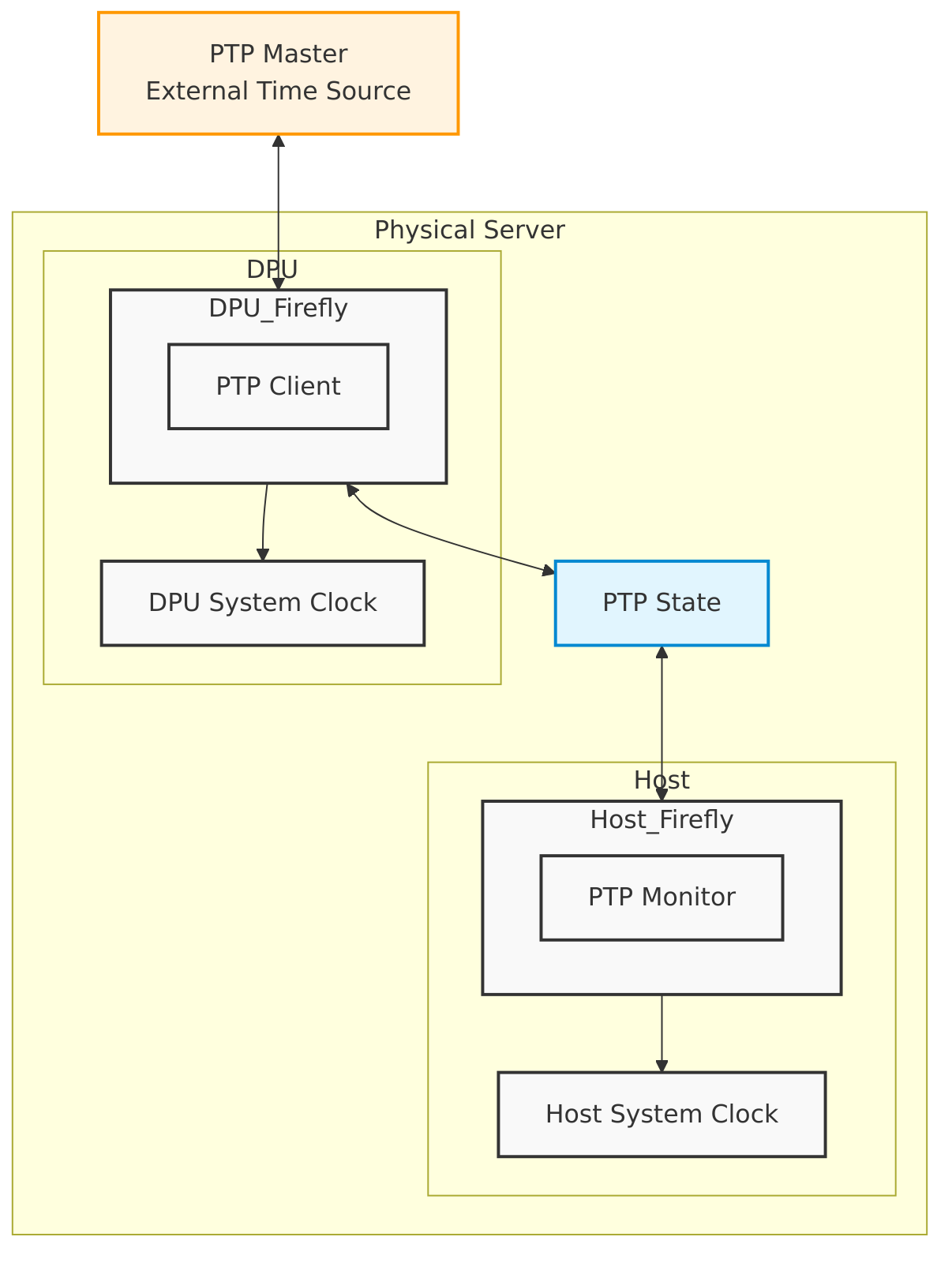
Service Components
Firefly consists of two main components:
1. DPU Component:
* Runs on the DPU
* Acts as the PTP client
* Handles PTP time synchronization
* Sets DPU system clock
Configuration files:
2. Host Component:
* Runs on the host
* Monitors PTP time synchronization
* Sets host system clock
Configuration files:
The general resources are:
DPUFlavor
Defines the DPU flavor for the Firefly service.
DPUServiceNAD
Defines the trusted Scalable Function (SF) for the Firefly service.
DPUDeployment
Defines the DPUDeployment for the Firefly service.
For information about OVN Kubernetes configuration see the OVN Kubernetes user guide
Configuration
Official Firefly documentation explains configuration options.
General note: In the official documentation, all options should be specified in the ptp.conf file.
In DPF the same options should be set via the DPUServiceConfiguration.
Preconfiguration
Our referenced example DPUServiceConfigration includes G.8275.1 PTP Profile configuration. You can set all necessary configurations to your needs.
Network Configuration
The Firefly service requires a trusted Scalable Function (SF) to enable secure PTP communication. This interface is added to the SFC bridge using a DPUServiceNAD (Network Attachment Definition). The DPUService controller takes care of injecting the correct resource to the Pod using that DPUServiceNAD.
DPUDeployment
The complete DPUDeployment configuration is in DPUDeployment.
Toleration Configuration
The Firefly service includes a special configuration (toleration) that ensures it always runs on the host system. This is important because:
-
The service needs to run on the host to properly synchronize the system time
-
Without proper time synchronization, other system components might not work correctly
-
The toleration prevents the service from being blocked from running on the host
This configuration is automatically handled in the DPUServiceTemplate and does not require any user configuration.
Check the Status
You can check the status of the Firefly service using the following command:
$ kubectl -n dpf-operator-system exec deploy/dpf-operator-controller-manager -- /dpfctl describe all --grouping=false --show-conditions=dpuservices
NAME                                                        NAMESPACE            STATUS        REASON             SINCE  MESSAGE
DPFOperatorConfig/dpfoperatorconfig                         dpf-operator-system  Ready: Trye   Success            31s
├─DPUClusters
│ └─DPUCluster/dpu-cplane-tenant1                           dpu-cplane-tenant1   Ready: True   HealthCheckPassed  27h
├─DPUDeployments
│ └─DPUDeployment/firefly                                   dpf-operator-system  Ready: True   Success            12m
│   ├─DPUServices
│   │ ├─DPUService/firefly-dpu-v6pbk                        dpf-operator-system
│   │ │             ├─Ready                                                      True          Success            8m24s
│   │ │             ├─ApplicationPrereqsReconciled                               True          Success            3h7m
│   │ │             ├─ApplicationsReady                                          True          Success            8m24s
│   │ │             ├─ApplicationsReconciled                                     True          Success            3h7m
│   │ │             ├─ConfigPortsReconciled                                      True          Success            3h7m
│   │ │             └─DPUServiceInterfaceReconciled                              True          Success            3h7m
│   │ ├─DPUService/firefly-host-jj98d                       dpf-operator-system
│   │ │             ├─Ready                                                      True          Success            4m46s
│   │ │             ├─ApplicationPrereqsReconciled                               True          Success            27h
│   │ │             ├─ApplicationsReady                                          True          Success            4m46s
│   │ │             ├─ApplicationsReconciled                                     True          Success            27h
│   │ │             ├─ConfigPortsReconciled                                      True          Success            27h
│   │ │             └─DPUServiceInterfaceReconciled                              True          Success            27h
...
Last updated: