

When a FlexBoot client boots, it sends the DHCP server various information, including its DHCP hardware Ethernet address (MAC). The MAC address is 6 bytes long, and it is used to distinguish between the various DHCP sessions.
Extracting the MAC Address – Method I
All Ethernet NICs have a label on the printed side of the adapter card that has the card serial number and the card MAC address.
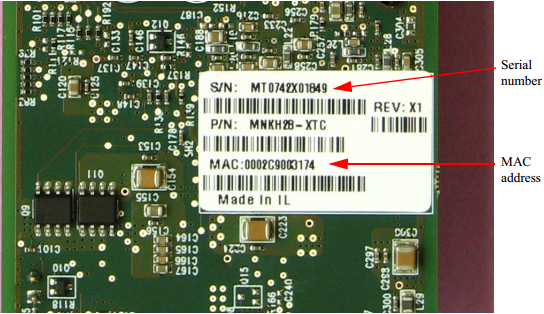
Extracting the MAC Address – Method II – FlexBoot Only
The six bytes of MAC address can be captured from the display upon the boot of the ConnectX device session as shown in the figure below.

Extracting the MAC Address – Method III

-
Start mst.
host1# mst start
host1# mst status
The following MFT commands assume that the MFT package has been installed on the client machine. -
Obtain the MAC using the device name.
The device name will be of the form: /dev/mst/ mt<dev_id>_pci{_cr0|conf0}.flint -d <MST_DEVICE_NAME> q
Assuming that FlexBoot is connected via Port 1, then the MAC address is 00:02:c9:0c:7c:11.
Placing MAC Addresses in /etc/dhcpd.conf
The following is an excerpt of a /etc/dhcpd.conf example file showing the format of representing a client machine for the DHCP server running on a Linux machine.
host host1 {
next-server 11.4.3.7; filename "pxelinux.0"; fixed-address 11.4.3.130;
hardware ethernet 00:02:c9:0c:78:12;
}
Last updated: