

Network Operator Deployment Guide
The Network Operator Release Notes chapter is available here.
NVIDIA Network Operator leverages Kubernetes CRDs and Operator SDK to manage networking related components, in order to enable fast networking, RDMA and GPUDirect for workloads in a Kubernetes cluster. The Network Operator works in conjunction with the GPU-Operator to enable GPU-Direct RDMA on compatible systems.
The goal of the Network Operator is to manage the networking related components, while enabling execution of RDMA and GPUDirect RDMA workloads in a Kubernetes cluster. This includes:
-
NVIDIA Networking drivers to enable advanced features
-
Kubernetes device plugins to provide hardware resources required for a fast network
-
Kubernetes secondary network components for network intensive workloads
Network Operator Deployment on Vanilla Kubernetes Cluster
It is recommended to have dedicated control plane nodes for Vanilla Kubernetes deployments with NVIDIA Network Operator.
The default installation via Helm as described below will deploy the Network Operator and related CRDs, after which an additional step is required to create a NicClusterPolicy custom resource with the configuration that is desired for the cluster. Please refer to the NicClusterPolicy CRD Section for more information on manual Custom Resource creation.
The provided Helm chart contains various parameters to facilitate the creation of a NicClusterPolicy custom resource upon deployment.
Each Network Operator Release has a set of default version values for the various components it deploys. It is recommended that these values will not be changed. Testing and validation were performed with these values, and there is no guarantee of interoperability nor correctness when different versions are used.
Add NVIDIA NGC repository:
helm repo add nvidia https://helm.ngc.nvidia.com/nvidia
helm repo update
Install Network Operator from the NVIDIA NGC chart using default values:
helm install network-operator nvidia/network-operator \
  -n nvidia-network-operator \
  --create-namespace \
  --version v23.9.0 \
  --wait
kubectl -n nvidia-network-operator get pods
Install Network Operator from the NVIDIA NGC chart using custom values:
Since several parameters should be provided when creating custom resources during operator deployment, it is recommended to use a configuration file. While it is possible to override the parameters via CLI, we recommend to avoid the use of CLI arguments in favor of a configuration file.
helm show values nvidia/network-operator --version v23.9.0 > values.yaml
helm install network-operator nvidia/network-operator \
  -n nvidia-network-operator \
  --create-namespace \
  --version v23.9.0 \
  -f ./values.yaml \
  --wait
Helm Chart Customization Options
In order to tailor the deployment of the Network Operator to your cluster needs, use the following parameters:
General Parameters
In order to tailor the deployment of the Network Operator to your cluster needs, use the following parameters:
|
Name |
Type |
Default |
Description |
|---|---|---|---|
|
|
Bool |
|
Deploy Node Feature Discovery |
|
|
Bool |
|
Deploy SR-IOV Network Operator |
|
|
List |
|
Additional values for SR-IOV Config Daemon nodes selector |
|
upgradeCRDs |
Bool |
|
Enable CRDs upgrade with helm pre-install and pre-upgrade hooks |
|
|
Bool |
|
Deploy Pod Security Policy |
|
|
String |
|
Network Operator image repository |
|
|
String |
|
Network Operator image name |
|
|
String |
|
Network Operator image tag. If set to |
|
|
List |
|
An optional list of references to secrets to use for pulling any of the Network Operator images |
|
|
Bool |
|
Deploy |
|
|
Object |
|
Configure node affinity settigs for Network Operator components |
The NFD labels required by the Network Operator and GPU Operator:
|
Label |
Location |
|---|---|
|
Nodes containing NVIDIA Networking hardware |
|
|
Nodes containing NVIDIA GPU hardware |
MLNX_OFED Driver
|
Name |
Type |
Default |
Description |
|---|---|---|---|
|
|
Bool |
|
Deploy the MLNX_OFED driver container |
|
|
String |
nvcr.io/nvidia/mellanox |
MLNX_OFED driver image repository |
|
|
String |
|
MLNX_OFED driver image name |
|
|
String |
23.07-0.5.0.0 |
MLNX_OFED driver version |
|
|
List |
|
An optional list of environment variables passed to the Mellanox OFED driver image |
|
|
Int |
300 |
MLNX_OFED termination grace period in seconds |
|
String |
"" |
Private mirror repository configuration configMap name |
|
|
String |
"" |
Custom TLS key/certificate configuration configMap name |
|
|
|
List |
|
An optional list of references to secrets to use for pulling any of the MLNX_OFED driver images |
|
|
Int |
10 |
MLNX_OFED startup probe initial delay |
|
|
Int |
20 |
MLNX_OFED startup probe interval |
|
|
Int |
30 |
MLNX_OFED liveness probe initial delay |
|
|
Int |
30 |
MLNX_OFED liveness probe interval |
|
|
Int |
10 |
MLNX_OFED readiness probe initial delay |
|
|
IIn tnt |
30 |
MLNX_OFED readiness probe interval |
|
|
Bool |
|
Global switch for the automatic upgrade feature. If set to false, all other options are ignored. |
|
|
Int |
1 |
The amount of nodes that can be upgraded in parallel. 0 means no limit. All nodes will be upgraded in parallel. |
|
|
Bool |
|
Options for node drain (`kubectl drain`) before the driver reload, if auto upgrade is enabled. |
|
|
Bool |
|
Use force drain of pods |
|
|
String |
"" |
Pod selector to specify which pods will be drained from the node. An empty selector means all pods. |
|
|
Int |
300 |
Number of seconds to wait for pod eviction |
|
|
Bool |
|
Delete pods local storage |
MLNX_OFED Driver Environment Variables
The following are special environment variables supported by the MLNX_OFED container to configure its behavior:
|
Name |
Default |
Description |
|---|---|---|
|
CREATE_IFNAMES_UDEV |
|
Create an udev rule to preserve "old-style" path based netdev names e.g |
|
UNLOAD_STORAGE_MODULES |
|
Unload host storage modules prior to loading MLNX_OFED modules:
|
|
ENABLE_NFSRDMA |
|
Enable loading of NFS related storage modules from a MLNX_OFED container |
|
RESTORE_DRIVER_ON_POD_TERMINATION |
|
Restore host drivers when a container is gracefully stopped |
In addition, it is possible to specify any environment variables to be exposed to the MLNX_OFED container, such as the standard "HTTP_PROXY", "HTTPS_PROXY", "NO_PROXY".
CREATE_IFNAMES_UDEV is set automatically by the Network Operator, depending on the Operating System of the worker nodes in the cluster (the cluster is assumed to be homogenous).
To set these variables, change them into Helm values. For example:
|
|
The variables can also be configured directly via the NicClusterPolicy CRD.
RDMA Shared Device Plugin
|
Name |
Type |
Default |
Description |
|---|---|---|---|
|
|
Bool |
|
Deploy RDMA shared device plugin |
|
|
String |
RDMA shared device plugin image repository |
|
|
|
String |
|
RDMA shared device plugin image name |
|
|
String |
|
RDMA shared device plugin version |
|
|
List |
|
An optional list of references to secrets to use for pulling any of the RDMA Shared device plugin image |
|
|
List |
See below |
RDMA shared device plugin resources |
RDMA Device Plugin Resource Configurations
These configurations consist of a list of RDMA resources, each with a name and a selector of RDMA capable network devices to be associated with the resource. Refer to RDMA Shared Device Plugin Selectors for supported selectors.
resources:
  - name: rdma_shared_device_a
    vendors: [15b3]
    deviceIDs: [1017]
    ifNames: [enp5s0f0]
  - name: rdma_shared_device_b
    vendors: [15b3]
    deviceIDs: [1017]
    ifNames: [enp4s0f0, enp4s0f1]
SR-IOV Network Device Plugin
|
Name |
Type |
Default |
Description |
|---|---|---|---|
|
|
Bool |
|
Deploy SR-IOV Network device plugin |
|
|
String |
SR-IOV Network device plugin image repository |
|
|
|
String |
|
SR-IOV Network device plugin image name |
|
|
String |
7e7f979087286ee950bd5ebc89d8bbb6723fc625 |
SR-IOV Network device plugin version |
|
|
List |
|
An optional list of references to secrets to use for pulling any of the SR-IOV Network device plugin image |
|
|
List |
See below |
SR-IOV Network device plugin resources |
SR-IOV Network Device Plugin Resource Configuration
Consists of a list of RDMA resources, each with a name and a selector of RDMA capable network devices to be associated with the resource. Refer to SR-IOV Network Device Plugin Selectors for supported selectors.
resources:
  - name: hostdev
    vendors: [15b3]
  - name: ethernet_rdma
    vendors: [15b3]
    linkTypes: [ether]
  - name: sriov_rdma
    vendors: [15b3]
    devices: [1018]
    drivers: [mlx5_ib]
IB Kubernetes
ib-kubernetes provides a daemon that works in conjunction with the SR-IOV Network Device Plugin. It acts on Kubernetes pod object changes (Create/Update/Delete), reading the pod's network annotation, fetching its corresponding network CRD and reading the PKey. This is done in order to add the newly generated GUID or the predefined GUID in the GUID field of the CRD cni-args to that PKey for pods with mellanox.infiniband.app. annotation.
|
Name |
Type |
Default |
Description |
|---|---|---|---|
|
|
bool |
|
Deploy IB Kubernetes |
|
|
string |
IB Kubernetes image repository |
|
|
|
string |
|
IB Kubernetes image name |
|
|
string |
|
IB Kubernetes version |
|
|
list |
|
An optional list of references to secrets used for pulling any of the IB Kubernetes images |
|
|
int |
|
Interval of periodic update in seconds |
|
|
string |
|
Minimal available GUID value to be allocated for the pod |
|
|
string |
|
Maximal available GUID value to be allocated for the pod |
|
|
string |
See below |
Name of the Secret with the NVIDIA UFM access credentials, deployed in advance |
UFM Secret
IB Kubernetes must access NVIDIA UFM in order to manage pods' GUIDs. To provide its credentials, the secret of the following format should be deployed in advance:
apiVersion: v1
kind: Secret
metadata:
  name: ufm-secret
  namespace: nvidia-network-operator
stringData:
  UFM_USERNAME: "admin"
  UFM_PASSWORD: "123456"
  UFM_ADDRESS: "ufm-hostname"
  UFM_HTTP_SCHEMA: ""
  UFM_PORT: ""
data:
  UFM_CERTIFICATE: ""
InfiniBand Fabric manages a single pool of GUIDs. In order to use IB Kubernetes in different clusters, different GUID ranges must be specified to avoid collisions.
Secondary Network
|
Name |
Type |
Default |
Description |
|---|---|---|---|
|
|
Bool |
|
Deploy Secondary Network |
Specifies components to deploy in order to facilitate a secondary network in Kubernetes. It consists of the following optionally deployed components:
-
Multus-CNI: Delegate CNI plugin to support secondary networks in Kubernetes
-
CNI plugins: Currently only containernetworking-plugins is supported
-
IPAM CNI: Currently only Whereabout IPAM CNI is supported as a part of the secondaryNetwork section. NVIDIA-IPAM is configured separately.
-
IPoIB CNI: Allow the user to create IPoIB child link and move it to the pod
CNI Plugin
|
Name |
Type |
Default |
Description |
|---|---|---|---|
|
|
Bool |
|
Deploy CNI Plugins Secondary Network |
|
|
String |
|
CNI Plugins image name |
|
|
String |
CNI Plugins image repository |
|
|
|
String |
|
CNI Plugins image version |
|
|
List |
|
An optional list of references to secrets to use for pulling any of the CNI Plugins images |
Multus CNI
|
Name |
Type |
Default |
Description |
|---|---|---|---|
|
|
Bool |
|
Deploy Multus Secondary Network |
|
|
String |
|
Multus image name |
|
|
String |
|
Multus image repository |
|
|
String |
|
Multus image version |
|
|
List |
|
An optional list of references to secrets to use for pulling any of the Multus images |
|
|
String |
`` |
Multus CNI config. If empty, the config will be automatically generated from the CNI configuration file of the master plugin (the first file in lexicographical order in the cni-confg-dir). |
IPoIB CNI
|
Name |
Type |
Default |
Description |
|---|---|---|---|
|
|
Bool |
|
Deploy IPoIB CNI |
|
|
String |
|
IPoIB CNI image name |
|
|
String |
|
IPoIB CNI image repository |
|
|
String |
|
IPoIB CNI image version |
|
|
List |
|
An optional list of references to secrets to use for pulling any of the IPoIB CNI images |
IPAM CNI Plugin
|
Name |
Type |
Default |
Description |
|---|---|---|---|
|
|
Bool |
|
Deploy IPAM CNI Plugin Secondary Network |
|
|
String |
|
IPAM CNI Plugin image name |
|
|
String |
IPAM CNI Plugin image repository |
|
|
|
String |
v0.6.1-amd64 |
IPAM CNI Plugin image version |
|
|
List |
|
An optional list of references to secrets to use for pulling any of the IPAM CNI Plugin images |
NVIDIA IPAM Plugin
NVIDIA IPAM Plugin is recommended to be used on large-scale deployments of the NVIDIA Network Operator.
|
Name |
Type |
Default |
Description |
|---|---|---|---|
|
|
Bool |
|
Deploy NVIDIA IPAM Plugin |
|
|
String |
|
NVIDIA IPAM Plugin image name |
|
|
String |
NVIDIA IPAM Plugin image repository |
|
|
|
String |
|
NVIDIA IPAM Plugin image version |
|
|
List |
|
An optional list of references to secrets to use for pulling any of the Plugin images |
|
|
String |
|
Network pool configuration as described in https://github.com/Mellanox/nvidia-k8s-ipam |
Since several parameters should be provided when creating custom resources during operator deployment, it is recommended to use a configuration file. While it is possible to override the parameters via CLI, we recommend to avoid the use of CLI arguments in favor of a configuration file.
$ helm install -f ./values.yaml -n nvidia-network-operator --create-namespace --wait nvidia/network-operator network-operator
Deployment with Pod Security Policy
This section applies to Kubernetes v1.24 or earlier versions only.
A Pod Security Policy is a cluster-level resource that controls security sensitive aspects of the pod specification. The PodSecurityPolicy objects define a set of conditions that a pod must run with in order to be accepted into the system, as well as defaults for the related fields.
By default, the NVIDIA Network Operator does not deploy pod Security Policy. To do that, override the PSP chart parameter:
$ helm install -n nvidia-network-operator --create-namespace --wait network-operator nvidia/network-operator --set psp.enabled=true
To enforce Pod Security Policies, PodSecurityPolicy admission controller must be enabled. For instructions, refer to this article in Kubernetes Documentation.
The NVIDIA Network Operator deploys a privileged Pod Security Policy, which provides the operator’s pods the following permissions:
  privileged: true
  hostIPC: false
  hostNetwork: true
  hostPID: false
  allowPrivilegeEscalation: true
  readOnlyRootFilesystem: false
  allowedHostPaths: []
  allowedCapabilities:
    - '*'
  fsGroup:
    rule: RunAsAny
  runAsUser:
    rule: RunAsAny
  seLinux:
    rule: RunAsAny
  supplementalGroups:
    rule: RunAsAny
  volumes:
    - configMap
    - hostPath
    - secret
    - downwardAPI
PodSecurityPolicy is deprecated as of Kubernetes v1.21 and is removed in v1.25.
Network Operator Deployment with Pod Security Admission
The Pod Security admission controller replaces PodSecurityPolicy, enforcing predefined Pod Security Standards by adding a label to a namespace.
There are three levels defined by the Pod Security Standards: privileged, baseline, and restricted.
In case you wish to enforce a PSA to the Network Operator namespace, the privileged level is required. Enforcing baseline or restricted levels will prevent the creation of required Network Operator pods.
If required, enforce PSA privileged level on the Network Operator namespace by running:
$ kubectl label --overwrite ns nvidia-network-operator pod-security.kubernetes.io/enforce=privileged
In case that baseline or restricted levels are being enforced on the Network Operator namespace, events for pods creation failures will be triggered:
$ kubectl get events -n nvidia-network-operator --field-selector reason=FailedCreate
LAST SEEN TYPE    REASON       OBJECT                         MESSAGE
2m36s     Warning FailedCreate daemonset/mofed-ubuntu22.04-ds Error creating: pods "mofed-ubuntu22.04-ds-rwmgs" is forbidden: violates PodSecurity "baseline:latest": host namespaces (hostNetwork=true), hostPath volumes (volumes "run-mlnx-ofed", "etc-network", "host-etc", "host-usr", "host-udev"), privileged (container "mofed-container" must not set securityContext.privileged=true)
Network Operator Deployment in Proxy Environment
This section describes how to successfully deploy the Network Operator in clusters behind an HTTP Proxy. By default, the Network Operator requires internet access for the following reasons:
-
Container images must be pulled during the GPU Operator installation.
-
The driver container must download several OS packages prior to the driver installation.
To address these requirements, all Kubernetes nodes, as well as the driver container, must be properly configured in order to direct traffic through the proxy.
This section demonstrates how to configure the GPU Operator, so that the driver container could successfully download packages behind an HTTP proxy. Since configuring Kubernetes/container runtime components for proxy use is not specific to the Network Operator, those instructions are not detailed here.
If you are not running OpenShift, please skip the section titled HTTP Proxy Configuration for OpenShift, as Opneshift configuration instructions are different.
Prerequisites
Kubernetes cluster is configured with HTTP proxy settings (container runtime should be enabled with HTTP proxy).
HTTP Proxy Configuration for Openshift
For Openshift, it is recommended to use the cluster-wide Proxy object to provide proxy information for the cluster. Please follow the procedure described in Configuring the Cluster-wide Proxy via the Red Hat Openshift public documentation. The GPU Operator will automatically inject proxy related ENV into the driver container, based on the information present in the cluster-wide Proxy object.
HTTP Proxy Configuration
Specify the ofedDriver.env in your values.yaml file with appropriate HTTP_PROXY, HTTPS_PROXY, and NO_PROXY environment variables (in both uppercase and lowercase).
ofedDriver:
   env:
   - name: HTTPS_PROXY
     value: http://<example.proxy.com:port>
   - name: HTTP_PROXY
     value: http://<example.proxy.com:port>
   - name: NO_PROXY
     value: <example.com>
   - name: https_proxy
     value: http://<example.proxy.com:port>
   - name: http_proxy
     value: http://<example.proxy.com:port>
   - name: no_proxy
     value: <example.com>
Network Operator Deployment in Air-gapped Environment
This section describes how to successfully deploy the Network Operator in clusters with restricted internet access. By default, the Network Operator requires internet access for the following reasons:
-
The container images must be pulled during the Network Operator installation.
-
The OFED driver container must download several OS packages prior to the driver installation.
To address these requirements, it may be necessary to create a local image registry and/or a local package repository, so that the necessary images and packages will be available for your cluster. Subsequent sections of this document detail how to configure the Network Operator to use local image registries and local package repositories. If your cluster is behind a proxy, follow the steps listed in Network Operator Deployment in Proxy Environments.
Local Image Registry
Without internet access, the Network Operator requires all images to be hosted in a local image registry that is accessible to all nodes in the cluster. To allow Network Operator to work with a local registry, users can specify local repository, image, tag along with pull secrets in the values.yaml file.
Pulling and Pushing Container Images to a Local Registry
To pull the correct images from the NVIDIA registry, you can leverage the fields repository, image and version specified in the values.yaml file.
Local Package Repository
The OFED driver container deployed as part of the Network Operator requires certain packages to be available as part of the driver installation. In restricted internet access or air-gapped installations, users are required to create a local mirror repository for their OS distribution, and make the following packages available:
ubuntu:
   linux-headers-${KERNEL_VERSION}
   linux-modules-${KERNEL_VERSION}

rhcos:
   kernel-headers-${KERNEL_VERSION}
   kernel-devel-${KERNEL_VERSION}
   kernel-core-${KERNEL_VERSION}
   createrepo
   elfutils-libelf-devel
   kernel-rpm-macros
   numactl-libs
For Ubuntu, these packages can be found at archive.ubuntu.com, and be used as the mirror that must be replicated locally for your cluster. By using apt-mirror or apt-get download, you can create a full or a partial mirror to your repository server.
For RHCOS, dnf reposync can be used to create the local mirror. This requires an active Red Hat subscription for the supported OpenShift version. For example:
dnf --releasever=8.4 reposync --repo rhel-8-for-x86_64-appstream-rpms --download-metadata
Once all the above required packages are mirrored to the local repository, repo lists must be created following distribution specific documentation. A ConfigMap containing the repo list file should be created in the namespace where the GPU Operator is deployed.
Following is an example of a repo list for Ubuntu 20.04 (access to a local package repository via HTTP):
custom-repo.list:
deb [arch=amd64 trusted=yes] http://<local pkg repository>/ubuntu/mirror/archive.ubuntu.com/ubuntu focal main universe
deb [arch=amd64 trusted=yes] http://<local pkg repository>/ubuntu/mirror/archive.ubuntu.com/ubuntu focal-updates main universe
deb [arch=amd64 trusted=yes] http://<local pkg repository>/ubuntu/mirror/archive.ubuntu.com/ubuntu focal-security main universe
Following is an example of a repo list for RHCOS (access to a local package repository via HTTP):
cuda.repo (A mirror of https://developer.download.nvidia.com/compute/cuda/repos/rhel8/x86_64):
[cuda]
name=cuda
baseurl=http://<local pkg repository>/cuda
priority=0
gpgcheck=0
enabled=1
redhat.repo:
[baseos]
name=rhel-8-for-x86_64-baseos-rpms
baseurl=http://<local pkg repository>/rhel-8-for-x86_64-baseos-rpms
gpgcheck=0
enabled=1
[baseoseus]
name=rhel-8-for-x86_64-baseos-eus-rpms
baseurl=http://<local pkg repository>/rhel-8-for-x86_64-baseos-eus-rpms
gpgcheck=0
enabled=1
[rhocp]
name=rhocp-4.10-for-rhel-8-x86_64-rpms
baseurl=http://<10.213.6.61:81/rhocp-4.10-for-rhel-8-x86_64-rpms
gpgcheck=0
enabled=1
[apstream]
name=rhel-8-for-x86_64-appstream-rpms
baseurl=http://<local pkg repository>/rhel-8-for-x86_64-appstream-rpms
gpgcheck=0
enabled=1
ubi.repo:
[ubi-8-baseos]
name = Red Hat Universal Base Image 8 (RPMs) - BaseOS
baseurl = http://<local pkg repository>/ubi-8-baseos
enabled = 1
gpgcheck = 0
[ubi-8-baseos-source]
name = Red Hat Universal Base Image 8 (Source RPMs) - BaseOS
baseurl = http://<local pkg repository>/ubi-8-baseos-source
enabled = 0
gpgcheck = 0
[ubi-8-appstream]
name = Red Hat Universal Base Image 8 (RPMs) - AppStream
baseurl = http://<local pkg repository>/ubi-8-appstream
enabled = 1
gpgcheck = 0
[ubi-8-appstream-source]
name = Red Hat Universal Base Image 8 (Source RPMs) - AppStream
baseurl = http://<local pkg repository>/ubi-8-appstream-source
enabled = 0
gpgcheck = 0
Create the ConfigMap for Ubuntu:
kubectl create configmap repo-config -n <Network Operator Namespace> --from-file=<path-to-repo-list-file>
Create the ConfigMap for RHCOS:
kubectl create configmap repo-config -n <Network Operator Namespace> --from-file=cuda.repo --from-file=redhat.r
epo --from-file=ubi.repo
Once the ConfigMap is created using the above command, update the values.yaml file with this information to let the Network Operator mount the repo configuration within the driver container and pull the required packages. Based on the OS distribution, the Network Operator will automatically mount this ConfigMap into the appropriate directory.
ofedDriver:
  deploy: true
  repoConfg:
    name: repo-config
If self-signed certificates are used for an HTTPS based internal repository, a ConfigMap must be created for those certifications and provided during the Network Operator installation. Based on the OS distribution, the Network Operator will automatically mount this ConfigMap into the appropriate directory.
kubectl create configmap cert-config -n <Network Operator Namespace> --from-file=<path-to-pem-file1> --from-file=<path-to-pem-file2>
ofedDriver:
  deploy: true
  certConfg:
    name: cert-config
Network Operator Deployment on an OpenShift Container Platform
Currently, NVIDIA Network Operator does not support Single Node OpenShift (SNO) deployments.
It is recommended to have dedicated control plane nodes for OpenShift deployments with NVIDIA Network Operator.
Cluster-wide Entitlement
Introduction
The NVIDIA Network Operator deploys MLNX_OFED pods used to deploy NVIDIA Network Adapter drivers in the OpenShift Container Platform. These Pods require packages that are not available by default in the Universal Base Image (UBI) that the OpenShift Container Platform uses. To make packages available to the MLNX_OFED driver container, enable the cluster-wide entitled container builds in OpenShift.
To enable a cluster-wide entitlement, perform the following three steps:
-
Download the Red Hat OpenShift Container Platform subscription certificates from the Red Hat Customer Portal (access requires login credentials).
-
Create a
MachineConfigthat enables the subscription manager and provides a valid subscription certificate. Wait for theMachineConfigOperatorto reboot the node and finish applying theMachineConfig. -
Validate that the cluster-wide entitlement is working properly.
These instructions assume you have downloaded an entitlement encoded in base64 from the Red Hat Customer Portal, or extracted it from an existing node.
Creating entitled containers requires that assigning machine configuration that has a valid Red Hat entitlement certificate to your worker nodes. This step is necessary, since the Red Hat Enterprise Linux (RHEL) CoreOS nodes are not automatically entitled yer.
Obtaining an Entitlement Certificate
Follow the guidance below to obtain the entitlement certificate.
-
Navigate to the Red Hat Customer Portal systems management page, and click New.
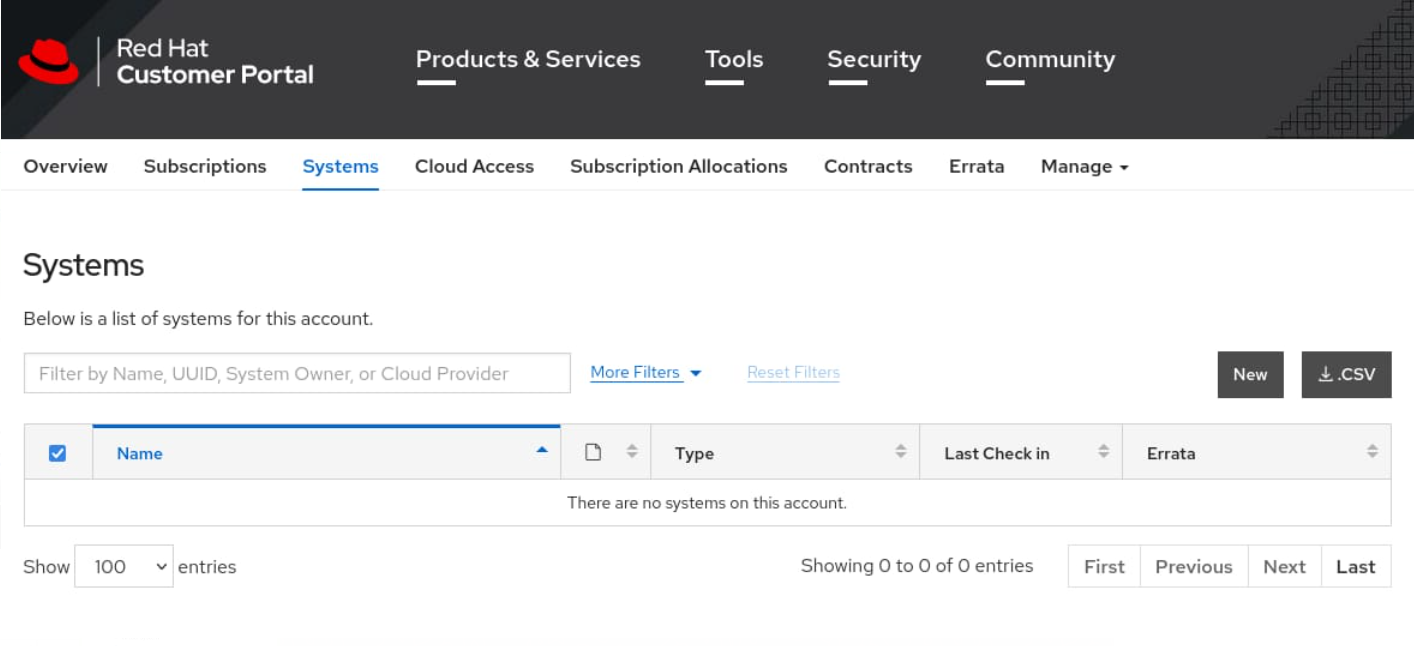
-
Select Hypervisor, and populate the Name field with the OpenShift-Entitlement text.
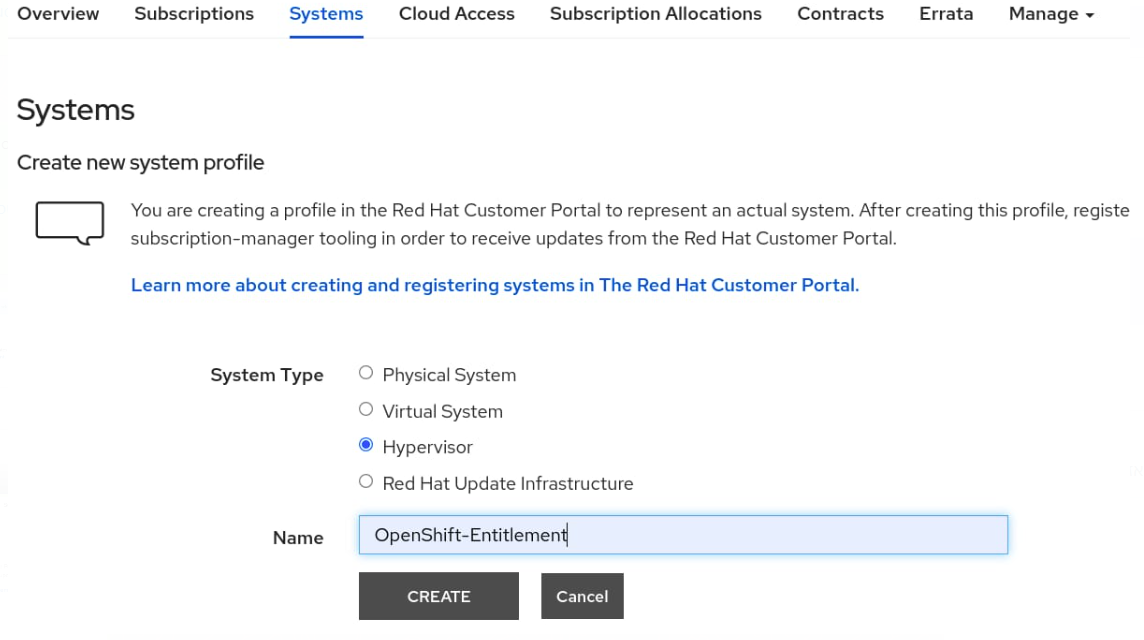
-
Click CREATE.
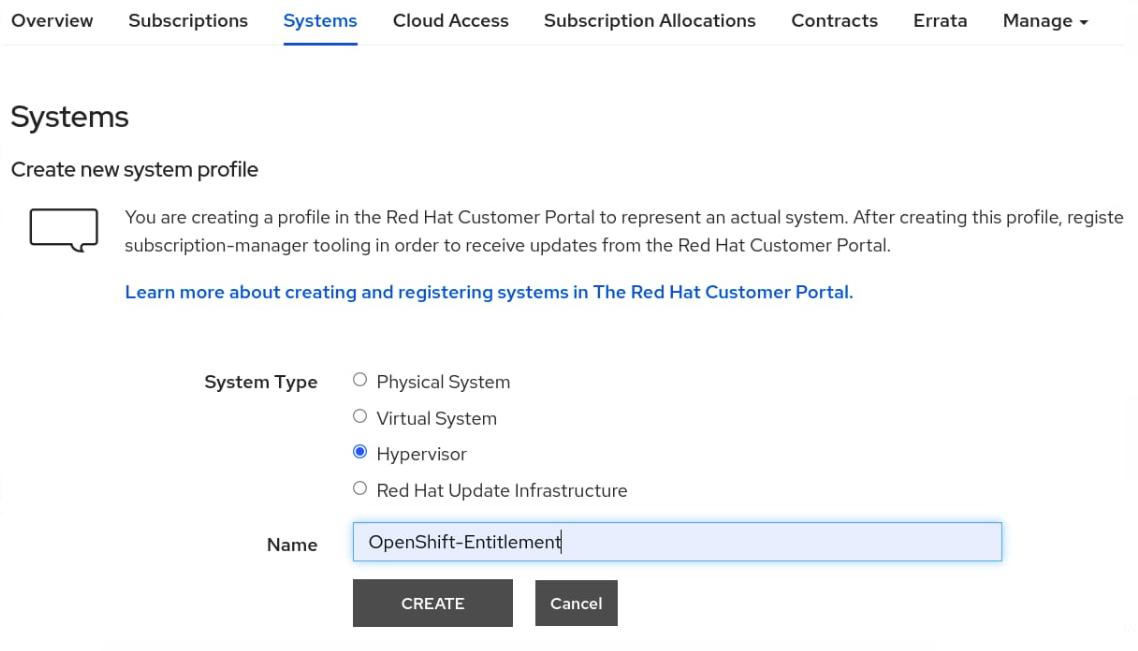
-
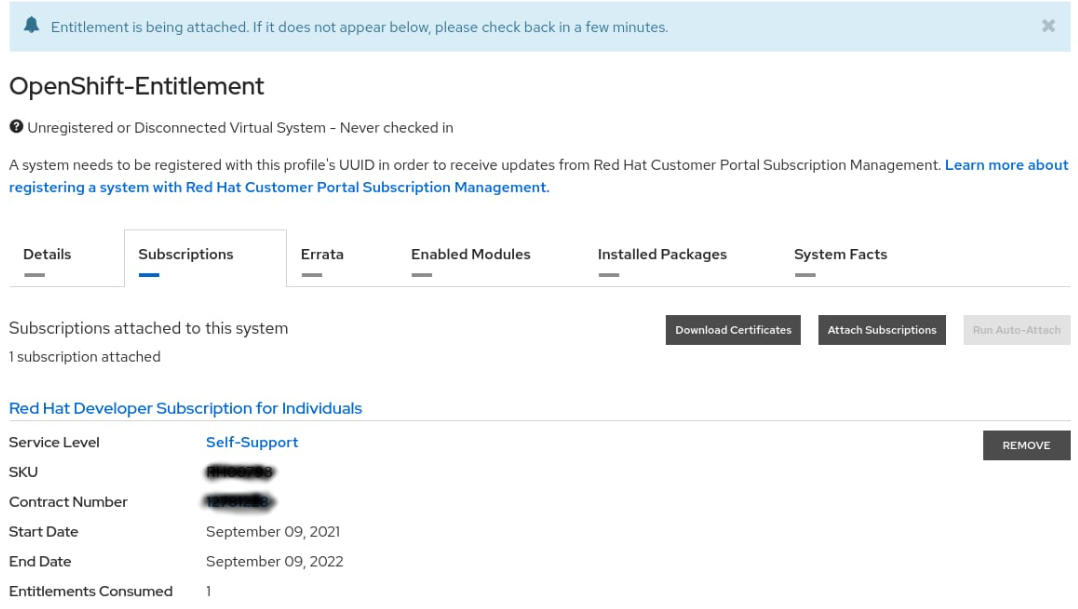
Select the Subscriptions tab, and click Attach Subscriptions.
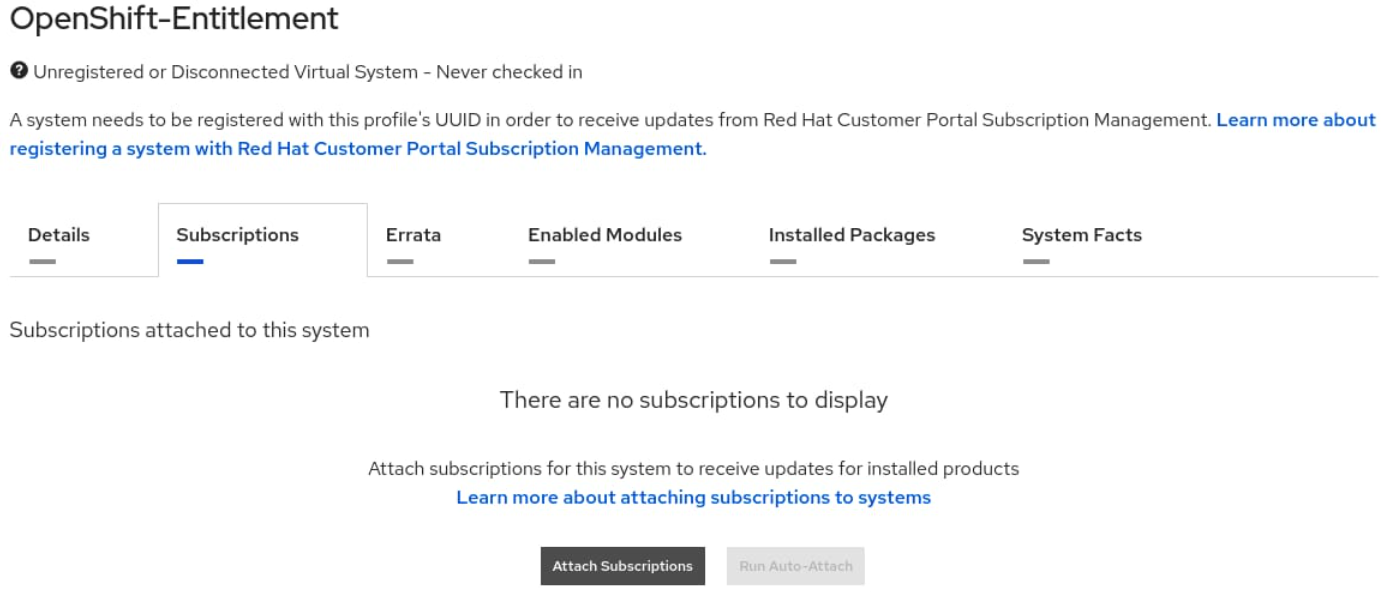
-
Search for the Red Hat Developer Subscription (the content here may vary according to the account), select the desired option, and click Attach Subscriptions.
The Red Hat Developer Subscription selected here is for illustration purposes only. Choose an appropriate subscription relevant for your your needs.
-
Click Download Certificates.
-
Download and extract the file.
-
Extract the <key>.pem key, and test it with the following command:
curl -E <key>.pem -Sfs -k https://cdn.redhat.com/content/dist/rhel8/8/x86_64/baseos/os/repodata/repomd.xml | head -3
<?xml version="1.0" encoding="UTF-8"?>
<repomd xmlns="http://linux.duke.edu/metadata/repo" xmlns:rpm="http://linux.duke.edu/metadata/rpm">
<revision>1631130504</revision>
curl -E <key>.pem -Sfs -k https://cdn.redhat.com/content/dist/rhel8/8/x86_64/baseos/os/repodata/repomd.xml | head -3
Adding a Cluster-wide Entitlement
Perform the following steps to add a cluster-wide entitlement:
-
Create an appropriately named local directory. Change to this directory.
-
Download the machine config YAML template for cluster-wide entitlements on the OpenShift Container Platform. Save the downloaded
0003-cluster-wide-machineconfigs.yaml.templatefile to the directory created in Step 1:apiVersion: machineconfiguration.openshift.io/v1 kind: MachineConfig metadata: labels: machineconfiguration.openshift.io/role: worker name: 50-rhsm-conf spec: config: ignition: version: 2.2.0 storage: files: - contents: source: data:text/plain;charset=utf-8;base64,IyBSZWQgSGF0IFN1YnNjcmlwdGlvbiBNYW5hZ2VyIENvbmZpZ3VyYXRpb24gRmlsZToKCiMgVW5pZmllZCBFbnRpdGxlbWVudCBQbGF0Zm9ybSBDb25maWd1cmF0aW9uCltzZXJ2ZXJdCiMgU2VydmVyIGhvc3RuYW1lOgpob3N0bmFtZSA9IHN1YnNjcmlwdGlvbi5yaHNtLnJlZGhhdC5jb20KCiMgU2VydmVyIHByZWZpeDoKcHJlZml4ID0gL3N1YnNjcmlwdGlvbgoKIyBTZXJ2ZXIgcG9ydDoKcG9ydCA9IDQ0MwoKIyBTZXQgdG8gMSB0byBkaXNhYmxlIGNlcnRpZmljYXRlIHZhbGlkYXRpb246Cmluc2VjdXJlID0gMAoKIyBTZXQgdGhlIGRlcHRoIG9mIGNlcnRzIHdoaWNoIHNob3VsZCBiZSBjaGVja2VkCiMgd2hlbiB2YWxpZGF0aW5nIGEgY2VydGlmaWNhdGUKc3NsX3ZlcmlmeV9kZXB0aCA9IDMKCiMgYW4gaHR0cCBwcm94eSBzZXJ2ZXIgdG8gdXNlCnByb3h5X2hvc3RuYW1lID0KCiMgVGhlIHNjaGVtZSB0byB1c2UgZm9yIHRoZSBwcm94eSB3aGVuIHVwZGF0aW5nIHJlcG8gZGVmaW5pdGlvbnMsIGlmIG5lZWRlZAojIGUuZy4gaHR0cCBvciBodHRwcwpwcm94eV9zY2hlbWUgPSBodHRwCgojIHBvcnQgZm9yIGh0dHAgcHJveHkgc2VydmVyCnByb3h5X3BvcnQgPQoKIyB1c2VyIG5hbWUgZm9yIGF1dGhlbnRpY2F0aW5nIHRvIGFuIGh0dHAgcHJveHksIGlmIG5lZWRlZApwcm94eV91c2VyID0KCiMgcGFzc3dvcmQgZm9yIGJhc2ljIGh0dHAgcHJveHkgYXV0aCwgaWYgbmVlZGVkCnByb3h5X3Bhc3N3b3JkID0KCiMgaG9zdC9kb21haW4gc3VmZml4IGJsYWNrbGlzdCBmb3IgcHJveHksIGlmIG5lZWRlZApub19wcm94eSA9CgpbcmhzbV0KIyBDb250ZW50IGJhc2UgVVJMOgpiYXNldXJsID0gaHR0cHM6Ly9jZG4ucmVkaGF0LmNvbQoKIyBSZXBvc2l0b3J5IG1ldGFkYXRhIEdQRyBrZXkgVVJMOgpyZXBvbWRfZ3BnX3VybCA9CgojIFNlcnZlciBDQSBjZXJ0aWZpY2F0ZSBsb2NhdGlvbjoKY2FfY2VydF9kaXIgPSAvZXRjL3Joc20vY2EvCgojIERlZmF1bHQgQ0EgY2VydCB0byB1c2Ugd2hlbiBnZW5lcmF0aW5nIHl1bSByZXBvIGNvbmZpZ3M6CnJlcG9fY2FfY2VydCA9ICUoY2FfY2VydF9kaXIpc3JlZGhhdC11ZXAucGVtCgojIFdoZXJlIHRoZSBjZXJ0aWZpY2F0ZXMgc2hvdWxkIGJlIHN0b3JlZApwcm9kdWN0Q2VydERpciA9IC9ldGMvcGtpL3Byb2R1Y3QKZW50aXRsZW1lbnRDZXJ0RGlyID0gL2V0Yy9wa2kvZW50aXRsZW1lbnQKY29uc3VtZXJDZXJ0RGlyID0gL2V0Yy9wa2kvY29uc3VtZXIKCiMgTWFuYWdlIGdlbmVyYXRpb24gb2YgeXVtIHJlcG9zaXRvcmllcyBmb3Igc3Vic2NyaWJlZCBjb250ZW50OgptYW5hZ2VfcmVwb3MgPSAxCgojIFJlZnJlc2ggcmVwbyBmaWxlcyB3aXRoIHNlcnZlciBvdmVycmlkZXMgb24gZXZlcnkgeXVtIGNvbW1hbmQKZnVsbF9yZWZyZXNoX29uX3l1bSA9IDAKCiMgSWYgc2V0IHRvIHplcm8sIHRoZSBjbGllbnQgd2lsbCBub3QgcmVwb3J0IHRoZSBwYWNrYWdlIHByb2ZpbGUgdG8KIyB0aGUgc3Vic2NyaXB0aW9uIG1hbmFnZW1lbnQgc2VydmljZS4KcmVwb3J0X3BhY2thZ2VfcHJvZmlsZSA9IDEKCiMgVGhlIGRpcmVjdG9yeSB0byBzZWFyY2ggZm9yIHN1YnNjcmlwdGlvbiBtYW5hZ2VyIHBsdWdpbnMKcGx1Z2luRGlyID0gL3Vzci9zaGFyZS9yaHNtLXBsdWdpbnMKCiMgVGhlIGRpcmVjdG9yeSB0byBzZWFyY2ggZm9yIHBsdWdpbiBjb25maWd1cmF0aW9uIGZpbGVzCnBsdWdpbkNvbmZEaXIgPSAvZXRjL3Joc20vcGx1Z2luY29uZi5kCgojIE1hbmFnZSBhdXRvbWF0aWMgZW5hYmxpbmcgb2YgeXVtL2RuZiBwbHVnaW5zIChwcm9kdWN0LWlkLCBzdWJzY3JpcHRpb24tbWFuYWdlcikKYXV0b19lbmFibGVfeXVtX3BsdWdpbnMgPSAxCgojIFJ1biB0aGUgcGFja2FnZSBwcm9maWxlIG9uIGVhY2ggeXVtL2RuZiB0cmFuc2FjdGlvbgpwYWNrYWdlX3Byb2ZpbGVfb25fdHJhbnMgPSAwCgojIElub3RpZnkgaXMgdXNlZCBmb3IgbW9uaXRvcmluZyBjaGFuZ2VzIGluIGRpcmVjdG9yaWVzIHdpdGggY2VydGlmaWNhdGVzLgojIEN1cnJlbnRseSBvbmx5IHRoZSAvZXRjL3BraS9jb25zdW1lciBkaXJlY3RvcnkgaXMgbW9uaXRvcmVkIGJ5IHRoZQojIHJoc20uc2VydmljZS4gV2hlbiB0aGlzIGRpcmVjdG9yeSBpcyBtb3VudGVkIHVzaW5nIGEgbmV0d29yayBmaWxlIHN5c3RlbQojIHdpdGhvdXQgaW5vdGlmeSBub3RpZmljYXRpb24gc3VwcG9ydCAoZS5nLiBORlMpLCB0aGVuIGRpc2FibGluZyBpbm90aWZ5CiMgaXMgc3Ryb25nbHkgcmVjb21tZW5kZWQuIFdoZW4gaW5vdGlmeSBpcyBkaXNhYmxlZCwgcGVyaW9kaWNhbCBkaXJlY3RvcnkKIyBwb2xsaW5nIGlzIHVzZWQgaW5zdGVhZC4KaW5vdGlmeSA9IDEKCltyaHNtY2VydGRdCiMgSW50ZXJ2YWwgdG8gcnVuIGNlcnQgY2hlY2sgKGluIG1pbnV0ZXMpOgpjZXJ0Q2hlY2tJbnRlcnZhbCA9IDI0MAojIEludGVydmFsIHRvIHJ1biBhdXRvLWF0dGFjaCAoaW4gbWludXRlcyk6CmF1dG9BdHRhY2hJbnRlcnZhbCA9IDE0NDAKIyBJZiBzZXQgdG8gemVybywgdGhlIGNoZWNrcyBkb25lIGJ5IHRoZSByaHNtY2VydGQgZGFlbW9uIHdpbGwgbm90IGJlIHNwbGF5ZWQgKHJhbmRvbWx5IG9mZnNldCkKc3BsYXkgPSAxCiMgSWYgc2V0IHRvIDEsIHJoc21jZXJ0ZCB3aWxsIG5vdCBleGVjdXRlLgpkaXNhYmxlID0gMAoKW2xvZ2dpbmddCmRlZmF1bHRfbG9nX2xldmVsID0gSU5GTwojIHN1YnNjcmlwdGlvbl9tYW5hZ2VyID0gREVCVUcKIyBzdWJzY3JpcHRpb25fbWFuYWdlci5tYW5hZ2VyY2xpID0gREVCVUcKIyByaHNtID0gREVCVUcKIyByaHNtLmNvbm5lY3Rpb24gPSBERUJVRwojIHJoc20tYXBwID0gREVCVUcKIyByaHNtLWFwcC5yaHNtZCA9IERFQlVHCg== filesystem: root mode: 0644 path: /etc/rhsm/rhsm.conf --- apiVersion: machineconfiguration.openshift.io/v1 kind: MachineConfig metadata: labels: machineconfiguration.openshift.io/role: worker name: 50-entitlement-pem spec: config: ignition: version: 2.2.0 storage: files: - contents: source: data:text/plain;charset=utf-8;base64,BASE64_ENCODED_PEM_FILE filesystem: root mode: 0644 path: /etc/pki/entitlement/entitlement.pem --- apiVersion: machineconfiguration.openshift.io/v1 kind: MachineConfig metadata: labels: machineconfiguration.openshift.io/role: worker name: 50-entitlement-key-pem spec: config: ignition: version: 2.2.0 storage: files: - contents: source: data:text/plain;charset=utf-8;base64,BASE64_ENCODED_PEM_FILE filesystem: root mode: 0644 path: /etc/pki/entitlement/entitlement-key.pem -
Copy the selected
pemfile from your entitlement certificate to a local file namednvidia.pem:cp <path/to/pem/file>/<certificate-file-name>.pem nvidia.pem -
Generate the MachineConfig file by appending the entitlement certificate:
sed -i -f - 0003-cluster-wide-machineconfigs.yaml.template << EOF s/BASE64_ENCODED_PEM_FILE/$(base64 -w0 nvidia.pem)/g EOF -
Apply the machine config to the OpenShift cluster:
oc apply –server-side -f 0003-cluster-wide-machineconfigs.yaml.templateThis step triggers an update driven by the OpenShift Machine Config Operator, and initiates a restart on all worker nodes, one by one.
machineconfig.machineconfiguration.openshift.io/50-rhsm-conf created machineconfig.machineconfiguration.openshift.io/50-entitlement-pem created machineconfig.machineconfiguration.openshift.io/50-entitlement-key-pem created -
Check the
machineconfig:oc get machineconfig | grep entitlement50-entitlement-key-pem 2.2.0 45s 50-entitlement-pem 2.2.0 45s -
Monitor the
MachineConfigPoolobject:oc get mcp/workerNAME CONFIG UPDATED UPDATING DEGRADED MACHINECOUNT READYMACHINECOUNT UPDATEDMACHINECOUNT DEGRADEDMACHINECOUNT AGE worker rendered-worker-5f1eaf24c760fb389d47d3c37ef41c29 True False False 2 2 2 0 7h15m
The status here indicates whether the MCP is updated, not updating or degraded. Make sure all the MachineConfig resources have been successfully applied to the nodes, so you can proceed to validate the cluster.
Validating the Cluster-wide Entitlement
Validate the cluster-wide entitlement with a test pod that queries a Red Hat subscription repo for the kernel-devel package.
-
Create a test pod:
cat << EOF >> mypod.yaml apiVersion: v1 kind: Pod metadata: name: cluster-entitled-build-pod namespace: default spec: containers: - name: cluster-entitled-build image: registry.access.redhat.com/ubi8:latest command: [ "/bin/sh", "-c", "dnf search kernel-devel --showduplicates" ] restartPolicy: Never EOF -
Apply the test pod:
oc create -f mypod.yamlpod/cluster-entitled-build-pod created -
Verify that the test pod has been created:
oc get pods -n defaultNAME READY STATUS RESTARTS AGE cluster-entitled-build-pod 1/1 Completed 0 64m -
Validate that the pod can locate the necessary kernel-devel packages:
oc logs cluster-entitled-build-pod -n defaultUpdating Subscription Management repositories. Unable to read consumer identity Subscription Manager is operating in container mode. Red Hat Enterprise Linux 8 for x86_64 - AppStre 15 MB/s | 14 MB 00:00 Red Hat Enterprise Linux 8 for x86_64 - BaseOS 15 MB/s | 13 MB 00:00 Red Hat Universal Base Image 8 (RPMs) - BaseOS 493 kB/s | 760 kB 00:01 Red Hat Universal Base Image 8 (RPMs) - AppStre 2.0 MB/s | 3.1 MB 00:01 Red Hat Universal Base Image 8 (RPMs) - CodeRea 12 kB/s | 9.1 kB 00:00 ====================== Name Exactly Matched: kernel-devel ====================== kernel-devel-4.18.0-80.1.2.el8_0.x86_64 : Development package for building : kernel modules to match the kernel kernel-devel-4.18.0-80.el8.x86_64 : Development package for building kernel : modules to match the kernel kernel-devel-4.18.0-80.4.2.el8_0.x86_64 : Development package for building : kernel modules to match the kernel kernel-devel-4.18.0-80.7.1.el8_0.x86_64 : Development package for building : kernel modules to match the kernel kernel-devel-4.18.0-80.11.1.el8_0.x86_64 : Development package for building : kernel modules to match the kernel kernel-devel-4.18.0-147.el8.x86_64 : Development package for building kernel : modules to match the kernel kernel-devel-4.18.0-80.11.2.el8_0.x86_64 : Development package for building : kernel modules to match the kernel kernel-devel-4.18.0-80.7.2.el8_0.x86_64 : Development package for building : kernel modules to match the kernel kernel-devel-4.18.0-147.0.3.el8_1.x86_64 : Development package for building : kernel modules to match the kernel kernel-devel-4.18.0-147.0.2.el8_1.x86_64 : Development package for building : kernel modules to match the kernel kernel-devel-4.18.0-147.3.1.el8_1.x86_64 : Development package for building : kernel modules to match the kernelAny Pod based on RHEL can now run entitled builds.
Node Feature Discovery
To enable Node Feature Discovery please follow the Official Guide.
An example of Node Feature Discovery configuration:
apiVersion: nfd.openshift.io/v1
kind: NodeFeatureDiscovery
metadata:
  name: nfd-instance
  namespace: openshift-nfd
spec:
  operand:
    namespace: openshift-nfd
    image: registry.redhat.io/openshift4/ose-node-feature-discovery:v4.10
    imagePullPolicy: Always
  workerConfig:
    configData: |
      sources:
        pci:
          deviceClassWhitelist:
            - "02"
            - "03"
            - "0200"
            - "0207"
          deviceLabelFields:
            - vendor
  customConfig:
    configData: ""
Verify that the following label is present on the nodes containing NVIDIA networking hardware:
feature.node.kubernetes.io/pci-15b3.present=true
$ oc describe node | egrep 'Roles|pci' | grep -v master

Roles:              worker
                    feature.node.kubernetes.io/pci-10de.present=true
                    feature.node.kubernetes.io/pci-14e4.present=true
                    feature.node.kubernetes.io/pci-15b3.present=true
Roles:              worker
                    feature.node.kubernetes.io/pci-10de.present=true
                    feature.node.kubernetes.io/pci-14e4.present=true
                    feature.node.kubernetes.io/pci-15b3.present=true
Roles:              worker
                    feature.node.kubernetes.io/pci-10de.present=true
                    feature.node.kubernetes.io/pci-14e4.present=true
                    feature.node.kubernetes.io/pci-15b3.present=true
SR-IOV Network Operator
If you are planning to use SR-IOV, follow this guide to install SR-IOV Network Operator in OpenShift Container Platform.
The SR-IOV resources created will have the openshift.io prefix.
For the default SriovOperatorConfig CR to work with the MLNX_OFED container, please run this command to update the following values:
oc patch sriovoperatorconfig default \
  --type=merge -n openshift-sriov-network-operator \
  --patch '{ "spec": { "configDaemonNodeSelector": { "network.nvidia.com/operator.mofed.wait": "false", "node-role.kubernetes.io/worker": "", "feature.node.kubernetes.io/pci-15b3.sriov.capable": "true" } } }'
SR-IOV Network Operator configuration documentation can be found on the Official Website.
GPU Operator
If you plan to use GPUDirect, follow this guide to install GPU Operator in OpenShift Container Platform.
Make sure to enable RDMA and disable useHostMofed in the driver section in the spec of the ClusterPolicy CR.
Network Operator installation on OpenShift Using a Catalog
-
In the OpenShift Container Platform web console side menu, select Operators > OperatorHub, and search for the NVIDIA Network Operator.
-
Select the NVIDIA Network Operator, and click Install in the first screen and in the subsequent one.
For additional information, see the Red Hat OpenShift Container Platform Documentation.
Network Operator Installation on OpenShift Using OC CLI
-
Create a namespace for the Network Operator.
Create the following Namespace custom resource (CR) that defines the nvidia-network-operator namespace, and then save the YAML in the
network-operator-namespace.yamlfile:apiVersion: v1 kind: Namespace metadata: name: nvidia-network-operatorCreate the namespace by running the following command:
$ oc create -f network-operator-namespace.yaml -
Install the Network Operator in the namespace created in the previous step by creating the below objects. Run the following command to get the channel value required for the next step:
$ oc get packagemanifest nvidia-network-operator -n openshift-marketplace -o jsonpath='{.status.defaultChannel}'Example Output
stable -
Create the following Subscription CR, and save the YAML in the
network-operator-sub.yamlfile:apiVersion: operators.coreos.com/v1alpha1 kind: Subscription metadata: name: nvidia-network-operator namespace: nvidia-network-operator spec: channel: "v23.9.0" installPlanApproval: Manual name: nvidia-network-operator source: certified-operators sourceNamespace: openshift-marketplace -
Create the subscription object by running the following command:
$ oc create -f network-operator-sub.yaml -
Change to the network-operator project:
$ oc project nvidia-network-operator
Verification
To verify that the operator deployment is successful, run:
$ oc get pods
Example Output:
NAME                                      READY   STATUS    RESTARTS   AGE
nvidia-network-operator-controller-manager-8f8ccf45c-zgfsq    2/2     Running   0          1m
A successful deployment shows a Running status.
Using Network Operator to Create NicClusterPolicy in an OpenShift Container Platform
See Deployment Examples for OCP.
Network Operator Upgrade
Before upgrading to Network Operator v23.1.0 or newer with SR-IOV Network Operator enabled, the following manual actions are required:
$ kubectl -n nvidia-network-operator scale deployment network-operator-sriov-network-operator --replicas 0
$ kubectl -n nvidia-network-operator delete sriovnetworknodepolicies.sriovnetwork.openshift.io default
The network operator provides limited upgrade capabilities, which require additional manual actions if a containerized OFED driver is used. Future releases of the network operator will provide an automatic upgrade flow for the containerized driver.
Since Helm does not support auto-upgrade of existing CRDs, the user must follow a two-step process to upgrade the network-operator release:
-
Upgrade the CRD to the latest version
-
Apply Helm chart update
Downloading a New Helm Chart
To obtain new releases, run:
# Download Helm chart
$ helm fetch https://helm.ngc.nvidia.com/nvidia/charts/network-operator-23.9.0.tgz
$ ls network-operator-*.tgz | xargs -n 1 tar xf
Upgrading CRDs for a Specific Release
It is possible to retrieve updated CRDs from the Helm chart or from the release branch on GitHub. The example below shows how to download and unpack an Helm chart for a specified release, and apply CRDs update from it.
$ kubectl apply \
  -f network-operator/crds \
  -f network-operator/charts/sriov-network-operator/crds
Preparing the Helm Values for the New Release
Download the Helm values for the specific release:
Edit the values-<VERSION>.yaml file as required for your cluster. The network operator has some limitations as to which updates in the NicClusterPolicy it can handle automatically. If the configuration for the new release is different from the current configuration in the deployed release, some additional manual actions may be required.
Known limitations:
-
If component configuration was removed from the
NicClusterPolicy, manual clean up of the component's resources (DaemonSets, ConfigMaps, etc.) may be required. -
If the configuration for
devicePluginchanged without image upgrade, manual restart of thedevicePluginmay be required.
These limitations will be addressed in future releases.
Changes that were made directly in the NicClusterPolicy CR (e.g. with kubectl edit) will be overwritten by the Helm upgrade.
Temporarily Disabling the Network-operator
This step is required to prevent the old network-operator version from handling the updated NicClusterPolicy CR. This limitation will be removed in future network-operator releases.
$ kubectl scale deployment --replicas=0 -n nvidia-network-operator network-operator
Please wait for the network-operator pod to be removed before proceeding.
The network-operator will be automatically enabled by the Helm upgrade command. There is no need to enable it manually.
Applying the Helm Chart Update
To apply the Helm chart update, run:
$ helm upgrade -n nvidia-network-operator network-operator nvidia/network-operator --version=<VERSION> -f values-<VERSION>.yaml
The --devel option is required if you wish to use the beta release.
OFED Driver Manual Upgrade
Restarting Pods with a Containerized OFED Driver
This operation is required only if containerized OFED is in use.
When a containerized OFED driver is reloaded on the node, all pods that use a secondary network based on NVIDIA NICs will lose network interface in their containers. To prevent outage, remove all pods that use a secondary network from the node before you reload the driver pod on it.
The Helm upgrade command will only upgrade the DaemonSet spec of the OFED driver to point to the new driver version. The OFED driver's DaemonSet will not automatically restart pods with the driver on the nodes, as it uses "OnDelete" updateStrategy. The old OFED version will still run on the node until you explicitly remove the driver pod or reboot the node:
$ kubectl delete pod -l app=mofed-<OS_NAME> -n nvidia-network-operator
It is possible to remove all pods with secondary networks from all cluster nodes, and then restart the OFED pods on all nodes at once.
The alternative option is to perform an upgrade in a rolling manner to reduce the impact of the driver upgrade on the cluster. The driver pod restart can be done on each node individually. In this case, pods with secondary networks should be removed from the single node only. There is no need to stop pods on all nodes.
For each node, follow these steps to reload the driver on the node:
-
Remove pods with a secondary network from the node.
-
Restart the OFED driver pod.
-
Return the pods with a secondary network to the node.
When the OFED driver is ready, proceed with the same steps for other nodes.
Removing Pods with a Secondary Network from the Node
To remove pods with a secondary network from the node with node drain, run the following command:
$ kubectl drain <NODE_NAME> --pod-selector=<SELECTOR_FOR_PODS>
Replace <NODE_NAME> with -l "network.nvidia.com/operator.mofed.wait=false" if you wish to drain all nodes at once.
Restarting the OFED Driver Pod
Find the OFED driver pod name for the node:
$ kubectl get pod -l app=mofed-<OS_NAME> -o wide -A
Example for Ubuntu 20.04:
kubectl get pod -l app=mofed-ubuntu20.04 -o wide -A
Deleting the OFED Driver Pod from the Node
To delete the OFED driver pod from the node, run:
$ kubectl delete pod -n <DRIVER_NAMESPACE> <OFED_POD_NAME>
Replace <OFED_POD_NAME> with -l app=mofed-ubuntu20.04 if you wish to remove OFED pods on all nodes at once.
A new version of the OFED pod will automatically start.
Returning Pods with a Secondary Network to the Node
After the OFED pod is ready on the node, you can make the node schedulable again.
The command below will uncordon (remove node.kubernetes.io/unschedulable:NoSchedule taint) the node, and return the pods to it:
$ kubectl uncordon -l "network.nvidia.com/operator.mofed.wait=false"
Automatic OFED Driver Upgrade
To enable automatic OFED upgrade, define the UpgradePolicy section for the ofedDriver in the NicClusterPolicy spec, and change the OFED version.
nicclusterpolicy.yaml:
apiVersion: mellanox.com/v1alpha1
kind: NicClusterPolicy
metadata:
  name: nic-cluster-policy
  namespace: nvidia-network-operator
spec:
  ofedDriver:
    image: mofed
    repository: nvcr.io/nvidia/mellanox
    version: 23.07-0.5.0.0
     upgradePolicy:
      # autoUpgrade is a global switch for automatic upgrade feature
	  # if set to false all other options are ignored
      autoUpgrade: true
      # maxParallelUpgrades indicates how many nodes can be upgraded in parallel
	  # 0 means no limit, all nodes will be upgraded in parallel
      maxParallelUpgrades: 0
      # describes the configuration for waiting on job completions
      waitForCompletion:
        # specifies a label selector for the pods to wait for completion
        podSelector: "app=myapp"
        # specify the length of time in seconds to wait before giving up for workload to finish, zero means infinite
        # if not specified, the default is 300 seconds
        timeoutSeconds: 300
      # describes configuration for node drain during automatic upgrade
      drain:
        # allow node draining during upgrade
        enable: true
        # allow force draining
        force: false
        # specify a label selector to filter pods on the node that need to be drained
        podSelector: ""
        # specify the length of time in seconds to wait before giving up drain, zero means infinite
        # if not specified, the default is 300 seconds
        timeoutSeconds: 300
        # specify if should continue even if there are pods using emptyDir
        deleteEmptyDir: false
Apply NicClusterPolicy CRD:
$ kubectl apply -f nicclusterpolicy.yaml
To be able to drain nodes, please make sure to fill the PodDisruptionBudget field for all the pods that use it. On some clusters (e.g. Openshift), many pods use PodDisruptionBudget, which makes draining multiple nodes at once impossible. Since evicting several pods that are controlled by the same deployment or replica set, violates their PodDisruptionBudget, this results in those pods not being evicted and in drain failure.
To perform a driver upgrade, the network-operator must evict pods that are using network resources. Therefore, in order to ensure that the network-operator is evicting only the required pods, the upgradePolicy.drain.podSelector field must be configured.
Node Upgrade States
The status upgrade of each node is reflected in its nvidia.com/ofed-upgrade-state annotation. This annotation can have the following values:
|
Name |
Description |
|---|---|
|
Unknown (empty) |
The node has this state when the upgrade flow is disabled or the node has not been processed yet. |
|
upgrade-done |
Set when OFED POD is up to date and running on the node, the node is schedulable. |
|
upgrade-required |
Set when OFED POD on the node is not up-to-date and requires upgrade. No actions are performed at this stage. |
|
cordon-required |
Set when the node needs to be made unschedulable in preparation for driver upgrade. |
|
wait-for-jobs-required |
Set on the node when waiting is required for jobs to complete until given timeout. |
|
drain-required |
Set when the node is scheduled for drain. After the drain, the state is changed either to pod-restart-required or upgrade-failed. |
|
pod-restart-required |
Set when the OFED POD on the node is scheduled for restart. After the restart, the state is changed to uncordon-required. |
|
uncordon-required |
Set when OFED POD on the node is up-to-date and has "Ready" status. After uncordone, the state is changed to upgrade-done |
|
upgrade-failed |
Set when the upgrade on the node has failed. Manual interaction is required at this stage. See Troubleshooting section for more details. |
Depending on your cluster workloads and pod Disruption Budget, set the following values for auto upgrade:
apiVersion: mellanox.com/v1alpha1
kind: NicClusterPolicy
metadata:
  name: nic-cluster-policy
  namespace: nvidia-network-operator
spec:
  ofedDriver:
    image: mofed
    repository: nvcr.io/nvidia/mellanox
    version: 23.07-0.5.0.0
     upgradePolicy:
      autoUpgrade: true
      maxParallelUpgrades: 1
      drain:
        enable: true
        force: false
        deleteEmptyDir: true
        podSelector: ""
Troubleshooting
|
Issue |
Required Action |
|---|---|
|
The node is in drain-failed state. |
Drain the node manually by running |
|
The updated MLNX_OFED pod failed to start/ a new version of MLNX_OFED cannot be installed on the node. |
Manually delete the pod by using |
Ensuring Deployment Readiness
Once the Network Operator is deployed, and a NicClusterPolicy resource is created, the operator will reconcile the state of the cluster until it reaches the desired state, as defined in the resource.
Alignment of the cluster to the defined policy can be verified in the custom resource status.
a "Ready" state indicates that the required components were deployed, and that the policy is applied on the cluster.
Status Field Example of a NICClusterPolicy Instance
kubectl get -n network-operator nicclusterpolicies.mellanox.com nic-cluster-policy -o yaml
status:
  appliedStates:
  - name: state-pod-security-policy
    state: ignore
  - name: state-multus-cni
    state: ready
  - name: state-container-networking-plugins
    state: ignore
  - name: state-ipoib-cni
    state: ignore
  - name: state-whereabouts-cni
    state: ready
  - name: state-OFED
    state: ready
  - name: state-SRIOV-device-plugin
    state: ignore
  - name: state-RDMA-device-plugin
    state: ready
  - name: state-NV-Peer
    state: ignore
  - name: state-ib-kubernetes
    state: ignore
  - name: state-nv-ipam-cni
    state: ready
  state: ready
An "Ignore" state indicates that the sub-state was not defined in the custom resource, and thus, it is ignored.
Uninstalling the Network Operator
Uninstalling Network Operator on a Vanilla Kubernetes Cluster
helm uninstall network-operator -n network-operator
kubectl get pods -n network-operator
kubectl get nicclusterpolicies.mellanox.com
No resources found
Uninstalling the Network Operator on an OpenShift Cluster
From the console:
In the OpenShift Container Platform web console side menu, select Operators >Installed Operators, search for the NVIDIA Network Operator and click on it.
On the right side of the Operator Details page, select Uninstall Operator from the Actions drop-down menu.
For additional information, see the Red Hat OpenShift Container Platform Documentation.
From the CLI:
-
Check the current version of the Network Operator in the currentCSV field:
Bashoc get subscription -n nvidia-network-operator nvidia-network-operator -o yaml | grep currentCSVExample output:
currentCSV: nvidia-network-operator.v23.9.0 -
Delete the subscription:
Bashoc delete subscription -n nvidia-network-operator nvidia-network-operatorExample output:
subscription.operators.coreos.com "nvidia-network-operator" deleted -
Delete the CSV using the currentCSV value from the previous step:
subscription.operators.coreos.com "nvidia-network-operator" deletedExample output:
clusterserviceversion.operators.coreos.com "nvidia-network-operator.v23.9.0" deleted
For additional information, see the Red Hat OpenShift Container Platform Documentation.
Additional Steps
In OCP, uninstalling an operator does not remove its managed resources, including CRDs and CRs.
To remove them, you must manually delete the Operator CRDs following the operator uninstallation.
$ oc delete crds hostdevicenetworks.mellanox.com macvlannetworks.mellanox.com nicclusterpolicies.mellanox.com
Deployment Examples
Since several parameters should be provided when creating custom resources during operator deployment, it is recommended to use a configuration file. While it is possible to override the parameters via CLI, we recommend to avoid the use of CLI arguments in favor of a configuration file.
Below are deployment examples, which the values.yaml file provided to the Helm during the installation of the network operator. This was achieved by running:
$ helm install -f ./values.yaml -n nvidia-network-operator --create-namespace --wait nvidia/network-operator network-operator
Network Operator Deployment with the RDMA Shared Device Plugin
Network operator deployment with the default version of the OFED driver and a single RDMA resource mapped to enp1 netdev.:
values.yaml configuration file for such a deployment:
nfd:
  enabled: true
sriovNetworkOperator:
  enabled: false
# NicClusterPolicy CR values:
deployCR: true
ofedDriver:
  deploy: true

nvPeerDriver:
  deploy: false

rdmaSharedDevicePlugin:
  deploy: true
  resources:
    - name: rdma_shared_device_a
      ifNames: [ens1f0]

sriovDevicePlugin:
  deploy: false
Network Operator Deployment with Multiple Resources in RDMA Shared Device Plugin
Network Operator deployment with the default version of OFED and an RDMA device plugin with two RDMA resources. The first is mapped to enp1 and enp2, and the second is mapped to enp3.
values.yaml configuration file for such a deployment:
nfd:
  enabled: true
sriovNetworkOperator:
  enabled: false
# NicClusterPolicy CR values:
deployCR: true
ofedDriver:
  deploy: true

nvPeerDriver:
  deploy: false

rdmaSharedDevicePlugin:
  deploy: true
  resources:
    - name: rdma_shared_device_a
      ifNames: [ens1f0, ens1f1]
    - name: rdma_shared_device_b
      ifNames: [ens2f0, ens2f1]

sriovDevicePlugin:
  deploy: false
Network Operator Deployment with a Secondary Network
Network Operator deployment with:
-
RDMA shared device plugin
-
Secondary network
-
Mutlus CNI
-
Containernetworking-plugins CNI plugins
-
Whereabouts IPAM CNI Plugin
values.yaml:
nfd:
  enabled: true
sriovNetworkOperator:
  enabled: false
# NicClusterPolicy CR values:
deployCR: true
ofedDriver:
  deploy: false

rdmaSharedDevicePlugin:
  deploy: true
  resources:
    - name: rdma_shared_device_a
      ifNames: [ens1f0]

secondaryNetwork:
  deploy: true
  multus:
    deploy: true
  cniPlugins:
    deploy: true
  ipamPlugin:
    deploy: true
Network Operator Deployment with NVIDIA-IPAM
Network Operator deployment with:
-
RDMA shared device plugin
-
Secondary network
-
Mutlus CNI
-
Containernetworking-plugins
-
CNI plugins
-
NVIDIA-IPAM CNI Plugin
values.yaml:
nfd:
  enabled: true
sriovNetworkOperator:
  enabled: false
# NicClusterPolicy CR values:
deployCR: true
ofedDriver:
  deploy: false

rdmaSharedDevicePlugin:
  deploy: true
  resources:
    - name: rdma_shared_device_a
      ifNames: [ens1f0]

secondaryNetwork:
  deploy: true
  multus:
    deploy: true
  cniPlugins:
    deploy: true
  ipamPlugin:
    deploy: false
nvIpam:
  deploy: true
  config: '{
      "pools":  {
        "my-pool": {"subnet": "192.168.0.0/24", "perNodeBlockSize": 100, "gateway": "192.168.0.1"}
      }
  }'
Example of the MacvlanNetwork that uses NVIDIA-IPAM:
apiVersion: mellanox.com/v1alpha1
kind: MacvlanNetwork
metadata:
  name: example-macvlannetwork
spec:
  networkNamespace: "default"
  master: "ens2f0"
  mode: "bridge"
  mtu: 1500
  ipam: |
    {
      "type": "nv-ipam",
      "poolName": "my-pool"
    }
Network Operator Deployment with a Host Device Network
Network operator deployment with:
-
SR-IOV device plugin, single SR-IOV resource pool
-
Secondary network
-
Mutlus CNI
-
Containernetworking-plugins CNI plugins
-
Whereabouts IPAM CNI plugin
In this mode, the Network Operator could be deployed on virtualized deployments as well. It supports both Ethernet and InfiniBand modes. From the Network Operator perspective, there is no difference between the deployment procedures. To work on a VM (virtual machine), the PCI passthrough must be configured for SR-IOV devices. The Network Operator works both with VF (Virtual Function) and PF (Physical Function) inside the VMs.
If the Host Device Network is used without the MLNX_OFED driver, the following packages should be installed:
-
the
linux-genericpackage on Ubuntu hosts -
the
kernel-modules-extrapackage on the RedHat-based hosts
values.yaml:
nfd:
  enabled: true
sriovNetworkOperator:
  enabled: false
# NicClusterPolicy CR values:
deployCR: true
ofedDriver:
  deploy: false

rdmaSharedDevicePlugin:
  deploy: false

sriovDevicePlugin:
  deploy: true
  resources:
    - name: hostdev
      vendors: [15b3]
secondaryNetwork:
  deploy: true
  multus:
    deploy: true
  cniPlugins:
    deploy: true
  ipamPlugin:
    deploy: true
After deployment, the network operator should be configured, and K8s networking is deployed in order to use it in pod configuration.
The host-device-net.yaml configuration file for such a deployment:
apiVersion: mellanox.com/v1alpha1
kind: HostDeviceNetwork
metadata:
  name: hostdev-net
spec:
  networkNamespace: "default"
  resourceName: "nvidia.com/hostdev"
  ipam: |
    {
      "type": "whereabouts",
      "datastore": "kubernetes",
      "kubernetes": {
        "kubeconfig": "/etc/cni/net.d/whereabouts.d/whereabouts.kubeconfig"
      },
      "range": "192.168.3.225/28",
      "exclude": [
       "192.168.3.229/30",
       "192.168.3.236/32"
      ],
      "log_file" : "/var/log/whereabouts.log",
      "log_level" : "info"
    }
The host-device-net-ocp.yaml configuration file for such a deployment in the OpenShift Platform:
apiVersion: mellanox.com/v1alpha1
kind: HostDeviceNetwork
metadata:
  name: hostdev-net
spec:
  networkNamespace: "default"
  resourceName: "nvidia.com/hostdev"
  ipam: |
    {
      "type": "whereabouts",
      "range": "192.168.3.225/28",
      "exclude": [
       "192.168.3.229/30",
       "192.168.3.236/32"
      ]
    }
The pod.yaml configuration file for such a deployment:
apiVersion: v1
kind: Pod
metadata:
  name: hostdev-test-pod
  annotations:
    k8s.v1.cni.cncf.io/networks: hostdev-net
spec:
  restartPolicy: OnFailure
  containers:
  - image:
    name: mofed-test-ctr
    securityContext:
      capabilities:
        add: [ "IPC_LOCK" ]
    resources:
      requests:
        nvidia.com/hostdev: 1
      limits:
        nvidia.com/hostdev: 1
    command:
    - sh
    - -c
    - sleep inf
Network Operator Deployment with an IP over InfiniBand (IPoIB) Network
Network operator deployment with:
-
RDMA shared device plugin
-
Secondary network
-
Mutlus CNI
-
IPoIB CNI
-
Whereabouts IPAM CNI plugin
In this mode, the Network Operator could be deployed on virtualized deployments as well. It supports both Ethernet and InfiniBand modes. From the Network Operator perspective, there is no difference between the deployment procedures. To work on a VM (virtual machine), the PCI passthrough must be configured for SR-IOV devices. The Network Operator works both with VF (Virtual Function) and PF (Physical Function) inside the VMs.
values.yaml:
nfd:
  enabled: true
sriovNetworkOperator:
  enabled: false
# NicClusterPolicy CR values:
deployCR: true
ofedDriver:
  deploy: true

rdmaSharedDevicePlugin:
  deploy: true
  resources:
    - name: rdma_shared_device_a
      ifNames: [ibs1f0]

secondaryNetwork:
  deploy: true
  multus:
    deploy: true
  ipoib:
    deploy: true
  ipamPlugin:
    deploy: true
Following the deployment, the network operator should be configured, and K8s networking deployed in order to use it in the pod configuration.
The ipoib-net.yaml configuration file for such a deployment:
apiVersion: mellanox.com/v1alpha1
kind: IPoIBNetwork
metadata:
  name: example-ipoibnetwork
spec:
  networkNamespace: "default"
  master: "ibs1f0"
  ipam: |
    {
      "type": "whereabouts",
      "datastore": "kubernetes",
      "kubernetes": {
        "kubeconfig": "/etc/cni/net.d/whereabouts.d/whereabouts.kubeconfig"
      },
      "range": "192.168.5.225/28",
      "exclude": [
       "192.168.6.229/30",
       "192.168.6.236/32"
      ],
      "log_file" : "/var/log/whereabouts.log",
      "log_level" : "info",
      "gateway": "192.168.6.1"
    }
The ipoib-net-ocp.yaml configuration file for such a deployment in the OpenShift Platform:
apiVersion: mellanox.com/v1alpha1
kind: IPoIBNetwork
metadata:
  name: example-ipoibnetwork
spec:
  networkNamespace: "default"
  master: "ibs1f0"
  ipam: |
    {
      "type": "whereabouts",
      "range": "192.168.5.225/28",
      "exclude": [
       "192.168.6.229/30",
       "192.168.6.236/32"
      ]
    }
The pod.yaml configuration file for such a deployment:
apiVersion: v1
kind: Pod
metadata:
  name: iboip-test-pod
  annotations:
    k8s.v1.cni.cncf.io/networks: example-ipoibnetwork
spec:
  restartPolicy: OnFailure
  containers:
  - image:
    name: mofed-test-ctr
    securityContext:
      capabilities:
        add: [ "IPC_LOCK" ]
    resources:
      requests:
        rdma/rdma_shared_device_a: 1
      limits:
        edma/rdma_shared_device_a: 1
    command:
    - sh
    - -c
    - sleep inf
Network Operator Deployment for GPUDirect Workloads
GPUDirect requires the following:
-
MLNX_OFED v5.5-1.0.3.2 or newer
-
GPU Operator v1.9.0 or newer
-
NVIDIA GPU and driver supporting GPUDirect e.g Quadro RTX 6000/8000 or NVIDIA T4/NVIDIA V100/NVIDIA A100
values.yaml example:
nfd:
  enabled: true
sriovNetworkOperator:
  enabled: false
# NicClusterPolicy CR values:
ofedDriver:
  deploy: true
deployCR: true

sriovDevicePlugin:
  deploy: true
  resources:
    - name: hostdev
      vendors: [15b3]

secondaryNetwork:
  deploy: true
  multus:
    deploy: true
  cniPlugins:
    deploy: true
  ipamPlugin:
    deploy: true
host-device-net.yaml:
apiVersion: mellanox.com/v1alpha1
kind: HostDeviceNetwork
metadata:
   name: hostdevice-net
spec:
  networkNamespace: "default"
  resourceName: "hostdev"
  ipam: |
    {
      "type": "whereabouts",
      "datastore": "kubernetes",
      "kubernetes": {
        "kubeconfig": "/etc/cni/net.d/whereabouts.d/whereabouts.kubeconfig"
      },
      "range": "192.168.3.225/28",
      "exclude": [
       "192.168.3.229/30",
       "192.168.3.236/32"
      ],
      "log_file" : "/var/log/whereabouts.log",
      "log_level" : "info"
    }
host-device-net-ocp.yaml configuration file for such a deployment in OpenShift Platform:
apiVersion: mellanox.com/v1alpha1
kind: HostDeviceNetwork
metadata:
   name: hostdevice-net
spec:
  networkNamespace: "default"
  resourceName: "hostdev"
  ipam: |
    {
      "type": "whereabouts",
      "range": "192.168.3.225/28",
      "exclude": [
       "192.168.3.229/30",
       "192.168.3.236/32"
      ]
    }
host-net-gpudirect-pod.yaml:
apiVersion: v1
kind: Pod
metadata:
  name: testpod1
  annotations:
     k8s.v1.cni.cncf.io/networks: hostdevice-net
spec:
  containers:
  - name: appcntr1
    image: <image>
    imagePullPolicy: IfNotPresent
    securityContext:
      capabilities:
        add: ["IPC_LOCK"]
    command:
      - sh
      - -c
      - sleep inf
    resources:
      requests:
        nvidia.com/hostdev: '1'
        nvidia.com/gpu: '1'
      limits:
        nvidia.com/hostdev: '1'
        nvidia.com/gpu: '1'
Network Operator Deployment in SR-IOV Legacy Mode
The SR-IOV Network Operator will be deployed with the default configuration. You can override these settings using a CLI argument, or the ‘sriov-network-operator’ section in the values.yaml file. For more information, refer to the Project Documentation.
This deployment mode supports SR-IOV in legacy mode.
values.yaml configuration file for such a deployment:
nfd:
  enabled: true
sriovNetworkOperator:
  enabled: true

# NicClusterPolicy CR values:
deployCR: true
ofedDriver:
  deploy: true
rdmaSharedDevicePlugin:
  deploy: false
sriovDevicePlugin:
  deploy: false

secondaryNetwork:
  deploy: true
  multus:
    deploy: true
  cniPlugins:
    deploy: true
  ipamPlugin:
    deploy: true
Following the deployment, the Network Operator should be configured, and sriovnetwork node policy and K8s networking should be deployed.
The sriovnetwork-node-policy.yaml configuration file for such a deployment:
apiVersion: sriovnetwork.openshift.io/v1
kind: SriovNetworkNodePolicy
metadata:
  name: policy-1
  namespace: nvidia-network-operator
spec:
  deviceType: netdevice
  mtu: 1500
  nicSelector:
    vendor: "15b3"
    pfNames: ["ens2f0"]
  nodeSelector:
    feature.node.kubernetes.io/pci-15b3.present: "true"
  numVfs: 8
  priority: 90
  isRdma: true
  resourceName: sriov_resource
The sriovnetwork.yaml configuration file for such a deployment:
apiVersion: sriovnetwork.openshift.io/v1
kind: SriovNetwork
metadata:
  name: "example-sriov-network"
  namespace: nvidia-network-operator
spec:
  vlan: 0
  networkNamespace: "default"
  resourceName: "sriov_resource"
  ipam: |-
    {
      "datastore": "kubernetes",
      "kubernetes": {
        "kubeconfig": "/etc/cni/net.d/whereabouts.d/whereabouts.kubeconfig"
      },
      "log_file": "/tmp/whereabouts.log",
      "log_level": "debug",
      "type": "whereabouts",
      "range": "192.168.101.0/24"
  }
The ens2f0 network interface name has been chosen from the following command output:
kubectl -n nvidia-network-operator get sriovnetworknodestates.sriovnetwork.openshift.io -o yaml.
...

status:
  interfaces:
  - deviceID: 101d
    driver: mlx5_core
    linkSpeed: 100000 Mb/s
    linkType: ETH
    mac: 0c:42:a1:2b:74:ae
    mtu: 1500
    name: ens2f0
    pciAddress: "0000:07:00.0"
    totalvfs: 8
    vendor: 15b3
  - deviceID: 101d
    driver: mlx5_core
    linkType: ETH
    mac: 0c:42:a1:2b:74:af
    mtu: 1500
    name: ens2f1
    pciAddress: "0000:07:00.1"
    totalvfs: 8
    vendor: 15b3

...
Wait for all required pods to be spawned:
# kubectl get pod -n nvidia-network-operator | grep sriov
network-operator-sriov-network-operator-544c8dbbb9-vzkmc          1/1     Running   0          5d
sriov-device-plugin-vwpzn                                         1/1     Running   0          2d6h
sriov-network-config-daemon-qv467                                 3/3     Running   0          5d

# kubectl get pod -n nvidia-network-operator
NAME                                            READY   STATUS    RESTARTS   AGE
cni-plugins-ds-kbvnm                            1/1     Running   0          5d
cni-plugins-ds-pcllg                            1/1     Running   0          5d
kube-multus-ds-5j6ns                            1/1     Running   0          5d
kube-multus-ds-mxgvl                            1/1     Running   0          5d
mofed-ubuntu20.04-ds-2zzf4                      1/1     Running   0          5d
mofed-ubuntu20.04-ds-rfnsw                      1/1     Running   0          5d
whereabouts-nw7hn                               1/1     Running   0          5d
whereabouts-zvhrv                               1/1     Running   0          5d
...
pod.yaml configuration file for such a deployment:
apiVersion: v1
kind: Pod
metadata:
  name: testpod1
  annotations:
    k8s.v1.cni.cncf.io/networks: example-sriov-network
spec:
  containers:
  - name: appcntr1
    image: <image>
    imagePullPolicy: IfNotPresent
    securityContext:
      capabilities:
        add: ["IPC_LOCK"]
    resources:
      requests:
        nvidia.com/sriov_resource: '1'
      limits:
        nvidia.com/sriov_resource: '1'
    command:
    - sh
    - -c
    - sleep inf
SR-IOV Network Operator Deployment – Parallel Node Configuration for SR-IOV
This is a Tech Preview feature, which is supported only for vanilla Kubernetes deployments with SR-IOV Network Operator.
To apply SriovNetworkNodePolicy on several nodes in parallel, specify the maxParallelConfiguration option in the SriovOperatorConfig CRD:
apiVersion: sriovnetwork.openshift.io/v1
kind: SriovOperatorConfig
metadata:
  labels:
    app.kubernetes.io/managed-by: Helm
  name: default
  namespace: network-operator
spec:
  configDaemonNodeSelector:
    beta.kubernetes.io/os: linux
    network.nvidia.com/operator.mofed.wait: "false"
    node-role.kubernetes.io/worker: ""
  enableInjector: false
  enableOperatorWebhook: false
  maxParallelNodeConfiguration: 1
Network Operator Deployment with an SR-IOV InfiniBand Network
Network Operator deployment with InfiniBand network requires the following:
-
MLNX_OFED and OpenSM running. OpenSM runs on top of the MLNX_OFED stack, so both the driver and the subnet manager should come from the same installation. Note that partitions that are configured by OpenSM should specify defmember=full to enable the SR-IOV functionality over InfiniBand. For more details, please refer to this article.
-
InfiniBand device – Both host device and switch ports must be enabled in InfiniBand mode.
-
rdma-core package should be installed when an inbox driver is used.
values.yaml:
nfd:
  enabled: true
sriovNetworkOperator:
  enabled: true

# NicClusterPolicy CR values:
deployCR: true
ofedDriver:
  deploy: true
rdmaSharedDevicePlugin:
  deploy: false
sriovDevicePlugin:
  deploy: false

secondaryNetwork:
  deploy: true
  multus:
    deploy: true
  cniPlugins:
    deploy: true
  ipamPlugin:
    deploy: true
sriov-ib-network-node-policy.yaml:
apiVersion: sriovnetwork.openshift.io/v1
kind: SriovNetworkNodePolicy
metadata:
  name: infiniband-sriov
  namespace: nvidia-network-operator
spec:
  deviceType: netdevice
  mtu: 1500
  nodeSelector:
    feature.node.kubernetes.io/pci-15b3.present: "true"
  nicSelector:
    vendor: "15b3"
  linkType: ib
  isRdma: true
  numVfs: 8
  priority: 90
  resourceName: mlnxnics
sriov-ib-network.yaml:
apiVersion: sriovnetwork.openshift.io/v1
kind: SriovIBNetwork
metadata:
  name: example-sriov-ib-network
  namespace: nvidia-network-operator
spec:
  ipam: |
    {
      "type": "whereabouts",
      "datastore": "kubernetes",
      "kubernetes": {
        "kubeconfig": "/etc/cni/net.d/whereabouts.d/whereabouts.kubeconfig"
      },
      "range": "192.168.5.225/28",
      "exclude": [
       "192.168.5.229/30",
       "192.168.5.236/32"
      ],
      "log_file": "/var/log/whereabouts.log",
      "log_level": "info"
    }
  resourceName: mlnxnics
  linkState: enable
  networkNamespace: default
sriov-ib-network-pod.yaml:
apiVersion: v1
kind: Pod
metadata:
  name: test-sriov-ib-pod
  annotations:
    k8s.v1.cni.cncf.io/networks: example-sriov-ib-network
spec:
  containers:
    - name: test-sriov-ib-pod
      image: centos/tools
      imagePullPolicy: IfNotPresent
      command:
        - sh
        - -c
        - sleep inf
      securityContext:
        capabilities:
          add: [ "IPC_LOCK" ]
      resources:
        requests:
          nvidia.com/mlnxics: "1"
        limits:
          nvidia.com/mlnxics: "1"
Network Operator Deployment with an SR-IOV InfiniBand Network with PKey Management
Network Operator deployment with InfiniBand network requires the following:
-
MLNX_OFED and OpenSM running. OpenSM runs on top of the MLNX_OFED stack, so both the driver and the subnet manager should come from the same installation. Note that partitions that are configured by OpenSM should specify defmember=full to enable the SR-IOV functionality over InfiniBand. For more details, please refer to this article.
-
NVIDIA UFM running on top of OpenSM. For more details, please refer to the project's documentation.
-
InfiniBand device – Both host device and switch ports must be enabled in InfiniBand mode.
-
rdma-core package should be installed when an inbox driver is used.
Current limitations:
-
Only a single PKey can be configured per workload pod.
-
When a single instance of NVIDIA UFM is used with several K8s clusters, different PKey GUID pools should be configured for each cluster.
values.yaml:
nfd:
  enabled: true
sriovNetworkOperator:
  enabled: true
  resourcePrefix: "nvidia.com"

# NicClusterPolicy CR values:
deployCR: true
ofedDriver:
  deploy: true
rdmaSharedDevicePlugin:
  deploy: false
sriovDevicePlugin:
  deploy: false
ibKubernetes:
  deploy: true
  periodicUpdateSeconds: 5
  pKeyGUIDPoolRangeStart: "02:00:00:00:00:00:00:00"
  pKeyGUIDPoolRangeEnd: "02:FF:FF:FF:FF:FF:FF:FF"
  ufmSecret: ufm-secret

secondaryNetwork:
  deploy: true
  multus:
    deploy: true
  cniPlugins:
    deploy: true
  ipamPlugin:
    deploy: true
ufm-secret.yaml:
apiVersion: v1
kind: Secret
metadata:
  name: ib-kubernetes-ufm-secret
  namespace: nvidia-network-operator
stringData:
  UFM_USERNAME: "admin"
  UFM_PASSWORD: "123456"
  UFM_ADDRESS: "ufm-host"
  UFM_HTTP_SCHEMA: ""
  UFM_PORT: ""
data:
  UFM_CERTIFICATE: ""
Wait for MLNX_OFED to install and apply the following CRs:
sriov-ib-network-node-policy.yaml:
apiVersion: sriovnetwork.openshift.io/v1
kind: SriovNetworkNodePolicy
metadata:
  name: infiniband-sriov
  namespace: nvidia-network-operator
spec:
  deviceType: netdevice
  mtu: 1500
  nodeSelector:
    feature.node.kubernetes.io/pci-15b3.present: "true"
  nicSelector:
    vendor: "15b3"
  linkType: ib
  isRdma: true
  numVfs: 8
  priority: 90
  resourceName: mlnxnics
sriov-ib-network.yaml:
apiVersion: "k8s.cni.cncf.io/v1"
kind: SriovIBNetwork
metadata:
  name: ib-sriov-network
  annotations:
    k8s.v1.cni.cncf.io/resourceName: nvidia.com/mlnxnics
spec:
  config: '{
  "type": "ib-sriov",
  "cniVersion": "0.3.1",
  "name": "ib-sriov-network",
  "pkey": "0x6",
  "link_state": "enable",
  "ibKubernetesEnabled": true,
  "ipam": {
      "type": "whereabouts",
      "datastore": "kubernetes",
      "kubernetes": {
        "kubeconfig": "/etc/cni/net.d/whereabouts.d/whereabouts.kubeconfig"
      },
      "range": "10.56.217.0/24",
      "log_file" : "/var/log/whereabouts.log",
      "log_level" : "info"
    }
}'
sriov-ib-network-pod.yaml:
apiVersion: v1
kind: Pod
metadata:
  name: test-sriov-ib-pod
  annotations:
    k8s.v1.cni.cncf.io/networks: ib-sriob-network
spec:
  containers:
    - name: test-sriov-ib-pod
      image: centos/tools
      imagePullPolicy: IfNotPresent
      command:
        - sh
        - -c
        - sleep inf
      securityContext:
        capabilities:
          add: [ "IPC_LOCK" ]
      resources:
        requests:
          nvidia.com/mlnxics: "1"
        limits:
          nvidia.com/mlnxics: "1"
Network Operator Deployment for DPDK Workloads with NicClusterPolicy
This deployment mode supports DPDK applications. In order to run DPDK applications, HUGEPAGE should be configured on the required K8s Worker Nodes. By default, the inbox operating system driver is used. For support of cases with specific requirements, OFED container should be deployed.
Network Operator deployment with:
-
Host Device Network, DPDK pod
nicclusterpolicy.yaml:
apiVersion: mellanox.com/v1alpha1
kind: NicClusterPolicy
metadata:
  name: nic-cluster-policy
spec:
  ofedDriver:
    image: mofed
    repository: nvcr.io/nvidia/mellanox
	version: 23.07-0.5.0.0
    sriovDevicePlugin:
    image: sriov-network-device-plugin
    repository: ghcr.io/k8snetworkplumbingwg
    version: 7e7f979087286ee950bd5ebc89d8bbb6723fc625
     config: |
      {
        "resourceList": [
            {
                "resourcePrefix": "nvidia.com",
                "resourceName": "rdma_host_dev",
                "selectors": {
                    "vendors": ["15b3"],
                    "devices": ["1018"],
                    "drivers": ["mlx5_core"]
                }
            }
        ]
      }
  psp:
    enabled: false
  secondaryNetwork:
    cniPlugins:
      image: plugins
      repository: ghcr.io/k8snetworkplumbingwg
      version: v1.2.0-amd64
    ipamPlugin:
      image: whereabouts
      repository: ghcr.io/k8snetworkplumbingwg
      version: v0.6.1-amd64
    multus:
      image: multus-cni
      repository: ghcr.io/k8snetworkplumbingwg
      version: v3.9.3  secondaryNetwork:
host-device-net.yaml:
apiVersion: mellanox.com/v1alpha1
kind: HostDeviceNetwork
metadata:
  name: example-hostdev-net
spec:
  networkNamespace: "default"
  resourceName: "rdma_host_dev"
  ipam: |
    {
      "type": "whereabouts",
      "datastore": "kubernetes",
      "kubernetes": {
        "kubeconfig": "/etc/cni/net.d/whereabouts.d/whereabouts.kubeconfig"
      },
      "range": "192.168.3.225/28",
      "exclude": [
       "192.168.3.229/30",
       "192.168.3.236/32"
      ],
      "log_file" : "/var/log/whereabouts.log",
      "log_level" : "info"
    }
pod.yaml:
apiVersion: v1
kind: Pod
metadata:
  name: testpod1
  annotations:
    k8s.v1.cni.cncf.io/networks: example-hostdev-net
spec:
  containers:
  - name: appcntr1
    image: <dpdk image>
    imagePullPolicy: IfNotPresent
    securityContext:
      capabilities:
          add: ["IPC_LOCK"]
    volumeMounts:
      - mountPath: /dev/hugepages
        name: hugepage
    resources:
      requests:
        memory: 1Gi
        hugepages-1Gi: 2Gi
        nvidia.com/rdma_host_dev: '1'
    command: [ "/bin/bash", "-c", "--" ]
    args: [ "while true; do sleep 300000; done;" ]
  volumes:
   - name: hugepage
     emptyDir:
       medium: HugePages
Deployment Examples For OpenShift Container Platform
In OCP, some components are deployed by default like Multus and WhereAbouts, whereas others, such as NFD and SR-IOV Network Operator must be deployed manually, as described in the Installation section.
In addition, since there is no use of the Helm chart, the configuration should be done via the NicClusterPolicy CRD.
Following are examples of NicClusterPolicy configuration for OCP.
Network Operator Deployment with a Host Device Network - OCP
Network Operator deployment with:
SR-IOV device plugin, single SR-IOV resource pool:
-
There is no need for a secondary network configuration, as it is installed by default in the OCP.
apiVersion: mellanox.com/v1alpha1
kind: NicClusterPolicy
metadata:
  name: nic-cluster-policy
spec:
  ofedDriver:
    image: mofed
    repository: nvcr.io/nvidia/mellanox
    version: 23.07-0.5.0.0
     startupProbe:
      initialDelaySeconds: 10
      periodSeconds: 20
    livenessProbe:
      initialDelaySeconds: 30
      periodSeconds: 30
    readinessProbe:
      initialDelaySeconds: 10
      periodSeconds: 30
  sriovDevicePlugin:
      image: sriov-network-device-plugin
      repository: ghcr.io/k8snetworkplumbingwg
      version: v3.5.1
      config: |
        {
          "resourceList": [
              {
                  "resourcePrefix": "nvidia.com",
                  "resourceName": "hostdev",
                  "selectors": {
                      "vendors": ["15b3"],
                      "isRdma": true
                  }
              }
          ]
        }
Following the deployment, the Network Operator should be configured, and K8s networking deployed in order to use it in pod configuration. The
host-device-net.yamlconfiguration file for such a deployment:apiVersion: mellanox.com/v1alpha1 kind: HostDeviceNetwork metadata: name: hostdev-net spec: networkNamespace: "default" resourceName: "nvidia.com/hostdev" ipam: | { "type": "whereabouts", "datastore": "kubernetes", "kubernetes": { "kubeconfig": "/etc/cni/net.d/whereabouts.d/whereabouts.kubeconfig" }, "range": "192.168.3.225/28", "exclude": [ "192.168.3.229/30", "192.168.3.236/32" ], "log_file" : "/var/log/whereabouts.log", "log_level" : "info" }The
pod.yamlconfiguration file for such a deployment:apiVersion: v1 kind: Pod metadata: name: hostdev-test-pod annotations: k8s.v1.cni.cncf.io/networks: hostdev-net spec: restartPolicy: OnFailure containers: - image: <rdma image> name: mofed-test-ctr securityContext: capabilities: add: [ "IPC_LOCK" ] resources: requests: nvidia.com/hostdev: 1 limits: nvidia.com/hostdev: 1 command: - sh - -c - sleep inf
Network Operator Deployment with SR-IOV Legacy Mode - OCP
This deployment mode supports SR-IOV in legacy mode.
Note that the SR-IOV Network Operator is required as described in the Deployment for OCP section.
apiVersion: mellanox.com/v1alpha1
kind: NicClusterPolicy
metadata:
  name: nic-cluster-policy
spec:
  ofedDriver:
    image: mofed
    repository: nvcr.io/nvidia/mellanox
    version: 23.07-0.5.0.0
     startupProbe:
      initialDelaySeconds: 10
      periodSeconds: 20
    livenessProbe:
      initialDelaySeconds: 30
      periodSeconds: 30
    readinessProbe:
      initialDelaySeconds: 10
      periodSeconds: 30
Sriovnetwork node policy and K8s networking should be deployed.
sriovnetwork-node-policy.yaml configuration file for such a deployment:
apiVersion: sriovnetwork.openshift.io/v1
kind: SriovNetworkNodePolicy
metadata:
  name: policy-1
  namespace:  openshift-sriov-network-operator
spec:
  deviceType: netdevice
  mtu: 1500
  nicSelector:
    vendor: "15b3"
    pfNames: ["ens2f0"]
  nodeSelector:
    feature.node.kubernetes.io/pci-15b3.present: "true"
  numVfs: 8
  priority: 90
  isRdma: true
  resourceName: sriovlegacy
The sriovnetwork.yaml configuration file for such a deployment:
apiVersion: sriovnetwork.openshift.io/v1
kind: SriovNetwork
metadata:
  name: "sriov-network"
  namespace:  openshift-sriov-network-operator
spec:
  vlan: 0
  networkNamespace: "default"
  resourceName: "sriovlegacy"
  ipam: |-
    {
      "datastore": "kubernetes",
      "kubernetes": {
        "kubeconfig": "/etc/cni/net.d/whereabouts.d/whereabouts.kubeconfig"
      },
      "log_file": "/tmp/whereabouts.log",
      "log_level": "debug",
      "type": "whereabouts",
      "range": "192.168.101.0/24"
  }
Note that the resource prefix in this case will be openshift.io.
The pod.yaml configuration file for such a deployment:
apiVersion: v1
kind: Pod
metadata:
  name: testpod1
  annotations:
    k8s.v1.cni.cncf.io/networks: sriov-network
spec:
  containers:
  - name: appcntr1
    image: <image>
    imagePullPolicy: IfNotPresent
    securityContext:
      capabilities:
        add: ["IPC_LOCK"]
    command:
      - sh
      - -c
      - sleep inf
    resources:
      requests:
        openshift.io/sriovlegacy: '1'
      limits:
        openshift.io/sriovlegacy: '1'
Network Operator Deployment with the RDMA Shared Device Plugin - OCP
The following is an example of RDMA Shared with MacVlanNetwork:
apiVersion: mellanox.com/v1alpha1
kind: NicClusterPolicy
metadata:
  name: nic-cluster-policy
spec:
  ofedDriver:
    image: mofed
    repository: nvcr.io/nvidia/mellanox
    version: 23.07-0.5.0.0
     startupProbe:
      initialDelaySeconds: 10
      periodSeconds: 20
    livenessProbe:
      initialDelaySeconds: 30
      periodSeconds: 30
    readinessProbe:
      initialDelaySeconds: 10
      periodSeconds: 30
  rdmaSharedDevicePlugin:
    config: |
      {
        "configList": [
          {
            "resourceName": "rdmashared",
            "rdmaHcaMax": 1000,
            "selectors": {
              "ifNames": ["enp4s0f0np0"]
            }
          }
        ]
      }
    image: k8s-rdma-shared-dev-plugin
    repository: nvcr.io/nvidia/cloud-native
    version: v1.3.2
The macvlan-net-ocp.yaml configuration file for such a deployment in OpenShift Platform:
apiVersion: mellanox.com/v1alpha1
kind: MacvlanNetwork
metadata:
  name: rdmashared-net
spec:
  networkNamespace: default
  master: enp4s0f0np0
  mode: bridge
  mtu: 1500
  ipam: '{"type": "whereabouts", "range": "16.0.2.0/24", "gateway": "16.0.2.1"}'

apiVersion: v1
kind: Pod
metadata:
  name: test-rdma-shared-1
  annotations:
    k8s.v1.cni.cncf.io/networks: rdmashared-net
spec:
  containers:
  - image: myimage
    name: rdma-shared-1
    securityContext:
      capabilities:
        add:
        - IPC_LOCK
    resources:
      limits:
        rdma/rdmashared: 1
      requests:
        rdma/rdmashared: 1
  restartPolicy: OnFailure
apiVersion: v1
kind: Pod
metadata:
  name: test-rdma-shared-1
  annotations:
    k8s.v1.cni.cncf.io/networks: rdma-shared-88
spec:
  containers:
  - image: myimage
    name: rdma-shared-1
    securityContext:
      capabilities:
        add:
        - IPC_LOCK
    resources:
      limits:
        rdma/rdma_shared_88: 1
      requests:
        rdma/rdma_shared_88: 1
  restartPolicy: OnFailure
Network Operator Deployment for DPDK Workloads - OCP
In order to configure HUGEPAGES in OpenShift, refer to this guide.
For Network Operator configuration instructions, see here.
NicClusterPolicy CRD
For more information on NicClusterPolicy custom resource, please refer to the Network-Operator Project Sources.
MacVlanNetwork CRD
For more information on MacVlanNetwork custom resource, please refer to the Network-Operator Project Sources.
HostDeviceNetwork CRD
For more information on HostDeviceNetwork custom resource, please refer to the Network-Operator Project Sources.
IPoIBNetwork CRD
For more information on IPoIBNetwork custom resource, please refer to the Network-Operator Project Sources.
Open Source Dependencies
Last updated: