

IB router provides the ability to send traffic between two or more IB subnets thereby potentially expanding the size of the network to over 40k end-ports, enabling separation and fault resilience between islands and IB subnets, and enabling connection to different topologies used by different subnets.
The forwarding between the InfiniBand subnets is performed using GRH (global route header) lookup.
IB router capabilities are supported only on QM9700 switch systems.
The IB router’s basic functionality includes:
-
Removal of current L2 LRH (local routing header)
-
Routing table lookup—using GID from GRH
-
Building new LRH according to the destination and the routing table
The DLID in the new LRH is built using simplified GID-to-LID mapping (where LID = 16 LSB bits of GID) thereby not requiring to send for ARP query/lookup.

For this to work, the SM allocates an alias GID for each host in the fabric where the alias GID = {subnet prefix[127:64], reserved[63:16], LID[15:0]}. Hosts should use alias GIDs in order to transmit traffic to peers on remote subnets.
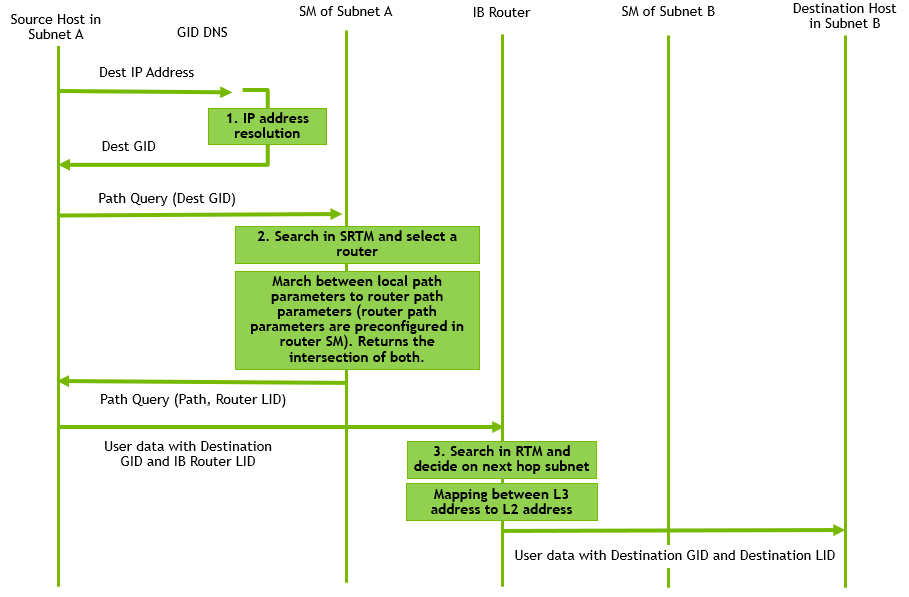
For more information on IB router architecture and functionality, please refer to the community post IB Router Architecture and Functionality.
IB router requires HCA configuration such as SM, partition key, MPI, GID translation, and more. To learn more about these configurations, please refer to the following community posts:
The minimal UFM SM version for NDR multi-SWID functionality is 5.15 and above.
Configuring IB Router
Prerequisites
-
Check system capabilities to make sure IB L3 is supported. Run:
switch (config) # show system capabilities
IB: Supported, L2, L3, Adaptive Routing, Split Ready
Max SM nodes: 2048
IB Max licensed speed: NDR
Please notice the second line in the output.
-
Configure system profile to multi-switch with 2 SWIDs.
switch (config) # system profile ib num-of-swids 2 ib-router
Note that all interfaces are mapped to subnet infiniband-default.
-
Verify system profile configuration.
switch (config) # show system profile
Profile                : ib
Number of SWIDs        : 2
Adaptive Routing       : yes
Adaptive Routing Groups: 256
Split Ready            : no
IB Routing             : yes
Note the number of SWIDs configured and that IB Routing is set to “yes”.
Configuring IB Router
-
Map an interface to a SWID.
switch (config) # interface ib 1/1/1 switchport access subnet infiniband-default force
switch (config) # interface ib 1/1/2 switchport access subnet infiniband-1 force
-
Verify SWID configuration on the aforementioned interfaces.
switch (config) # show interfaces ib status
-----------------------------------------------------------------------------------------------------------------------------------
Interface      Description     IB Subnet            Speed           Current line rate   Logical port state   Physical port state
-----------------------------------------------------------------------------------------------------------------------------------
IB1/1/1                        infiniband-default   ndr             400.0 Gbps          Initialize           LinkUp
IB1/1/2                        infiniband-1         ndr             400.0 Gbps          Initialize           LinkUp
IB1/2/1                        infiniband-default   -               -                   Down                 Polling
IB1/2/2                        infiniband-default   -               -                   Down                 Polling
IB1/3/1                        infiniband-default   -               -                   Down                 Polling
IB1/3/2                        infiniband-default   -               -                   Down                 Polling
IB1/4/1                        infiniband-default   -               -                   Down                 Polling
IB1/4/2                        infiniband-default   -               -                   Down                 Polling
IB1/5/1                        infiniband-default   -               -                   Down                 Polling
..
-
Configure and enable InfiniBand router.
switch (config) # ib router
switch (config) # no ib router shutdown
-
Enable IB subnet interface.
switch (config) # no interface ib-subnet infiniband-default shutdown
switch (config) # no interface ib-subnet infiniband-1 shutdown
-
Verify configuration.
switch (config) # show ib router

Routing state: enabled
---------------------------------------
IB subnet               Routing enabled
---------------------------------------
infiniband-default      enabled
infiniband-1            enabled
switch (config) # show interfaces ib-subnet infiniband-default

infiniband-default state:
  GUID              : 90:0A:84:03:00:40:C9:C8
  Alias GID         : N/A
  LID               : 4
  Subnet prefix     : FE:C0:00:00:00:00:00:11
  Physical state    : LinkUp
  Logical state     : Active
  L3 interface state: Up
IP to GID Resolution
-
Go to the following Github:
https://github.com/Mellanox/ip2gid
-
Clone the Git repository
-
Compile and run on each node in the fabric
-
Change the device MAC address of the IPoIB device to be based on the alias GID and not the GUID.
For example, # echo fec0:0000:0000:0003:0014:0500:0000:0001 > /sys/class/net/ib0/set_mac
where fe:c0:00:00:00:00:00:02:00:14:05:00:00:00:00:01 is the alias GID given by the SM to that node. -
Add route using "ip route add" command to the relevant hosts.
# ifconfig ib0 12.0.3.1/24 --> set ip for ib0
# ip route add 12.0.1.0/24 via 12.3.0.250 --> adding route to hosts with 12.1.xxx.xxx IP
# ip route add 12.0.2.0/24 via 12.3.0.250 --> adding route to hosts with 12.2.xxx.xxx IP
Subnet Prefix Checking
Subnet prefix checking only applies for when MLNX OS subnet manager is running in the InfiniBand fabric.
Subnet manager can’t be started on the switch with IB router functionality enabled.
To allow InfiniBand routing, the subnet prefixes in all routable subnets must be in site-local format - fe:c0:00:00:00:00:00:xx:xx (e.g. fe:c0:00:00:00:00:00:00:01).
By default, the command which defines the subnet prefix of the Infiniband subnet, validates the subnet prefix before allowing the change.
For proper IB management of the Infiniband fabric including IB routers, the recommended order of commands is as follows:
-
ib sm subnet-prefix – configures the subnet prefix
-
ib sm rtr-aguid-enable <1 | 2> – enables support for Host alias GIDs needed for sending routable traffic.
-
ib sm enable – start SM on this node or any node in cluster.
To disable subnet prefix checking
-
Verify the status of subnet prefix override. Run:
switch (config) # show ib sm subnet-prefix-override
enable
-
If enabled, disable subnet-prefix-override. Run:
switch (config) # ib sm subnet-prefix-override
-
Verify configuration. Run:
switch (config) # show ib sm subnet-prefix-override
disable
IB Router Commands
ib router
|
|
ib router
Enables the set of commands that allow control of IB router functionality.
|
|
|
Syntax Description |
N/A |
|
|
Default |
N/A |
|
|
Configuration Mode |
config |
|
|
History |
3.6.0500 |
|
|
Example |
switch (config) # ib router |
|
|
Related Commands |
system profile |
|
|
Notes |
|
|
ib router shutdown
|
|
ib router shutdown
Disables IB router.
|
|
|
Syntax Description |
N/A |
|
|
Default |
Disabled |
|
|
Configuration Mode |
config |
|
|
History |
3.6.0500 |
|
|
Example |
switch (config) # no ib router shutdown |
|
|
Related Commands |
|
|
|
Notes |
This command does not clear IB router configuration |
|
interface ib-subnet
|
|
interface ib-subnet <swid-name>
Creates routing on IB router subnet.
|
|
|
Syntax Description |
swid-name |
Name of the SWID: infiniband-default, infiniband-1...infiniband-5 |
|
Default |
N/A |
|
|
Configuration Mode |
config |
|
|
History |
3.6.0500 |
|
|
Example |
switch (config) # interface ib-subnet infiniband-3 |
|
|
Related Commands |
system profile |
|
|
Notes |
The maximum number of SWIDs depends on the number of SWIDs defined in the profile |
|
interface ib-subnet shutdown
|
|
interface ib-subnet <swid-name> shutdown
Disables routing on IB router subnet.
|
|
|
Syntax Description |
swid-name |
Name of the SWID: infiniband-default, infiniband-1...infiniband-5 |
|
shutdown |
Admin down on router interface
|
|
|
Default |
Disabled |
|
|
Configuration Mode |
config |
|
|
History |
3.6.0500 |
|
|
Example |
switch (config) # no interface ib-subnet infiniband-3 shutdown |
|
|
Related Commands |
|
|
|
Notes |
|
|
show ib router
|
|
show ib router Displays current IB router functionality. |
|
|
Syntax Description |
N/A |
|
|
Default |
N/A |
|
|
Configuration Mode |
Any command mode |
|
|
History |
3.6.0500 |
|
|
Example |
switch (config) # show ib router Routing state: enabled IB Subnet Routing enabled infiniband-default enabled infiniband-1 disabled infiniband-2 enabled infiniband-3 enabled |
|
|
Related Commands |
|
|
|
Notes |
|
|
show interfaces ib-subnet
|
|
show interfaces ib-subnet [<swid-name>] [brief] Displays statistics of one or all IB subnets with enabled IB routing. |
|
|
Syntax Description |
swid-name |
Name of the SWID: infiniband-default, infiniband-1...infiniband-5 |
|
brief |
Displays output in a table format |
|
|
Default |
Disabled |
|
|
Configuration Mode |
config |
|
|
History |
3.6.0500 |
|
|
Example |
switch (config) # show interfaces ib-subnet infiniband-3 infiniband-3 state: GUID : F4:52:14:03:00:6E:F2:8B Alias GID : N/A LID : 10 Subnet prefix : FE:C0:00:00:00:00:00:08 Physical state : LinkUp Logical state : Active L3 interface state : Up |
|
|
Related Commands |
|
|
|
Notes |
|
|
Last updated: