

NMX Telemetry supports three levels of the configuration interface, suitable for the various deployment and usage modes:
-
Configuration with NVOS/NVUE command line interface for the NVOS/NVUE users
-
Configuration via NMX-C for the standalone distributions of NMX cluster applications
-
Configuration with custom http interface for the package-based installation
All three levels of the configuration are eventually consistent.
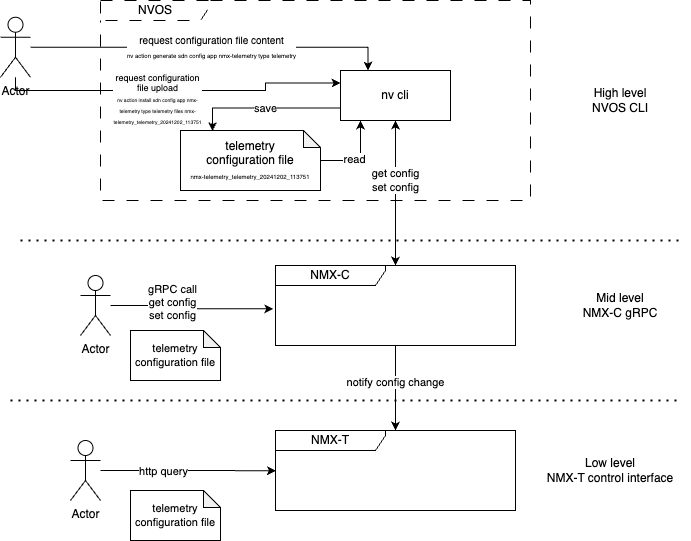
Configuration Unit and Format
-
Configuration unit is a fileentire configuration file is saved and loaded, including all the parametersParameters could be one or many configuration from (1.2.3-GB200-1.3) Telemetry Collection ConfigurationIf parameter is missing default value is implied
-
File content must be compliant to Linux INI format (https://en.wikipedia.org/wiki/INI_file), with the following restrictions:format “key = value”No support for sectionsNo support for hierarchyCase insensitiveSupport for commentsNo support for duplicate namesSupport for Quoted valuesSupport for Line continuationSupport for Escape characters
Example:
nvl_telemetry.enabled = true
nvl_telemetry.update_period = 30
Configuration Parameters
List of supported configuration parameters. Use Telemetry Collection Configuration to retrieve an up-to-date list of supported parameters.
|
Parameter |
Type |
Description |
Default |
|---|---|---|---|
|
connector.log_data |
boolean |
Dump telemetry data payloads to the connector's log output |
false |
|
NVL5 Telemetry confgiuration |
|||
|
nvl_telemetry.enabled |
boolean |
Enable or disable telemetry collection |
true |
|
nvl_telemetry.log_level |
integer |
Level of the log messaging 0 - disabled, 6 - Info, 7 - Debug |
6 |
|
nvl_telemetry.update_period |
integer |
Telemetry sampling and update period in seconds |
60 |
|
nvl_telemetry.collect.device.gpu |
boolean |
Enable or disable collection of the GPU counters |
true |
|
nvl_telemetry.collect.device.hca |
boolean |
Enable or disable collection of the HCA counters |
true |
|
nvl_telemetry.collect.device.router |
boolean |
Enable or disable collection of the router counters |
true |
|
nvl_telemetry.collect.device.switch |
boolean |
Enable or disable collection of the switch counters |
true |
|
nvl_telemetry.collect.down_port_counters |
boolean |
Let the telemetry to provide counters to the ports those are down |
true |
|
Telemetry generator configuration |
|||
|
nvl_telemetry.generator.enabled |
boolean |
Enable or disable telemetry data generator |
false |
|
nvl_telemetry.generator.profile.counters |
integer |
Number of counters in the data generation profile |
1900 |
|
nvl_telemetry.generator.profile.fields |
integer |
Number of fields in each event type within the data generation profile |
10 |
|
nvl_telemetry.generator.profile.ports |
integer |
Number of ports in the data generation profile |
48 |
|
nvl_telemetry.generator.profile.types |
integer |
Number of event data types in the data generation profile |
10 |
|
OpenTelemetry exporter configuration |
|||
|
nvl_telemetry.otlp.target |
string |
URL of an Open Telemetry receiver target |
|
|
nvl_telemetry.otlp.counter_set |
string |
Name of the counter-set to apply to the Open Telemetry exporter |
|
|
nvl_telemetry.otlp.field_set |
string |
Name of the field-set to apply to the Open Telemetry exporter |
|
|
nvl_telemetry.otlp.inbound_queue |
integer |
Length of the intake processing queue in data blocks the Open Telemetry exporter operates on |
10000 |
|
Prometheus remote write configuration |
|||
|
nvl_telemetry.remote_write.target |
string |
URL of a Prometheus Remote write receiver target |
|
|
nvl_telemetry.remote_write.counter_set |
string |
Name of the counter-set to apply to the remote write exporter |
|
|
nvl_telemetry.remote_write.field_set |
string |
Name of the field-set to apply to the remote write exporter |
|
|
nvl_telemetry.remote_write.inbound_queue |
integer |
Length of the intake processing queue in data blocks the Prometheus Remote write exporter operates on |
10000 |
|
gNMI aggregator configuration |
|||
|
gnmi_aggregator.enabled |
boolean |
Enable or disable gnmi aggregation |
true |
|
gnmi_aggregator.targets.0.host |
string |
Name or IP address of the gNMI target |
|
|
gnmi_aggregator.targets.0.port |
integer |
Port number of the gNMI target |
9339 |
|
gnmi_aggregator.targets.0.auth.user |
string |
User name for the basic auth |
|
|
gnmi_aggregator.targets.0.auth.password |
string |
Password for the basic auth. See Telemetry Collection Configuration | id (1.2.3 GB200 1.3)TelemetryCollectionConfiguration SecretsEncoding below. |
|
NVOS Command Line Interface
Configuration workflow reflected in the CLI interface commands:
-
Reveal list of configuration files available to the NMX-C. Should indicate both nmx-telemetry and nmx-controller installed, component "telemetry" present in the description of nmx-controller.
nv show cluster apps -
Get the configuration file.
nv action generate sdn config app nmx-telemetry type telemetry -
Locate the copy of configuration file.
nv show sdn config app nmx-telemetry type telemetry fileFile location would be similar to the following.
/host/cluster_infra/app_config/nmx-telemetry/telemetry/nmx-telemetry_telemetry_20241202_113751 -
Modify the location as needed.
cat /host/cluster_infra/app_config/nmx-telemetry/telemetry/nmx-telemetry_telemetry_20241202_113751 ... vim /host/cluster_infra/app_config/nmx-telemetry/telemetry/nmx-telemetry_telemetry_20241202_113751 -
Upload the modified configuration by providing the name of the file
nv action install sdn config app nmx-telemetry type telemetry files nmx-telemetry_telemetry_20241202_113751
NMX-Controller gRPC Interface
Mid-level configuration entry point, use NMX-C gRPC to retrieve and update the telemetry configuration.
Starting from NMX-C 0.8.0_2024-12-12, the default key/value separator for configuration tables is a space. For compatibility reasons, the following commands convert the space separator into an equal sign separator and vice versa. The default value must be updated.
-
Register the client's identifier "test_client" to enable the gateway to recognize the client.
docker run --network=host fullstorydev/grpcurl -plaintext -d \ '{ "gatewayId": "test_client", "major_version": "PROTO_MSG_MAJOR_VERSION", "minor_version": "PROTO_MSG_MINOR_VERSION" }' \ 0.0.0.0:9372 nmxc_service.NMXCService.Hello -
Get the telemetry configuration file.
docker run --network=host fullstorydev/grpcurl -plaintext -d \ '{"configFiles": {"configFile": [{"configFileName": "telemetry"}]},"gatewayId": "test_client"}'\ 0.0.0.0:9372 nmxc_service.NMXCService.GetStaticConfig \ | jq -r '.staticConfig.configFileContents.configFileContent[] | .configFileContent ' | sed -e 's/ / = /' | sort > telemetry.ini -
Set the configuration file.
docker run --network=host fullstorydev/grpcurl -plaintext -d \
  "$(jq -R -s '{"gatewayId": "test_client","staticConfig": {"configFileContents": {"configFileContent": [{"configFileName": "telemetry","configFileContent": gsub(" = "; "   ")}]}}}' telemetry.ini)" \
  0.0.0.0:9372 nmxc_service.NMXCService.SetStaticConfig
NMX-Telemetry Control Interface
Low-level configuration entry point, use the NMX-T runtime configuration interface to retrieve and update the telemetry configuration.
Get the Full Configuration File
-
In flatten INI format, compatible with NVOS
curl http://0.0.0.0:9350/telemetry/config
-
In JSON structured format
curl -H "Accept: application/json" http://0.0.0.0:9350/telemetry/config | jq
Upload the Full Configuration File
Using the POST method, the entire configuration state is replaced by the content of the file, with missing fields populated by default values.
-
In flatten INI format, compatible with NVOS
curl -X POST --data-binary @telemetry.ini http://0.0.0.0:9350/telemetry/config
-
In JSON structured format
curl -X POST -H "Content-Type: application/json" --data @telemetry.json http://0.0.0.0:9350/telemetry/config
Partial Configuration Update
Using the PUT method, the configuration state is updated with the file content, while leaving unspecified parameters unchanged.
-
In flatten INI format, compatible with NVOS
curl -X PUT --data-binary $'nvl_tlemetry.enabled = true \n nvl_tlemetry.sample_rate = 120' http://0.0.0.0:9350/telemetry/config
-
In JSON structured format
curl -X PUT -H "Content-Type: application/json" --data-binary '{"nvl_telemetry":{"enabled": true, "update_period" : 300}}}' http://0.0.0.0:9350/telemetry/config
List the Supported Configuration Parameters
Retrieve the list of parameters as a plain table.
curl http://0.0.0.0:9350/telemetry/config/params
Secrets Encoding
To ensure secure storage of sensitive authentication data - such as gNMI switch interface passwords - NMX-T includes a built-in secrets encoding tool.
Encoding a Secret
echo -n "password" | /usr/share/cluster_pkgs/nmx-telemetry/scripts/secrets.sh encode
Applying the Encoded Secret
Once encoded, insert the value into the telemetry configuration as follows:
curl -X PUT --data-binary $'gnmi_aggregator.targets.0.auth.password = ENCODEDSECRET' http://0.0.0.0:9350/telemetry/config
Last updated: