

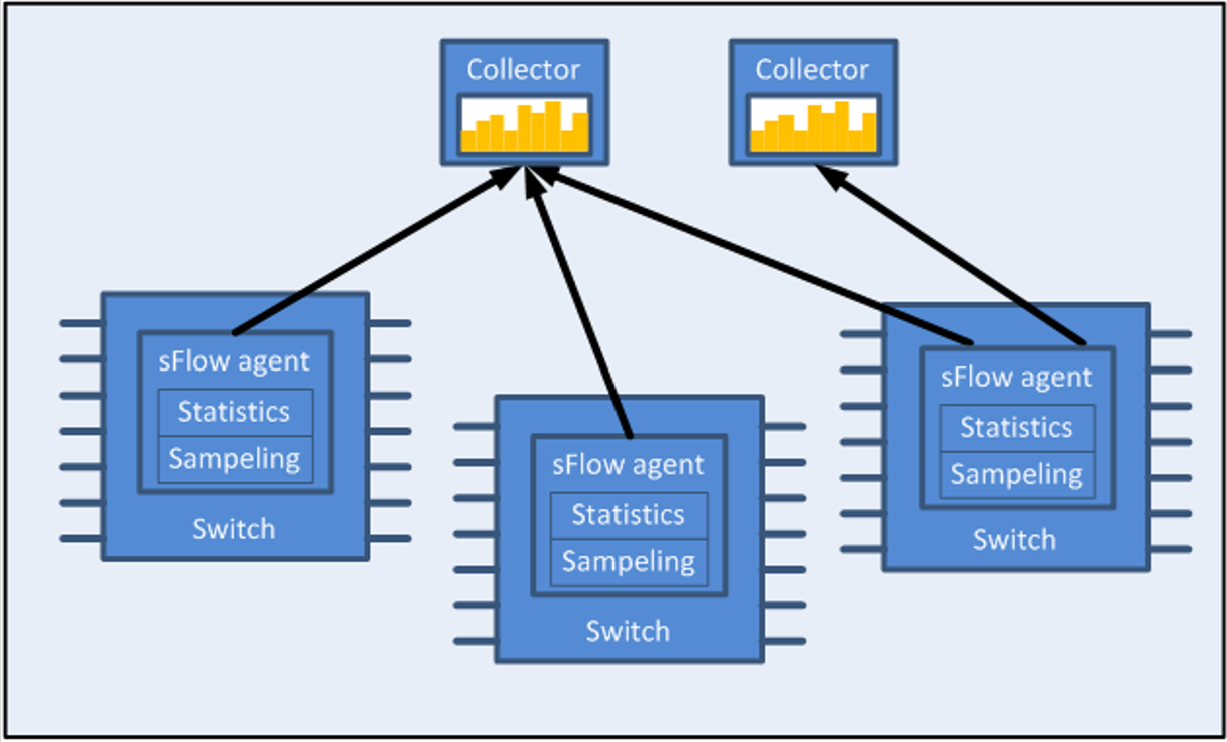
sFlow (ver. 5) is a procedure for statistical monitoring of traffic in networks.NVIDIAOnyx supports an sFlow sampling mechanism (agent), which includes collecting traffic samples and data from counters. The sFlow datagrams are then sent to a central collector.
The sampling mechanism must ensure that any packet going into the system has an equal chance of being sampled, irrespective of the flow to which it belongs. The sampling mechanism provides the collector with periodical information on the amount (and load) of traffic per interface by loading the counter samples into sFlow datagrams.
The sFlow packets are encapsulated and sent in UDP over IP. The UDP port number that is used is the standard 6343 by default.
Flow Samples
The sFlow agent samples the data path based on packets.
Truncation and sampling rate are the two parameters that influence the flow samples. In case of congestion the flow samples can be truncated to a predefined size before it is assigned to the CPU. The truncation can be set to any value between 64 to 256 bytes with the default being 128 bytes.
The sampling rate can be adjusted by setting an average rate. The system assures that a random number of packets is sampled, however, the sample rate on average converges to the configured rate. Valid values range between 4000 to 16777215 packets.
The sFlow sends flow samples using an expanded flow sample format.
Statistical Samples
The sFlow agent samples interface counters time based. Polling interval is configurable to any value between 5-3600 seconds with the default being 20 seconds.
The sFlow sends statistical samples using an expanded counter sample format.
The following statistics are gathered by the CPU:
|
Counter |
Description |
|---|---|
|
Total packets |
The number of packets that pass through sFlow-enabled ports |
|
Number of flow samples |
The number of packets that are captured by the sampling mechanism |
|
Number of statistic samples |
The number of statistical samples |
|
Number of discarded samples |
The number of samples that were discarded |
|
Number of datagrams |
The number of datagrams that were sent to the collector |
sFlow Datagrams
The sFlow datagrams contain flow samples and statistical samples.
The sFlow mechanism uses IP protocol, therefore if the packet length is more than the interface MTU, it becomes fragmented by the IP stack. The MTU may also be set manually to anything in the range of 200-9216 bytes. The default is 1400 bytes.
Sampled Interfaces
sFlow must be enabled on physical or LAG interfaces that require sampling. When adding a port to a LAG, sFlow must be disabled on the port. If a port with enabled sFlow is configured to be added to a LAG, the configuration is rejected. Removing a port from a LAG disables sFlow on the port regardless of the LAG’s sFlow status.
Configuring sFlow
-
Unlock the sFlow commands.
switch (config) # protocol sflow -
Enable sFlow on the system.
switch (config) # sflow enable -
Enter sFlow configuration mode.
switch (config) # sflow switch (config sflow) # -
Set the central collector’s IP.
switch (config sflow) # collector-ip 10.10.10.10 -
Set the agent-ip used in the sFlow header.
switch (config sflow) # agent-ip 20.20.20.20 -
(Optional) Set the sampling rate of the mechanism.
switch (config sflow) # sampling-rate 16000This means that one every 16000 packet gets collected for sampling.
-
(Optional) Set the maximum size of the data path sample.
switch (config sflow) # max-sample-size 156 -
(Optional) Set the frequency in which counters are polled.
switch (config sflow) # counter-poll-interval 19 -
(Optional) Set the maximum size of the datagrams sent to the central collector.
switch (config sflow) # max-datagram-size 1500 -
Enable the sFlow agent on the desired interfaces.
switch (config interface ethernet 1/1)# sflow enable
switch (config interface port-channel 1)# sflow enable
Verifying sFlow
To verify the attributes of the sFlow agent:
switch (config)# show sflow
sflow protocol: enabled
sflow: enabled
sampling-rate: 16000
max-sampled-size: 156
counter-poll-interval: 19
max-datagram-size: 1500
collector-ip: 10.10.10.10
collector-port: 6343
agent-ip: 20.20.20.20

ingress ports:
Interfaces:
Ethernet: eth1/1
Port-channel: po1

Statistics:
Total Samples: 2000
Number of flow samples: 1200
Estimated Number of flow discarded: 0
Number of statistic samples: 800
Number of datagrams: 300
Additional Reading and Use Cases
For more information about this feature and its potential applications, please refer to the following community post:
sFlow Commands
protocol sflow
|
|
protocol sflow
Unhides the sFlow commands.
|
|
|
Syntax Description |
N/A |
|
|
Default |
Disabled |
|
|
Configuration Mode |
config |
|
|
History |
3.3.3500 |
|
|
Example |
switch (config) # protocol sflow |
|
|
Related Commands |
|
|
|
Notes |
|
|
sflow enable (global)
|
|
sflow enable
Enables sFlow in the system.
|
|
|
Syntax Description |
N/A |
|
|
Default |
Disabled |
|
|
Configuration Mode |
config |
|
|
History |
3.3.3500 |
|
|
Example |
switch (config) # sflow enable |
|
|
Related Commands |
|
|
|
Notes |
|
|
sflow
|
|
sflow Enters sFlow configuration mode. |
|
|
Syntax Description |
N/A |
|
|
Default |
N/A |
|
|
Configuration Mode |
config |
|
|
History |
3.3.3500 |
|
|
Example |
switch (config) # sflowswitch (config sflow) # |
|
|
Related Commands |
|
|
|
Notes |
|
|
sampling-rate
|
|
sampling-rate <rate>
Configures sFlow sampling ratio.
|
|
|
Syntax Description |
rate |
Configures the number of packets passed before selecting one for sampling
|
|
Default |
N/A |
|
|
Configuration Mode |
config |
|
|
History |
3.3.3500 |
|
|
Example |
switch (config) # protocol sflow |
|
|
Related Commands |
|
|
|
Notes |
|
|
max-sample-size
|
|
max-sample-size <packet-size>
Configures the maximum size of sampled packets by sFlow.
|
|
|
Syntax Description |
packet-size |
The sampled packet size
|
|
Default |
N/A |
|
|
Configuration Mode |
config |
|
|
History |
3.3.3500 |
|
|
Example |
switch (config sflow) # max-sample-size 165 |
|
|
Related Commands |
|
|
|
Notes |
Sampled payload beyond the configured size is discarded |
|
counter-poll-interval
|
|
counter-poll-interval <seconds>
Configures the sFlow statistics polling interval.
|
|
|
Syntax Description |
seconds |
The sFlow statistics polling interval in seconds
|
|
Default |
20 seconds |
|
|
Configuration Mode |
config |
|
|
History |
3.3.3500 |
|
|
Example |
switch (config sflow) # counter-poll-interval 30 |
|
|
Related Commands |
|
|
|
Notes |
|
|
max-datagram-size
|
|
max-datagram-size <packet-size>
Configures the maximum sFlow packet size to be sent to the collector.
|
|
|
Syntax Description |
packet-size |
The packet size of the packet being sent to the collector
|
|
Default |
1400 bytes |
|
|
Configuration Mode |
config |
|
|
History |
3.3.3500 |
|
|
Example |
switch (config sflow) # max-datagram-size 9216 |
|
|
Related Commands |
|
|
|
Notes |
This packet contains the data sample as well as the statistical counter data |
|
collector-ip
|
|
collector-ip <ip-address> [udp-port <udp-port-number>]
Configures the collector’s IP.
|
|
|
Syntax Description |
ip-address |
The collector IP address |
|
udp-port |
Configures the collector UDP port number |
|
|
Default |
ip-address: 0.0.0.0
|
|
|
Configuration Mode |
config |
|
|
History |
3.3.3500 |
|
|
Example |
switch (config sflow) # collector-ip 10.10.10.10 |
|
|
Related Commands |
|
|
|
Notes |
|
|
agent-ip
|
|
agent-ip {<ip-address> | interface [ethernet <slot/port> | port-channel <channel-group>] | <if-name> | loopback <number> | vlan <id>}
Configures the IP address associated with this agent.
|
|
|
Syntax Description |
interface |
Configures a specific Ethernet/LAG interface’s agent IP |
|
if-name |
Interface name (e.g. mgmt0, mgmt1) |
|
|
ip-address |
The sFlow agent’s IP address (i.e. the source IP of the packet) |
|
|
loopback |
Loopback interface number
|
|
|
vlan |
Interface VLAN
|
|
|
Default |
ip-address: 0.0.0.0 |
|
|
Configuration Mode |
config |
|
|
History |
3.3.3500 |
|
|
3.3.5200 |
Updated “interface” parameters |
|
|
Example |
switch (config sflow) # agent-ip 20.20.20.20 |
|
|
Related Commands |
|
|
|
Notes |
The IP address here is used in the sFlow header |
|
clear counters
|
|
clear counters Clears sFlow counters. |
|
|
Syntax Description |
N/A |
|
|
Default |
N/A |
|
|
Configuration Mode |
config |
|
|
History |
3.3.3500 |
|
|
Example |
switch (config sflow) # clear counters |
|
|
Related Commands |
|
|
|
Notes |
|
|
sflow enable (interface)
|
|
sflow enable
Enables sFlow on this interface.
|
|
|
Syntax Description |
N/A |
|
|
Default |
disable
|
|
|
Configuration Mode |
config interface ethernet
|
|
|
History |
3.3.3500 |
|
|
3.3.4500 |
Added MPO configuration mode |
|
|
Example |
switch (config interface ethernet 1/1)# sflow enable |
|
|
Related Commands |
|
|
|
Notes |
|
|
show sflow
|
|
show sflow Displays sFlow configuration and counters. |
|
|
Syntax Description |
N/A |
|
|
Default |
N/A |
|
|
Configuration Mode |
Any command mode |
|
|
History |
3.3.3500 |
|
|
3.6.3004 |
Updated example |
|
|
3.6.6000 |
Updated example |
|
|
3.9.2000 |
Updated example, adding VRF field |
|
|
Example |
switch (config)# show sflow sflow protocol: enabled sflow: enabledVRF name: mgmt sampling-rate: 16000 max-sample-size: 128 counter-poll-interval: 20 max-datagram-size: 1400 ip-agent: 0.0.0.0 ingress ports: Interfaces: Ethernet eth1/2 eth1/1 Statistics: Total Samples: 0 Number of flow samples: 0 Estimated Number of flow discarded: 0 Number of flow statistics samples: 0 Number of datagrams: 0 |
|
|
Related Commands |
|
|
|
Notes |
|
|
Last updated: