

Front Panel Monitoring Components
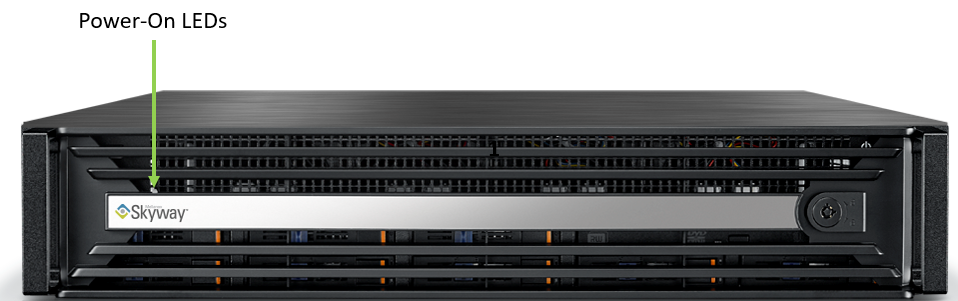
Power-On LED
There is one I/O LED (green) on the front panel to indicate if the system is powered.
|
LED State |
Color |
Description |
|---|---|---|
|
On |
Green |
System is turned on |
|
Blinking |
Green |
System is under S4 state |
|
Off |
N/A |
Power off |
Rear Panel LEDs
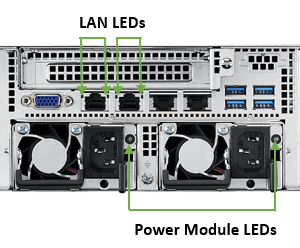
LAN Interfaces LEDs
LAN3/LAN4 Rear I/O LED Interface
There are two I/O LEDs (green and amber) to indicate LAN link and activity.
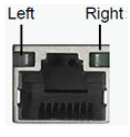
|
Left LED |
Right LED |
Description |
|---|---|---|
|
Off |
Green |
10M bps linked |
|
Off |
Blinking Green |
10M bps active |
|
Amber |
Green |
100M bps linked |
|
Amber |
Blinking Green |
100M bps active |
|
Green |
Green |
1G bps linked |
|
Green |
Blinking Green |
1G bps active |
|
Off |
Off |
No link |
LAN1/LAN 2 Rear I/O LED Interface
There are two I/O LEDs (green and amber) to indicate LAN link and activity.
|
Left LED |
Right LED |
Description |
|---|---|---|
|
Amber |
Green |
1G bps linked |
|
Amber |
Blinking Green |
1G bps active |
|
Green |
Green |
10G bps linked |
|
Green |
Blinking Green |
10G bps active |
|
Off |
Off |
No link |
Power Module LED
There are two I/O LEDs (amber and green) to indicate the power module state.
|
LED State |
Color |
Description |
|---|---|---|
|
Blinking |
Amber |
Power supply warning event |
|
Blinking |
Green |
AC present standy output on |
|
On |
Amber |
AC unplug to this module or power supply critical event |
|
On |
Green |
Power supply DC output ON and OK |
|
Off |
Off |
No AC power to both power modules |
Network Interface Cards LEDs
There are two I/O LEDs per port:
-
LED 1 and 2: Bi-color I/O LED which indicates link status. LED behavior is described below for Ethernet and InfiniBand port configurations.
-
LED 3 and 4: Reserved for future use.
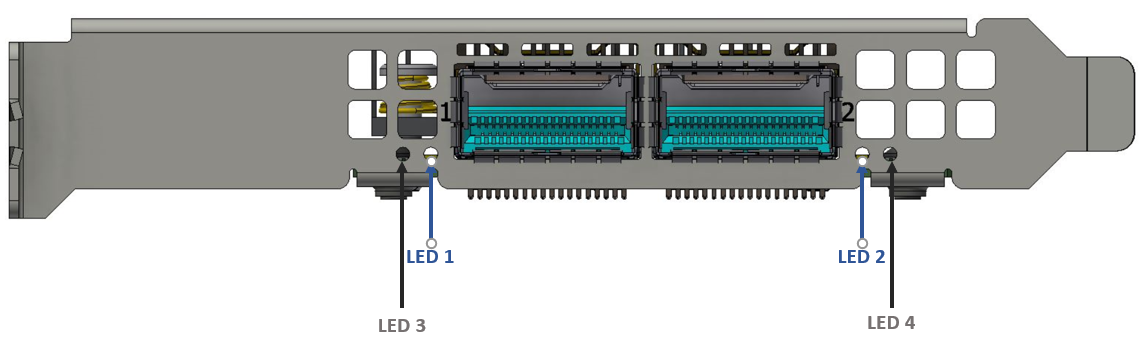
LED1 and LED2 Link Status Indications (Physical and Logical)—Ethernet Protocol
|
LED Color and State |
Description |
|---|---|
|
Off |
A link has not been established. |
|
Blinking amber |
1 Hz blinking amber occurs when a beacon command for locating the adapter card running .
|
|
Solid green |
Indicates a valid link with no active traffic. |
|
Blinking green |
Indicates a valid logical link with active traffic. |
LED1 and LED2 Link Status Indications (Physical and Logical)—InfiniBand Protocol
|
LED Color and State |
Description |
|---|---|
|
Off |
A physical link has not been established. |
|
Solid amber |
Indicates an active physical link. |
|
Blinking amber |
1 Hz blinking amber occurs when a beacon command for locating the adapter card is running.
|
|
Solid green |
Indicates a valid logical (data activity) link with no active traffic. |
|
Blinking green |
Indicates a valid logical link with active traffic. |
Last updated: