

Created on December 25, 2025
Scope
This Reference Deployment Guide (RDG) provides detailed instructions for deploying a Kubernetes (K8s) cluster using NVIDIA® BlueField®-3 DPUs and DOCA Platform Framework (DPF) in Host-Trusted mode. The guide covers setting up multiple services on multiple NVIDIA® BlueField®-3 DPUs: accelerated OVN-Kubernetes, Host-Based Networking (HBN) services, and additional complementary services on one DPU, while setting NVIDIA DOCA Storage-Defined Network Accelerated Processing (SNAP) in Virtio-fs mode with HBN on the other DPU.
This document is an extension of the RDG for DPF with OVN-Kubernetes and HBN Services (referred to as the Baseline RDG). It details the additional steps and modifications required to deploy SNAP-VirtioFS with HBN in addition to the services in the Baseline RDG and orchestrate them on a multiple DPUs.
Leveraging NVIDIA's DPF, administrators can provision and manage DPU resources within a Kubernetes cluster while deploying and orchestrating HBN, accelerated OVN-Kubernetes and SNAP Virtio-fs services on multiple DPUs. This approach enables full utilization of NVIDIA DPU hardware acceleration and offloading capabilities, maximizing data center workload efficiency and performance.
This guide is designed for experienced system administrators, system engineers, and solution architects who seek to deploy high-performance Kubernetes clusters and enable NVIDIA BlueField DPUs.
-
This reference implementation, as the name implies, is a specific, opiniated deployment example designed to address the use case described above
-
While other approaches may exist to implement similar solutions, this document provides a detailed guide for this particular method
Abbreviations and Acronyms
|
Term |
Definition |
Term |
Definition |
|---|---|---|---|
|
BFB |
BlueField Bootstream |
OVN |
Open Virtual Network |
|
BGP |
Border Gateway Protocol |
PVC |
Persistent Volume Claim |
|
CNI |
Container Network Interface |
RDG |
Reference Deployment Guide |
|
CRD |
Custom Resource Definition |
RDMA |
Remote Direct Memory Access |
|
CSI |
Container Storage Interface |
SF |
Scalable Function |
|
DOCA |
Data Center Infrastructure-on-a-Chip Architecture |
SFC |
Service Function Chaining |
|
DPF |
DOCA Platform Framework |
SNAP |
Storage-Defined Network Accelerated Processing |
|
DPU |
Data Processing Unit |
SR-IOV |
Single Root Input/Output Virtualization |
|
DTS |
DOCA Telemetry Service |
TOR |
Top of Rack |
|
HBN |
Host Based Networking |
VF |
Virtual Function |
|
IPAM |
IP Address Management |
VLAN |
Virtual LAN (Local Area Network) |
|
K8S |
Kubernetes |
VRR |
Virtual Router Redundancy |
|
MAAS |
Metal as a Service |
VTEP |
Virtual Tunnel End Point |
|
NFS |
Network File System |
VXLAN |
Virtual Extensible LAN |
Introduction
The NVIDIA BlueField-3 data processing unit (DPU) is a 400 Gb/s infrastructure compute platform designed for line-rate processing of software-defined networking, storage, and cybersecurity. BlueField-3 combines powerful computing, high-speed networking, and extensive programmability to deliver hardware-accelerated, software-defined solutions for demanding workloads.
NVIDIA DOCA unlocks the full potential of the NVIDIA BlueField platform, enabling rapid development of applications and services that offload, accelerate, and isolate data center workloads. One such example is DOCA SNAP Virtio-fs service, which allows hardware-accelerated, software-defined Virtio-fs PCIe device emulation. Using BlueField, users can offload and accelerate networked file system operations from the host, freeing up resources for other tasks and improving overall system efficiency. The DOCA SNAP service presents networked filesystem mounted within the BlueField as local volume to the host, allowing applications to interact directly with raw remote file system volume and bypassing traditional filesystem overhead.
Another example is Host-based Networking (HBN), a DOCA service that allows network architects to design networks based on layer-3 (L3) protocols. HBN enables routing to run on the server side by using BlueField as a BGP router. The HBN solution encapsulates a set of network functions inside a container, which is deployed as a service pod on BlueField's Arm cores, and allows user to optimize performance and accelerate traffic routing using DPU hardware.
In this solution, the SNAP Virtio-fs service deployed via NVIDIA DOCA Platform Framework (DPF) is composed of multiple functional components packaged into containers, which DPF orchestrates to run together with HBN on a specific set of DPUs in a multiple DPUs cluster. DPF simplifies DPU management by providing orchestration through a Kubernetes API. It handles the provisioning and lifecycle management of DPUs, orchestrates specialized DPU services, and automates tasks such as service function chaining (SFC).
This RDG extends the capabilities of the DPF-managed Kubernetes cluster described in the RDG for DPF with OVN-Kubernetes and HBN Services (referred to as the "Baseline RDG") by distributing the different DPU services between 2 pair of DPUs - one for OVN-Kubernetes, HBN, Blueman and DOCA Telemetry Service and additional DPU services as covered in the Baseline RDG, while the other pair for the SNAP Virtio-fs and an additional instance of the HBN service. This approach provides more granular control over which DPUs run specific services and allowing for better resource allocation, service isolation and scalability. It also demonstrates performance optimizations, including Jumbo frame implementation, with results validated through standard FIO workload test.
References
Solution Architecture
Key Components and Technologies
-
NVIDIA BlueField® Data Processing Unit (DPU)
The NVIDIA® BlueField® data processing unit (DPU) ignites unprecedented innovation for modern data centers and supercomputing clusters. With its robust compute power and integrated software-defined hardware accelerators for networking, storage, and security, BlueField creates a secure and accelerated infrastructure for any workload in any environment, ushering in a new era of accelerated computing and AI.
-
NVIDIA DOCA Software Framework
NVIDIA DOCA™ unlocks the potential of the NVIDIA® BlueField® networking platform. By harnessing the power of BlueField DPUs and SuperNICs, DOCA enables the rapid creation of applications and services that offload, accelerate, and isolate data center workloads. It lets developers create software-defined, cloud-native, DPU- and SuperNIC-accelerated services with zero-trust protection, addressing the performance and security demands of modern data centers.
-
NVIDIA ConnectX SmartNICs
10/25/40/50/100/200 and 400G Ethernet Network Adapters
The industry-leading NVIDIA® ConnectX® family of smart network interface cards (SmartNICs) offer advanced hardware offloads and accelerations.
NVIDIA Ethernet adapters enable the highest ROI and lowest Total Cost of Ownership for hyperscale, public and private clouds, storage, machine learning, AI, big data, and telco platforms.
-
NVIDIA LinkX Cables
The NVIDIA® LinkX® product family of cables and transceivers provides the industry’s most complete line of 10, 25, 40, 50, 100, 200, and 400GbE in Ethernet and 100, 200 and 400Gb/s InfiniBand products for Cloud, HPC, hyperscale, Enterprise, telco, storage and artificial intelligence, data center applications.
-
NVIDIA Spectrum Ethernet Switches
Flexible form-factors with 16 to 128 physical ports, supporting 1GbE through 400GbE speeds.
Based on a ground-breaking silicon technology optimized for performance and scalability, NVIDIA Spectrum switches are ideal for building high-performance, cost-effective, and efficient Cloud Data Center Networks, Ethernet Storage Fabric, and Deep Learning Interconnects.
NVIDIA combines the benefits of NVIDIA Spectrum™ switches, based on an industry-leading application-specific integrated circuit (ASIC) technology, with a wide variety of modern network operating system choices, including NVIDIA Cumulus® Linux, SONiC and NVIDIA Onyx®.
-
NVIDIA Cumulus Linux
NVIDIA® Cumulus® Linux is the industry's most innovative open network operating system that allows you to automate, customize, and scale your data center network like no other.
-
Kubernetes
Kubernetes is an open-source container orchestration platform for deployment automation, scaling, and management of containerized applications.
-
Kubespray
Kubespray is a composition ofAnsible
playbooks, inventory, provisioning tools, and domain knowledge for generic OS/Kubernetes clusters configuration management tasks and provides:
-
A highly available cluster
-
Composable attributes
-
Support for most popular Linux distributions
-
-
RDMA
RDMA is a technology that allows computers in a network to exchange data without involving the processor, cache or operating system of either computer.
Like locally based DMA, RDMA improves throughput and performance and frees up compute resources.
Solution Design
Solution Logical Design
The logical design includes the following components:
-
1 x Hypervisor node (KVM based) with ConnectX-7
-
1 x Firewall VM
-
1 x Jump VM
-
1 x MAAS VM
-
1 x Storage Target VM
-
3 x VMs running all K8s management components for Host/DPU clusters
-
-
2 x Worker nodes, each with a 2 x BlueField-3 NIC
-
Single 200 GbE High-Speed (HS) switch
-
1 GbE Host Management network
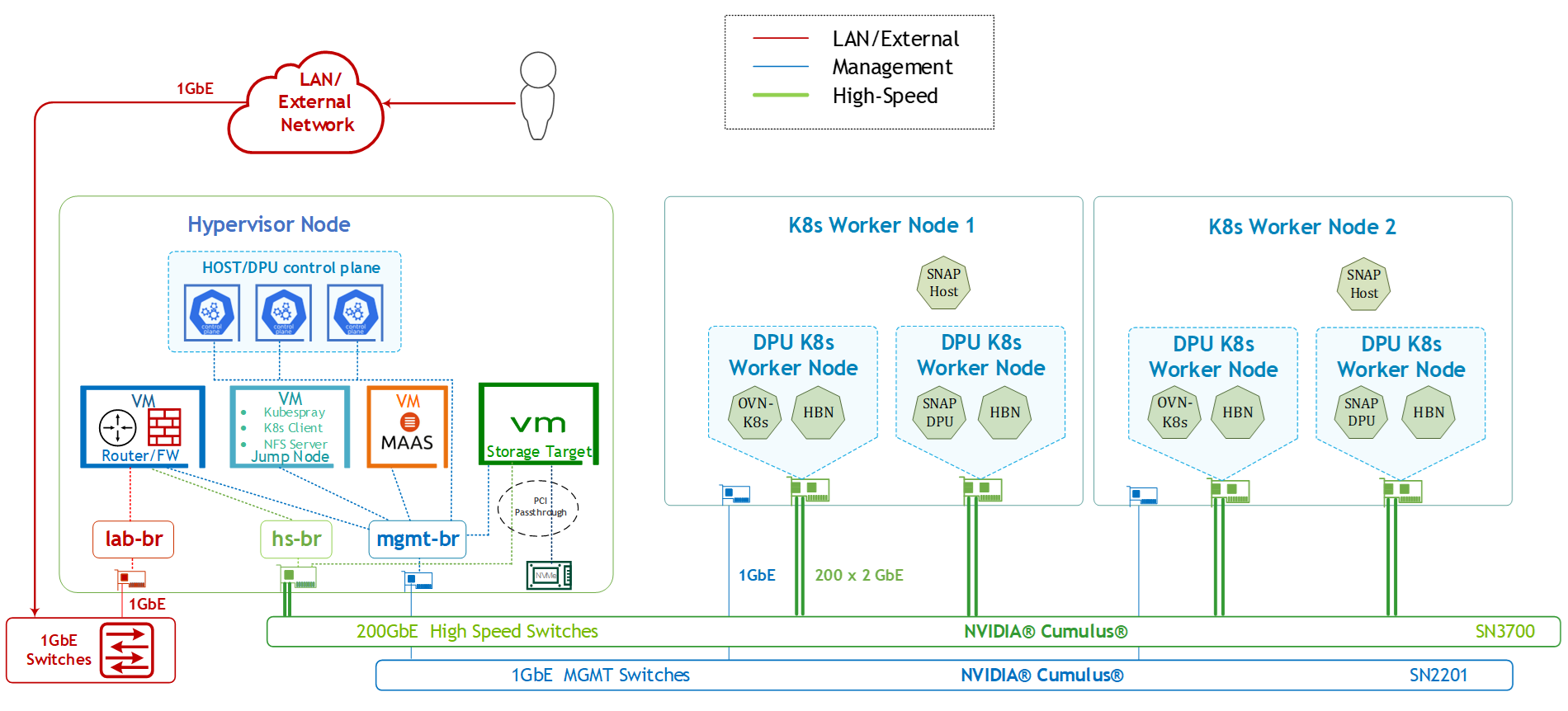
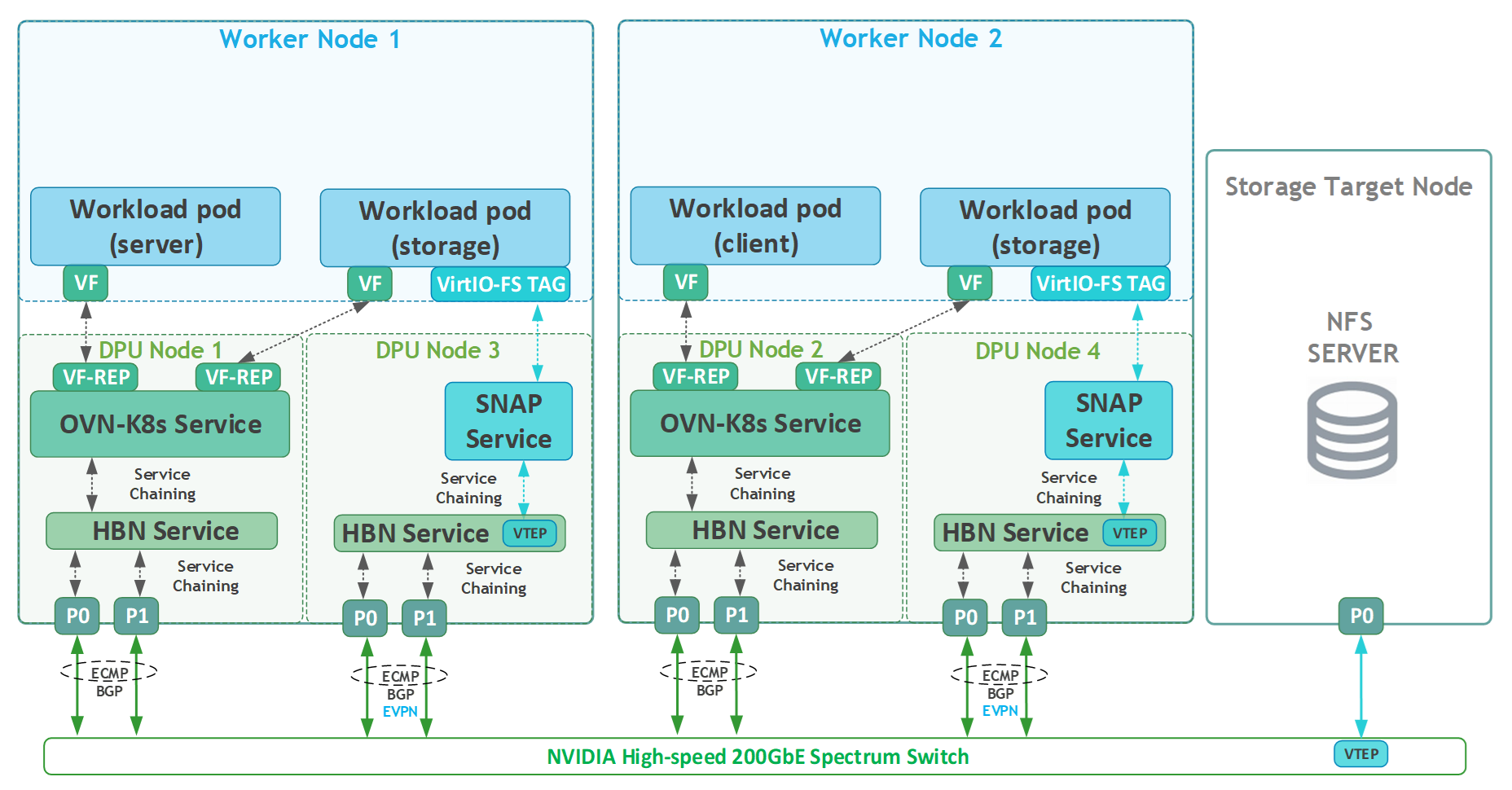
SFC Logical Diagram
The HBN+SNAP-VirtioFS services deployment leverages the Service Function Chaining (SFC) capabilities inherent in the DPF system, as described in the Baseline RDG for the HBN and OVN-Kubernetes (refer to section "Infrastructure Latency & Bandwidth Validation"). The following SFC logical diagram displays the complete flow for all of the services involved in the implemented solution:
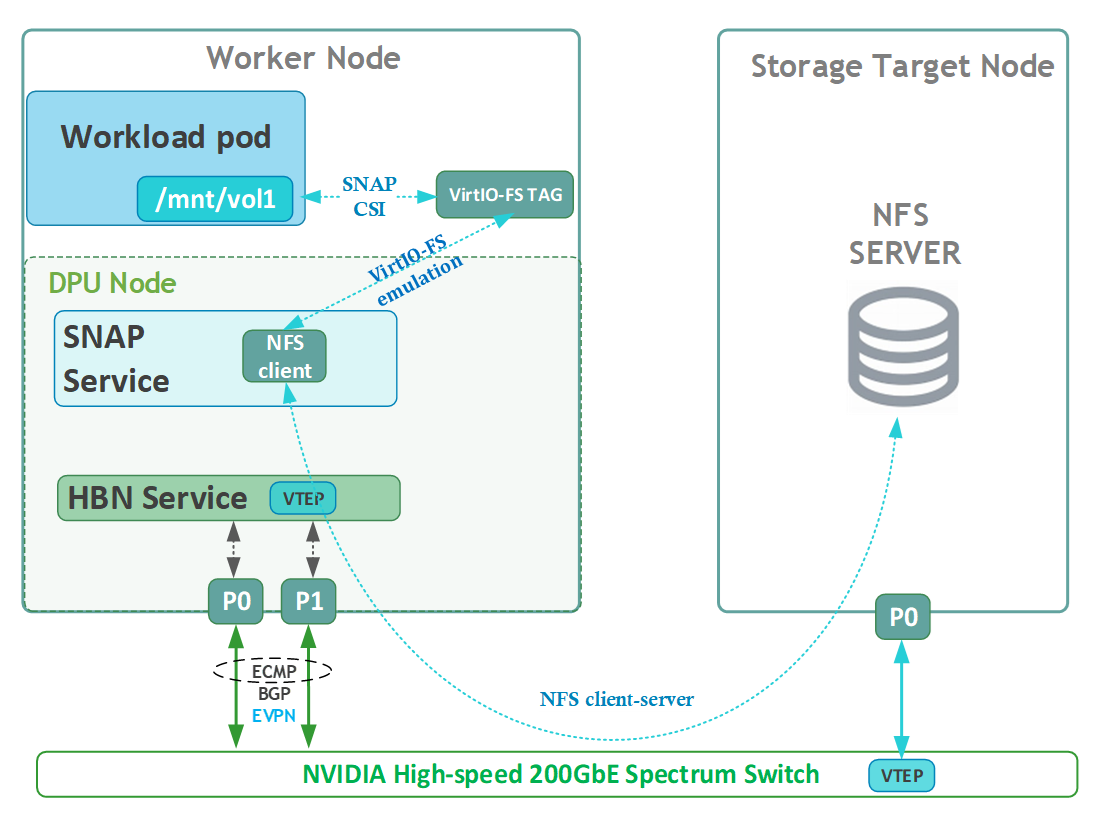
Volume Emulation Logical Diagram
The following logical diagram demonstrates the main components involved in a volume mount procedure to a workload pod.
In the Host Trusted mode, the hosts runs the SNAP CSI plugin, which performs all necessary actions to make storage resources available to the host. Users can utilize Kubernetes Storage APIs (StorageClass, PVC, PV, VolumeAttachment) to provision and attach storage to the host. Upon creation of PersistentVolumeClaim (PVC) object in the host cluster that references a storage class that specifies the SNAP CSI Plugin as its provisioner, the DPF storage subsystem components bring a NFS volume via NFS-kernel client to the required DPU K8s worker node. The DOCA SNAP service then emulates it as a Virtio-fs volume and presents the networked storage as local file system device to the host, which when requested by the kubelet is mounted into the Pod namespace by the SNAP CSI Plugin.
For a complete information about the different components involved in the emulation process and how they work together, refer to: DPF Storage Development Guide - NVIDIA Docs.
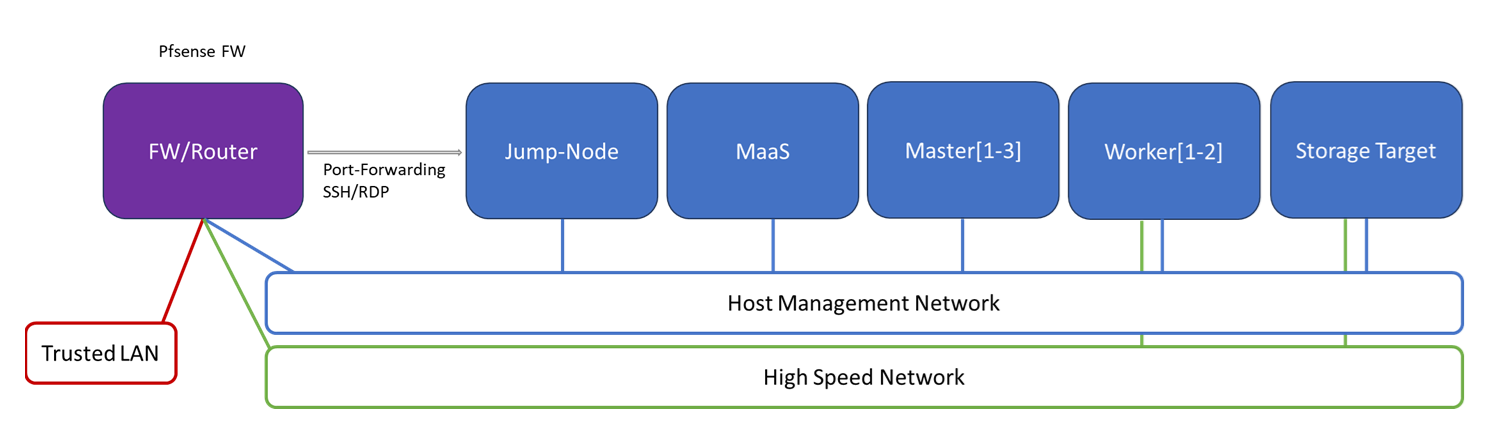
Firewall Design
The pfSense firewall in this solution serves a dual purpose:
-
Firewall – Provides an isolated environment for the DPF system, ensuring secure operations
-
Router – Enables internet access and connectivity between the host management network and the high-speed network
Port-forwarding rules for SSH and RDP are configured on the firewall to route traffic to the jump node’s IP address in the host management network. From the jump node, administrators can manage and access various devices in the setup, as well as handle the deployment of the Kubernetes (K8s) cluster and DPF components.
The following diagram illustrates the firewall design used in this solution:
Software Stack Components
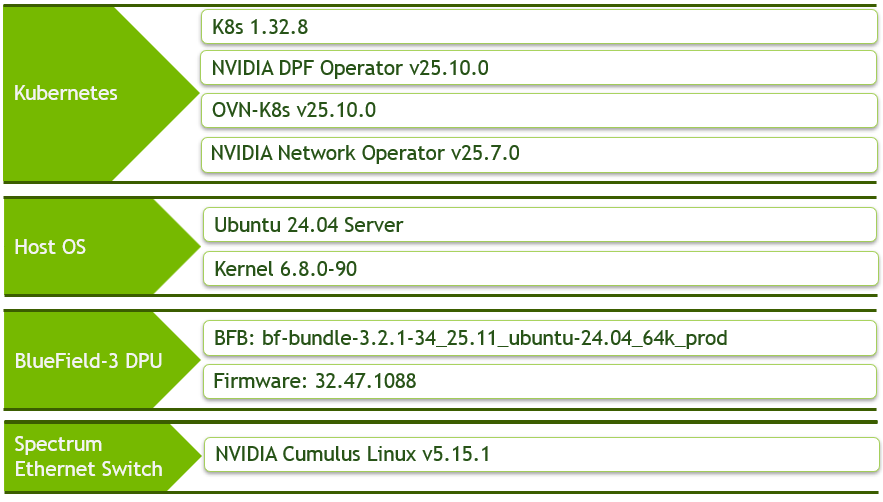
Make sure to use the exact same versions for the software stack as described above.
Bill of Materials
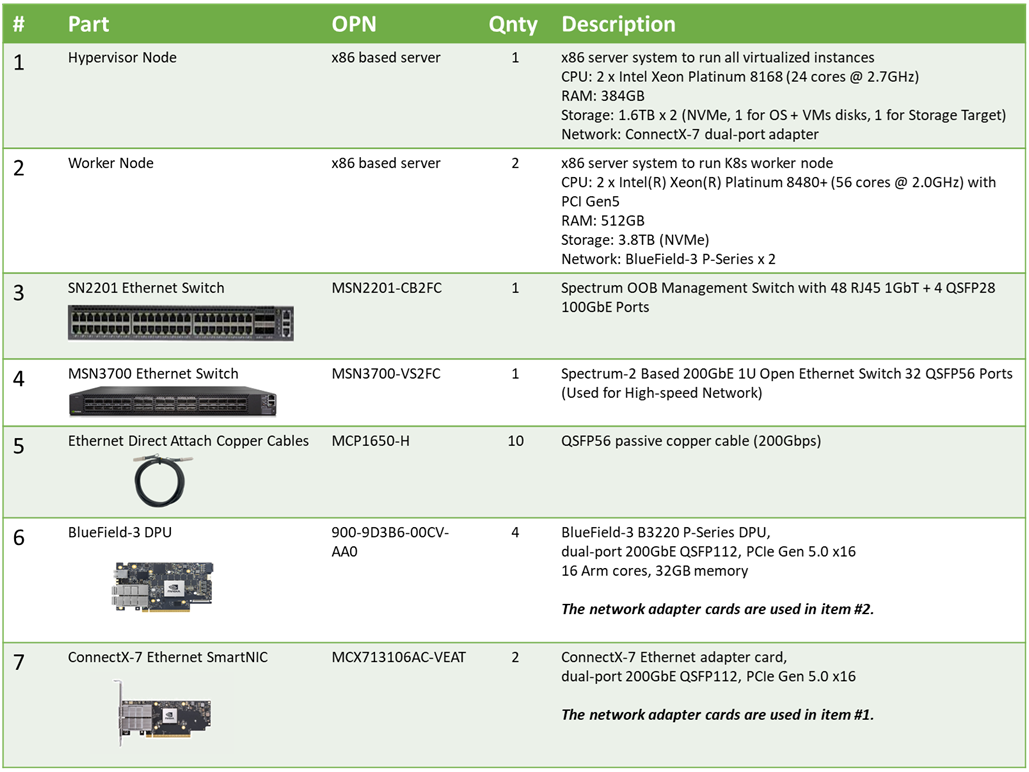
Deployment and Configuration
Node and Switch Definitions
These are the definitions and parameters used for deploying the demonstrated fabric:
|
Switch Port Usage |
||
|
|
1 |
swp1-3 |
|
|
1 |
swp1-2,11-18 |
|
Hosts |
|||||
|---|---|---|---|---|---|
|
Rack |
Server Type |
Server Name |
Switch Port |
IP and NICs |
Default Gateway |
|
Rack1
|
Hypervisor Node |
|
hs-switch: |
lab-br (interface eno1): Trusted LAN IP mgmt-br (interface eno2): - hs-br (interface ens2f0np0): - |
Trusted LAN GW |
|
Rack1
|
Worker Node |
|
mgmt-switch: hs-switch: |
ens14f0: 10.0.110.21/24 ens2f0np0/ens2f1np1: 10.0.120.0/22
|
10.0.110.254 |
|
Rack1
|
Worker Node |
|
mgmt-switch: hs-switch: |
ens14f0: 10.0.110.22/24 ens2f0np0/ens2f1np1: 10.0.120.0/22
|
10.0.110.254 |
|
Rack1 |
Firewall (Virtual) |
|
- |
WAN (lab-br): Trusted LAN IP LAN (mgmt-br): 10.0.110.254/24 OPT1 (hs-br): 172.169.50.1/30 |
Trusted LAN GW |
|
Rack1
|
Jump Node (Virtual) |
|
- |
enp1s0: 10.0.110.253/24 |
10.0.110.254 |
|
Rack1
|
MAAS (Virtual) |
|
- |
enp1s0: 10.0.110.252/24 |
10.0.110.254 |
|
Rack1
|
Storage Target Node (Virtual) |
|
- |
enp1s0: 10.0.110.30/24 enp5s0np1: 10.0.124.1/24 |
10.0.110.254 |
|
Rack1
|
Master Node (Virtual) |
|
- |
enp1s0: 10.0.110.1/24 |
10.0.110.254 |
|
Rack1
|
Master Node (Virtual) |
|
- |
enp1s0: 10.0.110.2/24 |
10.0.110.254 |
|
Rack1
|
Master Node (Virtual) |
|
- |
enp1s0: 10.0.110.3/24 |
10.0.110.254 |
Wiring
Hypervisor Node
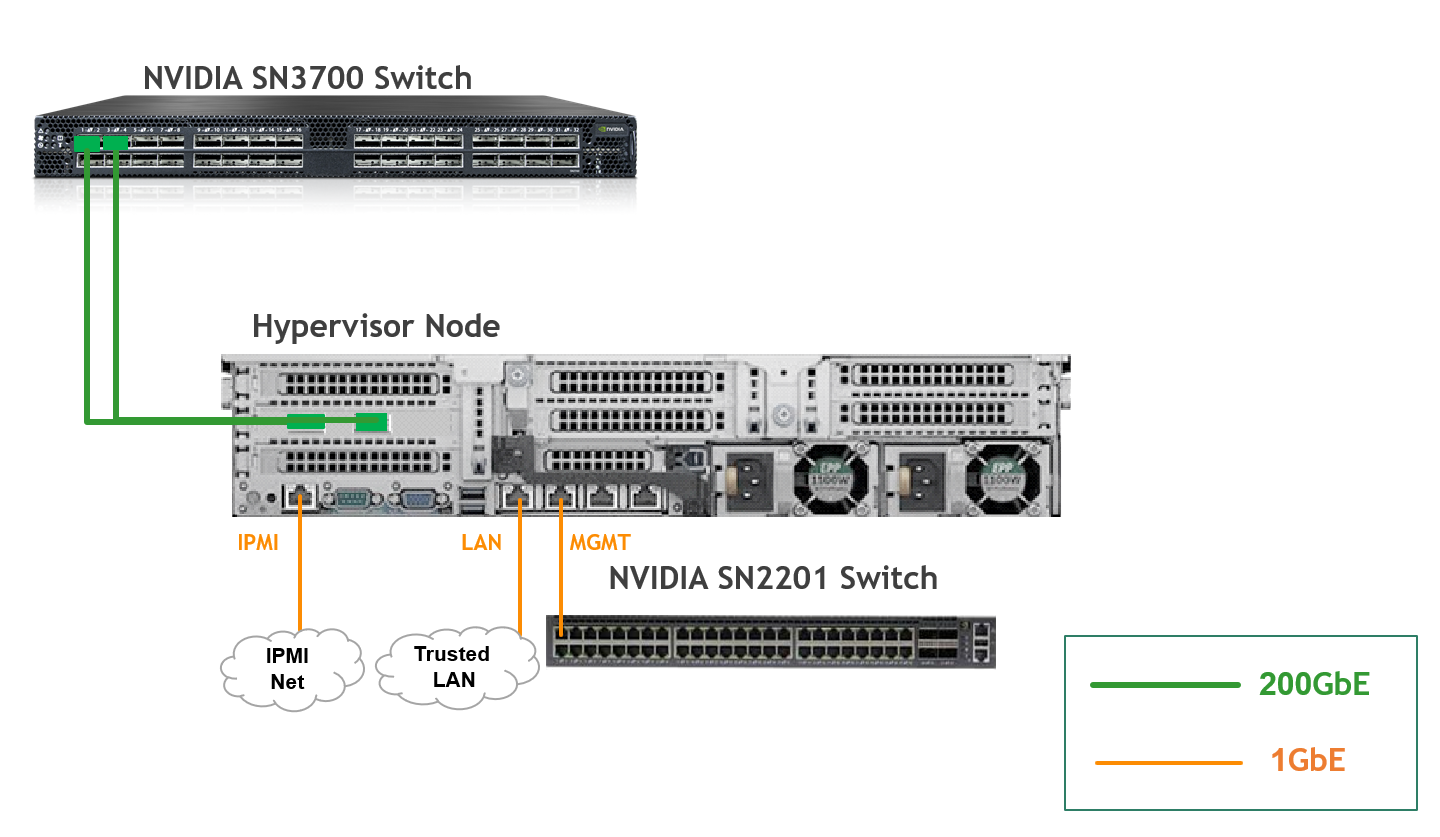
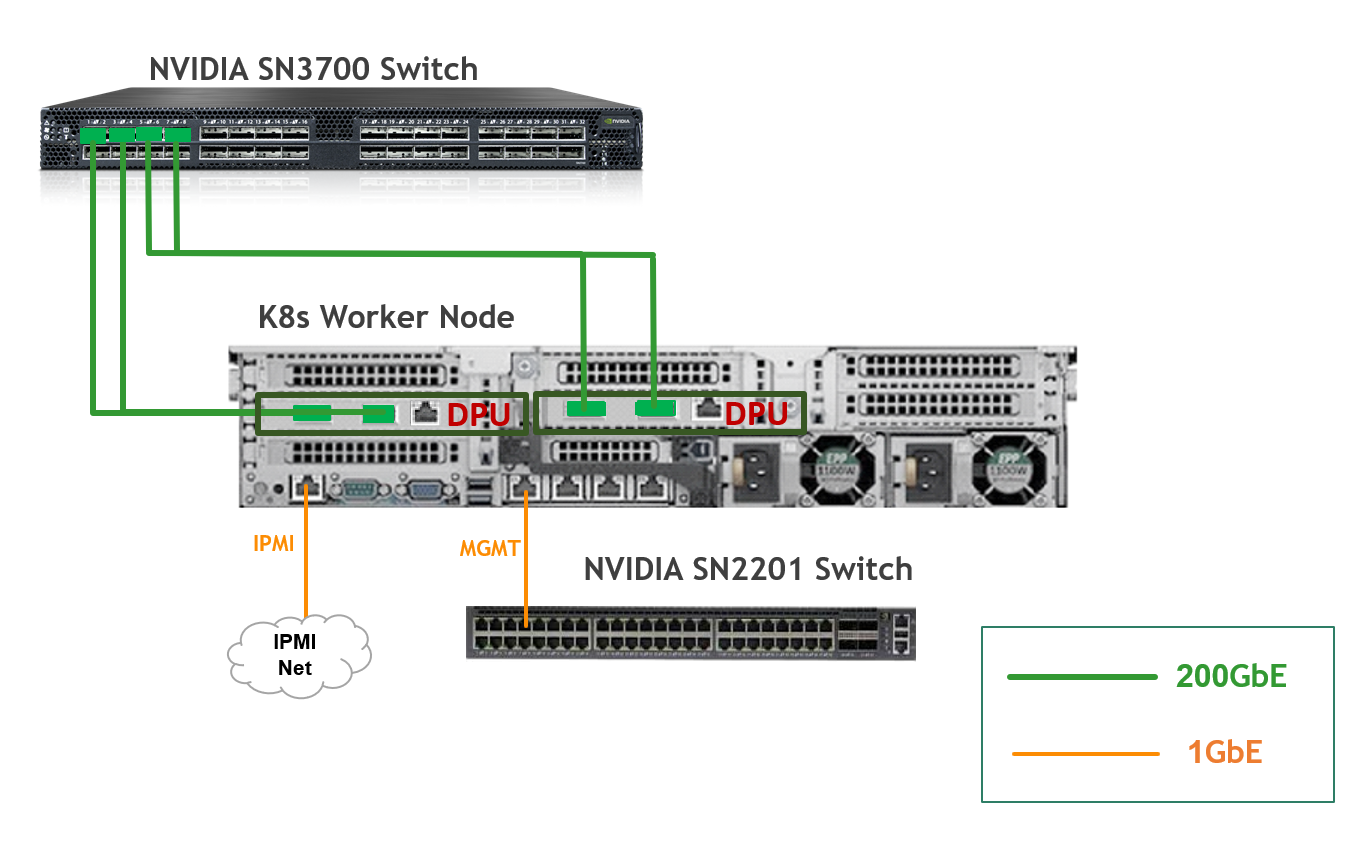
K8s Worker Node
Fabric Configuration
Updating Cumulus Linux
As a best practice, make sure to use the latest released Cumulus Linux NOS version.
For information on how to upgrade Cumulus Linux, refer to the Cumulus Linux User Guide.
Configuring the Cumulus Linux Switch
The SN3700 switch (hs-switch), is configured as follows:
-
The following commands configure BGP unnumbered on
hs-switch -
Cumulus Linux enables the BGP equal-cost multipathing (ECMP) option by default
The SN2201 switch (mgmt-switch) is configured as follows:
Host Configuration
Make sure that the BIOS settings on the worker node servers have SR-IOV enabled and that the servers are tuned for maximum performance.
All worker nodes must have the same PCIe placement for the BlueField-3 NIC and must display the same interface name.
No change from the Baseline RDG (Section "Deployment and Configuration", Subsection "Host Configuration").
Hypervisor Installation and Configuration
No change from the Baseline RDG (Section "Hypervisor Installation and Configuration").
Prepare Infrastructure Servers
No change from the Baseline RDG (Section "Deployment and Configuration", Subsection "Prepare Infrastructure Servers") regarding Firewall VM, Jump VM, MaaS VM.
Provision Master VMs and Worker Nodes Using MaaS
Proceed with the instructions from the Baseline RDG until you reach the subsection "Deploy Master VMs using Cloud-Init".
Use the following cloud-init script instead of the one in the Baseline RDG to install the necessary software, ensure OVS bridge persistency and also configure correct routing to the storage target node:
Replace enp1s0 and brenp1s0 in the following cloud-init with your interface names as displayed in MaaS network tab.
Master nodes cloud-init
#cloud-config
system_info:
  default_user:
    name: depuser
    passwd: "$6$jOKPZPHD9XbG72lJ$evCabLvy1GEZ5OR1Rrece3NhWpZ2CnS0E3fu5P1VcZgcRO37e4es9gmriyh14b8Jx8gmGwHAJxs3ZEjB0s0kn/"
    lock_passwd: false
    groups: [adm, audio, cdrom, dialout, dip, floppy, lxd, netdev, plugdev, sudo, video]
    sudo: ["ALL=(ALL) NOPASSWD:ALL"]
    shell: /bin/bash
ssh_pwauth: True
package_upgrade: true
runcmd:
    - apt-get update
    - apt-get -y install openvswitch-switch nfs-common
    - |
      UPLINK_MAC=$(cat /sys/class/net/enp1s0/address)
      ovs-vsctl set Bridge brenp1s0 other-config:hwaddr=$UPLINK_MAC
      ovs-vsctl br-set-external-id brenp1s0 bridge-id brenp1s0 -- br-set-external-id brenp1s0 bridge-uplink enp1s0
    - |
      cat <<'EOF' | tee /etc/netplan/99-static-route.yaml
      network:
        version: 2
        bridges:
          brenp1s0:
            routes:
              - to: 10.0.124.1
                via: 10.0.110.30
      EOF
    - netplan apply
After that proceed exactly as instructed in the Baseline RDG, and in addition to the verification commands mentioned there, run the following command to verify that the static route has been configured correctly:
Master1 Console
root@master1:~# ip r
default via 10.0.110.254 dev brenp1s0 proto static
10.0.110.0/24 dev brenp1s0 proto kernel scope link src 10.0.110.1
10.0.124.1 via 10.0.110.30 dev brenp1s0 proto static
No changes from the Baseline RDG to the worker nodes provisioning.
Make sure that you see two BlueField-3 devices in the network tab in MaaS for the worker nodes after their commissioning.
Storage Target Configuration
-
The Storage target node is a separate, manually configured node in this RDG.
-
It will be a VM running on the hypervisor, with ConnectX-7 NIC and NVMe SSD disk attached to it as PCIe devices using PCI passthrough.
Suggested specifications:
-
vCPU: 8
-
RAM: 32GB
-
Storage:
-
VirtIO disk of 60GB size
-
NVMe SSD of 1.7TB size
-
-
Network interface:
-
Bridge device, connected to
mgmt-br
-
Procedure:
-
Perform a regular Ubuntu 24.04 installation on the Storage target VM.
-
Create the following Netplan configuration to enable internet connectivity, DNS resolution and set an IP in the storage high-speed subnet:
Replace
enp1s0andenp5s0np1with your interface names.
Storage Target netplan
YAMLnetwork: version: 2 ethernets: enp1s0: addresses: - "10.0.110.30/24" mtu: 9000 nameservers: addresses: - 10.0.110.252 search: - dpf.rdg.local.domain routes: - to: "default" via: "10.0.110.254" enp5s0np1: addresses: - "10.0.124.1/24" mtu: 9000 -
Apply the netplan configuration:
Storage Target Console
depuser@storage-target:~$ sudo netplan apply -
Update and upgrade the system:
Storage Target Console
sudo apt update -y sudo apt upgrade -y -
Create XFS file system on the NVMe disk and mount it on
/srv/nfsdirectory:Replace
/dev/nvme0n1with your device name.Storage Target Console
sudo mkfs.xfs /dev/nvme0n1 sudo mkdir -m 777 /srv/nfs/ sudo mount /dev/nvme0n1 /srv/nfs/ -
Set the mount to be persistent:
Storage Target Console
$ sudo blkid /dev/nvme0n1 /dev/nvme0n1: UUID="b37df0a9-d741-4222-82c9-7a3d66ffc0e1" BLOCK_SIZE="512" TYPE="xfs" $ echo "/dev/disk/by-uuid/b37df0a9-d741-4222-82c9-7a3d66ffc0e1 /srv/nfs xfs defaults 0 1" | sudo tee -a /etc/fstab -
Install and configure an NFS server with the
/srv/nfsdirectory:Storage Target Console
sudo apt install -y nfs-server echo "/srv/nfs/ 10.0.110.0/24(rw,sync,no_subtree_check)" | sudo tee -a /etc/exports echo "/srv/nfs/ 10.0.124.0/24(rw,sync,no_subtree_check)" | sudo tee -a /etc/exports -
Restart the NFS server:
Storage Target Console
sudo systemctl restart nfs-server -
Create the directory
shareunder/srv/nfswith the same permissions as the parent directory:Storage Target Console
sudo mkdir -m 777 /srv/nfs/share
K8s Cluster Deployment and Configuration
Kubespray Deployment and Configuration
The procedures for initial Kubernetes cluster deployment using Kubespray for the master nodes, and subsequent verification, remain unchanged from the Baseline RDG (Section "K8s Cluster Deployment and Configuration", Subsections: "Kubespray Deployment and Configuration", "Deploying Cluster Using Kubespray Ansible Playbook","K8s Deployment Verification".
As in Baseline RDG, Worker nodes are added later, after DPF and prerequisite components for accelerated CNI are installed.
DPF Installation
The DPF installation process (Operator, System components) largely follows the Baseline RDG. The primary modifications occur during "DPU Provisioning and Service Installation" to deploy HBN+OVN-Kubernetes on the 1st DPU and HBN+SNAP-VirtioFS on the 2nd DPU.
Software Prerequisites and Required Variables
Refer to the Baseline RDG (Section "DPF Installation", Subsection "Software Prerequisites and Required Variables") for software prerequisites (like helm, envsubst) and the required environment variables defined in manifests/00-env-vars/envvars.env.
-
As opposed to the Baseline RDG, not all the commands will be run from
docs/public/user-guides/host-trusted/use-cases/hbn-ovnk. Until further instructed in this RDG, assume that the commands are executed from this directory -
Make sure that
DPU_P0andDPU_P0_VF1variables are set with the interface name of the BlueField-3 that you intend to run OVN-Kubernetes on
CNI Installation
No change from the Baseline RDG (Section "DPF Installation", Subsection "CNI Installation").
DPF Operator Installation
No change from the Baseline RDG (Section "DPF Installation", Subsection "DPF Operator Installation").
DPF System Installation
No change from the Baseline RDG (Section "DPF Installation", Subsection "DPF System Installation").
Install Components to Enable Accelerated CNI Nodes
No change from the Baseline RDG (Section "DPF Installation", Subsection "Install Components to Enable Accelerated CNI Nodes").
DPU Provisioning and Service Installation
In addition to the adjustments that outlined in the Baseline RDG, the following modification is needed:
-
Add
nodeSelectorto the ovn DPUServiceInterface so it will only be applied to the DPU cluster nodes managed by theovn-hbnDPUDeployment:manifests/05-dpudeployment-installation/ovn-iface.yaml
YAML--- apiVersion: svc.dpu.nvidia.com/v1alpha1 kind: DPUServiceInterface metadata: name: ovn namespace: dpf-operator-system spec: template: spec: nodeSelector: matchLabels: svc.dpu.nvidia.com/owned-by-dpudeployment: "dpf-operator-system_ovn-hbn" template: metadata: labels: port: ovn spec: interfaceType: ovn
After adding those modifications, proceed as described in the Baseline RDG until "Infrastructure Latency & Bandwidth Validation" section.
-
Due to known issue Long DPU provisioning time when multiple DPUs are provisioned on the same node, the K8s cluster scale-out is done right after the first DPUDeployment and its services installation to prevent simultaneous DPUs provisioning. Inevitably, it will require two host power-cycles (one for each DPU pair).
-
The procedure to add worker nodes to the cluster remains unchanged from the Baseline RDG (Section "K8s Cluster Scale-out", Subsection "Add Worker Nodes to the Cluster").
-
As workers are added to the cluster, DPUs will be provisioned and DPUServices will begin to be spun up.
At this point, the first DPUDeployment is ready and it's possible to continue to the second.
In another tab, change directory to readme.md of hbn-snap use-case from where all the commands will be run in this tab:
Jump Node Console
cd doca-platform/docs/public/user-guides/host-trusted/use-cases/hbn-snap
Use the following file to define the required variables for the installation:
You can leave the values of DPUCLUSTER_VIP, DPUCLUSTER_INTERFACE and NFS_SERVER_IP empty since they won't be required for the next steps.
manifests/00-env-vars/envvars.env
## Virtual IP used by the load balancer for the DPU Cluster. Must be a reserved IP from the management subnet and not allocated by DHCP.
export DPUCLUSTER_VIP=10.0.110.200

## Interface on which the DPUCluster load balancer will listen. Should be the management interface of the control plane node.
export DPUCLUSTER_INTERFACE=brenp1s0

## DPU2_P0 is the name of the first port of the 2nd DPU. This name must be the same on all worker nodes.
export DPU2_P0=ens4f0np0

## IP address of the NFS server used for storing the BFB image.
## NOTE: This environment variable does NOT control the address of the NFS server used as a remote target by SNAP VirtioFS.
export NFS_SERVER_IP=10.0.110.253

## The repository URL for the NVIDIA Helm chart registry.
## Usually this is the NVIDIA Helm NGC registry. For development purposes, this can be set to a different repository.
export HELM_REGISTRY_REPO_URL=https://helm.ngc.nvidia.com/nvidia/doca

## The repository URL for the HBN container image.
## Usually this is the NVIDIA NGC registry. For development purposes, this can be set to a different repository.
export HBN_NGC_IMAGE_URL=nvcr.io/nvidia/doca/doca_hbn

## The repository URL for the SNAP VFS container image.
## Usually this is the NVIDIA NGC registry. For development purposes, this can be set to a different repository.
export SNAP_NGC_IMAGE_URL=nvcr.io/nvidia/doca/doca_vfs

## The DPF REGISTRY is the Helm repository URL where the DPF Operator Chart resides.
## Usually this is the NVIDIA Helm NGC registry. For development purposes, this can be set to a different repository.
export REGISTRY=https://helm.ngc.nvidia.com/nvidia/doca

## The DPF TAG is the version of the DPF components which will be deployed in this guide.
export TAG=v25.10.0

## URL to the BFB used in the `bfb.yaml` and linked by the DPUSet.
export BFB_URL="https://content.mellanox.com/BlueField/BFBs/Ubuntu24.04/bf-bundle-3.2.1-34_25.11_ubuntu-24.04_64k_prod.bfb"
Export environment variables for the installation:
Jump Node Console
source manifests/00-env-vars/envvars.env
Since all the steps of the DPF installation up until the "DPU provisioning and service installation" have already been done, proceed to apply the files under manifests/04.2-dpudeployment-installation-virtiofs . However, few adjustments need to be made to support multi-dpu deployment and preserve consistency with the other DPUDeployment and DPUServices that were installed previously:
-
Edit the
dpudeployment.yamlbased on the following configuration to support multi-dpu and set high MTU suited for performance:manifests/04.2-dpudeployment-installation-virtiofs/dpudeployment.yaml
YAML--- apiVersion: svc.dpu.nvidia.com/v1alpha1 kind: DPUDeployment metadata: name: hbn-snap namespace: dpf-operator-system spec: dpus: bfb: bf-bundle-$TAG flavor: hbn-snap-virtiofs-$TAG dpuSets: - nameSuffix: "dpuset1" dpuAnnotations: storage.nvidia.com/preferred-dpu: "true" nodeSelector: matchLabels: feature.node.kubernetes.io/dpu-enabled: "true" dpuSelector: provisioning.dpu.nvidia.com/dpudevice-pf0-name: $DPU2_P0 services: doca-hbn: serviceTemplate: doca-hbn serviceConfiguration: doca-hbn snap-csi-plugin: serviceTemplate: snap-csi-plugin serviceConfiguration: snap-csi-plugin snap-host-controller: serviceTemplate: snap-host-controller serviceConfiguration: snap-host-controller snap-node-driver: serviceTemplate: snap-node-driver serviceConfiguration: snap-node-driver doca-snap: serviceTemplate: doca-snap serviceConfiguration: doca-snap fs-storage-dpu-plugin: serviceTemplate: fs-storage-dpu-plugin serviceConfiguration: fs-storage-dpu-plugin nfs-csi-controller: serviceTemplate: nfs-csi-controller serviceConfiguration: nfs-csi-controller nfs-csi-controller-dpu: serviceTemplate: nfs-csi-controller-dpu serviceConfiguration: nfs-csi-controller-dpu serviceChains: switches: - ports: - serviceInterface: matchLabels: uplink: p0 - service: name: doca-hbn interface: p0_if - ports: - serviceInterface: matchLabels: uplink: p1 - service: name: doca-hbn interface: p1_if - ports: - service: name: doca-snap interface: app_sf ipam: matchLabels: svc.dpu.nvidia.com/pool: storage-pool - service: name: fs-storage-dpu-plugin interface: app_sf ipam: matchLabels: svc.dpu.nvidia.com/pool: storage-pool - service: name: doca-hbn interface: snap_if serviceMTU: 9000 -
Remove
physical-ifaces.yamlsince the DPUServiceInterfaces for the uplinksp0/p1have already been created andpf0vf10-rep/pf1vf10-reparen't relevant for this deployment.Jump Node Console
rm manifests/04.2-dpudeployment-installation-virtiofs/physical-ifaces.yaml -
Apply the same for
hbn-ipam.yamlsince it won't need any IP allocation on those subnets:Jump Node Console
rm manifests/04.2-dpudeployment-installation-virtiofs/hbn-ipam.yaml -
Remove
bfb.yamlandhbn-loopback-ipam.yamlsince they were already created:Jump Node Console
rm manifests/04.2-dpudeployment-installation-virtiofs/bfb.yaml rm manifests/04.2-dpudeployment-installation-virtiofs/hbn-loopback-ipam.yaml -
Edit
hbn-dpuserviceconfig.yamlbased on the following configuration file:The changes include, but are not limited to:
-
Setting a different
bgp_peer_groupfor the 2nd HBN service. -
Adjusting
bgp_autonomous_systemvalues based on the loopback IPAM. -
Removal of unnecessary interfaces, annotations and EVPN distributed symmetric routing configuration.
manifests/04.2-dpudeployment-installation-virtiofs/hbn-dpuserviceconfig.yaml
YAML--- apiVersion: svc.dpu.nvidia.com/v1alpha1 kind: DPUServiceConfiguration metadata: name: doca-hbn namespace: dpf-operator-system spec: deploymentServiceName: "doca-hbn" serviceConfiguration: serviceDaemonSet: annotations: k8s.v1.cni.cncf.io/networks: |- [ {"name": "iprequest", "interface": "ip_lo", "cni-args": {"poolNames": ["loopback"], "poolType": "cidrpool"}} ] helmChart: values: configuration: perDPUValuesYAML: | - hostnamePattern: "*" values: bgp_peer_group: snap-hbn startupYAMLJ2: | - header: model: BLUEFIELD nvue-api-version: nvue_v1 rev-id: 1.0 version: HBN 3.0.0 - set: evpn: enable: on route-advertise: {} bridge: domain: br_default: vlan: '10': vni: '10': {} interface: lo: ip: address: {{ ipaddresses.ip_lo.ip }}/32: {} type: loopback p0_if,p1_if,snap_if: type: swp link: mtu: 9000 snap_if: bridge: domain: br_default: access: 10 nve: vxlan: arp-nd-suppress: on enable: on source: address: {{ ipaddresses.ip_lo.ip }} router: bgp: enable: on graceful-restart: mode: full vrf: default: router: bgp: address-family: ipv4-unicast: enable: on redistribute: connected: enable: on multipaths: ebgp: 16 l2vpn-evpn: enable: on autonomous-system: {{ ( ipaddresses.ip_lo.ip.split(".")[3] | int ) + 65101 }} enable: on neighbor: p0_if: peer-group: {{ config.bgp_peer_group }} type: unnumbered address-family: l2vpn-evpn: enable: on add-path-tx: off p1_if: peer-group: {{ config.bgp_peer_group }} type: unnumbered address-family: l2vpn-evpn: enable: on add-path-tx: off path-selection: multipath: aspath-ignore: on peer-group: {{ config.bgp_peer_group }}: address-family: ipv4-unicast: enable: on l2vpn-evpn: enable: on remote-as: external router-id: {{ ipaddresses.ip_lo.ip }} interfaces: - name: p0_if network: mybrhbn - name: p1_if network: mybrhbn - name: snap_if network: mybrhbn -
-
Edit
hbn-dpuservicetemplate.yamlto request 3 SFs instead of 5 since it only uses 3 DPUServiceInterfaces:manifests/04.2-dpudeployment-installation-virtiofs/hbn-dpuservicetemplate.yaml
YAML--- apiVersion: svc.dpu.nvidia.com/v1alpha1 kind: DPUServiceTemplate metadata: name: doca-hbn namespace: dpf-operator-system spec: deploymentServiceName: "doca-hbn" helmChart: source: repoURL: $HELM_REGISTRY_REPO_URL version: 1.0.5 chart: doca-hbn values: image: repository: $HBN_NGC_IMAGE_URL tag: 3.2.1-doca3.2.1 resources: memory: 6Gi nvidia.com/bf_sf: 3 -
Edit
snap-csi-plugin-dpuserviceconfiguration.yamlso it will usehostNetwork:manifests/04.2-dpudeployment-installation-virtiofs/snap-csi-plugin-dpuserviceconfiguration.yaml
YAML--- apiVersion: svc.dpu.nvidia.com/v1alpha1 kind: DPUServiceConfiguration metadata: name: snap-csi-plugin namespace: dpf-operator-system spec: deploymentServiceName: snap-csi-plugin upgradePolicy: applyNodeEffect: false serviceConfiguration: deployInCluster: true helmChart: values: host: snapCsiPlugin: enabled: true emulationMode: "virtiofs" controller: affinity: nodeAffinity: requiredDuringSchedulingIgnoredDuringExecution: nodeSelectorTerms: - matchExpressions: - key: "node-role.kubernetes.io/master" operator: Exists - matchExpressions: - key: "node-role.kubernetes.io/control-plane" operator: Exists node: hostNetwork: true -
The rest of the configuration files remain the same, including:
-
DPUServiceConfiguration and DPUServiceTemplate for DOCA SNAP.
YAML--- apiVersion: svc.dpu.nvidia.com/v1alpha1 kind: DPUServiceConfiguration metadata: name: doca-snap namespace: dpf-operator-system spec: deploymentServiceName: doca-snap serviceConfiguration: helmChart: values: dpu: docaSnap: enabled: true env: XLIO_ENABLED: "0" image: repository: $SNAP_NGC_IMAGE_URL tag: 1.5.0-doca3.2.0 interfaces: - name: app_sf network: mybrsfcYAML--- apiVersion: svc.dpu.nvidia.com/v1alpha1 kind: DPUServiceTemplate metadata: name: doca-snap namespace: dpf-operator-system spec: deploymentServiceName: doca-snap helmChart: source: repoURL: $REGISTRY version: $TAG chart: dpf-storage values: serviceDaemonSet: resources: memory: "2Gi" hugepages-2Mi: "4Gi" cpu: "8" nvidia.com/bf_sf: 1 resourceRequirements: memory: "2Gi" hugepages-2Mi: "4Gi" cpu: "8" nvidia.com/bf_sf: 1 -
DPUServiceConfiguration and DPUServiceTemplate for SNAP Host Controller.
YAML--- apiVersion: svc.dpu.nvidia.com/v1alpha1 kind: DPUServiceConfiguration metadata: name: snap-host-controller namespace: dpf-operator-system spec: deploymentServiceName: snap-host-controller upgradePolicy: applyNodeEffect: false serviceConfiguration: deployInCluster: true helmChart: values: host: snapHostController: enabled: true config: targetNamespace: dpf-operator-system affinity: nodeAffinity: requiredDuringSchedulingIgnoredDuringExecution: nodeSelectorTerms: - matchExpressions: - key: "node-role.kubernetes.io/master" operator: Exists - matchExpressions: - key: "node-role.kubernetes.io/control-plane" operator: ExistsYAML--- apiVersion: svc.dpu.nvidia.com/v1alpha1 kind: DPUServiceTemplate metadata: name: snap-host-controller namespace: dpf-operator-system spec: deploymentServiceName: snap-host-controller helmChart: source: repoURL: $REGISTRY version: $TAG chart: dpf-storage -
DPUServiceConfiguration and DPUServiceTemplate for SNAP Node Driver.
YAML--- apiVersion: svc.dpu.nvidia.com/v1alpha1 kind: DPUServiceConfiguration metadata: name: snap-node-driver namespace: dpf-operator-system spec: deploymentServiceName: snap-node-driver serviceConfiguration: helmChart: values: dpu: deployCrds: true snapNodeDriver: enabled: trueYAML--- apiVersion: svc.dpu.nvidia.com/v1alpha1 kind: DPUServiceTemplate metadata: name: snap-node-driver namespace: dpf-operator-system spec: deploymentServiceName: snap-node-driver helmChart: source: repoURL: $REGISTRY version: $TAG chart: dpf-storage -
DPUServiceTemplate for SNAP CSI Plugin.
YAML--- apiVersion: svc.dpu.nvidia.com/v1alpha1 kind: DPUServiceTemplate metadata: name: snap-csi-plugin namespace: dpf-operator-system spec: deploymentServiceName: snap-csi-plugin helmChart: source: repoURL: $REGISTRY version: $TAG chart: dpf-storage -
DPUServiceConfiguration and DPUServiceTemplate for FS Storage DPU Plugin.
YAML--- apiVersion: svc.dpu.nvidia.com/v1alpha1 kind: DPUServiceConfiguration metadata: name: fs-storage-dpu-plugin namespace: dpf-operator-system spec: deploymentServiceName: fs-storage-dpu-plugin serviceConfiguration: helmChart: values: dpu: fsStorageVendorDpuPlugin: enabled: true interfaces: - name: app_sf network: mybrsfcYAML--- apiVersion: svc.dpu.nvidia.com/v1alpha1 kind: DPUServiceTemplate metadata: name: fs-storage-dpu-plugin namespace: dpf-operator-system spec: deploymentServiceName: fs-storage-dpu-plugin helmChart: source: repoURL: $REGISTRY version: $TAG chart: dpf-storage values: serviceDaemonSet: resources: nvidia.com/bf_sf: 1 resourceRequirements: nvidia.com/bf_sf: 1 -
DPUServiceConfiguration, DPUServiceTemplate and DPUServiceCredentialRequest for NFS CSI Controller (host).
YAML--- apiVersion: svc.dpu.nvidia.com/v1alpha1 kind: DPUServiceConfiguration metadata: name: nfs-csi-controller namespace: dpf-operator-system spec: deploymentServiceName: nfs-csi-controller upgradePolicy: applyNodeEffect: false serviceConfiguration: deployInCluster: true helmChart: values: host: enabled: true config: # required parameter, name of the secret that contains connection # details to access the DPU cluster. # this secret should be created by the DPUServiceCredentialRequest API. dpuClusterSecret: nfs-csi-controller-dpu-cluster-credentialsYAML--- apiVersion: svc.dpu.nvidia.com/v1alpha1 kind: DPUServiceTemplate metadata: name: nfs-csi-controller namespace: dpf-operator-system spec: deploymentServiceName: nfs-csi-controller helmChart: source: repoURL: oci://ghcr.io/mellanox/dpf-storage-vendors-charts version: v0.2.0 chart: nfs-csi-controllerYAML--- apiVersion: svc.dpu.nvidia.com/v1alpha1 kind: DPUServiceCredentialRequest metadata: name: nfs-csi-controller-credentials namespace: dpf-operator-system spec: duration: 24h serviceAccount: name: nfs-csi-controller-sa namespace: dpf-operator-system targetCluster: name: dpu-cplane-tenant1 namespace: dpu-cplane-tenant1 type: tokenFile secret: name: nfs-csi-controller-dpu-cluster-credentials namespace: dpf-operator-system -
DPUServiceConfiguration and DPUServiceTemplate for NFS CSI Controller (DPU).
YAML--- apiVersion: svc.dpu.nvidia.com/v1alpha1 kind: DPUServiceConfiguration metadata: name: nfs-csi-controller-dpu namespace: dpf-operator-system spec: deploymentServiceName: nfs-csi-controller-dpu upgradePolicy: applyNodeEffect: false serviceConfiguration: helmChart: values: dpu: enabled: true storageClasses: # List of storage classes to be created for nfs-csi # These StorageClass names should be used in the StorageVendor settings - name: nfs-csi parameters: server: 10.0.124.1 share: /srv/nfs/share rbacRoles: nfsCsiController: # the name of the service account for nfs-csi-controller # this value must be aligned with the value from the DPUServiceCredentialRequest serviceAccount: nfs-csi-controller-saYAML--- apiVersion: svc.dpu.nvidia.com/v1alpha1 kind: DPUServiceTemplate metadata: name: nfs-csi-controller-dpu namespace: dpf-operator-system spec: deploymentServiceName: nfs-csi-controller-dpu helmChart: source: repoURL: oci://ghcr.io/mellanox/dpf-storage-vendors-charts version: v0.2.0 chart: nfs-csi-controller -
DPUServiceIPAM for storage.
YAML--- apiVersion: svc.dpu.nvidia.com/v1alpha1 kind: DPUServiceIPAM metadata: name: storage-pool namespace: dpf-operator-system spec: metadata: labels: svc.dpu.nvidia.com/pool: storage-pool ipv4Subnet: subnet: "10.0.124.0/24" gateway: "10.0.124.1" perNodeIPCount: 8
-
-
Apply all of the YAML files mentioned above using the following command:
Jump Node Console
cat manifests/04.2-dpudeployment-installation-virtiofs/*.yaml | envsubst | kubectl apply -f - -
Verify the DPU and Service installation by ensuring the DPUServices are created and have been reconciled, that the DPUServiceIPAMs have been reconciled, that the DPUServiceInterfaces have been reconciled, and that the DPUServiceChains have been reconciled
Jump Node Console
$ kubectl wait --for=condition=ApplicationsReconciled --namespace dpf-operator-system dpuservices -l svc.dpu.nvidia.com/owned-by-dpudeployment=dpf-operator-system_hbn-snap
dpuservice.svc.dpu.nvidia.com/doca-hbn-wm2mm condition met
dpuservice.svc.dpu.nvidia.com/doca-snap-knmzt condition met
dpuservice.svc.dpu.nvidia.com/fs-storage-dpu-plugin-97654 condition met
dpuservice.svc.dpu.nvidia.com/nfs-csi-controller-dpu-sckmp condition met
dpuservice.svc.dpu.nvidia.com/nfs-csi-controller-xwd66 condition met
dpuservice.svc.dpu.nvidia.com/snap-csi-plugin-crv7d condition met
dpuservice.svc.dpu.nvidia.com/snap-host-controller-b56jw condition met
dpuservice.svc.dpu.nvidia.com/snap-node-driver-gcmls condition met

$ kubectl wait --for=condition=DPUIPAMObjectReconciled --namespace dpf-operator-system dpuserviceipam --all
dpuserviceipam.svc.dpu.nvidia.com/loopback condition met
dpuserviceipam.svc.dpu.nvidia.com/pool1 condition met
dpuserviceipam.svc.dpu.nvidia.com/storage-pool condition met

$ kubectl wait --for=condition=ServiceInterfaceSetReconciled --namespace dpf-operator-system dpuserviceinterface -l svc.dpu.nvidia.com/owned-by-dpudeployment=dpf-operator-system_hbn-snap
dpuserviceinterface.svc.dpu.nvidia.com/doca-hbn-p0-if-qhqrv condition met
dpuserviceinterface.svc.dpu.nvidia.com/doca-hbn-p1-if-dxm6p condition met
dpuserviceinterface.svc.dpu.nvidia.com/doca-hbn-snap-if-9qgb2 condition met
dpuserviceinterface.svc.dpu.nvidia.com/doca-snap-app-sf-zvqbl condition met
dpuserviceinterface.svc.dpu.nvidia.com/fs-storage-dpu-plugin-app-sf-cdpq4 condition met

$ kubectl wait --for=condition=ServiceChainSetReconciled --namespace dpf-operator-system dpuservicechain -l svc.dpu.nvidia.com/owned-by-dpudeployment=dpf-operator-system_hbn-snap
dpuservicechain.svc.dpu.nvidia.com/hbn-snap-rbvvs condition met
K8s Cluster Scale-out
Add Worker Nodes to the Cluster
Since the worker nodes have already been added to the cluster, the second pair DPU provisioning should start immediately.
Verification
-
To follow the progress of the DPU provisioning, run the following command to check in which phase it currently is:
Jump Node Console
$ watch -n10 "kubectl describe dpu -n dpf-operator-system -l svc.dpu.nvidia.com/owned-by-dpudeployment=dpf-operator-system_hbn-snap | grep 'Node Name\|Type\|Last\|Phase'" Every 10.0s: kubectl describe dpu -n dpf-operator-system -l svc.dpu.nvidia.com/owned-by-dpudeployment=dpf-operator-system_... Dpu Node Name: worker1 Last Transition Time: 2025-12-25T16:10:08Z Type: BFBPrepared Last Transition Time: 2025-12-25T16:09:14Z Type: BFBReady Last Transition Time: 2025-12-25T16:09:14Z Type: Initialized Last Transition Time: 2025-12-25T16:10:04Z Type: NodeEffectReady Last Transition Time: 2025-12-25T16:10:08Z Type: FWConfigured Last Transition Time: 2025-12-25T16:10:05Z Type: InterfaceInitialized Last Transition Time: 2025-12-25T16:10:09Z Type: OSInstalled Phase: OS Installing Dpu Node Name: worker2 Last Transition Time: 2025-12-25T16:10:06Z Type: BFBPrepared Last Transition Time: 2025-12-25T16:09:14Z Type: BFBReady Last Transition Time: 2025-12-25T16:09:14Z Type: Initialized Last Transition Time: 2025-12-25T16:10:04Z Type: NodeEffectReady Last Transition Time: 2025-12-25T16:10:06Z Type: FWConfigured Last Transition Time: 2025-12-25T16:10:04Z Type: InterfaceInitialized Last Transition Time: 2025-12-25T16:10:06Z Type: OSInstalled Phase: OS Installing -
Validate that the DPUs have been provisioned successfully by ensuring they're in ready state:
Jump Node Console
$ kubectl wait --for=condition=ready --namespace dpf-operator-system dpu --all
dpu.provisioning.dpu.nvidia.com/worker1-mt2438xz0263 condition met
dpu.provisioning.dpu.nvidia.com/worker1-mt2516604v3j condition met
dpu.provisioning.dpu.nvidia.com/worker2-mt2438xz0265 condition met
dpu.provisioning.dpu.nvidia.com/worker2-mt2516604w9z condition met
-
Ensure that the following DaemonSets have 2 ready replicas:
Jump Node Console
$ kubectl wait ds --for=jsonpath='{.status.numberReady}'=2 --namespace nvidia-network-operator kube-multus-ds sriov-network-config-daemon sriov-device-plugin
daemonset.apps/kube-multus-ds condition met
daemonset.apps/sriov-network-config-daemon condition met
daemonset.apps/sriov-device-plugin condition met

$ kubectl wait ds --for=jsonpath='{.status.numberReady}'=2 --namespace ovn-kubernetes ovn-kubernetes-node-dpu-host
daemonset.apps/ovn-kubernetes-node-dpu-host condition met
-
Validate that all the different DPUServices, DPUServiceIPAMs, DPUServiceInterfaces and DPUServiceChains objects are now in ready state:
Jump Node Console
$ kubectl wait --for=condition=ApplicationsReady --namespace dpf-operator-system dpuservices -l 'svc.dpu.nvidia.com/owned-by-dpudeployment in (dpf-operator-system_ovn-hbn,dpf-operator-system_hbn-snap)'
dpuservice.svc.dpu.nvidia.com/blueman-w7rkk condition met
dpuservice.svc.dpu.nvidia.com/doca-hbn-wm2mm condition met
dpuservice.svc.dpu.nvidia.com/doca-snap-knmzt condition met
dpuservice.svc.dpu.nvidia.com/dts-thsl5 condition met
dpuservice.svc.dpu.nvidia.com/fs-storage-dpu-plugin-97654 condition met
dpuservice.svc.dpu.nvidia.com/hbn-skl2g condition met
dpuservice.svc.dpu.nvidia.com/nfs-csi-controller-dpu-sckmp condition met
dpuservice.svc.dpu.nvidia.com/nfs-csi-controller-xwd66 condition met
dpuservice.svc.dpu.nvidia.com/ovn-s8k5c condition met
dpuservice.svc.dpu.nvidia.com/snap-csi-plugin-crv7d condition met
dpuservice.svc.dpu.nvidia.com/snap-host-controller-b56jw condition met
dpuservice.svc.dpu.nvidia.com/snap-node-driver-gcmls condition met

$ kubectl wait --for=condition=DPUIPAMObjectReady --namespace dpf-operator-system dpuserviceipam --all
dpuserviceipam.svc.dpu.nvidia.com/loopback condition met
dpuserviceipam.svc.dpu.nvidia.com/pool1 condition met
dpuserviceipam.svc.dpu.nvidia.com/storage-pool condition met

$ kubectl wait --for=condition=ServiceInterfaceSetReady --namespace dpf-operator-system dpuserviceinterface --all
dpuserviceinterface.svc.dpu.nvidia.com/doca-hbn-p0-if-qhqrv condition met
dpuserviceinterface.svc.dpu.nvidia.com/doca-hbn-p1-if-dxm6p condition met
dpuserviceinterface.svc.dpu.nvidia.com/doca-hbn-snap-if-9qgb2 condition met
dpuserviceinterface.svc.dpu.nvidia.com/doca-snap-app-sf-zvqbl condition met
dpuserviceinterface.svc.dpu.nvidia.com/fs-storage-dpu-plugin-app-sf-cdpq4 condition met
dpuserviceinterface.svc.dpu.nvidia.com/hbn-p0-if-8t6gz condition met
dpuserviceinterface.svc.dpu.nvidia.com/hbn-p1-if-7mfn7 condition met
dpuserviceinterface.svc.dpu.nvidia.com/hbn-pf2dpu2-if-7shwq condition met
dpuserviceinterface.svc.dpu.nvidia.com/ovn condition met
dpuserviceinterface.svc.dpu.nvidia.com/p0 condition met
dpuserviceinterface.svc.dpu.nvidia.com/p1 condition met

$ kubectl wait --for=condition=ServiceChainSetReady --namespace dpf-operator-system dpuservicechain --all
dpuservicechain.svc.dpu.nvidia.com/hbn-snap-rbvvs condition met
dpuservicechain.svc.dpu.nvidia.com/ovn-hbn-lmxw2 condition met
-
Verify the status of the DPUDeployments using the following command:
Jump Node Console
$ kubectl -n dpf-operator-system exec deploy/dpf-operator-controller-manager -- /dpfctl describe dpudeployments
NAME                                 NAMESPACE            STATUS       REASON   SINCE  MESSAGE
DPFOperatorConfig/dpfoperatorconfig  dpf-operator-system  Ready: True  Success  4h32m
└─DPUDeployments
  └─2 DPUDeployments...              dpf-operator-system  Ready: True  Success  4h28m  See hbn-snap, ovn-hbn
Congratulations—the DPF system has been successfully installed!
Infrastructure Latency & Bandwidth Validation
No changes from the Baseline RDG (Section "Verification", Subsection "Infrastructure Latency & Bandwidth Validation").
HBN+SNAP-VirtioFS Services Validation
Perform the following steps to validate HBN+SNAP-VirtioFS services functionality and performance:
-
The following YAML files define the DPUStorageVendor for NFS CSI and the DPUStoragePolicy for filesystem policy:
manifests/07.2-storage-configuration-virtiofs/nfs-csi-dpustoragevendor.yaml
YAML--- apiVersion: storage.dpu.nvidia.com/v1alpha1 kind: DPUStorageVendor metadata: name: nfs-csi namespace: dpf-operator-system spec: storageClassName: nfs-csi pluginName: nvidia-fs
manifests/07.2-storage-configuration-virtiofs/policy-fs-dpustoragepolicy.yaml
YAML--- apiVersion: storage.dpu.nvidia.com/v1alpha1 kind: DPUStoragePolicy metadata: name: policy-fs namespace: dpf-operator-system spec: dpuStorageVendors: - nfs-csi selectionAlgorithm: "NumberVolumes" parameters: {}
-
Apply the previous YAML files:
Jump Node Console
cat manifests/07.2-storage-configuration-virtiofs/*.yaml | envsubst | kubectl apply -f -
-
Verify the DPUStorageVendor and DPUStoragePolicy objects are ready:
Jump Node Console
$ kubectl wait --for=condition=Ready --namespace dpf-operator-system dpustoragevendors --all
dpustoragevendor.storage.dpu.nvidia.com/nfs-csi condition met

$ kubectl wait --for=condition=Ready --namespace dpf-operator-system dpustoragepolicies --all
dpustoragepolicy.storage.dpu.nvidia.com/policy-fs condition met
-
Deploy storage test pods that mount a storage volume provided by SNAP VirtioFS:
Jump Node Console
kubectl apply -f manifests/08.2-storage-test-virtiofs
-
Check if the pod is ready and the virtiofs-tag name:
Jump Node Console
$ kubectl wait statefulsets --for=jsonpath='{.status.readyReplicas}'=1 storage-test-pod-virtiofs-hotplug-pf
statefulset.apps/storage-test-pod-virtiofs-hotplug-pf condition met

$ kubectl get dpuvolumeattachments.storage.dpu.nvidia.com -A -o json | jq '.items[0].status.dpu.virtioFSAttrs.filesystemTag'
"9c8eda4f518fc303tag"
-
Connect to the test pod, validate that the
virtiofsfilesystem is mounted with the previous tag name and install thefiosoftware:Jump Node Console
depuser@jump:~$ kubectl exec -it storage-test-pod-virtiofs-hotplug-pf-0 -- bash
root@storage-test-pod-virtiofs-hotplug-pf-0:/# df -Th
Filesystem          Type      Size  Used Avail Use% Mounted on
overlay             overlay   439G   20G  397G   5% /
tmpfs               tmpfs      64M     0   64M   0% /dev
9c8eda4f518fc303tag virtiofs  1.8T   35G  1.8T   2% /mnt/vol1
/dev/nvme0n1p2      ext4      439G   20G  397G   5% /etc/hosts
shm                 tmpfs      64M     0   64M   0% /dev/shm
tmpfs               tmpfs     251G   12K  251G   1% /run/secrets/kubernetes.io/serviceaccount
tmpfs               tmpfs     126G     0  126G   0% /proc/acpi
tmpfs               tmpfs     126G     0  126G   0% /proc/scsi
tmpfs               tmpfs     126G     0  126G   0% /sys/firmware
tmpfs               tmpfs     126G     0  126G   0% /sys/devices/virtual/powercap

root@storage-test-pod-virtiofs-hotplug-pf-0:/# apt update -y
root@storage-test-pod-virtiofs-hotplug-pf-0:/# apt install -y fio vim
-
Configure the following FIO job file:
job-4k.fio
[global]
ioengine=libaio
direct=1
iodepth=32
rw=read
bs=4k
size=1G
numjobs=8
runtime=60
time_based
group_reporting

[job1]
filename=/mnt/vol1/test.fio
-
Run the FIO job and check the performance:
Storage Test Pod Console
root@storage-test-pod-virtiofs-hotplug-pf-0:/# fio job-4k.fio
job1: (g=0): rw=read, bs=4K-4K/4K-4K/4K-4K, ioengine=libaio, iodepth=32
...
fio-2.2.10
...
...
Starting 8 processes
job1: Laying out IO file(s) (1 file(s) / 1024MB)
Jobs: 8 (f=8): [R(8)] [100.0% done] [826.1MB/0KB/0KB /s] [212K/0/0 iops] [eta 00m:00s]
job1: (groupid=0, jobs=8): err= 0: pid=1183: Mon Dec  1 10:31:32 2025
  read : io=47664MB, bw=813351KB/s, iops=203337, runt= 60008msec
    slat (usec): min=0, max=679, avg= 6.90, stdev= 4.13
    clat (usec): min=167, max=135036, avg=1250.42, stdev=4941.25
     lat (usec): min=170, max=135038, avg=1257.36, stdev=4940.79
    clat percentiles (usec):
     |  1.00th=[  258],  5.00th=[  278], 10.00th=[  286], 20.00th=[  298],
     | 30.00th=[  302], 40.00th=[  310], 50.00th=[  314], 60.00th=[  322],
     | 70.00th=[  326], 80.00th=[  338], 90.00th=[  358], 95.00th=[  470],
     | 99.00th=[27520], 99.50th=[32128], 99.90th=[46336], 99.95th=[52992],
     | 99.99th=[68096]
    bw (KB  /s): min=85832, max=121912, per=12.51%, avg=101789.00, stdev=5105.93
    lat (usec) : 250=0.39%, 500=95.22%, 750=0.55%, 1000=0.01%
    lat (msec) : 2=0.01%, 4=0.01%, 10=0.01%, 20=1.05%, 50=2.70%
    lat (msec) : 100=0.07%, 250=0.01%
  cpu          : usr=2.78%, sys=24.20%, ctx=8652632, majf=0, minf=340
  IO depths    : 1=0.1%, 2=0.1%, 4=0.1%, 8=0.1%, 16=0.1%, 32=100.0%, >=64=0.0%
     submit    : 0=0.0%, 4=100.0%, 8=0.0%, 16=0.0%, 32=0.0%, 64=0.0%, >=64=0.0%
     complete  : 0=0.0%, 4=100.0%, 8=0.0%, 16=0.0%, 32=0.1%, 64=0.0%, >=64=0.0%
     issued    : total=r=12201896/w=0/d=0, short=r=0/w=0/d=0, drop=r=0/w=0/d=0
     latency   : target=0, window=0, percentile=100.00%, depth=32

Run status group 0 (all jobs):
   READ: io=47664MB, aggrb=813351KB/s, minb=813351KB/s, maxb=813351KB/s, mint=60008msec, maxt=60008msec
Done.
Authors

|
Guy Zilberman Guy Zilberman is a solution architect at NVIDIA's Networking Solutions Labs, bringing extensive experience from several leadership roles in cloud computing.
|
|
|
Vitaliy Razinkov Vitaliy Razinkov is a Solutions Architect on the NVIDIA Networking team, specializing in complex Kubernetes, OpenShift, and Microsoft solutions. With over 25 years of experience in senior technical roles, he brings deep expertise in designing and implementing advanced infrastructures. Vitaliy has authored several reference design guides on Microsoft technologies, RoCE/RDMA-accelerated machine learning in Kubernetes/OpenShift, and containerized solutions—all available on the NVIDIA Networking Documentation site. |

Last updated: