

Created on Jan 2026
Scope
This Reference Deployment Guide (RDG) provides detailed instructions on how to deploy, configure and validate the NVIDIA® DOCA™ Firefly Time Synchronization Service within a Kubernetes cluster using the DOCA Platform Framework (DPF). This document is an extension of the RDG for DPF Host Trusted with OVN-Kubernetes and HBN Services (referred to as the Baseline RDG). It details the additional steps and modifications required to deploy the Firefly Time Sync Service into the environment established by the Baseline RDG.
This guide is designed for experienced System Administrators, System Engineers, and Solution Architects seeking to implement high-precision time synchronization in high-performance Kubernetes clusters using NVIDIA BlueField DPUs and DPF. Familiarity with the Baseline RDG is required.
-
This reference implementation, as the name implies, is a specific, opinionated deployment example designed to address the use case described above.
-
While other approaches may exist to implement similar solutions, this document provides a detailed guide for this particular method.
Abbreviations and Acronyms
|
Term |
Definition |
Term |
Definition |
|---|---|---|---|
|
BC |
Boundary Clock |
NTP |
Network Time Protocol |
|
BFB |
BlueField Bootstream |
OC |
Ordinary Clock |
|
BGP |
Border Gateway Protocol |
OVN |
Open Virtual Network |
|
CNI |
Container Network Interface |
PHC |
PTP Hardware Clock |
|
DOCA |
Data Center Infrastructure-on-a-Chip Architecture |
PRTC |
Primary Reference Time Clock (e.g., ITU-T G.8272) |
|
DPF |
DOCA Platform Framework |
PTP |
Precision Time Protocol (IEEE 1588) |
|
DPU |
Data Processing Unit |
RDG |
Reference Deployment Guide |
|
DTS |
DOCA Telemetry Service |
RDMA |
Remote Direct Memory Access |
|
G.8275.1 |
ITU-T Recommendation for PTP Profile (Full Timing Support) |
SF |
Scalable Function |
|
GM |
Grandmaster Clock |
SFC |
Service Function Chaining |
|
HBN |
Host-Based Networking |
SR-IOV |
Single Root Input/Output Virtualization |
|
IPAM |
IP Address Management |
TAI |
International Atomic Time |
|
ITU-T |
International Telecommunication Union - Telecommunication Standardization Sector |
TOR |
Top of Rack |
|
K8S |
Kubernetes |
UTC |
Coordinated Universal Time |
|
MAAS |
Metal as a Service |
|
|
Introduction
Accurate time synchronization is critical for various modern data center applications, including distributed databases, real-time analytics, precise event ordering, and detailed telemetry. While Network Time Protocol (NTP) is commonly used and provides millisecond-level time accuracy, which is sufficient for many legacy applications, emerging applications—particularly in fields such as artificial intelligence (AI) and high-performance computing—require time synchronization with precision levels far beyond what NTP can offer. These applications often necessitate time accuracy in the range of tens of nanoseconds to microseconds.
The Firefly Time Sync Service, deployed via the NVIDIA DOCA Platform Framework (DPF), leverages the Precision Time Protocol (PTP) capabilities of NVIDIA BlueField® DPUs and NVIDIA Spectrum™ switches to deliver highly accurate time synchronization across the cluster.
Firefly runs the PTP stack directly on the DPU's Arm cores, synchronizing the DPU's PTP Hardware Clock (PHC). It then facilitates the synchronization of the DPU's system clock and the host server's system clock with this precise PHC. This architecture offloads the time synchronization task from the host CPU and provides a robust, OS-agnostic solution. This combined approach enables the full utilization of the DPU for precise timekeeping (sub-microsecond accuracy), supporting time-sensitive applications and enhancing overall data center synchronization.
The guide details the steps required to achieve highly accurate, PTP-based time synchronization across cluster nodes equipped with NVIDIA® BlueField® DPUs, interconnected via NVIDIA® Spectrum® switches running Cumulus Linux. Leveraging NVIDIA's DPF, administrators can provision and manage DPU resources while deploying and orchestrating the Firefly Time Sync Service alongside other essential infrastructure components, like accelerated OVN-Kubernetes and Host-Based Networking (HBN).
This document extends the capabilities of the DPF-managed Kubernetes cluster described in the RDG for DPF Host Trusted with OVN-Kubernetes and HBN Services (referred to as the Baseline RDG) by deploying the NVIDIA DOCA Firefly Time Sync Service within the existing DPF deployment (which includes OVN-Kubernetes and HBN services) to achieve a comprehensive, accelerated, and precisely synchronized infrastructure.
References
This section supplements the "References" section of the Baseline RDG. Refer to the Baseline RDG (Section "References") for other relevant references.
Solution Architecture
The overall solution architecture remains consistent with the Baseline RDG (Section "Solution Architecture"), with the addition of components and configurations for time synchronization using the Firefly Time Sync Service.
Key Components and Technologies
This section highlights the key technologies involved in the time synchronization solution, supplementing those described in the Baseline RDG (Section "Solution Architecture", Subsection "Key Components and Technologies").
-
Precision Time Protocol (PTP) (defined by IEEE 1588) is a protocol used to synchronize clocks throughout a computer network. It is designed to achieve sub-microsecond accuracy, making it suitable for demanding applications in telecommunications, finance, industrial automation, and high-performance computing clusters. PTP relies on a master-slave hierarchy of clocks and uses hardware timestamping to minimize latency and jitter introduced by network components and software stacks.
-
NVIDIA DOCA™ Firefly Time Sync Service is an NVIDIA DOCA service that enables high-precision time synchronization for NVIDIA BlueField DPUs and connected hosts. It leverages the PTP capabilities of the DPU hardware to achieve sub-microsecond accuracy. The Firefly service supports multiple deployment modes, configuration profiles, and third-party providers to deliver time synchronization services to DPUs and connected hosts.
Solution Design
Solution Logical Design
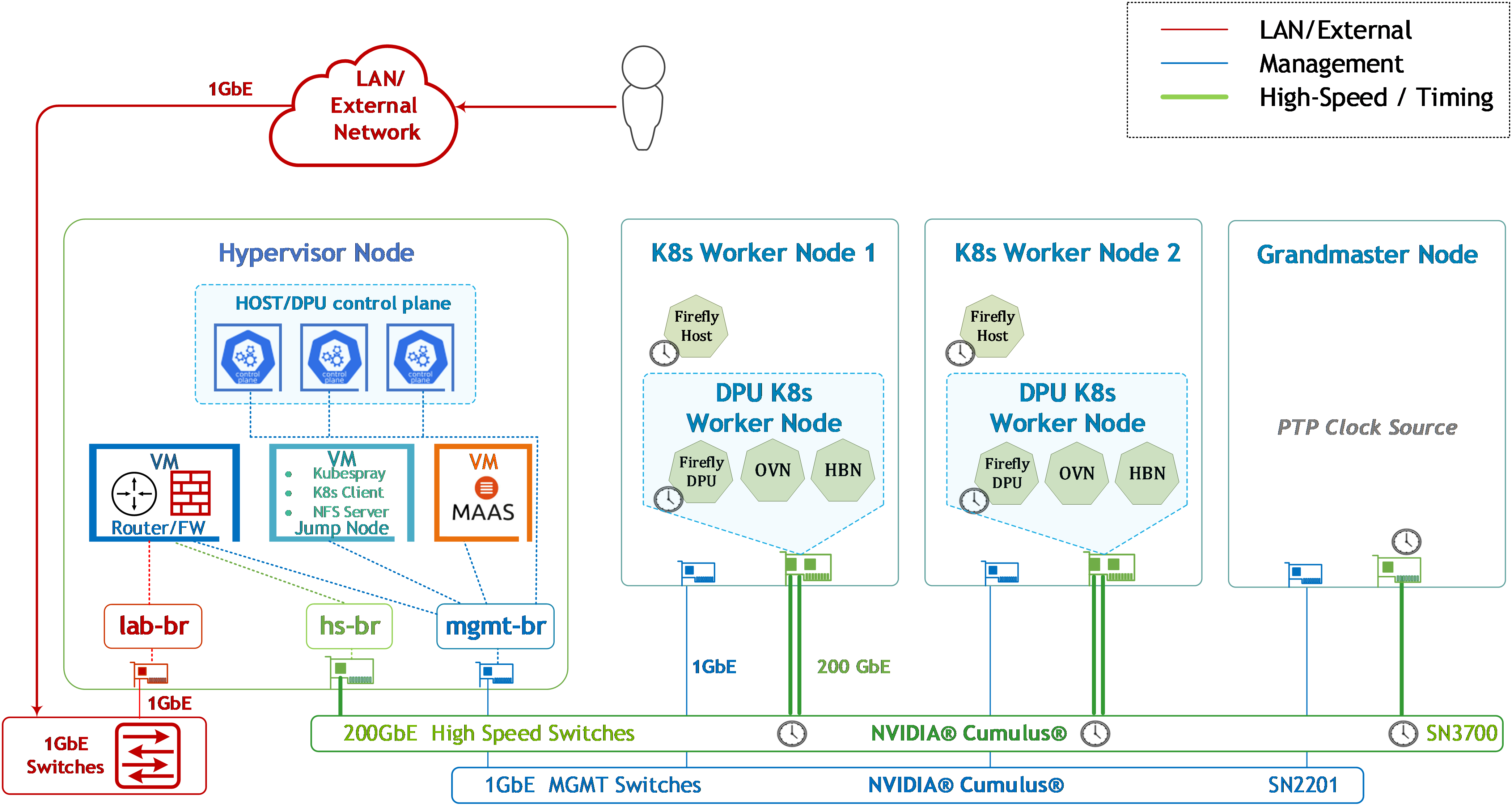
The logical design described in the Baseline RDG (Section "Solution Architecture", Subsection "Solution Design", Sub-subsection "Solution Logical Design") is augmented with the PTP Grandmaster node and the time synchronization components.
Additions for Firefly:
-
PTP Grandmaster Node is added:
-
A bare-metal server equipped with an NVIDIA ConnectX-7 NIC.
-
Connected to the high-speed switch (e.g., SN3700).
-
-
The SN3700 switch acts as a PTP Boundary Clock.
-
Firefly Time Sync Services are deployed on both K8s tenant hosts and DPU nodes:
-
The Firefly Time Sync Service on the DPU acts as a PTP client, synchronizing the PHCs from the SN3700, and then the DPU's Arm system clock.
-
The Firefly Time Sync Service on the host synchronizes the host system clock to the DPU's PHC.
-
K8s Cluster Logical Design
The K8s cluster logical design remains the same as described in the Baseline RDG (Section "Solution Architecture", Subsection "Solution Design", Sub-subsection "K8s Cluster Logical Design").
DPF is responsible for deploying the Firefly DPUServices—both DPU and host components—onto the respective DPU K8s worker nodes and their hosts.
Timing Network Design
This section details the time synchronization architecture.
Key Design Considerations
-
The PTP profile demonstrated utilizes Layer 2 transport. It aligns closely with the ITU-T G.8275.1 telecom profile, which defines PTP for phase/time synchronization with full timing support from the network. This profile maps PTP messages directly over Ethernet using a specific EtherType and employs non-forwardable, link-local multicast MAC addresses (e.g.,
01-80-C2-00-00-0E) for PTP message communication between peer ports. The solution also incorporates Boundary Clock (BC) functionality on the NVIDIA Spectrum switch. -
The PTP time source (Grandmaster) used in this reference setup is a Linux server configured as a PTP Grandmaster for demonstration purposes and may not meet formal PTP Grandmaster clock performance standards (like ITU-T G.8272 PRTC). Setting up the Grandmaster node itself (OS installation, basic configuration) is not be demonstrated in detail; however, its PTP "master" configuration files are provided as examples.
For a UTC-traceable and accurate reference, a PRTC: ITU-T G.8272-compliant Grandmaster connected to GPS/GNSS can be used.
-
The setup described is a reference deployment and does not encompass all considerations required for a production-grade, highly available, and fully redundant time synchronization infrastructure, such as multiple Grandmaster deployment or complex failover scenarios (except for basic PTP interface redundancy on the Firefly Time Sync Service).
-
NTP Considerations:
-
The cluster is expected to be deployed with NTP (Network Time Protocol) initially, as per the Baseline RDG.
-
Control-plane nodes will continue to use NTP and are not part of the PTP synchronization domain in this guide.
-
NTP service should be disabled on Worker Nodes and DPUs once the Firefly Time Sync Service is operational and PTP synchronization is established. This is typically handled by the DPF's DPUFlavor for the DPU and is the user's responsibility for the host.
-
Core Synchronization Elements
-
PTP Grandmaster (GM) Node: A dedicated server (bare-metal recommended) acting as the primary time source for the PTP domain. In this RDG, a Linux server with a ConnectX-7 NIC is configured to function as a PTP Grandmaster. For production environments, a dedicated, commercially available PTP Grandmaster appliance compliant with standards such as ITU-T G.8272 (PRTC-A or PRTC-B) is recommended for higher stability and accuracy.
-
NVIDIA Spectrum Switches (as PTP Boundary Clocks): The existing Spectrum switches (e.g., SN3700) are configured to act as PTP Boundary Clocks (BCs). They synchronize to an upstream PTP clock (either the GM or another BC) and provide PTP time to downstream devices (DPUs or other BCs).
-
NVIDIA BlueField-3 DPU (as PTP Ordinary Clock–Slave/Client): The DPUs on the worker nodes run the Firefly Time Sync Service. The DPU's PTP client synchronizes its PTP Hardware Clock (PHC) to the PTP time provided by the connected switch (BC).
-
DOCA Platform Framework (DPF): As in the Baseline RDG, DPF orchestrates the deployment and lifecycle management of DPUServices, now including the Firefly Time Sync Service components.
PTP Network Hierarchy
-
PTP Grandmaster (GM): The authoritative time source for the PTP domain.
-
In this RDG: A Linux server with ConnectX-7, configured as a PTP master.
-
-
PTP Boundary Clock (BC): The SN3700 Cumulus Linux switch.
-
It synchronizes its clock to the PTP GM (acting as a PTP slave towards the GM).
-
It provides PTP time to the DPUs (acting as a PTP master towards the DPUs).
-
-
PTP Ordinary Clock (OC) - Slave: The BlueField-3 DPUs running the Firefly Time Sync Service.
-
The DPU's PTP client synchronizes its PHC from the PTP time provided by the switch (BC).
-
Clock Types and Standards (Targeted)
-
PTP Grandmaster (Conceptual): Aims for PRTC-like behavior (ITU-T G.8272).
-
Switch (Boundary Clock): Configured to meet ITU-T G.8273.2 Class C T-BC requirements (without SyncE).
-
DPU (Ordinary Clock - Slave): Configured to meet ITU-T G.8273.2 Class C T-TSC (Telecom Time Slave Clock) requirements (without SyncE).
Reference PTP configurations for the DPU (via Firefly DPUServiceConfiguration CR), the Switch (Cumulus Linux commands), and the PTP Grandmaster (linuxptp configuration files) are provided in the relevant subsections of the 'Deployment and Configuration' section of this RDG.
Firefly Time Sync Service Design
-
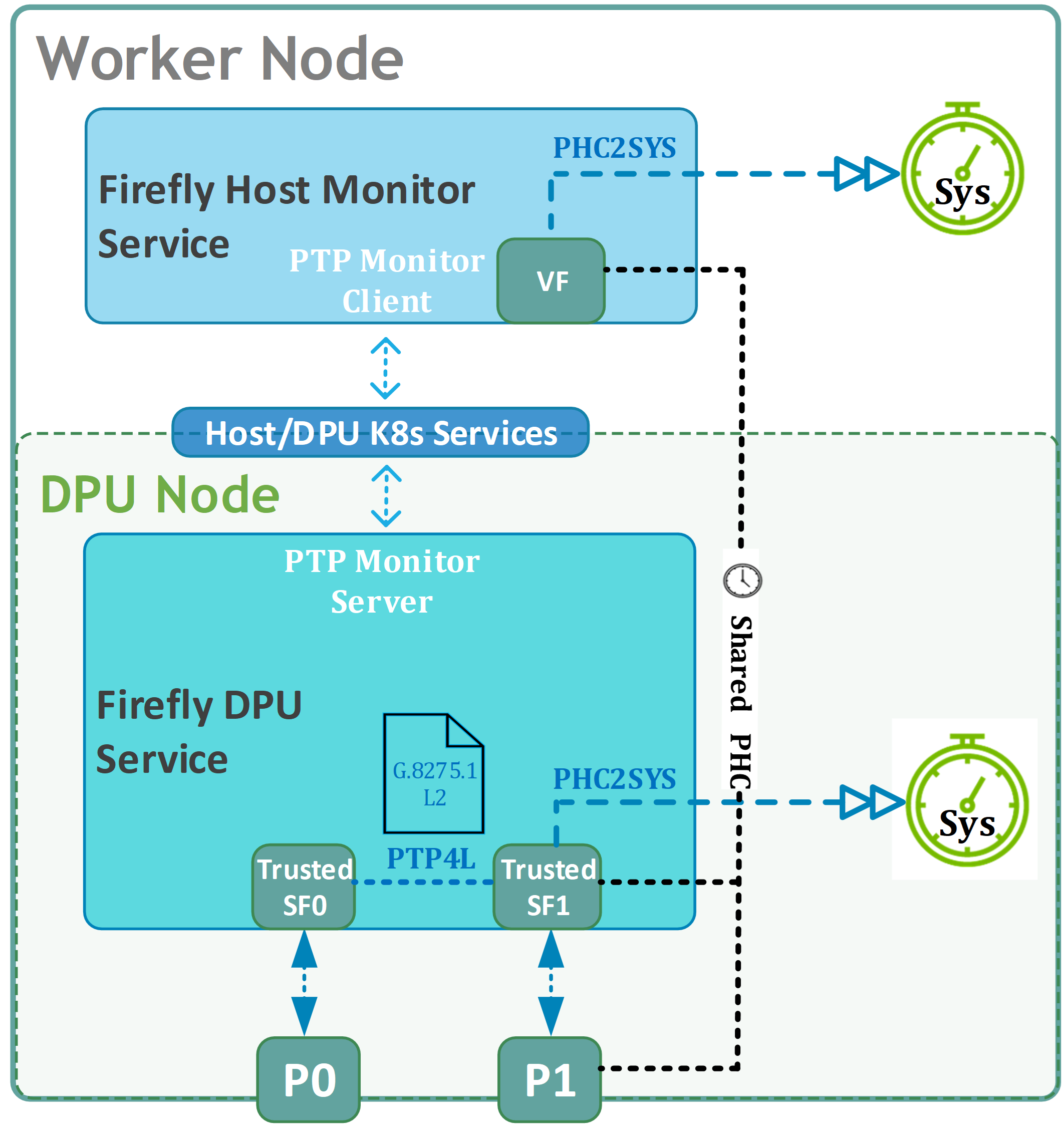
Firefly DPU Service (firefly-dpu-dpuservice). The Firefly DPU service is orchestrated as a DPU Service deployed on the BlueField DPU's Arm cores and is responsible for the primary PTP client operations and DPU time synchronization.
-
PTP Service: Utilizes
PTP4Lprogram as a third-party provider for PTP time synching service -
OS Time Calibration: Utilizes
PHC2SYSprogram as a third-party provider for OS time calibration service on the DPU Arm OS -
Service Interface (Trusted Scalable Function): Utilizes a Trusted Scalable Function (SF) as its network interface to the fabric. This is crucial for achieving the high-precision timestamping functionality required by Firefly. The Trusted SF is configured and provisioned using DPUFlavor and potentially DPUServiceNAD (Network Attachment Definition) DPF Custom Resources.
-
Redundant PTP Interfaces: Supports configuration of two service interfaces (Trusted SFs) for PTP link redundancy. This allows the service to maintain PTP lock in case one of the physical links or paths to the PTP Boundary Clock fails.
-
PTP Profile Configuration: The PTP client within the Firefly DPU service is configured to align with the ITU-T G.8275.1 telecom profile, utilizing L2 transport and specific PTP message parameters.
-
Custom Flows for PTP Control Traffic: DPF facilitates the setup of custom OVS flows to steer the specific PTP control traffic (non-forwardable L2 multicast) between the physical port and the Firefly service's SF. This ensures PTP packets are correctly handled and not misrouted.
-
PTP Monitor Server: DPU Firefly service acts as a server exposing PTP monitoring data to a PTP Monitor Client (Firefly Host Monitor Service)
-
Communication with Host Service: Exposes a DPU Cluster NodePort service, which allows the Firefly Host Monitor Service running on the x86 host to communicate with the DPU service for retrieving PTP monitoring information.
-
-
Firefly Host Monitor Service (firefly-host-monitor-dpuservice). The Firefly Host Monitor service is orchestrated as a DPUService deployed on the X86 tenant cluster hosts and is responsible for PTP state monitoring and host time synchronization.
-
OS Time Calibration: Utilizes
PHC2SYSprogram as a third-party provider for OS time calibration service on the Host OS -
Network Interface (VF): The service utilizes a Virtual Function (VF) injected into its pod by the OVN-Kubernetes CNI (via Multus and the SRIOV Network Operator). This VF shares the underlying PTP Hardware Clock (PHC) with the DPU, allowing the Firefly Host Monitor service to accurately fetch the DPU's synchronized PHC time.
-
PTP Monitor Client: Host Firefly service acts as a client registered for consuming PTP monitoring data from a PTP Monitor Server (Firefly DPU Service)
-
Communication with DPU Service: The Firefly DPU service (running on the DPU) exposes a DPU Cluster NodePort Kubernetes service. The Firefly Host Monitor service (running on the host) in turn exposes a tenant cluster Kubernetes service, which facilitates its connection to the local DPU's NodePort service. This communication channel is primarily used to monitor the DPU's PTP synchronization state and verify its health.
-
Time Synchronization Flow
-
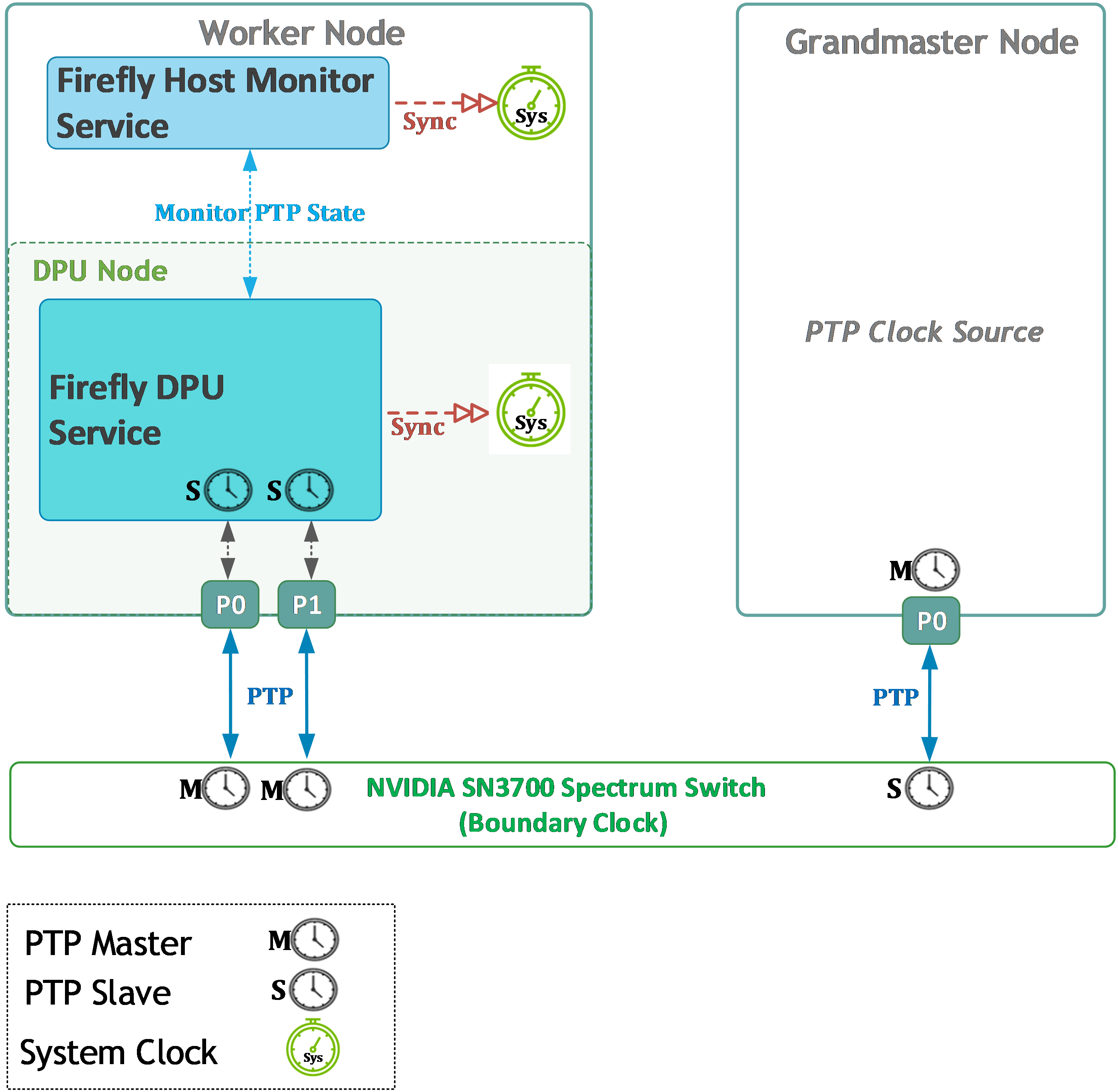
The PTP Grandmaster node generates and distributes PTP timing messages.
-
The SN3700 switch (PTP BC) receives these messages on its PTP slave port connected to the GM, synchronizes its internal clock, and regenerates PTP messages on its PTP master ports connected to the DPUs.
-
The BlueField-3 DPU (running Firefly's PTP client) receives PTP messages from the switch on its PTP slave port(s) and disciplines its PTP Hardware Clock (PHC). Firefly Time Sync Service supports using two DPU ports for PTP slave for link redundancy.
-
The Firefly DPU service synchronizes the DPU's Arm OS system clock to its disciplined PTP Hardware Clock (PHC).
-
The Firefly Host Monitor service, running on the host, monitors the PTP synchronization state on the DPU.
-
The Firefly Host Monitor service then synchronizes the host's OS system clock to the DPU's precise PHC.
Service Function Chaining (SFC) Design
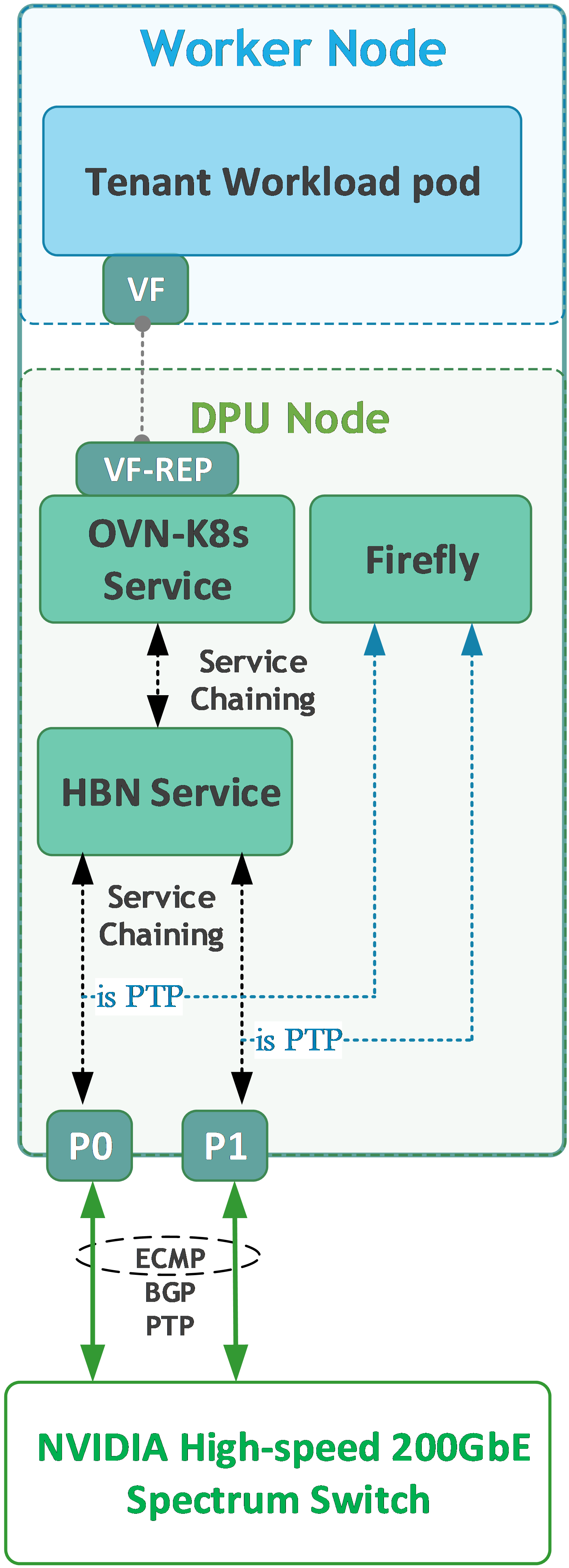
The Firefly Time Sync Service deployment leverages the Service Function Chaining (SFC) capabilities inherent in the DPF system, as described in the Baseline RDG (refer to HBN and OVN-Kubernetes SFC discussions in the Baseline RDG, Section "DPF Installation", Subsection "DPU Provisioning and Service Installation"). However, the introduction of Firefly for PTP traffic necessitates specific considerations and alterations to the traffic flow:
-
The deployment of the Firefly Time Sync Service modifies the existing Service Function Chain (SFC). The original SFC, designed for HBN and OVN-Kubernetes services, now takes the form of a branched structure. This "T-shaped" chain allows the Firefly service, residing on a dedicated branch, to directly communicate with the physical network interface for PTP message exchange.
-
Concurrently, DPF orchestrates a custom flow mechanism specifically for PTP's non-forwardable L2 multicast traffic (e.g., packets to
01-80-C2-00-00-0E). This mechanism ensures that these specialized PTP packets are handled distinctly from the primary workload data path, being precisely redirected only between the wire and the Firefly service on the DPU. Such isolation prevents the propagation of link-local PTP packets to other services in the chain, thereby maintaining the integrity of both PTP communication and general workload traffic.
Firewall Design
The firewall design remains as described in the Baseline RDG (Section "Solution Architecture", Subsection "Solution Design", Sub-subsection "Firewall Design").
The PTP GM node is connected to both the High-Speed and Management networks, as shown in the diagram with the worker nodes.
PTP traffic for this internal cluster synchronization does not traverse the main firewall providing external connectivity.
Software Stack Components
This section updates the software stack from the Baseline RDG (Section "Solution Architecture", Subsection "Software Stack Components") with Firefly-specific components.

Make sure to use the exact same versions for the software stack as described above and in the Baseline RDG.
Bill of Materials
This section updates the Bill of Materials (BOM) from the Baseline RDG (Section "Solution Architecture", Subsection "Bill of Materials"). All other components remain as per the Baseline RDG.
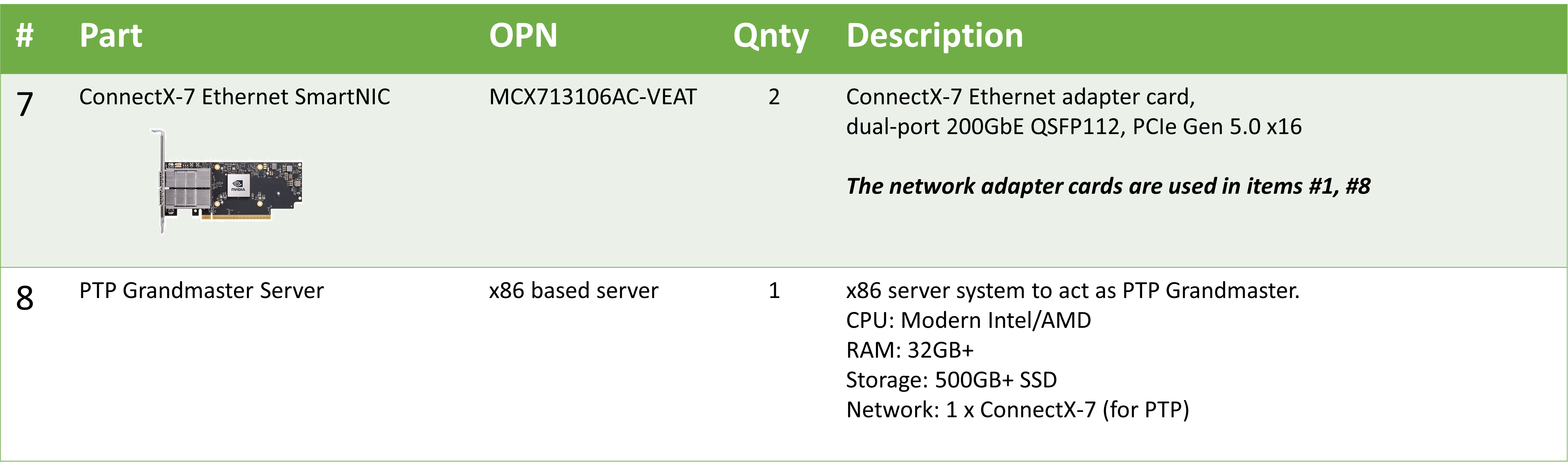
Deployment and Configuration
This section details the deployment and configuration steps, referencing the Baseline RDG where procedures are unchanged and detailing new or modified steps for Firefly Time Sync Service integration.
Node and Switch Definitions
These are the definitions and parameters used for deploying the demonstrated fabric:
Refer to the "Node and Switch Definitions" in the Baseline RDG (Section "Deployment and Configuration", Subsection "Node and Switch Definitions").
The following provides the definition for the new PTP Grandmaster Node switch port:
|
Switch Port Usage |
||
|---|---|---|
|
Hostname |
Rack ID |
Ports |
|
|
1 |
swp1,11-14,20 |
|
|
1 |
swp1-4 |
|
Hosts |
|||||
|---|---|---|---|---|---|
|
Rack |
Server Type |
Server Name |
Switch Port |
IP and NICs |
Default Gateway |
|
Rack1
|
PTP GM Node |
|
mgmt-switch: hs-switch: |
eno4: 10.0.110.8/24 ens1f1np1: n/a |
10.0.110.254 |
Wiring
Reference the Baseline RDG: (Section "Deployment and Configuration", Subsection "Wiring", including Sub-subsections "Hypervisor Node" and "K8s Worker Node") for Hypervisor and K8s Worker Node wiring.
PTP GM Node
-
Basic wiring is similar to that of a Worker Node (with single high-speed port)
-
Connect the management interface of the
ptp-gmserver to themgmt-switch(e.g., SN2201). -
Connect the ConnectX-7 interface (intended for PTP) of the
ptp-gmserver to thehs-switch(e.g., SN3700). This port on the switch will be a PTP slave port from the switch's perspective, receiving time from the GM.
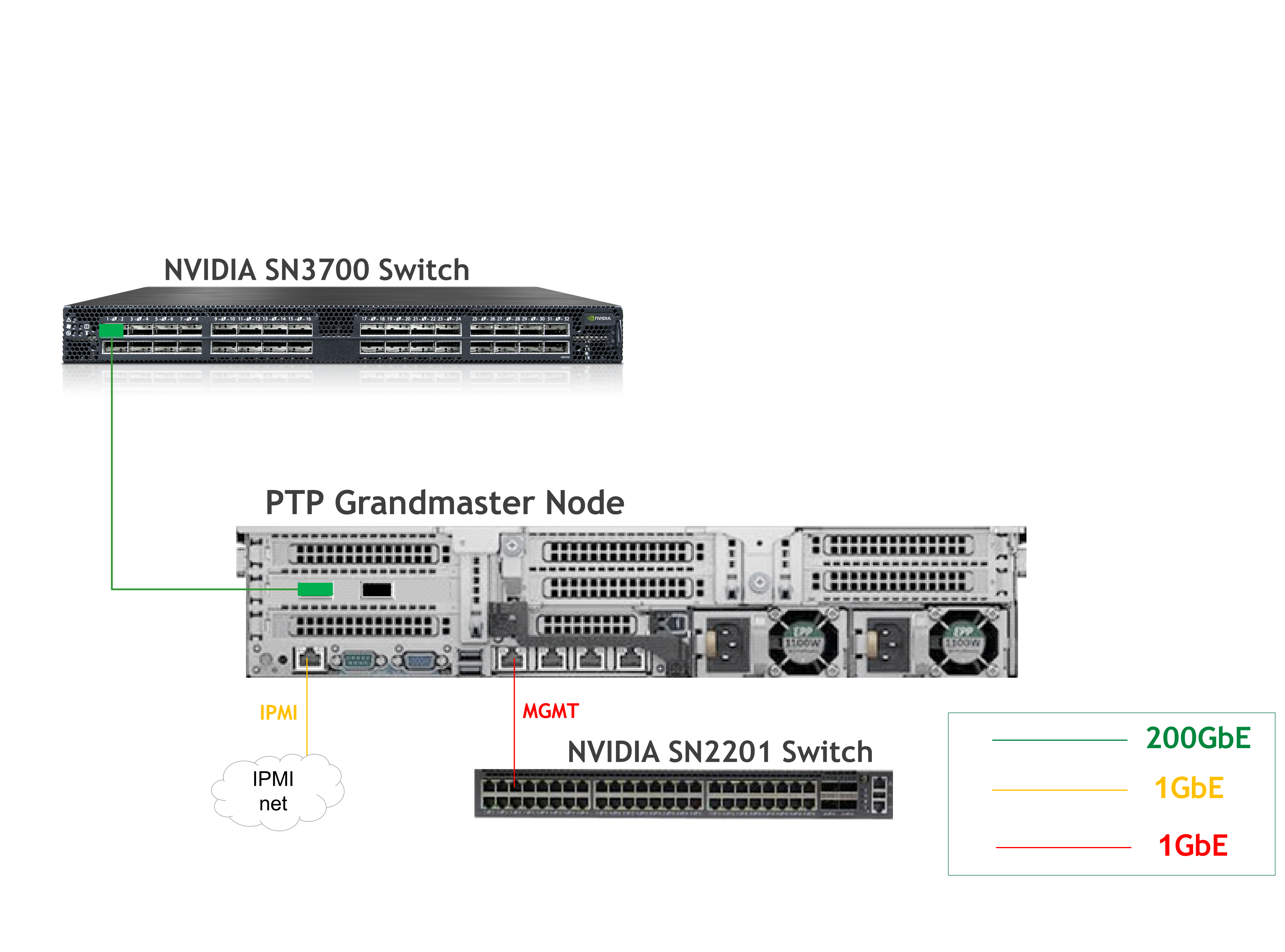
Fabric Configuration
Updating Cumulus Linux
No change from the Baseline RDG (Section "Deployment and Configuration", Subsection "Fabric Configuration", Sub-subsection "Updating Cumulus Linux"). Ensure switches are in the recommended Cumulus Linux version.
Configuring the Cumulus Linux Switch
This section details modifications to the switch configuration (hs-switch, e.g., SN3700) to enable PTP Boundary Clock functionality. The configuration from the Baseline RDG (Section "Deployment and Configuration", Subsection "Fabric Configuration", Sub-subsection "Configuring the Cumulus Linux Switch") for BGP and basic L3 networking remains foundational. The following are additional configurations for PTP:
The SN2201 switch (mgmt-switch) is configured as follows after adding the PTP GM node:
Host Configuration
No change from the Baseline RDG (Section "Deployment and Configuration", Subsection "Host Configuration").
Hypervisor Installation and Configuration
No change from the Baseline RDG (Section "Deployment and Configuration", Subsection "Hypervisor Installation and Configuration").
Prepare Infrastructure Servers
No change from the Baseline RDG (Section "Deployment and Configuration", Subsection "Prepare Infrastructure Servers") regarding Firewall VM, Jump VM, MaaS VM.
Provision Master VMs and Worker Nodes Using MaaS
No change from the Baseline RDG (Section "Deployment and Configuration", Subsection "Provision Master VMs and Worker Nodes Using MaaS").
The PTP Grandmaster node is a separate, manually configured node in this RDG.
PTP GrandMaster Server Configuration
As mentioned before, detailed OS installation and basic server configuration for the Grandmaster node are not covered in this RDG. The GM in this reference deployment is assumed to be a Linux server with the linuxptp package installed, using its ConnectX-7 NIC for PTP.
The following describes the reference ptp4l.conf configuration file used for the PTP Grandmaster node in this RDG. This file should typically be placed at /etc/linuxptp/ptp4l-master.conf on the GM server. In this example, the interface connected to the high-speed switch is "ens1f1np1".
K8s Cluster Deployment and Configuration
Kubespray Deployment and Configuration
The procedures for initial Kubernetes cluster deployment using Kubespray for the master nodes, and subsequent verification, remain unchanged from the Baseline RDG (Section "K8s Cluster Deployment and Configuration", Subsections: "Kubespray Deployment and Configuration", "Deploying Cluster Using Kubespray Ansible Playbook","K8s Deployment Verification".
As in Baseline RDG, Worker nodes are added later, after DPF and prerequisite components for accelerated CNI are installed
DPF Installation
The DPF installation process (Operator, System components) largely follows the Baseline RDG. The primary modifications occur during "DPU Provisioning and Service Installation" to deploy the Firefly Time Sync Service configurations.
Software Prerequisites and Required Variables
Refer to the Baseline RDG (Section "DPF Installation", Subsection "Software Prerequisites and Required Variables") for software prerequisites (like helm, envsubst) and the required environment variables defined in export_vars.env.
CNI Installation
No change from the Baseline RDG (Section "DPF Installation", Subsection "CNI Installation").
DPF Operator Installation
No change from the Baseline RDG (Section "DPF Installation", Subsection "DPF Operator Installation").
DPF System Installation
No change from the Baseline RDG (Section "DPF Installation", Subsection "DPF System Installation").
Install Components to Enable Accelerated CNI Nodes
No change from the Baseline RDG (Section "DPF Installation", Subsection "Install Components to Enable Accelerated CNI Nodes").
DPU Provisioning and Service Installation
This section details the deployment of the Firefly Time Sync Service. The process involves creating dedicated Custom Resources (CRs) for Firefly and configuring the necessary DPF objects to facilitate its deployment alongside the DPU provisioning phase.
While the general methodology for deploying DPUServices (such as OVN, HBN, DTS, and BlueMan) is covered in the Baseline RDG (Section "DPF Installation", Subsection "DPU Provisioning and Service Installation"), this section specifically focuses on deploying the Firefly service in conjunction with the OVN and HBN core services.
-
Before deploying the objects under
manifests/05-dpudeployment-installationdirectory, few adjustments need to be made to include Firefly services and achieve better performance results, as instructed in the Baseline RDG.-
Create a new DPUFlavor using the following YAML:
-
Per Baseline RDG: The parameter
NUM_VF_MSIXis configured to 48 in the provided example, which is suited for the HP servers that were used in this RDG. Set this parameter to the physical number of cores in the NUMA node where the NIC is located. -
A special annotation is used for creating Trusted SFs required by Firefly
-
The Real Time Clock required by Firefly is enabled using the parameter:
REAL_TIME_CLOCK_ENABLE -
THe NTP service is disabled on the DPU, as required by Firefly running
phc2sys
YAML--- apiVersion: provisioning.dpu.nvidia.com/v1alpha1 kind: DPUFlavor metadata: annotations: provisioning.dpu.nvidia.com/num-of-trusted-sfs: "2" name: dpf-provisioning-hbn-ovn-performance-firefly namespace: dpf-operator-system spec: bfcfgParameters: - UPDATE_ATF_UEFI=yes - UPDATE_DPU_OS=yes - WITH_NIC_FW_UPDATE=yes configFiles: - operation: override path: /etc/mellanox/mlnx-bf.conf permissions: "0644" raw: | ALLOW_SHARED_RQ="no" IPSEC_FULL_OFFLOAD="no" ENABLE_ESWITCH_MULTIPORT="yes" - operation: override path: /etc/mellanox/mlnx-ovs.conf permissions: "0644" raw: | CREATE_OVS_BRIDGES="no" OVS_DOCA="yes" - operation: override path: /etc/mellanox/mlnx-sf.conf permissions: "0644" raw: "" dpuMode: dpu grub: kernelParameters: - console=hvc0 - console=ttyAMA0 - earlycon=pl011,0x13010000 - fixrttc - net.ifnames=0 - biosdevname=0 - iommu.passthrough=1 - cgroup_no_v1=net_prio,net_cls - hugepagesz=2048kB - hugepages=8072 nvconfig: - device: '*' parameters: - PF_BAR2_ENABLE=0 - PER_PF_NUM_SF=1 - PF_TOTAL_SF=20 - PF_SF_BAR_SIZE=10 - NUM_PF_MSIX_VALID=0 - PF_NUM_PF_MSIX_VALID=1 - PF_NUM_PF_MSIX=228 - INTERNAL_CPU_MODEL=1 - INTERNAL_CPU_OFFLOAD_ENGINE=0 - SRIOV_EN=1 - NUM_OF_VFS=46 - LAG_RESOURCE_ALLOCATION=1 - NUM_VF_MSIX=48 - REAL_TIME_CLOCK_ENABLE=1 ovs: rawConfigScript: | _ovs-vsctl() { ovs-vsctl --no-wait --timeout 15 "$@" } _ovs-vsctl set Open_vSwitch . other_config:doca-init=true _ovs-vsctl set Open_vSwitch . other_config:dpdk-max-memzones=50000 _ovs-vsctl set Open_vSwitch . other_config:hw-offload=true _ovs-vsctl set Open_vSwitch . other_config:pmd-quiet-idle=true _ovs-vsctl set Open_vSwitch . other_config:max-idle=20000 _ovs-vsctl set Open_vSwitch . other_config:max-revalidator=5000 _ovs-vsctl set Open_vSwitch . other_config:ctl-pipe-size=1024 _ovs-vsctl --if-exists del-br ovsbr1 _ovs-vsctl --if-exists del-br ovsbr2 _ovs-vsctl --may-exist add-br br-sfc _ovs-vsctl set bridge br-sfc datapath_type=netdev _ovs-vsctl set bridge br-sfc fail_mode=secure _ovs-vsctl --may-exist add-br br-hbn _ovs-vsctl set bridge br-hbn datapath_type=netdev _ovs-vsctl set bridge br-hbn fail_mode=secure _ovs-vsctl --may-exist add-port br-sfc p0 _ovs-vsctl set Interface p0 type=dpdk _ovs-vsctl set Interface p0 mtu_request=9216 _ovs-vsctl set Port p0 external_ids:dpf-type=physical _ovs-vsctl set Open_vSwitch . external-ids:ovn-bridge-datapath-type=netdev _ovs-vsctl --may-exist add-br br-ovn _ovs-vsctl set bridge br-ovn datapath_type=netdev _ovs-vsctl br-set-external-id br-ovn bridge-id br-ovn _ovs-vsctl br-set-external-id br-ovn bridge-uplink puplinkbrovntobrsfc _ovs-vsctl --may-exist add-port br-ovn pf0hpf _ovs-vsctl set Interface pf0hpf type=dpdk _ovs-vsctl set Interface pf0hpf mtu_request=9216 _ovs-vsctl --may-exist add-port br-sfc p1 _ovs-vsctl set Interface p1 type=dpdk _ovs-vsctl set Interface p1 mtu_request=9216 _ovs-vsctl set Port p1 external_ids:dpf-type=physical _ovs-vsctl set Interface br-ovn mtu_request=9216 cat <<EOT > /etc/netplan/99-dpf-comm-ch.yaml network: renderer: networkd version: 2 ethernets: pf0vf0: mtu: 9000 dhcp4: no bridges: br-comm-ch: dhcp4: yes interfaces: - pf0vf0 EOT # When running Firefly with phc2sys on the DPU, NTP must be disabled hwclock --systohc systemctl disable ntpsec --now -
-
Adjust
dpudeployment.yamlto reference the DPUFlavor suited for performance/Firefly (This component provisions DPUs on the worker nodes and defines a set of DPUServices and DPUServiceChain to run on those DPUs. The DTS and BlueMan services are removed):YAML--- apiVersion: svc.dpu.nvidia.com/v1alpha1 kind: DPUDeployment metadata: name: ovn-hbn-firefly namespace: dpf-operator-system spec: dpus: bfb: bf-bundle flavor: dpf-provisioning-hbn-ovn-performance-firefly dpuSets: - nameSuffix: "dpuset1" nodeSelector: matchLabels: feature.node.kubernetes.io/dpu-enabled: "true" services: ovn: serviceTemplate: ovn serviceConfiguration: ovn hbn: serviceTemplate: hbn serviceConfiguration: hbn firefly-dpu: serviceConfiguration: firefly-dpu serviceTemplate: firefly-dpu firefly-host: serviceConfiguration: firefly-host serviceTemplate: firefly-host dependsOn: - name: firefly-dpu serviceChains: switches: - ports: - serviceInterface: matchLabels: uplink: p0 - service: name: hbn interface: p0_if - service: interface: firefly_if name: firefly-dpu - ports: - serviceInterface: matchLabels: uplink: p1 - service: name: hbn interface: p1_if - service: interface: firefly2_if name: firefly-dpu - ports: - serviceInterface: matchLabels: port: ovn - service: name: hbn interface: pf2dpu2_if -
Set the
mtuto8940for the OVN DPUServiceConfig (to deploy the OVN Kubernetes workloads on the DPU with the same MTU as in the host):YAML--- apiVersion: svc.dpu.nvidia.com/v1alpha1 kind: DPUServiceConfiguration metadata: name: ovn namespace: dpf-operator-system spec: deploymentServiceName: "ovn" serviceConfiguration: helmChart: values: k8sAPIServer: https://$TARGETCLUSTER_API_SERVER_HOST:$TARGETCLUSTER_API_SERVER_PORT podNetwork: $POD_CIDR/24 serviceNetwork: $SERVICE_CIDR mtu: 8940 dpuManifests: kubernetesSecretName: "ovn-dpu" # user needs to populate based on DPUServiceCredentialRequest vtepCIDR: "10.0.120.0/22" # user needs to populate based on DPUServiceIPAM hostCIDR: $TARGETCLUSTER_NODE_CIDR # user needs to populate ipamPool: "pool1" # user needs to populate based on DPUServiceIPAM ipamPoolType: "cidrpool" # user needs to populate based on DPUServiceIPAM ipamVTEPIPIndex: 0 ipamPFIPIndex: 1 -
Create a new DPUServiceNAD to allow FIreFly to consume a network with Trusted SF resources and without IPAM:
YAML--- apiVersion: svc.dpu.nvidia.com/v1alpha1 kind: DPUServiceNAD metadata: name: mybrsfc-firefly namespace: dpf-operator-system annotations: dpuservicenad.svc.dpu.nvidia.com/use-trusted-sfs: "" spec: resourceType: sf ipam: false bridge: "br-sfc" serviceMTU: 1500 -
Create a new DPUServiceConfig (references to firefly DPUServiceNAD network) and DPUServiceTemplate for the Firefly DPU service:
-
YAML
--- apiVersion: svc.dpu.nvidia.com/v1alpha1 kind: DPUServiceConfiguration metadata: name: firefly-dpu namespace: dpf-operator-system spec: deploymentServiceName: firefly-dpu interfaces: - name: firefly_if network: mybrsfc-firefly - name: firefly2_if network: mybrsfc-firefly serviceConfiguration: configPorts: ports: - name: monitor port: 25600 protocol: TCP serviceType: ClusterIP serviceDaemonSet: labels: svc.dpu.nvidia.com/custom-flows: firefly helmChart: values: exposedPorts: ports: monitor: true ptpConfig: ptp.conf ptpInterfaces: firefly_if config: content: ptp.conf: | [global] domainNumber 24 clientOnly 1 verbose 1 logging_level 6 dataset_comparison G.8275.x G.8275.defaultDS.localPriority 128 maxStepsRemoved 255 logAnnounceInterval -3 logSyncInterval -4 logMinDelayReqInterval -4 G.8275.portDS.localPriority 128 ptp_dst_mac 01:80:C2:00:00:0E network_transport L2 fault_reset_interval 1 hybrid_e2e 0 [firefly_if] [firefly2_if] -
YAML
---
apiVersion: svc.dpu.nvidia.com/v1alpha1
kind: DPUServiceTemplate
metadata:
  name: firefly-dpu
  namespace: dpf-operator-system
spec:
  deploymentServiceName: firefly-dpu
  helmChart:
    source:
      chart: doca-firefly
      repoURL: $HELM_REGISTRY_REPO_URL
      version: 1.1.9
    values:
      config:
        isLocalPath: false
      containerImage: nvcr.io/nvidia/doca/doca_firefly:1.7.4-doca3.2.0
      enableTXPortTimestampOffloading: true
      hostNetwork: false
      monitorState: 0.0.0.0
      phc2sysArgs: -a -r -l 6
  resourceRequirements:
    memory: 512Mi
-
-
Create a new DPUServiceConfig and DPUServiceTemplate for the Firefly Host Monitor service:
-
YAML
--- apiVersion: svc.dpu.nvidia.com/v1alpha1 kind: DPUServiceConfiguration metadata: name: firefly-host namespace: dpf-operator-system spec: deploymentServiceName: firefly-host upgradePolicy: applyNodeEffect: false serviceConfiguration: deployInCluster: true helmChart: values: monitorState: '{{ (index .Services "firefly-dpu").Name }}.{{ (index .Services "firefly-dpu").Namespace }}' -
YAML
---
apiVersion: svc.dpu.nvidia.com/v1alpha1
kind: DPUServiceTemplate
metadata:
  name: firefly-host
  namespace: dpf-operator-system
spec:
  deploymentServiceName: firefly-host
  helmChart:
    source:
      chart: doca-firefly
      repoURL: $HELM_REGISTRY_REPO_URL
      version: 1.1.9
    values:
      containerImage: nvcr.io/nvidia/doca/doca_firefly:1.7.4-doca3.2.0-host
      hostNetwork: false
      monitorClientPhc2sysInterface: eth0
      monitorClientType: phc2sys
      phc2sysState: disable
      ppsDevice: disable
      ppsState: do_nothing
      ptpState: disable
      tolerations:
        - effect: NoSchedule
          key: k8s.ovn.org/network-unavailable
          operator: Exists
  resourceRequirements:
    memory: 512Mi
-
-
The rest of the configuration files remain the same, including:
-
BFB to download BlueField Bitstream to a shared volume.
YAML--- apiVersion: provisioning.dpu.nvidia.com/v1alpha1 kind: BFB metadata: name: bf-bundle namespace: dpf-operator-system spec: url: $BLUEFIELD_BITSTREAM -
OVN DPUServiceTemplate to deploy OVN Kubernetes workloads to the DPUs.
YAML--- apiVersion: svc.dpu.nvidia.com/v1alpha1 kind: DPUServiceTemplate metadata: name: ovn namespace: dpf-operator-system spec: deploymentServiceName: "ovn" helmChart: source: repoURL: $OVN_KUBERNETES_REPO_URL chart: ovn-kubernetes-chart version: $TAG values: commonManifests: enabled: true dpuManifests: enabled: true leaseNamespace: "ovn-kubernetes" gatewayOpts: "--gateway-interface=br-ovn" -
HBN DPUServiceConfig and DPUServiceTemplate to deploy HBN workloads to the DPUs.
YAML--- apiVersion: svc.dpu.nvidia.com/v1alpha1 kind: DPUServiceConfiguration metadata: name: hbn namespace: dpf-operator-system spec: deploymentServiceName: "hbn" serviceConfiguration: serviceDaemonSet: annotations: k8s.v1.cni.cncf.io/networks: |- [ {"name": "iprequest", "interface": "ip_lo", "cni-args": {"poolNames": ["loopback"], "poolType": "cidrpool"}}, {"name": "iprequest", "interface": "ip_pf2dpu2", "cni-args": {"poolNames": ["pool1"], "poolType": "cidrpool", "allocateDefaultGateway": true}} ] helmChart: values: configuration: perDPUValuesYAML: | - hostnamePattern: "*" values: bgp_peer_group: hbn startupYAMLJ2: | - header: model: BLUEFIELD nvue-api-version: nvue_v1 rev-id: 1.0 version: HBN 2.4.0 - set: interface: lo: ip: address: {{ ipaddresses.ip_lo.ip }}/32: {} type: loopback p0_if,p1_if: type: swp link: mtu: 9000 pf2dpu2_if: ip: address: {{ ipaddresses.ip_pf2dpu2.cidr }}: {} type: swp link: mtu: 9000 router: bgp: autonomous-system: {{ ( ipaddresses.ip_lo.ip.split(".")[3] | int ) + 65101 }} enable: on graceful-restart: mode: full router-id: {{ ipaddresses.ip_lo.ip }} vrf: default: router: bgp: address-family: ipv4-unicast: enable: on redistribute: connected: enable: on ipv6-unicast: enable: on redistribute: connected: enable: on enable: on neighbor: p0_if: peer-group: {{ config.bgp_peer_group }} type: unnumbered p1_if: peer-group: {{ config.bgp_peer_group }} type: unnumbered path-selection: multipath: aspath-ignore: on peer-group: {{ config.bgp_peer_group }}: remote-as: external interfaces: ## NOTE: Interfaces inside the HBN pod must have the `_if` suffix due to a naming convention in HBN. - name: p0_if network: mybrhbn - name: p1_if network: mybrhbn - name: pf2dpu2_if network: mybrhbnYAML--- apiVersion: svc.dpu.nvidia.com/v1alpha1 kind: DPUServiceTemplate metadata: name: hbn namespace: dpf-operator-system spec: deploymentServiceName: "hbn" helmChart: source: repoURL: $HELM_REGISTRY_REPO_URL version: 1.0.5 chart: doca-hbn values: image: repository: $HBN_NGC_IMAGE_URL tag: 3.2.1-doca3.2.1 resources: memory: 6Gi nvidia.com/bf_sf: 3 -
OVN DPUServiceCredentialRequest to allow cross-cluster communication.
YAML--- apiVersion: svc.dpu.nvidia.com/v1alpha1 kind: DPUServiceCredentialRequest metadata: name: ovn-dpu namespace: dpf-operator-system spec: serviceAccount: name: ovn-dpu namespace: dpf-operator-system duration: 24h type: tokenFile secret: name: ovn-dpu namespace: dpf-operator-system metadata: labels: dpu.nvidia.com/image-pull-secret: "" -
DPUServiceInterfaces for physical ports on the DPU.
YAML--- apiVersion: svc.dpu.nvidia.com/v1alpha1 kind: DPUServiceInterface metadata: name: p0 namespace: dpf-operator-system spec: template: spec: template: metadata: labels: uplink: "p0" spec: interfaceType: physical physical: interfaceName: p0 --- apiVersion: svc.dpu.nvidia.com/v1alpha1 kind: DPUServiceInterface metadata: name: p1 namespace: dpf-operator-system spec: template: spec: template: metadata: labels: uplink: "p1" spec: interfaceType: physical physical: interfaceName: p1 -
OVN DPUServiceInterface to define the ports attached to OVN workloads on the DPU.
YAML--- apiVersion: svc.dpu.nvidia.com/v1alpha1 kind: DPUServiceInterface metadata: name: ovn namespace: dpf-operator-system spec: template: spec: template: metadata: labels: port: ovn spec: interfaceType: ovn -
DPUServiceIPAM to set up IP Address Management on the DPUCluster.
YAML--- apiVersion: svc.dpu.nvidia.com/v1alpha1 kind: DPUServiceIPAM metadata: name: pool1 namespace: dpf-operator-system spec: ipv4Network: network: "10.0.120.0/22" gatewayIndex: 3 prefixSize: 29 -
DPUServiceIPAM for the loopback interface in HBN.
YAML--- apiVersion: svc.dpu.nvidia.com/v1alpha1 kind: DPUServiceIPAM metadata: name: loopback namespace: dpf-operator-system spec: ipv4Network: network: "11.0.0.0/24" prefixSize: 32
-
-
-
Apply all of the YAML files mentioned above using the following command:
Jump Node Console
$ cat manifests/05-dpudeployment-installation/*.yaml | envsubst | kubectl apply -f - -
Verify the DPUService installation by ensuring that the DPUServices are created and have been reconciled, that the DPUServiceIPAMs have been reconciled, that the DPUServiceInterfaces have been reconciled, and that the DPUServiceChains have been reconciled:
These verification commands may need to be run multiple times to ensure that the conditions are met.
Jump Node Console
$ kubectl wait --for=condition=ApplicationsReconciled --namespace dpf-operator-system dpuservices -l svc.dpu.nvidia.com/owned-by-dpudeployment=dpf-operator-system_ovn-hbn-firefly
dpuservice.svc.dpu.nvidia.com/firefly-dpu-4v26p condition met
dpuservice.svc.dpu.nvidia.com/firefly-host-d5c97 condition met
dpuservice.svc.dpu.nvidia.com/hbn-77jcn condition met
dpuservice.svc.dpu.nvidia.com/ovn-6xnbh condition met

$ kubectl wait --for=condition=DPUIPAMObjectReconciled --namespace dpf-operator-system dpuserviceipam --all
dpuserviceipam.svc.dpu.nvidia.com/loopback condition met
dpuserviceipam.svc.dpu.nvidia.com/pool1 condition met

$ kubectl wait --for=condition=ServiceInterfaceSetReconciled --namespace dpf-operator-system dpuserviceinterface --all
dpuserviceinterface.svc.dpu.nvidia.com/firefly-dpu-firefly-if-v8r7j condition met
dpuserviceinterface.svc.dpu.nvidia.com/firefly-dpu-firefly2-if-h6hhd condition met
dpuserviceinterface.svc.dpu.nvidia.com/hbn-p0-if-6jprb condition met
dpuserviceinterface.svc.dpu.nvidia.com/hbn-p1-if-fh2w6 condition met
dpuserviceinterface.svc.dpu.nvidia.com/hbn-pf2dpu2-if-wks6w condition met
dpuserviceinterface.svc.dpu.nvidia.com/ovn condition met
dpuserviceinterface.svc.dpu.nvidia.com/p0 condition met
dpuserviceinterface.svc.dpu.nvidia.com/p1 condition met

$ kubectl wait --for=condition=ServiceChainSetReconciled --namespace dpf-operator-system dpuservicechain --all
dpuservicechain.svc.dpu.nvidia.com/ovn-hbn-firefly-d7vtb condition met
K8s Cluster Scale-out
Add Worker Nodes to the Cluster
The procedure to add worker nodes to the cluster remains unchanged from the Baseline RDG (Section "K8s Cluster Scale-out", Subsection "Add Worker Nodes to the Cluster").
-
Reference Baseline RDG: Section "K8s Cluster Scale-out", Subsection "Add Worker Nodes to the Cluster".
-
When new worker nodes are added, DPF will provision their DPUs and deploy all configured DPUServices, including the newly added Firefly DPU and Host Monitor services, onto these nodes/DPUs.
Make sure to disable NTP on the Worker Nodes once the Firefly Host Service is deployed.
Congratulations—the DPF system has been successfully installed!
Verification
This section details how to verify the overall deployment. General DPF system verification (DPU readiness, DaemonSet status for core components like Multus, SR-IOV, OVN on host/DPU) remains as per the Baseline RDG (Section "Verification").
Infrastructure Latency & Bandwidth Validation
No changes from the Baseline RDG (Section "Verification", Subsection "Infrastructure Latency & Bandwidth Validation"). This RDG does not include new performance tests or validation beyond time synchronization.
Time Sync Service Verification
PTP State Monitoring from Tenant K8s Host
The Firefly host-monitor service should provide logs or status indicating the PTP synchronization state of the DPU that it is monitoring.
-
Verify that a Firefly pod is running on each host and retrieve its name:
Jump Node Console
$ kubectl get pod -n dpf-operator-system -o wide | grep firefly
doca-firefly-dgnmf                                            1/1     Running     1 (2m33s ago)   2m40s   10.233.68.22   worker1   <none>           <none>
doca-firefly-pkxsm                                            1/1     Running     1 (2m33s ago)   2m40s   10.233.67.12   worker2   <none>           <none>
-
View logs of a specific pod:
Jump Node Console
$ kubectl logs -n dpf-operator-system doca-firefly-dgnmf -
In the logs, look for output similar to the example below, which indicates the PTP and host synchronization status. Key fields to observe include, among others:
-
gmIdentity: The identity of the current Grandmaster clock.
-
port_state: Should indicate
Activefor the DPU's PTP ports when synchronized. -
master_offset: Shows the average, maximum, and root mean square (rms) offset from the master clock in nanoseconds. Lower, stable values are desirable.
-
ptp_stable: Should indicate
YesorRecoveredwhen PTP synchronization is stable. -
ptp_time (TAI) and system_time (UTC) (under DPU information): These should reflect the current PHC time and the DPU's system time.
-
ptp_ports: Lists the state of the DPU's PTP ports (e.g., one
Slaveand otherListeningif redundant ports are configured).
-
-
PTP Monitor log example:
PTP Monitor Logs
gmIdentity: B8:3F:D2:FF:FE:6A:E7:67 (b83fd2.fffe.6ae767) portIdentity: 46:66:06:FF:FE:AA:AF:B2 (466606.fffe.aaafb2-1) port_state: Active domainNumber: 24 master_offset: avg: 7 max: 19 rms: 5 gmPresent: true ptp_stable: Yes UtcOffset: 37 timeTraceable: 0 frequencyTraceable: 0 grandmasterPriority1: 128 gmClockClass: 6 gmClockAccuracy: 0xfe grandmasterPriority2: 128 gmOffsetScaledLogVariance: 0xffff ptp_time (TAI): Thu Jan 15 07:15:33 2026 ptp_time (UTC adjusted): Thu Jan 15 07:14:56 2026 system_time (UTC): Thu Jan 15 07:14:56 2026 ptp_ports: 46:66:06:FF:FE:AA:AF:B2 (466606.fffe.aaafb2-1) - Slave 46:66:06:FF:FE:AA:AF:B2 (466606.fffe.aaafb2-2) - Listening Host information: system_time (UTC): Thu Jan 15 07:14:56 2026 phc_time (TAI): Thu Jan 15 07:15:33 2026 -
For additional PTP Monitor information, refer to the DOCA Firefly Service Guide (References list).
Automatic Host System Clock Sync Verification
Make sure NTP is disabled on the Worker Nodes once the Firefly Host Service is deployed.
As mentioned in this RDG, the Firefly Host Monitor service is also responsible for syncing the host OS system clock to the PHC, and using the PHC2SYS program as a third-party OS time calibration provider.
-
Connect to one of the tenant K8s worker node hosts and verify that NTP services are inactive/disabled.
-
Check the following log created by the service on the host filesystem:
Worker Host Console
worker1:~# tail -f /var/log/doca/firefly/monitor_client_phc2sys.log phc2sys[1112425.357]: CLOCK_REALTIME phc offset 14 s2 freq +8045 delay 521 phc2sys[1112426.357]: CLOCK_REALTIME phc offset 1 s2 freq +8036 delay 498 phc2sys[1112427.357]: CLOCK_REALTIME phc offset 19 s2 freq +8055 delay 513 phc2sys[1112428.357]: CLOCK_REALTIME phc offset -9 s2 freq +8032 delay 520 phc2sys[1112429.358]: CLOCK_REALTIME phc offset -7 s2 freq +8032 delay 521 phc2sys[1112430.358]: CLOCK_REALTIME phc offset -11 s2 freq +8025 delay 511 phc2sys[1112431.358]: CLOCK_REALTIME phc offset -9 s2 freq +8024 delay 520 phc2sys[1112432.358]: CLOCK_REALTIME phc offset -11 s2 freq +8019 delay 520 phc2sys[1112433.359]: CLOCK_REALTIME phc offset 4 s2 freq +8031 delay 523 phc2sys[1112434.378]: CLOCK_REALTIME phc offset 3 s2 freq +8031 delay 520 phc2sys[1112435.379]: CLOCK_REALTIME phc offset -13 s2 freq +8016 delay 521 -
The log should be actively updating, indicating that
PHC2SYSis running and periodically comparing and adjusting the host'sCLOCK_REALTIME(system clock) against the DPU's PHC. -
Stable frequency/delay values and consistently small offset values are good indicators for close and stable synchronization between the host clock and the DPU PHC.
The Monitoring information presented by the Firefly Host Monitor service also provides indications of the host's current system time under the "Host information" section.
-
PTP Monitor log example–DPU information:
PTP Monitor Logs
ptp_time (TAI): Thu Jan 15 07:15:33 2026 ptp_time (UTC adjusted): Thu Jan 15 07:14:56 2026 system_time (UTC): Thu Jan 15 07:14:56 2026 -
PTP Monitor log example–Host information:
PTP Monitor Logs
Host information: system_time (UTC): Thu Jan 15 07:14:56 2026 phc_time (TAI): Thu Jan 15 07:15:33 2026 -
Host information:
-
phc_time (TAI): Current PHC time detected by Firefly host service, should match the PHC time presented by DPU (ptp_time TAI)
-
system_time (UTC): Host's system clock, should be synchronized to the DPU's PHC, after accounting for the UTC offset (e.g., 37 seconds for TAI to UTC). These times should be very closely aligned. Host system time (UTC) should match the DPU's system_time (UTC) as both services are using
PHC2SYSto sync the system time to a shared PHC.
-
-
Issue "date" command on the host to verify the current system time matches the one shown in the PTP Monitor log. You can compare it to a known accurate time source (e.g., the PTP GM's system clock). The drift should be minimal and within expected PTP accuracy.
Worker Host Console
worker1:~# date --iso-8601=ns
2026-01-15T07:18:32,915864585+00:00
Link Failure/Recovery (PTP Failover on DPU)
The Firefly Host-monitor service should provide logs or status indicating the PTP synchronization state of the DPU it's monitoring information.
-
Simulate Link Failure–Administratively bring down the link for the active PTP port on one of the DPUs from the switch side.
SN3700 Switch Console
nv set interface swp11 link state down nv config apply -y -
Observe failover via PTP Monitor logs on the relevant worker host—look for "State Recovered", an increased error count, and the second port acquiring the "Slave" role.
PTP Monitor Logs
gmIdentity: B8:3F:D2:FF:FE:6A:E7:67 (b83fd2.fffe.6ae767) portIdentity: F2:77:76:FF:FE:1A:BE:19 (f27776.fffe.1abe19-2) port_state: Active domainNumber: 24 master_offset: avg: 47 max: 151 rms: 54 gmPresent: true ptp_stable: Recovered UtcOffset: 37 timeTraceable: 0 frequencyTraceable: 0 grandmasterPriority1: 128 gmClockClass: 6 gmClockAccuracy: 0xfe grandmasterPriority2: 128 gmOffsetScaledLogVariance: 0xffff ptp_time (TAI): Tue May 27 15:02:10 2025 ptp_time (UTC adjusted): Tue May 27 15:01:33 2025 system_time (UTC): Tue May 27 15:01:33 2025 ptp_ports: F2:77:76:FF:FE:1A:BE:19 (f27776.fffe.1abe19-1) - Listening F2:77:76:FF:FE:1A:BE:19 (f27776.fffe.1abe19-2) - Slave error_count: 1 last_err_time (UTC): Tue May 27 15:01:04 2025 Host information: system_time (UTC): Tue May 27 15:01:33 2025 phc_time (TAI): Tue May 27 15:02:10 2025 -
Simulate Link Recovery–Administratively bring down the network link for the active PTP port on the switch.
SN3700 Switch Console
nv set interface swp11 link state up nv config apply -y -
Observe Recovery via PTP Monitor logs–look for "State Recovered", an increased error count, and the first port reqcquiring the "Slave" role .
PTP Monitor Logs
gmIdentity:                B8:3F:D2:FF:FE:6A:E7:67 (b83fd2.fffe.6ae767)
portIdentity:              F2:77:76:FF:FE:1A:BE:19 (f27776.fffe.1abe19-1)
port_state:                Active
domainNumber:              24
master_offset:             avg: 0       max:    11      rms:    5
gmPresent:                 true
ptp_stable:                Recovered
UtcOffset:                 37
timeTraceable:             0
frequencyTraceable:        0
grandmasterPriority1:      128
gmClockClass:              6
gmClockAccuracy:           0xfe
grandmasterPriority2:      128
gmOffsetScaledLogVariance: 0xffff
ptp_time (TAI):            Tue May 27 15:04:39 2025
ptp_time (UTC adjusted):   Tue May 27 15:04:02 2025
system_time (UTC):         Tue May 27 15:04:02 2025
ptp_ports:                 F2:77:76:FF:FE:1A:BE:19 (f27776.fffe.1abe19-1) - Slave
                           F2:77:76:FF:FE:1A:BE:19 (f27776.fffe.1abe19-2) - Listening
error_count:               2
last_err_time (UTC):       Tue May 27 15:03:52 2025

Host information:
system_time (UTC):    Tue May 27 15:04:02 2025
phc_time (TAI):       Tue May 27 15:04:39 2025
Authors
|
|
Itai Levy
Over the past few years, Itai Levy has worked as a Solutions Architect and member of the NVIDIA Networking “Solutions Labs” team. Itai designs and executes cutting-edge solutions around Cloud Computing, Software-Defined Networking, Storage and Security. His main areas of expertise include NVIDIA BlueField Data Processing Unit (DPU) solutions and accelerated K8s/OpenStack platforms. |

Last updated: