

Created on Jul 01, 2026 (v26.4.0 GA)
Scope
This Reference Deployment Guide (RDG) provides comprehensive instructions for deploying the NVIDIA DOCA Platform Framework (DPF) with the DOCA Argus service on high-performance, bare-metal infrastructure in Zero-Trust mode. It focuses on the setup and use of DPU-based services on NVIDIA® BlueField®-3 DPUs to deliver secure, isolated, and hardware-accelerated environments.
The guide is intended for experienced system administrators, systems engineers, and solution architects who build highly secure bare-metal environments using NVIDIA BlueField DPUs for acceleration, isolation, and infrastructure offload.
This document is an extension of the RDG for DPF Zero Trust (DPF-ZT) (referred to as the Baseline RDG). It details the additional steps and modifications required to deploy the Argus Service into the Baseline RDG environment.
-
This reference implementation, as the name implies, is a specific, opinionated deployment example designed to address the use case described above.
-
Although other approaches may exist for implementing similar solutions, this document provides a detailed guide for this specific method.
Abbreviations and Acronyms
|
Term |
Definition |
Term |
Definition |
|---|---|---|---|
|
BFB |
BlueField Bootstream |
NGC |
NVIDIA GPU Cloud |
|
DOCA |
Data Center Infrastructure-on-a-Chip Architecture |
OOB |
Out-of-Band |
|
DPF |
DOCA Platform Framework |
OVN |
Open Virtual Network |
|
DPU |
Data Processing Unit |
PF |
Physical Function |
|
K8S |
Kubernetes |
RDG |
Reference Deployment Guide |
|
KVM |
Kernel-based Virtual Machine |
RDMA |
Remote Direct Memory Access |
|
MAAS |
Metal as a Service |
RoCE |
RDMA over Converged Ethernet |
|
MTU |
Maximum Transmission Unit |
ZT |
Zero Trust |
Introduction
The NVIDIA BlueField-3 Data Processing Unit (DPU) is a 400 Gb/s infrastructure compute platform designed for line-rate processing of software-defined networking, storage, and cybersecurity workloads. It combines powerful compute resources, high-speed networking, and advanced programmability to deliver hardware-accelerated, software-defined solutions for modern data centers.
NVIDIA DOCA unleashes the full potential of the BlueField platform by enabling rapid development of applications and services that offload, accelerate, and isolate data center workloads.
One such service is the DOCA Argus Service provides Workload Threat Detection is a novel approach for container threat detection in AI workloads and microservices, utilizing a Bluefield DPU to perform live machine introspection at the hardware level. This approach analyzes specific snippets of volatile memory to provide real-time visibility into container activity and behavior at the network, host, and application levels.
The state of container node images is continuously monitored in real-time, checking for deviations from their secure, compliant versions and configurations to detect and stop runtime attacks. These insights also include the ability to identify attacks targeting network facing applications/services.
The Argus service provides events and data on any object on the OS (host/VM) without any configuration needed and without any active part from the user or the host.
Examples what Argus service provides:
-
Any new processes with its PID, name, attributes, and status.
-
Reverse shells with process and network connection details such as source & destination IP and number of transferred bytes.
-
SHA256 hash of running executable and loaded libraries
However, deploying and managing DPUs, especially at scale, presents operational challenges. Without a robust provisioning and orchestration system, tasks such as lifecycle management, service deployment, and network configuration for service function chaining (SFC) can quickly become complex and error prone. This is where the DOCA Platform Framework (DPF) comes into play.
DPF automates the full DPU lifecycle, and simplifies advanced network configurations. With DPF, services can be deployed seamlessly, allowing for efficient offloading and intelligent routing of traffic through the DPU data plane.
By leveraging DPF, users can scale and automate DPU management across Bare Metal, Virtual, and Kubernetes customer environments - optimizing performance while simplifying operations.
DPF supports multiple deployment models. This guide focuses on the Zero Trust bare-metal deployment model. In this scenario:
-
The DPU is managed through its Baseboard Management Controller (BMC)
-
All management traffic occurs over the DPU's out-of-band (OOB) network
-
The host is considered as an untrusted entity towards the data center network. The DPU acts as a barrier between the host and the network.
-
The host sees the DPU as a standard NIC, with no access to the internal DPU management plane (Zero Trust Mode)
This Reference Deployment Guide (RDG) provides a step-by-step example for installing DPF in Zero-Trust mode. It also includes practical demonstrations of performance optimization, validated using standard RDMA and TCP workloads.
As part of the reference implementation, open-source components outside the scope of DPF (e.g., MAAS, pfSense, Kubespray) are used to simulate a realistic customer deployment environment. The guide includes the full end-to-end deployment process, including:
-
Infrastructure provisioning
-
DPF deployment
-
DPU provisioning (redfish)
-
Service configuration and deployment
-
Service chaining.
This document extends the capabilities of the DPF-managed Kubernetes cluster described in the RDG for DPF Zero Trust (DPF-ZT) (referred to as the Baseline RDG) by deploying the NVIDIA DOCA Argus Service within the existing DPF deployment to achieve a comprehensive, accelerated infrastructure.
References
Solution Architecture
Key Components and Technologies
-
NVIDIA BlueField® Data Processing Unit (DPU)
The NVIDIA® BlueField® data processing unit (DPU) ignites unprecedented innovation for modern data centers and supercomputing clusters. With its robust compute power and integrated software-defined hardware accelerators for networking, storage, and security, BlueField creates a secure and accelerated infrastructure for any workload in any environment, ushering in a new era of accelerated computing and AI.
-
NVIDIA DOCA Software Framework
NVIDIA DOCA™ unlocks the potential of the NVIDIA® BlueField® networking platform. By harnessing the power of BlueField DPUs and SuperNICs, DOCA enables the rapid creation of applications and services that offload, accelerate, and isolate data center workloads. It lets developers create software-defined, cloud-native, DPU- and SuperNIC-accelerated services with zero-trust protection, addressing the performance and security demands of modern data centers.
-
NVIDIA ConnectX SmartNICs
10/25/40/50/100/200 and 400G Ethernet Network Adapters
The industry-leading NVIDIA® ConnectX® family of smart network interface cards (SmartNICs) offer advanced hardware offloads and accelerations.
NVIDIA Ethernet adapters enable the highest ROI and lowest Total Cost of Ownership for hyperscale, public and private clouds, storage, machine learning, AI, big data, and telco platforms.
-
NVIDIA LinkX Cables
The NVIDIA® LinkX® product family of cables and transceivers provides the industry’s most complete line of 10, 25, 40, 50, 100, 200, and 400GbE in Ethernet and 100, 200 and 400Gb/s InfiniBand products for Cloud, HPC, hyperscale, Enterprise, telco, storage and artificial intelligence, data center applications.
-
NVIDIA Spectrum Ethernet Switches
Flexible form-factors with 16 to 128 physical ports, supporting 1GbE through 400GbE speeds.
Based on a ground-breaking silicon technology optimized for performance and scalability, NVIDIA Spectrum switches are ideal for building high-performance, cost-effective, and efficient Cloud Data Center Networks, Ethernet Storage Fabric, and Deep Learning Interconnects.
NVIDIA combines the benefits of NVIDIA Spectrum™ switches, based on an industry-leading application-specific integrated circuit (ASIC) technology, with a wide variety of modern network operating system choices, including NVIDIA Cumulus® Linux, SONiC and NVIDIA Onyx®.
-
NVIDIA Cumulus Linux
NVIDIA® Cumulus® Linux is the industry's most innovative open network operating system that allows you to automate, customize, and scale your data center network like no other.
-
Kubernetes
Kubernetes is an open-source container orchestration platform for deployment automation, scaling, and management of containerized applications.
-
Kubespray
Kubespray is a composition ofAnsible
playbooks, inventory, provisioning tools, and domain knowledge for generic OS/Kubernetes clusters configuration management tasks and provides:
-
A highly available cluster
-
Composable attributes
-
Support for most popular Linux distributions
-
Solution Design
Solution Logical Design
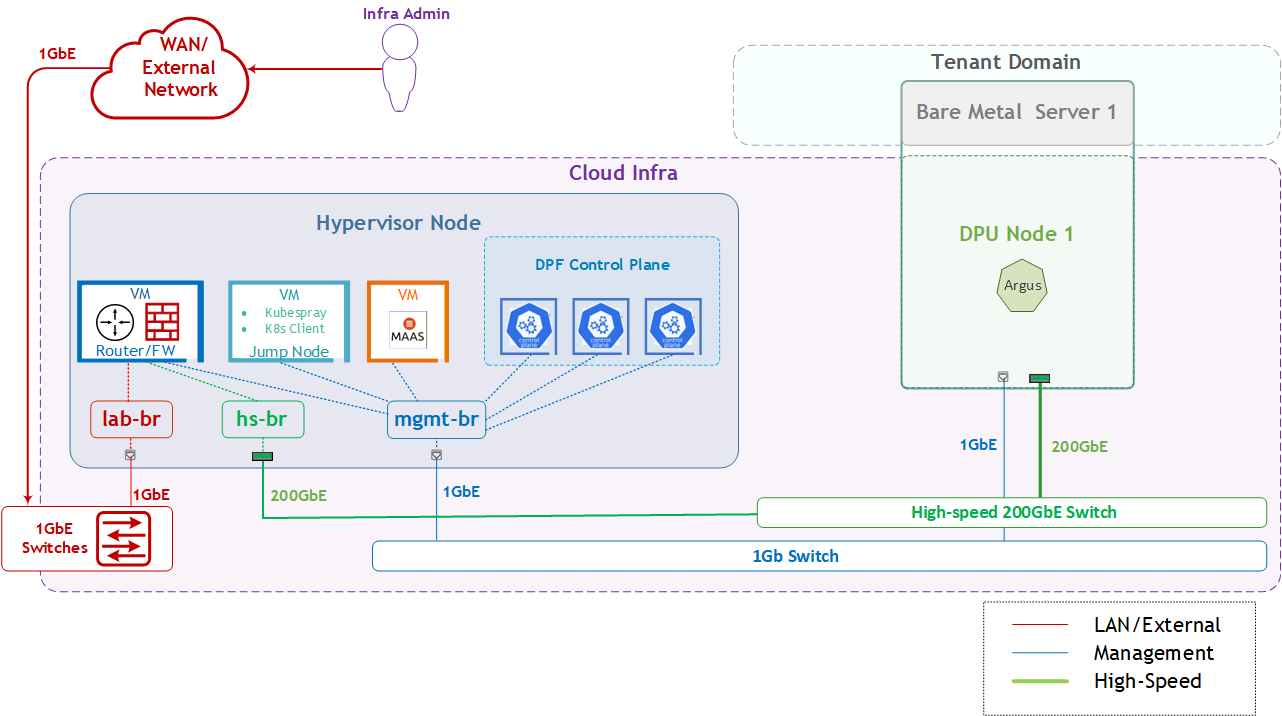
The logical design includes the following components:
-
1 x Hypervisor node (KVM-based) with ConnectX-7:
-
1 x Firewall VM
-
1 x Jump Node VM
-
1 x MaaS VM
-
3 x K8s Master VMs running all K8s management components
-
-
1 x Worker nodes (PCI Gen5), each with a 1 x BlueField-3 NIC
-
Single High-Speed (HS) switch
-
1 Gb Host Management network
Firewall Design
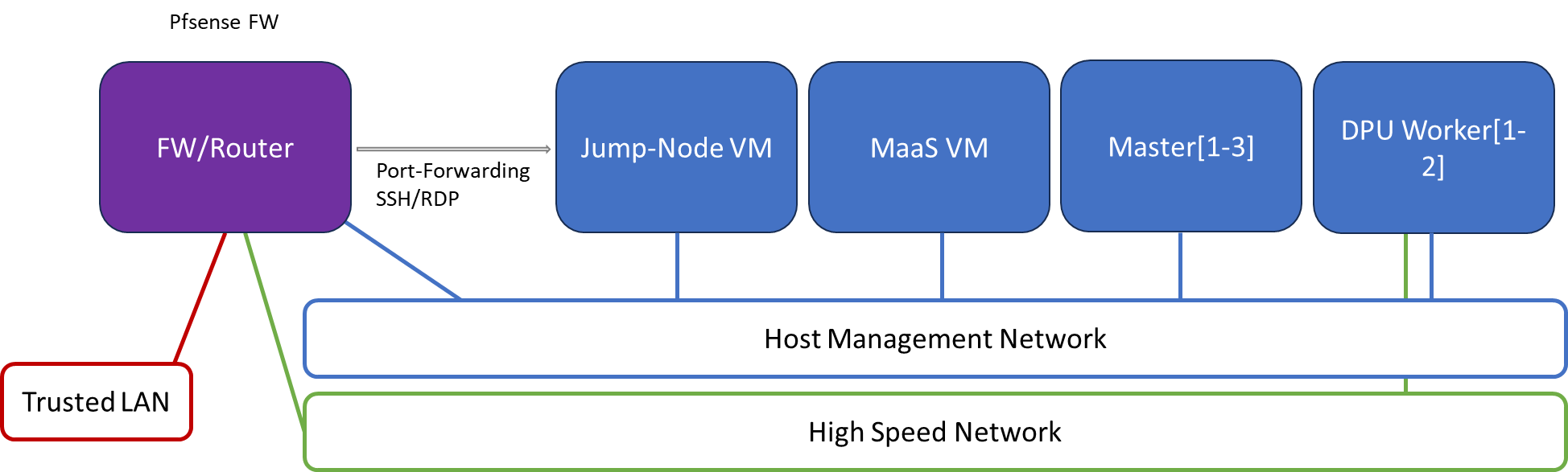
The pfSense firewall in this solution serves a dual purpose:
-
Firewall—provides an isolated environment for the DPF system, ensuring secure operations
-
Router—enables Internet access for the management network
Port-forwarding rules for SSH and RDP are configured on the firewall to route traffic to the jump node’s IP address in the host management network. From the jump node, administrators can manage and access various devices in the setup, as well as handle the deployment of the Kubernetes (K8s) cluster and DPF components.
The following diagram illustrates the firewall design used in this solution:
Software Stack Components
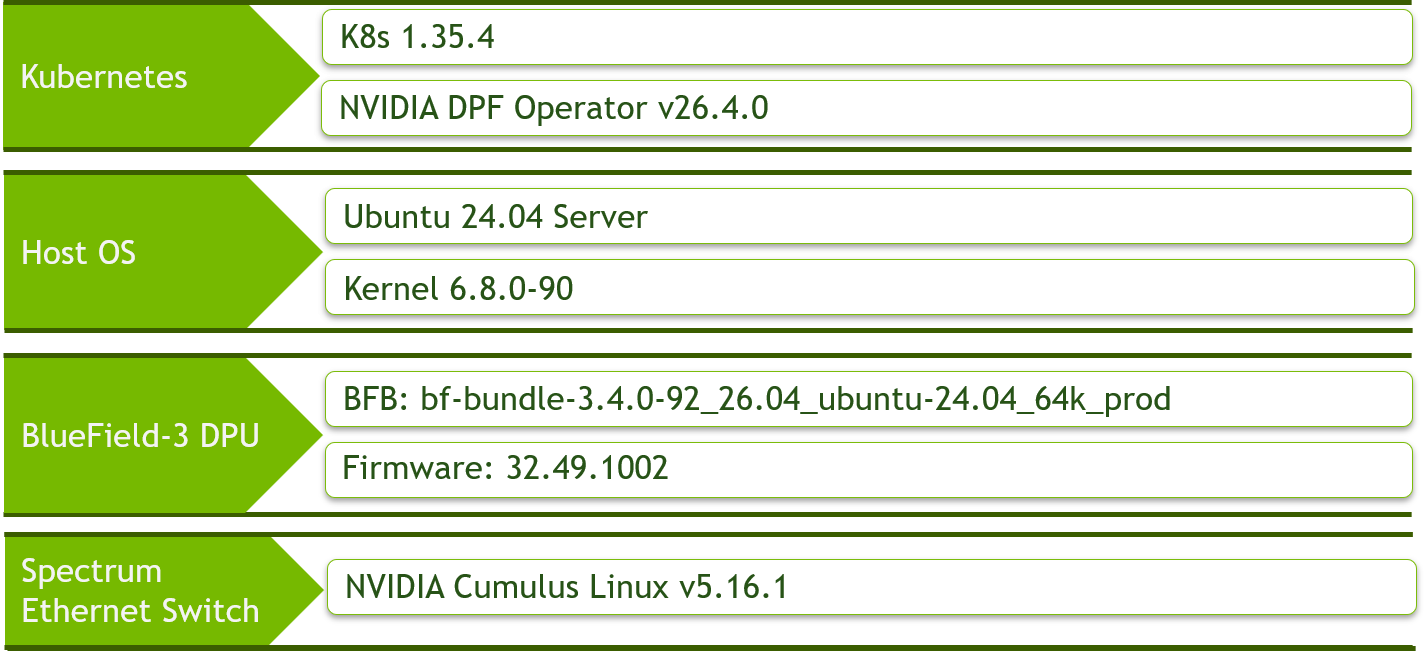
Make sure to use the exact same versions for the software stack as described above.
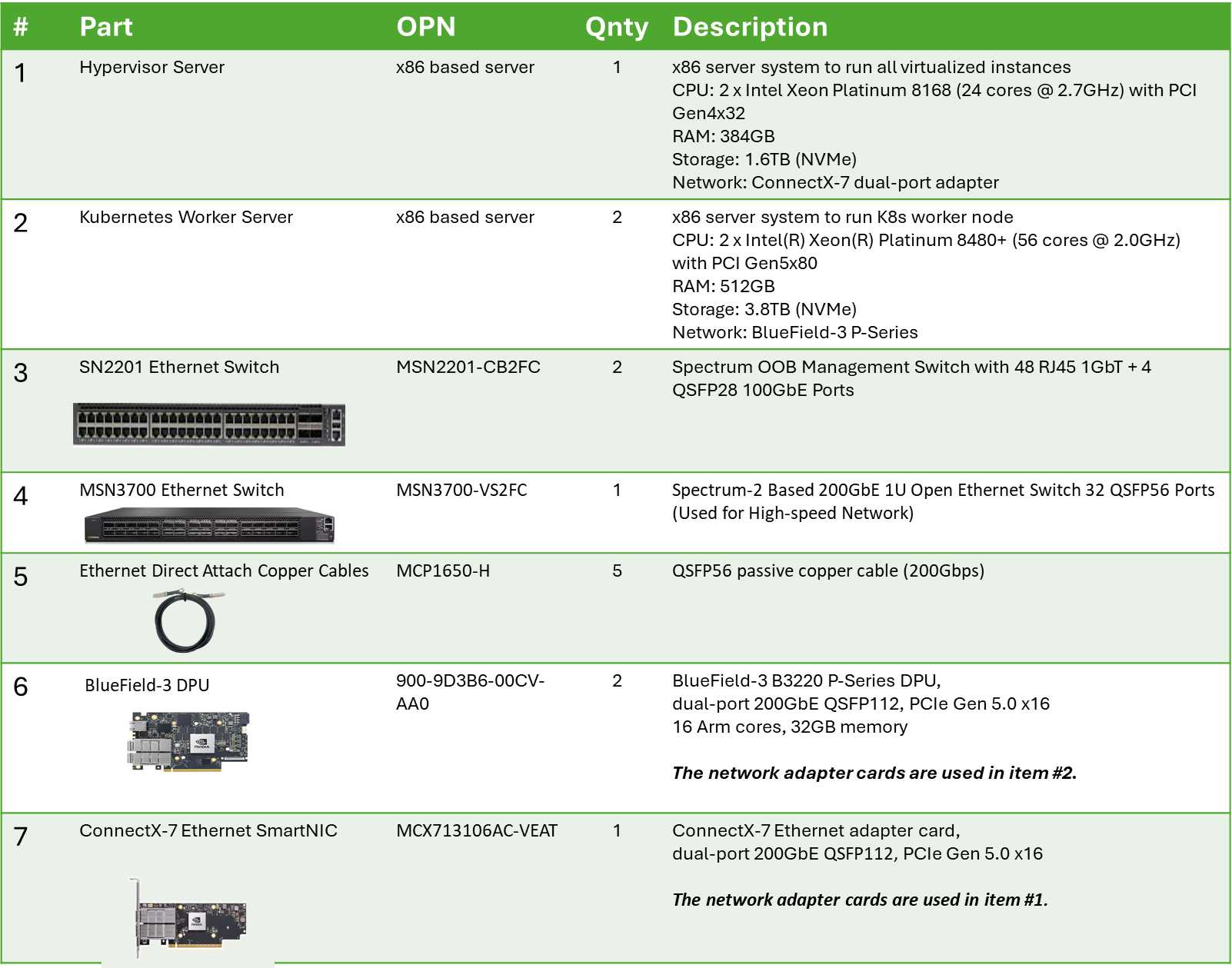
Bill of Materials
Deployment and Configuration
Node and Switch Definitions
These are the definitions and parameters used for deploying the demonstrated fabric:
|
Switches Ports Usage |
||
|---|---|---|
|
Hostname |
Rack ID |
Ports |
|
|
1 |
swp1-2 |
|
|
1 |
swp1-2 |
|
Hosts |
|||||
|---|---|---|---|---|---|
|
Rack |
Server Type |
Server Name |
Switch Port |
IP and NICs |
Default Gateway |
|
Rack1
|
Hypervisor Node |
|
mgmt-switch: hs-switch: |
lab-br (interface eno1): Trusted LAN IP mgmt-br (interface eno2): - hs-br (interface enp1s0): - |
Trusted LAN GW |
|
Rack1 |
Firewall (Virtual) |
|
- |
WAN (lab-br): Trusted LAN IP LAN (mgmt-br): 10.0.110.254/24 OPT1(hs-br): 10.0.123.254/22 |
Trusted LAN GW |
|
Rack1 |
Jump Node (Virtual) |
|
- |
enp1s0: 10.0.110.253/24 |
10.0.110.254 |
|
Rack1 |
MaaS (Virtual) |
|
- |
enp1s0: 10.0.110.252/24 |
10.0.110.254 |
|
Rack1 |
Master Node
|
|
- |
enp1s0: 10.0.110.1/24 |
10.0.110.254 |
|
Rack1 |
Master Node
|
|
- |
enp1s0: 10.0.110.2/24 |
10.0.110.254 |
|
Rack1 |
Master Node
|
|
- |
enp1s0: 10.0.110.3/24 |
10.0.110.254 |
|
Rack1
|
Worker Node |
|
mgmt-switch: hs-switch: |
dpubmc: 10.0.110.21/24 ens1f0v2: DHCP |
10.0.110.254 10.0.123.254 |
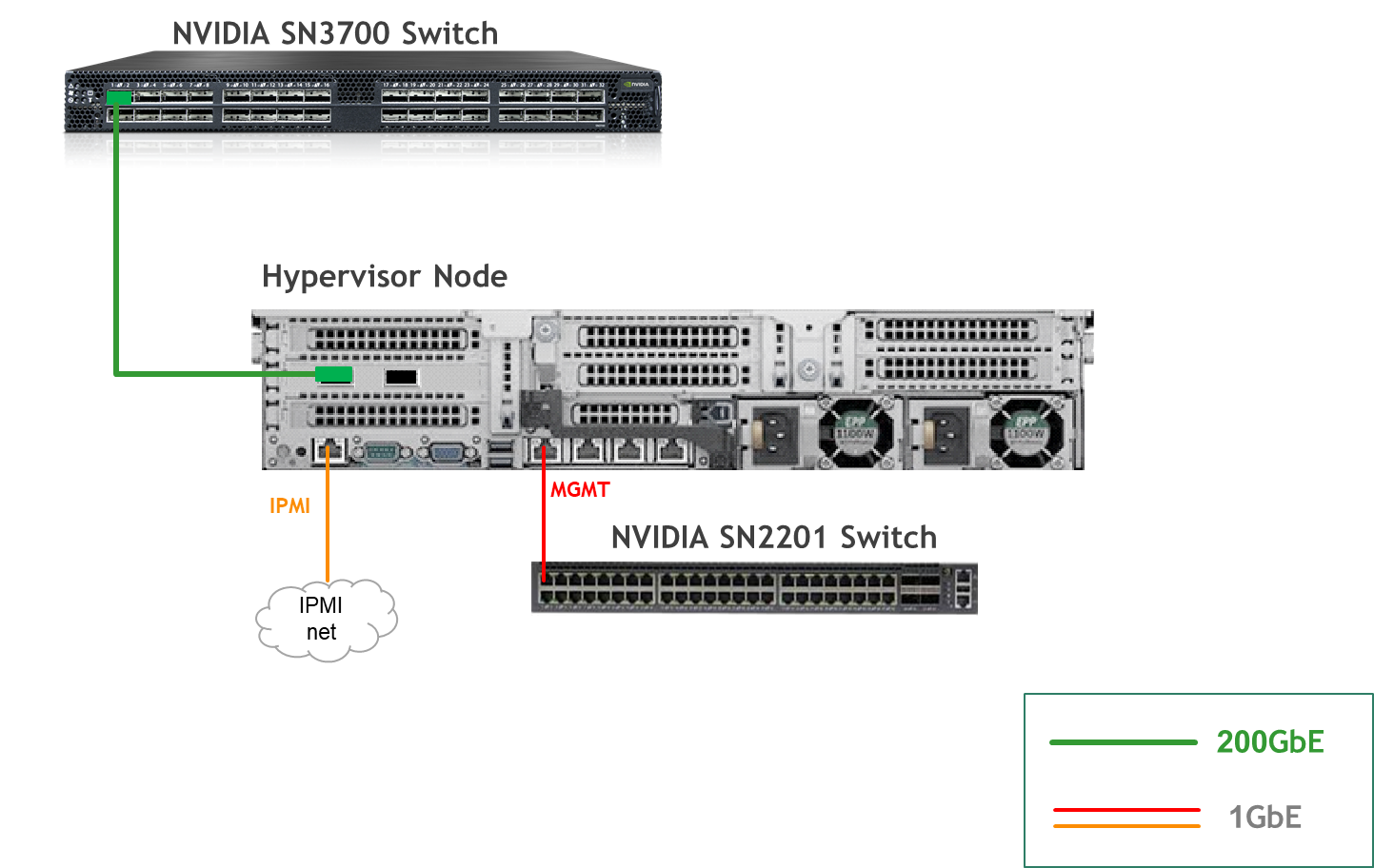
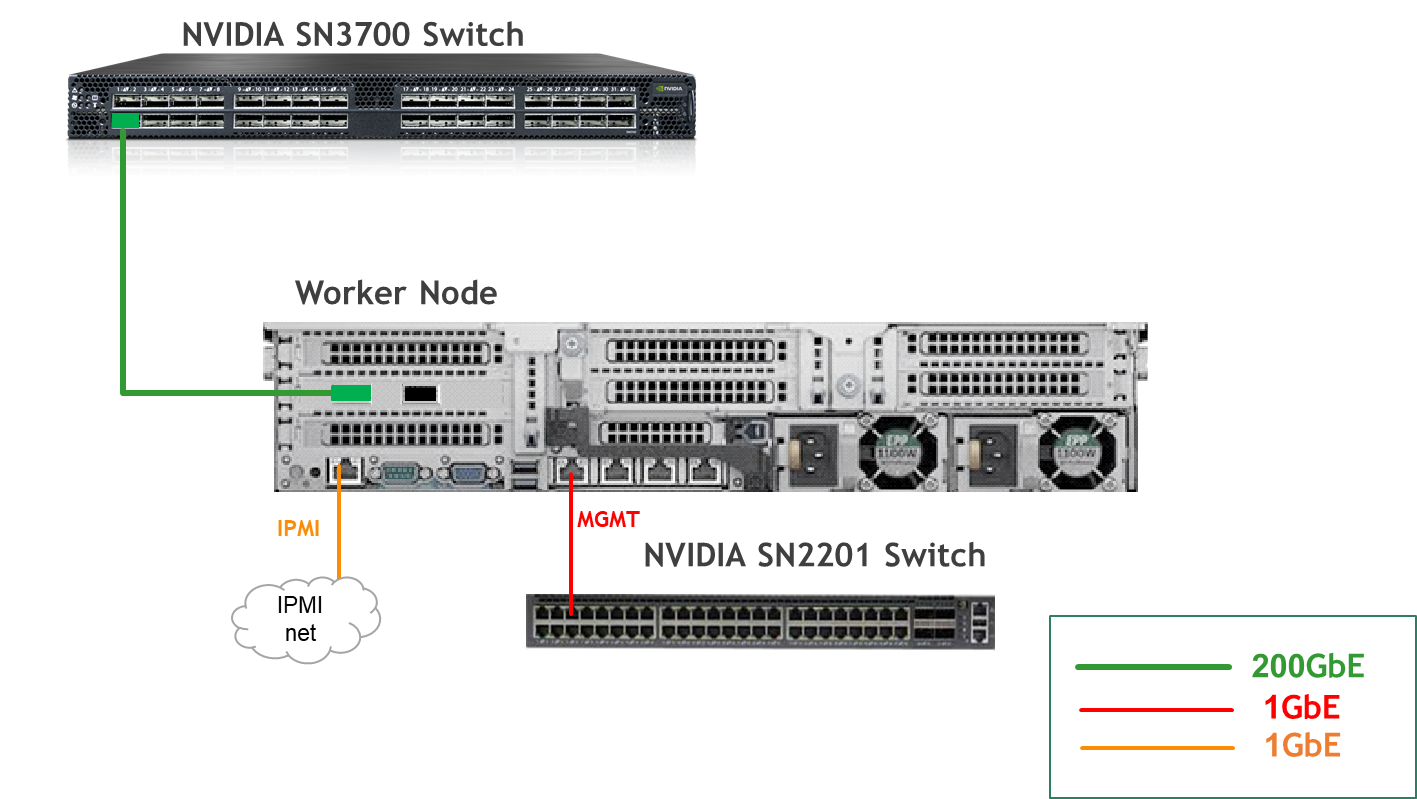
Wiring
Hypervisor Node
Bare Metal Worker Node
Fabric Configuration
Updating Cumulus Linux
As a best practice, make sure to use the latest released version of Cumulus Linux NOS.
For information on upgrading Cumulus Linux, refer to the Cumulus Linux User Guide.
Configuring the Cumulus Linux Switch
The SN3700 switch (hs-switch) is configured as follows:
The SN2201 switch (mgmt-switch) is configured as follows:
Host Configuration
Make sure that the BIOS settings on the worker node servers have SR-IOV enabled and that the servers are tuned for maximum performance.
All worker nodes must have the same PCIe placement for the BlueField-3 NIC and must display the same interface name.
Make sure that you have DPU BMC and OOB MAC addresses.
No change from the Reference Deployment Guide (Baseline RDG) (Section "Deployment and Configuration", Subsection "Host Configuration").
Hypervisor Installation and Configuration
No change from the Baseline RDG (Section "Deployment and Configuration", Subsection "Hypervisor Installation and Configuration").
Prepare Infrastructure Servers
No change from the Baseline RDG (Section "Deployment and Configuration", Subsection "Prepare Infrastructure Servers") regarding Firewall VM, Jump VM, MaaS VM.
Provision Master VMs Using MaaS
No change from the Baseline RDG (Section "Deployment and Configuration", Subsection "Provision Master VMs Using MaaS").
K8s Cluster Deployment and Configuration
The procedures for initial Kubernetes cluster deployment using Kubespray for the master nodes, and subsequent verification, remain unchanged from the Baseline RDG (Section "K8s Cluster Deployment and Configuration", Subsections: "Kubespray Deployment and Configuration", "Deploying Cluster Using Kubespray Ansible Playbook","K8s Deployment Verification".
DPF Installation
The DPF installation process (Operator, System components) largely follows the Baseline RDG.
Software Prerequisites and Required Variables
-
Start by installing the remaining software perquisites.
Jump Node Console
## Connect to master1 to copy helm client utility that was installed during kubespray deployment $ depuser@jump:~$ ssh master1 depuser@master1:~$ cp /usr/local/bin/helm /tmp/ ## In another tab depuser@jump:~$ scp master1:/tmp/helm /tmp/ depuser@jump:~$ sudo chown root:root /tmp/helm depuser@jump:~$ sudo mv /tmp/helm /usr/local/bin/ ## Verify that envsubst utility is installed depuser@jump:~$ which envsubst /usr/bin/envsubst -
Proceed to clone the doca-platform Git repository:
Jump Node Console
$ git clone https://github.com/NVIDIA/doca-platform.git -
Change directory to doca-platform and checkout to tag v26.4.0:
Jump Node Console
$ cd doca-platform/ $ git checkout v26.4.0 -
Change directory to doca-platform/dpuservices/argus/ from where all the commands will be run:
Jump Node Console
$ cd doca-platform/dpuservices/argus/ -
Change the BMC root's password.
In Zero Trust mode, provisioning DPUs requires authentication with Redfish.
In order to do that, you must set the same root password to access the BMC for all DPUs DPF is going to manage.For more information on how to set the BMC root password refer to BlueField DPU Administrator Quick Start Guide.Connect to the DPU BMC over SSH to change the BMC root's password on all DPUs.
Jump Node Console
$ ssh root@10.0.110.201 root@10.0.110.201's password: <BMC Root Password. Default root/0penBmc. need to change first time to $BMC_ROOT_PASSWORD in the manifests/00-env-vars/envvars.env file> -
Modify the variables in
manifests/00-env-vars/argus_vars.envto fit your environment, then source the file.Replace the values for the variables in the following file with the values that fit your setup. Specifically, pay attention to
DPUCLUSTER_INTERFACE,BMC_ROOT_PASSWORD.
manifests/00-env-vars/argus_vars.env
Bash## IP Address for the Kubernetes API server of the target cluster on which DPF is installed. ## This should never include a scheme or a port. ## e.g. 10.10.10.10 export TARGETCLUSTER_API_SERVER_HOST=10.0.110.10 ## Virtual IP used by the load balancer for the DPU Cluster. Must be a reserved IP from the management subnet and not ## allocated by DHCP. export DPUCLUSTER_VIP=10.0.110.200 ## Interface on which the DPUCluster load balancer will listen. Should be the management interface of the control plane node. export DPUCLUSTER_INTERFACE=enp1s0 ## The repository URL for the NVIDIA Helm chart registry. ## Usually this is the NVIDIA Helm NGC registry. For development purposes, this can be set to a different repository. export HELM_REGISTRY_REPO_URL=https://helm.ngc.nvidia.com/nvidia/doca ## The DPF REGISTRY is the Helm repository URL where the DPF Operator Chart resides. ## Usually this is the NVIDIA Helm NGC registry. For development purposes, this can be set to a different repository. export REGISTRY=https://helm.ngc.nvidia.com/nvidia/doca ## The DPF TAG is the version of the DPF components which will be deployed in this guide. export TAG=v26.4.0 ## URL to the BFB used in the `bfb.yaml` and linked by the DPUSet. export BFB_URL="https://content.mellanox.com/BlueField/BFBs/Ubuntu24.04/bf-bundle-3.4.0-92_26.04_ubuntu-24.04_64k_prod.bfb" ## IP_RANGE_START and IP_RANGE_END ## These define the IP range for DPU discovery via Redfish/BMC interfaces ## Example: If your DPUs have BMC IPs in range 10.0.110.201-224 ## export IP_RANGE_START=10.0.110.201 ## export IP_RANGE_END=10.0.110.224 ## Start of DPUDiscovery IpRange export IP_RANGE_START=10.0.110.201 ## End of DPUDiscovery IpRange export IP_RANGE_END=10.0.110.201 # The password used for DPU BMC root login, must be the same for all DPUs # For more information on how to set the BMC root password refer to BlueField DPU Administrator Quick Start Guide. export BMC_ROOT_PASSWORD=<set your BMC_ROOT_PASSWORD> ## The repository URL for the Argus container image. ## Usually this is the NVIDIA NGC registry. For development purposes, this can be set to a different repository. export ARGUS_NGC_IMAGE_URL=nvcr.io/nvidia/doca/doca_argus:1.4.0-doca3.4.0 -
Export environment variables for the installation:
Jump Node Console
$ source argus_vars.env
DPF Operator Installation
No change from the Baseline RDG (Section "DPF Installation", Subsection "DPF Operator Installation").
DPF System Installation
No change from the Baseline RDG (Section "DPF Installation", Subsection "DPF System Installation").
DPU Service Installation
Change the DPUDeployment, DPUServiceConfiguration, DPUServiceTemplate yaml files.
Before deploying the objects under doca-platform/dpuservices/argus/directory, a few adjustments are required.
-
Use the following YAML to define a
BFBresource that downloads the Bluefield Bitstream to a shared volume: -
Run the command to create the
BFB:Jump Node Console
$ cat bfb.yaml | envsubst |kubectl apply -f - -
Change the DPUFlavor using the following YAML:
-
Change the
DPUDeployment.yamlfile:Please notice that with default nodeEffect above, DPU provisioning workflow will be paused and wait for an external signal (annotation) in order to proceed, as demonstrated in upcoming steps.
To implement a fully automated process that won’t require user intervention, see customAction option. -
Change the
DPUServiceConfiguration.yamlfile:--- apiVersion: svc.dpu.nvidia.com/v1alpha1 kind: DPUServiceConfiguration metadata: name: argus namespace: dpf-operator-system spec: deploymentServiceName: argus serviceConfiguration: helmChart: values: config: isLocalPath: false containerImage: $ARGUS_NGC_IMAGE_URL -
Change the
DPUServiceTemplate.yamlfile: -
Apply all of the YAML files mentioned above using the following command:
Jump Node Console
$ cat *.yaml | envsubst | kubectl apply -f - -
To follow the progress of DPU provisioning, run the following command to check its current phase:
Jump Node Console
$ watch -n10 "kubectl -n dpf-operator-system get dpu,dpuset,dpudeployment,dpuservice,dpuserviceconfigurations,dpuservicetemplates"
-
Wait for the NodeEffect stage (at this point the provisioning is paused, waintig for external signal).
Run following command on all/specific DPU nodemaintanace object/s to proceed with provisioning:Jump Node Console
$ kubectl annotate dpunodemaintenances -n dpf-operator-system --all \ provisioning.dpu.nvidia.com/wait-for-external-nodeeffect=false \ maintenance.dpu.nvidia.com/wait-for-external-nodeeffect=false \ --overwrite -
To follow the progress of DPU provisioning, run the following command to check its current phase:
Jump Node Console
$ watch -n10 "kubectl -n dpf-operator-system get dpu,dpuset,dpudeployment,dpuservice,dpuserviceconfigurations,dpuservicetemplates" -
Wait for the Rebooted stage and then Power Cycle the bare-metal host manual.
After the DPU is up, run following command for each DPU worker:Jump Node Console
$ kubectl -n dpf-operator-system annotate dpunode --all provisioning.dpu.nvidia.com/dpunode-external-reboot-required- -
At this point, the DPU workers should be added to the cluster. As they being added to the cluster, the DPUs are provisioned.
Jump Node Console
$ watch -n10 "kubectl -n dpf-operator-system get dpu,dpuset,dpudeployment,dpuservice,dpuserviceconfigurations,dpuservicetemplates" -
At this point, the DPU workers should be added to the cluster. As they being added to the cluster, the DPUs are provisioned.
-
Finally, validate that all the different DPU-related objects are now in the Ready state:
Jump Node Console
$ echo 'alias dpfctl="kubectl -n dpf-operator-system exec deploy/dpf-operator-controller-manager -- /dpfctl "' >> ~/.bashrc

$ dpfctl describe dpudeployments
NAME                                 NAMESPACE            STATUS       REASON    SINCE  MESSAGE
....
└─DPUDeployments
  └─DPUDeployment/argus                             dpf-operator-system  Ready: True  Success   15s
    ├─DPUServiceChains
    │ └─DPUServiceChain/argus-kjbb2                 dpf-operator-system  Ready: True  Success   23h
    ├─DPUSets
    │ └─DPUSet/argus-dpuset-argus                   dpf-operator-system
    │   ├─BFB/bf-bundle                             dpf-operator-system  Ready: True  Ready     24h    File: bf-bundle-3.4.0-92_26.04_ubuntu-24.04_64k_prod.bfb, DOCA: 3.4.0
    │   └─DPUs
    │     └─DPU/dpu-node-mt2402xz0f7x-mt2402xz0f7x  dpf-operator-system  Ready: True  DPUReady  34s
    └─Services
      ├─DPUServiceTemplates
      │ └─DPUServiceTemplate/argus                  dpf-operator-system  Ready: True  Success   23h
      └─DPUServices
        └─DPUService/argus-76pxl                    dpf-operator-system  Ready: True  Success   15s


$ echo "alias ki='KUBECONFIG=/home/depuser/dpu-cluster.config kubectl'" >> ~/.bashrc
$ kubectl get secrets -n dpu-cplane-tenant1 dpu-cplane-tenant1-admin-kubeconfig -o json | jq -r '.data["admin.conf"]' | base64 --decode > /home/depuser/dpu-cluster.config
$ ki get node -A
NAME                                 STATUS   ROLES    AGE   VERSION
dpu-node-mt2337xz04qz-mt2337xz04qz   Ready    <none>   46m   v1.34.8

$ kubectl get dpu -A
NAMESPACE             NAME                                 READY   PHASE   AGE
dpf-operator-system   dpu-node-mt2337xz04qz-mt2337xz04qz   True    Ready   94m

$ kubectl wait --for=condition=ready --namespace dpf-operator-system dpu --all
dpu.provisioning.dpu.nvidia.com/dpu-node-mt2402xz0f7x-mt2402xz0f7x condition met
Zero-Trust Mode Checking
Here's a step-by-step procedure to check the Zero-Trust Mode on your NVIDIA BlueField DPU from the host server, including the installation of the Mellanox Firmware Tools (MFT).
Ubuntu 24.04 was installed on the servers.
-
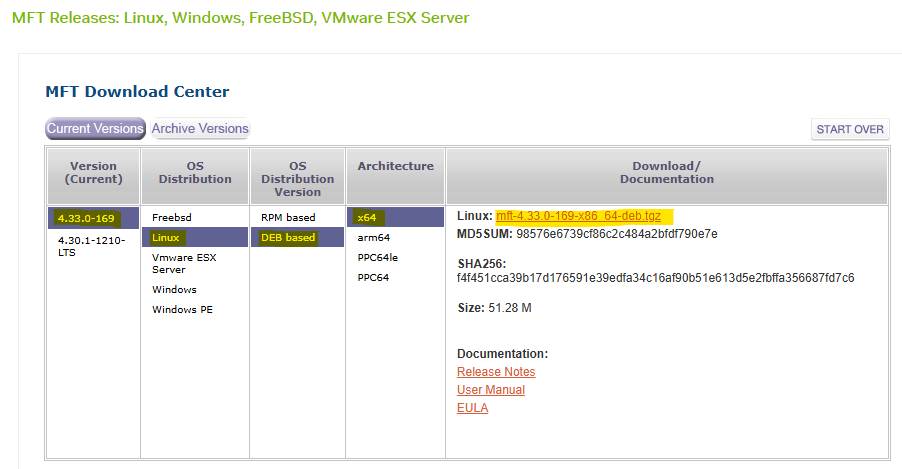
Navigate to the NVIDIA Downloads Site: Open your web browser and go to the official NVIDIA Mellanox software downloads page.
-
Select the Latest Version for your OS:
-
Transfer and Extract MFT Tools on the Worker 1 BareMetal Host.
First Pod Console
root@worker1:~# tar -xvzf /tmp/mft-4.33.0-169-x86_64-deb.tgz -
Navigate into the Extracted Directory.
First Pod Console
root@worker1:~# cd mft-4.33.0-169-x86_64-deb/ -
Run following commands.
First Pod Console
root@worker1:~# apt-get install gcc make dkms root@worker1:~# ./install.sh -
Start MST (Mellanox Software Tools) Service and Identify DPU Device Name.
First Pod Console
root@worker1:~# mst start Starting MST (Mellanox Software Tools) driver set Loading MST PCI module - Success Loading MST PCI configuration module - Success Create devices Unloading MST PCI module (unused) - Success root@worker1:~# mst status MST modules: ------------ MST PCI module is not loaded MST PCI configuration module loaded MST devices: ------------ /dev/mst/mt41692_pciconf0 - PCI configuration cycles access. domain:bus:dev.fn=0000:2b:00.0 addr.reg=88 data.reg=92 cr_bar.gw_offset=-1 Chip revision is: 01 -
Perform Zero-Trust Checking.
First Pod Console
root@worker1:~# mlxprivhost -d 2b:00.0 q
Host configurations
-------------------
level                         : RESTRICTED

Port functions status:
-----------------------
disable_rshim                 : TRUE
disable_tracer                : TRUE
disable_port_owner            : TRUE
disable_counter_rd            : TRUE

#Expected Zero-Trust Output.
This is the most definitive confirmation.
level : RESTRICTEDmeans the host is in Zero-Trust Mode, and theTRUEflags confirm individual security restrictions are active. -
Check Firmware Access with
mlxfwmanager:First Pod Console
root@worker1:~# mlxfwmanager -d 2b:00.0 --query
Querying Mellanox devices firmware ...

Device #1:
----------

  Device Type:      BlueField3
  Part Number:      --
  Description:
  PSID:
  PCI Device Name:  2b:00.0
  Base MAC:         N/A
  Versions:         Current        Available
     FW             --

  Status:           Failed to open device
"Failed to open device" indicates the host is blocked from accessing the DPU for firmware operations, a key aspect of Zero-Trust.
-
Check Device Configuration with
mlxconfig:First Pod Console
root@worker1:~# mlxconfig -d 2b:00.0 q

Device #1:
----------

Device type:        BlueField3
Name:               900-9D3B6-00CV-A_Ax
Description:        NVIDIA BlueField-3 B3220 P-Series FHHL DPU; 200GbE (default mode) / NDR200 IB; Dual-port QSFP112; PCIe Gen5.0 x16 with x16 PCIe extension option; 16 Arm cores; 32GB on-board DDR; integrated BMC; Crypto Enabled
Device:             2b:00.0

Configurations:                                          Next Boot
...
        ALLOW_RD_COUNTERS                           True(1)   # No RO, but restricted by mlxprivhost
...
        PORT_OWNER                                  True(1)   # No RO, but restricted by mlxprivhost
...
        TRACER_ENABLE                               True(1)   # No RO, but restricted by mlxprivhost
Most configuration parameters will be prefixed with
RO(Read-Only). Parameters related to direct host control, likePORT_OWNER,ALLOW_RD_COUNTERS,TRACER_ENABLE, even if shown asTrue(1)for the DPU's internal capability, will be unenforcible by the host due to themlxprivhostrestrictions. The widespreadROstatus shows that the host cannot modify these configurations, reinforcing the DPU's autonomous and secure state. The few parameters withoutROare still overridden by themlxprivhostsecurity policy. -
Check Low-Level Hardware Access with
ethtool:First Pod Console
root@worker1:~# ethtool -d ens1f0np0
Cannot get register dump: Operation not supported
This confirms the DPU is preventing deep, low-level hardware access from the host, aligning with Zero-Trust's isolation goals.
Conclusion
The command outputs of mlxprivhost, mlxfwmanager, mlxconfig (showing RO flags), and ethtool (showing "Operation not supported"), then your NVIDIA BlueField DPU is indeed operating in Zero-Trust Mode.
This means the host has significantly restricted privileges and cannot perform sensitive operations on the DPU, ensuring its security and isolation.
DOCA Argus service verificaton
Here's a step-by-step procedure to check the DOCA Argus service on your NVIDIA BlueField DPU.
Ubuntu 24.04 was installed on the servers.
-
Open the first worker server console.
Jump Node Console
$ ssh worker1
-
Add iommu configuration in the
/etc/default/grubfile:First BM Server Console
root@worker1:~# vim /etc/default/grub ## Add iommu=pt intel_iommu=on in GRUB_CMDLINE_LINUX_DEFAULT parameter GRUB_CMDLINE_LINUX_DEFAULT="iommu.passthrough=1 intel_iommu=on" -
Reboot the server.
Second BM Server Console
root@worker1:~# reboot -
For test we will run the sleep 100 command.
Second BM Server Console
root@worker1:~# sleep 100& -
Connect to the first DPU
OOBover SSH and change theOOBubuntu's user password(default password is ubuntu).DPU BM Server Console
root@worker1:~# ssh ubuntu@10.0.110.211 -
Run following command to see Argus log events about the
sleep 100process on the worker host.ubuntu@dpu-node-mt2402xz0f7x-mt2402xz0f7x:~$ jq 'select(.activity_data.process_details.process_name == "sleep") | .activity_data' /var/log/doca_argus_activity_report/doca_argus_log_MT2402XZ0F7XMLNXS0D0F0.log -C | less -R { "name": "process_created", "process_details": { "process_id": "2089", "process_name": "sleep", "process_file_name": "sleep", "process_self_exec_id": "8", "process_parent_process_id": "2047", "process_cpu_clock_cycles": "2082047", "process_real_group_id": "1000", "process_real_user_id": "1000", "process_command_line_arguments": "sleep 100", "process_state": "RUNNING", "process_pid_namespace": "4026531836", "process_mount_points_namespace": "4026531841", "process_network_namespace": "4026531840", "process_hash_sha256": "4a193eb6f25eecf27bad523cb8a53ec4d40775eb498f44760b19bfc421cc90aa", "process_hash_sha1": "bab62b22ddb568b245ebc0132200a5e2ddd8577c", "process_hash_md5": "ecdb9cd1468ff7151564b334b73161f5", "process_file_size_bytes": "35336", "process_folder_path": "/usr/bin/", "process_creation_time_iso_8601_ns": "2025-09-15T13:58:35.624512074+00:00", "process_container_id": "" } } { "name": "thread_created", "process_details": { "process_id": "2089", "process_name": "sleep", "process_file_name": "sleep", "process_self_exec_id": "8", "process_parent_process_id": "2047", "process_cpu_clock_cycles": "2082047", "process_real_group_id": "1000", "process_real_user_id": "1000", "process_command_line_arguments": "sleep 100", "process_state": "RUNNING", "process_pid_namespace": "4026531836", "process_mount_points_namespace": "4026531841", "process_network_namespace": "4026531840", "process_hash_sha256": "4a193eb6f25eecf27bad523cb8a53ec4d40775eb498f44760b19bfc421cc90aa", "process_hash_sha1": "bab62b22ddb568b245ebc0132200a5e2ddd8577c", "process_hash_md5": "ecdb9cd1468ff7151564b334b73161f5", "process_file_size_bytes": "35336", "process_folder_path": "/usr/bin/", "process_creation_time_iso_8601_ns": "2025-09-15T13:58:35.624512074+00:00", "process_container_id": "" }, "thread_details": { "thread_id": "2089", "thread_self_exec_id": "8", "thread_exit_state": "0" } } { "name": "new_file_mapped", "process_details": { "process_id": "2089", "process_name": "sleep", "process_file_name": "sleep", "process_self_exec_id": "8", "process_parent_process_id": "2047", "process_cpu_clock_cycles": "2082047", "process_real_group_id": "1000", "process_real_user_id": "1000", "process_command_line_arguments": "sleep 100", "process_state": "RUNNING", "process_pid_namespace": "4026531836", "process_mount_points_namespace": "4026531841", "process_network_namespace": "4026531840", "process_hash_sha256": "4a193eb6f25eecf27bad523cb8a53ec4d40775eb498f44760b19bfc421cc90aa", "process_hash_sha1": "bab62b22ddb568b245ebc0132200a5e2ddd8577c", "process_hash_md5": "ecdb9cd1468ff7151564b334b73161f5", "process_file_size_bytes": "35336", "process_folder_path": "/usr/bin/", "process_creation_time_iso_8601_ns": "2025-09-15T13:58:35.624512074+00:00", "process_container_id": "" }, "process_memory_details": { "process_id": "2089", "virtual_memory_area_start_address": "101967991353344", "virtual_memory_area_end_address": "101967991369728", "memory_permissions": "r-x", "virtual_memory_area_file_structure": "18387451888125847296", "is_main_process_executable": "1", "file_path": "/usr/bin/sleep", "file_name": "sleep" }, "process_attestation_details": { "elf_file_inode_number": "14287898", "elf_file_name": "sleep", "elf_file_path": "/usr/bin/sleep", "elf_file_hash_sha256": "4a193eb6f25eecf27bad523cb8a53ec4d40775eb498f44760b19bfc421cc90aa", "elf_file_hash_sha1": "bab62b22ddb568b245ebc0132200a5e2ddd8577c", "elf_file_hash_md5": "ecdb9cd1468ff7151564b334b73161f5", "elf_file_size_bytes": "35336", "elf_file_process_executable_state": "1", "elf_file_type": "ET_DYN + INTERP segment - Executable file" } } { "name": "foreign_binary_executed", "process_details": { "process_id": "2089", "process_name": "sleep", "process_file_name": "sleep", "process_self_exec_id": "8", "process_parent_process_id": "2047", "process_cpu_clock_cycles": "2082047", "process_real_group_id": "1000", "process_real_user_id": "1000", "process_command_line_arguments": "sleep 100", "process_state": "RUNNING", "process_pid_namespace": "4026531836", "process_mount_points_namespace": "4026531841", "process_network_namespace": "4026531840", "process_hash_sha256": "4a193eb6f25eecf27bad523cb8a53ec4d40775eb498f44760b19bfc421cc90aa", "process_hash_sha1": "bab62b22ddb568b245ebc0132200a5e2ddd8577c", "process_hash_md5": "ecdb9cd1468ff7151564b334b73161f5", "process_file_size_bytes": "35336", "process_folder_path": "/usr/bin/", "process_creation_time_iso_8601_ns": "2025-09-15T13:58:35.624512074+00:00", "process_container_id": "" }, "process_memory_details": { "process_id": "2089", "virtual_memory_area_start_address": "101967991353344", "virtual_memory_area_end_address": "101967991369728", "memory_permissions": "r-x", "virtual_memory_area_file_structure": "18387451888125847296", "is_main_process_executable": "1", "file_path": "/usr/bin/sleep", "file_name": "sleep" }, "process_attestation_details": { "elf_file_inode_number": "14287898", "elf_file_name": "sleep", "elf_file_path": "/usr/bin/sleep", "elf_file_hash_sha256": "4a193eb6f25eecf27bad523cb8a53ec4d40775eb498f44760b19bfc421cc90aa", "elf_file_hash_sha1": "bab62b22ddb568b245ebc0132200a5e2ddd8577c", "elf_file_hash_md5": "ecdb9cd1468ff7151564b334b73161f5", "elf_file_size_bytes": "35336", "elf_file_process_executable_state": "1", "elf_file_type": "ET_DYN + INTERP segment - Executable file" } } { "name": "new_file_mapped", "process_details": { "process_id": "2089", "process_name": "sleep", "process_file_name": "sleep", "process_self_exec_id": "8", "process_parent_process_id": "2047", "process_cpu_clock_cycles": "2082047", "process_real_group_id": "1000", "process_real_user_id": "1000", "process_command_line_arguments": "sleep 100", "process_state": "RUNNING", "process_pid_namespace": "4026531836", "process_mount_points_namespace": "4026531841", "process_network_namespace": "4026531840", "process_hash_sha256": "4a193eb6f25eecf27bad523cb8a53ec4d40775eb498f44760b19bfc421cc90aa", "process_hash_sha1": "bab62b22ddb568b245ebc0132200a5e2ddd8577c", "process_hash_md5": "ecdb9cd1468ff7151564b334b73161f5", "process_file_size_bytes": "35336", "process_folder_path": "/usr/bin/", "process_creation_time_iso_8601_ns": "2025-09-15T13:58:35.624512074+00:00", "process_container_id": "" }, "process_memory_details": { "process_id": "2089", "virtual_memory_area_start_address": "135366862262272", "virtual_memory_area_end_address": "135366862438400", "memory_permissions": "r-x", "virtual_memory_area_file_structure": "18387451615680367360", "is_main_process_executable": "0", "file_path": "/usr/lib/x86_64-linux-gnu/ld-linux-x86-64.so.2", "file_name": "ld-linux-x86-64.so.2" }, "process_attestation_details": { "elf_file_inode_number": "14321201", "elf_file_name": "ld-linux-x86-64.so.2", "elf_file_path": "/usr/lib/x86_64-linux-gnu/ld-linux-x86-64.so.2", "elf_file_hash_sha256": "4f961aefd1ecbc91b6de5980623aa389ca56e8bfb5f2a1d2a0b94b54b0fde894", "elf_file_hash_sha1": "d6878eaa6b21fc4eee9d5e441bbf2df102f850aa", "elf_file_hash_md5": "9d4fdd5d382e1212c9f793974ee0f44a", "elf_file_size_bytes": "236616", "elf_file_process_executable_state": "0", "elf_file_type": "ET_DYN - Shared object" } } { "name": "foreign_library_loaded", "process_details": { "process_id": "2089", "process_name": "sleep", "process_file_name": "sleep", "process_self_exec_id": "8", "process_parent_process_id": "2047", "process_cpu_clock_cycles": "2082047", "process_real_group_id": "1000", "process_real_user_id": "1000", "process_command_line_arguments": "sleep 100", "process_state": "RUNNING", "process_pid_namespace": "4026531836", "process_mount_points_namespace": "4026531841", "process_network_namespace": "4026531840", "process_hash_sha256": "4a193eb6f25eecf27bad523cb8a53ec4d40775eb498f44760b19bfc421cc90aa", "process_hash_sha1": "bab62b22ddb568b245ebc0132200a5e2ddd8577c", "process_hash_md5": "ecdb9cd1468ff7151564b334b73161f5", "process_file_size_bytes": "35336", "process_folder_path": "/usr/bin/", "process_creation_time_iso_8601_ns": "2025-09-15T13:58:35.624512074+00:00", "process_container_id": "" }, "process_memory_details": { "process_id": "2089", "virtual_memory_area_start_address": "135366862262272", "virtual_memory_area_end_address": "135366862438400", "memory_permissions": "r-x", "virtual_memory_area_file_structure": "18387451615680367360", "is_main_process_executable": "0", "file_path": "/usr/lib/x86_64-linux-gnu/ld-linux-x86-64.so.2", "file_name": "ld-linux-x86-64.so.2" }, "process_attestation_details": { "elf_file_inode_number": "14321201", "elf_file_name": "ld-linux-x86-64.so.2", "elf_file_path": "/usr/lib/x86_64-linux-gnu/ld-linux-x86-64.so.2", "elf_file_hash_sha256": "4f961aefd1ecbc91b6de5980623aa389ca56e8bfb5f2a1d2a0b94b54b0fde894", "elf_file_hash_sha1": "d6878eaa6b21fc4eee9d5e441bbf2df102f850aa", "elf_file_hash_md5": "9d4fdd5d382e1212c9f793974ee0f44a", "elf_file_size_bytes": "236616", "elf_file_process_executable_state": "0", "elf_file_type": "ET_DYN - Shared object" } } { "name": "new_file_mapped", "process_details": { "process_id": "2089", "process_name": "sleep", "process_file_name": "sleep", "process_self_exec_id": "8", "process_parent_process_id": "2047", "process_cpu_clock_cycles": "2082047", "process_real_group_id": "1000", "process_real_user_id": "1000", "process_command_line_arguments": "sleep 100", "process_state": "RUNNING", "process_pid_namespace": "4026531836", "process_mount_points_namespace": "4026531841", "process_network_namespace": "4026531840", "process_hash_sha256": "4a193eb6f25eecf27bad523cb8a53ec4d40775eb498f44760b19bfc421cc90aa", "process_hash_sha1": "bab62b22ddb568b245ebc0132200a5e2ddd8577c", "process_hash_md5": "ecdb9cd1468ff7151564b334b73161f5", "process_file_size_bytes": "35336", "process_folder_path": "/usr/bin/", "process_creation_time_iso_8601_ns": "2025-09-15T13:58:35.624512074+00:00", "process_container_id": "" }, "process_memory_details": { "process_id": "2089", "virtual_memory_area_start_address": "135366858407936", "virtual_memory_area_end_address": "135366860013568", "memory_permissions": "r-x", "virtual_memory_area_file_structure": "18387451615680368896", "is_main_process_executable": "0", "file_path": "/usr/lib/x86_64-linux-gnu/libc.so.6", "file_name": "libc.so.6" }, "process_attestation_details": { "elf_file_inode_number": "14321204", "elf_file_name": "libc.so.6", "elf_file_path": "/usr/lib/x86_64-linux-gnu/libc.so.6", "elf_file_hash_sha256": "de259f5276c4a991f78bf87225d6b40e56edbffe0dcbc0ffca36ec7fe30f3f77", "elf_file_hash_sha1": "5b02e178d9ded9b8c37a605e7a233687aa45f72f", "elf_file_hash_md5": "289071786eab0c1910da49b2b1bfd377", "elf_file_size_bytes": "2125328", "elf_file_process_executable_state": "0", "elf_file_type": "ET_DYN + INTERP segment - Executable file" } } { "name": "foreign_library_loaded", "process_details": { "process_id": "2089", "process_name": "sleep", "process_file_name": "sleep", "process_self_exec_id": "8", "process_parent_process_id": "2047", "process_cpu_clock_cycles": "2082047", "process_real_group_id": "1000", "process_real_user_id": "1000", "process_command_line_arguments": "sleep 100", "process_state": "RUNNING", "process_pid_namespace": "4026531836", "process_mount_points_namespace": "4026531841", "process_network_namespace": "4026531840", "process_hash_sha256": "4a193eb6f25eecf27bad523cb8a53ec4d40775eb498f44760b19bfc421cc90aa", "process_hash_sha1": "bab62b22ddb568b245ebc0132200a5e2ddd8577c", "process_hash_md5": "ecdb9cd1468ff7151564b334b73161f5", "process_file_size_bytes": "35336", "process_folder_path": "/usr/bin/", "process_creation_time_iso_8601_ns": "2025-09-15T13:58:35.624512074+00:00", "process_container_id": "" }, "process_memory_details": { "process_id": "2089", "virtual_memory_area_start_address": "135366858407936", "virtual_memory_area_end_address": "135366860013568", "memory_permissions": "r-x", "virtual_memory_area_file_structure": "18387451615680368896", "is_main_process_executable": "0", "file_path": "/usr/lib/x86_64-linux-gnu/libc.so.6", "file_name": "libc.so.6" }, "process_attestation_details": { "elf_file_inode_number": "14321204", "elf_file_name": "libc.so.6", "elf_file_path": "/usr/lib/x86_64-linux-gnu/libc.so.6", "elf_file_hash_sha256": "de259f5276c4a991f78bf87225d6b40e56edbffe0dcbc0ffca36ec7fe30f3f77", "elf_file_hash_sha1": "5b02e178d9ded9b8c37a605e7a233687aa45f72f", "elf_file_hash_md5": "289071786eab0c1910da49b2b1bfd377", "elf_file_size_bytes": "2125328", "elf_file_process_executable_state": "0", "elf_file_type": "ET_DYN + INTERP segment - Executable file" } }
Done.
Authors
|
|
Boris Kovalev
Boris Kovalev has worked for the past several years as a Solutions Architect, focusing on NVIDIA Networking/Mellanox technology, and is responsible for complex machine learning, Big Data and advanced VMware-based cloud research and design. Boris previously spent more than 20 years as a senior consultant and solutions architect at multiple companies, most recently at VMware. He has written multiple reference designs covering VMware, machine learning, Kubernetes, and container solutions which are available at the NVIDIA Documents website. |

NVIDIA, the NVIDIA logo, and BlueField are trademarks and/or registered trademarks of NVIDIA Corporation in the U.S. and other countries. Other company and product names may be trademarks of the respective companies with which they are associated.™
2025 NVIDIA Corporation. All rights reserved.©
Last updated: