

Created on Jul 1, 2026 (DPF 26.4.0 GA)
Scope
This Reference Deployment Guide (RDG) provides comprehensive instructions for deploying the NVIDIA DOCA Platform Framework (DPF) on high-performance, bare-metal infrastructure in Zero-Trust mode. The guide focuses on setting up an accelerated Host-Based Networking (HBN) and DOCA Argus services on NVIDIA® BlueField®-3 DPUs to deliver secure, isolated, and hardware-accelerated environments.
The guide is intended for experienced system administrators, systems engineers, and solution architects who build highly secure bare-metal environments with Host-Based Networking enabled using NVIDIA BlueField DPUs for acceleration, isolation, and infrastructure offload.
This document is an extension of the RDG for DPF Zero Trust (DPF-ZT) (referred to as the Baseline RDG). It details the additional steps and modifications required to deploy the HBN and Argus Services in the Baseline RDG environment.
-
This reference implementation, as the name implies, is a specific, opinionated deployment example designed to address the use case described above.
-
Although other approaches may exist for implementing similar solutions, this document provides a detailed guide for this specific method.
Abbreviations and Acronyms
|
Term |
Definition |
Term |
Definition |
|---|---|---|---|
|
BFB |
BlueField Bootstream |
OOB |
Out-of-Band |
|
BGP |
Border Gateway Protocol |
PF |
Physical Function |
|
DOCA |
Data Center Infrastructure-on-a-Chip Architecture |
RDG |
Reference Deployment Guide |
|
DPF |
DOCA Platform Framework |
RDMA |
Remote Direct Memory Access |
|
DPU |
Data Processing Unit |
RoCE |
RDMA over Converged Ethernet |
|
HBN |
Host Based Networking |
SFC |
Service Function Chaining |
|
IPAM |
IP Address Management |
SR-IOV |
Single Root Input/Output Virtualization |
|
K8S |
Kubernetes |
VLAN |
Virtual LAN (Local Area Network) |
|
KVM |
Kernel-based Virtual Machine |
VNI |
Virtual Network Interface |
|
MAAS |
Metal as a Service |
VRF |
Virtual Router/Forwarder |
|
MTU |
Maximum Transmission Unit |
ZT |
Zero Trust |
|
NGC |
NVIDIA GPU Cloud |
|
|
Introduction
The NVIDIA BlueField-3 Data Processing Unit (DPU) is a 400 Gb/s infrastructure compute platform designed for line-rate processing of software-defined networking, storage, and cybersecurity workloads. It combines powerful compute resources, high-speed networking, and advanced programmability to deliver hardware-accelerated, software-defined solutions for modern data centers.
NVIDIA DOCA unleashes the full potential of the BlueField platform by enabling rapid development of applications and services that offload, accelerate, and isolate data center workloads.
One such service is Host-Based Networking (HBN) - a DOCA-enabled solution that allows network architects to design networks based on Layer 3 (L3) protocols. HBN enables routing on the server side by using BlueField as a BGP router. It encapsulates key networking functions in a containerized service pod, deployed directly on the BlueField’s Arm cores.
Another service is the DOCA Argus Service provides Workload Threat Detection is a novel approach for container threat detection in AI workloads and microservices, utilizing a Bluefield DPU to perform live machine introspection at the hardware level. This approach analyzes specific snippets of volatile memory to provide real-time visibility into container activity and behavior at the network, host, and application levels.
The state of container node images is continuously monitored in real-time, checking for deviations from their secure, compliant versions and configurations to detect and stop runtime attacks. These insights also include the ability to identify attacks targeting network facing applications/services.
The Argus service provides events and data on any object on the OS (host/VM) without any configuration needed and without any active part from the user or the host.
Examples what Argus service provides:
-
Any new processes with its PID, name, attributes, and status.
-
Reverse shells with process and network connection details such as source & destination IP and number of transferred bytes.
-
SHA256 hash of running executable and loaded libraries.
However, deploying and managing DPUs and their associated DOCA services, especially at scale, presents operational challenges. Without a robust provisioning and orchestration system, tasks such as lifecycle management, service deployment, and network configuration for service function chaining (SFC) can quickly become complex and error prone. This is where the DOCA Platform Framework (DPF) comes into play.
DPF automates the full DPU lifecycle, streamlines the deployment of DOCA services, and simplifies advanced network configurations. With DPF, services such as HBN can be deployed seamlessly, allowing for efficient offloading and intelligent routing of traffic through the DPU data plane.
By leveraging DPF, users can scale and automate DPU management across Bare Metal, Virtual, and Kubernetes customer environments - optimizing performance while simplifying operations.
DPF supports multiple deployment models. This guide focuses on the Zero Trust bare-metal deployment model. In this scenario:
-
The DPU is managed through its Baseboard Management Controller (BMC)
-
All management traffic occurs over the DPU's out-of-band (OOB) network
-
The host is considered as an untrusted entity towards the data center network. The DPU acts as a barrier between the host and the network.
-
The host sees the DPU as a standard NIC, with no access to the internal DPU management plane (Zero Trust Mode)
This Reference Deployment Guide (RDG) provides a step-by-step example for installing DPF in Zero-Trust mode and HBN. It also includes practical demonstrations of performance optimization, validated using standard RDMA and TCP workloads.
As part of the reference implementation, open-source components outside the scope of DPF (e.g., MAAS, pfSense, Kubespray) are used to simulate a realistic customer deployment environment. The guide includes the full end-to-end deployment process, including:
-
Infrastructure provisioning
-
DPF deployment
-
DPU provisioning (redfish)
-
Service configuration and deployment
-
Service chaining.
This document extends the capabilities of the DPF-managed Kubernetes cluster described in the RDG for DPF Zero Trust (DPF-ZT) (referred to as the Baseline RDG) by deploying the NVIDIA DOCA HBN and Argus Services within the existing DPF deployment to achieve a comprehensive, accelerated infrastructure.
References
Solution Architecture
Key Components and Technologies
-
NVIDIA BlueField® Data Processing Unit (DPU)
The NVIDIA® BlueField® data processing unit (DPU) ignites unprecedented innovation for modern data centers and supercomputing clusters. With its robust compute power and integrated software-defined hardware accelerators for networking, storage, and security, BlueField creates a secure and accelerated infrastructure for any workload in any environment, ushering in a new era of accelerated computing and AI.
-
NVIDIA DOCA Software Framework
NVIDIA DOCA™ unlocks the potential of the NVIDIA® BlueField® networking platform. By harnessing the power of BlueField DPUs and SuperNICs, DOCA enables the rapid creation of applications and services that offload, accelerate, and isolate data center workloads. It lets developers create software-defined, cloud-native, DPU- and SuperNIC-accelerated services with zero-trust protection, addressing the performance and security demands of modern data centers.
-
NVIDIA ConnectX SmartNICs
10/25/40/50/100/200 and 400G Ethernet Network Adapters
The industry-leading NVIDIA® ConnectX® family of smart network interface cards (SmartNICs) offer advanced hardware offloads and accelerations.
NVIDIA Ethernet adapters enable the highest ROI and lowest Total Cost of Ownership for hyperscale, public and private clouds, storage, machine learning, AI, big data, and telco platforms.
-
NVIDIA LinkX Cables
The NVIDIA® LinkX® product family of cables and transceivers provides the industry’s most complete line of 10, 25, 40, 50, 100, 200, and 400GbE in Ethernet and 100, 200 and 400Gb/s InfiniBand products for Cloud, HPC, hyperscale, Enterprise, telco, storage and artificial intelligence, data center applications.
-
NVIDIA Spectrum Ethernet Switches
Flexible form-factors with 16 to 128 physical ports, supporting 1GbE through 400GbE speeds.
Based on a ground-breaking silicon technology optimized for performance and scalability, NVIDIA Spectrum switches are ideal for building high-performance, cost-effective, and efficient Cloud Data Center Networks, Ethernet Storage Fabric, and Deep Learning Interconnects.
NVIDIA combines the benefits of NVIDIA Spectrum™ switches, based on an industry-leading application-specific integrated circuit (ASIC) technology, with a wide variety of modern network operating system choices, including NVIDIA Cumulus® Linux, SONiC and NVIDIA Onyx®.
-
NVIDIA Cumulus Linux
NVIDIA® Cumulus® Linux is the industry's most innovative open network operating system that allows you to automate, customize, and scale your data center network like no other.
-
Kubernetes
Kubernetes is an open-source container orchestration platform for deployment automation, scaling, and management of containerized applications.
-
Kubespray
Kubespray is a composition of Ansible playbooks, inventory, provisioning tools, and domain knowledge for generic OS/Kubernetes clusters configuration management tasks and provides:-
A highly available cluster
-
Composable attributes
-
Support for most popular Linux distributions
-
Solution Design
Solution Logical Design
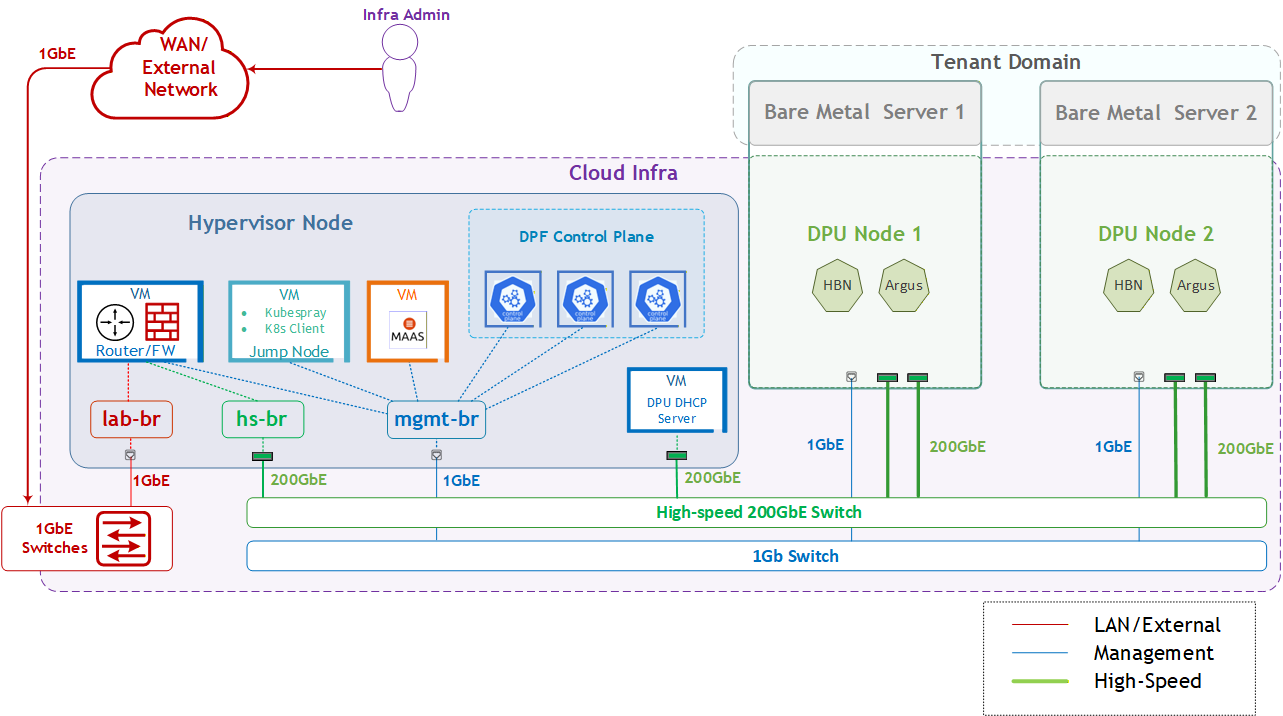
The logical design includes the following components:
-
1 x Hypervisor node (KVM-based) with ConnectX-7:
-
1 x Firewall VM
-
1 x Jump Node VM
-
1 x MaaS VM
-
3 x K8s Master VMs running all K8s management components
-
-
2 x Worker nodes (PCI Gen5), each with a 1 x BlueField-3 NIC
-
Single High-Speed (HS) switch
-
1 Gb Host Management network
HBN service Logical Design
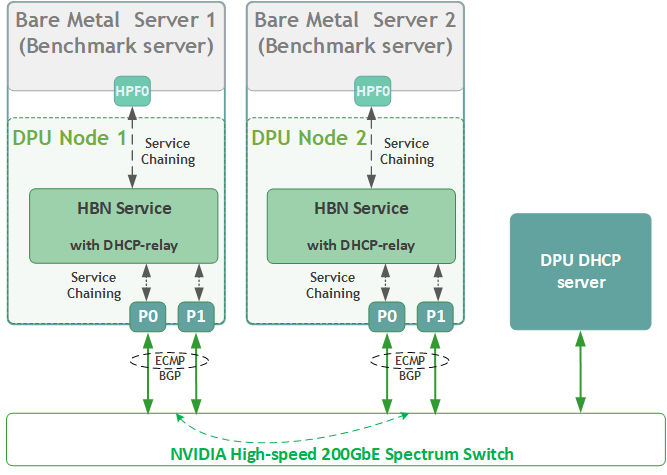
As part of this RDG, we will:
-
Create a logical network for a bare-metal workload server using a single physical function (HPF0)
-
Route all workload traffic through the HBN service, routing inside the DPU.
-
Assign HPF0 as the sole network interface for each bare-metal workload server, with no host networking configuration.
HPF0 on each server should have DHCP enabled. -
Demonstrate accelerated RDMA and TCP traffic between workload servers on different bare-metal hosts within the same network.
Firewall Design
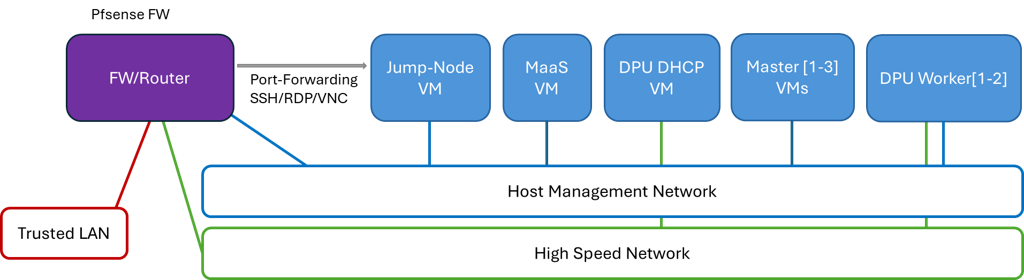
The pfSense firewall in this solution serves a dual purpose:
-
Firewall—provides an isolated environment for the DPF system, ensuring secure operations
-
Router—enables Internet access for the management network
Port-forwarding rules for SSH and RDP are configured on the firewall to route traffic to the jump node’s IP address in the host management network. From the jump node, administrators can manage and access various devices in the setup, as well as handle the deployment of the Kubernetes (K8s) cluster and DPF components.
The following diagram illustrates the firewall design used in this solution:
Software Stack Components
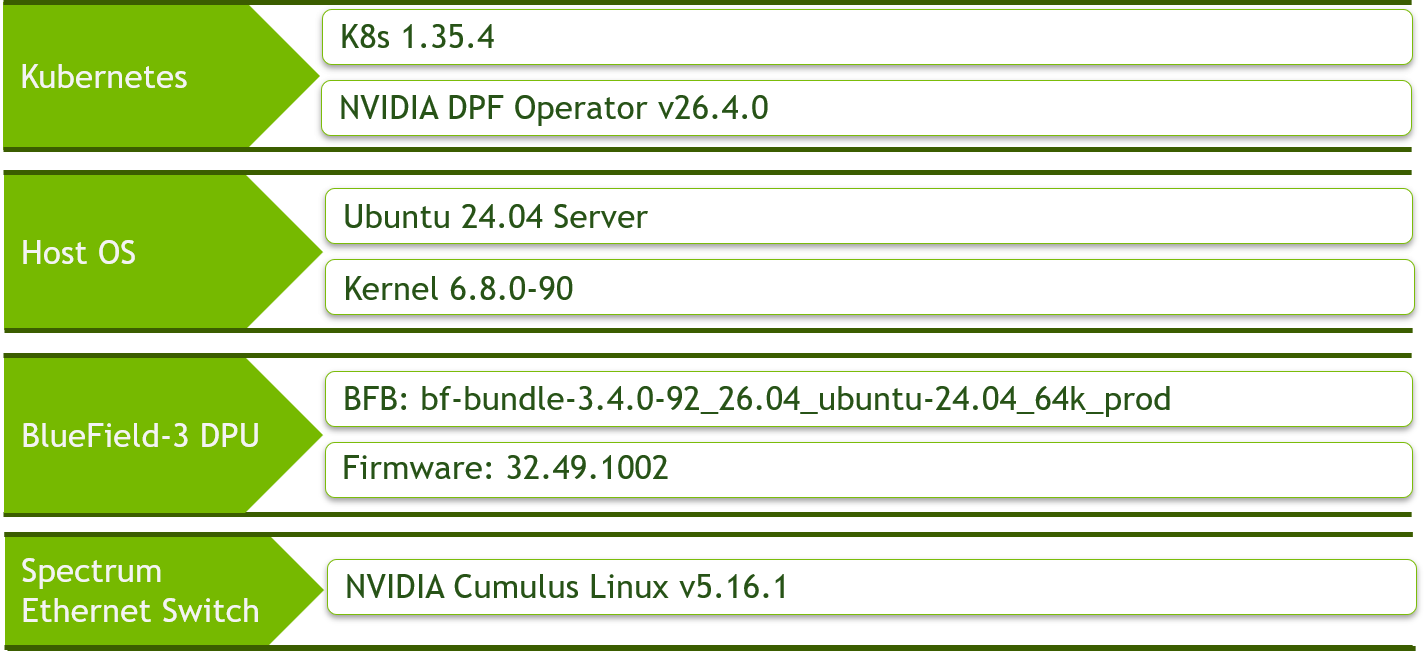
Make sure to use the exact same versions for the software stack as described above.
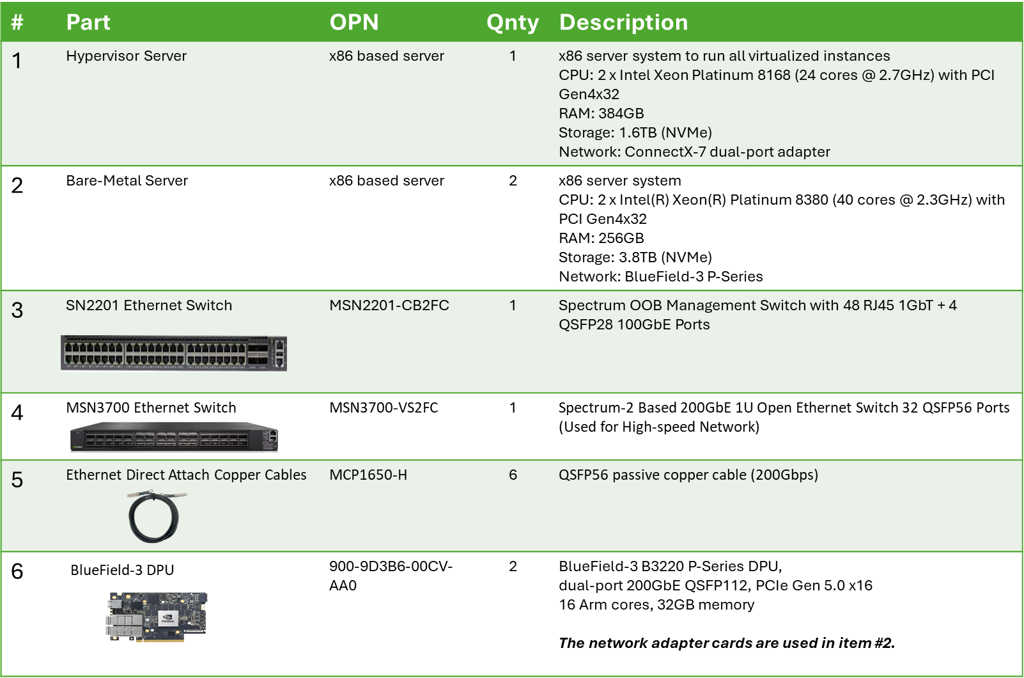
Bill of Materials
Deployment and Configuration
Node and Switch Definitions
These are the definitions and parameters used for deploying the demonstrated fabric:
|
Switches Ports Usage |
||
|---|---|---|
|
Hostname |
Rack ID |
Ports |
|
|
1 |
swp1-3 |
|
|
1 |
swp1-4,31-32 |
|
Hosts |
|||||
|---|---|---|---|---|---|
|
Rack |
Server Type |
Server Name |
Switch Port |
IP and NICs |
Default Gateway |
|
Rack1
|
Hypervisor Node |
|
mgmt-switch: hs-switch: |
lab-br (interface eno1): Trusted LAN IP mgmt-br (interface eno2): - hs-br (interface enp1s0): - |
Trusted LAN GW |
|
Rack1 |
Firewall (Virtual) |
|
- |
WAN (lab-br): Trusted LAN IP LAN (mgmt-br): 10.0.110.254/24 OPT1(hs-br): 10.0.123.254/22 |
Trusted LAN GW |
|
Rack1 |
Jump Node (Virtual) |
|
- |
enp1s0: 10.0.110.253/24 |
10.0.110.254 |
|
Rack1 |
MaaS (Virtual) |
|
- |
enp1s0: 10.0.110.252/24 |
10.0.110.254 |
|
Rack1 |
Master Node
|
|
- |
enp1s0: 10.0.110.1/24 |
10.0.110.254 |
|
Rack1 |
Master Node
|
|
- |
enp1s0: 10.0.110.2/24 |
10.0.110.254 |
|
Rack1 |
Master Node
|
|
- |
enp1s0: 10.0.110.3/24 |
10.0.110.254 |
|
Rack1 |
DPU DHCP Node
|
|
- |
enp1s0: 10.0.125.4/24 |
10.0.125.1 |
|
Rack1 |
Worker Node |
|
mgmt-switch: hs-switch: |
dpubmc: 10.0.110.201/24
ens1f0np0/ens1f1np1: 10.0.120.0/22 |
10.0.110.254 |
|
Rack1
|
Worker Node |
|
mgmt-switch: hs-switch: |
dpubmc: 10.0.110.202/24
ens1f0np0/ens1f1np1: 10.0.120.0/22 |
10.0.110.254 |
Note: On BlueField-3, the DPU BMC and DPU OOB management interfaces share a single 1G out-of-band link via an internal bridge (oob_net0 ↔ tmfifo_net0 on BMC side). Both IPs (.201/.211) reside on the same L2 segment of the management network (10.0.110.0/24) and are reached via a single switch port (swpN). It is necessary to set several environment variables before running this command.
$ source manifests/00-env-vars/envvars.env
Note: Workers' high-speed PFs (ens1f0np0, ens1f1np1) connect to hs-switch via 200GbE. No persistent host-side IP in Zero-Trust baseline mode — DPU acts as a transparent NIC. Subnet 10.0.120.0/22 is reserved for the high-speed fabric.
Wiring
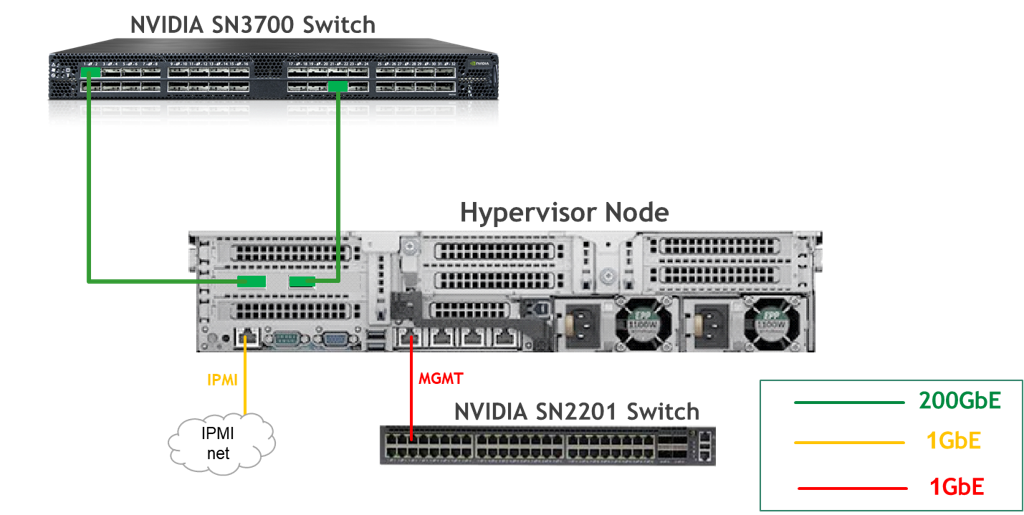
Hypervisor Node
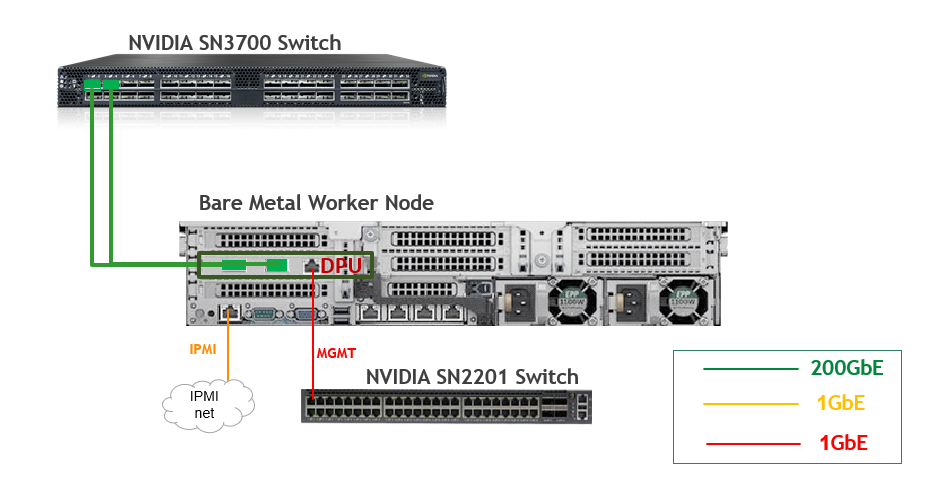
Bare Metal Worker Node
Fabric Configuration
Updating Cumulus Linux
As a best practice, make sure to use the latest released Cumulus Linux NOS version.
For information on how to upgrade Cumulus Linux, refer to the Cumulus Linux User Guide.
Configuring the Cumulus Linux Switch
The SN3700 switch (hs-switch), is configured as follows:
The SN2201 switch (mgmt-switch) is configured as follows:
Host Configuration
Make sure that the BIOS settings on the worker node servers have SR-IOV enabled and that the servers are tuned for maximum performance.
Required:
-
SR-IOV: Enabled
-
VT-d / AMD-Vi (IOMMU): Enabled
-
Above 4G Decoding: Enabled (mandatory for PCIe BAR sizes on BlueField-3)
Performance-recommended:
-
CPU C-states: Disabled (or up to C1 only)
-
Hyper-Threading: Enabled
-
Memory speed: Maximum supported
-
Power profile: Performance / Maximum Performance
All worker nodes must have the same PCIe placement for the BlueField-3 NIC and must display the same interface name.
Make sure that you have DPU BMC and OOB MAC addresses.
No change from the Reference Deployment Guide (Baseline RDG) (Section "Deployment and Configuration", Subsection "Host Configuration").
Hypervisor Installation and Configuration
No change from the Baseline RDG (Section "Deployment and Configuration", Subsection "Hypervisor Installation and Configuration").
Prepare Infrastructure Servers
No change from the Baseline RDG (Section "Deployment and Configuration", Subsection "Prepare Infrastructure Servers") regarding Firewall VM, Jump VM, MaaS VM.
(Optional) Firewall VM – Bare Metal Server Outside Conection
To provide outside connection from Bare Metal Host via High Speed network, open Firefox web browser and go to the pfSense web UI (http://10.0.110.254).
-
System:
-
-
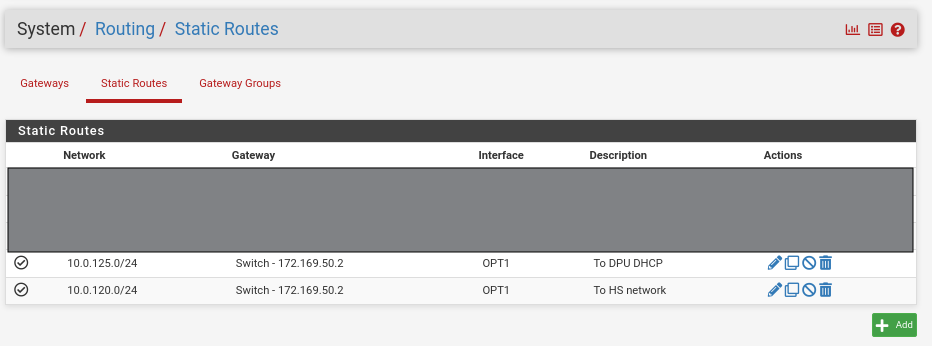
Routing → Static Routing → Add → “Destination network”: 10.0.125.0/24, “Gateway”: Switch - 172.169.50.2 → , “Description”: To DPU DHCP → Click "Save"→ Under "Default Gateway" - "Default gateway IPv4" choose WAN_DHCP → Click "Save"
-
-
Note that the IP addresses from the Trusted LAN network under "Gateway" and "Monitor IP" are blurred.
Provisioning "DPU DHCP VM"
-
Please install Rocky Linux 9.0 in minimal server configuration.
-
Configure manually IP address to 10.0.125.4/24 with default GW 10.0.125.1/24 and your prefferred DNS server.
-
Install following modules:
DPU DHCP Node Console
sudo dnf -y update sudo dnf install -y lldpd dnsmasq -
Apply following configuration to DNSMASQ apps - file /etc/dnsmasq.conf
-
Start and enable autostart for dnsmasq.service.
DPU DHCP Node Console
sudo systemctl start dnsmasq.service sudo systemctl enable dnsmasq.service -
Check service status
DPU DHCP Node Console
sudo systemctl status dnsmasq.service

### Command output should look like: ###

 dnsmasq.service - DNS caching server.
     Loaded: loaded (/usr/lib/systemd/system/dnsmasq.service; enabled; preset: disabled)
     Active: active (running) since Wed 2025-12-24 08:49:28 EST; 2 weeks 3 days ago
 Invocation: 10eb617fa5fe4bedb1fc021ddcc7751f
    Process: 1172 ExecStart=/usr/sbin/dnsmasq (code=exited, status=0/SUCCESS)
   Main PID: 1193 (dnsmasq)
      Tasks: 1 (limit: 23017)
     Memory: 2M (peak: 2.5M)
        CPU: 112ms
     CGroup: /system.slice/dnsmasq.service
             └─1193 /usr/sbin/dnsmasq

Dec 24 08:49:28 hbn-dhcp systemd[1]: Starting dnsmasq.service - DNS caching server....
Dec 24 08:49:28 hbn-dhcp systemd[1]: Started dnsmasq.service - DNS caching server..
Provision Master VMs Using MaaS
No change from the Baseline RDG (Section "Deployment and Configuration", Subsection "Provision Master VMs Using MaaS").
K8s Cluster Deployment and Configuration
The procedures for initial Kubernetes cluster deployment using Kubespray for the master nodes, and subsequent verification, remain unchanged from the Baseline RDG (Section "K8s Cluster Deployment and Configuration", Subsections: "Kubespray Deployment and Configuration", "Deploying Cluster Using Kubespray Ansible Playbook","K8s Deployment Verification".
DPF Installation
The DPF installation process (Operator, System components) largely follows the Baseline RDG.
Software Prerequisites and Required Variables
-
Start by installing the remaining software perquisites.
Jump Node Console
## Connect to master1 to copy helm client utility that was installed during kubespray deployment $ depuser@jump:~$ ssh master1 depuser@master1:~$ cp /usr/local/bin/helm /tmp/ ## In another tab depuser@jump:~$ scp master1:/tmp/helm /tmp/ depuser@jump:~$ sudo chown root:root /tmp/helm depuser@jump:~$ sudo mv /tmp/helm /usr/local/bin/ ## Verify that envsubst utility is installed depuser@jump:~$ which envsubst /usr/bin/envsubst -
Proceed to clone the doca-platform Git repository:
Jump Node Console
$ git clone https://github.com/NVIDIA/doca-platform.git -
Change directory to doca-platform and checkout to tag v26.4.0:
Jump Node Console
$ cd doca-platform/ $ git checkout v26.4.0 -
Change directory to doca-platform/docs/public/user-guides/zero-trust/use-cases/hbn from where all the commands will be run:
Jump Node Console
$ cd doca-platform/docs/public/user-guides/zero-trust/use-cases/hbn -
Change the BMC root's password.
In Zero Trust mode, provisioning DPUs requires authentication with Redfish.
In order to do that, you must set the same root password to access the BMC for all DPUs DPF is going to manage.For more information on how to set the BMC root password refer to BlueField DPU Administrator Quick Start Guide.Connect to the DPU BMC over SSH to change the BMC root's password on all DPUs.
Jump Node Console
$ ssh root@10.0.110.201 root@10.0.110.201's password: <BMC Root Password. Default root/0penBmc. need to change first time to $BMC_ROOT_PASSWORD in the manifests/00-env-vars/envvars.env file> -
Modify the variables in
manifests/00-env-vars/envvars.envto fit your environment, then source the file:Replace the values for the variables in the following file with the values that fit your setup. Specifically, pay attention to
DPUCLUSTER_INTERFACE,BMC_ROOT_PASSWORD, andDPU's serial number.
To get aDPU's serial numberyou can use following command. Sample:
$ curl -k -u root:'BMC root password' https://10.0.110.201/redfish/v1/Systems/Bluefield | jq -r '.SerialNumber | ascii_downcase'
% Total % Received % Xferd Average Speed Time Time Time Current
Dload Upload Total Spent Left Speed
100 4970 100 4970 0 0 4211 0 0:00:01 0:00:01 --:--:-- 4211
mt2402xz0f7xmanifests/00-env-vars/envvars.env
Bash## IP Address for the Kubernetes API server of the target cluster on which DPF is installed. ## This should never include a scheme or a port. ## e.g. 10.10.10.10 export TARGETCLUSTER_API_SERVER_HOST=10.0.110.10 ## Port for the Kubernetes API server of the target cluster on which DPF is installed. ## e.g. 6443 export TARGETCLUSTER_API_SERVER_PORT=6443 ## Virtual IP used by the load balancer for the DPU Cluster. Must be a reserved IP from the management subnet and not ## allocated by DHCP. export DPUCLUSTER_VIP=10.0.110.200 ## Interface on which the DPUCluster load balancer will listen. Should be the management interface of the control plane node. export DPUCLUSTER_INTERFACE=enp1s0 ## The repository URL for the NVIDIA Helm chart registry. ## Usually this is the NVIDIA Helm NGC registry. For development purposes, this can be set to a different repository. export HELM_REGISTRY_REPO_URL=https://helm.ngc.nvidia.com/nvidia/doca ## The repository URL for the HBN container image. ## Usually this is the NVIDIA NGC registry. For development purposes, this can be set to a different repository. export HBN_NGC_IMAGE_URL=nvcr.io/nvidia/doca/doca_hbn ## The DPF REGISTRY is the Helm repository URL where the DPF Operator Chart resides. ## Usually this is the NVIDIA Helm NGC registry. For development purposes, this can be set to a different repository. export REGISTRY=https://helm.ngc.nvidia.com/nvidia/doca ## The DPF TAG is the version of the DPF components which will be deployed in this guide. export TAG=v26.4.0 ## URL to the BFB used in the `bfb.yaml` and linked by the DPUSet. export BFB_URL="https://content.mellanox.com/BlueField/BFBs/Ubuntu24.04/bf-bundle-3.4.0-92_26.04_ubuntu-24.04_64k_prod.bfb" ## IP_RANGE_START and IP_RANGE_END ## These define the IP range for DPU discovery via Redfish/BMC interfaces ## Example: If your DPUs have BMC IPs in range 10.0.110.201-224 ## export IP_RANGE_START=10.0.110.201 ## export IP_RANGE_END=10.0.110.224 ## Start of DPUDiscovery IpRange export IP_RANGE_START=10.0.110.201 ## End of DPUDiscovery IpRange export IP_RANGE_END=10.0.110.202 # The password used for DPU BMC root login, must be the same for all DPUs # For more information on how to set the BMC root password refer to BlueField DPU Administrator Quick Start Guide. export BMC_ROOT_PASSWORD=<set your BMC_ROOT_PASSWORD> ## Serial number of DPUs. If you have more than 2 DPUs, you will need to parameterize the system accordingly and expose ## additional variables. ## All serial numbers must be in lowercase. ## Serial number of DPU1 export DPU1_SERIAL=mt2402xz0f7x ## Serial number of DPU2 export DPU2_SERIAL=mt2402xz0f80 ## The repository URL for the Argus container image. ## Usually this is the NVIDIA NGC registry. export ARGUS_NGC_IMAGE_URL=nvcr.io/nvidia/doca/doca_argus:1.4.0-doca3.4.0 -
Export environment variables for the installation:
Jump Node Console
$ source manifests/00-env-vars/envvars.env
DPF Operator Installation
No change from the Baseline RDG (Section "DPF Installation", Subsection "DPF Operator Installation").
DPF System Installation
No change from the Baseline RDG (Section "DPF Installation", Subsection "DPF System Installation").
DPU Services Installation
This section focuses on provisioning NVIDIA® BlueField®-3 DPUs using DPF and installing the HBN and Argus DPU Services on those DPUs. The DOCA HBN Service ensures that all workload traffic is routed through HBN before leaving the DPU, providing secure and policy-enforced network processing. The DOCA Argus Service performs live machine introspection directly on the BlueField DPU, enabling real-time detection of attacks, anomalies, and malicious behavior in AI workloads and microservices—without impacting host performance.
Before deploying the objects under doca-platform/docs/public/user-guides/zero-trust/use-cases/hbndirectory, a few adjustments are required.
-
Export environment variables for the installation:
Jump Node Console
$ source manifests/00-env-vars/envvars.env -
Use the following YAML to define a
BFBresource that downloads the Bluefield Bitstream to a shared volume: -
Review the DPUFlavor using the following YAML.
-
Change the
dpudeployment.yamlfile to reference the DPUFlavor.Please notice that with default nodeEffect above, DPU provisioning workflow will be paused and wait for an external signal (annotation) in order to proceed, as demonstrated in upcoming steps.
To implement a fully automated process that won’t require user intervention, see customAction option. -
Change the rest of the configuration files.
As explained in the introduction, these files create service chains that connect physical functions PF) to the outer fabric through HBN, providing EVPN VXLAN overlay, and ECMP redundancy across both DPU uplinks (p0 and p1).
These are the configuration files.-
HBN DPUServiceConfig and DPUServiceTemplate to deploy HBN workloads to the DPUs.
-
Physical Interfaces for physical ports on the DPU.
--- apiVersion: svc.dpu.nvidia.com/v1alpha1 kind: DPUServiceInterface metadata: name: p0 namespace: dpf-operator-system spec: template: spec: template: metadata: labels: uplink: "p0" spec: interfaceType: physical physical: interfaceName: p0 --- apiVersion: svc.dpu.nvidia.com/v1alpha1 kind: DPUServiceInterface metadata: name: p1 namespace: dpf-operator-system spec: template: spec: template: metadata: labels: uplink: "p1" spec: interfaceType: physical physical: interfaceName: p1 --- apiVersion: svc.dpu.nvidia.com/v1alpha1 kind: DPUServiceInterface metadata: name: pf0hpf namespace: dpf-operator-system spec: template: spec: template: metadata: labels: interface: "pf0hpf" spec: interfaceType: pf pf: pfID: 0 -
DPU Service IPAM objects to set up IP Address Management on the DPUCluster.
---
apiVersion: svc.dpu.nvidia.com/v1alpha1
kind: DPUServiceIPAM
metadata:
  name: loopback
  namespace: dpf-operator-system
spec:
  ipv4Network:
    network: "11.0.0.0/24"
    prefixSize: 32
It is necessary to set several environment variables before running this command.
$ source manifests/00-env-vars/envvars.env
-
-
Create the
Argus-DPUServiceConfiguration.yamlfile for the Argus service:--- apiVersion: svc.dpu.nvidia.com/v1alpha1 kind: DPUServiceConfiguration metadata: name: argus namespace: dpf-operator-system spec: deploymentServiceName: argus serviceConfiguration: helmChart: values: config: isLocalPath: false containerImage: $ARGUS_NGC_IMAGE_URL -
Create the
Argus-DPUServiceTemplate.yamlfile for the Argus service: -
Apply all of the YAML files mentioned above using the following command:
Jump Node Console
$ cat manifests/03.1-dpudeployment-installation-pf/*.yaml | envsubst | kubectl apply -f -Jump Node Console
$ kubectl wait --for=condition=ApplicationsReconciled --namespace dpf-operator-system dpuservices --all dpuservice.svc.dpu.nvidia.com/argus-d4f6z condition met dpuservice.svc.dpu.nvidia.com/cni-installer condition met dpuservice.svc.dpu.nvidia.com/doca-hbn-j9tx2 condition met dpuservice.svc.dpu.nvidia.com/flannel condition met dpuservice.svc.dpu.nvidia.com/multus condition met dpuservice.svc.dpu.nvidia.com/nvidia-k8s-ipam condition met dpuservice.svc.dpu.nvidia.com/ovs-cni condition met dpuservice.svc.dpu.nvidia.com/servicechainset-controller condition met dpuservice.svc.dpu.nvidia.com/servicechainset-rbac-and-crds condition met dpuservice.svc.dpu.nvidia.com/sfc-controller condition met dpuservice.svc.dpu.nvidia.com/sriov-device-plugin condition met $ kubectl wait --for=condition=DPUIPAMObjectReconciled --namespace dpf-operator-system dpuserviceipam --all dpuserviceipam.svc.dpu.nvidia.com/loopback condition met dpuserviceipam.svc.dpu.nvidia.com/pool1 condition met dpuserviceipam.svc.dpu.nvidia.com/pool2 condition met $ kubectl wait --for=condition=ServiceInterfaceSetReconciled --namespace dpf-operator-system dpuserviceinterface --all dpuserviceinterface.svc.dpu.nvidia.com/doca-hbn-p0-if-fsmwc condition met dpuserviceinterface.svc.dpu.nvidia.com/doca-hbn-p1-if-7lrlp condition met dpuserviceinterface.svc.dpu.nvidia.com/doca-hbn-pf0hpf-if-ts78b condition met dpuserviceinterface.svc.dpu.nvidia.com/doca-hbn-pf1hpf-if-mtr6t condition met dpuserviceinterface.svc.dpu.nvidia.com/p0 condition met dpuserviceinterface.svc.dpu.nvidia.com/p1 condition met dpuserviceinterface.svc.dpu.nvidia.com/pf0hpf condition met dpuserviceinterface.svc.dpu.nvidia.com/pf1hpf condition met $ kubectl wait --for=condition=ServiceChainSetReconciled --namespace dpf-operator-system dpuservicechain --all dpuservicechain.svc.dpu.nvidia.com/hbn-c9bsz condition met -
To follow the progress of DPU provisioning, run the following command to check its current phase:
Jump Node Console
$ watch -n10 "kubectl -n dpf-operator-system get dpu,dpuset,dpudeployment,dpuservice,dpuserviceconfigurations,dpuservicetemplates"
-
Wait for the NodeEffect stage (at this point the provisioning is paused, waintig for external signal).
Run following command on all/specific DPU nodemaintanace object/s to proceed with provisioning:Jump Node Console
$ kubectl annotate dpunodemaintenances -n dpf-operator-system --all \ provisioning.dpu.nvidia.com/wait-for-external-nodeeffect=false \ maintenance.dpu.nvidia.com/wait-for-external-nodeeffect=false \ --overwrite -
To follow the progress of DPU provisioning, run the following command to check its current phase:
Jump Node Console$ watch -n10 "kubectl -n dpf-operator-system get dpu,dpuset,dpudeployment,dpuservice,dpuserviceconfigurations,dpuservicetemplates" -
Wait for the Rebooted stage and then Power Cycle the bare-metal host manual.
After the DPU is up, run following command for each DPU worker:Jump Node Console
$ kubectl annotate dpunodes -n dpf-operator-system --all provisioning.dpu.nvidia.com/dpunode-external-reboot-required- -
At this point, the DPU workers should be added to the cluster. As they being added to the cluster, the DPUs are provisioned.
Jump Node Console
$ watch -n10 "kubectl -n dpf-operator-system get dpu,dpuset,dpudeployment,dpuservice,dpuserviceconfigurations,dpuservicetemplates" -
Finally, validate that all the different DPU-related objects are now in the Ready state:
Jump Node Console
$ kubectl get secrets -n dpu-cplane-tenant1 dpu-cplane-tenant1-admin-kubeconfig -o json | jq -r '.data["admin.conf"]' | base64 --decode > /home/depuser/dpu-cluster.config

$ echo "alias ki='KUBECONFIG=/home/depuser/dpu-cluster.config kubectl'" >> ~/.bashrc
$ echo 'alias dpfctl="kubectl -n dpf-operator-system exec deploy/dpf-operator-controller-manager -- /dpfctl "' >> ~/.bashrc
$ source ~/.bashrc

$ dpfctl describe dpudeployments
NAME                                   NAMESPACE            STATUS       REASON    SINCE  MESSAGE
DPFOperatorConfig/dpfoperatorconfig    dpf-operator-system  Ready: True  Success   9m48s
└─DPUDeployments
  └─DPUDeployment/hbn                  dpf-operator-system  Ready: True  Success   8m42s
    ├─DPUServiceChains
    │ └─DPUServiceChain/hbn-nwcrh      dpf-operator-system  Ready: True  Success   9m35s
    ├─DPUServiceInterfaces
    │ └─3 DPUServiceInterfaces...      dpf-operator-system  Ready: True  Success   9m40s  See doca-hbn-p0-if-n5cnz, doca-hbn-p1-if-m8cz2, doca-hbn-pf0hpf-if-c4slv
    ├─DPUSets
    │ └─DPUSet/hbn-dpuset1             dpf-operator-system  Ready: True  Success   9m40s
    │   ├─BFB/bf-bundle-v26.4.0       dpf-operator-system  Ready: True  Ready     44m    File: 3.4.0-92_26.04_ubuntu-24.04_64k_prod.bfb, DOCA: 3.4.0
    │   ├─DPUNodes
    │   │ └─2 DPUNodes...              dpf-operator-system  Ready: True  Ready     9m41s  See dpu-node-mt2402xz0f7x, dpu-node-mt2402xz0f80
    │   └─DPUs
    │     └─2 DPUs...                  dpf-operator-system  Ready: True  DPUReady  9m40s  See dpu-node-mt2402xz0f7x-mt2402xz0f7x, dpu-node-mt2402xz0f80-mt2402xz0f80
    │
    └─Services
      ├─DPUServiceTemplates
      │ ├─DPUServiceTemplate/argus     dpf-operator-system  Ready: True  Success   44m
      │ └─DPUServiceTemplate/doca-hbn  dpf-operator-system  Ready: True  Success   35m
      └─DPUServices
        └─2 DPUServices...             dpf-operator-system  Ready: True  Success   9m16s  See argus-njfpf, doca-hbn-76gsm

$ ki get node -A
NAME                                 STATUS   ROLES    AGE   VERSION
dpu-node-mt2402xz0f7x-mt2402xz0f7x   Ready    <none>   11m   v1.34.8
dpu-node-mt2402xz0f80-mt2402xz0f80   Ready    <none>   11m   v1.34.8

$ kubectl get dpu -A
NAMESPACE             NAME                                 READY   PHASE   AGE
dpf-operator-system   dpu-node-mt2402xz0f7x-mt2402xz0f7x   True    Ready   36m
dpf-operator-system   dpu-node-mt2402xz0f80-mt2402xz0f80   True    Ready   36m

$ kubectl wait --for=condition=ready --namespace dpf-operator-system dpu --all
dpu.provisioning.dpu.nvidia.com/dpu-node-mt2402xz0f7x-mt2402xz0f7x condition met
dpu.provisioning.dpu.nvidia.com/dpu-node-mt2402xz0f80-mt2402xz0f80 condition met

$ ki get pods -A -o wide
NAMESPACE             NAME                                                             READY   STATUS    RESTARTS      AGE    IP             NODE                                 NOMINATED NODE   READINESS GATES
dpf-operator-system   dpu-cplane-tenant1-argus-njfpf-doca-argus-7qp7p                  1/1     Running   0             11m    10.0.110.212   dpu-node-mt2402xz0f80-mt2402xz0f80   <none>           <none>
dpf-operator-system   dpu-cplane-tenant1-argus-njfpf-doca-argus-pzk5b                  1/1     Running   0             11m    10.0.110.211   dpu-node-mt2402xz0f7x-mt2402xz0f7x   <none>           <none>
dpf-operator-system   dpu-cplane-tenant1-cni-installer-kcjmg                           1/1     Running   0             12m    10.244.1.3     dpu-node-mt2402xz0f7x-mt2402xz0f7x   <none>           <none>
dpf-operator-system   dpu-cplane-tenant1-cni-installer-xllw8                           1/1     Running   0             12m    10.244.3.2     dpu-node-mt2402xz0f80-mt2402xz0f80   <none>           <none>
dpf-operator-system   dpu-cplane-tenant1-doca-hbn-76gsm-ds-c6xfm                       2/2     Running   0             11m    10.244.1.5     dpu-node-mt2402xz0f7x-mt2402xz0f7x   <none>           <none>
dpf-operator-system   dpu-cplane-tenant1-doca-hbn-76gsm-ds-dgp2f                       2/2     Running   0             11m    10.244.3.4     dpu-node-mt2402xz0f80-mt2402xz0f80   <none>           <none>
dpf-operator-system   dpu-cplane-tenant1-nvidia-k8s-ipam-controller-5c77854fcc-l97cq   1/1     Running   0             148m   10.244.1.2     dpu-node-mt2402xz0f7x-mt2402xz0f7x   <none>           <none>
dpf-operator-system   dpu-cplane-tenant1-nvidia-k8s-ipam-node-ds-7pfz5                 1/1     Running   0             12m    10.244.1.4     dpu-node-mt2402xz0f7x-mt2402xz0f7x   <none>           <none>
dpf-operator-system   dpu-cplane-tenant1-nvidia-k8s-ipam-node-ds-psdr7                 1/1     Running   0             12m    10.244.3.3     dpu-node-mt2402xz0f80-mt2402xz0f80   <none>           <none>
dpf-operator-system   dpu-cplane-tenant1-ovs-cni-arm64-c9px6                           1/1     Running   0             12m    10.0.110.211   dpu-node-mt2402xz0f7x-mt2402xz0f7x   <none>           <none>
dpf-operator-system   dpu-cplane-tenant1-ovs-cni-arm64-w7sgb                           1/1     Running   0             12m    10.0.110.212   dpu-node-mt2402xz0f80-mt2402xz0f80   <none>           <none>
dpf-operator-system   dpu-cplane-tenant1-sfc-controller-node-ds-f4scv                  1/1     Running   0             12m    10.0.110.211   dpu-node-mt2402xz0f7x-mt2402xz0f7x   <none>           <none>
dpf-operator-system   dpu-cplane-tenant1-sfc-controller-node-ds-rkrsb                  1/1     Running   1 (11m ago)   12m    10.0.110.212   dpu-node-mt2402xz0f80-mt2402xz0f80   <none>           <none>
dpf-operator-system   kube-flannel-ds-4h4l9                                            1/1     Running   0             12m    10.0.110.211   dpu-node-mt2402xz0f7x-mt2402xz0f7x   <none>           <none>
dpf-operator-system   kube-flannel-ds-mm2jl                                            1/1     Running   0             12m    10.0.110.212   dpu-node-mt2402xz0f80-mt2402xz0f80   <none>           <none>
dpf-operator-system   kube-multus-ds-7jzp6                                             1/1     Running   0             12m    10.0.110.211   dpu-node-mt2402xz0f7x-mt2402xz0f7x   <none>           <none>
dpf-operator-system   kube-multus-ds-zc6h8                                             1/1     Running   0             12m    10.0.110.212   dpu-node-mt2402xz0f80-mt2402xz0f80   <none>           <none>
dpf-operator-system   kube-sriov-device-plugin-g26lk                                   1/1     Running   0             12m    10.0.110.211   dpu-node-mt2402xz0f7x-mt2402xz0f7x   <none>           <none>
dpf-operator-system   kube-sriov-device-plugin-vzlnw                                   1/1     Running   0             12m    10.0.110.212   dpu-node-mt2402xz0f80-mt2402xz0f80   <none>           <none>
kube-system           coredns-66bc5c9577-nzbtq                                         1/1     Running   0             148m   10.244.0.2     dpu-node-mt2402xz0f7x-mt2402xz0f7x   <none>           <none>
kube-system           coredns-66bc5c9577-s2qnl                                         1/1     Running   0             148m   10.244.0.5     dpu-node-mt2402xz0f7x-mt2402xz0f7x   <none>           <none>
kube-system           kube-proxy-54sqk                                                 1/1     Running   0             12m    10.0.110.211   dpu-node-mt2402xz0f7x-mt2402xz0f7x   <none>           <none>
kube-system           kube-proxy-trz5g                                                 1/1     Running   0             12m    10.0.110.212   dpu-node-mt2402xz0f80-mt2402xz0f80   <none>           <none>
Congratulations! The DPF system with the HBN service has been successfully installed.
Zero-Trust Mode Checking
Here's a step-by-step procedure to check the Zero-Trust Mode on your NVIDIA BlueField DPU from the host server, including the installation of the Mellanox Firmware Tools (MFT).
Ubuntu 24.04 was installed on the servers.
-
Navigate to the NVIDIA Downloads Site: Open your web browser and go to the official NVIDIA Mellanox software downloads page.
-
Select the Latest Version for your OS:
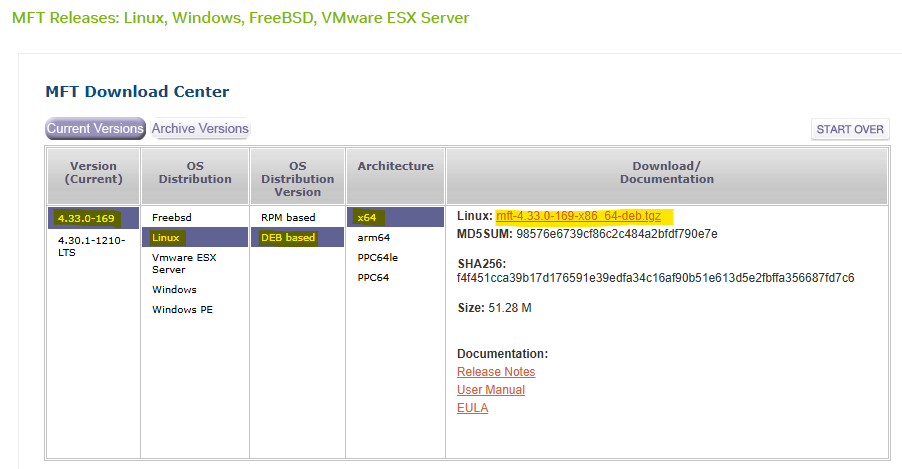
-
Transfer and Extract MFT Tools on the Worker 1 BareMetal Host.
First Pod Console
root@worker1:~# tar -xvzf /tmp/mft-4.33.0-169-x86_64-deb.tgz -
Navigate into the Extracted Directory.
First Pod Console
root@worker1:~# cd mft-4.33.0-169-x86_64-deb/ -
Run following commands.
First Pod Console
root@worker1:~# apt-get install gcc make dkms root@worker1:~# ./install.sh -
Start MST (Mellanox Software Tools) Service and Identify DPU Device Name.
First Pod Console
root@worker1:~# mst start Starting MST (Mellanox Software Tools) driver set Loading MST PCI module - Success Loading MST PCI configuration module - Success Create devices Unloading MST PCI module (unused) - Success root@worker1:~# mst status MST modules: ------------ MST PCI module is not loaded MST PCI configuration module loaded MST devices: ------------ /dev/mst/mt41692_pciconf0 - PCI configuration cycles access. domain:bus:dev.fn=0000:2b:00.0 addr.reg=88 data.reg=92 cr_bar.gw_offset=-1 Chip revision is: 01 -
Perform Zero-Trust Checking.
First Pod Console
root@worker1:~# mlxprivhost -d 2b:00.0 q
Host configurations
-------------------
level                         : RESTRICTED

Port functions status:
-----------------------
disable_rshim                 : TRUE
disable_tracer                : TRUE
disable_port_owner            : TRUE
disable_counter_rd            : TRUE

#Expected Zero-Trust Output.
This is the most definitive confirmation.
level : RESTRICTEDmeans the host is in Zero-Trust Mode, and theTRUEflags confirm individual security restrictions are active. -
Check Firmware Access with
mlxfwmanager:First Pod Console
root@worker1:~# mlxfwmanager -d 2b:00.0 --query
Querying Mellanox devices firmware ...

Device #1:
----------

  Device Type:      BlueField3
  Part Number:      --
  Description:
  PSID:
  PCI Device Name:  2b:00.0
  Base MAC:         N/A
  Versions:         Current        Available
     FW             --

  Status:           Failed to open device
"Failed to open device" indicates the host is blocked from accessing the DPU for firmware operations, a key aspect of Zero-Trust.
-
Check Device Configuration with
mlxconfig:First Pod Console
root@worker1:~# mlxconfig -d 2b:00.0 q

Device #1:
----------

Device type:        BlueField3
Name:               900-9D3B6-00CV-A_Ax
Description:        NVIDIA BlueField-3 B3220 P-Series FHHL DPU; 200GbE (default mode) / NDR200 IB; Dual-port QSFP112; PCIe Gen5.0 x16 with x16 PCIe extension option; 16 Arm cores; 32GB on-board DDR; integrated BMC; Crypto Enabled
Device:             2b:00.0

Configurations:                                          Next Boot
...
        ALLOW_RD_COUNTERS                           True(1)   # No RO, but restricted by mlxprivhost
...
        PORT_OWNER                                  True(1)   # No RO, but restricted by mlxprivhost
...
        TRACER_ENABLE                               True(1)   # No RO, but restricted by mlxprivhost
Most configuration parameters will be prefixed with
RO(Read-Only). Parameters related to direct host control, likePORT_OWNER,ALLOW_RD_COUNTERS,TRACER_ENABLE, even if shown asTrue(1)for the DPU's internal capability, will be unenforcible by the host due to themlxprivhostrestrictions. The widespreadROstatus shows that the host cannot modify these configurations, reinforcing the DPU's autonomous and secure state. The few parameters withoutROare still overridden by themlxprivhostsecurity policy. -
Check Low-Level Hardware Access with
ethtool:First Pod Console
root@worker1:~# ethtool -d ens1f0np0
Cannot get register dump: Operation not supported
This confirms the DPU is preventing deep, low-level hardware access from the host, aligning with Zero-Trust's isolation goals.
Conclusion
The command outputs of mlxprivhost, mlxfwmanager, mlxconfig (showing RO flags), and ethtool (showing "Operation not supported"), then your NVIDIA BlueField DPU is indeed operating in Zero-Trust Mode.
This means the host has significantly restricted privileges and cannot perform sensitive operations on the DPU, ensuring its security and isolation.
Infrastructure Bandwidth & Latency Validation
Verify the deployment and confirm that the DPU system achieves link-speed performance and low latency by running various tests:
-
Iperf TCP—for bandwidth measurements
-
RDMA—for bandwidth and latency measurements
-
Network isolation
Each test is described in detail. At the end of each test, the achieved performance is displayed.
Notes
Make sure that the servers are tuned for maximum performance (not covered in this document).
Performance and Isolation Tests
Now that the test deployment is running, perform bandwidth and latency performance tests between two bare-metal workload servers.
Ubuntu 24.04 was installed on the servers.
-
Before running the tests, check the Gateway address and BGP configuration on each HBN pod:
Jump Node Console
$ ki -n dpf-operator-system get pod -o wide | grep doca-hbn
dpu-cplane-tenant1-doca-hbn-x92vr-ds-4h7rw              2/2     Running   0          72m   10.244.1.5     dpu-node-mt2402xz0f80-mt2402xz0f80   <none>           <none>
dpu-cplane-tenant1-doca-hbn-x92vr-ds-8g5hc              2/2     Running   0          80m   10.244.0.8     dpu-node-mt2402xz0f7x-mt2402xz0f7x   <none>           <none>

$ ki exec -it -n dpf-operator-system dpu-cplane-tenant1-doca-hbn-x92vr-ds-8g5hc -- bash
Defaulted container "doca-hbn" out of: doca-hbn, hbn-init (init), hbn-sidecar (init)
root@dpu-cplane-tenant1-doca-hbn-x92vr-ds-8g5hc:/tmp# ip a s

...
56: pf0hpf_if: <BROADCAST,MULTICAST,UP,LOWER_UP> mtu 9000 qdisc mq state UP group default qlen 1000
    link/ether 22:44:57:9d:01:25 brd ff:ff:ff:ff:ff:ff
    inet 10.0.120.1/29 scope global pf0hpf_if
       valid_lft forever preferred_lft forever
    inet6 fe80::2044:57ff:fe9d:125/64 scope link
       valid_lft forever preferred_lft forever
...


# vtysh

# show bgp summary

IPv4 Unicast Summary (VRF default):
BGP router identifier 11.0.0.0, local AS number 65101 vrf-id 0
BGP table version 9
RIB entries 8, using 1792 bytes of memory
Peers 2, using 40 KiB of memory
Peer groups 1, using 64 bytes of memory

Neighbor           V         AS   MsgRcvd   MsgSent   TblVer  InQ OutQ  Up/Down State/PfxRcd   PfxSnt Desc
clx-swx-056(p0_if) 4      65001       185       184        0    0    0 00:08:55            4        5 N/A
clx-swx-056(p1_if) 4      65001       184       183        0    0    0 00:08:53            4        5 N/A

Total number of neighbors 2

L2VPN EVPN Summary (VRF default):
BGP router identifier 11.0.0.0, local AS number 65101 vrf-id 0
BGP table version 0
RIB entries 3, using 672 bytes of memory
Peers 2, using 40 KiB of memory
Peer groups 1, using 64 bytes of memory

Neighbor           V         AS   MsgRcvd   MsgSent   TblVer  InQ OutQ  Up/Down State/PfxRcd   PfxSnt Desc
clx-swx-056(p0_if) 4      65001       185       184        0    0    0 00:08:55        NoNeg    NoNeg N/A
clx-swx-056(p1_if) 4      65001       184       183        0    0    0 00:08:53        NoNeg    NoNeg N/A

Total number of neighbors 2


# show ip bgp
BGP table version is 7, local router ID is 11.0.0.0, vrf id 0
Default local pref 100, local AS 65101
Status codes:  s suppressed, d damped, h history, u unsorted, * valid, > best, = multipath, + multipath nhg,
               i internal, r RIB-failure, S Stale, R Removed
Nexthop codes: @NNN nexthop's vrf id, < announce-nh-self
Origin codes:  i - IGP, e - EGP, ? - incomplete
RPKI validation codes: V valid, I invalid, N Not found

   Network          Next Hop            Metric LocPrf Weight Path
*> 0.0.0.0/0        p0_if                    0             0 65001 i
*=                  p1_if                    0             0 65001 i
*> 10.0.120.0/29    0.0.0.0(dpu-cplane-tenant1-doca-hbn-j9p7q-ds-r8p66)
                                             0         32768 ?
*> 10.0.120.8/29    p0_if                                  0 65001 65201 ?
*=                  p1_if                                  0 65001 65201 ?
*> 10.0.125.0/24    p0_if                    0             0 65001 i
*=                  p1_if                    0             0 65001 i
*> 11.0.0.0/32      0.0.0.0(dpu-cplane-tenant1-doca-hbn-j9p7q-ds-r8p66)
                                             0         32768 ?
*> 11.0.0.1/32      p0_if                                  0 65001 65201 ?
*=                  p1_if                                  0 65001 65201 ?
*> 11.0.0.101/32    p0_if                    0             0 65001 i
*=                  p1_if                    0             0 65001 i

Displayed  7 routes and 12 total paths


# exit

$ exit
-
Connect to a first Workload Server console, install iperf, perftest, check DPU High Speed Interfaces, set the route to Ethernet, and identify the relevant RDMA device:
First Pod Console
root@worker1:~# apt install iperf3 root@worker1:~# apt install perftest root@worker1:~# ip a s ... 8: ens1f0np0: <BROADCAST,MULTICAST,UP,LOWER_UP> mtu 9000 qdisc mq state UP group default qlen 1000 link/ether 58:a2:e1:73:69:e6 brd ff:ff:ff:ff:ff:ff altname enp43s0f0np0 inet 10.0.120.2/29 metric 50 brd 10.0.120.7 scope global dynamic ens1f0np0 valid_lft 28624sec preferred_lft 28624sec inet6 fe80::5aa2:e1ff:fe73:69e6/64 scope link valid_lft forever preferred_lft forever ... root@worker1:~# vim /etc/netplan/50-cloud-init.yaml network: version: 2 ethernets: ens1f0np0: mtu: 9000 dhcp4: true dhcp4-overrides: route-metric: 50 ens10f0: addresses: - "10.0.110.21/24" nameservers: addresses: - 10.0.110.252 search: - dpf.rdg.local.domain routes: - to: default via: 10.0.110.254 metric: 100 mtu: 9000 depuser@worker1:~$ ping 8.8.8.8 PING 8.8.8.8 (8.8.8.8) 56(84) bytes of data. 64 bytes from 8.8.8.8: icmp_seq=1 ttl=117 time=5.35 ms 64 bytes from 8.8.8.8: icmp_seq=2 ttl=117 time=5.10 ms 64 bytes from 8.8.8.8: icmp_seq=3 ttl=117 time=5.15 ms root@worker1:~# rdma link | grep ens1f0np0 link mlx5_2/1 state ACTIVE physical_state LINK_UP netdev ens1f0np0 -
Using another console window, reconnect to the jump node and connect to a second Workload Server.
From within the servers, install iperf, perftest, check DPU Hight Speed Interfaces, set route to ethernet and identify the relevant RDMA device:Second Pod Console
root@worker2:~# apt install iperf3
root@worker2:~# apt install perftest
root@worker2:~# ip a s
...
8: ens1f0np0: <BROADCAST,MULTICAST,UP,LOWER_UP> mtu 9000 qdisc mq state UP group default qlen 1000
    link/ether 58:a2:e1:73:6a:58 brd ff:ff:ff:ff:ff:ff
    altname enp43s0f0np0
    inet 10.0.120.10/29 metric 50 brd 10.0.120.15 scope global dynamic ens1f0np0
       valid_lft 28501sec preferred_lft 28501sec
    inet6 fe80::5aa2:e1ff:fe73:6a58/64 scope link
       valid_lft forever preferred_lft forever
...

depuser@worker2:~$ ping 8.8.8.8
PING 8.8.8.8 (8.8.8.8) 56(84) bytes of data.
64 bytes from 8.8.8.8: icmp_seq=1 ttl=117 time=5.35 ms
64 bytes from 8.8.8.8: icmp_seq=2 ttl=117 time=5.10 ms
64 bytes from 8.8.8.8: icmp_seq=3 ttl=117 time=5.15 ms


root@worker2:~# rdma link | grep ens1f0np0
link mlx5_2/1 state ACTIVE physical_state LINK_UP netdev ens1f0np0
Network Connection Test
Verify that the two servers running on same network - using virtual functions can communicate with each other.
Connect to the first workload server, and try to ping the PF0 on the second node.
-
Run the
pingcommand:First BM Server Console
root@worker1:~# ping -c 3 10.0.120.10
PING 10.0.120.10 (10.0.120.10) 56(84) bytes of data.
64 bytes from 10.0.120.10: icmp_seq=1 ttl=61 time=0.933 ms
64 bytes from 10.0.120.10: icmp_seq=2 ttl=61 time=0.260 ms
64 bytes from 10.0.120.10: icmp_seq=3 ttl=61 time=0.248 ms

--- 10.0.120.10 ping statistics ---
3 packets transmitted, 3 received, 0% packet loss, time 2059ms
rtt min/avg/max/mdev = 0.248/0.480/0.933/0.320 ms
iPerf TCP Bandwidth Test
Move back to the first server console.
-
Start the
iperf3server side:First BM Server Console
root@worker1:~# iperf3 -s ------------------------------------------------------------ Server listening on TCP port 5001 TCP window size: 128 KByte (default) ------------------------------------------------------------ -
Move to the second server console.
Start theiperfclient side:Second BM Server Console
root@worker2:~#  iperf3 -c 10.0.120.2 -P 16
------------------------------------------------------------
Connecting to host 10.0.120.2, port 5201
[  5] local 10.0.120.10 port 59718 connected to 10.0.120.2 port 5201
[  7] local 10.0.120.10 port 59726 connected to 10.0.120.2 port 5201
[  9] local 10.0.120.10 port 59734 connected to 10.0.120.2 port 5201
[ 11] local 10.0.120.10 port 59744 connected to 10.0.120.2 port 5201
[ 13] local 10.0.120.10 port 59758 connected to 10.0.120.2 port 5201
[ 15] local 10.0.120.10 port 59760 connected to 10.0.120.2 port 5201
[ 17] local 10.0.120.10 port 59770 connected to 10.0.120.2 port 5201
[ 19] local 10.0.120.10 port 59782 connected to 10.0.120.2 port 5201
[ 21] local 10.0.120.10 port 59792 connected to 10.0.120.2 port 5201
[ 23] local 10.0.120.10 port 59802 connected to 10.0.120.2 port 5201
[ 25] local 10.0.120.10 port 59804 connected to 10.0.120.2 port 5201
[ 27] local 10.0.120.10 port 59820 connected to 10.0.120.2 port 5201
[ 29] local 10.0.120.10 port 59824 connected to 10.0.120.2 port 5201
[ 31] local 10.0.120.10 port 59830 connected to 10.0.120.2 port 5201
[ 33] local 10.0.120.10 port 59834 connected to 10.0.120.2 port 5201
[ 35] local 10.0.120.10 port 59838 connected to 10.0.120.2 port 5201
[ ID] Interval           Transfer     Bitrate         Retr  Cwnd
[  5]   0.00-1.00   sec   914 MBytes  7.67 Gbits/sec  568    603 KBytes
[  7]   0.00-1.00   sec  1.03 GBytes  8.84 Gbits/sec  438    620 KBytes
[  9]   0.00-1.00   sec  1.14 GBytes  9.78 Gbits/sec  564   1.22 MBytes
[ 11]   0.00-1.00   sec   850 MBytes  7.12 Gbits/sec  426    813 KBytes
[ 13]   0.00-1.00   sec   982 MBytes  8.23 Gbits/sec  338    297 KBytes
[ 15]   0.00-1.00   sec   989 MBytes  8.29 Gbits/sec  474    271 KBytes
[ 17]   0.00-1.00   sec   736 MBytes  6.17 Gbits/sec  372    760 KBytes
[ 19]   0.00-1.00   sec  1.63 GBytes  14.0 Gbits/sec  597   1.89 MBytes
[ 21]   0.00-1.00   sec   774 MBytes  6.48 Gbits/sec  470    358 KBytes
[ 23]   0.00-1.00   sec  1.01 GBytes  8.67 Gbits/sec  566    297 KBytes
[ 25]   0.00-1.00   sec   896 MBytes  7.51 Gbits/sec  386    489 KBytes
[ 27]   0.00-1.00   sec  1.09 GBytes  9.32 Gbits/sec  674    446 KBytes
[ 29]   0.00-1.00   sec  1.20 GBytes  10.3 Gbits/sec  607    507 KBytes
[ 31]   0.00-1.00   sec  1010 MBytes  8.46 Gbits/sec  528    769 KBytes
[ 33]   0.00-1.00   sec   896 MBytes  7.51 Gbits/sec  452    350 KBytes
[ 35]   0.00-1.00   sec  1.52 GBytes  13.0 Gbits/sec  531    472 KBytes
[SUM]   0.00-1.00   sec  16.5 GBytes   141 Gbits/sec  7991
- - - - - - - - - - - - - - - - - - - - - - - - -
[  5]   1.00-2.00   sec  1.95 GBytes  16.7 Gbits/sec  832    585 KBytes
[  7]   1.00-2.00   sec  1.19 GBytes  10.2 Gbits/sec  451    708 KBytes
[  9]   1.00-2.00   sec  1.14 GBytes  9.76 Gbits/sec  784    245 KBytes
[ 11]   1.00-2.00   sec  1.12 GBytes  9.66 Gbits/sec  596    358 KBytes
[ 13]   1.00-2.00   sec  1.02 GBytes  8.80 Gbits/sec  433    821 KBytes
[ 15]   1.00-2.00   sec  1.33 GBytes  11.5 Gbits/sec  730    280 KBytes
[ 17]   1.00-2.00   sec   975 MBytes  8.18 Gbits/sec  591    227 KBytes
[ 19]   1.00-2.00   sec  2.00 GBytes  17.1 Gbits/sec  922   1.11 MBytes
[ 21]   1.00-2.00   sec   963 MBytes  8.08 Gbits/sec  766    271 KBytes
[ 23]   1.00-2.00   sec  1.96 GBytes  16.8 Gbits/sec  1086    542 KBytes
[ 25]   1.00-2.00   sec  1.13 GBytes  9.72 Gbits/sec  712    315 KBytes
[ 27]   1.00-2.00   sec  1.50 GBytes  12.9 Gbits/sec  908   1.19 MBytes
[ 29]   1.00-2.00   sec  1.15 GBytes  9.91 Gbits/sec  594    577 KBytes
[ 31]   1.00-2.00   sec   998 MBytes  8.37 Gbits/sec  562    393 KBytes
[ 33]   1.00-2.00   sec  1.77 GBytes  15.2 Gbits/sec  879    673 KBytes
[ 35]   1.00-2.00   sec  1.43 GBytes  12.3 Gbits/sec  453    559 KBytes
[SUM]   1.00-2.00   sec  21.6 GBytes   185 Gbits/sec  11299
- - - - - - - - - - - - - - - - - - - - - - - - -
[  5]   2.00-3.00   sec  1.79 GBytes  15.4 Gbits/sec  814    446 KBytes
[  7]   2.00-3.00   sec  1.16 GBytes  9.97 Gbits/sec  348    629 KBytes
[  9]   2.00-3.00   sec   855 MBytes  7.17 Gbits/sec  501    149 KBytes
[ 11]   2.00-3.00   sec   968 MBytes  8.12 Gbits/sec  567    446 KBytes
[ 13]   2.00-3.00   sec  1.26 GBytes  10.8 Gbits/sec  406    218 KBytes
[ 15]   2.00-3.00   sec  1.67 GBytes  14.4 Gbits/sec  722    961 KBytes
[ 17]   2.00-3.00   sec  1014 MBytes  8.50 Gbits/sec  623    542 KBytes
[ 19]   2.00-3.00   sec  2.30 GBytes  19.8 Gbits/sec  779    830 KBytes
[ 21]   2.00-3.00   sec  1.02 GBytes  8.74 Gbits/sec  530    542 KBytes
[ 23]   2.00-3.00   sec  1.57 GBytes  13.5 Gbits/sec  669    367 KBytes
[ 25]   2.00-3.00   sec  1.07 GBytes  9.21 Gbits/sec  637    454 KBytes
[ 27]   2.00-3.00   sec  1.97 GBytes  16.9 Gbits/sec  922    839 KBytes
[ 29]   2.00-3.00   sec  1.41 GBytes  12.1 Gbits/sec  695    253 KBytes
[ 31]   2.00-3.00   sec  1.20 GBytes  10.3 Gbits/sec  577   78.6 KBytes
[ 33]   2.00-3.00   sec  1.43 GBytes  12.3 Gbits/sec  725    227 KBytes
[ 35]   2.00-3.00   sec  1.63 GBytes  14.0 Gbits/sec  453    280 KBytes
[SUM]   2.00-3.00   sec  22.3 GBytes   191 Gbits/sec  9968
- - - - - - - - - - - - - - - - - - - - - - - - -
[  5]   3.00-4.00   sec  1.79 GBytes  15.4 Gbits/sec  900    848 KBytes
[  7]   3.00-4.00   sec  1.36 GBytes  11.7 Gbits/sec  574    472 KBytes
[  9]   3.00-4.00   sec   904 MBytes  7.58 Gbits/sec  629    472 KBytes
[ 11]   3.00-4.00   sec  1.18 GBytes  10.2 Gbits/sec  721    481 KBytes
[ 13]   3.00-4.00   sec  1.09 GBytes  9.33 Gbits/sec  455    376 KBytes
[ 15]   3.00-4.00   sec  1.63 GBytes  14.0 Gbits/sec  956    489 KBytes
[ 17]   3.00-4.00   sec  1.11 GBytes  9.52 Gbits/sec  674    489 KBytes
[ 19]   3.00-4.00   sec  1.67 GBytes  14.3 Gbits/sec  673    996 KBytes
[ 21]   3.00-4.00   sec   954 MBytes  8.00 Gbits/sec  657    585 KBytes
[ 23]   3.00-4.00   sec  1.49 GBytes  12.8 Gbits/sec  804    446 KBytes
[ 25]   3.00-4.00   sec  1.29 GBytes  11.1 Gbits/sec  762    682 KBytes
[ 27]   3.00-4.00   sec  1.79 GBytes  15.4 Gbits/sec  846    551 KBytes
[ 29]   3.00-4.00   sec  1.55 GBytes  13.3 Gbits/sec  814    865 KBytes
[ 31]   3.00-4.00   sec  1.30 GBytes  11.2 Gbits/sec  705    402 KBytes
[ 33]   3.00-4.00   sec  1.34 GBytes  11.5 Gbits/sec  825    760 KBytes
[ 35]   3.00-4.00   sec  1.50 GBytes  12.9 Gbits/sec  607    883 KBytes
[SUM]   3.00-4.00   sec  21.9 GBytes   188 Gbits/sec  11602
- - - - - - - - - - - - - - - - - - - - - - - - -
[  5]   4.00-5.00   sec  1.39 GBytes  11.9 Gbits/sec  712    428 KBytes
[  7]   4.00-5.00   sec  1.33 GBytes  11.4 Gbits/sec  565    446 KBytes
[  9]   4.00-5.00   sec  1.27 GBytes  11.0 Gbits/sec  813    341 KBytes
[ 11]   4.00-5.00   sec  1.49 GBytes  12.8 Gbits/sec  757    760 KBytes
[ 13]   4.00-5.00   sec  1.18 GBytes  10.1 Gbits/sec  460    472 KBytes
[ 15]   4.00-5.00   sec  1.36 GBytes  11.7 Gbits/sec  859    524 KBytes
[ 17]   4.00-5.00   sec  1.12 GBytes  9.59 Gbits/sec  500    559 KBytes
[ 19]   4.00-5.00   sec  1.84 GBytes  15.8 Gbits/sec  957    245 KBytes
[ 21]   4.00-5.00   sec  1.03 GBytes  8.86 Gbits/sec  641    699 KBytes
[ 23]   4.00-5.00   sec  1.48 GBytes  12.7 Gbits/sec  803   1.06 MBytes
[ 25]   4.00-5.00   sec  1.01 GBytes  8.69 Gbits/sec  638    358 KBytes
[ 27]   4.00-5.00   sec  1.39 GBytes  11.9 Gbits/sec  842    350 KBytes
[ 29]   4.00-5.00   sec  1.30 GBytes  11.2 Gbits/sec  673    402 KBytes
[ 31]   4.00-5.00   sec  1.51 GBytes  12.9 Gbits/sec  780    227 KBytes
[ 33]   4.00-5.00   sec  1.46 GBytes  12.6 Gbits/sec  818    944 KBytes
[ 35]   4.00-5.00   sec  1.35 GBytes  11.6 Gbits/sec  531    315 KBytes
[SUM]   4.00-5.00   sec  21.5 GBytes   185 Gbits/sec  11349
- - - - - - - - - - - - - - - - - - - - - - - - -
[  5]   5.00-6.00   sec  1.57 GBytes  13.5 Gbits/sec  730    288 KBytes
[  7]   5.00-6.00   sec  1.21 GBytes  10.4 Gbits/sec  466    419 KBytes
[  9]   5.00-6.00   sec   936 MBytes  7.85 Gbits/sec  501    393 KBytes
[ 11]   5.00-6.00   sec  1.16 GBytes  10.0 Gbits/sec  705    350 KBytes
[ 13]   5.00-6.00   sec  1.21 GBytes  10.4 Gbits/sec  410    393 KBytes
[ 15]   5.00-6.00   sec  1.96 GBytes  16.9 Gbits/sec  1101   2.73 MBytes
[ 17]   5.00-6.00   sec  1.01 GBytes  8.68 Gbits/sec  533   1.21 MBytes
[ 19]   5.00-6.00   sec  1.80 GBytes  15.5 Gbits/sec  893    481 KBytes
[ 21]   5.00-6.00   sec   978 MBytes  8.21 Gbits/sec  578    288 KBytes
[ 23]   5.00-6.00   sec  1.37 GBytes  11.8 Gbits/sec  755    795 KBytes
[ 25]   5.00-6.00   sec  1024 MBytes  8.59 Gbits/sec  588    323 KBytes
[ 27]   5.00-6.00   sec  1.34 GBytes  11.5 Gbits/sec  627    620 KBytes
[ 29]   5.00-6.00   sec  1.87 GBytes  16.1 Gbits/sec  1001    507 KBytes
[ 31]   5.00-6.00   sec  1.39 GBytes  11.9 Gbits/sec  746    376 KBytes
[ 33]   5.00-6.00   sec  1.27 GBytes  10.9 Gbits/sec  688    996 KBytes
[ 35]   5.00-6.00   sec  1.51 GBytes  13.0 Gbits/sec  646    446 KBytes
[SUM]   5.00-6.00   sec  21.5 GBytes   185 Gbits/sec  10968
- - - - - - - - - - - - - - - - - - - - - - - - -
[  5]   6.00-7.00   sec  1.69 GBytes  14.5 Gbits/sec  756    865 KBytes
[  7]   6.00-7.00   sec  1.14 GBytes  9.75 Gbits/sec  376    551 KBytes
[  9]   6.00-7.00   sec   967 MBytes  8.10 Gbits/sec  647    760 KBytes
[ 11]   6.00-7.00   sec  1.13 GBytes  9.66 Gbits/sec  948    507 KBytes
[ 13]   6.00-7.00   sec  1.15 GBytes  9.86 Gbits/sec  324   2.12 MBytes
[ 15]   6.00-7.00   sec  2.21 GBytes  18.9 Gbits/sec  945    664 KBytes
[ 17]   6.00-7.00   sec  1014 MBytes  8.50 Gbits/sec  687    192 KBytes
[ 19]   6.00-7.00   sec  1.45 GBytes  12.5 Gbits/sec  724    384 KBytes
[ 21]   6.00-7.00   sec   777 MBytes  6.51 Gbits/sec  440    393 KBytes
[ 23]   6.00-7.00   sec  1.47 GBytes  12.6 Gbits/sec  817    673 KBytes
[ 25]   6.00-7.00   sec  1.01 GBytes  8.70 Gbits/sec  549    446 KBytes
[ 27]   6.00-7.00   sec  1.37 GBytes  11.7 Gbits/sec  715    856 KBytes
[ 29]   6.00-7.00   sec  1.23 GBytes  10.6 Gbits/sec  718    682 KBytes
[ 31]   6.00-7.00   sec  1.99 GBytes  17.0 Gbits/sec  975    498 KBytes
[ 33]   6.00-7.00   sec  1.91 GBytes  16.4 Gbits/sec  908    603 KBytes
[ 35]   6.00-7.00   sec  1.62 GBytes  13.9 Gbits/sec  658    166 KBytes
[SUM]   6.00-7.00   sec  22.1 GBytes   189 Gbits/sec  11187
- - - - - - - - - - - - - - - - - - - - - - - - -
[  5]   7.00-8.00   sec  1.82 GBytes  15.7 Gbits/sec  806    821 KBytes
[  7]   7.00-8.00   sec  1.25 GBytes  10.8 Gbits/sec  428    743 KBytes
[  9]   7.00-8.00   sec   744 MBytes  6.24 Gbits/sec  485    551 KBytes
[ 11]   7.00-8.00   sec   662 MBytes  5.55 Gbits/sec  487    419 KBytes
[ 13]   7.00-8.00   sec  1.18 GBytes  10.1 Gbits/sec  452   1.26 MBytes
[ 15]   7.00-8.00   sec  2.23 GBytes  19.2 Gbits/sec  709   1.19 MBytes
[ 17]   7.00-8.00   sec  1.53 GBytes  13.1 Gbits/sec  793   1.79 MBytes
[ 19]   7.00-8.00   sec  1.35 GBytes  11.6 Gbits/sec  784   1.14 MBytes
[ 21]   7.00-8.00   sec   796 MBytes  6.68 Gbits/sec  501    149 KBytes
[ 23]   7.00-8.00   sec  1.54 GBytes  13.3 Gbits/sec  724    952 KBytes
[ 25]   7.00-8.00   sec  1.08 GBytes  9.26 Gbits/sec  634    542 KBytes
[ 27]   7.00-8.00   sec  1.23 GBytes  10.5 Gbits/sec  577    192 KBytes
[ 29]   7.00-8.00   sec   970 MBytes  8.15 Gbits/sec  716    315 KBytes
[ 31]   7.00-8.00   sec  2.02 GBytes  17.4 Gbits/sec  898    996 KBytes
[ 33]   7.00-8.00   sec  1.82 GBytes  15.7 Gbits/sec  918    769 KBytes
[ 35]   7.00-8.00   sec  1.65 GBytes  14.2 Gbits/sec  706    786 KBytes
[SUM]   7.00-8.00   sec  21.8 GBytes   187 Gbits/sec  10618
- - - - - - - - - - - - - - - - - - - - - - - - -
[  5]   8.00-9.00   sec  1.51 GBytes  12.9 Gbits/sec  863    428 KBytes
[  7]   8.00-9.00   sec  1.03 GBytes  8.81 Gbits/sec  532    306 KBytes
[  9]   8.00-9.00   sec   780 MBytes  6.54 Gbits/sec  584    647 KBytes
[ 11]   8.00-9.00   sec  1.35 GBytes  11.6 Gbits/sec  937    498 KBytes
[ 13]   8.00-9.00   sec  1.59 GBytes  13.7 Gbits/sec  714    900 KBytes
[ 15]   8.00-9.00   sec  2.04 GBytes  17.6 Gbits/sec  1096    891 KBytes
[ 17]   8.00-9.00   sec  1.00 GBytes  8.58 Gbits/sec  841    201 KBytes
[ 19]   8.00-9.00   sec  1.29 GBytes  11.1 Gbits/sec  796    970 KBytes
[ 21]   8.00-9.00   sec  1.01 GBytes  8.65 Gbits/sec  882    288 KBytes
[ 23]   8.00-9.00   sec  1.40 GBytes  12.0 Gbits/sec  854    376 KBytes
[ 25]   8.00-9.00   sec  1019 MBytes  8.54 Gbits/sec  760    472 KBytes
[ 27]   8.00-9.00   sec  1.28 GBytes  11.0 Gbits/sec  849    725 KBytes
[ 29]   8.00-9.00   sec  1.57 GBytes  13.5 Gbits/sec  941   1022 KBytes
[ 31]   8.00-9.00   sec  1.56 GBytes  13.4 Gbits/sec  1028    411 KBytes
[ 33]   8.00-9.00   sec  1.85 GBytes  15.9 Gbits/sec  1032    472 KBytes
[ 35]   8.00-9.00   sec  1.48 GBytes  12.7 Gbits/sec  645    699 KBytes
[SUM]   8.00-9.00   sec  21.7 GBytes   186 Gbits/sec  13354
- - - - - - - - - - - - - - - - - - - - - - - - -
[  5]   9.00-10.00  sec  1.78 GBytes  15.3 Gbits/sec  797    507 KBytes
[  7]   9.00-10.00  sec  1.23 GBytes  10.5 Gbits/sec  496    699 KBytes
[  9]   9.00-10.00  sec  1.11 GBytes  9.51 Gbits/sec  633    489 KBytes
[ 11]   9.00-10.00  sec  1004 MBytes  8.41 Gbits/sec  571    769 KBytes
[ 13]   9.00-10.00  sec  1.11 GBytes  9.48 Gbits/sec  435    463 KBytes
[ 15]   9.00-10.00  sec  1.85 GBytes  15.9 Gbits/sec  776    848 KBytes
[ 17]   9.00-10.00  sec  1.12 GBytes  9.64 Gbits/sec  568   1.40 MBytes
[ 19]   9.00-10.00  sec  1.82 GBytes  15.6 Gbits/sec  763   1.14 MBytes
[ 21]   9.00-10.00  sec   559 MBytes  4.68 Gbits/sec  393    428 KBytes
[ 23]   9.00-10.00  sec  1.35 GBytes  11.6 Gbits/sec  744   1.11 MBytes
[ 25]   9.00-10.00  sec  1.02 GBytes  8.74 Gbits/sec  508    734 KBytes
[ 27]   9.00-10.00  sec  1.73 GBytes  14.8 Gbits/sec  748   1.37 MBytes
[ 29]   9.00-10.00  sec  1.91 GBytes  16.4 Gbits/sec  1030    253 KBytes
[ 31]   9.00-10.00  sec  1.76 GBytes  15.1 Gbits/sec  781   1.20 MBytes
[ 33]   9.00-10.00  sec  1.52 GBytes  13.1 Gbits/sec  880    839 KBytes
[ 35]   9.00-10.00  sec  1.45 GBytes  12.4 Gbits/sec  436    516 KBytes
[SUM]   9.00-10.00  sec  22.3 GBytes   191 Gbits/sec  10559
- - - - - - - - - - - - - - - - - - - - - - - - -
[ ID] Interval           Transfer     Bitrate         Retr
[  5]   0.00-10.00  sec  16.2 GBytes  13.9 Gbits/sec  7778             sender
[  5]   0.00-10.00  sec  16.2 GBytes  13.9 Gbits/sec                  receiver
[  7]   0.00-10.00  sec  11.9 GBytes  10.2 Gbits/sec  4674             sender
[  7]   0.00-10.00  sec  11.9 GBytes  10.2 Gbits/sec                  receiver
[  9]   0.00-10.00  sec  9.72 GBytes  8.35 Gbits/sec  6141             sender
[  9]   0.00-10.00  sec  9.72 GBytes  8.35 Gbits/sec                  receiver
[ 11]   0.00-10.00  sec  10.8 GBytes  9.31 Gbits/sec  6715             sender
[ 11]   0.00-10.00  sec  10.8 GBytes  9.31 Gbits/sec                  receiver
[ 13]   0.00-10.00  sec  11.7 GBytes  10.1 Gbits/sec  4427             sender
[ 13]   0.00-10.00  sec  11.7 GBytes  10.1 Gbits/sec                  receiver
[ 15]   0.00-10.00  sec  17.3 GBytes  14.8 Gbits/sec  8368             sender
[ 15]   0.00-10.00  sec  17.3 GBytes  14.8 Gbits/sec                  receiver
[ 17]   0.00-10.00  sec  10.5 GBytes  9.05 Gbits/sec  6182             sender
[ 17]   0.00-10.00  sec  10.5 GBytes  9.05 Gbits/sec                  receiver
[ 19]   0.00-10.00  sec  17.2 GBytes  14.7 Gbits/sec  7888             sender
[ 19]   0.00-10.00  sec  17.2 GBytes  14.7 Gbits/sec                  receiver
[ 21]   0.00-10.00  sec  8.72 GBytes  7.49 Gbits/sec  5858             sender
[ 21]   0.00-10.00  sec  8.72 GBytes  7.49 Gbits/sec                  receiver
[ 23]   0.00-10.00  sec  14.6 GBytes  12.6 Gbits/sec  7822             sender
[ 23]   0.00-10.00  sec  14.6 GBytes  12.6 Gbits/sec                  receiver
[ 25]   0.00-10.00  sec  10.5 GBytes  9.01 Gbits/sec  6174             sender
[ 25]   0.00-10.00  sec  10.5 GBytes  9.00 Gbits/sec                  receiver
[ 27]   0.00-10.00  sec  14.7 GBytes  12.6 Gbits/sec  7708             sender
[ 27]   0.00-10.00  sec  14.7 GBytes  12.6 Gbits/sec                  receiver
[ 29]   0.00-10.00  sec  14.1 GBytes  12.1 Gbits/sec  7789             sender
[ 29]   0.00-10.00  sec  14.1 GBytes  12.1 Gbits/sec                  receiver
[ 31]   0.00-10.00  sec  14.7 GBytes  12.6 Gbits/sec  7580             sender
[ 31]   0.00-10.00  sec  14.7 GBytes  12.6 Gbits/sec                  receiver
[ 33]   0.00-10.00  sec  15.2 GBytes  13.1 Gbits/sec  8125             sender
[ 33]   0.00-10.00  sec  15.2 GBytes  13.1 Gbits/sec                  receiver
[ 35]   0.00-10.00  sec  15.1 GBytes  13.0 Gbits/sec  5666             sender
[ 35]   0.00-10.00  sec  15.1 GBytes  13.0 Gbits/sec                  receiver
[SUM]   0.00-10.00  sec   213 GBytes   183 Gbits/sec  108895             sender
[SUM]   0.00-10.00  sec   213 GBytes   183 Gbits/sec                  receiver

iperf Done.
RoCE Latency Test
Return to the first server console.
-
Start the
ib_read_latserver side:First BM Server Console
root@worker1:~# ib_read_lat -F -n 20000 -d mlx5_2 ************************************ * Waiting for client to connect... * ************************************ -
Move to the second server console.
Start theib_read_latclient side:
Second BM Server Console
root@worker2:~# ib_read_lat -F -n 20000 -d mlx5_2 10.0.120.2
---------------------------------------------------------------------------------------
                    RDMA_Read Latency Test
 Dual-port       : OFF          Device         : mlx5_2
 Number of qps   : 1            Transport type : IB
 Connection type : RC           Using SRQ      : OFF
 PCIe relax order: ON
 ibv_wr* API     : ON
 TX depth        : 1
 Mtu             : 4096[B]
 Link type       : Ethernet
 GID index       : 3
 Outstand reads  : 16
 rdma_cm QPs     : OFF
 Data ex. method : Ethernet
---------------------------------------------------------------------------------------
 local address: LID 0000 QPN 0x0056 PSN 0xb55108 OUT 0x10 RKey 0x182e00 VAddr 0x00574c7c16f000
 GID: 00:00:00:00:00:00:00:00:00:00:255:255:10:00:120:10
 remote address: LID 0000 QPN 0x0056 PSN 0xcfa0b7 OUT 0x10 RKey 0x182d00 VAddr 0x00630148ba9000
 GID: 00:00:00:00:00:00:00:00:00:00:255:255:10:00:120:02
---------------------------------------------------------------------------------------
 #bytes #iterations    t_min[usec]    t_max[usec]  t_typical[usec]    t_avg[usec]    t_stdev[usec]   99% percentile[usec]   99.9% percentile[usec]
 2       20000          3.66           129.14       3.70               5.23             4.65            30.09                   38.56
---------------------------------------------------------------------------------------
RoCE Bandwidth Test
Return to the first server console.
-
Start the
ib_write_bwserver side:First BM Server Console
root@worker1:~# ib_write_bw -d mlx5_2 -F -a -q 4 --report_gbits ************************************ * Waiting for client to connect... * ************************************ -
Move to the second server console.
Start theib_write_bwclient side:Second BM Server Console
root@worker2:~# ib_write_bw -d mlx5_2 -F -a -q 4 10.0.120.2 --report_gbits
---------------------------------------------------------------------------------------
                    RDMA_Write BW Test
 Dual-port       : OFF          Device         : mlx5_2
 Number of qps   : 4            Transport type : IB
 Connection type : RC           Using SRQ      : OFF
 PCIe relax order: ON
 ibv_wr* API     : ON
 TX depth        : 128
 CQ Moderation   : 100
 Mtu             : 4096[B]
 Link type       : Ethernet
 GID index       : 3
 Max inline data : 0[B]
 rdma_cm QPs     : OFF
 Data ex. method : Ethernet
---------------------------------------------------------------------------------------
 local address: LID 0000 QPN 0x0052 PSN 0x5b54f8 RKey 0x182e00 VAddr 0x0070e928a01000
 GID: 00:00:00:00:00:00:00:00:00:00:255:255:10:00:120:10
 local address: LID 0000 QPN 0x0053 PSN 0xa16782 RKey 0x182e00 VAddr 0x0070e929201000
 GID: 00:00:00:00:00:00:00:00:00:00:255:255:10:00:120:10
 local address: LID 0000 QPN 0x0054 PSN 0x15fa4 RKey 0x182e00 VAddr 0x0070e929a01000
 GID: 00:00:00:00:00:00:00:00:00:00:255:255:10:00:120:10
 local address: LID 0000 QPN 0x0055 PSN 0xd9b023 RKey 0x182e00 VAddr 0x0070e92a201000
 GID: 00:00:00:00:00:00:00:00:00:00:255:255:10:00:120:10
 remote address: LID 0000 QPN 0x0052 PSN 0xefbd15 RKey 0x182d00 VAddr 0x007ff2aa1d7000
 GID: 00:00:00:00:00:00:00:00:00:00:255:255:10:00:120:02
 remote address: LID 0000 QPN 0x0053 PSN 0x17c9db RKey 0x182d00 VAddr 0x007ff2aa9d7000
 GID: 00:00:00:00:00:00:00:00:00:00:255:255:10:00:120:02
 remote address: LID 0000 QPN 0x0054 PSN 0xd13589 RKey 0x182d00 VAddr 0x007ff2ab1d7000
 GID: 00:00:00:00:00:00:00:00:00:00:255:255:10:00:120:02
 remote address: LID 0000 QPN 0x0055 PSN 0x9f80a4 RKey 0x182d00 VAddr 0x007ff2ab9d7000
 GID: 00:00:00:00:00:00:00:00:00:00:255:255:10:00:120:02
---------------------------------------------------------------------------------------
 #bytes     #iterations    BW peak[Gb/sec]    BW average[Gb/sec]   MsgRate[Mpps]
 2          20000           0.022036            0.016848            1.053021
 4          20000            0.25               0.25               7.739084
 8          20000            0.50               0.49               7.721015
 16         20000            0.99               0.99               7.728775
 32         20000            1.98               1.97               7.692634
 64         20000            3.96               3.96               7.728619
 128        20000            7.90               7.86               7.675307
 256        20000            15.81              15.77              7.702318
 512        20000            31.51              31.39              7.663545
 1024       20000            62.18              61.98              7.565755
 2048       20000            121.66             121.25             7.400641
 4096       20000            212.90             212.79             6.493855
 8192       20000            228.04             164.11             2.504087
 16384      20000            228.21             228.10             1.740301
 32768      20000            229.78             229.36             0.874950
 65536      20000            230.35             229.53             0.437792
 131072     20000            230.52             229.68             0.219042
 262144     20000            230.90             230.89             0.110097
 524288     20000            186.92             186.91             0.044564
 1048576    20000            179.16             179.16             0.021358
 2097152    20000            182.22             182.22             0.010861
 4194304    20000            181.55             181.52             0.005410
 8388608    20000            181.72             181.72             0.002708
---------------------------------------------------------------------------------------
Argus Service Verification
Here's a step-by-step procedure to check the DOCA Argus service on your NVIDIA BlueField DPU.
Ubuntu 24.04 was installed on the servers.
-
Open the first worker server console.
Jump Node Console
$ ssh worker1 -
Add iommu configuration in the
/etc/default/grubfile:First BM Server Console
root@worker1:~# vim /etc/default/grub ## Add iommu=pt intel_iommu=on in GRUB_CMDLINE_LINUX_DEFAULT parameter GRUB_CMDLINE_LINUX_DEFAULT="iommu.passthrough=1 intel_iommu=on" -
Reboot the server.
Second BM Server Console
root@worker1:~# reboot -
For test we will run the sleep 100 command.
Second BM Server Console
root@worker1:~# sleep 100& -
Connect to the first DPU
OOBover SSH and change theOOBubuntu's user password(default password is ubuntu).DPU BM Server Console
root@worker1:~# ssh ubuntu@10.0.110.211 -
Run following command to see Argus log events about the
sleep 100process on the worker host.
DPU BM Server Consoleubuntu@dpu-node-mt2402xz0f7x-mt2402xz0f7x:~$ jq 'select(.activity_data.process_details.process_name == "sleep") | .activity_data' /var/log/doca_argus_activity_report/doca_argus_log_MT2402XZ0F7XMLNXS0D0F0.log -C | less -R { "name": "process_created", "process_details": { "process_id": "2089", "process_name": "sleep", "process_file_name": "sleep", "process_self_exec_id": "8", "process_parent_process_id": "2047", "process_cpu_clock_cycles": "2082047", "process_real_group_id": "1000", "process_real_user_id": "1000", "process_command_line_arguments": "sleep 100", "process_state": "RUNNING", "process_pid_namespace": "4026531836", "process_mount_points_namespace": "4026531841", "process_network_namespace": "4026531840", "process_hash_sha256": "4a193eb6f25eecf27bad523cb8a53ec4d40775eb498f44760b19bfc421cc90aa", "process_hash_sha1": "bab62b22ddb568b245ebc0132200a5e2ddd8577c", "process_hash_md5": "ecdb9cd1468ff7151564b334b73161f5", "process_file_size_bytes": "35336", "process_folder_path": "/usr/bin/", "process_creation_time_iso_8601_ns": "2025-09-15T13:58:35.624512074+00:00", "process_container_id": "" } } { "name": "thread_created", "process_details": { "process_id": "2089", "process_name": "sleep", "process_file_name": "sleep", "process_self_exec_id": "8", "process_parent_process_id": "2047", "process_cpu_clock_cycles": "2082047", "process_real_group_id": "1000", "process_real_user_id": "1000", "process_command_line_arguments": "sleep 100", "process_state": "RUNNING", "process_pid_namespace": "4026531836", "process_mount_points_namespace": "4026531841", "process_network_namespace": "4026531840", "process_hash_sha256": "4a193eb6f25eecf27bad523cb8a53ec4d40775eb498f44760b19bfc421cc90aa", "process_hash_sha1": "bab62b22ddb568b245ebc0132200a5e2ddd8577c", "process_hash_md5": "ecdb9cd1468ff7151564b334b73161f5", "process_file_size_bytes": "35336", "process_folder_path": "/usr/bin/", "process_creation_time_iso_8601_ns": "2025-09-15T13:58:35.624512074+00:00", "process_container_id": "" }, "thread_details": { "thread_id": "2089", "thread_self_exec_id": "8", "thread_exit_state": "0" } } { "name": "new_file_mapped", "process_details": { "process_id": "2089", "process_name": "sleep", "process_file_name": "sleep", "process_self_exec_id": "8", "process_parent_process_id": "2047", "process_cpu_clock_cycles": "2082047", "process_real_group_id": "1000", "process_real_user_id": "1000", "process_command_line_arguments": "sleep 100", "process_state": "RUNNING", "process_pid_namespace": "4026531836", "process_mount_points_namespace": "4026531841", "process_network_namespace": "4026531840", "process_hash_sha256": "4a193eb6f25eecf27bad523cb8a53ec4d40775eb498f44760b19bfc421cc90aa", "process_hash_sha1": "bab62b22ddb568b245ebc0132200a5e2ddd8577c", "process_hash_md5": "ecdb9cd1468ff7151564b334b73161f5", "process_file_size_bytes": "35336", "process_folder_path": "/usr/bin/", "process_creation_time_iso_8601_ns": "2025-09-15T13:58:35.624512074+00:00", "process_container_id": "" }, "process_memory_details": { "process_id": "2089", "virtual_memory_area_start_address": "101967991353344", "virtual_memory_area_end_address": "101967991369728", "memory_permissions": "r-x", "virtual_memory_area_file_structure": "18387451888125847296", "is_main_process_executable": "1", "file_path": "/usr/bin/sleep", "file_name": "sleep" }, "process_attestation_details": { "elf_file_inode_number": "14287898", "elf_file_name": "sleep", "elf_file_path": "/usr/bin/sleep", "elf_file_hash_sha256": "4a193eb6f25eecf27bad523cb8a53ec4d40775eb498f44760b19bfc421cc90aa", "elf_file_hash_sha1": "bab62b22ddb568b245ebc0132200a5e2ddd8577c", "elf_file_hash_md5": "ecdb9cd1468ff7151564b334b73161f5", "elf_file_size_bytes": "35336", "elf_file_process_executable_state": "1", "elf_file_type": "ET_DYN + INTERP segment - Executable file" } } { "name": "foreign_binary_executed", "process_details": { "process_id": "2089", "process_name": "sleep", "process_file_name": "sleep", "process_self_exec_id": "8", "process_parent_process_id": "2047", "process_cpu_clock_cycles": "2082047", "process_real_group_id": "1000", "process_real_user_id": "1000", "process_command_line_arguments": "sleep 100", "process_state": "RUNNING", "process_pid_namespace": "4026531836", "process_mount_points_namespace": "4026531841", "process_network_namespace": "4026531840", "process_hash_sha256": "4a193eb6f25eecf27bad523cb8a53ec4d40775eb498f44760b19bfc421cc90aa", "process_hash_sha1": "bab62b22ddb568b245ebc0132200a5e2ddd8577c", "process_hash_md5": "ecdb9cd1468ff7151564b334b73161f5", "process_file_size_bytes": "35336", "process_folder_path": "/usr/bin/", "process_creation_time_iso_8601_ns": "2025-09-15T13:58:35.624512074+00:00", "process_container_id": "" }, "process_memory_details": { "process_id": "2089", "virtual_memory_area_start_address": "101967991353344", "virtual_memory_area_end_address": "101967991369728", "memory_permissions": "r-x", "virtual_memory_area_file_structure": "18387451888125847296", "is_main_process_executable": "1", "file_path": "/usr/bin/sleep", "file_name": "sleep" }, "process_attestation_details": { "elf_file_inode_number": "14287898", "elf_file_name": "sleep", "elf_file_path": "/usr/bin/sleep", "elf_file_hash_sha256": "4a193eb6f25eecf27bad523cb8a53ec4d40775eb498f44760b19bfc421cc90aa", "elf_file_hash_sha1": "bab62b22ddb568b245ebc0132200a5e2ddd8577c", "elf_file_hash_md5": "ecdb9cd1468ff7151564b334b73161f5", "elf_file_size_bytes": "35336", "elf_file_process_executable_state": "1", "elf_file_type": "ET_DYN + INTERP segment - Executable file" } } { "name": "new_file_mapped", "process_details": { "process_id": "2089", "process_name": "sleep", "process_file_name": "sleep", "process_self_exec_id": "8", "process_parent_process_id": "2047", "process_cpu_clock_cycles": "2082047", "process_real_group_id": "1000", "process_real_user_id": "1000", "process_command_line_arguments": "sleep 100", "process_state": "RUNNING", "process_pid_namespace": "4026531836", "process_mount_points_namespace": "4026531841", "process_network_namespace": "4026531840", "process_hash_sha256": "4a193eb6f25eecf27bad523cb8a53ec4d40775eb498f44760b19bfc421cc90aa", "process_hash_sha1": "bab62b22ddb568b245ebc0132200a5e2ddd8577c", "process_hash_md5": "ecdb9cd1468ff7151564b334b73161f5", "process_file_size_bytes": "35336", "process_folder_path": "/usr/bin/", "process_creation_time_iso_8601_ns": "2025-09-15T13:58:35.624512074+00:00", "process_container_id": "" }, "process_memory_details": { "process_id": "2089", "virtual_memory_area_start_address": "135366862262272", "virtual_memory_area_end_address": "135366862438400", "memory_permissions": "r-x", "virtual_memory_area_file_structure": "18387451615680367360", "is_main_process_executable": "0", "file_path": "/usr/lib/x86_64-linux-gnu/ld-linux-x86-64.so.2", "file_name": "ld-linux-x86-64.so.2" }, "process_attestation_details": { "elf_file_inode_number": "14321201", "elf_file_name": "ld-linux-x86-64.so.2", "elf_file_path": "/usr/lib/x86_64-linux-gnu/ld-linux-x86-64.so.2", "elf_file_hash_sha256": "4f961aefd1ecbc91b6de5980623aa389ca56e8bfb5f2a1d2a0b94b54b0fde894", "elf_file_hash_sha1": "d6878eaa6b21fc4eee9d5e441bbf2df102f850aa", "elf_file_hash_md5": "9d4fdd5d382e1212c9f793974ee0f44a", "elf_file_size_bytes": "236616", "elf_file_process_executable_state": "0", "elf_file_type": "ET_DYN - Shared object" } } { "name": "foreign_library_loaded", "process_details": { "process_id": "2089", "process_name": "sleep", "process_file_name": "sleep", "process_self_exec_id": "8", "process_parent_process_id": "2047", "process_cpu_clock_cycles": "2082047", "process_real_group_id": "1000", "process_real_user_id": "1000", "process_command_line_arguments": "sleep 100", "process_state": "RUNNING", "process_pid_namespace": "4026531836", "process_mount_points_namespace": "4026531841", "process_network_namespace": "4026531840", "process_hash_sha256": "4a193eb6f25eecf27bad523cb8a53ec4d40775eb498f44760b19bfc421cc90aa", "process_hash_sha1": "bab62b22ddb568b245ebc0132200a5e2ddd8577c", "process_hash_md5": "ecdb9cd1468ff7151564b334b73161f5", "process_file_size_bytes": "35336", "process_folder_path": "/usr/bin/", "process_creation_time_iso_8601_ns": "2025-09-15T13:58:35.624512074+00:00", "process_container_id": "" }, "process_memory_details": { "process_id": "2089", "virtual_memory_area_start_address": "135366862262272", "virtual_memory_area_end_address": "135366862438400", "memory_permissions": "r-x", "virtual_memory_area_file_structure": "18387451615680367360", "is_main_process_executable": "0", "file_path": "/usr/lib/x86_64-linux-gnu/ld-linux-x86-64.so.2", "file_name": "ld-linux-x86-64.so.2" }, "process_attestation_details": { "elf_file_inode_number": "14321201", "elf_file_name": "ld-linux-x86-64.so.2", "elf_file_path": "/usr/lib/x86_64-linux-gnu/ld-linux-x86-64.so.2", "elf_file_hash_sha256": "4f961aefd1ecbc91b6de5980623aa389ca56e8bfb5f2a1d2a0b94b54b0fde894", "elf_file_hash_sha1": "d6878eaa6b21fc4eee9d5e441bbf2df102f850aa", "elf_file_hash_md5": "9d4fdd5d382e1212c9f793974ee0f44a", "elf_file_size_bytes": "236616", "elf_file_process_executable_state": "0", "elf_file_type": "ET_DYN - Shared object" } } { "name": "new_file_mapped", "process_details": { "process_id": "2089", "process_name": "sleep", "process_file_name": "sleep", "process_self_exec_id": "8", "process_parent_process_id": "2047", "process_cpu_clock_cycles": "2082047", "process_real_group_id": "1000", "process_real_user_id": "1000", "process_command_line_arguments": "sleep 100", "process_state": "RUNNING", "process_pid_namespace": "4026531836", "process_mount_points_namespace": "4026531841", "process_network_namespace": "4026531840", "process_hash_sha256": "4a193eb6f25eecf27bad523cb8a53ec4d40775eb498f44760b19bfc421cc90aa", "process_hash_sha1": "bab62b22ddb568b245ebc0132200a5e2ddd8577c", "process_hash_md5": "ecdb9cd1468ff7151564b334b73161f5", "process_file_size_bytes": "35336", "process_folder_path": "/usr/bin/", "process_creation_time_iso_8601_ns": "2025-09-15T13:58:35.624512074+00:00", "process_container_id": "" }, "process_memory_details": { "process_id": "2089", "virtual_memory_area_start_address": "135366858407936", "virtual_memory_area_end_address": "135366860013568", "memory_permissions": "r-x", "virtual_memory_area_file_structure": "18387451615680368896", "is_main_process_executable": "0", "file_path": "/usr/lib/x86_64-linux-gnu/libc.so.6", "file_name": "libc.so.6" }, "process_attestation_details": { "elf_file_inode_number": "14321204", "elf_file_name": "libc.so.6", "elf_file_path": "/usr/lib/x86_64-linux-gnu/libc.so.6", "elf_file_hash_sha256": "de259f5276c4a991f78bf87225d6b40e56edbffe0dcbc0ffca36ec7fe30f3f77", "elf_file_hash_sha1": "5b02e178d9ded9b8c37a605e7a233687aa45f72f", "elf_file_hash_md5": "289071786eab0c1910da49b2b1bfd377", "elf_file_size_bytes": "2125328", "elf_file_process_executable_state": "0", "elf_file_type": "ET_DYN + INTERP segment - Executable file" } } { "name": "foreign_library_loaded", "process_details": { "process_id": "2089", "process_name": "sleep", "process_file_name": "sleep", "process_self_exec_id": "8", "process_parent_process_id": "2047", "process_cpu_clock_cycles": "2082047", "process_real_group_id": "1000", "process_real_user_id": "1000", "process_command_line_arguments": "sleep 100", "process_state": "RUNNING", "process_pid_namespace": "4026531836", "process_mount_points_namespace": "4026531841", "process_network_namespace": "4026531840", "process_hash_sha256": "4a193eb6f25eecf27bad523cb8a53ec4d40775eb498f44760b19bfc421cc90aa", "process_hash_sha1": "bab62b22ddb568b245ebc0132200a5e2ddd8577c", "process_hash_md5": "ecdb9cd1468ff7151564b334b73161f5", "process_file_size_bytes": "35336", "process_folder_path": "/usr/bin/", "process_creation_time_iso_8601_ns": "2025-09-15T13:58:35.624512074+00:00", "process_container_id": "" }, "process_memory_details": { "process_id": "2089", "virtual_memory_area_start_address": "135366858407936", "virtual_memory_area_end_address": "135366860013568", "memory_permissions": "r-x", "virtual_memory_area_file_structure": "18387451615680368896", "is_main_process_executable": "0", "file_path": "/usr/lib/x86_64-linux-gnu/libc.so.6", "file_name": "libc.so.6" }, "process_attestation_details": { "elf_file_inode_number": "14321204", "elf_file_name": "libc.so.6", "elf_file_path": "/usr/lib/x86_64-linux-gnu/libc.so.6", "elf_file_hash_sha256": "de259f5276c4a991f78bf87225d6b40e56edbffe0dcbc0ffca36ec7fe30f3f77", "elf_file_hash_sha1": "5b02e178d9ded9b8c37a605e7a233687aa45f72f", "elf_file_hash_md5": "289071786eab0c1910da49b2b1bfd377", "elf_file_size_bytes": "2125328", "elf_file_process_executable_state": "0", "elf_file_type": "ET_DYN + INTERP segment - Executable file" } }
Done.
Authors
|
|
Boris Kovalev
Boris Kovalev has worked for the past several years as a Solutions Architect, focusing on NVIDIA Networking/Mellanox technology, and is responsible for complex machine learning, Big Data and advanced VMware-based cloud research and design. Boris previously spent more than 20 years as a senior consultant and solutions architect at multiple companies, most recently at VMware. He has written multiple reference designs covering VMware, machine learning, Kubernetes, and container solutions which are available at the NVIDIA Documents website. |

NVIDIA, the NVIDIA logo, and BlueField are trademarks and/or registered trademarks of NVIDIA Corporation in the U.S. and other countries. Other company and product names may be trademarks of the respective companies with which they are associated.™
2025 NVIDIA Corporation. All rights reserved.©
Last updated: