

Created on Sep 10, 2025
Update on Dec 31, 2025 (v25.10.0 GA)
Scope
This Reference Deployment Guide (RDG) provides comprehensive instructions for deploying the NVIDIA DOCA Platform Framework (DPF) with the DOCA VPC(Virtual Private Cloud) OVN(Open Virtual Network) service on high-performance, bare-metal infrastructure in Zero-Trust mode. It focuses on the setup and use of DPU-based services on NVIDIA® BlueField®-3 DPUs to deliver secure, isolated, and hardware-accelerated environments.
The guide is intended for experienced system administrators, systems engineers, and solution architects who build highly secure bare-metal environments using NVIDIA BlueField DPUs for acceleration, isolation, and infrastructure offload.
This document is an extension of the RDG for DPF Zero Trust (DPF-ZT) - NVIDIA Docs (referred to as the Baseline RDG). It outlines the additional steps and modifications required to deploy the VPC OVN service in the Baseline RDG environment.
-
This reference implementation, as the name implies, is a specific, opinionated deployment example designed to address the use case described above.
-
Although other approaches may exist for implementing similar solutions, this document provides a detailed guide for this specific method.
Abbreviations and Acronyms
|
Term |
Definition |
Term |
Definition |
|---|---|---|---|
|
BFB |
BlueField Bootstream |
NFS |
Network File System |
|
DOCA |
Data Center Infrastructure-on-a-Chip Architecture |
OOB |
Out-of-Band |
|
DPF |
DOCA Platform Framework |
OVN |
Open Virtual Network |
|
DPU |
Data Processing Unit |
PF |
Physical Function |
|
K8S |
Kubernetes |
RDG |
Reference Deployment Guide |
|
KVM |
Kernel-based Virtual Machine |
RDMA |
Remote Direct Memory Access |
|
MAAS |
Metal as a Service |
RoCE |
RDMA over Converged Ethernet |
|
MTU |
Maximum Transmission Unit |
VPC |
Virtual Private Cloud |
|
NGC |
NVIDIA GPU Cloud |
ZT |
Zero Trust |
Introduction
The NVIDIA BlueField-3 Data Processing Unit (DPU) is a 400 Gb/s infrastructure compute platform designed for line-rate processing of software-defined networking, storage, and cybersecurity workloads. It combines powerful compute resources, high-speed networking, and advanced programmability to deliver hardware-accelerated, software-defined solutions for modern data centers.
NVIDIA DOCA unleashes the full potential of the BlueField platform by enabling rapid development of applications and services that offload, accelerate, and isolate data center workloads.
One such service is the DOCA VPC OVN Service provides accelerated VPC networking functionality for the DPF. Built on top of OVN, this service enables network isolation, virtualization, and advanced SDN capabilities directly on NVIDIA DPUs.
Key Features:
-
Multi-tenant Network Isolation: Create isolated VPCs for different tenants with guaranteed network separation.
-
Virtual Network Management: Support the creation of virtual networks with DHCP and custom IP addressing.
-
External Connectivity: Configurable external routing with NAT/masquerading capabilities.
-
Hardware Acceleration: Leverages DPU hardware acceleration for high-performance networking.
-
Flexible Topology: Support for complex network topologies with inter-network routing controls.
-
Kubernetes Integration: Native Kubernetes resources for declarative VPC management.
However, deploying and managing DPUs, especially at scale, presents operational challenges. Without a robust provisioning and orchestration system, tasks such as lifecycle management, service deployment, and network configuration for service function chaining (SFC) can quickly become complex and error prone. This is where the DOCA Platform Framework (DPF) comes into play.
DPF automates the full DPU lifecycle, and simplifies advanced network configurations. With DPF, services can be deployed seamlessly, allowing for efficient offloading and intelligent routing of traffic through the DPU data plane.
By leveraging DPF, users can scale and automate DPU management across Bare Metal, Virtual, and Kubernetes customer environments - optimizing performance while simplifying operations.
DPF supports multiple deployment models. This guide focuses on the Zero Trust bare-metal deployment model. In this scenario:
-
The DPU is managed through its Baseboard Management Controller (BMC)
-
All management traffic occurs over the DPU's out-of-band (OOB) network
-
The host is considered as an untrusted entity towards the data center network. The DPU acts as a barrier between the host and the network.
-
The host sees the DPU as a standard NIC, with no access to the internal DPU management plane (Zero Trust Mode)
This Reference Deployment Guide (RDG) provides a step-by-step example for installing DPF in Zero-Trust mode. It also includes practical demonstrations of performance optimization, validated using standard RDMA and TCP workloads.
As part of the reference implementation, open-source components outside the scope of DPF (e.g., MAAS, pfSense, Kubespray) are used to simulate a realistic customer deployment environment. The guide includes the full end-to-end deployment process, including:
-
Infrastructure provisioning
-
DPF deployment
-
DPU provisioning (redfish)
-
Service configuration and deployment
-
Service chaining.
This document extends the capabilities of the DPF-managed Kubernetes cluster described in the RDG for DPF Zero Trust (DPF-ZT) - NVIDIA Docs (referred to as the Baseline RDG) by deploying the NVIDIA DOCA VPC OVN Service within the existing DPF deployment to achieve a comprehensive, accelerated infrastructure.
References
Solution Architecture
Key Components and Technologies
-
NVIDIA BlueField® Data Processing Unit (DPU)
The NVIDIA® BlueField® data processing unit (DPU) ignites unprecedented innovation for modern data centers and supercomputing clusters. With its robust compute power and integrated software-defined hardware accelerators for networking, storage, and security, BlueField creates a secure and accelerated infrastructure for any workload in any environment, ushering in a new era of accelerated computing and AI.
-
NVIDIA DOCA Software Framework
NVIDIA DOCA™ unlocks the potential of the NVIDIA® BlueField® networking platform. By harnessing the power of BlueField DPUs and SuperNICs, DOCA enables the rapid creation of applications and services that offload, accelerate, and isolate data center workloads. It lets developers create software-defined, cloud-native, DPU- and SuperNIC-accelerated services with zero-trust protection, addressing the performance and security demands of modern data centers.
-
NVIDIA ConnectX SmartNICs
10/25/40/50/100/200 and 400G Ethernet Network Adapters
The industry-leading NVIDIA® ConnectX® family of smart network interface cards (SmartNICs) offer advanced hardware offloads and accelerations.
NVIDIA Ethernet adapters enable the highest ROI and lowest Total Cost of Ownership for hyperscale, public and private clouds, storage, machine learning, AI, big data, and telco platforms.
-
NVIDIA LinkX Cables
The NVIDIA® LinkX® product family of cables and transceivers provides the industry’s most complete line of 10, 25, 40, 50, 100, 200, and 400GbE in Ethernet and 100, 200 and 400Gb/s InfiniBand products for Cloud, HPC, hyperscale, Enterprise, telco, storage and artificial intelligence, data center applications.
-
NVIDIA Spectrum Ethernet Switches
Flexible form-factors with 16 to 128 physical ports, supporting 1GbE through 400GbE speeds.
Based on a ground-breaking silicon technology optimized for performance and scalability, NVIDIA Spectrum switches are ideal for building high-performance, cost-effective, and efficient Cloud Data Center Networks, Ethernet Storage Fabric, and Deep Learning Interconnects.
NVIDIA combines the benefits of NVIDIA Spectrum™ switches, based on an industry-leading application-specific integrated circuit (ASIC) technology, with a wide variety of modern network operating system choices, including NVIDIA Cumulus® Linux, SONiC and NVIDIA Onyx®.
-
NVIDIA Cumulus Linux
NVIDIA® Cumulus® Linux is the industry's most innovative open network operating system that allows you to automate, customize, and scale your data center network like no other.
-
Kubernetes
Kubernetes is an open-source container orchestration platform for deployment automation, scaling, and management of containerized applications.
-
Kubespray
Kubespray is a composition ofAnsible
playbooks, inventory, provisioning tools, and domain knowledge for generic OS/Kubernetes clusters configuration management tasks and provides:
-
A highly available cluster
-
Composable attributes
-
Support for most popular Linux distributions
-
Solution Design
Solution Logical Design
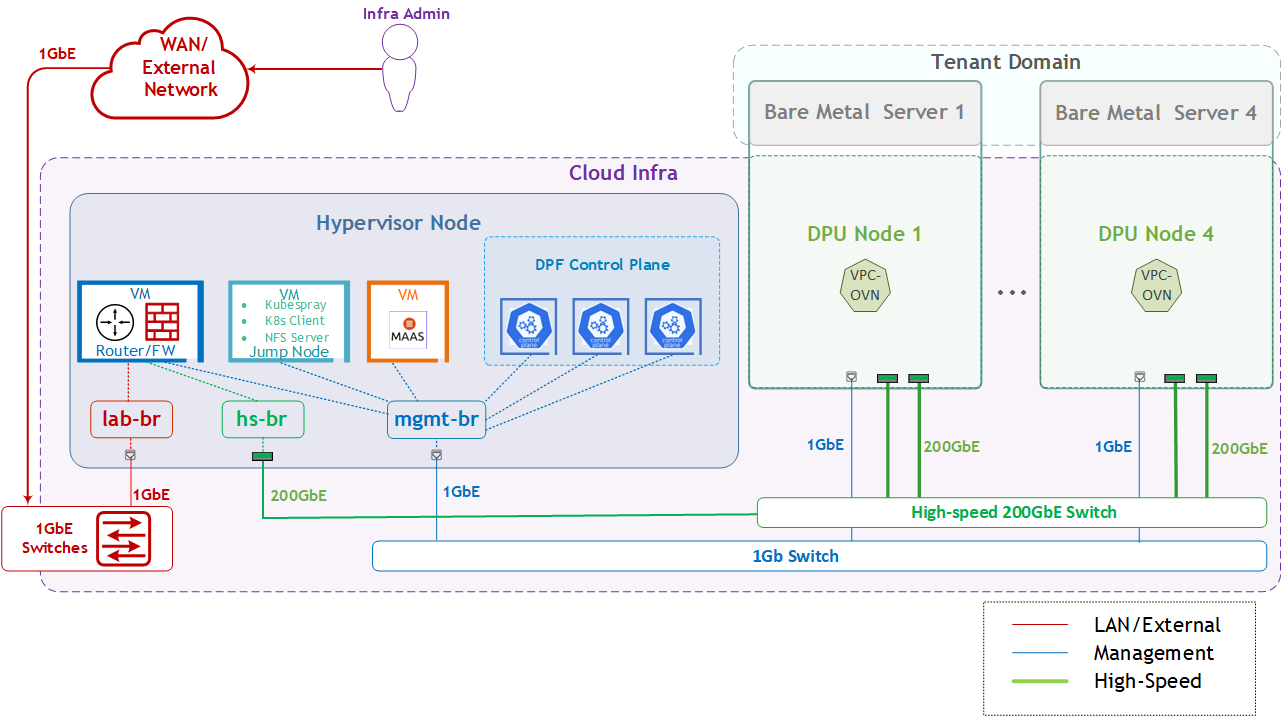
The logical design includes the following components:
-
1 x Hypervisor node (KVM-based) with ConnectX-7:
-
1 x Firewall VM
-
1 x Jump Node VM
-
1 x MaaS VM
-
3 x K8s Master VMs running all K8s management components
-
-
4 x Worker nodes (PCI Gen5), each with a 1 x BlueField-3 NIC
-
Single High-Speed (HS) switch
-
1 Gb Host Management network
VPC service Logical Design
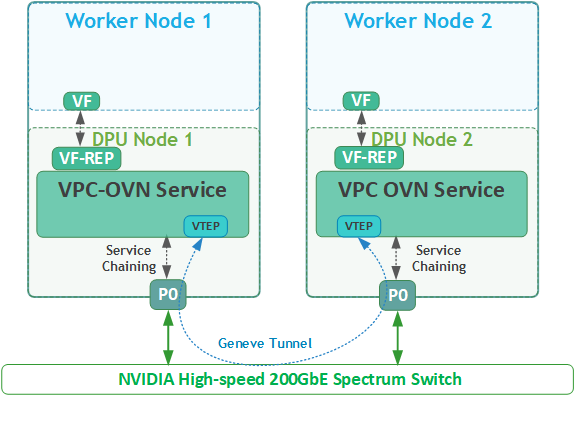
As part of this RDG, we will:
We will deploy VPC OVN over a simple bridged network, using a single highspeed uplink on each worker node
-
Create two isolated VPCs on each pair bare-metal workload server (Worker1/2, Worker3/4) using a virtual function VF
-
Each network connects through the VPC OVN service on separate VPCs - RED and BLUE
-
Route traffic through the VPC OVN service
-
Assign VF to each bare-metal workload server as its network interfaces
-
Demonstrate accelerated RDMA and TCP traffic between two workload servers that run on different bare-metal servers within the same VPC network (e.g., RED network)
-
Validate network isolation between bare-metal workload servers connected to different VPC networks (RED vs BLUE).
Firewall Design
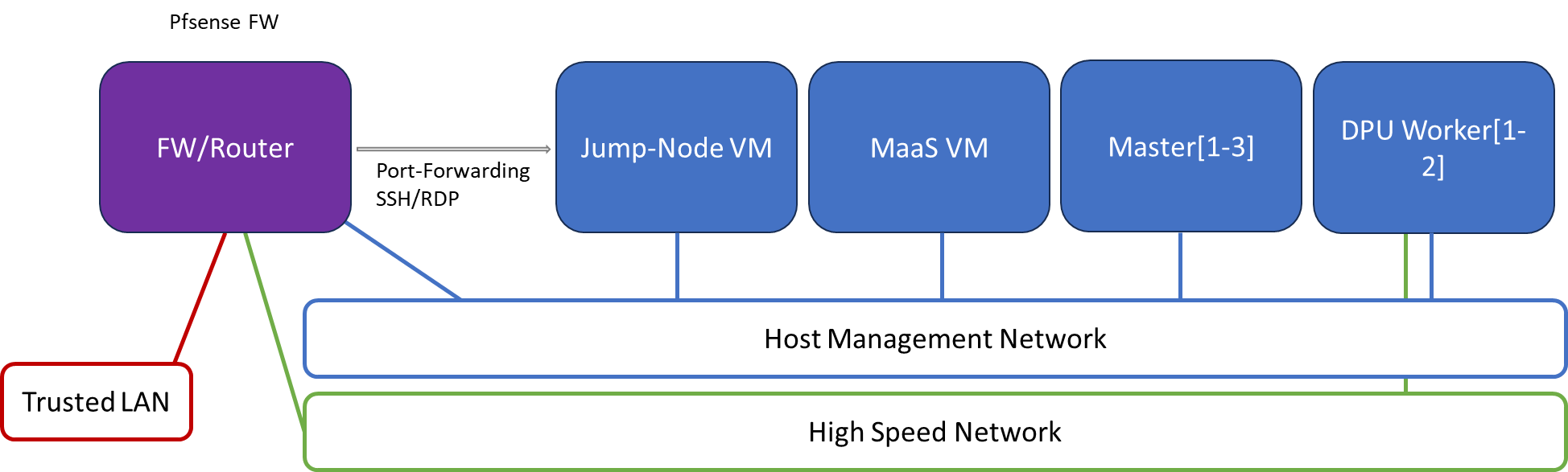
The pfSense firewall in this solution serves a dual purpose:
-
Firewall—provides an isolated environment for the DPF system, ensuring secure operations
-
Router—enables Internet access for the management network
Port-forwarding rules for SSH and RDP are configured on the firewall to route traffic to the jump node’s IP address in the host management network. From the jump node, administrators can manage and access various devices in the setup, as well as handle the deployment of the Kubernetes (K8s) cluster and DPF components.
The following diagram illustrates the firewall design used in this solution:
Software Stack Components
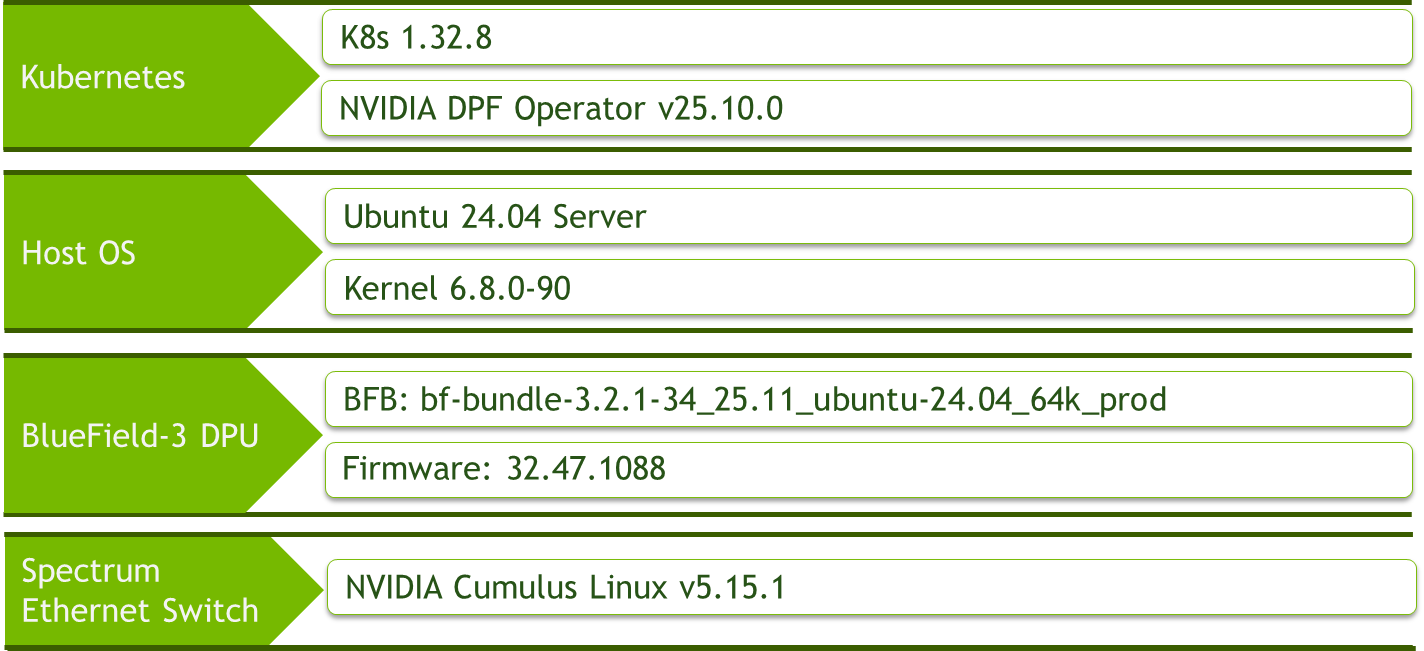
Make sure to use the exact same versions for the software stack as described above.
Bill of Materials
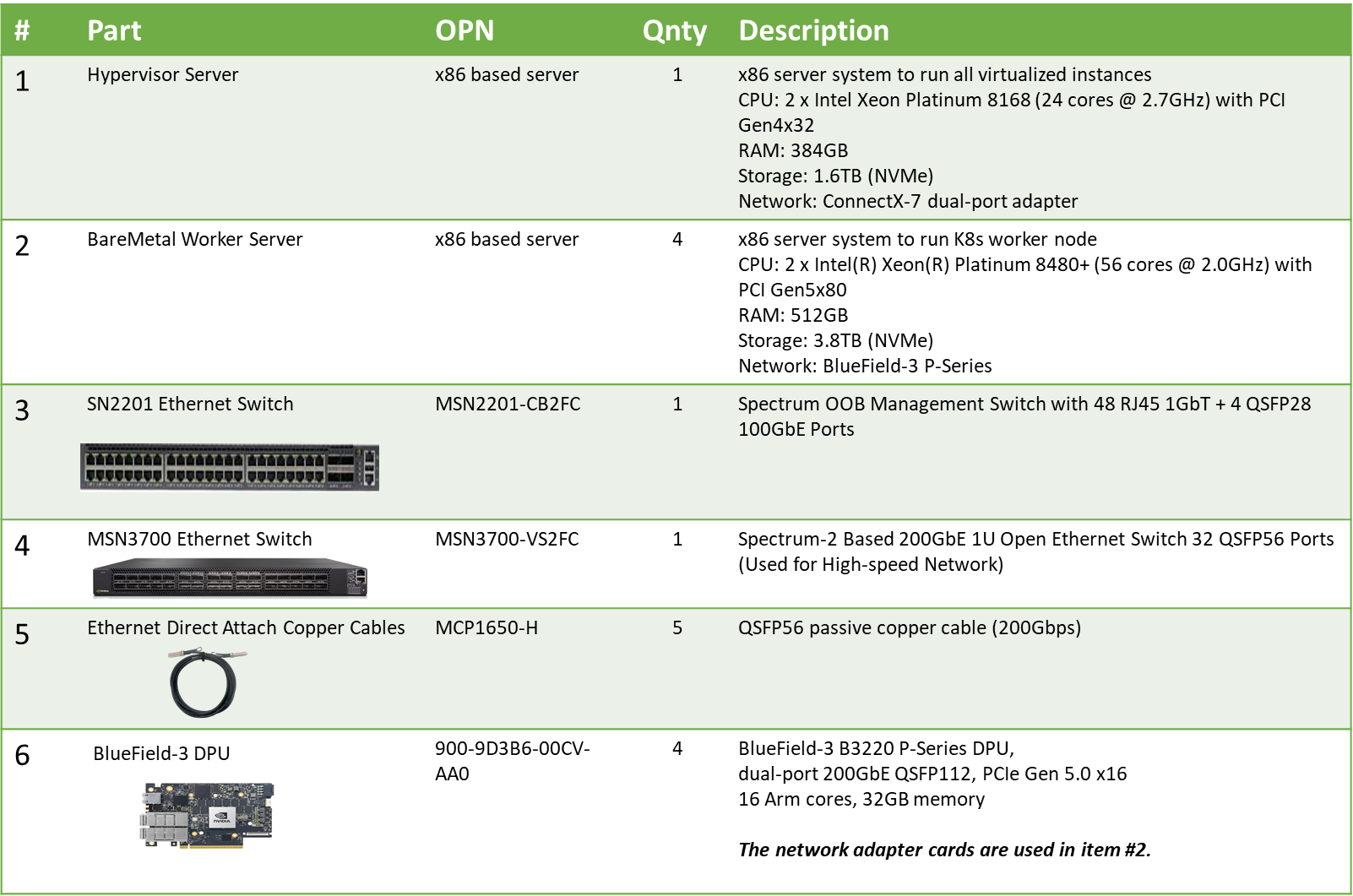
Deployment and Configuration
Node and Switch Definitions
These are the definitions and parameters used for deploying the demonstrated fabric:
|
Switches Ports Usage |
||
|---|---|---|
|
Hostname |
Rack ID |
Ports |
|
|
1 |
swp1-5 |
|
|
1 |
swp1-5 |
|
Hosts |
|||||
|---|---|---|---|---|---|
|
Rack |
Server Type |
Server Name |
Switch Port |
IP and NICs |
Default Gateway |
|
Rack1
|
Hypervisor Node |
|
mgmt-switch: hs-switch: |
lab-br (interface eno1): Trusted LAN IP mgmt-br (interface eno2): - hs-br (interface enp1s0): - |
Trusted LAN GW |
|
Rack1 |
Firewall (Virtual) |
|
- |
WAN (lab-br): Trusted LAN IP LAN (mgmt-br): 10.0.110.254/24 OPT1(hs-br): 10.0.123.254/22 |
Trusted LAN GW |
|
Rack1 |
Jump Node (Virtual) |
|
- |
enp1s0: 10.0.110.253/24 |
10.0.110.254 |
|
Rack1 |
MaaS (Virtual) |
|
- |
enp1s0: 10.0.110.252/24 |
10.0.110.254 |
|
Rack1 |
Master Node
|
|
- |
enp1s0: 10.0.110.1/24 |
10.0.110.254 |
|
Rack1 |
Master Node
|
|
- |
enp1s0: 10.0.110.2/24 |
10.0.110.254 |
|
Rack1 |
Master Node
|
|
- |
enp1s0: 10.0.110.3/24 |
10.0.110.254 |
|
Rack1
|
Worker Node |
|
mgmt-switch: hs-switch: |
dpubmc: 10.0.110.21/24 ens1f0v2: DHCP |
10.0.110.254 10.0.123.254 |
|
Rack1
|
Worker Node |
|
mgmt-switch: hs-switch: |
dpubmc: 10.0.110.22/24 ens1f0v2: DHCP |
10.0.110.254 10.0.123.254 |
|
Rack1
|
Worker Node |
|
mgmt-switch: hs-switch: |
dpubmc: 10.0.110.23/24 ens1f0v2: DHCP |
10.0.110.254 10.0.123.254 |
|
Rack1
|
Worker Node |
|
mgmt-switch: hs-switch: |
dpubmc: 10.0.110.24/24 ens1f0v2: DHCP |
10.0.110.254 10.0.123.254 |
Wiring
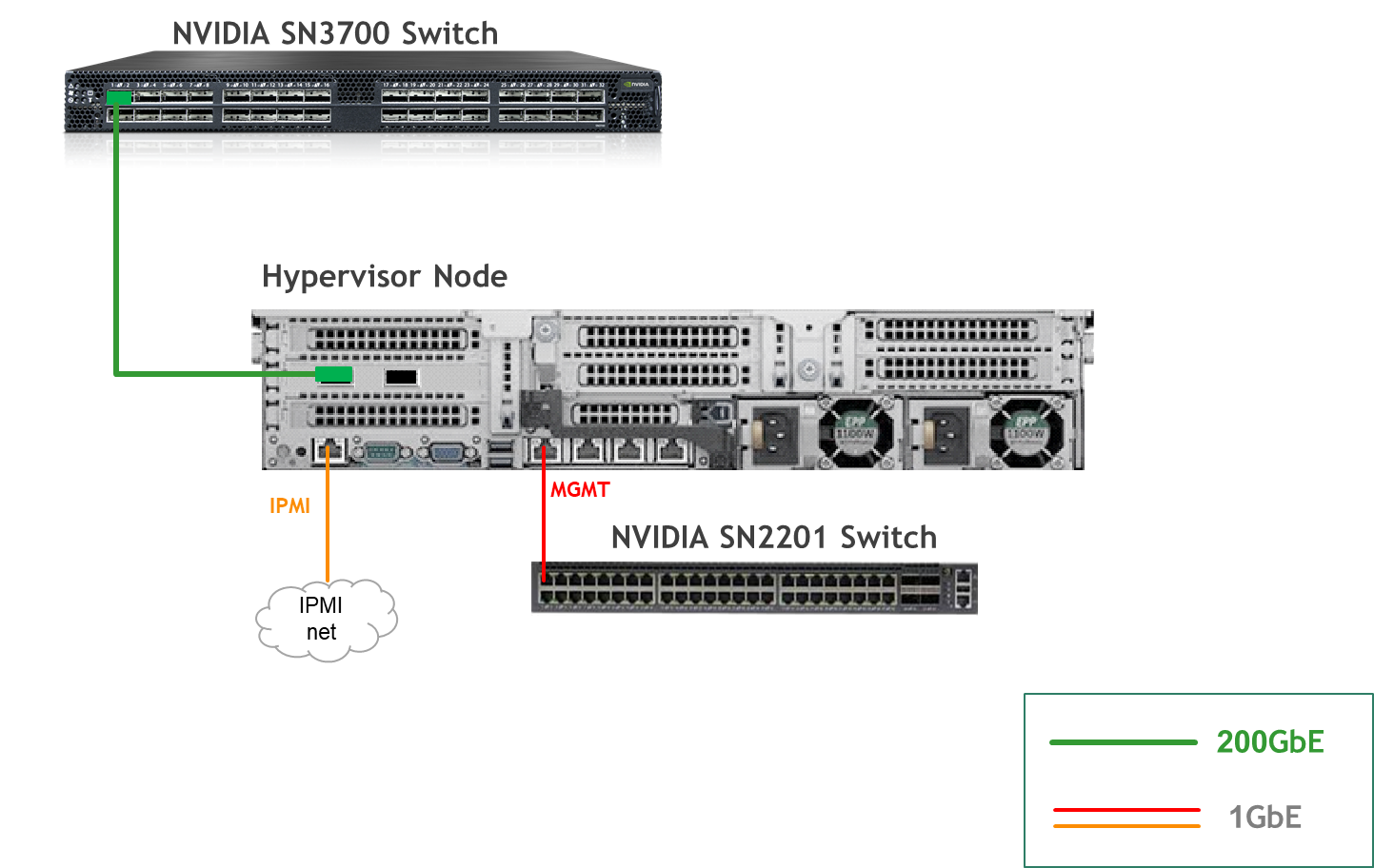
Hypervisor Node
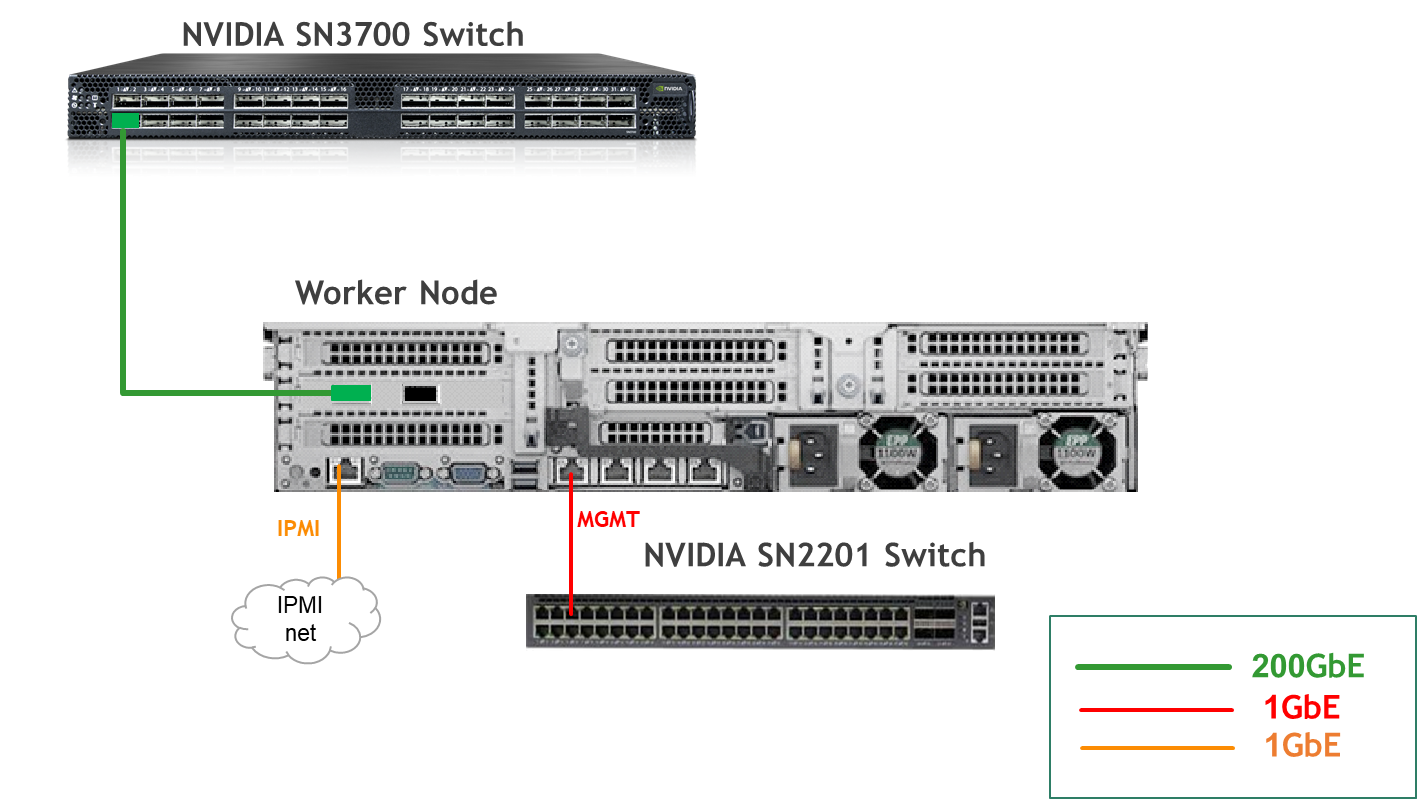
Bare Metal Worker Node
Fabric Configuration
Updating Cumulus Linux
As a best practice, make sure to use the latest released Cumulus Linux NOS version.
For information on how to upgrade Cumulus Linux, refer to the Cumulus Linux User Guide.
Configuring the Cumulus Linux Switch
The SN3700 switch (hs-switch), is configured as follows:
The SN2201 switch (mgmt-switch) is configured as follows:
Host Configuration
Make sure that the BIOS settings on the worker node servers have SR-IOV enabled and that the servers are tuned for maximum performance.
All worker nodes must have the same PCIe placement for the BlueField-3 NIC and must display the same interface name.
Make sure that you have DPU BMC and OOB MAC addresses.
No change from the Reference Deployment Guide (Baseline RDG) (Section "Deployment and Configuration", Subsection "Host Configuration").
Hypervisor Installation and Configuration
No change from the Baseline RDG (Section "Deployment and Configuration", Subsection "Hypervisor Installation and Configuration").
Prepare Infrastructure Servers
No change from the Baseline RDG (Section "Deployment and Configuration", Subsection "Prepare Infrastructure Servers") regarding Firewall VM, Jump VM, MaaS VM.
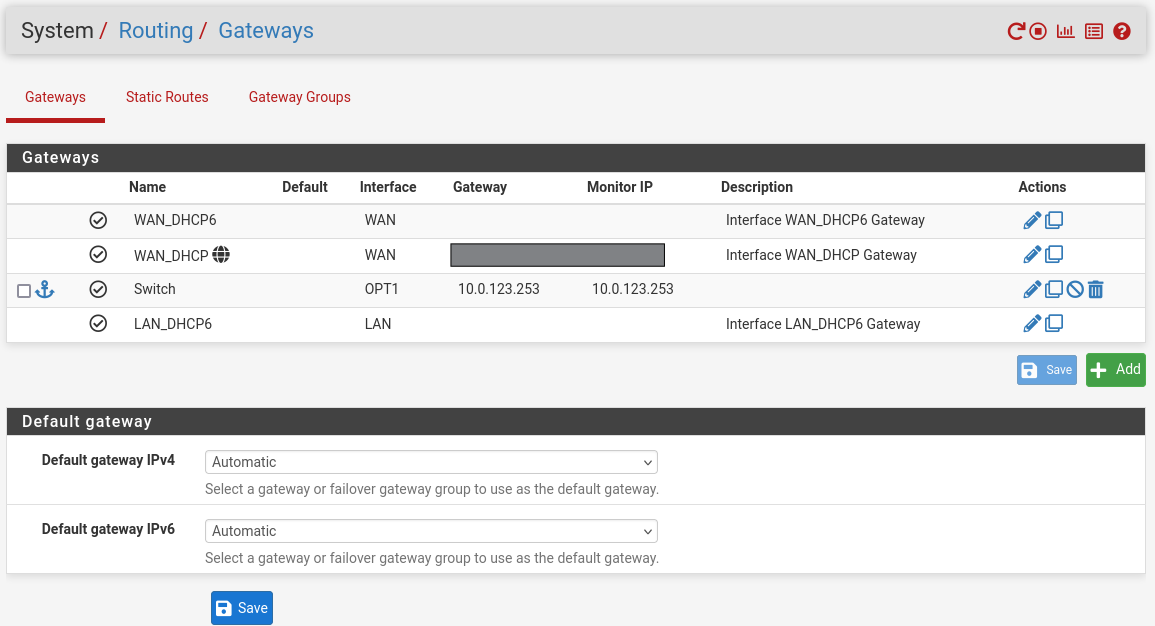
(Optional) Firewall VM – Bare Metal Server Outside Conection
To provide outside connection from Bare Metal Host via High Speed network, open Firefox web browser and go to the pfSense web UI (http://10.0.110.254).
-
System:
-
Routing → Gateways → Add → “Interface”: OPT1, “Address Family”: IPv4, “Name”: switch, “Gateway”: 10.0.123.253 → Click "Save"→ Under "Default Gateway" - "Default gateway IPv4" choose WAN_DHCP → Click "Save"
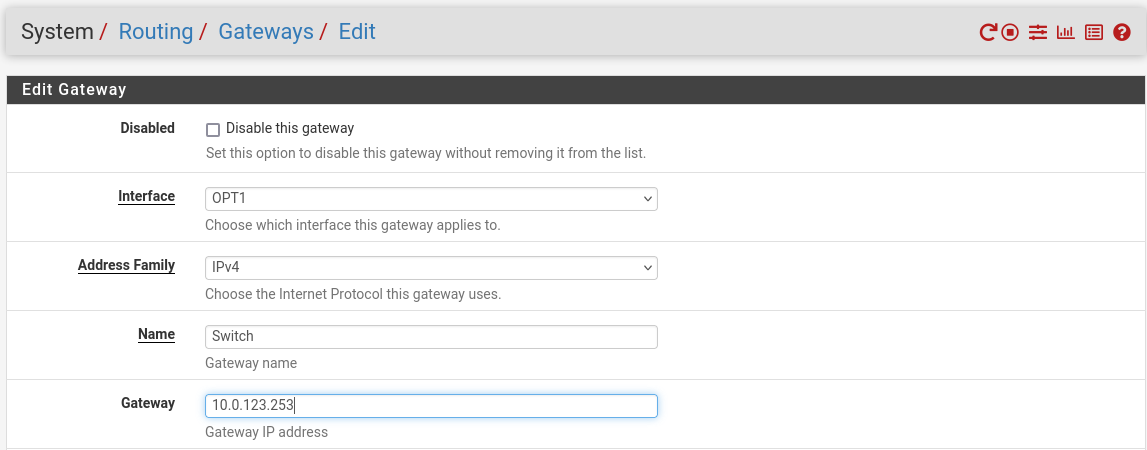
Note that the IP addresses from the Trusted LAN network under "Gateway" and "Monitor IP" are blurred.
-
Provision Master VMs Using MaaS
No change from the Baseline RDG (Section "Deployment and Configuration", Subsection "Provision Master VMs Using MaaS").
K8s Cluster Deployment and Configuration
The procedures for initial Kubernetes cluster deployment using Kubespray for the master nodes, and subsequent verification, remain unchanged from the Baseline RDG (Section "K8s Cluster Deployment and Configuration", Subsections: "Kubespray Deployment and Configuration", "Deploying Cluster Using Kubespray Ansible Playbook","K8s Deployment Verification".
DPF Installation
The DPF installation process (Operator, System components) largely follows the Baseline RDG.
Software Prerequisites and Required Variables
-
Start by installing the remaining software perquisites.
Jump Node Console
## Connect to master1 to copy helm client utility that was installed during kubespray deployment $ depuser@jump:~$ ssh master1 depuser@master1:~$ cp /usr/local/bin/helm /tmp/ ## In another tab depuser@jump:~$ scp master1:/tmp/helm /tmp/ depuser@jump:~$ sudo chown root:root /tmp/helm depuser@jump:~$ sudo mv /tmp/helm /usr/local/bin/ ## Verify that envsubst utility is installed depuser@jump:~$ which envsubst /usr/bin/envsubst -
Proceed to clone the doca-platform Git repository:
Jump Node Console
$ git clone https://github.com/NVIDIA/doca-platform.git -
Change directory to doca-platform and checkout to tag v25.10.0:
Jump Node Console
$ cd doca-platform/ $ git checkout v25.10.0 -
Change directory to readme.md from where all the commands will be run:
Jump Node Console
$ cd doca-platform/docs/public/user-guides/zero-trust/use-cases/hbn -
Change the BMC root's password.
In Zero Trust mode, provisioning DPUs requires authentication with Redfish.
In order to do that, you must set the same root password to access the BMC for all DPUs DPF is going to manage.For more information on how to set the BMC root password refer to BlueField DPU Administrator Quick Start Guide.Connect to the DPU BMC over SSH to change the BMC root's password on all DPUs.
Jump Node Console
$ ssh root@10.0.110.201 root@10.0.110.201's password: <BMC Root Password. Default root/0penBmc. need to change first time to $BMC_ROOT_PASSWORD in the manifests/00-env-vars/envvars.env file> -
Modify the variables in
manifests/00-env-vars/envvars.envto fit your environment, then source the file:Replace the values for the variables in the following file with the values that fit your setup. Specifically, pay attention to
DPUCLUSTER_INTERFACE, andBMC_ROOT_PASSWORD.manifests/00-env-vars/envvars.env
Bash## IP Address for the Kubernetes API server of the target cluster on which DPF is installed. ## This should never include a scheme or a port. ## e.g. 10.10.10.10 export TARGETCLUSTER_API_SERVER_HOST=10.0.110.10 ## Virtual IP used by the load balancer for the DPU Cluster. Must be a reserved IP from the management subnet and not ## allocated by DHCP. export DPUCLUSTER_VIP=10.0.110.200 ## Interface on which the DPUCluster load balancer will listen. Should be the management interface of the control plane node. export DPUCLUSTER_INTERFACE=ens160 ## IP address to the NFS server used as storage for the BFB. export NFS_SERVER_IP=10.0.110.253 ## The DPF REGISTRY is the Helm repository URL where the DPF Operator Chart resides. ## Usually this is the NVIDIA Helm NGC registry. For development purposes, this can be set to a different repository. export REGISTRY=https://helm.ngc.nvidia.com/nvidia/doca ## The repository URL for the NVIDIA Helm chart registry. ## Usually this is the NVIDIA Helm NGC registry. For development purposes, this can be set to a different repository. export HELM_REGISTRY_REPO_URL=https://helm.ngc.nvidia.com/nvidia/doca ## IP_RANGE_START and IP_RANGE_END ## These define the IP range for DPU discovery via Redfish/BMC interfaces ## Example: If your DPUs have BMC IPs in range 10.0.110.201-240 ## export IP_RANGE_START=10.0.110.201 ## export IP_RANGE_END=10.0.110.224 ## Start of DPUDiscovery IpRange export IP_RANGE_START=10.0.110.201 ## End of DPUDiscovery IpRange export IP_RANGE_END=10.0.110.204 # The password used for DPU BMC root login, must be the same for all DPUs # For more information on how to set the BMC root password refer to BlueField DPU Administrator Quick Start Guide. export BMC_ROOT_PASSWORD=<set your BMC_ROOT_PASSWORD> ## IP Address through which ovn-central service (exposed as NodePort) ## is accessible. This can be a VIP or one of the control-plane node IP ## in the host k8s cluster. ## This should never include a scheme or a port. ## e.g. 10.10.10.10 export TARGETCLUSTER_OVN_CENTRAL_IP=${TARGETCLUSTER_API_SERVER_HOST} ## IP address range for VTEPs used by VPC OVN Service on the high speed fabric. ## This is a CIDR in the form e.g. 20.20.0.0/16 export VTEP_CIDR=20.20.0.0/16 ## The Gateway address of the VTEP subnet ## This is an IP in the form e.g. 20.20.0.1 export VTEP_GATEWAY=20.20.0.1 ## IP address range for external network used by VPC OVN Service on the high speed fabric. ## This is a CIDR in the form e.g. 30.30.0.0/16 export EXTERNAL_CIDR=30.30.0.0/16 ## The Gateway address of the external subnet ## This is an IP in the form e.g. 30.30.0.1 export EXTERNAL_GATEWAY=30.30.0.1 ## The DPF TAG is the version of the DPF components which will be deployed in this guide. export TAG=v25.10.0 ## URL to the BFB used in the `bfb.yaml` and linked by the DPUSet. export BFB_URL="https://content.mellanox.com/BlueField/BFBs/Ubuntu24.04/bf-bundle-3.2.1-34_25.11_ubuntu-24.04_64k_prod.bfb" -
Export environment variables for the installation:
Jump Node Console
$ source manifests/00-env-vars/envvars.env
DPF Operator Installation
No change from the Baseline RDG (Section "DPF Installation", Subsection "DPF Operator Installation").
DPF System Installation
No change from the Baseline RDG (Section "DPF Installation", Subsection "DPF System Installation").
DPU Service Installation
This section focuses on provisioning NVIDIA® BlueField®-3 DPUs using DPF and installing the VPC OVN and Argus DPU Services on those DPUs.
The DOCA VPC OVN Service provides accelerated VPC networking functionality for the DPF. Built on top of OVN, this service enables network isolation, virtualization, and advanced SDN capabilities directly on NVIDIA DPUs.
Before deploying the objects under doca-platform/docs/public/zero-trust/use-cases/vpc/ directory, a few adjustments are required.
-
Change directory to readme.md from where all the commands will be run:
Jump Node Console
$ cd doca-platform/docs/public/user-guides/zero-trust/use-cases/vpc/ -
Use the following YAML to define a
BFBresource that downloads the Bluefield Bitstream to a shared volume:--- apiVersion: provisioning.dpu.nvidia.com/v1alpha1 kind: BFB metadata: name: bf-bundle-$TAG namespace: dpf-operator-system spec: url: $BFB_URL -
Run the command to create the
BFB:Jump Node Console
$ cat manifests/03-bfb-and-flavor/bfb.yaml | envsubst |kubectl apply -f - -
Change a DPUFlavor using the following YAML.
-
Apply all of the YAML files mentioned above using the following command:
Jump Node Console
$ cat manifests/03-bfb-and-flavor/dpuflavor.yaml | envsubst | kubectl apply -f - -
Change the
dpudeployment.yamlfile to reference the DPUFlavor.--- apiVersion: svc.dpu.nvidia.com/v1alpha1 kind: DPUDeployment metadata: name: vpc-ovn namespace: dpf-operator-system spec: dpus: bfb: bf-bundle-$TAG flavor: vpc-flavor-$TAG nodeEffect: hold: true dpuSets: - nameSuffix: "dpuset1" nodeSelector: matchLabels: feature.node.kubernetes.io/dpu-enabled: "true" services: ovn-central: serviceTemplate: ovn-central serviceConfiguration: ovn-central ovn-controller: serviceTemplate: ovn-controller serviceConfiguration: ovn-controller vpc-ovn-controller: serviceTemplate: vpc-ovn-controller serviceConfiguration: vpc-ovn-controller vpc-ovn-node: serviceTemplate: vpc-ovn-node serviceConfiguration: vpc-ovn-node serviceChains: switches: - ports: - serviceInterface: matchLabels: ovn.vpc.dpu.nvidia.com/interface: p0 - serviceInterface: matchLabels: ovn.vpc.dpu.nvidia.com/interface: ovn-vtep-patch - serviceInterface: matchLabels: ovn.vpc.dpu.nvidia.com/interface: ovn-ext-patchPlease notice that with default nodeEffect above, DPU provisioning workflow will be paused and wait for an external signal (annotation) in order to proceed, as demonstrated in upcoming steps.
To implement a fully automated process that won’t require user intervention, see customAction option. -
The VPC OVN service consists of the following components:
-
ovn-central: Deployed in the target cluster (runs northd, sb_db, nb_db)
-
ovn-controller: Deployed in the DPU cluster
-
vpc-ovn-controller: VPC controller in the target cluster
-
vpc-ovn-node: VPC node agent in the DPU cluster
---
apiVersion: svc.dpu.nvidia.com/v1alpha1
kind: DPUServiceConfiguration
metadata:
  name: ovn-central
  namespace: dpf-operator-system
spec:
  deploymentServiceName: ovn-central
  upgradePolicy:
    applyNodeEffect: false
  serviceConfiguration:
    deployInCluster: true
    helmChart:
      values:
        exposedPorts:
          ports:
            ovnnb: true
            ovnsb: true
        management:
          ovnCentral:
            enabled: true
            affinity:
              nodeAffinity:
                requiredDuringSchedulingIgnoredDuringExecution:
                  nodeSelectorTerms:
                    - matchExpressions:
                        - key: "node-role.kubernetes.io/master"
                          operator: Exists
                    - matchExpressions:
                        - key: "node-role.kubernetes.io/control-plane"
                          operator: Exists
            tolerations:
              - key: node-role.kubernetes.io/master
                operator: Exists
                effect: NoSchedule
              - key: node-role.kubernetes.io/control-plane
                operator: Exists
                effect: NoSchedule
--- apiVersion: svc.dpu.nvidia.com/v1alpha1 kind: DPUServiceConfiguration metadata: name: ovn-controller namespace: dpf-operator-system spec: deploymentServiceName: ovn-controller upgradePolicy: applyNodeEffect: false serviceConfiguration: helmChart: values: dpu: ovnController: enabled: true--- apiVersion: svc.dpu.nvidia.com/v1alpha1 kind: DPUServiceConfiguration metadata: name: vpc-ovn-controller namespace: dpf-operator-system spec: deploymentServiceName: vpc-ovn-controller upgradePolicy: applyNodeEffect: false serviceConfiguration: deployInCluster: true helmChart: values: host: vpcOVNController: enabled: true affinity: nodeAffinity: requiredDuringSchedulingIgnoredDuringExecution: nodeSelectorTerms: - matchExpressions: - key: "node-role.kubernetes.io/master" operator: Exists - matchExpressions: - key: "node-role.kubernetes.io/control-plane" operator: Exists--- apiVersion: svc.dpu.nvidia.com/v1alpha1 kind: DPUServiceConfiguration metadata: name: vpc-ovn-node namespace: dpf-operator-system spec: deploymentServiceName: vpc-ovn-node upgradePolicy: applyNodeEffect: false serviceConfiguration: helmChart: values: dpu: vpcOVNNode: enabled: true initContainers: vpcOVNDpuProvisioner: env: ovnSbEndpoint: "tcp:$TARGETCLUSTER_OVN_CENTRAL_IP:30642" ipRequests: - name: "vtep" poolName: "vpc-ippool-vtep" allocateIPWithIndex: 1 - name: "gateway" poolName: "vpc-ippool-gateway" allocateIPWithIndex: 1--- apiVersion: svc.dpu.nvidia.com/v1alpha1 kind: DPUServiceTemplate metadata: name: ovn-central namespace: dpf-operator-system spec: deploymentServiceName: ovn-central helmChart: source: repoURL: $HELM_REGISTRY_REPO_URL version: $TAG chart: ovn-chart--- apiVersion: svc.dpu.nvidia.com/v1alpha1 kind: DPUServiceTemplate metadata: name: ovn-controller namespace: dpf-operator-system spec: deploymentServiceName: ovn-controller helmChart: source: repoURL: $HELM_REGISTRY_REPO_URL version: $TAG chart: ovn-chart--- apiVersion: svc.dpu.nvidia.com/v1alpha1 kind: DPUServiceTemplate metadata: name: vpc-ovn-controller namespace: dpf-operator-system spec: deploymentServiceName: vpc-ovn-controller helmChart: source: repoURL: $HELM_REGISTRY_REPO_URL version: $TAG chart: dpf-vpc-ovn--- apiVersion: svc.dpu.nvidia.com/v1alpha1 kind: DPUServiceTemplate metadata: name: vpc-ovn-node namespace: dpf-operator-system spec: deploymentServiceName: vpc-ovn-node helmChart: source: repoURL: $HELM_REGISTRY_REPO_URL version: $TAG chart: dpf-vpc-ovn--- apiVersion: svc.dpu.nvidia.com/v1alpha1 kind: DPUServiceIPAM metadata: name: vpc-ippool-vtep namespace: dpf-operator-system spec: metadata: labels: ovn.vpc.dpu.nvidia.com/pool: vpc-ippool-vtep ipv4Subnet: subnet: $VTEP_CIDR gateway: $VTEP_GATEWAY perNodeIPCount: 4 --- apiVersion: svc.dpu.nvidia.com/v1alpha1 kind: DPUServiceIPAM metadata: name: vpc-ippool-gateway namespace: dpf-operator-system spec: metadata: labels: ovn.vpc.dpu.nvidia.com/pool: vpc-ippool-gateway ipv4Subnet: subnet: $EXTERNAL_CIDR gateway: $EXTERNAL_GATEWAY perNodeIPCount: 4--- apiVersion: "svc.dpu.nvidia.com/v1alpha1" kind: DPUServiceInterface metadata: name: p0 namespace: dpf-operator-system spec: template: spec: template: metadata: labels: ovn.vpc.dpu.nvidia.com/interface: "p0" spec: interfaceType: physical physical: interfaceName: p0 --- apiVersion: "svc.dpu.nvidia.com/v1alpha1" kind: DPUServiceInterface metadata: name: ovn-vtep-patch namespace: dpf-operator-system spec: template: spec: template: metadata: labels: ovn.vpc.dpu.nvidia.com/interface: "ovn-vtep-patch" spec: interfaceType: ovn ovn: externalBridge: br-ovn-vtep --- apiVersion: "svc.dpu.nvidia.com/v1alpha1" kind: DPUServiceInterface metadata: name: ovn-ext-patch namespace: dpf-operator-system spec: template: spec: template: metadata: labels: ovn.vpc.dpu.nvidia.com/interface: "ovn-ext-patch" spec: interfaceType: ovn ovn: externalBridge: br-ovn-ext
-
-
Apply all of the YAML files mentioned above using the following command:
Jump Node Console
$ cat manifests/04-vpc-ovn-dpudeployment/* | envsubst | kubectl apply -f - -
Verify the DPUService installation by ensuring that:
These verification commands may need to be run multiple times to ensure the conditions are met.
Jump Node Console
$ kubectl wait --for=condition=ApplicationsReconciled --namespace dpf-operator-system dpuservices --all dpuservice.svc.dpu.nvidia.com/cni-installer condition met dpuservice.svc.dpu.nvidia.com/flannel condition met dpuservice.svc.dpu.nvidia.com/multus condition met dpuservice.svc.dpu.nvidia.com/nvidia-k8s-ipam condition met dpuservice.svc.dpu.nvidia.com/ovn-central-q2t74 condition met dpuservice.svc.dpu.nvidia.com/ovn-controller-fppzd condition met dpuservice.svc.dpu.nvidia.com/ovs-cni condition met dpuservice.svc.dpu.nvidia.com/servicechainset-controller condition met dpuservice.svc.dpu.nvidia.com/servicechainset-rbac-and-crds condition met dpuservice.svc.dpu.nvidia.com/sfc-controller condition met dpuservice.svc.dpu.nvidia.com/sriov-device-plugin condition met dpuservice.svc.dpu.nvidia.com/vpc-ovn-controller-mxssq condition met dpuservice.svc.dpu.nvidia.com/vpc-ovn-node-zqm9n condition met $ kubectl wait --for=condition=DPUIPAMObjectReconciled --namespace dpf-operator-system dpuserviceipam --all dpuserviceipam.svc.dpu.nvidia.com/vpc-ippool-gateway condition met dpuserviceipam.svc.dpu.nvidia.com/vpc-ippool-vtep condition met $ kubectl wait --for=condition=ServiceInterfaceSetReconciled --namespace dpf-operator-system dpuserviceinterface --all dpuserviceinterface.svc.dpu.nvidia.com/ovn-ext-patch condition met dpuserviceinterface.svc.dpu.nvidia.com/p0 condition met $ kubectl wait --for=condition=ServiceChainSetReconciled --namespace dpf-operator-system dpuservicechain --all dpuservicechain.svc.dpu.nvidia.com/vpc-ovn-b2qsp condition met -
To follow the progress of DPU provisioning, run the following command to check its current phase:Jump Node Console
$ watch -n10 "kubectl describe dpu -n dpf-operator-system | grep 'Node Name\|Type\|Last\|Phase'"
-
Wait for the NodeEffect stage (at this point the provisioning is paused, waintig for external signal).
Run following command on all/specific DPU nodemaintanace object/s to proceed with provisioning:Jump Node Console
$ kubectl annotate dpunodemaintenances -n dpf-operator-system --all provisioning.dpu.nvidia.com/wait-for-external-nodeeffect=false --overwrite -
To follow the progress of DPU provisioning, run the following command to check its current phase:Jump Node Console
$ watch -n10 "kubectl describe dpu -n dpf-operator-system | grep 'Node Name\|Type\|Last\|Phase'" Every 10.0s: kubectl describe dpu -n dpf-operator-system | grep 'Node Name\|Type\|Last\|Phase' setup5-jump: Wed Dec 31 10:58:00 2025 Dpu Node Name: dpu-node-mt2402xz0f7x Last Transition Time: 2025-12-31T08:42:35Z Type: BFBPrepared Last Transition Time: 2025-12-31T08:42:31Z Type: BFBReady Last Transition Time: 2025-12-31T08:47:12Z Type: BFBTransferred Last Transition Time: 2025-12-31T08:42:34Z Type: FWConfigured Last Transition Time: 2025-12-31T08:42:31Z Type: Initialized Last Transition Time: 2025-12-31T08:42:32Z Type: InterfaceInitialized Last Transition Time: 2025-12-31T08:42:31Z Type: NodeEffectReady Last Transition Time: 2025-12-31T08:53:59Z Reason: OemLastState Type: OSInstalled Last Transition Time: 2025-12-31T08:57:02Z Type: Rebooted Phase: Rebooting Dpu Node Name: dpu-node-mt2402xz0f80 Last Transition Time: 2025-12-31T08:42:35Z Type: BFBPrepared Last Transition Time: 2025-12-31T08:42:31Z Type: BFBReady Last Transition Time: 2025-12-31T08:47:14Z Type: BFBTransferred Last Transition Time: 2025-12-31T08:42:34Z Type: FWConfigured Last Transition Time: 2025-12-31T08:42:31Z Type: Initialized Last Transition Time: 2025-12-31T08:42:33Z Type: InterfaceInitialized Last Transition Time: 2025-12-31T08:42:31Z Type: NodeEffectReady Last Transition Time: 2025-12-31T08:54:19Z Reason: OemLastState Type: OSInstalled Last Transition Time: 2025-12-31T08:57:21Z Type: Rebooted Phase: Rebooting ... -
Wait for the Rebooted stage and then Power Cycle the bare-metal host manual.
After the DPU is up, run following command for each DPU worker:
Jump Node Console
$ kubectl -n dpf-operator-system annotate dpunode --all provisioning.dpu.nvidia.com/dpunode-external-reboot-required- -
At this point, the DPU workers should be added to the cluster. As they being added to the cluster, the DPUs are provisioned.
Jump Node Console
$ watch -n10 "kubectl describe dpu -n dpf-operator-system | grep 'Node Name\|Type\|Last\|Phase'" Every 10.0s: kubectl describe dpu -n dpf-operator-system | grep 'Node Name\|Type\|Last\|Phase' setup5-jump: Wed Dec 31 11:05:08 2025 Dpu Node Name: dpu-node-mt2402xz0f7x Type: InternalIP Type: Hostname Last Transition Time: 2025-12-31T09:04:40Z Type: Ready Last Transition Time: 2025-12-31T08:42:35Z Type: BFBPrepared Last Transition Time: 2025-12-31T08:42:31Z Type: BFBReady Last Transition Time: 2025-12-31T08:47:12Z Type: BFBTransferred Last Transition Time: 2025-12-31T09:04:40Z Type: DPUClusterReady Last Transition Time: 2025-12-31T08:42:34Z Type: FWConfigured Last Transition Time: 2025-12-31T08:42:31Z Type: Initialized Last Transition Time: 2025-12-31T08:42:32Z Type: InterfaceInitialized Last Transition Time: 2025-12-31T08:42:31Z Type: NodeEffectReady Last Transition Time: 2025-12-31T09:04:40Z Type: NodeEffectRemoved Last Transition Time: 2025-12-31T08:53:59Z Reason: OemLastState Type: OSInstalled Last Transition Time: 2025-12-31T09:04:40Z Type: Rebooted Phase: Ready Dpu Node Name: dpu-node-mt2402xz0f80 Type: InternalIP Type: Hostname Last Transition Time: 2025-12-31T09:04:40Z Type: Ready Last Transition Time: 2025-12-31T08:42:35Z Type: BFBPrepared Last Transition Time: 2025-12-31T08:42:31Z Type: BFBReady Last Transition Time: 2025-12-31T08:47:14Z Type: BFBTransferred Last Transition Time: 2025-12-31T09:04:40Z Type: DPUClusterReady Last Transition Time: 2025-12-31T08:42:34Z Type: FWConfigured Last Transition Time: 2025-12-31T08:42:31Z Type: Initialized Last Transition Time: 2025-12-31T08:42:33Z Type: InterfaceInitialized Last Transition Time: 2025-12-31T08:42:31Z Type: NodeEffectReady Last Transition Time: 2025-12-31T09:04:40Z Type: NodeEffectRemoved Last Transition Time: 2025-12-31T08:54:19Z Reason: OemLastState Type: OSInstalled Last Transition Time: 2025-12-31T09:04:40Z Type: Rebooted Phase: Ready ... -
Finally, validate that all the different DPU-related objects are now in the Ready state:
Jump Node Console
$ echo 'alias dpfctl="kubectl -n dpf-operator-system exec deploy/dpf-operator-controller-manager -- /dpfctl "' >> ~/.bashrc

$ dpfctl describe dpudeployments
NAME                                             NAMESPACE            STATUS       REASON    SINCE  MESSAGE
DPFOperatorConfig/dpfoperatorconfig              dpf-operator-system  Ready: True  Success   40s
└─DPUDeployments
  └─DPUDeployment/vpc-ovn                        dpf-operator-system  Ready: True  Success   13s
    ├─DPUServiceChains
    │ └─DPUServiceChain/vpc-ovn-b2qsp            dpf-operator-system  Ready: True  Success   88s
    ├─DPUSets
    │ └─DPUSet/vpc-ovn-dpuset1                   dpf-operator-system  Ready: True  Success   110s
    │   ├─BFB/bf-bundle-v25.10.0                 dpf-operator-system  Ready: True  Ready     36m    File: bf-bundle-3.2.1-34_25.11_ubuntu-24.04_64k_prod.bfb, DOCA: 3.2.1
    │   ├─DPUNodes
    │   │ └─4 DPUNodes...                        dpf-operator-system  Ready: True  Ready     110s   See dpu-node-mt2402xz0f7x, dpu-node-mt2402xz0f80, dpu-node-mt2402xz0f8g, dpu-node-mt2402xz0f9n
    │   └─DPUs
    │     └─4 DPUs...                            dpf-operator-system  Ready: True  DPUReady  110s   See dpu-node-mt2402xz0f7x-mt2402xz0f7x, dpu-node-mt2402xz0f80-mt2402xz0f80,
    │                                                                                               dpu-node-mt2402xz0f8g-mt2402xz0f8g, dpu-node-mt2402xz0f9n-mt2402xz0f9n
    └─Services
      ├─DPUServiceTemplates
      │ ├─DPUServiceTemplate/ovn-central         dpf-operator-system  Ready: True  Success   24m
      │ ├─DPUServiceTemplate/ovn-controller      dpf-operator-system  Ready: True  Success   24m
      │ ├─DPUServiceTemplate/vpc-ovn-controller  dpf-operator-system  Ready: True  Success   24m
      │ └─DPUServiceTemplate/vpc-ovn-node        dpf-operator-system  Ready: True  Success   24m
      └─DPUServices
        └─4 DPUServices...                       dpf-operator-system  Ready: True  Success   23m    See ovn-central-q2t74, ovn-controller-fppzd, vpc-ovn-controller-mxssq, vpc-ovn-node-zqm9n


$ echo "alias ki='KUBECONFIG=/home/depuser/dpu-cluster.config kubectl'" >> ~/.bashrc
$ kubectl get secrets -n dpu-cplane-tenant1 dpu-cplane-tenant1-admin-kubeconfig -o json | jq -r '.data["admin.conf"]' | base64 --decode > /home/depuser/dpu-cluster.config
$ ki get node -A
NAME                                 STATUS   ROLES    AGE     VERSION
dpu-node-mt2402xz0f7x-mt2402xz0f7x   Ready    <none>   3m33s   v1.34.3
dpu-node-mt2402xz0f80-mt2402xz0f80   Ready    <none>   2m51s   v1.34.3
dpu-node-mt2402xz0f8g-mt2402xz0f8g   Ready    <none>   2m51s   v1.34.3
dpu-node-mt2402xz0f9n-mt2402xz0f9n   Ready    <none>   3m24s   v1.34.3

$ kubectl get dpu -A
NAMESPACE             NAME                                 READY   PHASE   AGE
dpf-operator-system   dpu-node-mt2402xz0f7x-mt2402xz0f7x   True    Ready   24m
dpf-operator-system   dpu-node-mt2402xz0f80-mt2402xz0f80   True    Ready   24m
dpf-operator-system   dpu-node-mt2402xz0f8g-mt2402xz0f8g   True    Ready   24m
dpf-operator-system   dpu-node-mt2402xz0f9n-mt2402xz0f9n   True    Ready   24m

$ kubectl wait --for=condition=ready --namespace dpf-operator-system dpu --all
dpu.provisioning.dpu.nvidia.com/dpu-node-mt2402xz0f7x-mt2402xz0f7x condition met
dpu.provisioning.dpu.nvidia.com/dpu-node-mt2402xz0f80-mt2402xz0f80 condition met
dpu.provisioning.dpu.nvidia.com/dpu-node-mt2402xz0f8g-mt2402xz0f8g condition met
dpu.provisioning.dpu.nvidia.com/dpu-node-mt2402xz0f9n-mt2402xz0f9n condition met
Deploy IsolationClass
In this step, you will deploy the IsolationClass resource, which will be used by subsequent user-created DPUVPC and DPUVirtualNetwork resources.
-
Validate the
manifests/05-vpc-resources/ovn-isolation-class.yamlfile.--- apiVersion: vpc.dpu.nvidia.com/v1alpha1 kind: IsolationClass metadata: name: ovn.vpc.dpu.nvidia.com spec: provisioner: ovn.vpc.dpu.nvidia.com parameters: ovn-nb-endpoint: "tcp:$TARGETCLUSTER_OVN_CENTRAL_IP:30641" ovn-sb-endpoint: "tcp:$TARGETCLUSTER_OVN_CENTRAL_IP:30642" ovn-nb-reconnect-time: "5" -
Deploy
IsolationClassJump Node Console
cat manifests/05-vpc-resources/* | envsubst | kubectl apply -f -
Deploy test topology
In our deployment we are going to create dual VPC environment (blue and red).
-
Add blue and red labels to relevant
DPU Nodes. Set the values according to your environment.Jump Node Console
$ ki label node dpu-node-mt2402xz0f7x-mt2402xz0f7x dpu-node-mt2402xz0f80-mt2402xz0f80 vpc.dpu.nvidia.com/tenant=red node/dpu-node-mt2402xz0f7x-mt2402xz0f7x labeled node/dpu-node-mt2402xz0f80-mt2402xz0f80 labeled $ ki label node dpu-node-mt2402xz0f8g-mt2402xz0f8g dpu-node-mt2402xz0f9n-mt2402xz0f9n vpc.dpu.nvidia.com/tenant=blue node/dpu-node-mt2402xz0f8g-mt2402xz0f8g labeled node/dpu-node-mt2402xz0f9n-mt2402xz0f9n labeled -
Create the manifests/06-optional-test-traffic/vpc-topology-dual-vpc.yaml to following configuration:
--- apiVersion: v1 kind: Namespace metadata: name: blue --- apiVersion: v1 kind: Namespace metadata: name: red --- apiVersion: vpc.dpu.nvidia.com/v1alpha1 kind: DPUVPC metadata: name: blue-vpc namespace: blue spec: tenant: blue isolationClassName: ovn.vpc.dpu.nvidia.com interNetworkAccess: true nodeSelector: matchLabels: vpc.dpu.nvidia.com/tenant: blue --- apiVersion: vpc.dpu.nvidia.com/v1alpha1 kind: DPUVirtualNetwork metadata: name: blue-net namespace: blue spec: vpcName: blue-vpc type: Bridged externallyRouted: true masquerade: true bridgedNetwork: ipam: ipv4: dhcp: true subnet: 192.178.0.0/16 --- apiVersion: svc.dpu.nvidia.com/v1alpha1 kind: DPUServiceInterface metadata: name: blue-vf2 namespace: blue spec: template: spec: nodeSelector: matchLabels: vpc.dpu.nvidia.com/tenant: blue template: spec: interfaceType: vf vf: pfID: 0 vfID: 2 virtualNetwork: blue-net parentInterfaceRef: "" --- apiVersion: vpc.dpu.nvidia.com/v1alpha1 kind: DPUVPC metadata: name: red-vpc namespace: red spec: tenant: red isolationClassName: ovn.vpc.dpu.nvidia.com interNetworkAccess: true nodeSelector: matchLabels: vpc.dpu.nvidia.com/tenant: red --- apiVersion: vpc.dpu.nvidia.com/v1alpha1 kind: DPUVirtualNetwork metadata: name: red-net namespace: red spec: vpcName: red-vpc type: Bridged externallyRouted: true masquerade: true bridgedNetwork: ipam: ipv4: dhcp: true subnet: 192.178.0.0/16 --- apiVersion: svc.dpu.nvidia.com/v1alpha1 kind: DPUServiceInterface metadata: name: red-vf2 namespace: red spec: template: spec: nodeSelector: matchLabels: vpc.dpu.nvidia.com/tenant: red template: spec: interfaceType: vf vf: pfID: 0 vfID: 2 virtualNetwork: red-net parentInterfaceRef: "" -
Connect to Workload Servers console, set number of VFs:
First Pod Console
root@worker1:~# lspci | grep nox
2b:00.0 Ethernet controller: Mellanox Technologies MT43244 BlueField-3 integrated ConnectX-7 network controller (rev 01)
2b:00.1 Ethernet controller: Mellanox Technologies MT43244 BlueField-3 integrated ConnectX-7 network controller (rev 01)

root@worker1:~# echo 8 > /sys/bus/pci/devices/0000\:2b:00.0/sriov_numvfs
First Pod Console
root@worker2:~# lspci | grep nox
2b:00.0 Ethernet controller: Mellanox Technologies MT43244 BlueField-3 integrated ConnectX-7 network controller (rev 01)
2b:00.1 Ethernet controller: Mellanox Technologies MT43244 BlueField-3 integrated ConnectX-7 network controller (rev 01)

root@worker2:~# echo 8 > /sys/bus/pci/devices/0000\:2b:00.0/sriov_numvfs
First Pod Console
root@worker3:~# lspci | grep nox
2b:00.0 Ethernet controller: Mellanox Technologies MT43244 BlueField-3 integrated ConnectX-7 network controller (rev 01)
2b:00.1 Ethernet controller: Mellanox Technologies MT43244 BlueField-3 integrated ConnectX-7 network controller (rev 01)

root@worker3:~# echo 8 > /sys/bus/pci/devices/0000\:2b:00.0/sriov_numvfs
First Pod Console
root@worker4:~# lspci | grep nox 2b:00.0 Ethernet controller: Mellanox Technologies MT43244 BlueField-3 integrated ConnectX-7 network controller (rev 01) 2b:00.1 Ethernet controller: Mellanox Technologies MT43244 BlueField-3 integrated ConnectX-7 network controller (rev 01) root@worker4:~# echo 8 > /sys/bus/pci/devices/0000\:2b:00.0/sriov_numvfs -
Apply the YAML files mentioned above using the following command:
Jump Node Console
$ kubectl apply -f manifests/06-optional-test-traffic/vpc-topology-dual-vpc.yaml -
Verify:
Jump Node Console
$ ki get serviceinterface -A
NAMESPACE             NAME                 IFTYPE     IFNAME   NODE                                 READY   REASON    AGE
blue                  blue-vf29xcrl        vf                  dpu-node-mt2402xz0f8g-mt2402xz0f8g   True    Success   7s
blue                  blue-vf2pvbc8        vf                  dpu-node-mt2402xz0f9n-mt2402xz0f9n   True    Success   7s
dpf-operator-system   ovn-ext-patchdfhtf   ovn                 dpu-node-mt2402xz0f7x-mt2402xz0f7x   True    Success   19m
dpf-operator-system   ovn-ext-patchmpg54   ovn                 dpu-node-mt2402xz0f8g-mt2402xz0f8g   True    Success   19m
dpf-operator-system   ovn-ext-patchpnmxl   ovn                 dpu-node-mt2402xz0f9n-mt2402xz0f9n   True    Success   19m
dpf-operator-system   ovn-ext-patchz9q9l   ovn                 dpu-node-mt2402xz0f80-mt2402xz0f80   True    Success   19m
dpf-operator-system   p04g2pt              physical            dpu-node-mt2402xz0f9n-mt2402xz0f9n   True    Success   19m
dpf-operator-system   p09nzbv              physical            dpu-node-mt2402xz0f80-mt2402xz0f80   True    Success   19m
dpf-operator-system   p0f8rqq              physical            dpu-node-mt2402xz0f7x-mt2402xz0f7x   True    Success   19m
dpf-operator-system   p0wdsfs              physical            dpu-node-mt2402xz0f8g-mt2402xz0f8g   True    Success   19m
red                   red-vf2tnpcd         vf                  dpu-node-mt2402xz0f80-mt2402xz0f80   True    Success   5s
red                   red-vf2w8prh         vf                  dpu-node-mt2402xz0f7x-mt2402xz0f7x   True    Success   6s

$ kubectl get dpuvpcs.vpc.dpu.nvidia.com -A
NAMESPACE   NAME       READY   PHASE     AGE
blue        blue-vpc   True    Success   40s
red         red-vpc    True    Success   39s

$ ki get serviceinterface -A -o yaml -n red
...
  status:
    conditions:
    - lastTransitionTime: "2025-12-31T09:33:53Z"
      message: ""
      observedGeneration: 1
      reason: Success
      status: "True"
      type: Ready
    - lastTransitionTime: "2025-12-31T09:33:53Z"
      message: ""
      observedGeneration: 1
      reason: Success
      status: "True"
      type: ServiceInterfaceReconciled
    observedGeneration: 1
...

$ ki get serviceinterface -A -o yaml -n blue
...
  status:
    conditions:
    - lastTransitionTime: "2025-12-31T09:33:53Z"
      message: ""
      observedGeneration: 1
      reason: Success
      status: "True"
      type: Ready
    - lastTransitionTime: "2025-12-31T09:33:53Z"
      message: ""
      observedGeneration: 1
      reason: Success
      status: "True"
      type: ServiceInterfaceReconciled
    observedGeneration: 1
...
Zero-Trust Mode Checking
Ubuntu 24.04 was installed on the servers.
Here's a step-by-step procedure to check the Zero-Trust Mode on your NVIDIA BlueField DPU from the host server, including the installation of the Mellanox Firmware Tools (MFT).
-
Navigate to the NVIDIA Downloads Site: Open your web browser and go to the official NVIDIA Mellanox software downloads page.
-
Select the Latest Version for your OS:

-
Transfer and Extract MFT Tools on the Worker 1 BareMetal Host.
First Pod Console
root@worker1:~# tar -xvzf /tmp/mft-4.33.0-169-x86_64-deb.tgz -
Navigate into the Extracted Directory.
First Pod Console
root@worker1:~# cd mft-4.33.0-169-x86_64-deb/ -
Run following commands.
First Pod Console
root@worker1:~# apt-get install gcc make dkms root@worker1:~# ./install.sh -
Start MST (Mellanox Software Tools) Service and Identify DPU Device Name.
First Pod Console
root@worker1:~# mst start Starting MST (Mellanox Software Tools) driver set Loading MST PCI module - Success Loading MST PCI configuration module - Success Create devices Unloading MST PCI module (unused) - Success root@worker1:~# mst status MST modules: ------------ MST PCI module is not loaded MST PCI configuration module loaded MST devices: ------------ /dev/mst/mt41692_pciconf0 - PCI configuration cycles access. domain:bus:dev.fn=0000:2b:00.0 addr.reg=88 data.reg=92 cr_bar.gw_offset=-1 Chip revision is: 01 -
Perform Zero-Trust Checking.
First Pod Console
root@worker1:~# mlxprivhost -d 2b:00.0 q
Host configurations
-------------------
level                         : RESTRICTED

Port functions status:
-----------------------
disable_rshim                 : TRUE
disable_tracer                : TRUE
disable_port_owner            : TRUE
disable_counter_rd            : TRUE

#Expected Zero-Trust Output.
This is the most definitive confirmation.
level : RESTRICTEDmeans the host is in Zero-Trust Mode, and theTRUEflags confirm individual security restrictions are active. -
Check Firmware Access with
mlxfwmanager:First Pod Console
root@worker1:~# mlxfwmanager -d 2b:00.0 --query
Querying Mellanox devices firmware ...

Device #1:
----------

  Device Type:      BlueField3
  Part Number:      --
  Description:
  PSID:
  PCI Device Name:  2b:00.0
  Base MAC:         N/A
  Versions:         Current        Available
     FW             --

  Status:           Failed to open device      # Expected Zero-Trust Output
"Failed to open device" indicates the host is blocked from accessing the DPU for firmware operations, a key aspect of Zero-Trust.
-
Check Device Configuration with
mlxconfig:First Pod Console
root@worker1:~# mlxconfig -d 2b:00.0 q

Device #1:
----------

Device type:        BlueField3
Name:               900-9D3B6-00CV-A_Ax
Description:        NVIDIA BlueField-3 B3220 P-Series FHHL DPU; 200GbE (default mode) / NDR200 IB; Dual-port QSFP112; PCIe Gen5.0 x16 with x16 PCIe extension option; 16 Arm cores; 32GB on-board DDR; integrated BMC; Crypto Enabled
Device:             2b:00.0

Configurations:                                          Next Boot
...
        ALLOW_RD_COUNTERS                           True(1)   # No RO, but restricted by mlxprivhost
...
        PORT_OWNER                                  True(1)   # No RO, but restricted by mlxprivhost
...
        TRACER_ENABLE                               True(1)   # No RO, but restricted by mlxprivhost
Most configuration parameters will be prefixed with
RO(Read-Only). Parameters related to direct host control, likePORT_OWNER,ALLOW_RD_COUNTERS,TRACER_ENABLE, even if shown asTrue(1)for the DPU's internal capability, will be unenforcible by the host due to themlxprivhostrestrictions. The widespreadROstatus shows that the host cannot modify these configurations, reinforcing the DPU's autonomous and secure state. The few parameters withoutROare still overridden by themlxprivhostsecurity policy. -
Check Low-Level Hardware Access with
ethtool:First Pod Console
root@worker1:~# ethtool -d ens1f0np0
Cannot get register dump: Operation not supported
This confirms the DPU is preventing deep, low-level hardware access from the host, aligning with Zero-Trust's isolation goals.
Conclusion
The command outputs of mlxprivhost, mlxfwmanager, mlxconfig (showing RO flags), and ethtool (showing "Operation not supported"), then your NVIDIA BlueField DPU is indeed operating in Zero-Trust Mode.
This means the host has significantly restricted privileges and cannot perform sensitive operations on the DPU, ensuring its security and isolation.
Infrastructure Bandwidth & Latency Validation
Verify the deployment and confirm that the DPU system achieves link-speed performance and low latency by running various tests:
-
Iperf TCP—for bandwidth measurements
-
RDMA—for bandwidth and latency measurements
-
Network isolation
Each test is described in detail. At the end of each test, the achieved performance is displayed.
Notes
Make sure that the servers are tuned for maximum performance (not covered in this document).
Performance and Isolation Tests
Now that the test deployment is running, perform bandwidth and latency performance tests between two bare-metal workload servers.
Ubuntu 24.04 was installed on the servers.
-
Connect to a first Workload Server console, install iperf, perftest, dhcp client, check VF2 IP address, and identify the relevant RDMA device:
First Pod Console
root@worker1:~# apt install iperf3
root@worker1:~# apt install perftest
root@worker1:~# apt install isc-dhcp-client
root@worker1:~# dhclient -1 -v ens1f0v2
root@worker1:~# ip a s
...
10: ens1f0v2: <BROADCAST,MULTICAST,UP,LOWER_UP> mtu 1500 qdisc mq state UP group default qlen 1000
    link/ether 72:fa:ff:bc:3a:43 brd ff:ff:ff:ff:ff:ff
    altname enp43s0f0v2
    inet 192.178.0.2/16 brd 192.178.255.255 scope global dynamic ens1f0v2
       valid_lft 3595sec preferred_lft 3595sec
    inet6 fe80::70fa:ffff:febc:3a43/64 scope link
       valid_lft forever preferred_lft forever
...

depuser@worker1:~$ ping 8.8.8.8
PING 8.8.8.8 (8.8.8.8) 56(84) bytes of data.
64 bytes from 8.8.8.8: icmp_seq=1 ttl=117 time=5.35 ms
64 bytes from 8.8.8.8: icmp_seq=2 ttl=117 time=5.10 ms
64 bytes from 8.8.8.8: icmp_seq=3 ttl=117 time=5.15 ms

root@worker1:~#  rdma link | grep ens1f0v2
link mlx5_4/1 state ACTIVE physical_state LINK_UP netdev ens1f0v2
-
Using another console window, reconnect to the jump node and connect to a second Workload Server.
From within the servers, install iperf, perftest, dhcp client, check VF2 IP address, and identify the relevant RDMA device:First Pod Console
root@worker2:~# apt install iperf3
root@worker2:~# apt install perftest
root@worker2:~# apt install isc-dhcp-client
root@worker2:~# dhclient -1 -v ens1f0v2
root@worker2:~# ip a s
...
10: ens1f0v2: <BROADCAST,MULTICAST,UP,LOWER_UP> mtu 1500 qdisc mq state UP group default qlen 1000
    link/ether 66:8a:59:ea:40:fa brd ff:ff:ff:ff:ff:ff
    altname enp43s0f0v2
    inet 192.178.0.3/16 brd 192.178.255.255 scope global dynamic ens1f0v2
       valid_lft 3596sec preferred_lft 3596sec
    inet6 fe80::648a:59ff:feea:40fa/64 scope link
       valid_lft forever preferred_lft forever
...

depuser@worker2:~$ ping 8.8.8.8
PING 8.8.8.8 (8.8.8.8) 56(84) bytes of data.
64 bytes from 8.8.8.8: icmp_seq=1 ttl=117 time=5.35 ms
64 bytes from 8.8.8.8: icmp_seq=2 ttl=117 time=5.10 ms
64 bytes from 8.8.8.8: icmp_seq=3 ttl=117 time=5.15 ms

root@worker2:~# rdma link | grep ens1f0v2
link mlx5_4/1 state ACTIVE physical_state LINK_UP netdev ens1f0v2
iPerf TCP Bandwidth Test
-
Move back to the first server console.
-
Start the
iperfserver side:First BM Server Console
root@worker1:~# iperf3 -s ----------------------------------------------------------- Server listening on 5201 (test #1) ----------------------------------------------------------- -
Move to the second server console.
Start theiperfclient side:Second BM Server Console
root@worker2:~# iperf3 -c 192.178.0.3 -P 16
Connecting to host 192.178.0.3, port 5201
[  5] local 192.178.0.2 port 46348 connected to 192.178.0.3 port 5201
[  7] local 192.178.0.2 port 46360 connected to 192.178.0.3 port 5201
[  9] local 192.178.0.2 port 46368 connected to 192.178.0.3 port 5201
[ 11] local 192.178.0.2 port 46372 connected to 192.178.0.3 port 5201
[ 13] local 192.178.0.2 port 46376 connected to 192.178.0.3 port 5201
[ 15] local 192.178.0.2 port 46378 connected to 192.178.0.3 port 5201
[ 17] local 192.178.0.2 port 46382 connected to 192.178.0.3 port 5201
[ 19] local 192.178.0.2 port 46384 connected to 192.178.0.3 port 5201
[ 21] local 192.178.0.2 port 46396 connected to 192.178.0.3 port 5201
[ 23] local 192.178.0.2 port 46402 connected to 192.178.0.3 port 5201
[ 25] local 192.178.0.2 port 46410 connected to 192.178.0.3 port 5201
[ 27] local 192.178.0.2 port 46424 connected to 192.178.0.3 port 5201
[ 29] local 192.178.0.2 port 46438 connected to 192.178.0.3 port 5201
[ 31] local 192.178.0.2 port 46454 connected to 192.178.0.3 port 5201
[ 33] local 192.178.0.2 port 46466 connected to 192.178.0.3 port 5201
[ 35] local 192.178.0.2 port 46472 connected to 192.178.0.3 port 5201

[ ID] Interval       Transfer     Bandwidth
[  3] 0.0000-10.0058 sec  14.1 GBytes  12.1 Gbits/sec
[ 13] 0.0000-10.0057 sec  14.2 GBytes  12.2 Gbits/sec
[  7] 0.0000-10.0056 sec  13.4 GBytes  11.5 Gbits/sec
[ 12] 0.0000-10.0057 sec  15.2 GBytes  13.1 Gbits/sec
[  4] 0.0000-10.0058 sec  14.1 GBytes  12.1 Gbits/sec
[ 11] 0.0000-10.0058 sec  15.8 GBytes  13.6 Gbits/sec
[  8] 0.0000-10.0057 sec  13.9 GBytes  11.9 Gbits/sec
[  9] 0.0000-10.0058 sec  13.8 GBytes  11.9 Gbits/sec
[ 15] 0.0000-10.0057 sec  14.3 GBytes  12.3 Gbits/sec
[ 16] 0.0000-10.0058 sec  14.6 GBytes  12.5 Gbits/sec
[  1] 0.0000-10.0057 sec  14.6 GBytes  12.6 Gbits/sec
[  6] 0.0000-10.0058 sec  13.1 GBytes  11.3 Gbits/sec
[ 14] 0.0000-10.0059 sec  13.6 GBytes  11.6 Gbits/sec
[ 10] 0.0000-10.0055 sec  13.5 GBytes  11.6 Gbits/sec
[  2] 0.0000-10.0057 sec  14.0 GBytes  12.0 Gbits/sec
[  5] 0.0000-10.0058 sec  14.6 GBytes  12.6 Gbits/sec
[SUM] 0.0000-10.0010 sec   227 GBytes   195 Gbits/sec
RoCE Latency Test
Return to the first server console.
-
Start the
ib_read_latserver side:First BM Server Console
root@worker1:~# ib_read_lat -F -n 20000 -d mlx5_4 ************************************ * Waiting for client to connect... * ************************************ -
Move to the second server console.
Start theib_read_latclient side:Second BM Server Console
root@worker2:~# ib_read_lat -F -n 20000 -d mlx5_4 192.178.0.3

---------------------------------------------------------------------------------------
                    RDMA_Read Latency Test
 Dual-port       : OFF          Device         : mlx5_4
 Number of qps   : 1            Transport type : IB
 Connection type : RC           Using SRQ      : OFF
 PCIe relax order: ON
 ibv_wr* API     : ON
 TX depth        : 1
 Mtu             : 1024[B]
 Link type       : Ethernet
 GID index       : 3
 Outstand reads  : 16
 rdma_cm QPs     : OFF
 Data ex. method : Ethernet
---------------------------------------------------------------------------------------
 local address: LID 0000 QPN 0x0108 PSN 0xa5a4e OUT 0x10 RKey 0x031005 VAddr 0x005a7a24ef7000
 GID: 00:00:00:00:00:00:00:00:00:00:255:255:192:178:00:02
 remote address: LID 0000 QPN 0x0108 PSN 0x6caf0 OUT 0x10 RKey 0x031005 VAddr 0x006264a9e00000
 GID: 00:00:00:00:00:00:00:00:00:00:255:255:192:178:00:03
---------------------------------------------------------------------------------------
 #bytes #iterations    t_min[usec]    t_max[usec]  t_typical[usec]    t_avg[usec]    t_stdev[usec]   99% percentile[usec]   99.9% percentile[usec]
 2       20000          10.51          73.16        13.81              15.35            4.74            29.66                   42.23
---------------------------------------------------------------------------------------
RoCE Bandwidth Test
Return to the first server console.
-
Start the
ib_write_bwserver side:First BM Server Console
root@worker1:~# ib_write_bw -s 1048576 -F -D 30 -q 64 -d mlx5_4 ************************************ * Waiting for client to connect... * ************************************ -
Move to the second server console.
Start theib_write_bwclient side:Second BM Server Console
root@worker2:~# ib_write_bw -s 1048576 -F  -D 30 -q 64 -d mlx5_4 192.178.0.3 --report_gbit
 ---------------------------------------------------------------------------------------
                    RDMA_Write BW Test
Dual-port       : OFF          Device         : mlx5_4
Number of qps   : 64           Transport type : IB
Connection type : RC           Using SRQ      : OFF
PCIe relax order: ON
ibv_wr* API     : ON
TX depth        : 128
CQ Moderation   : 1
Mtu             : 1024[B]
Link type       : Ethernet
GID index       : 3
Max inline data : 0[B]
rdma_cm QPs     : OFF
Data ex. method : Ethernet
---------------------------------------------------------------------------------------
…
---------------------------------------------------------------------------------------
#bytes     #iterations    BW peak[Gb/sec]    BW average[Gb/sec]   MsgRate[Mpps]
1048576    448865           0.00               235.89             0.028120
---------------------------------------------------------------------------------------
Network Isolation Test
Finally, verify that the two servers running on different networks—using virtual functions on the RED VPC and the PBLUE VPC can't communicate with each other.
Run the Iperf3 test between the Worker1 to the Worker3.
-
Start the
iperf3server side:First BM Server Console
root@worker1:~# iperf3 -s ----------------------------------------------------------- Server listening on 5201 (test #1) ----------------------------------------------------------- -
Move to the second server console.
-
Start the
iperf3client side:
Second BM Server Console
root@worker3:~# apt install iperf3
root@worker3:~# apt install isc-dhcp-client
root@worker3:~# dhclient -1 -v ens1f0v2
root@worker3:~# iperf3 -c 192.178.0.3 -P 16
iperf3: error - unable to connect to server - server may have stopped running or use a different port, firewall issue, etc.: Connection refused
This ping operation should fail due to the network isolation implemented in HBN using different VLANs, VNIs and VRFs.
Done.
Authors
|
|
Boris Kovalev
Boris Kovalev has worked for the past several years as a Solutions Architect, focusing on NVIDIA Networking/Mellanox technology, and is responsible for complex machine learning, Big Data and advanced VMware-based cloud research and design. Boris previously spent more than 20 years as a senior consultant and solutions architect at multiple companies, most recently at VMware. He has written multiple reference designs covering VMware, machine learning, Kubernetes, and container solutions which are available at the NVIDIA Documents website. |

NVIDIA, the NVIDIA logo, and BlueField are trademarks and/or registered trademarks of NVIDIA Corporation in the U.S. and other countries. Other company and product names may be trademarks of the respective companies with which they are associated.™
2025 NVIDIA Corporation. All rights reserved.©
Last updated: