

Scope
This Technology Preview (TP) guide offers comprehensive instructions for deploying the NVIDIA DOCA Platform Framework (DPF) on high-performance, bare-metal infrastructure in Zero-Trust mode. The guide focuses on deploying the NVIDIA DOCA SNAP service in virtio-fs mode on NVIDIA® BlueField®-3 DPUs to deliver secure, isolated, and hardware-accelerated environments.
This guide is designed for experienced system administrators, system engineers, and solution architects looking to provision highly secure bare-metal environments with backed by NFS storage. We will take full advantage of NVIDIA DPU hardware acceleration and offload capabilities, maximizing datacenter workload efficiency and performance.
-
This reference implementation, as the name implies, is a specific, opiniated deployment example designed to address the usecase described above.
-
While other approaches may exist to implement similar solutions, this document provides a detailed guide for this particular method.
Abbreviations and Acronyms
|
Term |
Definition |
Term |
Definition |
|---|---|---|---|
|
BFB |
BlueField Bootstream |
NFS |
Network File System |
|
BGP |
Border Gateway Protocol |
PVC |
Persistent Volume Claim |
|
CNI |
Container Network Interface |
RDG |
Reference Deployment Guide |
|
CRD |
Custom Resource Definition |
RDMA |
Remote Direct Memory Access |
|
CSI |
Container Storage Interface |
SF |
Scalable Function |
|
DOCA |
Data Center Infrastructure-on-a-Chip Architecture |
SFC |
Service Function Chaining |
|
DOCA SNAP |
NVIDIA® DOCA™ Storage-Defined Network Accelerated Processing |
SR-IOV |
Single Root Input/Output Virtualization |
|
DPF |
DOCA Platform Framework |
TOR |
Top of Rack |
|
DPU |
Data Processing Unit |
VF |
Virtual Function |
|
HBN |
Host Based Networking |
VLAN |
Virtual LAN (Local Area Network) |
|
IPAM |
IP Address Management |
VRR |
Virtual Router Redundancy |
|
K8S |
Kubernetes |
VTEP |
Virtual Tunnel End Point |
|
MAAS |
Metal as a Service |
VXLAN |
Virtual Extensible LAN |
Introduction
The NVIDIA BlueField-3 Data Processing Unit is a powerful infrastructure compute platform designed for high-speed processing of software-defined networking, storage, and cybersecurity. With a capacity of 400 Gb/s, BlueField-3 combines robust computing, high-speed networking, and extensive programmability to deliver hardware-accelerated, software-defined solutions for demanding workloads.
Deploying and managing DPUs and their associated DOCA services, especially at scale, can be quite challenging. Without a proper provisioning and orchestration system, handling the DPU lifecycle and configuring DOCA services place a heavy operational burden on system administrators. The NVIDIA DOCA Platform Foundation addresses this challenge by streamlining and automating the lifecycle management of DOCA services.
NVIDIA DOCA unlocks the full potential of the BlueField platform, enabling rapid development of applications and services that offload, accelerate, and isolate data center workloads. One such example is NVIDIA DOCA SNAP, a DPU storage service that is designed to accelerate and optimize storage protocol by leveraging the capabilities of NVIDIA's BlueField DPUs. NVIDIA DOCA SNAP technology encompasses a family of services that enable hardware-accelerated virtualization of local storage running on NVIDIA BlueField products. The DOCA SNAP service present NFS based networked storage as local volume to the host, emulated by DOCA SNAP service on the DPU. At its core, DOCA SNAP enables high-performance, low-latency access to storage by allowing applications to interact directly with raw remote file system volume - bypassing traditional filesystem overhead. As part of the DPF deployment model, the DOCA SNAP solution is composed of multiple functional components packaged into containers, which are deployed across both the x86 Kubernetes management and DPU Kubernetes clusters.
This reference implementation leverages open-source components, and provides an end-to-end walkthrough of the deployment process, including:
-
Infrastructure provisioning with MAAS
-
Integration with NVIDIA’s DPF
-
Deployment and orchestration of DPU-based services inside the Kubernetes cluster
-
Configuration of BlueField devices with enabled NFS(viroi-fs) emulation for DOCA SNAP service
-
Management of DPU resources and workloads using Kubernetes-native constructs
This guide provides a comprehensive, practical example of installing the DPF system with NVIDIA DOCA SNAP service on a Kubernetes cluster according to the "Storage Development Guide".
In our guide we used the NFS server as an example of storage backend service.
This storage backend service is used only for demonstration purposes and is not intended or supported for production usecases.
References
Solution Architecture
Key Components and Technologies
-
NVIDIA BlueField® Data Processing Unit (DPU)
The NVIDIA® BlueField® data processing unit (DPU) ignites unprecedented innovation for modern data centers and supercomputing clusters. With its robust compute power and integrated software-defined hardware accelerators for networking, storage, and security, BlueField creates a secure and accelerated infrastructure for any workload in any environment, ushering in a new era of accelerated computing and AI.
-
NVIDIA DOCA Software Framework
NVIDIA DOCA™ unlocks the potential of the NVIDIA® BlueField® networking platform. By harnessing the power of BlueField DPUs and SuperNICs, DOCA enables the rapid creation of applications and services that offload, accelerate, and isolate data center workloads. It lets developers create software-defined, cloud-native, DPU- and SuperNIC-accelerated services with zero-trust protection, addressing the performance and security demands of modern data centers.
-
NVIDIA ConnectX SmartNICs
10/25/40/50/100/200 and 400G Ethernet Network Adapters
The industry-leading NVIDIA® ConnectX® family of smart network interface cards (SmartNICs) offer advanced hardware offloads and accelerations.
NVIDIA Ethernet adapters enable the highest ROI and lowest Total Cost of Ownership for hyperscale, public and private clouds, storage, machine learning, AI, big data, and telco platforms.
-
NVIDIA LinkX Cables
The NVIDIA® LinkX® product family of cables and transceivers provides the industry’s most complete line of 10, 25, 40, 50, 100, 200, and 400GbE in Ethernet and 100, 200 and 400Gb/s InfiniBand products for Cloud, HPC, hyperscale, Enterprise, telco, storage and artificial intelligence, data center applications.
-
NVIDIA Spectrum Ethernet Switches
Flexible form-factors with 16 to 128 physical ports, supporting 1GbE through 400GbE speeds.
Based on a ground-breaking silicon technology optimized for performance and scalability, NVIDIA Spectrum switches are ideal for building high-performance, cost-effective, and efficient Cloud Data Center Networks, Ethernet Storage Fabric, and Deep Learning Interconnects.
NVIDIA combines the benefits of NVIDIA Spectrum™ switches, based on an industry-leading application-specific integrated circuit (ASIC) technology, with a wide variety of modern network operating system choices, including NVIDIA Cumulus® Linux, SONiC and NVIDIA Onyx®.
-
NVIDIA Cumulus Linux
NVIDIA® Cumulus® Linux is the industry's most innovative open network operating system that allows you to automate, customize, and scale your data center network like no other.
-
Kubernetes
Kubernetes is an open-source container orchestration platform for deployment automation, scaling, and management of containerized applications.
-
Kubespray
Kubespray is a composition ofAnsible
playbooks, inventory, provisioning tools, and domain knowledge for generic OS/Kubernetes clusters configuration management tasks and provides:
-
A highly available cluster
-
Composable attributes
-
Support for most popular Linux distributions
-
-
RDMA
RDMA is a technology that allows computers in a network to exchange data without involving the processor, cache or operating system of either computer.
Like locally based DMA, RDMA improves throughput and performance and frees up compute resources.
Solution Design
Solution Logical Design
The logical design includes the following components:
-
1 x Hypervisor node (KVM based) with ConnectX-7
-
1 x Firewall VM
-
1 x Jump VM
-
1 x MAAS VM
-
3 x VMs running all K8s management components for Host/DPU clusters
-
-
2 x Worker nodes, each with a 1 x BlueField-3 NIC
-
Storage Target Node with ConnectX-7 and NFS server apps
-
Single 200 GbE High-Speed (HS) switch
-
1 GbE Host Management network
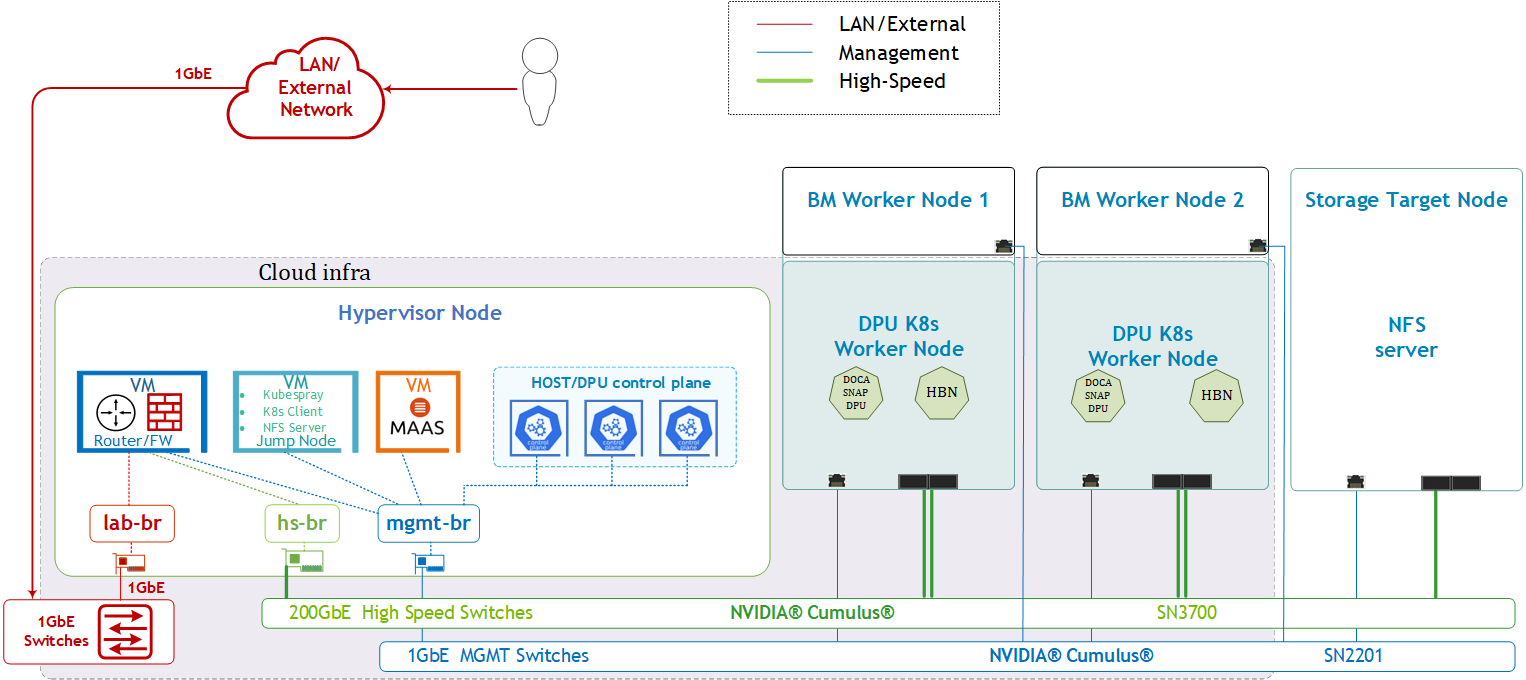
SFC Logical Diagram
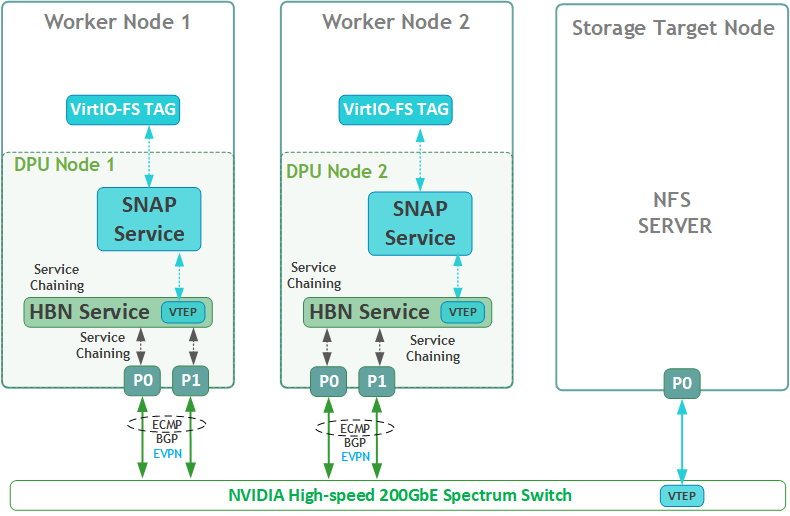
The DOCA Platform Framework simplifies DPU management by providing orchestration through a K8s API. It handles the provisioning and lifecycle management of DPUs, orchestrates specialized DPU services, and automates service function chaining (SFC) tasks. This ensures seamless deployment of NVIDIA DOCA services, enabling efficient offloading and routing of traffic across the HBN data plane. The SFC logic diagram implemented in this guide is presented below.
Volume Emulation Logical Diagram
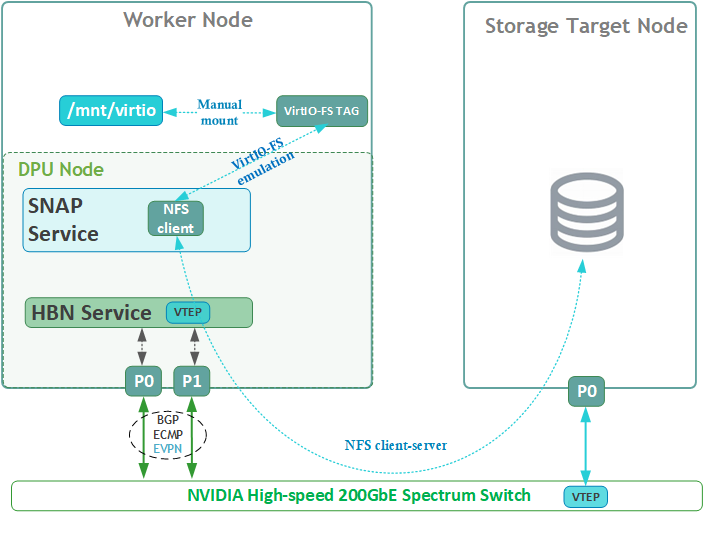
The following logical diagram demonstrates the main components involved in a volume mount procedure to tenant host.
Upon receiving a new request for an emulated VIRTIO-FS volume, DOCA SNAP components bring a NFS volume via SNAP NFS client to the required DPU K8s worker node. The DPU then emulates it as a VIRTIO-FS volume to mount (manual procedure) on the same x86 host.
Firewall Design
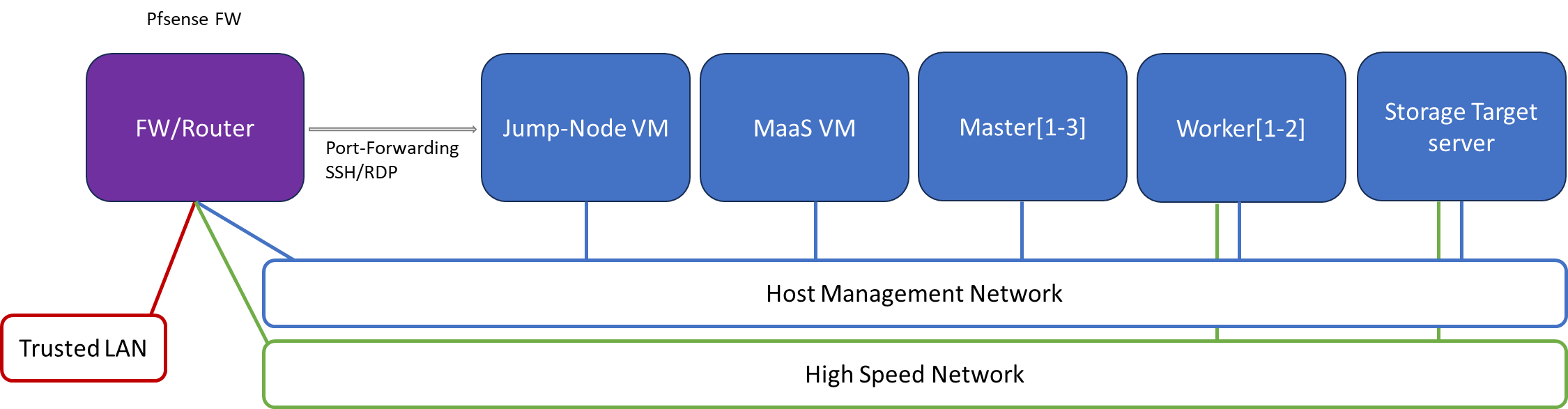
The pfSense firewall in this solution serves a dual purpose:
-
Firewall – Provides an isolated environment for the DPF system, ensuring secure operations
-
Router – Enables internet access and connectivity between the host management network and the high-speed network
Port-forwarding rules for SSH and RDP are configured on the firewall to route traffic to the jump node’s IP address in the host management network. From the jump node, administrators can manage and access various devices in the setup, as well as handle the deployment of the Kubernetes (K8s) cluster and DPF components.
The following diagram illustrates the firewall design used in this solution:
Software Stack Components
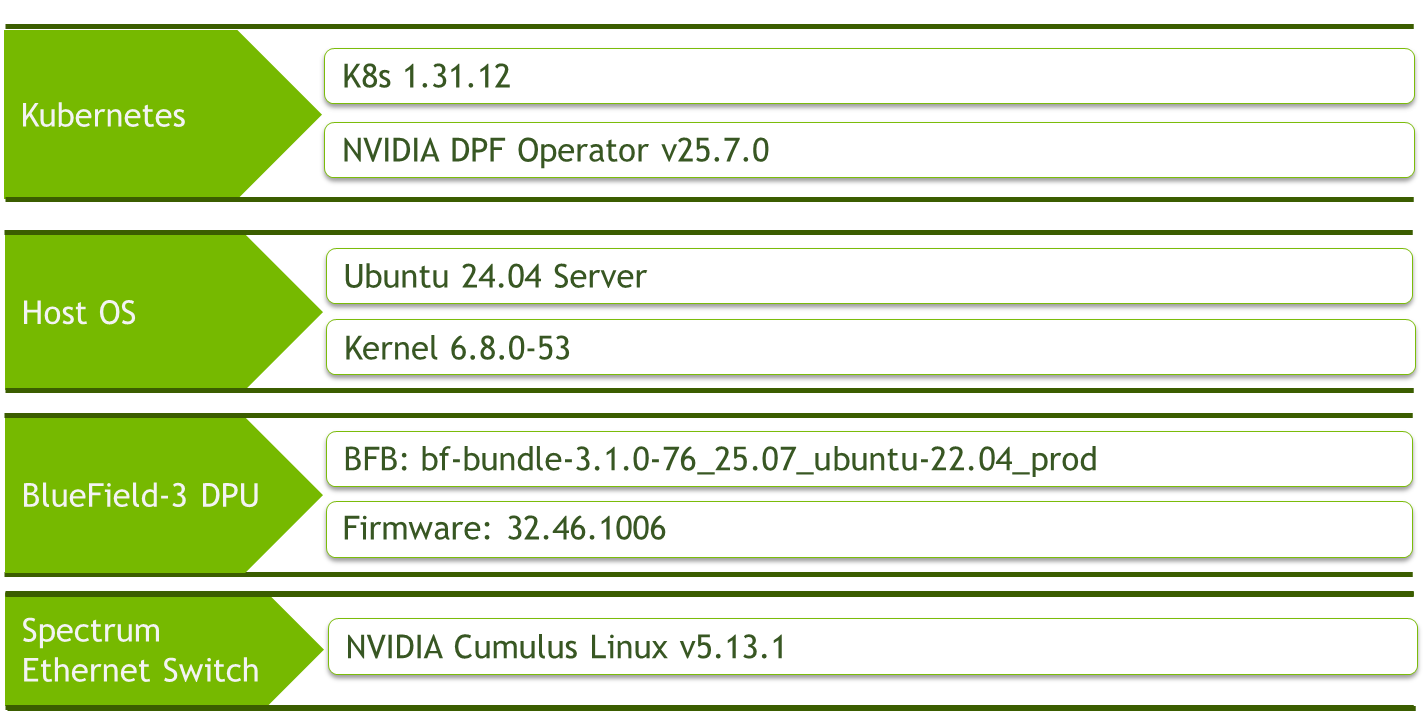
Make sure to use the exact same versions for the software stack as described above.
Bill of Materials
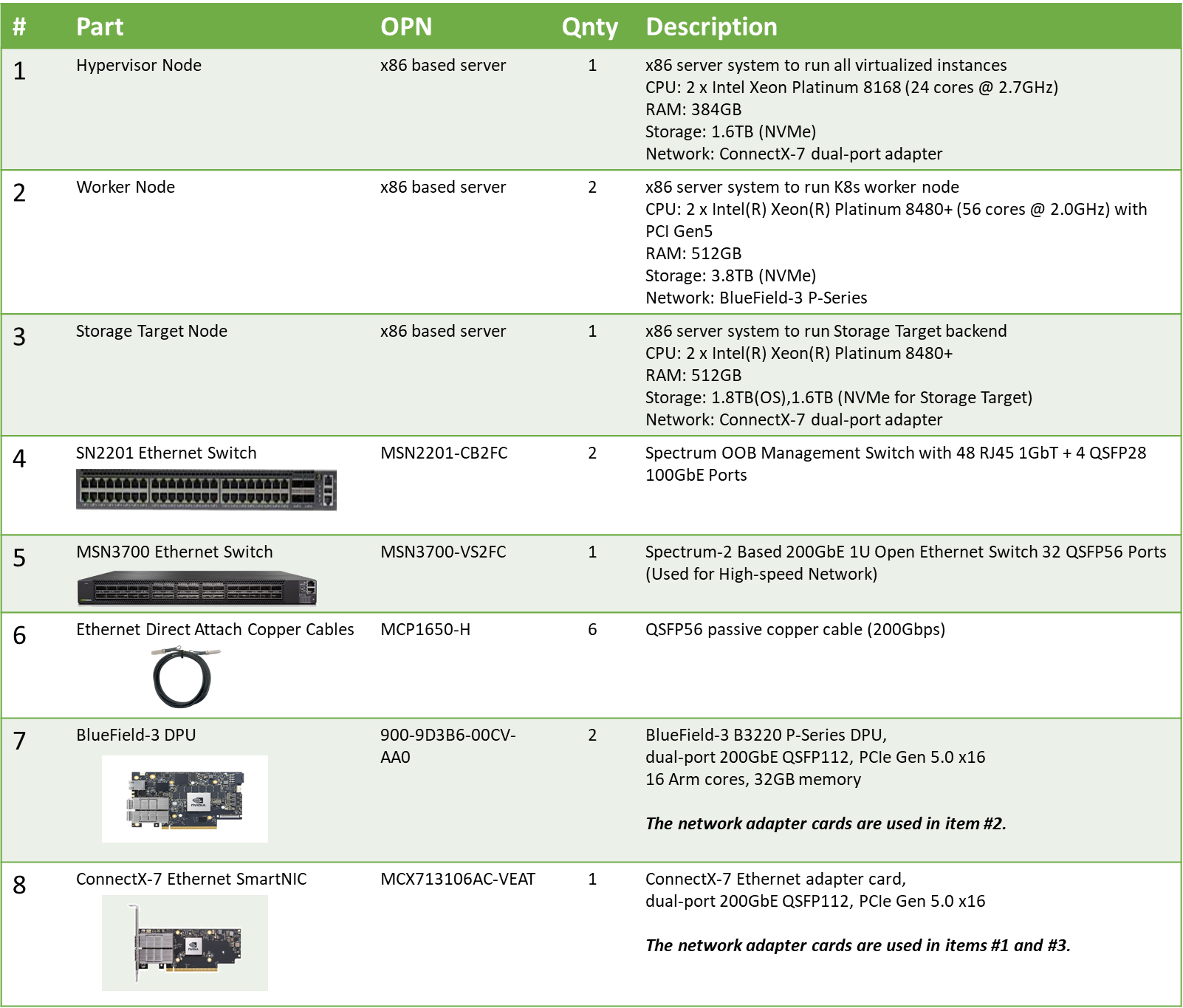
Deployment and Configuration
Node and Switch Definitions
These are the definitions and parameters used for deploying the demonstrated fabric:
|
Switch Port Usage |
||
|
|
1 |
swp1-6 |
|
|
1 |
swp1,11-14,32 |
|
Hosts |
|||||
|---|---|---|---|---|---|
|
Rack |
Server Type |
Server Name |
Switch Port |
IP and NICs |
Default Gateway |
|
Rack1
|
Hypervisor Node |
|
hs-switch: |
lab-br (interface eno1): Trusted LAN IP mgmt-br (interface eno2): - hs-br (interface ens2f0np0): |
Trusted LAN GW |
|
Rack1
|
Storage Target Node |
|
mgmt-switch: hs-switch: |
enp1s0f0: 10.0.110.25/24 enp144s0f0np0: 10.0.124.1/24 |
10.0.110.254 |
|
Rack1
|
Worker Node |
|
mgmt-switch: hs-switch:
|
ens15f0: 10.0.110.21/24 ens5f0np0/ens5f1np1: 10.0.120.0/22
|
10.0.110.254 |
|
Rack1
|
Worker Node |
|
mgmt-switch: hs-switch:
|
ens15f0: 10.0.110.22/24 ens5f0np0/ens5f1np1: 10.0.120.0/22
|
10.0.110.254 |
|
Rack1 |
Firewall (Virtual) |
|
- |
WAN (lab-br): Trusted LAN IP LAN (mgmt-br): 10.0.110.254/24 OPT1 (hs-br): 172.169.50.1/30 |
Trusted LAN GW |
|
Rack1
|
Jump Node (Virtual) |
|
- |
enp1s0: 10.0.110.253/24 |
10.0.110.254 |
|
Rack1
|
MAAS (Virtual) |
|
- |
enp1s0: 10.0.110.252/24 |
10.0.110.254 |
|
Rack1
|
Master Node (Virtual) |
|
- |
enp1s0: 10.0.110.1/24 |
10.0.110.254 |
|
Rack1
|
Master Node (Virtual) |
|
- |
enp1s0: 10.0.110.2/24 |
10.0.110.254 |
|
Rack1
|
Master Node (Virtual) |
|
- |
enp1s0: 10.0.110.3/24 |
10.0.110.254 |
Wiring
Hypervisor Node
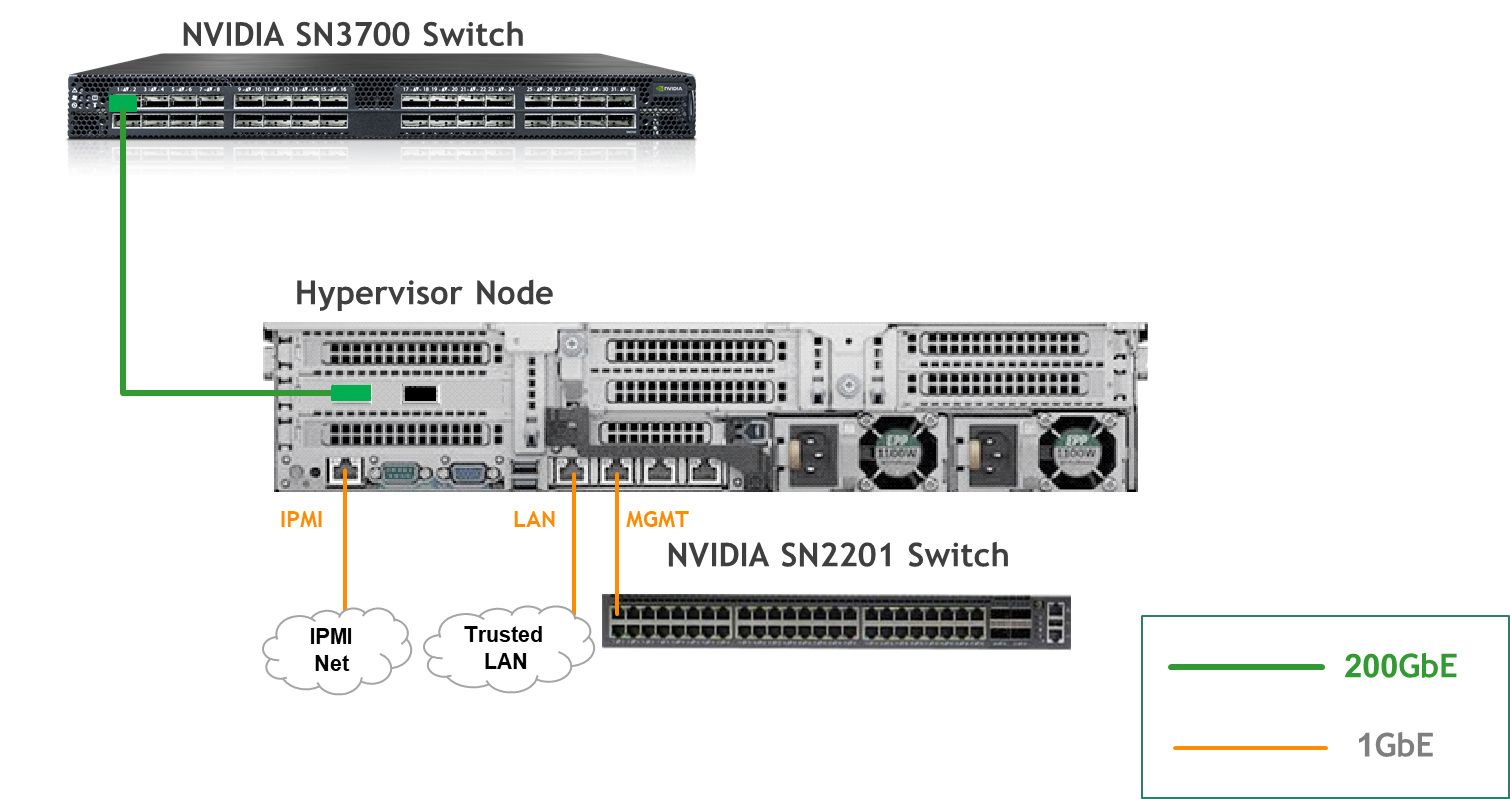
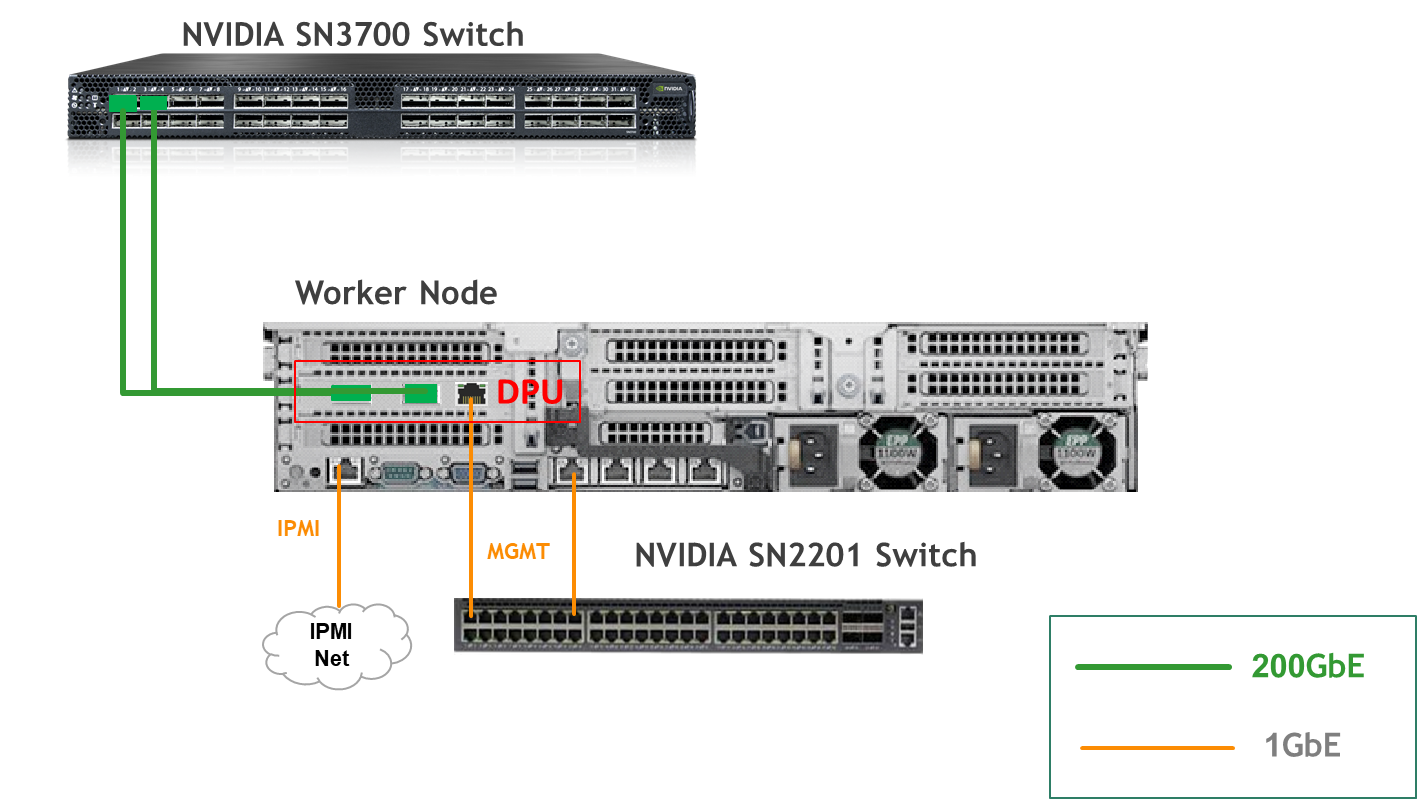
Bare Metal Worker Node
Storage Target Node
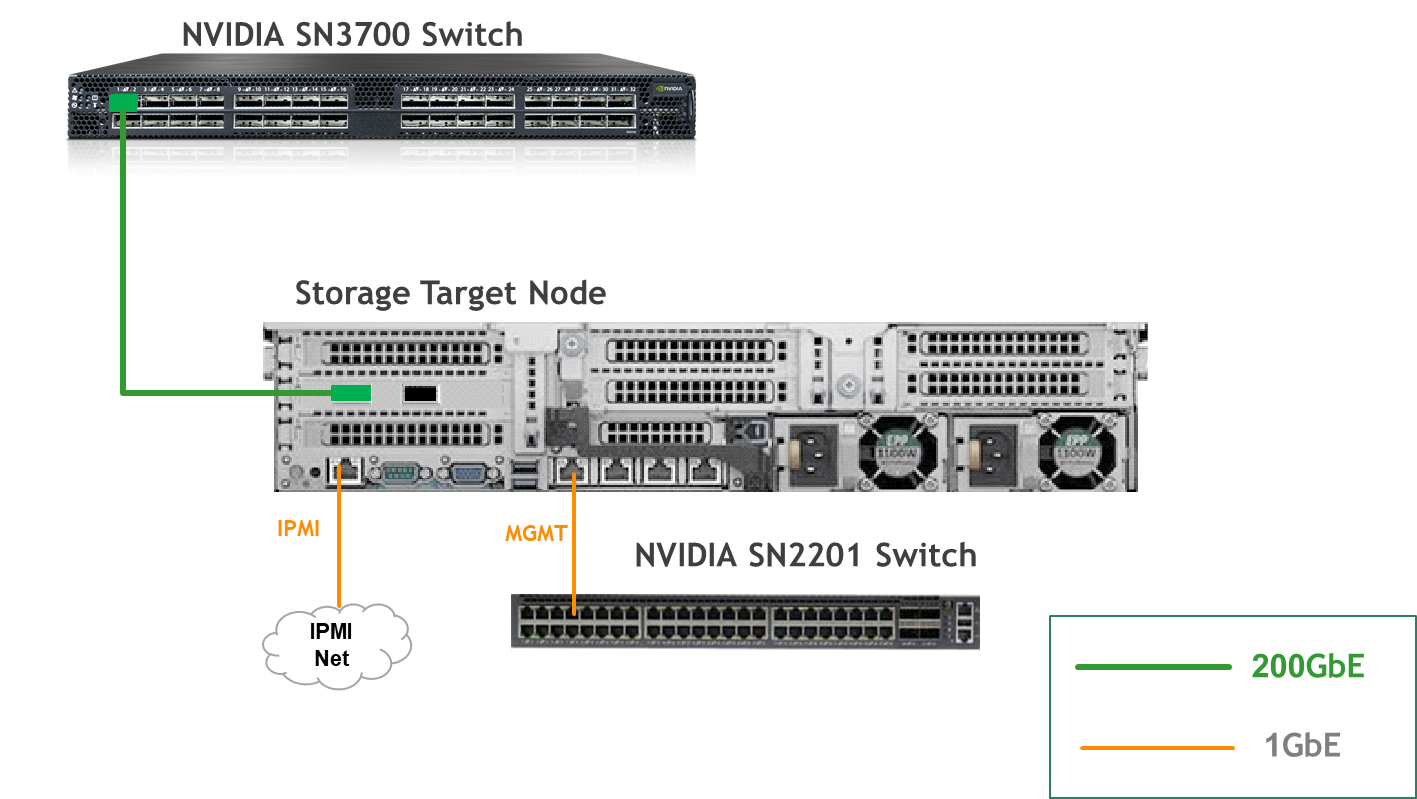
Fabric Configuration
Updating Cumulus Linux
As a best practice, make sure to use the latest released Cumulus Linux NOS version.
For information on how to upgrade Cumulus Linux, refer to the Cumulus Linux User Guide.
Configuring the Cumulus Linux Switch
The SN3700 switch (hs-switch), is configured as follows:
-
The following commands configure BGP unnumbered on
hs-switch. -
Cumulus Linux enables the BGP equal-cost multipathing (ECMP) option by default.
The SN2201 switch (mgmt-switch) is configured as follows:
Installation and Configuration
Make sure that the BIOS settings on the worker node servers have SR-IOV enabled and that the servers are tuned for maximum performance.
All worker nodes must have the same PCIe placement for the BlueField-3 NIC and must display the same interface name.
Make sure that you have DPU BMC and OOB MAC addresses.
Use this Reference Deployment Guide (RDG) for:
-
Host Configuration,
-
K8s Cluster Deployment and Configuration,
-
DPF Installation
DPU Service Installation
Prerequisites
Before start deployment a few adjustments are required.
-
Add additional routing on each K8s control plane node to Target node:
network:
  version: 2
  ethernets:
    enp1s0:
      match:
        macaddress: "52:54:00:cf:1d:38"
      addresses:
      - "10.0.110.1/24"
      nameservers:
        addresses:
        - 10.0.110.252
        search:
        - dpf.rdg.local.domain
      set-name: "enp1s0"
      mtu: 1500
      routes:
      - to: default
        via: 10.0.110.254
        metric: 50
      - to: 10.0.124.1
        via: 10.0.110.25
Apply new configuration by run command:
netplan apply
-
Build and push nfs-csi-controller helm chart
Run the following commands from the DPF repo root (~/doca-platform).
export HELM_REGISTRY=<your-registry> For example: export HELM_REGISTRY="oci://cr.example.com"
export TAG="v0.1.0"
make helm-package-nfs-csi-controller
make helm-push-nfs-csi-controller
Later, your Helm registry will be referenced in both dpuservicetemplate_nfs-csi-controller.yaml and dpuservicetemplate_nfs-csi-controller-dpu.yaml.GO language should be installed on your build machine.
To install Go (Golang) on Ubuntu 24.04, two primary methods are available: using the apt package manager or using snap.-
Installing Go using
apt(from Ubuntu repositories):
sudo apt install golang-go -y
-
Installing Go using snap (for potentially newer versions):
sudo snap install go --classic
The--classicargument grants the snap package classic confinement, allowing it broader access to the system.
-
Verify installation:
go version
-
-
Download the snap-virtiofs.zip file with the required YAML deployment files for this guide, then unarchive it.
Jump Node Console
$ cd ~
$ unzip snap-virtiofs.zip
$ cd snap-virtiofs

$ ls -R manifests
manifests:
00-env-vars
00-high-speed-switch-configuration
04-dpudeployment-installation

manifests/00-env-vars:
envvars.env

manifests/00-high-speed-switch-configuration:
switch-hs.conf

manifests/04-dpudeployment-installation:
bfb.yaml                                             dpuserviceconfiguration_snap-node-driver.yaml        dpuservicetemplate_snap-node-driver.yaml
dpudeployment.yaml                                   dpuservicecredentialrequest_nfs-csi-controller.yaml  dpustoragepolicy_policy-fs.yaml
dpuflavor.yaml                                       dpuservicecredentialrequest_snap-controller.yaml     dpustoragevendor_nfs-csi.yaml
dpuserviceconfiguration_doca-snap.yaml               dpuservicetemplate_doca-snap.yaml                    hbn-dpuserviceconfig.yaml
dpuserviceconfiguration_fs-storage-dpu-plugin.yaml   dpuservicetemplate_fs-storage-dpu-plugin.yaml        hbn-dpuservicetemplate.yaml
dpuserviceconfiguration_nfs-csi-controller-dpu.yaml  dpuservicetemplate_nfs-csi-controller-dpu.yaml       hbn-ipam.yaml
dpuserviceconfiguration_nfs-csi-controller.yaml      dpuservicetemplate_nfs-csi-controller.yaml           hbn-loopback-ipam.yaml
dpuserviceconfiguration_snap-configuration.yaml      dpuservicetemplate_snap-configuration.yaml           physical-ifaces.yaml
dpuserviceconfiguration_snap-controller.yaml         dpuservicetemplate_snap-controller.yaml              storage-ipam.yaml
dpuserviceconfiguration_snap-host-controller.yaml    dpuservicetemplate_snap-host-controller.yaml
-
Modify the variables in
manifests/00-env-vars/envvars.envto fit your environment, then source the file:Replace the values for the variables in the following file with the values that fit your setup. Specifically, pay attention to
DPUCLUSTER_INTERFACEandBMC_ROOT_PASSWORD.It is necessary to set several environment variables before running this command.
$ source manifests/00-env-vars/envvars.env
Change the DPUDeployment, DPUServiceConfig, DPUServiceTemplate and other necessary objects.
-
Before deploying the objects under the
manifests/04-dpudeployment-installationdirectory, a few adjustments need to be made.
-
Review
dpudeployment.yamlto reference the DPUFlavor suited for SNAP:YAML--- apiVersion: svc.dpu.nvidia.com/v1alpha1 kind: DPUDeployment metadata: name: hbn-storage namespace: dpf-operator-system spec: dpus: bfb: bf-bundle flavor: dpf-provisioning-hbn-storage nodeEffect: noEffect: true dpuSets: - nameSuffix: "dpuset1" nodeSelector: matchLabels: feature.node.kubernetes.io/dpu-enabled: "true" services: doca-hbn: serviceTemplate: doca-hbn serviceConfiguration: doca-hbn snap-host-controller: serviceTemplate: snap-host-controller serviceConfiguration: snap-host-controller snap-controller: serviceTemplate: snap-controller serviceConfiguration: snap-controller snap-node-driver: serviceTemplate: snap-node-driver serviceConfiguration: snap-node-driver snap-configuration: serviceTemplate: snap-configuration serviceConfiguration: snap-configuration doca-snap: serviceTemplate: doca-snap serviceConfiguration: doca-snap fs-storage-dpu-plugin: serviceTemplate: fs-storage-dpu-plugin serviceConfiguration: fs-storage-dpu-plugin nfs-csi-controller: serviceTemplate: nfs-csi-controller serviceConfiguration: nfs-csi-controller nfs-csi-controller-dpu: serviceTemplate: nfs-csi-controller-dpu serviceConfiguration: nfs-csi-controller-dpu serviceChains: switches: - ports: - serviceInterface: matchLabels: uplink: p0 - service: name: doca-hbn interface: p0_if - ports: - serviceInterface: matchLabels: uplink: p1 - service: name: doca-hbn interface: p1_if - ports: - serviceInterface: matchLabels: interface: hostpf0 - service: interface: pf0hpf_if name: doca-hbn - ports: - service: name: doca-snap interface: app_sf ipam: matchLabels: svc.dpu.nvidia.com/pool: storage-pool - service: name: fs-storage-dpu-plugin interface: app_sf ipam: matchLabels: svc.dpu.nvidia.com/pool: storage-pool - service: name: doca-hbn interface: snap_if
-
Set the
ipv4Subnetsettings for the storage-pool (please note: GW IP should be assigned to DATA interface in Storage Target Node installation).
Following IPAM configuration files:
hbn-ipam.yaml
hbn-loopback-ipam.yaml
storage-ipam.yamlYAML--- apiVersion: svc.dpu.nvidia.com/v1alpha1 kind: DPUServiceIPAM metadata: name: pool1 namespace: dpf-operator-system spec: ipv4Network: network: "10.0.120.0/22" gatewayIndex: 1 prefixSize: 29 --- apiVersion: svc.dpu.nvidia.com/v1alpha1 kind: DPUServiceIPAM metadata: name: loopback namespace: dpf-operator-system spec: ipv4Network: network: "11.0.0.0/24" prefixSize: 32 --- apiVersion: svc.dpu.nvidia.com/v1alpha1 kind: DPUServiceIPAM metadata: name: storage-pool namespace: dpf-operator-system spec: metadata: labels: svc.dpu.nvidia.com/pool: storage-pool ipv4Subnet: subnet: "10.0.124.0/24" gateway: "10.0.124.1" perNodeIPCount: 8 -
Set the
storageClassessettings according to your environment in dpuserviceconfiguration_nfs-csi-controller-dpu.yaml. Appropriated NFS share folders should exist on Target server node. You can configure more than one storageClasses:YAML--- apiVersion: svc.dpu.nvidia.com/v1alpha1 kind: DPUServiceConfiguration metadata: name: nfs-csi-controller-dpu namespace: dpf-operator-system spec: deploymentServiceName: nfs-csi-controller-dpu serviceConfiguration: helmChart: values: dpu: enabled: true storageClasses: # List of storage classes to be created for nfs-csi # These StorageClass names should be used in the StorageVendor settings - name: nfs-csi parameters: server: 10.0.124.1 share: /srv/nfs/share - name: nfs-csi-nvme parameters: server: 10.0.124.1 share: /srv/nfs/nvmeshare rbacRoles: nfsCsiController: # the name of the service account for nfs-csi-controller # this value must be aligned with the value from the DPUServiceCredentialRequest serviceAccount: nfs-csi-controller-sa -
The rest of the configuration files in the folder
manifest/04-dpudeployment-installation/remain the same, including:-
BFB provisioning YAML:
bfb.yaml -
DPUFlavor provisioning YAML
dpuflavor.yaml -
DOCA-SNAP DPUService deployment and configuration YAMLs:
dpuserviceconfig_doca-snap.yaml
dpuservicetemplate_doca-snap.yaml -
HBN DPUService deployment and configuration YAMLs:
hbn-dpuserviceconfig.yaml
hbn-dpuservicetemplate.yaml -
SNAP configuration DPUService deployment and configuration YAMLs:
dpuserviceconfig_snap-configuration.yaml
dpuservicetemplate_snap-configuration.yaml -
SNAP controller DPUService deployment and configuration YAMLs:
dpuserviceconfig_snap-controller.yaml
dpuservicetemplate_snap-controller.yaml -
SNAP Host controller DPUService deployment and configuration YAMLs
dpuserviceconfiguration_snap-host-controller.yaml
dpuservicetemplate_snap-host-controller.yaml -
SNAP node driver DPUService deployment and configuration YAMLs:
dpuserviceconfig_snap-node-driver.yaml
dpuservicetemplate_snap-node-driver.yaml -
NFS CSI controller DPUService deployment and configuration YAMLs:
dpuserviceconfiguration_nfs-csi-controller.yaml
dpuservicetemplate_nfs-csi-controller.yaml (required repo update) -
NFS CSI DPU controller DPUService deployment and configuration YAMLs:
dpuserviceconfiguration_nfs-csi-controller-dpu.yaml
dpuservicetemplate_nfs-csi-controller-dpu.yaml (required repo update) -
Storage vendor DPU pludin DPUService deployment and configuration YAMLs:
dpuserviceconfiguration_fs-storage-dpu-plugin.yaml
dpuservicetemplate_fs-storage-dpu-plugin.yaml -
DPUServiceIPAM deployment and configuration YAMLs:
hbn-loopback-ipam.yaml
storage-ipam.yaml
hbn-ipam.yaml -
DPUServiceInterfaces for physical ports on the DPU:
physical-ifaces.yaml -
SNAP DPUServiceCredentialRequest to allow cross cluster communication:
dpuservicecredentialrequest_nfs-csi-controller.yaml
dpuservicecredentialrequest_snap-controller.yaml -
StoragePolicy deployment and configuration YAMLs:
dpustoragepolicy_policy-fs.yaml -
StorageVendor deployment and configuration YAMLs:
dpustoragevendor_nfs-csi.yaml
-
-
-
Apply all of the YAML files mentioned above using the following command.
$ cd manifest/04-dpudeployment-installation
$ cat *.yaml | envsubst | kubectl apply -f -
bfb.provisioning.dpu.nvidia.com/bf-bundle created
dpudeployment.svc.dpu.nvidia.com/hbn-storage created
dpuflavor.provisioning.dpu.nvidia.com/dpf-provisioning-hbn-storage created
dpuserviceconfiguration.svc.dpu.nvidia.com/doca-snap created
dpuserviceconfiguration.svc.dpu.nvidia.com/fs-storage-dpu-plugin created
dpuserviceconfiguration.svc.dpu.nvidia.com/nfs-csi-controller-dpu created
dpuserviceconfiguration.svc.dpu.nvidia.com/nfs-csi-controller created
dpuserviceconfiguration.svc.dpu.nvidia.com/snap-configuration created
dpuserviceconfiguration.svc.dpu.nvidia.com/snap-controller created
dpuserviceconfiguration.svc.dpu.nvidia.com/snap-host-controller created
dpuserviceconfiguration.svc.dpu.nvidia.com/snap-node-driver created
dpuservicecredentialrequest.svc.dpu.nvidia.com/nfs-csi-controller-credentials created
dpuservicecredentialrequest.svc.dpu.nvidia.com/snap-controller-credentials created
dpuservicetemplate.svc.dpu.nvidia.com/doca-snap created
dpuservicetemplate.svc.dpu.nvidia.com/fs-storage-dpu-plugin created
dpuservicetemplate.svc.dpu.nvidia.com/nfs-csi-controller-dpu created
dpuservicetemplate.svc.dpu.nvidia.com/nfs-csi-controller created
dpuservicetemplate.svc.dpu.nvidia.com/snap-configuration created
dpuservicetemplate.svc.dpu.nvidia.com/snap-controller created
dpuservicetemplate.svc.dpu.nvidia.com/snap-host-controller created
dpuservicetemplate.svc.dpu.nvidia.com/snap-node-driver created
dpustoragepolicy.storage.dpu.nvidia.com/policy-fs created
dpustoragepolicy.storage.dpu.nvidia.com/policy-fs-nvme created
dpustoragevendor.storage.dpu.nvidia.com/nfs-csi created
dpustoragevendor.storage.dpu.nvidia.com/nfs-csi-nvme created
dpuserviceconfiguration.svc.dpu.nvidia.com/doca-hbn created
dpuservicetemplate.svc.dpu.nvidia.com/doca-hbn created
dpuserviceipam.svc.dpu.nvidia.com/pool1 created
dpuserviceipam.svc.dpu.nvidia.com/loopback created
dpuserviceinterface.svc.dpu.nvidia.com/p0 created
dpuserviceinterface.svc.dpu.nvidia.com/p1 created
dpuserviceinterface.svc.dpu.nvidia.com/hostpf0 created
dpuserviceipam.svc.dpu.nvidia.com/storage-pool created
-
To follow the progress of DPU provisioning, run the following command to check its current phase:
Jump Node Console
$ watch -n10 "kubectl describe dpu -n dpf-operator-system | grep 'Node Name\|Type\|Last\|Phase'"
Every 10.0s: kubectl describe dpu -n dpf-operator-system | grep 'Node Name\|Type\|Last\|Phase'
  Dpu Node Name:                                                     dpu-node-mt2334xz09f0
    Last Transition Time:  2025-09-28T11:43:57Z
    Type:                  Initialized
    Last Transition Time:  2025-09-28T11:43:57Z
    Type:                  BFBReady
    Last Transition Time:  2025-09-28T11:43:57Z
    Type:                  NodeEffectReady
    Last Transition Time:  2025-09-28T11:43:59Z
    Type:                  InterfaceInitialized
    Last Transition Time:  2025-09-28T11:44:00Z
    Type:                  FWConfigured
    Last Transition Time:  2025-09-28T11:44:00Z
    Type:                  BFBPrepared
    Last Transition Time:  2025-09-28T11:56:32Z
    Type:                  OSInstalled
    Last Transition Time:  2025-09-28T11:59:32Z
    Type:                  Rebooted
  Phase:  Rebooting
  Dpu Node Name:                                                     dpu-node-mt2334xz09f1
    Last Transition Time:  2025-09-28T11:43:57Z
    Type:                  Initialized
    Last Transition Time:  2025-09-28T11:43:57Z
    Type:                  BFBReady
    Last Transition Time:  2025-09-28T11:43:57Z
    Type:                  NodeEffectReady
    Last Transition Time:  2025-09-28T11:43:58Z
    Type:                  InterfaceInitialized
    Last Transition Time:  2025-09-28T11:44:00Z
    Type:                  FWConfigured
    Last Transition Time:  2025-09-28T11:44:00Z
    Type:                  BFBPrepared
    Last Transition Time:  2025-09-28T11:56:46Z
    Type:                  OSInstalled
    Last Transition Time:  2025-09-28T11:59:49Z
    Type:                  Rebooted
  Phase:  Rebooting
-
Wait for the Rebooted stage and then Power Cycle the bare-metal host manual.
After the DPU is up, run following command for each DPU worker:Jump Node Console
kubectl annotate dpunodes dpu-node-mt2334xz09f0 -n dpf-operator-system  provisioning.dpu.nvidia.com/dpunode-external-reboot-required-
kubectl annotate dpunodes dpu-node-mt2334xz09f1 -n dpf-operator-system  provisioning.dpu.nvidia.com/dpunode-external-reboot-required-
-
At this point, the DPU workers should be added to the cluster. As they being added to the cluster, the DPUs are provisioned.
Jump Node Console
$ watch -n10 "kubectl describe dpu -n dpf-operator-system | grep 'Node Name\|Type\|Last\|Phase'"
Every 10.0s: kubectl describe dpu -n dpf-operator-system | grep 'Node Name\|Type\|Last\|Phase'                                                                     setup5-jump: Wed May 21 10:45:44 2025
  Dpu Node Name:                                                     dpu-node-mt2334xz09f0
    Type:       InternalIP
    Type:       Hostname
    Last Transition Time:  2025-09-28T11:43:57Z
    Type:                  Initialized
    Last Transition Time:  2025-09-28T11:43:57Z
    Type:                  BFBReady
    Last Transition Time:  2025-09-28T11:43:57Z
    Type:                  NodeEffectReady
    Last Transition Time:  2025-09-28T11:43:59Z
    Type:                  InterfaceInitialized
    Last Transition Time:  2025-09-28T11:44:00Z
    Type:                  FWConfigured
    Last Transition Time:  2025-09-28T11:44:00Z
    Type:                  BFBPrepared
    Last Transition Time:  2025-09-28T11:56:32Z
    Type:                  OSInstalled
    Last Transition Time:  2025-09-28T12:37:26Z
    Type:                  Rebooted
    Last Transition Time:  2025-09-28T12:37:26Z
    Type:                  DPUClusterReady
    Last Transition Time:  2025-09-28T12:37:26Z
    Type:                  Ready
  Phase:  Ready
  Dpu Node Name:                                                     dpu-node-mt2334xz09f1
    Type:       InternalIP
    Type:       Hostname
    Last Transition Time:  2025-09-28T11:43:57Z
    Type:                  Initialized
    Last Transition Time:  2025-09-28T11:43:57Z
    Type:                  BFBReady
    Last Transition Time:  2025-09-28T11:43:57Z
    Type:                  NodeEffectReady
    Last Transition Time:  2025-09-28T11:43:58Z
    Type:                  InterfaceInitialized
    Last Transition Time:  2025-09-28T11:44:00Z
    Type:                  FWConfigured
    Last Transition Time:  2025-09-28T11:44:00Z
    Type:                  BFBPrepared
    Last Transition Time:  2025-09-28T11:56:46Z
    Type:                  OSInstalled
    Last Transition Time:  2025-09-28T12:37:26Z
    Type:                  Rebooted
    Last Transition Time:  2025-09-28T13:38:23Z
    Type:                  DPUClusterReady
    Last Transition Time:  2025-09-28T13:38:23Z
    Type:                  Ready
  Phase:  Ready
-
Finally, validate that all the different DPU-related objects are now in the Ready state:
Jump Node Console
$ kubectl get secrets -n dpu-cplane-tenant1 dpu-cplane-tenant1-admin-kubeconfig -o json | jq -r '.data["admin.conf"]' | base64 --decode > /home/depuser/dpu-cluster.config
$ echo "alias ki='KUBECONFIG=/home/depuser/dpu-cluster.config kubectl'" >> ~/.bashrc

$ kubectl -n dpf-operator-system exec deploy/dpf-operator-controller-manager -- /dpfctl describe dpudeployments
NAME                                                 NAMESPACE            STATUS       REASON    SINCE  MESSAGE
DPFOperatorConfig/dpfoperatorconfig                  dpf-operator-system  Ready: True  Success   28m
└─DPUDeployments
  └─DPUDeployment/hbn-storage                        dpf-operator-system  Ready: True  Success   27m
    ├─DPUServiceChains
    | └─DPUServiceChain/hbn-storage-b782l            dpf-operator-system  Ready: True  Success   144m
    ├─DPUServiceInterfaces
    │ └─6 DPUServiceInterfaces...                    dpf-operator-system  Ready: True  Success   144m   See doca-hbn-p0-if-z2g6t, doca-hbn-p1-if-pbp47, doca-hbn-pf0hpf-if-qnzsw, doca-hbn-snap-if-qs22b,
    │                                                                                                   doca-snap-app-sf-72zh7, fs-storage-dpu-plugin-app-sf-pcvc5
    ├─DPUSets
    │ └─DPUSet/hbn-storage-dpuset1                   dpf-operator-system
    │   └─BFB/bf-bundle                              dpf-operator-system  Ready: True  Ready     144m   File: bf-bundle-3.0.0-135_25.04_ubuntu-22.04_prod.bfb, DOCA: 3.0.0
    │   └─DPUs
    │     └─2 DPUs...                                dpf-operator-system  Ready: True  DPUReady  90m    See dpu-node-mt2334xz09f0-mt2334xz09f0, dpu-node-mt2334xz09f1-mt2334xz09f1
    └─Services
      ├─DPUServiceTemplates
      │ ├─DPUServiceTemplate/doca-hbn                dpf-operator-system  Ready: True  Success   144m
      │ ├─DPUServiceTemplate/doca-snap               dpf-operator-system  Ready: True  Success   144m
      │ ├─DPUServiceTemplate/fs-storage-dpu-plugin   dpf-operator-system  Ready: True  Success   144m
      │ ├─DPUServiceTemplate/nfs-csi-controller      dpf-operator-system  Ready: True  Success   144m
      │ ├─DPUServiceTemplate/nfs-csi-controller-dpu  dpf-operator-system  Ready: True  Success   144m
      │ ├─DPUServiceTemplate/snap-configuration      dpf-operator-system  Ready: True  Success   144m
      │ ├─DPUServiceTemplate/snap-controller         dpf-operator-system  Ready: True  Success   144m
      │ ├─DPUServiceTemplate/snap-host-controller    dpf-operator-system  Ready: True  Success   144m
      │ └─DPUServiceTemplate/snap-node-driver        dpf-operator-system  Ready: True  Success   144m
      └─DPUServices
        └─9 DPUServices...                           dpf-operator-system  Ready: True  Success   144m   See doca-hbn-k9xdp, doca-snap-nnj2t, fs-storage-dpu-plugin-cqqfn, nfs-csi-controller-dpu-nzrqn,
                                                                                                        nfs-csi-controller-w992c, snap-configuration-vz4gc, snap-controller-jr5c7,
                                                                                                        snap-host-controller-z7jds, snap-node-driver-gtsds

$ kubectl get dpu -A
NAMESPACE             NAME                                 READY   PHASE   AGE
dpf-operator-system   dpu-node-mt2334xz09f0-mt2334xz09f0   True    Ready   161m
dpf-operator-system   dpu-node-mt2334xz09f1-mt2334xz09f1   True    Ready   161m

$ kubectl wait --for=condition=ready --namespace dpf-operator-system dpu --all
dpu.provisioning.dpu.nvidia.com/dpu-node-mt2334xz09f0-mt2334xz09f0 condition met
dpu.provisioning.dpu.nvidia.com/dpu-node-mt2334xz09f1-mt2334xz09f1 condition met

$ ki get pod -o wide -A
NAMESPACE             NAME                                                              READY   STATUS    RESTARTS   AGE    IP            NODE                                 NOMINATED NODE   READINESS GATES
dpf-operator-system   dpu-cplane-tenant1-doca-hbn-k9xdp-ds-bhtcx                        2/2     Running   0          49m    10.244.6.20   dpu-node-mt2334xz09f1-mt2334xz09f1   <none>           <none>
dpf-operator-system   dpu-cplane-tenant1-doca-hbn-k9xdp-ds-q5kb5                        2/2     Running   0          110m   10.244.4.10   dpu-node-mt2334xz09f0-mt2334xz09f0   <none>           <none>
dpf-operator-system   dpu-cplane-tenant1-doca-snap-nnj2t-8g9pb                          1/1     Running   0          49m    10.244.6.22   dpu-node-mt2334xz09f1-mt2334xz09f1   <none>           <none>
dpf-operator-system   dpu-cplane-tenant1-doca-snap-nnj2t-zg8s8                          1/1     Running   0          110m   10.244.4.11   dpu-node-mt2334xz09f0-mt2334xz09f0   <none>           <none>
dpf-operator-system   dpu-cplane-tenant1-fs-storage-dpu-plugin-cqqfn-fs-storage-79nb4   1/1     Running   0          110m   10.244.4.12   dpu-node-mt2334xz09f0-mt2334xz09f0   <none>           <none>
dpf-operator-system   dpu-cplane-tenant1-fs-storage-dpu-plugin-cqqfn-fs-storage-vbr4j   1/1     Running   0          49m    10.244.6.21   dpu-node-mt2334xz09f1-mt2334xz09f1   <none>           <none>
dpf-operator-system   dpu-cplane-tenant1-nvidia-k8s-ipam-controller-6cb8f65fc5-lnxcm    1/1     Running   0          7d1h   10.244.4.2    dpu-node-mt2334xz09f0-mt2334xz09f0   <none>           <none>
dpf-operator-system   dpu-cplane-tenant1-nvidia-k8s-ipam-node-ds-c8drf                  1/1     Running   0          49m    10.244.6.8    dpu-node-mt2334xz09f1-mt2334xz09f1   <none>           <none>
dpf-operator-system   dpu-cplane-tenant1-nvidia-k8s-ipam-node-ds-f7tkd                  1/1     Running   0          113m   10.244.4.6    dpu-node-mt2334xz09f0-mt2334xz09f0   <none>           <none>
dpf-operator-system   dpu-cplane-tenant1-ovs-cni-arm64-5nhvq                            1/1     Running   0          49m    10.0.110.80   dpu-node-mt2334xz09f1-mt2334xz09f1   <none>           <none>
dpf-operator-system   dpu-cplane-tenant1-ovs-cni-arm64-z97g8                            1/1     Running   0          113m   10.0.110.89   dpu-node-mt2334xz09f0-mt2334xz09f0   <none>           <none>
dpf-operator-system   dpu-cplane-tenant1-sfc-controller-node-ds-69blq                   1/1     Running   0          49m    10.244.6.10   dpu-node-mt2334xz09f1-mt2334xz09f1   <none>           <none>
dpf-operator-system   dpu-cplane-tenant1-sfc-controller-node-ds-w27fn                   1/1     Running   0          113m   10.244.4.4    dpu-node-mt2334xz09f0-mt2334xz09f0   <none>           <none>
dpf-operator-system   dpu-cplane-tenant1-snap-node-driver-gtsds-5h8b7                   1/1     Running   0          49m    10.244.6.11   dpu-node-mt2334xz09f1-mt2334xz09f1   <none>           <none>
dpf-operator-system   dpu-cplane-tenant1-snap-node-driver-gtsds-6h7z5                   1/1     Running   0          110m   10.244.4.7    dpu-node-mt2334xz09f0-mt2334xz09f0   <none>           <none>
dpf-operator-system   kube-flannel-ds-fzplj                                             1/1     Running   0          113m   10.0.110.89   dpu-node-mt2334xz09f0-mt2334xz09f0   <none>           <none>
dpf-operator-system   kube-flannel-ds-xdkpk                                             1/1     Running   0          49m    10.0.110.80   dpu-node-mt2334xz09f1-mt2334xz09f1   <none>           <none>
dpf-operator-system   kube-multus-ds-djwr5                                              1/1     Running   0          49m    10.0.110.80   dpu-node-mt2334xz09f1-mt2334xz09f1   <none>           <none>
dpf-operator-system   kube-multus-ds-lkh2w                                              1/1     Running   0          113m   10.0.110.89   dpu-node-mt2334xz09f0-mt2334xz09f0   <none>           <none>
dpf-operator-system   kube-sriov-device-plugin-b5sm9                                    1/1     Running   0          49m    10.0.110.80   dpu-node-mt2334xz09f1-mt2334xz09f1   <none>           <none>
dpf-operator-system   kube-sriov-device-plugin-dnl2s                                    1/1     Running   0          113m   10.0.110.89   dpu-node-mt2334xz09f0-mt2334xz09f0   <none>           <none>
kube-system           coredns-796d84c46b-c2wrm                                          1/1     Running   0          7d1h   10.244.4.5    dpu-node-mt2334xz09f0-mt2334xz09f0   <none>           <none>
kube-system           coredns-796d84c46b-dhtw6                                          1/1     Running   0          7d1h   10.244.4.3    dpu-node-mt2334xz09f0-mt2334xz09f0   <none>           <none>
kube-system           kube-proxy-sf5dc                                                  1/1     Running   0          49m    10.0.110.80   dpu-node-mt2334xz09f1-mt2334xz09f1   <none>           <none>
kube-system           kube-proxy-zg5mf                                                  1/1     Running   0          113m   10.0.110.89   dpu-node-mt2334xz09f0-mt2334xz09f0   <none>           <none>
Congratulations, the DPF system with SNAP service has been successfully installed!
Please reboot all Worker nodes in order to activate the latest BlueField firmware settings!
Deployment Validation
To verify the DPF deployment with DOCA SNAP storage services by using following simple workload:
-
Create a simple DPUvolume with PVC storage provisioning:
dpuvolume-nvme.yaml
YAML--- apiVersion: storage.dpu.nvidia.com/v1alpha1 kind: DPUVolume metadata: name: test-volume-virtiofs-hotplug-pf-nvme namespace: dpf-operator-system spec: dpuStoragePolicyName: policy-fs-nvme resources: requests: storage: 100Gi accessModes: - ReadWriteOnce volumeMode: Filesystem
-
Create volume:
Jump console
Bash$ kubectl apply -f dpuvolume-nvme.yaml dpuvolume.storage.dpu.nvidia.com/test-volume-virtiofs-hotplug-pf-nvme created Look NFS share folder on Target Node: root@target:~# ll /srv/nfs/nvmeshare total 4 drwxr-xr-x 3 root root 54 Sep 28 14:40 ./ drwxr-xr-x 4 root root 4096 Jul 22 08:30 ../ drwxr-xr-x 2 root root 6 Sep 28 14:40 pvc-a988763f-9d84-4dc2-930b-86657a931895/
-
Create a DPUVolumeAttachment to attach DPUvolume to both Worker nodes:
Jump console
Bash--- apiVersion: storage.dpu.nvidia.com/v1alpha1 kind: DPUVolumeAttachment metadata: name: test-volume-attachment-virtiofs-hotplug-pf-nvme-w1 namespace: dpf-operator-system spec: dpuNodeName: dpu-node-mt2334xz09f0 # change to actual worker node name dpuVolumeName: test-volume-virtiofs-hotplug-pf-nvme functionType: pf hotplugFunction: true --- apiVersion: storage.dpu.nvidia.com/v1alpha1 kind: DPUVolumeAttachment metadata: name: test-volume-attachment-virtiofs-hotplug-pf-nvme-w2 namespace: dpf-operator-system spec: dpuNodeName: dpu-node-mt2334xz09f1 # change to actual worker node name dpuVolumeName: test-volume-virtiofs-hotplug-pf-nvme functionType: pf hotplugFunction: true -
Attach volume to both Worker nodes:
Jump console
Bash$ kubectl apply -f dpuvolumeattachment-nvme.yaml dpuvolumeattachment.storage.dpu.nvidia.com/test-volume-attachment-virtiofs-hotplug-pf-nvme-w1 created dpuvolumeattachment.storage.dpu.nvidia.com/test-volume-attachment-virtiofs-hotplug-pf-nvme-w2 created
-
Check volume attachment
Jump console
$ kubectl get dpuvolumeattachment -n dpf-operator-system -o yaml | grep filesystemTag
        filesystemTag: d8dffc9d64fbf39btag
        filesystemTag: d8dffc9d64fbf39btag

The output above indicates that the DPUVolume has been successfully mounted on the DPU and the VirtIO-FS
emulation has successfully published the TAG, making it available for mounting on the x86 Worker node.
-
Mount VIRTIO-FS volume on X86 hosts:
Jump console
BashFor Worker1: $ ssh worker1 depuser@worker1:~$ sudo mkdir /mnt/virtio depuser@worker1:~$ sudo mount -t virtiofs d8dffc9d64fbf39btag /mnt/virtio depuser@worker1:~$ mount | grep virtio d8dffc9d64fbf39btag on /mnt/virtio type virtiofs (rw,relatime) depuser@worker1:~$ cd /mnt/virtio/ depuser@worker1:/mnt/virtio$ sudo touch worker1.file depuser@worker1:/mnt/virtio$ ls worker1.file For Worker2: $ ssh worker2 depuser@worker2:~$ sudo mkdir /mnt/virtio depuser@worker2:~$ sudo mount -t virtiofs d8dffc9d64fbf39btag /mnt/virtio depuser@worker2:~$ mount | grep virtio d8dffc9d64fbf39btag on /mnt/virtio type virtiofs (rw,relatime) depuser@worker2:~$ cd /mnt/virtio/ depuser@worker2:/mnt/virtio$ sudo touch worker2.file depuser@worker1:/mnt/virtio$ ls worker1.file worker2.file
-
FIO performance test:
Jump console
BashCreate FIO job file. cat /mnt/virtio/job-4k.fio [global] ioengine=libaio direct=1 iodepth=32 rw=read bs=4k size=10G numjobs=8 runtime=60 time_based group_reporting [job1] filename=/mnt/virtio/test.fio Run FIO job. $ sudo fio /mnt/virtio/job-4k.fio job1: (g=0): rw=read, bs=(R) 4096B-4096B, (W) 4096B-4096B, (T) 4096B-4096B, ioengine=libaio, iodepth=32 ... fio-3.36 Starting 8 processes job1: Laying out IO file (1 file / 10240MiB) Jobs: 8 (f=8): [R(8)][100.0%][r=491MiB/s][r=126k IOPS][eta 00m:00s] job1: (groupid=0, jobs=8): err= 0: pid=3636: Mon Sep 29 05:25:21 2025 read: IOPS=126k, BW=492MiB/s (516MB/s)(28.8GiB/60006msec) slat (usec): min=2, max=538, avg=12.48, stdev=16.18 clat (usec): min=82, max=432099, avg=2006.02, stdev=5859.85 lat (usec): min=316, max=432109, avg=2018.50, stdev=5858.35 clat percentiles (usec): | 1.00th=[ 420], 5.00th=[ 449], 10.00th=[ 465], 20.00th=[ 478], | 30.00th=[ 490], 40.00th=[ 498], 50.00th=[ 506], 60.00th=[ 519], | 70.00th=[ 537], 80.00th=[ 562], 90.00th=[ 644], 95.00th=[18744], | 99.00th=[27395], 99.50th=[30802], 99.90th=[44827], 99.95th=[49546], | 99.99th=[60031] bw ( KiB/s): min=57640, max=586624, per=100.00%, avg=504163.97, stdev=6096.69, samples=952 iops : min=14410, max=146656, avg=126040.96, stdev=1524.17, samples=952 lat (usec) : 100=0.01%, 250=0.01%, 500=42.67%, 750=49.16%, 1000=1.25% lat (msec) : 2=0.20%, 4=0.01%, 10=0.01%, 20=2.32%, 50=4.33% lat (msec) : 100=0.05%, 250=0.01%, 500=0.01% cpu : usr=2.47%, sys=25.21%, ctx=6479868, majf=0, minf=968 IO depths : 1=0.1%, 2=0.1%, 4=0.1%, 8=0.1%, 16=0.1%, 32=100.0%, >=64=0.0% submit : 0=0.0%, 4=100.0%, 8=0.0%, 16=0.0%, 32=0.0%, 64=0.0%, >=64=0.0% complete : 0=0.0%, 4=100.0%, 8=0.0%, 16=0.0%, 32=0.1%, 64=0.0%, >=64=0.0% issued rwts: total=7560139,0,0,0 short=0,0,0,0 dropped=0,0,0,0 latency : target=0, window=0, percentile=100.00%, depth=32 Run status group 0 (all jobs): READ: bw=492MiB/s (516MB/s), 492MiB/s-492MiB/s (516MB/s-516MB/s), io=28.8GiB (31.0GB), run=60006-60006msec
Done.
Authors
|
|
Vitaliy Razinkov Vitaliy Razinkov is a Solutions Architect on the NVIDIA Networking team, specializing in complex Kubernetes, OpenShift, and Microsoft solutions. With over 25 years of experience in senior technical roles, he brings deep expertise in designing and implementing advanced infrastructures. Vitaliy has authored several reference design guides on Microsoft technologies, RoCE/RDMA-accelerated machine learning in Kubernetes/OpenShift, and containerized solutions—all available on the NVIDIA Networking Documentation site. |

Last updated: