

SMTP configuration is required to set both the Daily Reports Tab and the Email-on-Events features.
-
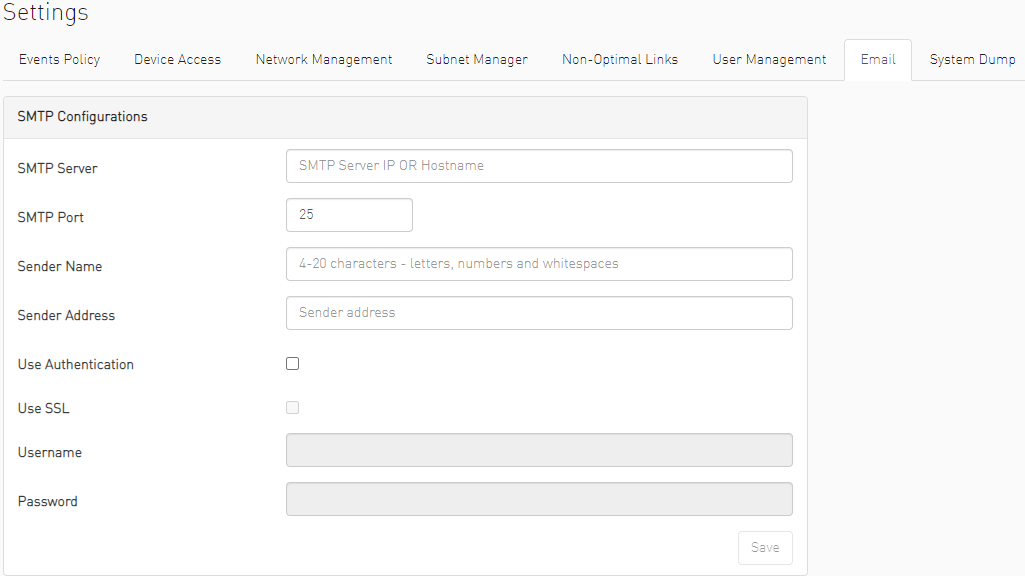
In the SMTP Configuration dialogue window, enter the following information:
Attribute
Description
SMTP Server
The IP or host name of the SMTP server.
Examples:
-
If mail service is installed, localhost is a valid value for this field, but usually it cannot send mails outside the local domain.
-
smtp.gmail.com
SMTP Port
Default value – 25
Sender Name
The name that will be displayed in the email header
Sender Address
A valid email address that will be displayed in the email header
Use Authentication
By default, this field is unchecked. If checked, you must supply a username and password in the respective fields
Use SSL
Default value is false – not using SSL
Username
SMTP account username
Password
SMTP account password
-
-
Click “Save." All configuration of the SMTP server will be saved in the UFM Database.
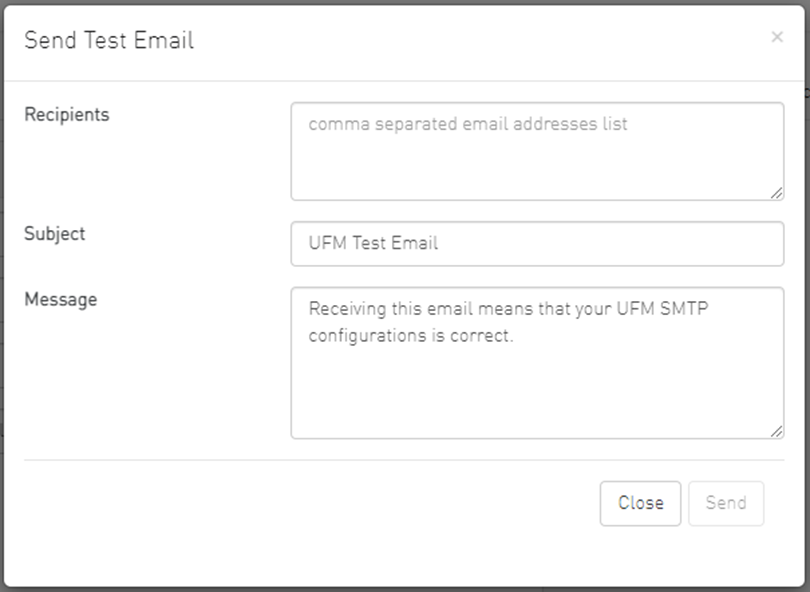
Click “Send Test Email” to test the configuration and the following model will appear:
|
Attribute |
Description |
|---|---|
|
Recipients |
User can choose email from event policy and daily report recipients or enter any email |
|
Subject |
Email subject |
|
Message |
Email message |
The System Health window enables running and viewing reports and logs for monitoring and analyzing UFM server and fabric health through the following tabs: UFM Health, UFM Logs, UFM Snapshot, Fabric Health, Daily Reports and Topology Compare.
Last updated: