

Overview
The UFM Infra feature introduces a structured architecture where services are divided into two categories, each deployed differently based on functionality:
-
UFM Infra: A set of persistent infrastructure services that run on all nodes. These services support system-level operations and ensure distributed availability.
-
UFM Enterprise: Services that run exclusively on the master node, responsible for management, orchestration, and user-facing functionality.
Key Benefits
-
Faster API Availability after Failover: By limiting service transitions during node failures, recovery times are significantly reduced.
-
Improved Modularity: Separating core infrastructure from enterprise logic simplifies maintenance and troubleshooting.
-
Enhanced Scalability: Services can be scaled and managed independently across nodes.
Users can enable or disable the UFM Infra feature without requiring a reinstallation of the UFM system. For more information, refer to UFM Infra | id (6.23.11)UFMInfra EnablingorDisablingUFMInfra.
Installation instructions are available at Installing UFM Infra Using Rootless with Podman.
As part of the updated architecture, a FAST-API plugin is deployed and a Redis server is required for inter-service communication. Redis can be configured in two ways:
-
As an internal service (installed with UFM)
-
As an external Redis instance, depending on deployment needs.
For more information, refer to UFM Infra | id (6.23.11)UFMInfra Redis RelatedConfiguration.
Communication Flow: Fast API, Redis, SM/SHARP Components
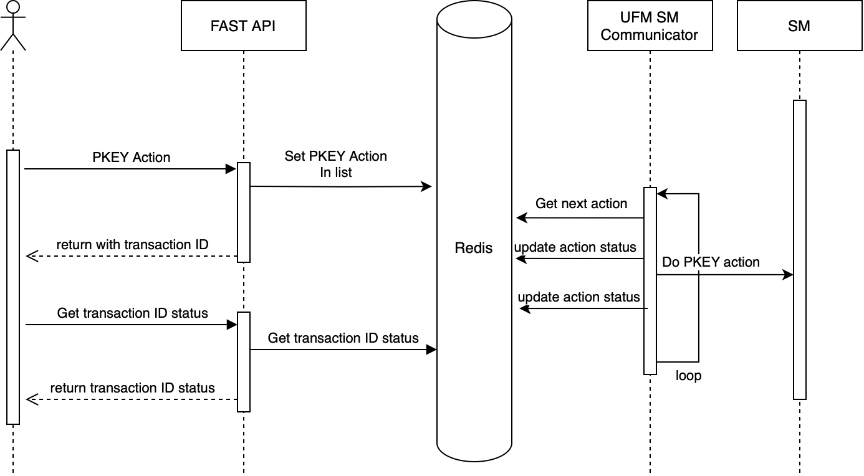
The following sequence describes how communication is handled between Fast API, Redis, and SM/SHARP components:
-
Request Submission via Fast API
Users send REST API requests (e.g., for PKey creation or SHARP reservation actions) to the Fast API. These requests are placed into Redis queues, and a Transaction ID (TID) is returned to the user for tracking purposes. -
Processing by Communicators
-
The SM Communicator or SHARP Communicator monitors Redis queues for new requests.
-
Upon receiving a request, the communicator forwards it to the relevant component (SM or SHARP) for execution.
-
After processing, the communicator captures the response and status.
-
-
Status Updates
The communicators update the status of each request back into Redis. Users can query the status of their transaction using the TID provided during request submission. -
Configuration Storage and Retrieval
-
Communicators store the configuration in Redis.
-
This allows the Fast API to retrieve and expose configuration data via REST APIs, giving users access to the configuration via REST APIs to understand cluster-level settings.
-
Configuring UFM Infra
Redis-Related Configuration
Redis configuration parameters can be modified within the UFMInfra section of the gv.cfg file. This allows for customization of Redis behavior to better suit UFM infrastructure requirements.
[UFMInfra]
...
# What is the host where the Redis server is running
redis_host = localhost

# What is the Redis port
redis_port = 6379

# Redis timeout in seconds
redis_socket_timeout = 5

# Flag that shows if we use external Redis database
is_external_redis = False

# Flag that shows if we use TLS connection to Redis database
is_tls_redis = False
Fast-API configuration
The following parameters can be modified within the Fast API configuration file:
|
Section |
Default Value |
Description |
|---|---|---|
|
|
|
Default Time-to-live (TTL) for SM-related transactions before expiration (in seconds) |
|
|
|
Default Time-to-live (TTL) for SHARP-related transactions before expiration (in seconds) |
Enabling or Disabling UFM Infra
Prerequisites
Before enabling or disabling the UFM Infra feature, ensure the following conditions are met:
-
The UFM Docker image has been installed using the
deploy_rootless_ufmscript. Refer to Installing UFM Infra Using Rootless with Podman. -
UFM High Availability (HA) is deployed using the Enterprise Multinode setup.
-
The control script for managing the feature is available on the host at:
/opt/ufm/files/scripts/ufm_infra_feature_flag.py -
Example:
ufm_infra_feature_flag.py -h
usage: ufm_infra_feature_flag.py [-h] (-e | -d) [--log-level {DEBUG,INFO,WARNING,ERROR,CRITICAL}] [--timeout-seconds TIMEOUT_SECONDS] [--ufm-user UFM_USER]

Control UFM Infra feature flags

This script turns on/off the UFM Infra (multi node) feature. It
manages the UFM Infrastructure feature by controlling both the configuration
and HA cluster resources. The script follows these flows:

Prerequisites check:
  1. Verifies Python version is 3.6 or higher
  2. Verifies script is run with root privileges
  3. Verifies ufm_user user exists (default is ufmadm but can be overridden with --ufm-user)
  4. Validates HA configuration and UFM Infra installation

Enable flow:
  1. Stops the HA cluster and waits for all UFM containers to stop
  2. Updates the UFM configuration to enable the Infra feature
  3. Updates the Redis trigger file to enable topology publishing
  4. Enables the HA resources
  5. Starts the HA cluster (only if previous steps succeeded)

Disable flow:
  1. Stops the HA cluster and waits for all UFM containers to stop
  2. Updates the UFM configuration to disable the Infra feature
  3. Updates the Redis trigger file to disable topology publishing
  4. Disables the HA resources
  5. Starts the HA cluster (only if previous steps succeeded)

Note: This script requires root privileges to modify the UFM configuration.
If any step fails, the script will exit without starting the HA cluster.
In case of failure, manual intervention will be required to restore the system
to a working state. The HA cluster may need to be started manually using
'ufm_ha_cluster start' command.

optional arguments:
  -h, --help            show this help message and exit
  -e, --enable          Enable the Infra feature (mutually exclusive with -d)
  -d, --disable         Disable the Infra feature (mutually exclusive with -e)
  --log-level {DEBUG,INFO,WARNING,ERROR,CRITICAL}
                        Set the logging level (default: INFO)
  --timeout-seconds TIMEOUT_SECONDS
                        Timeout for waiting for containers to go down (default: 120 seconds)
  --ufm-user UFM_USER   The user to run the command as (default: ufmadm)
Important Notes
When deploying a plugin with ufm_infra is installed, users can choose one of the following methods:
-
Via the UI: Use the UFM user interface to deploy the plugin. For instructions, refer to Plugin Management.
-
Via REST API: Deploy the plugin through UFM's REST API. For more information, refer to NVIDIA UFM Enterprise REST API Guide.
-
Using the Plugin Management Script: Run the
manage_ufm_pluginsscript inside the UFM container (not theufm_infracontainer). For more information, refer to UFM Plugins Management.
Last updated: