

The UFM Infra feature introduces a structured architecture where services are divided into two categories, each deployed differently based on functionality:
-
UFM Infra: A set of persistent infrastructure services that run on all nodes. These services support system-level operations and ensure distributed availability.
-
UFM Enterprise: Services that run exclusively on the master node, responsible for management, orchestration, and user-facing functionality.
Key Benefits
-
Faster API Availability after Failover: By limiting service transitions during node failures, recovery times are significantly reduced.
-
Improved Modularity: Separating core infrastructure from enterprise logic simplifies maintenance and troubleshooting.
-
Enhanced Scalability: Services can be scaled and managed independently across nodes.
Users can enable or disable the UFM Infra feature without requiring a reinstallation of the UFM system. For more information, refer to UFM Infra | Enabling or Disabling UFM Infra.
Installation instructions are available at UFM Infra Installation.
Pre-Requirement
The Valkey image must be loaded, or the is_external_redis flag must be enabled in gv.cfg.
Service Architecture
ufm-infra.service
Manages the following infrastructure components:
|
Component |
Description |
|---|---|
|
Valkey Server |
Inter-node communication and topology storage |
|
Apache Web Server |
HTTP/HTTPS web server for UFM API and UI |
|
Authentication Server |
User authentication and session management |
|
UFM Health (Infra) |
Infrastructure health monitoring |
|
Infra Plugins |
Plugins running in infra context (e.g., Fast API) |
|
UTM Telemetry |
Telemetry services (when UTM mode enabled) |
ufm-enterprise.service
Manages the following enterprise components:
|
Component |
Description |
|---|---|
|
OpenSM |
Subnet Manager for InfiniBand fabric |
|
UFM Main Process |
Core UFM fabric management engine |
|
Enterprise Plugins |
Plugins running in enterprise context |
|
Topology Publishing |
Publishes fabric topology to Valkey (Infra mode) |
Shared Resources
In Infra mode, the following resources are shared between services:
-
Docker Volume (
ufm-shared-data) (ufm-shared-data): Shared Apache configuration between containers
-
Shared Configuration Files:
opt/ufm/files/mounted to both containers
-
Valkey: Used for topology publishing and inter-service communication
Configuring UFM Infra
|
Key |
Type |
Default Value |
Description |
|---|---|---|---|
|
|
boolean |
false |
Enable or disable UFM Infra mode |
|
|
string |
localhost |
Valkey server hostname or IP address |
|
|
integer |
6379 |
Valkey server port number |
|
|
integer |
5 |
Valkey connection timeout in seconds |
|
|
boolean |
false |
Use external Redis/Valkey server instead of internal |
|
|
boolean |
false |
Enable TLS encryption for Valkey connections |
Fast-API configuration
The following parameters can be modified within the Fast API configuration file:
|
Section |
Default Value |
Description |
|---|---|---|
|
|
|
Default Time-to-live (TTL) for SM-related transactions before expiration (in seconds) |
|
|
|
Default Time-to-live (TTL) for SHARP-related transactions before expiration (in seconds) |
Enabling or Disabling UFM Infra
UFM Infra mode can be enabled or disabled after installation using the ufm_infra_feature_flag.py script.
Script Location
/opt/ufm/files/scripts/ufm_infra_feature_flag.py
Command Line Options
Usage:
ufm_infra_feature_flag.py[-h](
    -e | -d)[--rootless][--log - level{DEBUG, INFO, WARNING, ERROR, CRITICAL}]
            [--timeout - seconds TIMEOUT_SECONDS][--ufm - user UFM_USER]
            [--force][--skip - ha - validation]
            [--infra - plugins - dir<path>] Control UFM Infra feature flags
|
Flag |
Description |
|---|---|
|
|
Enable the Infra feature |
|
|
Disable the Infra feature |
|
|
Use rootless Podman mode (default: root Docker mode) |
|
|
Set logging level (default: INFO) |
|
|
Timeout for waiting for containers to stop (default: 120) |
|
|
User for rootless Podman commands (default: ufmadm) |
|
|
Automatically stop/start UFM services |
|
|
Skip HA configuration validation |
|
|
Directory containing plugin images to load and install |
Enabling Infra Mode
Standalone Mode (Docker)
Without Automatic Service Management
-
Stop UFM services manually:
systemctl stop ufm-enterprise systemctl stop ufm-infra
-
Enable Infra mode:
cd /opt/ufm/files/scripts/ ./ufm_infra_feature_flag.py --enable
-
Start UFM services manually:
systemctl start ufm-infra systemctl start ufm-enterpriseThe script automatically detects whether the system is running in HA mode and manages cluster resources accordingly.
Disabling Infra Mode
Standalone Mode (Docker)
cd /opt/ufm/files/scripts/ ./ufm_infra_feature_flag.py --disable --force
Standalone Mode (Rootless Podman)
cd /opt/ufm/files/scripts/ ./ufm_infra_feature_flag.py --disable --rootless --force
High Availability (HA) Mode
cd /opt/ufm/files/scripts/ ./ufm_infra_feature_flag.py --disable --force
Script Behavior
When Enabling Infra Mode
The script performs the following actions:
-
Stops UFM services (standalone) or the HA cluster
-
Waits for all UFM containers to stop
-
Updates
gv.cfgto set:[UFMInfra] enabled = true
-
Updates the Valkey trigger file to
enabled -
Validates HA resources (if running in HA mode)
-
Loads and installs Infra plugins if
--infra-plugins-diris specified -
Restarts UFM services or the HA cluster
When Disabling Infra Mode
The script performs the following actions:
-
Stops UFM services (standalone) or the HA cluster
-
Waits for all UFM containers to stop
-
Updates
gv.cfgto set:[UFMInfra] enabled = false
-
Updates the Valkey trigger file to
disabled -
Restarts UFM services or the HA cluster
Communication Flow: Fast API, Valkey, SM/SHARP Components
As part of the updated architecture, a FAST-API plugin can be deployed as an Infra Plugin and a Valkey server is required for inter-service communication. Valkey can be configured in two ways:
-
As an internal service (installed with UFM)
-
As an external Redis/Valkey instance, depending on deployment needs.
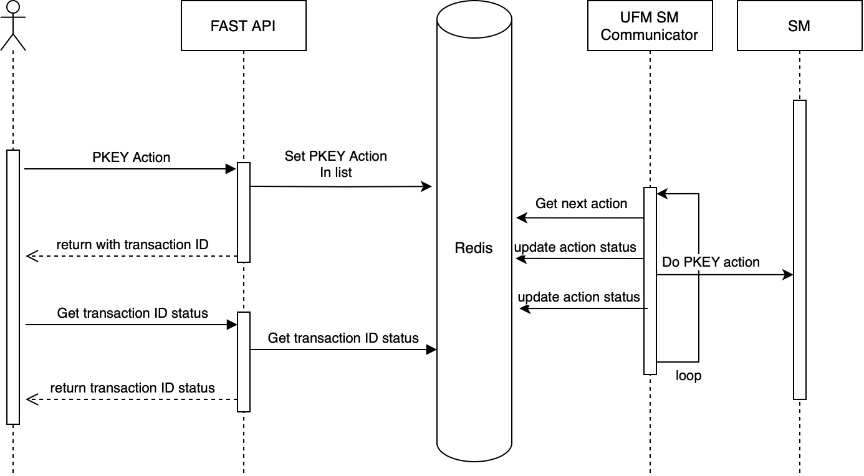
The following sequence describes how communication is handled between Fast API, Valkey, and SM/SHARP components:
-
Request Submission via Fast API
Users send REST API requests (e.g., for PKey creation or SHARP reservation actions) to the Fast API. These requests are placed into Valkey queues, and a Transaction ID (TID) is returned to the user for tracking purposes. -
Processing by Communicators
-
The SM Communicator or SHARP Communicator monitors Valkey queues for new requests.
-
Upon receiving a request, the communicator forwards it to the relevant component (SM or SHARP) for execution.
-
After processing, the communicator captures the response and status.
-
-
Status Updates
The communicators update the status of each request back into Valkey. Users can query the status of their transaction using the TID provided during request submission. -
Configuration Storage and Retrieval
-
Communicators store the configuration in Valkey.
-
This allows the Fast API to retrieve and expose configuration data via REST APIs, giving users access to the configuration via REST APIs to understand cluster-level settings.
-
Last updated: