

UFM Enterprise appliance supports High-Availability on the host level. The solution is based on a pacemaker to monitor services, and on DRBD to sync file-system states.
The diagram below describes the connectivity scheme of the UFM High-Availability cluster.
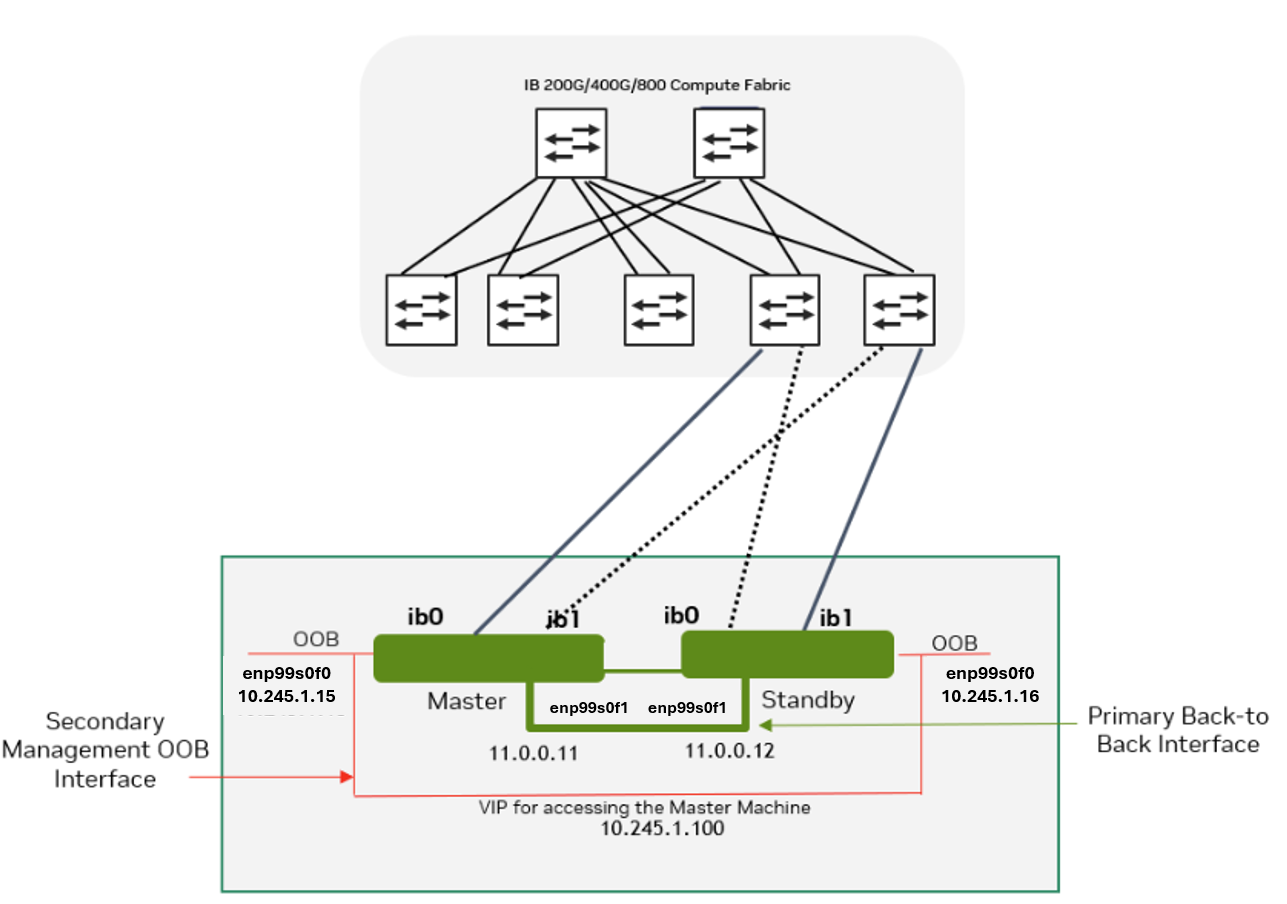
High-Availability Configuration
UFM HA should be configured on two appliances, master and standby.
High-availability should be configured first on on the standby node. When completed, it should be configured on the master node.
Command Usage:
# ufm_ha_cluster config --help
Usage: ufm_ha_cluster config [<options>]

The config command configures ha add-on for ufm server.
Options:
|
Option |
Description |
|---|---|
|
-r | --role <node role> |
Node role (master or standby) - Mandatory |
|
-e | --peer-primary-ip <ip address> |
Peer node primary IP address - Mandatory |
|
-l | --local-primary-ip <ip address> |
Local node primary IP address - Mandatory |
|
-E | --peer-secondary-ip <ip address> |
Peer node secondary IP address - Mandatory |
|
-L | --local-secondary-ip <ip address> |
Local node secondary IP address - Mandatory |
|
-i | --virtual-ip <virtual-ip> OR -N | --no-vip |
Cluster virtual IP OR
One of the two options is mandatory. |
|
-p | --hacluster-pwd <pwd> |
|
|
-f | --ha-config-file <file path> |
HA configuration file - The default is |
Configure HA with VIP (Virtual IP)
-
[On Standby Server] Run the following command to configure Standby Server:
ufm_ha_cluster config -r standby \ --local-primary-ip <local back-to-back IP> \ --peer-primary-ip <peer back-to-back IP> \ --local-secondary-ip <local management IP> \ --peer-secondary-ip <peer management IP> \ --virtual-ip <virtual management IP used for accessing the master node> \ --hacluster-pwd <password> -
[On Master Server] Run the following command to configure Master Server:
ufm_ha_cluster config -r master \
--local-primary-ip <local back-to-back IP> \
--peer-primary-ip <peer back-to-back IP> \
--local-secondary-ip <local management IP> \
--peer-secondary-ip <peer management IP> \
--virtual-ip <virtual management IP used for accessing the master node> \
--hacluster-pwd <password>
Alternatively, you can run the CLI command ufm ha configure.
You must wait until after configuration for DRBD sync to finish before starting the UFM cluster. To check the DRBD sync status, run:
ufm_ha_cluster status
Configure HA without VIP (on a Dual Subnet)
Please change the variables in the commands below based on your setup.
-
[On Standby Server] Run the following command to configure Standby Server:
ufm_ha_cluster config -r standby \ --local-primary-ip <local back-to-back IP> \ --peer-primary-ip <peer back-to-back IP> \ --local-secondary-ip <local management IP> \ --peer-secondary-ip <peer management IP> \ --hacluster-pwd <password> \ --no-vip -
[On Master Server] Run the following command to configure Master Server:
ufm_ha_cluster config -r master \
--local-primary-ip <local back-to-back IP> \
--peer-primary-ip <peer back-to-back IP> \
--local-secondary-ip <local management IP> \
--peer-secondary-ip <peer management IP> \
--hacluster-pwd <password> \
--no-vip
Alternatively, you can run the CLI command ufm ha configure dual-subnet.
You must wait until after configuration for DRBD sync to finish before starting the UFM cluster. To check the DRBD sync status, run:
ufm_ha_cluster status
High-Availability Cluster Management
-
To manage the HA cluster, use the ufm_ha_cluster tool.
ufm_ha_cluster Usage# ufm_ha_cluster --help =================================================================== UFM-HA version: 5.3.0-17 ------------------------------------------------------------------- Usage: ufm_ha_cluster [-h|--help] <command> [<options>] This script manages UFM HA cluster.Options:
OPTIONS: -h|--help Show this message COMMANDS: version HA cluster version config Configure HA cluster cleanup Remove HA configurations status Check HA cluster status failover Master node failover takeover Standby node takeover start Start HA services stop Stop HA services detach etach the standby from cluster attach Attach a new standby to cluster enable-maintain Enable maintenance to cluster disable-maintain Disable maintenance to cluster reset Reset DRBD connectivity from split-brain is-master check if the current node is a master is-running check if ufm services are running is-ha Check if running in HA mode -
For further information on each command, run:
ufm_ha_cluster <command> --help -
To check UFM HA cluster status, run:
ufm_ha_cluster status -
To start the UFM HA cluster, run:
ufm_ha_cluster start -
To stop the UFM HA cluster, run:
ufm_ha_cluster stop -
Execute the failover command on the master appliance to become the standby appliance. Run:
ufm_ha_cluster failover -
Execute the takeover command on the standby machine to become the master appliance. Run:
ufm_ha_cluster takeover
For additional information on configuring UFM HA, please refer to Installing UFM Server Software for High Availability. Since the UFM HA package and related components (i.e. pacemaker and DRBD) are already deployed, follow instructions from step 6 (Configure HA from the main server) and onward.
Last updated: